2016 MERCEDES-BENZ GLC-Class lights
[x] Cancel search: lightsPage 69 of 418

Never leave animals unattended in the vehi-
cle. Always secure animals properly during
the journey, e.g. use a suitable animal trans-
port box.
Driving safety systems
Overview of driving safety systems
In this section, you will find information about
the following driving safety systems:
RABS (Anti-lock Braking System)
(
Ypage 67)
RBAS ( Brake Assist System) (Ypage 68)
RBAS PLUS with Cross-Traffic Assist ( Brake
A ssist System PLUS with Cross-Traffic
Assist) (
Ypage 68)
RCOLLISION PREVENTION ASSIST PLUS
(
Ypage 70)
RESP®(Electronic StabilityProgram)
(
Ypage 73)
REBD ( Electronic Brake force Distribution)
(
Ypage 75)
RADAPTIVE BRAKE (Ypage 75)
RPRE-SAFE®Brake (Ypage 75)
RSTEER CONTROL (Ypage 78)
Important safety notes
If you fail to adapt your driving style or if you
are inattentive, the driving safety systems can
neither reduce the risk of an accident nor
override the laws of physics. Driving safety
systems are merely aids designed to assist
driving. You are responsible for the distance
to the vehicle in front, for vehicle speed and
for braking in good time. Always adapt your
driving style to suit the prevailing road,
weather and traffic conditions and maintain a
safe distance from the vehicle in front. Drive
carefully.
The driving safety systems described only
work as effectively as possible when there is
adequate contact between the tires and the road surface. Please pay special attention to
the notes on tires, recommended minimum
tire tread depths, etc. (
Ypage 374).
In wintry driving conditions, always use winter tires (M+S tires) and if necessary, snow
chains. Only in this way will the driving safety
systems described in this section work as
effectively as possible.
ABS (Anti-lock Braking System)
General information
ABS regulates brake pressure in such a way
that the wheels do not lock when you brake.
This allows you to continue steering the vehi-
cle when braking.
The ! ABS warning lamp in the instrument
cluster lights up when the ignition is switched
on. It goes out when the engine is running.
ABS works from a speed of about 5 mph
(8 km/h), regardless of road-surface condi-
tions. ABS works on slippery surfaces, even
when you only brake gently.
Important safety notes
iObserve the "Important safety notes" sec-
tion (
Ypage 67).
GWARNING
If ABS is faulty, the wheels could lock when
braking. The steerability and braking charac-
teristics may be severely impaired. Addition-
ally, further driving safety systems are deac-
tivated. There is an increased danger of skid-
ding and accidents.
Drive on carefully. Have ABS checked imme-
diately at a qualified specialist workshop.
When ABS is malfunctioning, other systems,
including driving safety systems, will also
become inoperative. Observe the information on the ABS warning lamp (
Ypage 294) and
display messages which may be shown in the
instrument cluster (
Ypage 258).
Driving safety systems67
Safety
Z
Page 75 of 418

Due to the nature of the system, particularly
complicated but non-critical driving condi-
tions may also cause Brake Assist to inter-
vene.
If adaptive Brake Assist is not available due to
a malfunction in the radar sensor system, the
brake system remains available with full
brake boosting effect and BAS.
ESP®(Electronic Stability Program)
General notes
iObserve the "Important safety notes" sec-
tion (
Ypage 67).
ESP
®monitors driving stability and traction,
i.e. power transmission between the tires and
the road surface.
If ESP
®detects that the vehicle is deviating
from the direction desired by the driver, one
or more wheels are braked to stabilize the
vehicle. The engine output is also modified to
keep the vehicle on the desired course within
physical limits. ESP
®assists the driver when
pulling away on wet or slippery roads. ESP®
can also stabilize the vehicle during braking.
ETS/4ETS (Electronic Traction System)
iObserve the "Important safety notes" sec-
tion (
Ypage 67).
ETS traction control is part of ESP
®. On vehi-
cles with 4MATIC, 4ETS is part of ESP®.
Traction control brakes the drive wheels indi-
vidually if they spin. This enables you to pull
away and accelerate on slippery surfaces, for
example if the road surface is slippery on one side. In addition, more drive torque is trans-
ferred to the wheel or wheels with traction.
Traction control remains active, even if you
deactivate ESP
®.
Important safety notes
iObserve the "Important safety notes" sec-
tion (
Ypage 67).
GWARNING
If ESP
®is malfunctioning, ESP®is unable to
stabilize the vehicle. Additionally, further driv-
ing safety systems are deactivated. This
increases the risk of skidding and an accident.
Drive on carefully. Have ESP
®checked at a
qualified specialist workshop.
If the å ESP®OFF warning lamp lights up
continuously, ESP®is deactivated.
If the ÷ ESP
®warning lamp lights up con-
tinuously, ESP®is not available due to a mal-
function.
Observe the information on warning lamps
(
Ypage 296) and display messages which
may be shown in the instrument cluster
(
Ypage 258).
Only use wheels with the recommended tire
sizes. Only then will ESP
®function properly.
Characteristics of ESP®
General information
If the ÷ ESP warning lamp goes out before
beginning the journey, ESP
®is automatically
active.
If ESP
®intervenes, the ÷ESP®warning
lamp flashes in the instrument cluster.
If ESP
®intervenes:
XDo not deactivate ESP®under any circum-
stances.
XOnly depress the accelerator pedal as far as
necessary when pulling away.
XAdapt your driving style to suit the prevail-
ing road and weather conditions.
ECO start/stop function
The ECO start/stop function switches the
engine off automatically when the vehicle
stops moving. The engine starts automati-
cally when the driver wants to pull away again.
Driving safet ysystem s73
Safety
Z
Page 76 of 418

ESP®remains in its previously selected sta-
tus. Example: if ESP®was deactivated before
the engine was switched off, ESP®remains
deactivated when the engine is switched on
again.
Deactivating/activating ESP®
Important safety notes
iObserve the "Important safety notes" sec-
tion (
Ypage 67).
You can select between the following states
of ESP
®:
RESP®is activated.
RESP®is deactivated.
GWARNING
If you deactivate ESP
®, ESP®no longer sta-
bilizes the vehicle. There is an increased risk
of skidding and an accident.
Only deactivate ESP
®in the situations descri-
bed in the following.
It may be best to deactivate ESP®in the fol-
lowing situations:
Rwhen using snow chains
Rin deep snow
Ron sand or gravel
Activate ESP
®as soon as the situations
described above no longer apply. ESP®will
otherwise not be able to stabilize the vehicle
if the vehicle starts to skid or a wheel starts to
spin.
!Avoid spinning the driven wheels for an
extended period with ESP®deactivated.
You could otherwise damage the drivetrain. Deactivating/activating ESP
®
XTo deactivate:
press button:.
The å ESP®OFF warning lamp in the
instrument cluster lights up.
XTo activate: press button :.
The å ESP®OFF warning lamp in the
instrument cluster goes out.
Characteristics when ESP
®is deactivated
If ESP
®is deactivated and one or more wheels
start to spin, the ÷ESP®warning lamp in
the instrument cluster flashes. In such situa-
tions, ESP
®will not stabilize the vehicle.
If you deactivate ESP
®:
RESP®no longer improves driving stability.
REngine torque is no longer limited and the
drive wheels are able to spin.
The spinning of the wheels results in a cut-
ting action for better traction on loose sur-
faces.
RTraction control is still activated.
RCOLLISION PREVENTION ASSIST is no lon-
ger available; nor is it activated if you brake
firmly with assistance from ESP
®.
RPRE-SAFE®is no longer available, nor is it
activated if you brake firmly and ESP®
intervenes.
RPRE-SAFE®Brake is no longer available, it
is also not activated if you brake firmly and
ESP
®intervenes.
RESP®still provides support when you brake
firmly.
74Driving safet ysystem s
Safety
Page 85 of 418

SmartKey functions
:&To lock the vehicle
;FTo open/close the tailgate
=%To unlock the vehicle
XTo unlock centrally: press%button.
If you do not open the vehicle within
approximately 40 seconds of unlocking:
Rthe vehicle is locked again.
Rprotection against theft is reactivated.
XTo lock centrally: press the&button.
The SmartKey centrally locks and unlocks the following components:
Rthe doors
Rthe tailgate
Rthe fuel filler flap
The turn signals flash once when unlocking
and three times when locking.
You can also set an audible signal to confirm
that the vehicle has been locked. The audible
signal can be activated and deactivated via
COMAND or Audio 20 (see the separate oper-
ating instructions).
You will receive visual and acoustic locking
confirmation if all components were able to
be locked.
When the locator lighting is activated via
COMAND or Audio 20, it lights up when it is
dark and after the vehicle is unlocked with the
SmartKey (see the separate operating
instructions).
XTo open the tailgate automatically from outside the vehicle: press and hold the
F button until the tailgate opens.
Vehicles with KEYLESS-GO or KEYLESS-
GO start function:
XTo close the tailgate automatically from
outside the vehicle: if the SmartKey is
located in the immediate vicinity of the
vehicle, press the Fbutton on the
SmartKey.
When the tailgate closes you can then
release the button.
KEYLESS-GO
General notes
Bear in mind that the engine can be started by
any of the vehicle occupants if there is a
SmartKey in the vehicle.
Locking/unlocking centrally
You can start, lock or unlock the vehicle using KEYLESS-GO. To do this, you only need carry
the SmartKey with you. You can combine the
functions of KEYLESS-GO with those of a con-ventional SmartKey. Unlock the vehicle by
using KEYLESS-GO, for instance, and lock it
using the &button on the SmartKey.
The driver's door and the door at which the
handle is used, must both be closed. The
SmartKey must be outside the vehicle. When
locking or unlocking with KEYLESS-GO, the
distance between the SmartKey and the cor-
responding door handle must not be greater
than 3 ft (1 m).
A brief radio connection between the vehicle
and the SmartKey determines whether a valid
SmartKey is in, or in the direct vicinity of, the
vehicle. This occurs, for example:
Rwhen starting the engine
Rwhilst driving
Rwhen using HANDS-FREE ACCESS
SmartKey83
Opening and closing
Z
Page 86 of 418

Rwhen the external door handles are
touched
Rduring convenience closing
XTo unlock the vehicle:touch the inner
surface of the door handle.
XTo lock the vehicle: touch sensor sur-
face :or;.
Make sure that you do not touch the inner
surface of the door handle.
XConvenience closing feature: touch
recessed sensor surface ;for an exten-
ded period.
Further information on the convenience
closing feature (
Ypage 99).
XTo unlock the tailgate: pull the tailgate
handle.
Deactivating and activating
If you do not intend to use a SmartKey for an
extended period of time, you can deactivate
the KEYLESS-GO function of the SmartKey.
The SmartKey will then use very little power,
thereby conserving battery power. For the
purposes of activation/deactivation, the
vehicle must not be nearby.
XTo deactivate: press the&button on
the SmartKey twice in rapid succession.
The battery check lamp of the SmartKey
flashes twice briefly and lights up once, then KEYLESS-GO is deactivated
(
Ypage 86).
XTo activate:
press any button on the
SmartKey.
or
XInsert the SmartKey into the ignition lock.
KEYLESS-GO and all of its associated fea-
tures are available again.
KEYLESS-GO start function
Bear in mind that the engine can be started by
any of the vehicle occupants if there is a
SmartKey in the vehicle.
Changing the settings of the locking
system
You can change the settings of the locking
system. This means that only the driver's door
and the fuel filler flap are unlocked when the
vehicle is unlocked. This is useful if you fre-
quently travel on your own.
XTo change the setting: press and hold the
% and& buttons simultaneously for
approximately six seconds until the battery
indicator lamp flashes twice (
Ypage 86).
If the setting of the locking system is changed
within the signal range of the vehicle, press-
ing the &or% button:
Rlocks or
Runlocks the vehicle
The SmartKey now functions as follows:
XTo unlock: press the%button once.
XTo unlock centrally: press the%but-
ton twice.
XTo lock: press the &button.
84SmartKey
Opening and closing
Page 88 of 418
and regard for the environment. National
guidelines must be observed during disposal.
In California, seewww.dtsc.ca.gov/
HazardousWaste/Perchlorate/
index.cfm.
Mercedes-Benz recommends that you have
the batteries replaced at a qualified specialist
workshop.
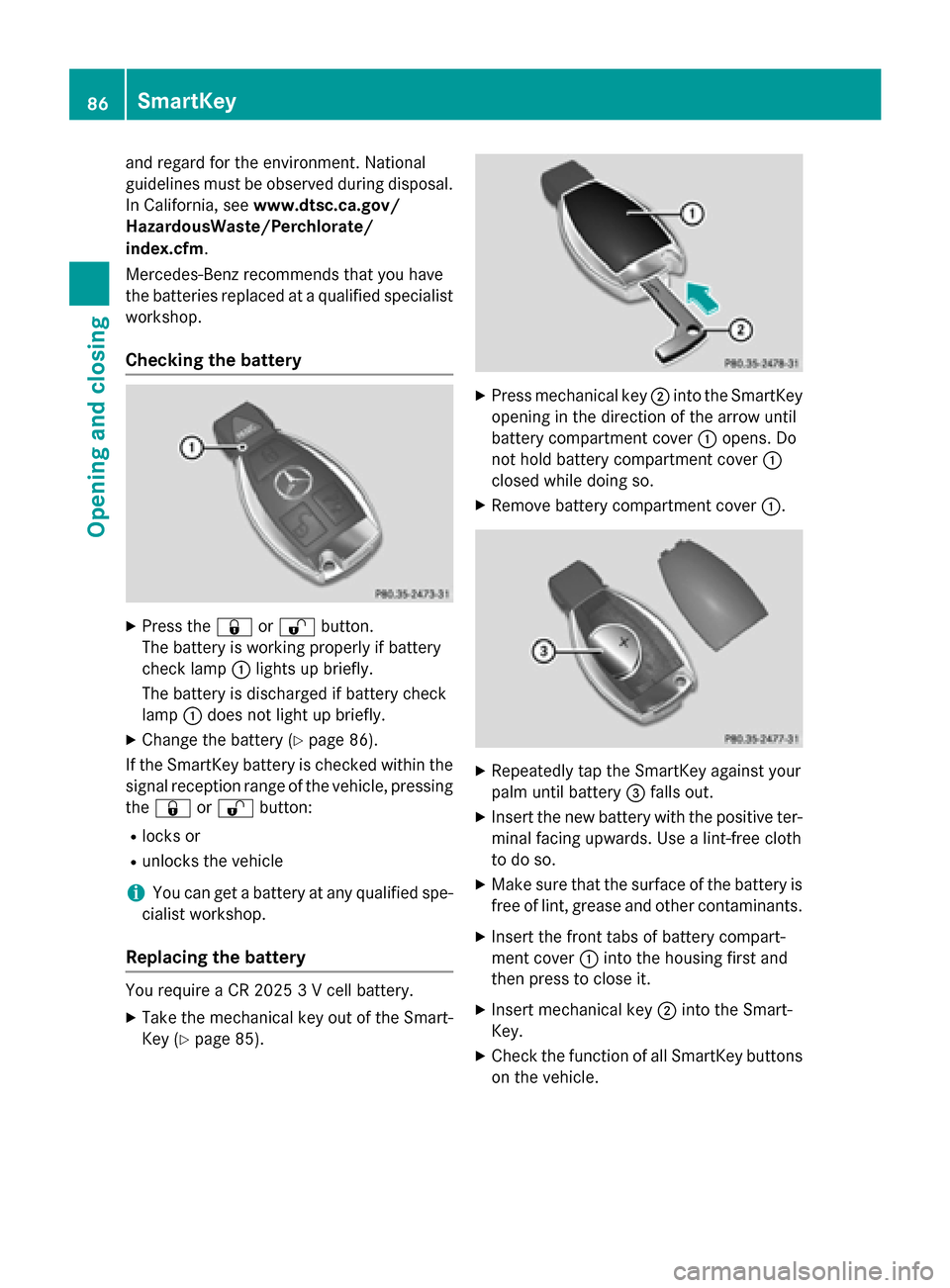
Checking the battery
XPress the &or% button.
The battery is working properly if battery
check lamp :lights up briefly.
The battery is discharged if battery check
lamp :does not light up briefly.
XChange the battery (Ypage 86).
If the SmartKey battery is checked within the
signal reception range of the vehicle, pressing
the & or% button:
Rlocks or
Runlocks the vehicle
iYou can get a battery at any qualified spe-
cialist workshop.
Replacing the battery
You require a CR 2025 3 V cell battery.
XTake the mechanical key out of the Smart-
Key (
Ypage 85).
XPress mechanical key ;into the SmartKey
opening in the direction of the arrow until
battery compartment cover :opens. Do
not hold battery compartment cover :
closed while doing so.
XRemove battery compartment cover :.
XRepeatedly tap the SmartKey against your
palm until battery=falls out.
XInsert the new battery with the positive ter-
minal facing upwards. Use a lint-free cloth
to do so.
XMake sure that the surface of the battery is
free of lint, grease and other contaminants.
XInsert the front tabs of battery compart-
ment cover :into the housing first and
then press to close it.
XInsert mechanical key ;into the Smart-
Key.
XCheck the function of all SmartKey buttons
on the vehicle.
86SmartKey
Opening and closing
Page 118 of 418

Adjusting the steering wheel electri-
cally
:To adjust th esteering whee lheight
;To adjust th esteering whee lposition
(fore-and-af tadjustment)
iFurther relate dsubjects :
REASY-ENTRY/EXIT feature
(
Ypage 117)
RStoring setting s (Ypage 122)
ROperating theon-board computer
(
Ypage 239).
Steering wheel heating
Switching on/off
XTurn th eSmartKey to position 2in th eigni-
tion loc k (
Ypage 153).
XTo switch on/of f:tur nth elever in th e
direction of arrow :or;.
Indicato rlamp =lights up or goes out .Vehicles without KE
YLESS-GO:when you
remove th eSmartKey from th eignition lock,
th e steering whee lheating is deactivated.
Vehicles wit hKE YLESS-GO :when you switch
off th eignition and open th edriver' sdoor ,th e
steering whee lheating is deactivated.
116Steering wheel
Seats, steering wheel and mirrors
Page 121 of 418
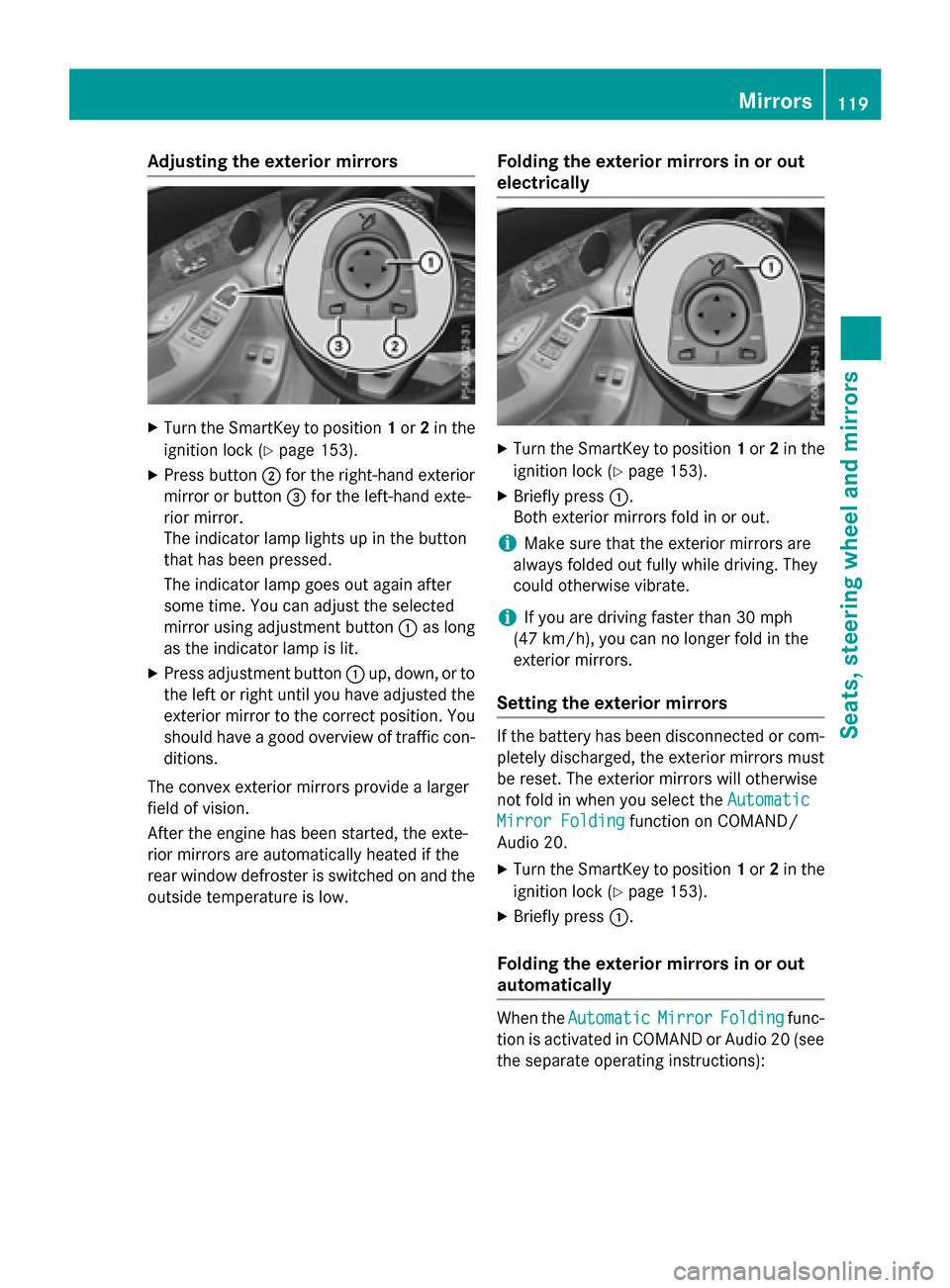
Adjusting the exterior mirrors
XTurn theSmartKey to position 1or 2in th e
ignition loc k (
Ypage 153).
XPress butto n; for th eright-hand exterio r
mirror or butto n= for th eleft-han dexte -
rio rmirror .
The indicator lamp lights up in th ebutto n
that has been pressed.
The indicator lamp goes out again after
som etime. You can adjust th eselected
mirror usin gadjustmen tbutto n: as lon g
as th eindicator lamp is lit .
XPress adjustmentbutto n: up, down ,or to
th elef tor right until you hav eadjusted th e
exterio rmirror to th ecorrec tposition .You
should hav e agoo doverview of traffic con-
ditions.
The convex exterio rmirror sprovide alarger
field of vision .
Afte rth eengin ehas been started, th eexte -
rio rmirror sare automatically heated if th e
rear window defroste ris switched on and th e
outside temperature is low.
Folding the exteri or mirrorsinor out
electri cally
XTurn th eSmartKey to position 1or 2in th e
ignition loc k (
Ypage 153).
XBriefly press :.
Both exterio rmirror sfol din or out .
iMakesur ethat th eexterio rmirror sare
always folded out fully while driving .The y
could otherwise vibrate .
iIf you are driving fasterthan 30 mph
(47 km/ h), you can no longer fold in the
exterior mirrors.
Setting the exterior mirrors
If the battery has been disconnected or com-
pletely discharged, the exterior mirrors must
be reset. The exterior mirrors will otherwise
not fold in when you select the Automatic
Mirror Foldingfunction on COMAND/
Audio 20.
XTurn the SmartKey to position 1or 2in the
ignition lock (
Ypage 153).
XBriefly press :.
Folding the exterior mirrors in or out
automatically
When theAutomaticMirrorFoldingfunc-
tion is activated in COMAND or Audio 20 (see
the separate operating instructions):
Mirrors119
Seats, steering wheel and mirrors
Z