Mechanical key
General notes If the vehicle can no longer be locked or
unlocked with the SmartKey or KEYLESS-GO,
use the mechanical key.
If you use the mechanical key to unlock and
open the driver's door or the trunk lid, the
anti-theft alarm system will be triggered
( Y
page 73).
There are several ways to turn off the alarm: X
To deactivate the alarm with the key:
press the 6 or 7 button on the key.
or X
Insert the SmartKey into the ignition lock.
or X
To deactivate the alarm with KEYLESS-
GO: press the Start/Stop button in the igni-
tion lock. The SmartKey must be in the
vehicle.
or X
Lock or unlock the vehicle using KEYLESS-
GO. The SmartKey must be outside the
vehicle.
If you unlock the vehicle using the mechanical
key, the fuel filler flap will not be unlocked
automatically. X
To unlock the fuel filler flap: insert the
SmartKey into the ignition lock.
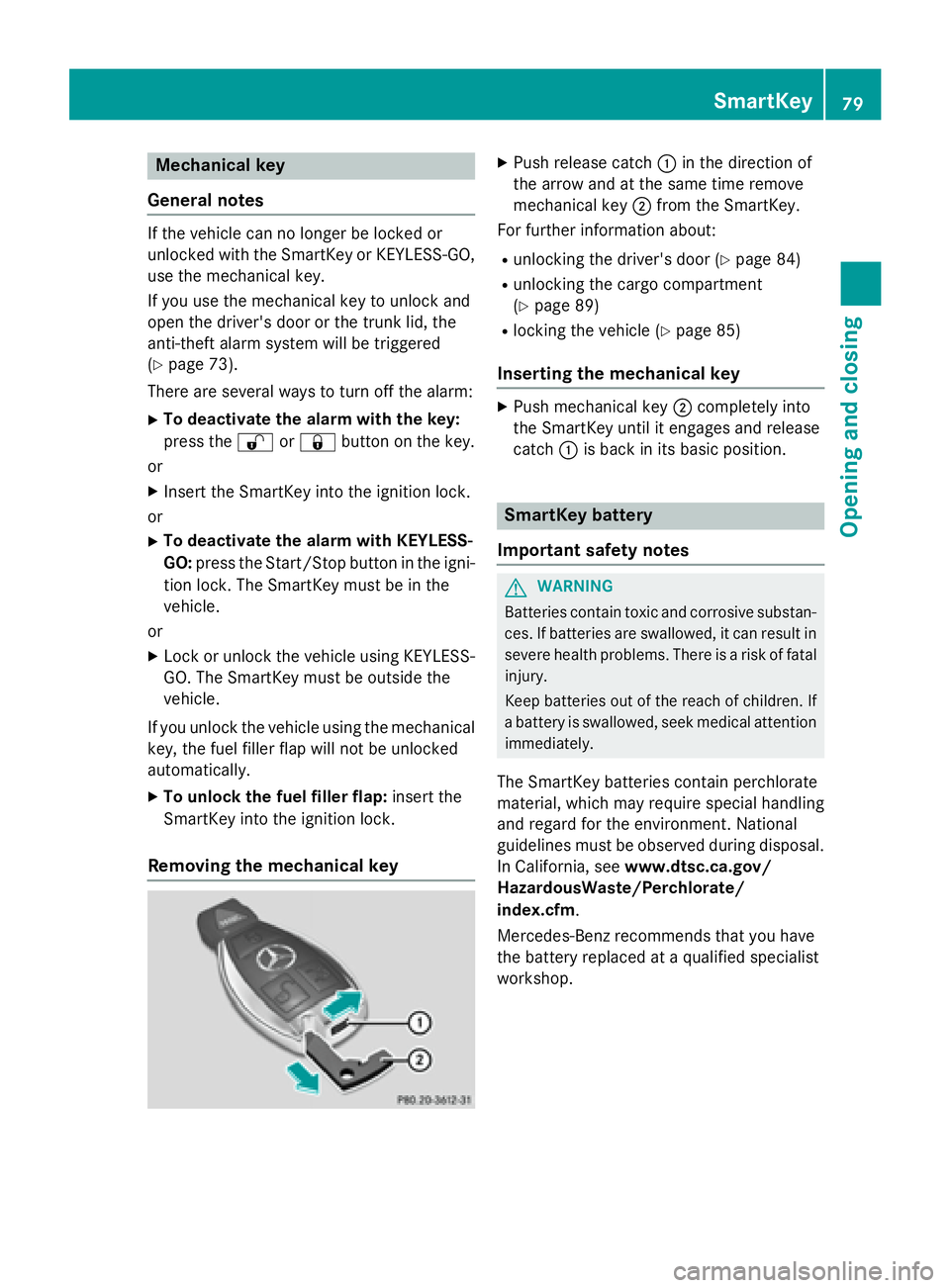
Removing the mechanical key X
Push release catch C in the direction of
the arrow and at the same time remove
mechanical key D from the SmartKey.
For further information about: R
unlocking the driver's door ( Y
page 84)R
unlocking the cargo compartment
( Y
page 89) R
locking the vehicle ( Y
page 85)
Inserting the mechanical key X
Push mechanical key D completely into
the SmartKey until it engages and release
catch C is back in its basic position.
SmartKey battery
Important safety notes
G WARNING
Batteries contain toxic and corrosive substan-
ces. If batteries are swallowed, it can result in
severe health problems. There is a risk of fatal
injury.
Keep batteries out of the reach of children. If
a battery is swallowed, seek medical attention
immediately.
The SmartKey batteries contain perchlorate
material, which may require special handling
and regard for the environment. National
guidelines must be observed during disposal.
In California, see www.dtsc.ca.gov/
HazardousWaste/Perchlorate/
index.cfm .
Mercedes-Benz recommends that you have
the battery replaced at a qualified specialist
workshop. SmartKey 79
Opening and closing Z
X
Depress the brake pedal firmly with your
left foot and keep the brake pedal
depressed. X
Shift the transmission to position D .X
Use the DYNAMIC SELECT button to select
the S drive program ( Y
page 157).X
Quickly depress the accelerator pedal fully. X
Take your foot off the brake, but keep the
accelerator pedal depressed.
The vehicle pulls away at maximum accel-
eration.
i Activate ESP ®
as soon as the acceleration
process has ended. ESP ®
will otherwise not
be able to stabilize the vehicle if the vehicle
starts to skid or a wheel starts to spin.
Canceling start-off assist X
Remove your foot from the accelerator
pedal. X
Reactivate ESP.
RACE START (AMG vehicles)
Important safety notes
i RACE START must not be used on normal
roads. RACE START must only be activated
and used on dedicated road circuits, out-
side of public road use.
i RACE START is only available in
Mercedes ‑ AMG vehicles.
G WARNING
If you use RACE START, individual tires may
start to spin and the vehicle could skid.
Depending on the selected ESP ®
mode, there
is an increased risk of skidding and having an
accident. Make sure that no persons, animals
or obstacles are within range of the vehicle.
RACE START enables optimal acceleration
from a standing start. For this, a suitably high-
grip road surface is required, along with the
tires and vehicle being in proper operating
condition. i Observe the safety notes on driving safety
systems ( Y
page 65).
Be sure to read the safety notes and infor-
mation on ESP ®
( Y
page 69).
Conditions for activation You can activate RACE START if: R
the doors, hood and the trunk lid are
closed. R
the engine is running and the transmission,
all-wheel drive clutch and the engine are at
operating temperature. R
the steering wheel is in the straight-ahead
position. R
the vehicle is stationary and the brake
pedal is depressed (left foot). R
the transmission is in position D .R
drive program S , S+ or RACE is selected
( Y
page 158).
Activating RACE START X
Depress the brake pedal with your left foot
and keep it depressed. X
Pull and hold both steering wheel paddle
shifters. X
The RACE START Confirm: Paddle UP
Cancel: Paddle DOWN message appears
in the multifunction display. X
Release both steering wheel paddle shift-
ers.
i If the activation conditions are no longer
fulfilled, RACE START is canceled. The
RACE START Not Possible See Opera‐
tor's Manual message appears in the
multifunction display. X
To cancel: pull the left steering wheel pad-
dle shifter ( Y
page 166).
or X
To confirm: pull the right steering wheel
paddle shifter ( Y
page 166).
The RACE START Available Depress
gas pedal message appears in the multi-
function display. Driving system s 195
Dr ivi ng an d parking Z