2016 MERCEDES-BENZ GLA electric parking brake
[x] Cancel search: electric parking brakePage 12 of 390
Emergency
Automatic measures after an acci-
dent ................................................ .5 8
Emergency braking
see BAS (Brake Assist System)
Emergency release
Driver's door .................................... 84
Vehicle ............................................ .8 4
Emergency Tensioning Devices
Activation ........................................ .5 6
Emergency unlocking
Tailgate ............................................ 89
Engine
Check Engine warning lamp .......... .2 75
Display message ............................ 251
ECO start/stop function ................ 153
Engine number ............................... 377
Irregular running ............................ 156
Jump-starting ................................. 331
Starting (important safety notes) ... 151
Starting problems .......................... 156
Starting the engine with the
SmartKey ....................................... 151
Starting with the Start/Stop but-
ton ................................................. 152
Switching off .................................. 172
Tow-starting (vehicle) ..................... 337
Engine electronics
Problem (malfunction) ................... 156
Engine oil
Adding .......................................... .3 10
Additives ........................................ 380
Checking the oil level ..................... 309
Checking the oil level using the
dipstick .......................................... 310
Display message ............................ 252
Filling capacity ............................... 380
Notes about oil grades ................... 379
Notes on oil level/consumption .... 309
Temperature (on-board computer,
Mercedes-AMG vehicles) .............. .2 31
Viscosity .............. .......................... 380
E ng
ine, starting
see Starting (engine)
ESC (Electronic Stability Control)
see ESP ®
(Electronic Stability Program) ESP ®
(Electronic Stability Pro-
gram)
AMG menu (on-board computer) ... 232
Characteristics ................................. 69
Deactivating/activating (button
in Mercedes-AMG vehicles) ............. 70
Deactivating/activating (except
Mercedes ‑ AMG vehicles) ................. 70
Deactivating/activating (on-
board computer, except
Mercedes-AMG vehicles) .............. .2 27
Display message ............................ 236
Function/notes ................................ 69
General notes .................................. 69
Important safety information ........... 69
Trailer stabilization ........................... 72
Warning lamp ................................. 271
ETS/4ETS (Electronic Traction Sys-
tem) ...................................................... 69
Exhaust
see Exhaust pipe
Exhaust check ................................... 175
Exhaust pipe
Cleaning ......................................... 318
Exterior lighting
Cleaning ......................................... 317
see Lights
Exterior mirrors
Adjusting ....................................... 109
Dipping (automatic) ....................... 110
Folding in when locking (on-board
computer) ...................................... 231
Folding in/out (automatically) ....... 110
Folding in/out (electrically) ........... 109
Out of position (troubleshooting) ... 110
Storing settings (memory func-
tion) ............................................... 112
Storing the parking position .......... 111
Eyeglasses compartment ................. 281
F
Filler cap
see Refueling
Flat tire
MOExtended tires .......................... 323
Preparing the vehicle ..................... 322
TIREFIT kit ...................................... 32410
Index
Page 17 of 390

Position of exterior mirror, front-
passenger side .............................. .1 11
Rear view camera .......................... 208
see Active Parking Assist
see PARKTRONIC
Parking aid
Active Parking Assist ..................... 203
see Exterior mirrors
see PARKTRONIC
Parking assistance
see PARKTRONIC
Parking brake
Display message ............................ 239
Electric parking brake .................... 173
Warning lamp ................................. 274
Parking lamps
Switching on/off ........................... 118
PARKTRONIC
Deactivating/activating ................. 202
Driving system ............................... 200
Function/notes ............................ .2 00
Important safety notes .................. 200
Problem (malfunction) ................... 203
Range of the sensors ..................... 201
Warning display ............................. 202
PASSENGER AIR BAG
Display message ............................ 246
Indicator lamps ................................ 43
Problem (malfunction) ................... 246
Pets in the vehicle ............................... 64
Plastic trim (cleaning instruc-
tions) .................................................. 318
Power washers .................................. 315
Power windows
see Side windows
Protection against theft
ATA (Anti-Theft Alarm system) ......... 73
Immobilizer ...................................... 73
Protection of the environment
General notes .................................. 23
Pulling away
Automatic transmission ................. 152
General notes ................................ 152
Hill start assist ............................... 153 Q QR code
Mercedes-Benz Guide App ................. 1
Rescue card ..................................... 26
Qualified specialist workshop ........... 25
R RACE START
Important safety notes .................. 195
RACE START (AMG vehicles) ............. 195
RACETIMER (on-board computer) .... 232
Radio
Selecting a station ......................... 225
see separate operating instructions
Radio-wave reception/transmis-
sion in the vehicle
Declaration of conformity ................ 25
Rain closing feature (panorama
roof with power tilt/sliding panel) .... 96
Reading lamp ..................................... 120
Rear compartment
Setting the air vents ...................... 145
Rear fog lamp
Changing bulbs .............................. 124
Display message ............................ 249
Switching on/off ........................... 118
Rear lamps
see Lights
Rear seat
Adjusting the angle of the backr-
ests ................................................ 285
Rear seats
Folding the backrest forwards/
back ............................................... 284
Rear view camera
Cleaning instructions ..................... 318
Displays in the Audio display ......... 208
Displays in the COMAND display ... 208
Function/notes ............................. 208
Switching on/off ........................... 208
Rear window defroster
Problem (malfunction) ................... 143
Switching on/off ........................... 142
Rear window wiper
Replacing the wiper blade .............. 128
Switching on/off ........................... 126 Index 15
Page 78 of 390
Useful information
i This Operator's Manual describes all
models and all standard and optional equip-
ment of your vehicle available at the time of
publication of the Operator's Manual.
Country-specific differences are possible.
Please note that your vehicle may not be
equipped with all features described. This
also applies to safety-related systems and
functions.
i Read the information on qualified special-
ist workshops ( Y
page 25).
SmartKey
Important safety notes
G WARNING
If children are left unsupervised in the vehicle,
they could: R
open the doors, thus endangering other
people or road users. R
get out and disrupt traffic. R
operate the vehicle's equipment.
Additionally, children could set the vehicle in
motion if, for example, they: R
release the parking brake. R
shifting the automatic transmission out of
park position PR
Start the engine.
There is a risk of an accident and injury.
When leaving the vehicle, always take the
SmartKey with you and lock the vehicle. Never
leave children or animals unattended in the
vehicle. Always keep the SmartKey out of
reach of children.
G WARNING
If you attach heavy or large objects to the
SmartKey, the SmartKey could be uninten-
tionally turned in the ignition lock. This could
cause the engine to be switched off. There is a
risk of an accident. Do not attach any heavy or large objects to the
SmartKey. Remove any bulky key rings before
inserting the SmartKey into the ignition lock.
! Keep the SmartKey away from strong
magnetic fields. Otherwise, the remote
control function could be affected.
Strong magnetic fields can occur in the
vicinity of powerful electrical installations.
Do not keep the SmartKey: R
with electronic devices, e.g. a mobile
phone or another SmartKey. R
with metallic objects, e.g. coins or metal
foil. R
inside metallic objects, e.g. a metal case.
Vehicles with KEYLESS-GO start function:
do not keep the SmartKey in the cargo com-
partment. Otherwise, the SmartKey may not
be detected, e.g. when starting the engine
using the Start/Stop button.
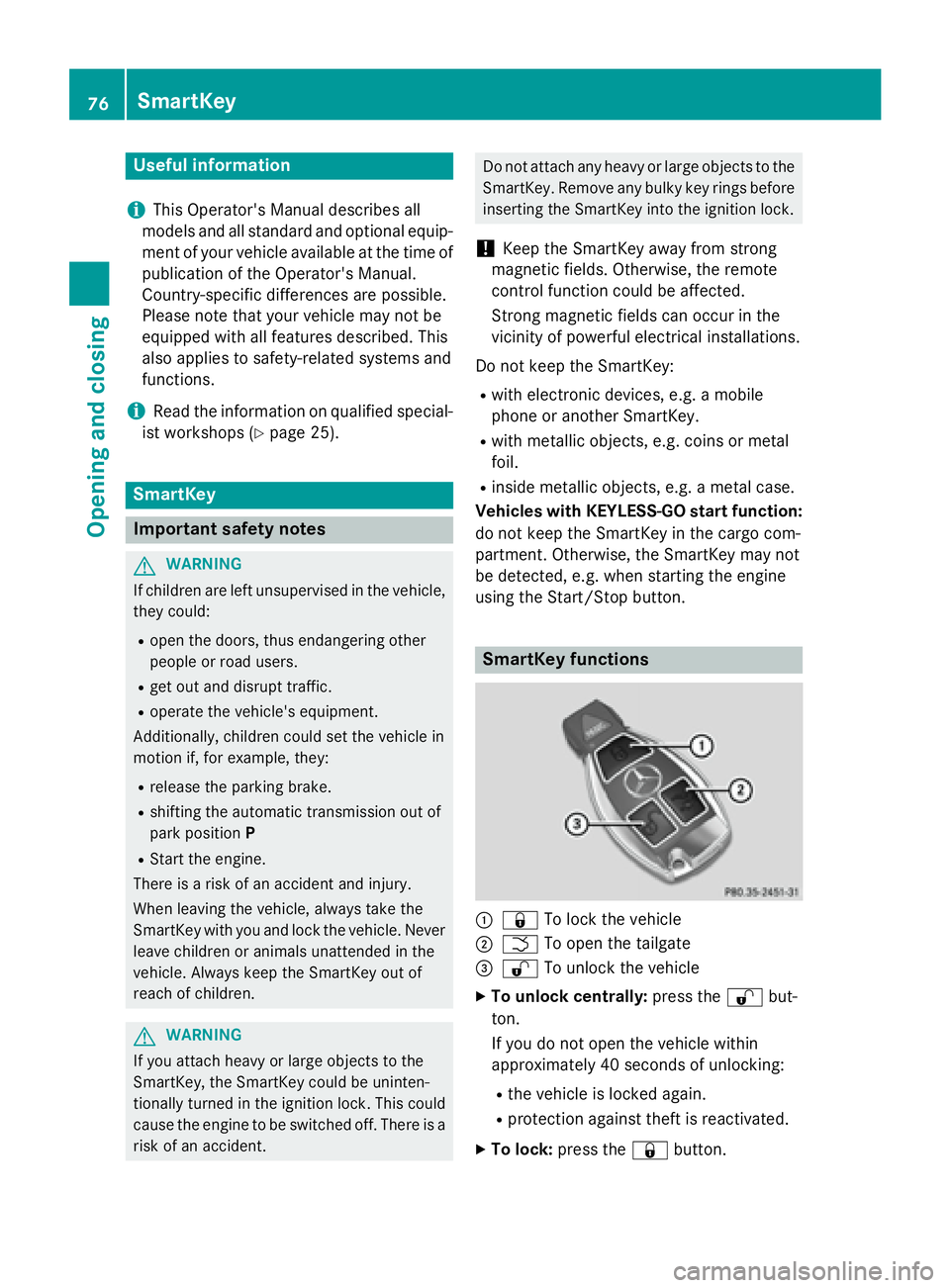
SmartKey functions
C
7 To lock the vehicleD
T To open the tailgate
Page 153 of 390
You can only switch between Start/Stop but-
ton mode and SmartKey operation when the
vehicle is stationary.
You must also engage park position P .X
Remove Start/Stop button C from ignition
lock D .
You do not have to remove the Start/Stop
button from the ignition lock when you leave
the vehicle. You should, however, always take
the SmartKey with you when leaving the vehi-
cle. As long as the SmartKey is in the vehicle: R
the vehicle can be started using the Start/
Stop button R
the electrically powered equipment can be
operated
Starting the engine
Important safety notes
G WARNING
If children are left unsupervised in the vehicle,
they could: R
open the doors, thus endangering other
people or road users. R
get out and disrupt traffic. R
operate the vehicle's equipment.
Additionally, children could set the vehicle in
motion if, for example, they: R
release the parking brake. R
shifting the automatic transmission out of
park position PR
Start the engine.
There is a risk of an accident and injury.
When leaving the vehicle, always take the
SmartKey with you and lock the vehicle. Never
leave children or animals unattended in the
vehicle. Always keep the SmartKey out of
reach of children.
G WARNING
Combustion engines emit poisonous exhaust
gases such as carbon monoxide. Inhaling these exhaust gases leads to poisoning. There
is a risk of fatal injury. Therefore never leave
the engine running in enclosed spaces with-
out sufficient ventilation.
G WARNING
Flammable materials introduced through
environmental influence or by animals can
ignite if in contact with the exhaust system or
parts of the engine that heat up. There is a risk
of fire.
Carry out regular checks to make sure that
there are no flammable foreign materials in
the engine compartment or in the exhaust
system.
! Do not depress the accelerator when
starting the engine.
General notes During a cold start, the engine runs at higher
speeds to enable the catalytic converter to
reach its operating temperature. The sound of
the engine may change during this time.
Automatic transmission X
Shift the transmission to position P
( Y
page 159).
The transmission position display in the
multifunction display shows
P ( Y
page 159).
i You can start the engine in transmission
position P and N .
Starting procedure with the SmartKey
To start the engine using the SmartKey
instead of the Start/Stop button, pull the
Start/Stop button out of the ignition lock. X
Turn the SmartKey to position 3 in the igni-
tion lock and release it as soon as the
engine is running ( Y
page 149).Driving 151
Driving and parking Z
Page 163 of 390
When leaving the vehicle, always take the
SmartKey with you and lock the vehicle. Never
leave children or animals unattended in the
vehicle. Always keep the SmartKey out of
reach of children. X
If the transmission is in position D or R :
push the DIRECT SELECT lever up or down
to the first point of resistance. X
If the transmission is in position P : depress
the brake pedal and push the DIRECT
SELECT lever up or down to the first point of
resistance.
If you switch the engine off with the trans-
mission in position R or D , the automatic
transmission shifts to N automatically.
With the SmartKey: if you then open the
driver's door or the front-passenger door or
remove the SmartKey from the ignition, the
automatic transmission shifts to P automati-
cally.
With the Start/Stop button: if you then
open the driver's door or the front-passenger
door, the automatic transmission shifts to P
automatically.
If you want the automatic transmission to
remain in neutral N , e.g. when having the
vehicle cleaned in an automatic car wash with
a towing system:
Using the SmartKey: X
Switch on the ignition. X
Depress the brake pedal and keep it
depressed. X
Shift to neutral N .X
Release the brake pedal. X
Release the electric parking brake. X
Switch off the ignition and leave the Smart-
Key in the ignition lock.
With the Start/Stop button: X
Remove the Start/Stop button from the
ignition lock. X
Insert the SmartKey into the ignition lock. X
Switch on the ignition. X
Depress the brake pedal and keep it
depressed. X
Shift to neutral N . X
Release the brake pedal. X
Release the electric parking brake. X
Switch off the ignition and leave the Smart-
Key in the ignition lock.
Engaging drive position D X
If the transmission is in position R or N :
push the DIRECT SELECT lever down past
the first point of resistance. X
If the transmission is in position P : depress
the brake pedal and push the DIRECT
SELECT lever down past the first point of
resistance.
Selector lever (Mercedes-AMG vehi-
cles)
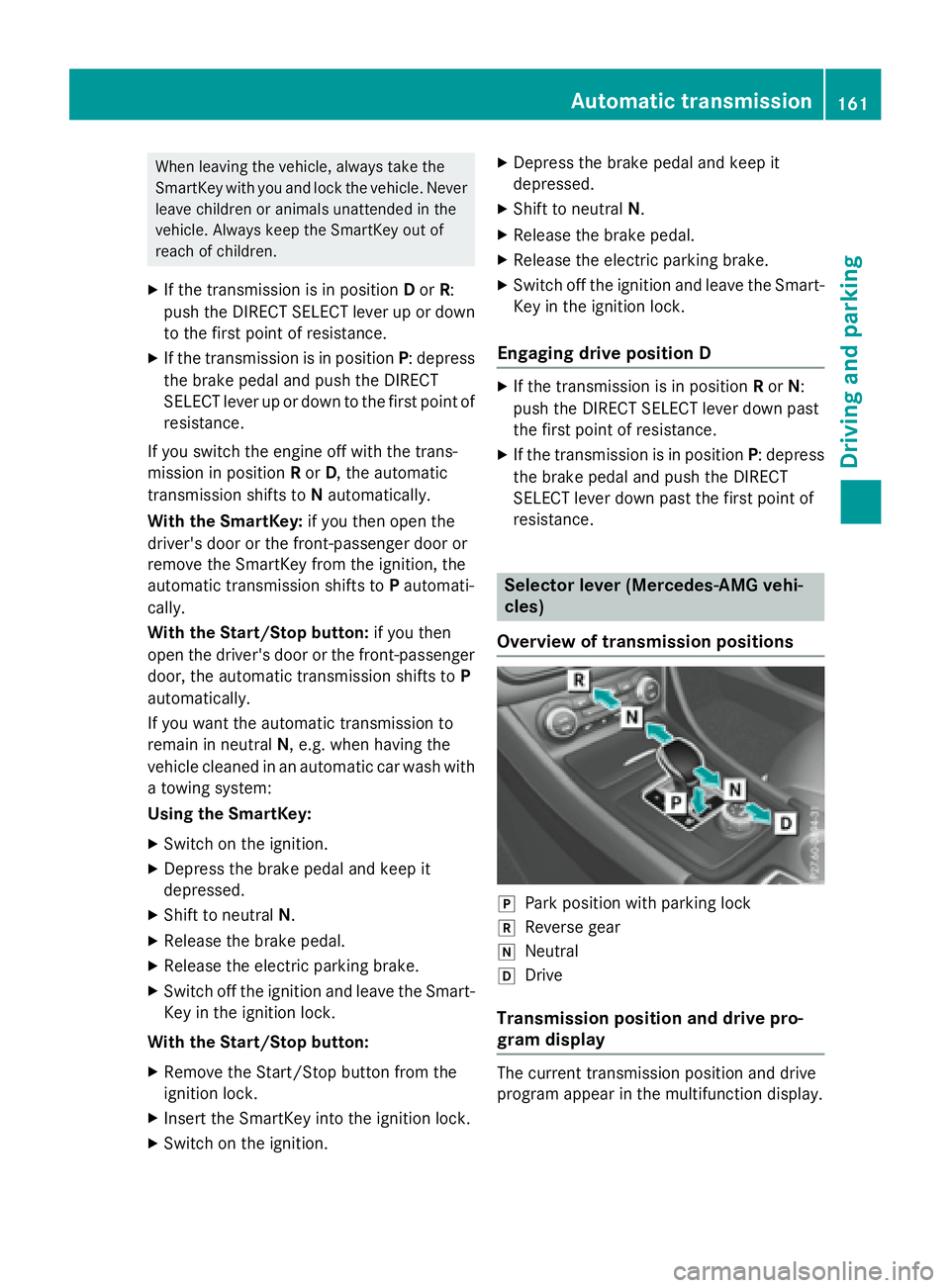
Overview of transmission positions
]
Park position with parking lock ^
Reverse gear \\
Neutral [
Drive
Transmission position and drive pro-
gram display
The current transmission position and drive
program appear in the multifunction display.Automatic transmission 161
Driving and parking Z
Page 165 of 390
D Neutral
Do not shift the transmission to N
while driving. Otherwise, the auto-
matic transmission could be dam-
aged.
No power is transmitted from the
engine to the drive wheels.
Releasing the brakes will allow you
to move the vehicle freely, e.g. to
push it or tow it.
If ESP ®
is deactivated or faulty:
shift the transmission to position N
if the vehicle is in danger of skid-
ding, e.g. on icy roads.
If you switch the engine off with the
transmission in position R or D , the
automatic transmission shifts to N
automatically.
! Rolling in neutral N can damage
the drive train.
: Drive
The automatic transmission
changes gear automatically. All
forward gears are available.
Driving tips
Changing gear
The automatic transmission shifts to the indi-
vidual gears automatically when it is in trans-
mission position D . This automatic gear shift-
ing behavior is determined by: R
the selected drive program R
the position of the accelerator pedal R
the road speed
Accelerator pedal position
Your style of driving influences how the auto-
matic transmission shifts gear: R
little throttle: early upshifts R
more throttle: late upshifts Holding the vehicle stationary on uphill
gradients
G WARNING
If the clutch overheats, the electronic man-
agement system is automatically deactivated.
This interrupts the power transmission. The
vehicle may, for example, roll backwards on
gradients. There is a risk of an accident.
Never hold the vehicle stationary on uphill
gradients by depressing the accelerator.
The clutch may overheat if you hold the vehi-
cle stationary on uphill gradients by depress-
ing the accelerator pedal. If the clutch over-
heats, a warning tone sounds.
All vehicles (except Mercedes-AMG vehi-
cles): the Stop Vehicle Shift to P
Leave Engine Running display message
appears in the multifunction display. You will
only be able to continue your journey once the
clutch has cooled down and the display mes-
sage in the multifunction display has disap-
peared.
Mercedes-AMG vehicles: the Trans. Oil
Overheated Drive on with Care display
message appears in the multifunction dis-
play.
Do not hold the vehicle stationary on uphill
gradients by depressing the accelerator
pedal. Instead, only ever hold the vehicle sta-
tionary on uphill gradients by: R
depressing the brake pedal R
activating the HOLD function R
engaging the electric parking brake
Kickdown
Use kickdown for maximum acceleration. X
Depress the accelerator pedal beyond the
pressure point.
The automatic transmission shifts to a
lower gear depending on the engine speed. X
Ease off the accelerator pedal once the
desired speed is reached.
The automatic transmission shifts back up.Automatic transmission 163
Driving an d parking Z
Page 173 of 390
Problems with fuel and the fuel tank Problem
Possible causes/consequences and P Solutions
Fuel is leaking from the
vehicle. The fuel line or the fuel tank is faulty.
G WARNING
Risk of explosion or fire. X
Turn the SmartKey to position 0 immediately and remove it
( Y
page 149). X
Do not restart the engine under any circumstances. X
Consult a qualified specialist workshop.
The fuel filler flap can-
not be opened. The fuel filler flap is not unlocked. X
Unlock the vehicle ( Y
page 76).
The SmartKey battery is discharged or nearly discharged. X
Unlock the vehicle using the mechanical key ( Y
page 79).
The fuel filler flap is unlocked, but the opening mechanism is jam-
med. X
Consult a qualified specialist workshop.
Parking
Important safety notes
G WARNING
Flammable material such as leaves, grass or
twigs may ignite if they come into contact with
hot parts of the exhaust system or exhaust
gas flow. There is a risk of fire.
Park the vehicle so that no flammable mate-
rials come into contact with parts of the vehi-
cle which are hot. Take particular care not to
park on dry grassland or harvested grain
fields.
G WARNING
If you leave children unsupervised in the vehi-
cle, they could set it in motion by, for example: R
release the parking brake. R
shift the automatic transmission out of the
parking position P .R
start the engine. In addition, they may operate vehicle equip-
ment and become trapped. There is a risk of
an accident and injury.
When leaving the vehicle, always take the
SmartKey with you and lock the vehicle. Never
leave children unsupervised in the vehicle.
! Always secure the vehicle correctly
against rolling away. Otherwise, the vehicle
or its drivetrain could be damaged.
To ensure that the vehicle is secured against
rolling away unintentionally: R
the electric parking brake must be applied. R
the transmission must be in position P and
the transmission position display must
show P . R
the SmartKey must be removed from the
ignition lock. R
on uphill or downhill gradients, the front
wheels must be turned towards the curb. Parking 171
Driving and parking Z
Page 174 of 390
Switching off the engine
Important safety notes
G WARNING
The automatic transmission switches to neu-
tral position N when you switch off the engine.
The vehicle may roll away. There is a risk of an
accident.
After switching off the engine, always switch
to parking position P . Prevent the parked vehi-
cle from rolling away by applying the parking
brake.
Vehicles with automatic transmission X
Apply the electric parking brake. X
All vehicles (except Mercedes-AMG
vehicles): shift the transmission to posi-
tion P .
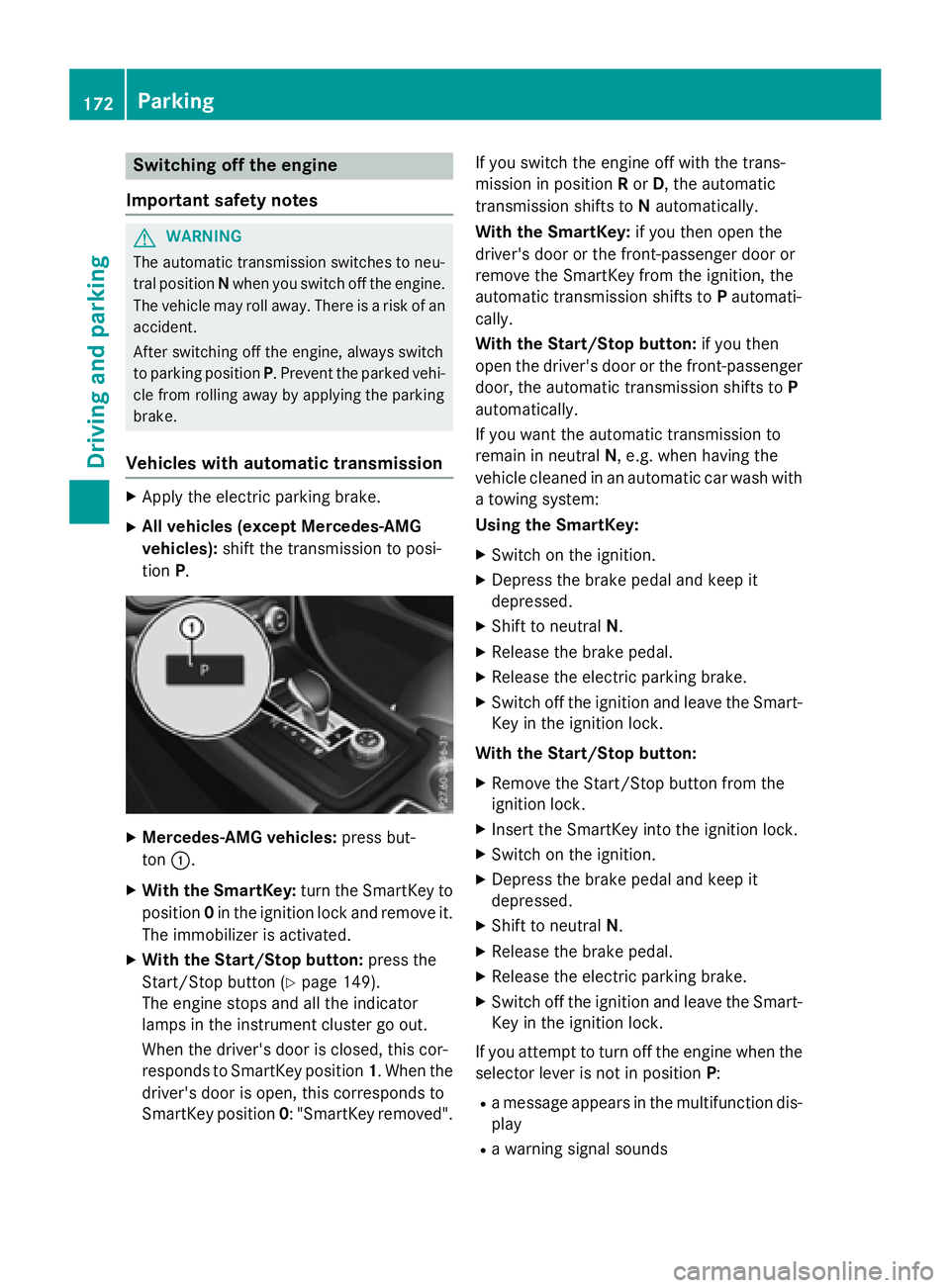
X
Mercedes-AMG vehicles: press but-
ton C .X
With the SmartKey: turn the SmartKey to
position 0 in the ignition lock and remove it.
The immobilizer is activated. X
With the Start/Stop button: press the
Start/Stop button ( Y
page 149).
The engine stops and all the indicator
lamps in the instrument cluster go out.
When the driver's door is closed, this cor-
responds to SmartKey position 1 . When the
driver's door is open, this corresponds to
SmartKey position 0 : "SmartKey removed". If you switch the engine off with the trans-
mission in position R or D , the automatic
transmission shifts to N automatically.
With the SmartKey: if you then open the
driver's door or the front-passenger door or
remove the SmartKey from the ignition, the
automatic transmission shifts to P automati-
cally.
With the Start/Stop button: if you then
open the driver's door or the front-passenger
door, the automatic transmission shifts to P
automatically.
If you want the automatic transmission to
remain in neutral N , e.g. when having the
vehicle cleaned in an automatic car wash with
a towing system:
Using the SmartKey: X
Switch on the ignition. X
Depress the brake pedal and keep it
depressed. X
Shift to neutral N . X
Release the brake pedal. X
Release the electric parking brake. X
Switch off the ignition and leave the Smart-
Key in the ignition lock.
With the Start/Stop button: X
Remove the Start/Stop button from the
ignition lock. X
Insert the SmartKey into the ignition lock. X
Switch on the ignition. X
Depress the brake pedal and keep it
depressed. X
Shift to neutral N . X
Release the brake pedal. X
Release the electric parking brake. X
Switch off the ignition and leave the Smart-
Key in the ignition lock.
If you attempt to turn off the engine when the
selector lever is not in position P :R
a message appears in the multifunction dis-
play R
a warning signal sounds172
Parking
Driving and parking