2016 MERCEDES-BENZ GLA sensor
[x] Cancel search: sensorPage 319 of 390
ces prevent water from draining away. This
can lead to corrosion damage and damage
to electronic components. X
Clean the inside and outside of the win-
dows with a damp cloth and a cleaning
product that is recommended and
approved by Mercedes-Benz.
Cleaning wiper blades
G WARNING
You could become trapped by the windshield
wipers if they start moving while cleaning the
windshield or wiper blades. There is a risk of
injury.
Always switch off the windshield wipers and
the ignition before cleaning the windshield or
wiper blades.
! Only fold the windshield wipers away from
the windshield when vertical. Otherwise,
you will damage the hood.
! Do not pull the wiper blade. Otherwise,
the wiper blade could be damaged.
! Do not clean wiper blades too often and
do not rub them too hard. Otherwise, the
graphite coating could be damaged. This
could cause wiper noise.
! Hold the wiper arm securely when folding
back. The windshield could be damaged if
the wiper arm smacks against it suddenly. X
Fold the windshield wiper arms away from
the windshield. X
Carefully clean the wiper blades with a
damp cloth. X
Fold the windshield wiper arms back again
before switching on the ignition.
Cleaning the exterior lighting
! Only use cleaning agents or cleaning
cloths which are suitable for plastic light
lenses. Unsuitable cleaning agents or
cleaning cloths could scratch or damage
the plastic light lenses. X
Clean the plastic lenses of the exterior
lights with a wet sponge and a mild cleaning
agent, e.g. Mercedes-Benz car shampoo or
cleaning cloths.
Cleaning the mirror turn signals
! Only use cleaning agents or cleaning
cloths that are suitable for plastic lenses.
Unsuitable cleaning agents or cleaning
cloths could scratch or damage the plastic
lenses of the mirror turn signals. X
Clean the plastic lenses of the mirror turn
signals in the exterior mirror housing using
a wet sponge and mild cleaning agent, e.g.
Mercedes-Benz car shampoo or cleaning
cloths.
Cleaning the sensors
! If you clean the sensors with a power
washer, make sure that you keep a dis-
tance of at least 11.8 in (30 cm) between
the vehicle and the power washer nozzle.
Information about the correct distance is
available from the equipment manufac-
turer.
X
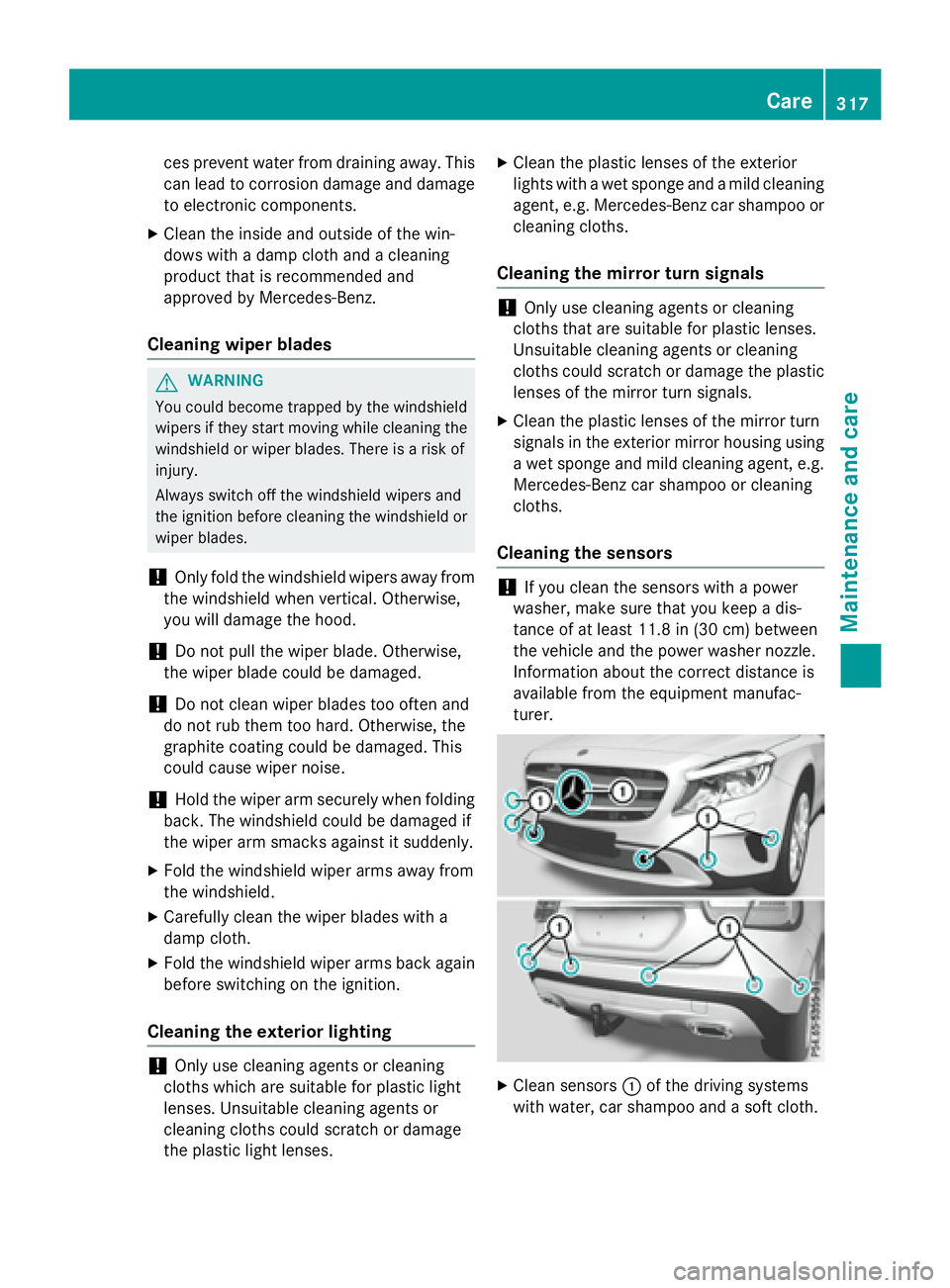
Clean sensors C of the driving systems
with water, car shampoo and a soft cloth. Care 317
Maintenance and care Z
Page 350 of 390
set the correct tire pressure. If an incorrect
tire pressure is set, these incorrect values
will be monitored. X
Also observe the notes in the section on tire
pressures ( Y
page 343).X
Make sure that the SmartKey is in position
2 in the ignition lock ( Y
page 149).X
Press Y or e on the steering wheel
to select the Serv.
menu.X
Press the c or d button to select
Tire Pressure
.X
Press the v button.
The Run Flat Indicator Active
Press 'OK' to Restart message
appears in the multifunction display.
If you wish to confirm the restart: X
Press the v button.
The Tire Pressure Now OK?
message
appears in the multifunction display. X
Press the c or d button to select
Yes
. X
Press the v button.
The Run Flat Indicator Restarted
message appears in the multifunction dis-
play.
After a teach-in period, the tire pressure
loss warning system will monitor the set
tire pressures of all four tires.
If you wish to cancel the restart: X
Press the 8 button.
or X
If the Tire Pressure Now OK? message
appears, press the c or d button to
select Cancel .X
Press the v button.
The tire pressure values stored at the last
restart will continue to be monitored. Tire pressure monitor
General notes If a tire pressure monitor is installed, the vehi-
cle's wheels have sensors that monitor the
tire pressures in all four tires. The tire pres-
sure monitor warns you if the pressure drops
in one or more of the tires. The tire pressure
monitor only functions if the corresponding
sensors are installed in all wheels.
Information on tire pressures is displayed in
the multifunction display. After a few minutes
of driving, the current tire pressure of each
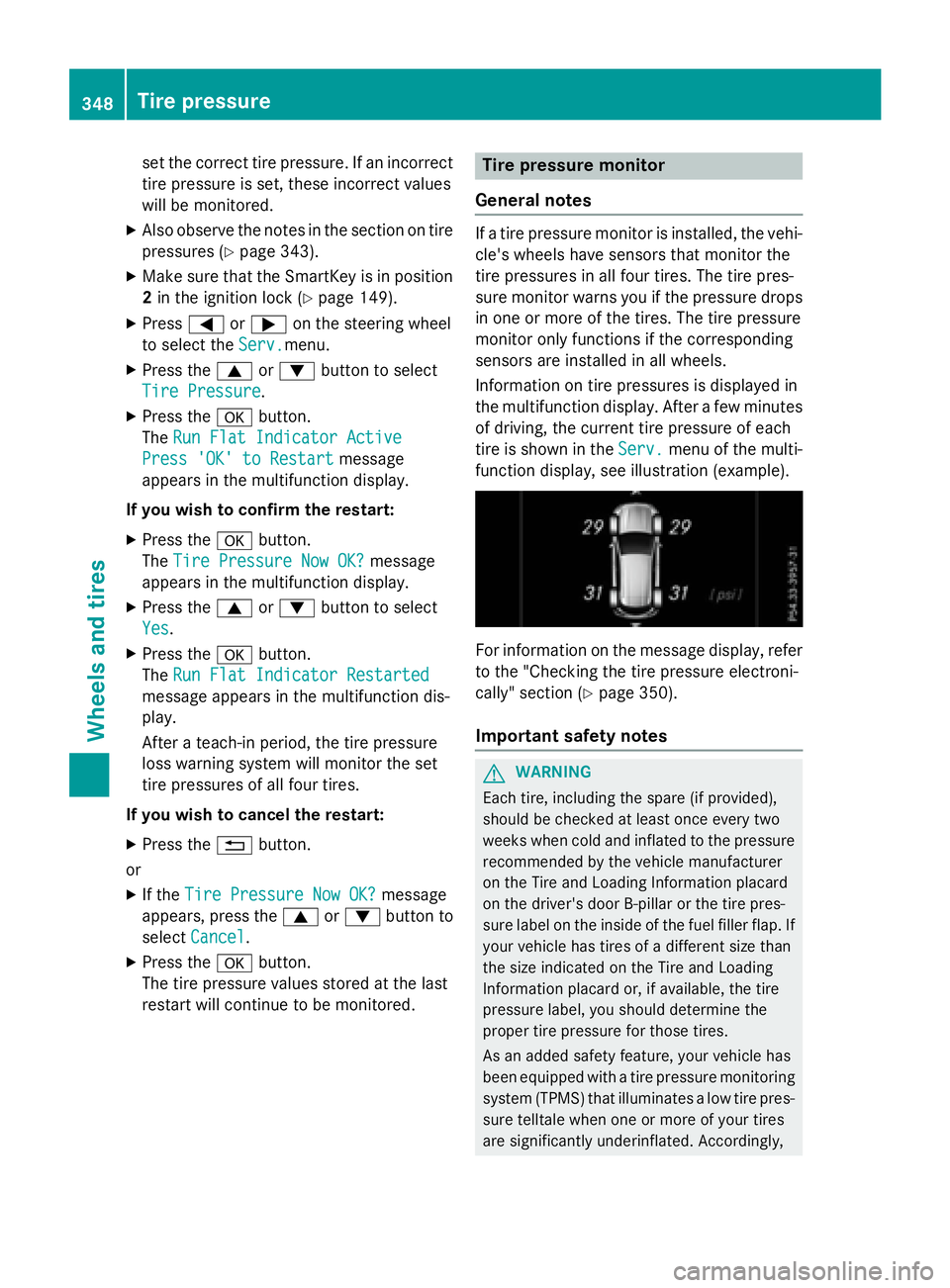
tire is shown in the Serv. menu of the multi-
function display, see illustration (example).
For information on the message display, refer
to the "Checking the tire pressure electroni-
cally" section ( Y
page 350).
Important safety notes
G WARNING
Each tire, including the spare (if provided),
should be checked at least once every two
weeks when cold and inflated to the pressure
recommended by the vehicle manufacturer
on the Tire and Loading Information placard
on the driver's door B-pillar or the tire pres-
sure label on the inside of the fuel filler flap. If
your vehicle has tires of a different size than
the size indicated on the Tire and Loading
Information placard or, if available, the tire
pressure label, you should determine the
proper tire pressure for those tires.
As an added safety feature, your vehicle has
been equipped with a tire pressure monitoring
system (TPMS) that illuminates a low tire pres-
sure telltale when one or more of your tires
are significantly underinflated. Accordingly,348
Tire pressure
Wheels and tires
Page 352 of 390
computer refer to those measured at sea
level. At high altitudes, the tire pressure val-
ues indicated by a pressure gauge are higher
than those shown by the on-board computer.
In this case, do not reduce the tire pressures.
The operation of the tire pressure monitor can
be affected by interference from radio trans-
mitting equipment (e.g. radio headphones,
two-way radios) that may be being operated
in or near the vehicle.
Checking the tire pressure electroni-
cally X
Make sure that the SmartKey is in position
2 in the ignition lock ( Y
page 149).X
Press Y or e on the steering wheel
to select the Serv.
menu.X
Press the c or d button to select
Tire Pressure
.X
Press the v button.
The current tire pressure of each tire is
shown in the multifunction display.
If the vehicle was parked for longer than
20 minutes, the Tire pressure will be
displayed after driving a few
minutes message is shown.
After a teach-in process, the tire pressure
monitor automatically detects new wheels or
new sensors. As long as a clear allocation of
the tire pressure value to the individual
wheels is not possible, the Tire Pressure
Monitor Active message is shown instead
of the tire pressure display. The tire pressures
are already being monitored.
Tire pressure monitor warning mes-
sages
If the tire pressure monitor detects a pressure
loss in one or more tires, a warning message
is shown in the multifunction display. The yel-
low tire pressure warning lamp then lights up. R
If the Please Correct Tire Pressure
message appears in the multifunction dis-
play, the tire pressure in at least one tire is too low. The tire pressure must be correc-
ted when the opportunity arises. R
If the Check Tire Pressure message
appears in the multifunction display, the
tire pressure in one or more tires has drop-
ped significantly. The tires must be
checked. R
If the Tire Pressure Warning Tire
Failure message appears in the multi-
function display, the tire pressure in one or
more tires has dropped suddenly. The tires
must be checked.
Observe the instructions and safety notes in
the display messages in the "Tires" section
( Y
page 258).
If the wheel positions on the vehicle are rota-
ted, the tire pressures may be displayed for
the wrong positions for a short time. This is
rectified after a few minutes of driving, and
the tire pressures are displayed for the cor-
rect positions.
Restarting the tire pressure monitor
When you restart the tire pressure monitor, all
existing warning messages are deleted and
the warning lamps go out. The monitor uses
the currently set tire pressures as the refer-
ence values for monitoring. In most cases, the
tire pressure monitor will automatically
detect the new reference values after you
have changed the tire pressure. However, you
can also define reference values manually as
described here. The tire pressure monitor
then monitors the new tire pressure values. X
Set the tire pressure to the value recom-
mended for the corresponding driving sit-
uation on the Tire and Loading Information
placard on the driver's side
B-pillar ( Y
page 343).
You can find more tire pressure values for
various operating conditions in the tire
pressure table inside the fuel filler flap
( Y
page 170). X
Make sure that the tire pressure is correct
on all four wheels.350
Tire pressure
Wheels and tires
Page 384 of 390
Windshield washer system
Important safety notes
G WARNING
Windshield washer concentrate could ignite if
it comes into contact with hot engine compo-
nents or the exhaust system. There is a risk of
fire and injury.
Make sure that no windshield washer con-
centrate is spilled next to the filler neck.
! Do not add distilled or de-ionized water to
the washer fluid container. Otherwise, the
level sensor may be damaged.
! Only MB SummerFit and MB WinterFit
washer fluid should be mixed together. The
spray nozzles may otherwise become
blocked.
When handling washer fluid, observe the
important safety notes on service products
( Y
page 377).
At temperatures above freezing: X
Fill the washer fluid reservoir with a mixture
of water and windshield washer fluid, e.g.
MB SummerFit.
Add 1 part MB SummerFit to 100 parts water.
At temperatures below freezing: X
Fill the washer fluid reservoir with a mixture
of water and washer fluid, e.g. MB Winter-
Fit.
For the correct mixing ratio refer to the
information on the antifreeze reservoir.
i Add windshield washer fluid, e.g. MB
SummerFit or MB WinterFit, to the washer
fluid all year round.
Climate control system refrigerant
Important safety notes
The climate control system of your vehicle is
filled with refrigerant R ‑ 134a. The instruction label regarding the refrigerant
type used can be found on the left, on the
underside of the hood.
! Only the refrigerant R ‑ 134a and the PAG
oil approved by Mercedes-Benz may be
used. The approved PAG oil may not be
mixed with any other PAG oil that is not
approved for R-134a refrigerant. Other-
wise, the climate control system may be
damaged.
Service work, such as topping up refrigerant
or replacing components, may only be carried
out by a qualified specialist workshop. All
applicable regulations must be adhered to,
SAE standard J639 included.
Always have work on the climate control sys-
tem carried out at a qualified specialist work-
shop.
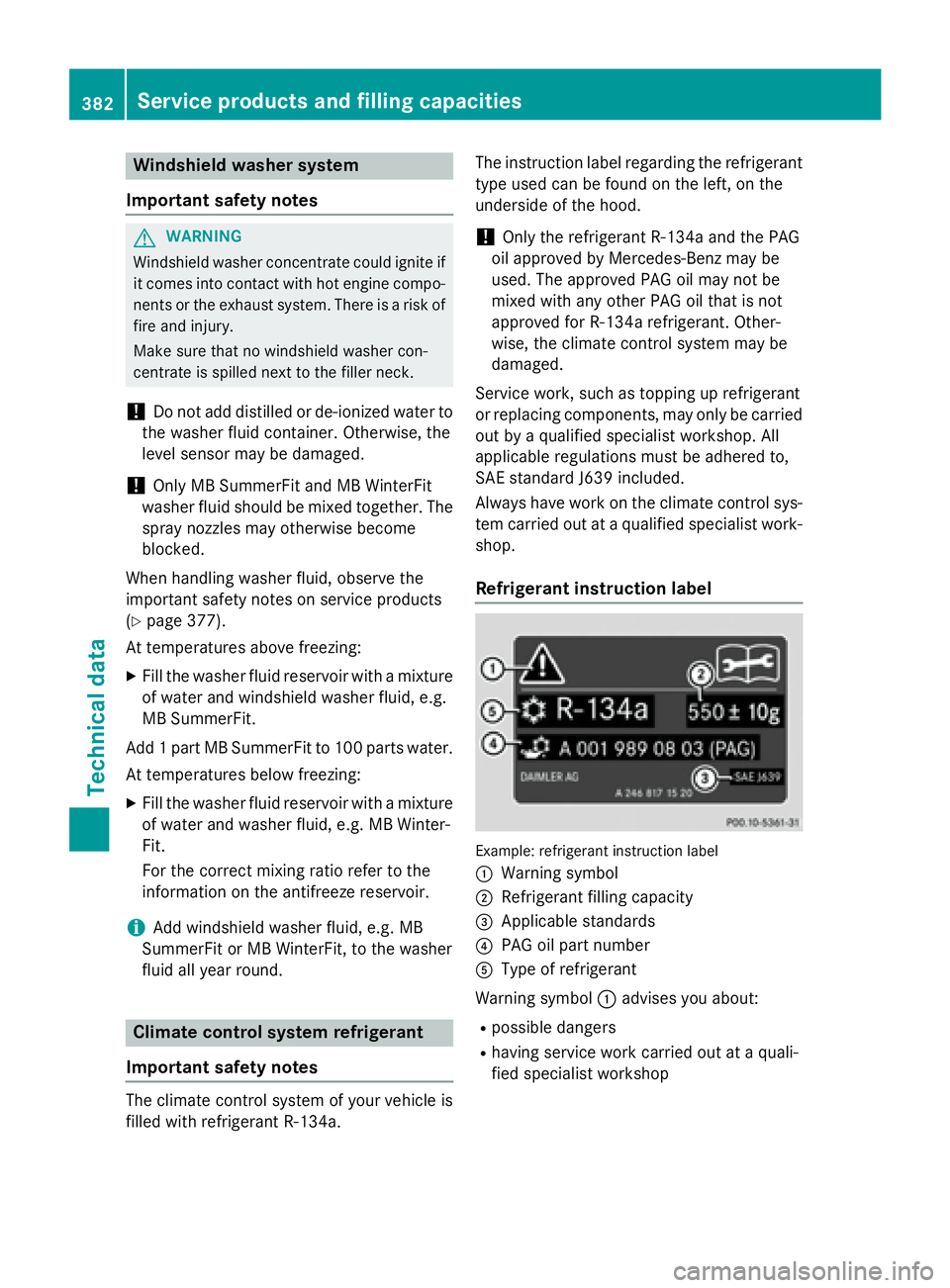
Refrigerant instruction label
Example: refrigerant instruction label
C
Warning symbol D
Refrigerant filling capacity