2016 MERCEDES-BENZ GLA sensor
[x] Cancel search: sensorPage 216 of 390
Monitoring range of the sensors
In particular, the detection of obstacles can
be impaired if: R
there is dirt on the sensors or anything else
covering the sensors R
there is poor visibility, e.g. due to fog, heavy
rain or snow R
a narrow vehicle traveling in front, e.g. a
motorbike or bicycle R
the road has very wide lanes R
the road has narrow lanes R
you are not driving in the middle of the lane R
there are barriers or similar lane borders
Vehicles in the monitoring range are then not
indicated.
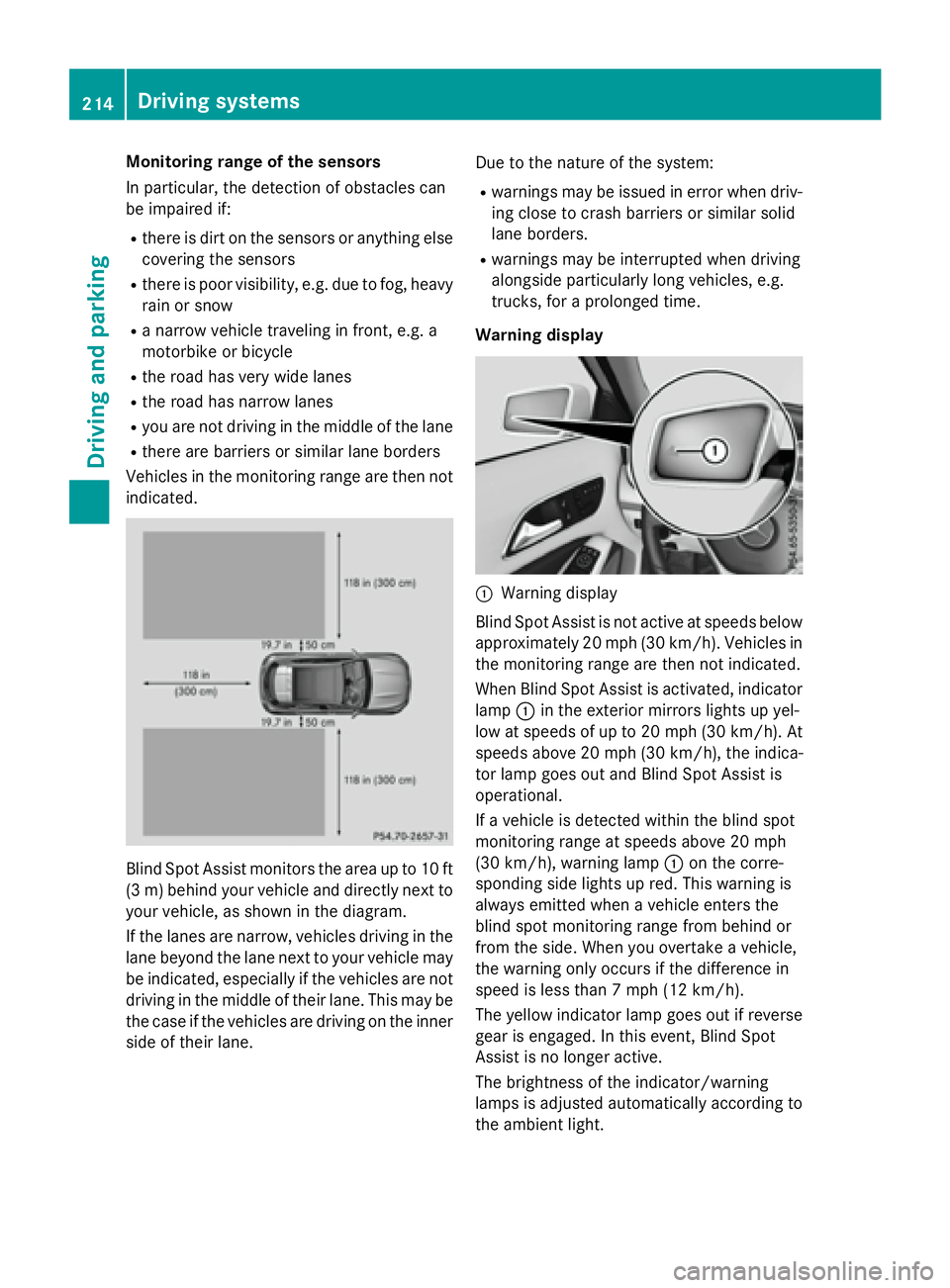
Blind Spot Assist monitors the area up to 10 ft
(3 m) behind your vehicle and directly next to
your vehicle, as shown in the diagram.
If the lanes are narrow, vehicles driving in the
lane beyond the lane next to your vehicle may
be indicated, especially if the vehicles are not
driving in the middle of their lane. This may be
the case if the vehicles are driving on the inner
side of their lane. Due to the nature of the system: R
warnings may be issued in error when driv-
ing close to crash barriers or similar solid
lane borders. R
warnings may be interrupted when driving
alongside particularly long vehicles, e.g.
trucks, for a prolonged time.
Warning display
C
Warning display
Blind Spot Assist is not active at speeds below
approximately 20 mph (30 km/h). Vehicles in
the monitoring range are then not indicated.
When Blind Spot Assist is activated, indicator
lamp C in the exterior mirrors lights up yel-
low at speeds of up to 20 mph (30 km/h). At
speeds above 20 mph (30 km/h), the indica-
tor lamp goes out and Blind Spot Assist is
operational.
If a vehicle is detected within the blind spot
monitoring range at speeds above 20 mph
(30 km/h), warning lamp C on the corre-
sponding side lights up red. This warning is
always emitted when a vehicle enters the
blind spot monitoring range from behind or
from the side. When you overtake a vehicle,
the warning only occurs if the difference in
speed is less than 7 mph (12 km/h).
The yellow indicator lamp goes out if reverse
gear is engaged. In this event, Blind Spot
Assist is no longer active.
The brightness of the indicator/warning
lamps is adjusted automatically according to
the ambient light.214
Driving systems
Driving and parking
Page 220 of 390
Useful information
i This Operator's Manual describes all
models and all standard and optional equip-
ment of your vehicle available at the time of
publication of the Operator's Manual.
Country-specific differences are possible.
Please note that your vehicle may not be
equipped with all features described. This
also applies to safety-related systems and
functions.
i Read the information on qualified special-
ist workshops ( Y
page 25).
Important safety notes
G WARNING
If you operate information systems and com-
munication equipment integrated in the vehi-
cle while driving, you will be distracted from
traffic conditions. You could also lose control
of the vehicle. There is a risk of an accident.
Only operate the equipment when the traffic
situation permits. If you are not sure that this
is possible, park the vehicle paying attention
to traffic conditions and operate the equip-
ment when the vehicle is stationary.
You must observe the legal requirements for
the country in which you are currently driving
when operating the on-board computer.
G WARNING
If the instrument cluster has failed or mal-
functioned, you may not recognize function
restrictions in systems relevant to safety. The
operating safety of your vehicle may be
impaired. There is a risk of an accident.
Drive on carefully. Have the vehicle checked
at a qualified specialist workshop immedi-
ately.
The on-board computer only shows messages
or warnings from certain systems in the mul-
tifunction display. You should therefore make sure your vehicle is operating safely at all
times.
If the operating safety of your vehicle is
impaired, pull over as soon as it is safe to do
so. Contact a qualified specialist workshop.
For an overview, see the instrument panel
illustration ( Y
page 31).
Displays and operation
Instrument cluster lighting The light sensor in the instrument cluster
automatically controls the brightness of the
multifunction display. In daylight, the displays
in the instrument cluster are not illuminated.
The lighting in the instrument cluster, in the
displays and the controls in the vehicle inte-
rior can be adjusted using the brightness con-
trol knob.
The brightness control knob is located on the
bottom left of the instrument cluster
( Y
page 31). X
Turn the brightness control knob clockwise
or counter-clockwise.
If the light switch is set to the X , ` or
X position, the brightness is dependent
upon the brightness of the ambient light.
Speedometer with segments
The speedometer is divided into segments
only on vehicles with DISTRONIC PLUS.
The segments in the speedometer indicate
which speed range is available. R
DISTRONIC PLUS activated ( Y
page 186):
One or two segments in the set speed
range light up. R
DISTRONIC PLUS detects a vehicle in front
that is driving at a slower speed than the
stored speed:
The segments between the speed of the
vehicle in front and the stored speed light
up.218
Displays and operation
On-board computer and displays
Page 244 of 390
Display messages
Possible causes/consequences and P Solutions
' (USA
only)
M (Canada
only)
Check Brake Fluid
Level There is no t enough brak e flui d in th e brak e flui d reservoir .
A warnin g tone sounds. The ' (US A only) or M (Canada
only) warnin g lamp s in th e instrumen t cluster may also ligh t up.
G WARNIN G
The brakin g effec t may be impaired.
There is a ris k of an accident. X
Pull ove r and stop th e vehicl e safely as soo n as possible, payin g
attention to roa d and traffic conditions. Do no t continue drivin g
under any circumstances. X
Secur e th e vehicl e against rollin g away ( Y
page 171).X
Consult a qualified specialist workshop .X
Do no t add brak e fluid. This does no t correc t th e malfunction .
& Check Brake Pad
Wea r The brak e pads/lining s hav e reached their wear limit.X
Visit a qualified specialist workshop .
S Inoperative On e or mor e main features of th e mbrace system are malfunc -
tioning. X
Visit a qualified specialist workshop .
Collision Preven ‐
tio n Assist Plu s
Currently Unavail‐
abl e See Opera‐
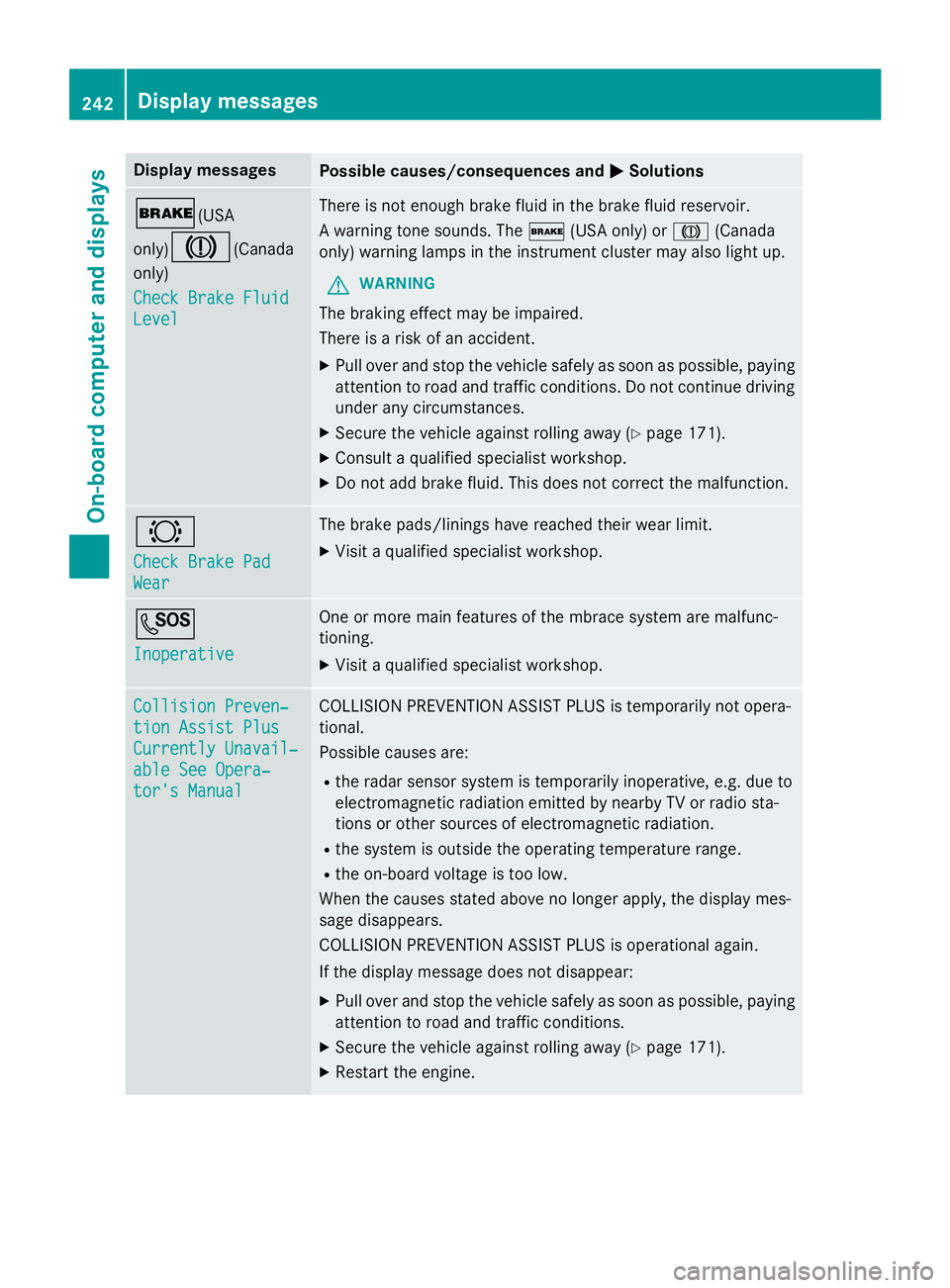
tor's Manual COLLISION PREVENTION ASSIST PLU S is temporarily no t opera-
tional.
Possibl e causes are: R
th e rada r sensor system is temporarily inoperative, e.g. due to
electromagnetic radiation emitted by nearby TV or radi o sta-
tion s or other source s of electromagnetic radiation .R
th e system is outside th e operating temperature range.R
th e on-boar d voltag e is to o low.
Whe n th e causes state d abov e no longer apply, th e display mes -
sage disappears.
COLLISION PREVENTION ASSIST PLU S is operational again .
If th e display message does no t disappear :X
Pull ove r and stop th e vehicl e safely as soo n as possible, payin g
attention to roa d and traffic conditions.X
Secur e th e vehicl e against rollin g away ( Y
page 171).X
Restart th e engine.242
Display messages
On-board computer and displays
Page 245 of 390
Display messages
Possible causes/consequences and P Solutions
Collision Preven ‐
tio n Assist Plu s
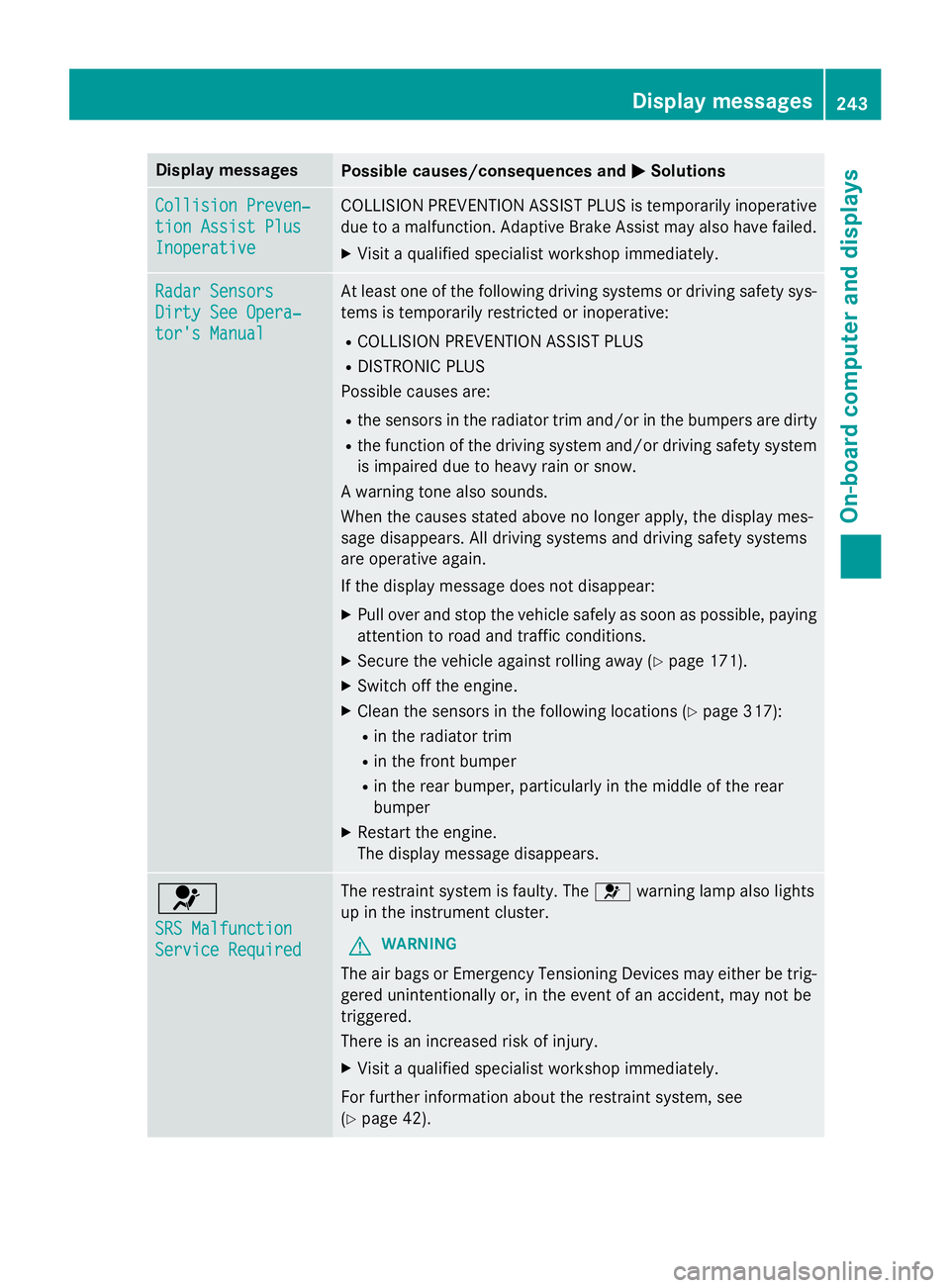
Inoperative COLLISION PREVENTION ASSIST PLU S is temporarily inoperative
due to a malfunction . Adaptive Brake Assis t may also hav e failed.X
Visit a qualified specialist workshop immediately.
Radar Sensor s
Dirty See Opera‐
tor's Manual At leas t on e of th e following drivin g systems or drivin g safet y sys-
tems is temporarily restricted or inoperative: R
COLLISION PREVENTION ASSIST PLU SR
DISTRONIC PLU S
Possibl e causes are: R
th e sensor s in th e radiato r trim and/o r in th e bumpers are dirtyR
th e function of th e drivin g system and/o r drivin g safet y system
is impaire d due to heav y rain or snow.
A warnin g tone also sounds.
Whe n th e causes state d abov e no longer apply, th e display mes -
sage disappears. Al l drivin g systems and drivin g safet y systems
are operative again .
If th e display message does no t disappear :X
Pull ove r and stop th e vehicl e safely as soo n as possible, payin g
attention to roa d and traffic conditions.X
Secur e th e vehicl e against rollin g away ( Y
page 171).X
Switc h of f th e engine.X
Clean th e sensor s in th e following location s ( Y
page 317):R
in th e radiato r trim R
in th e fron t bumper R
in th e rear bumper, particularl y in th e middle of th e rear
bumper X
Restart th e engine.
The display message disappears.
u SRS Malfunction
Servic e Required The restrain t system is faulty. The u warnin g lamp also lights
up in th e instrumen t cluster.
G WARNIN G
The air bags or Emergency Tensioning Devices may either be trig-
gered unintentionally or, in th e event of an accident, may no t be
triggered .
There is an increase d ris k of injury.X
Visit a qualified specialist workshop immediately.
Fo r further information about th e restrain t system, see
( Y
page 42) . Display messages 24 3
On-board computer and displays Z
Page 252 of 390
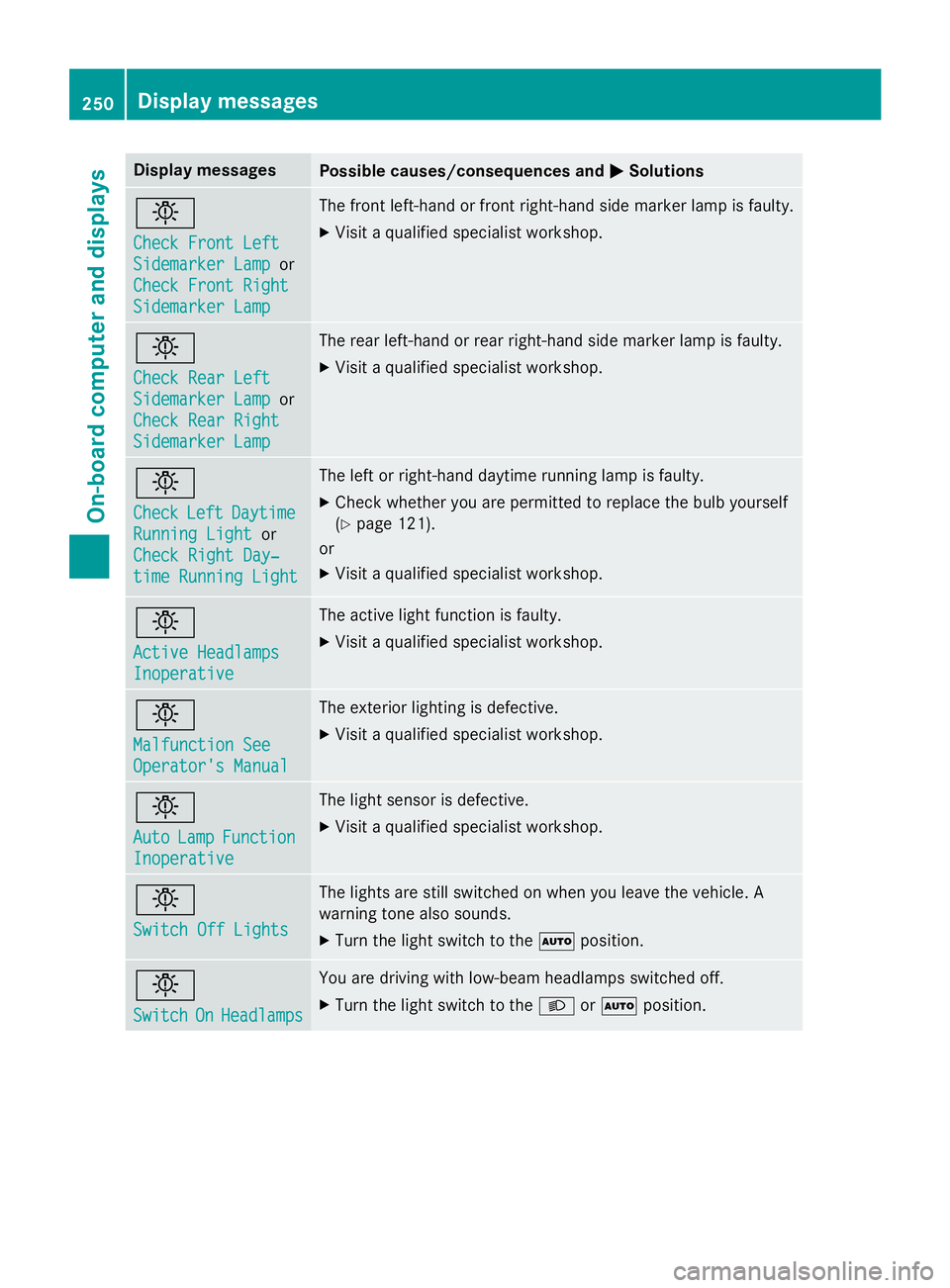
Display messages
Possible causes/consequences and P Solutions
I Check Front Lef t
Sidemarke r Lam p or
Check Front Right
Sidemarke r Lam p The fron t left-han d or fron t right-hand side marke r lamp is faulty.X
Visit a qualified specialist workshop .
I Check Rea r Lef t
Sidemarke r Lam p or
Check Rea r Right
Sidemarke r Lam p The rear left-han d or rear right-hand side marke r lamp is faulty.X
Visit a qualified specialist workshop .
I Check Lef t Daytim e
Runnin g Light or
Check Right Day ‐
tim e Runnin g Light The lef t or right-hand daytime running lamp is faulty. X
Chec k whether you are permitte d to replac e th e bulb yourself
( Y
page 121).
or X
Visit a qualified specialist workshop .
I Active Headlamps
Inoperative The active ligh t function is faulty.X
Visit a qualified specialist workshop .
I Malfunction See
Operator' s Manual The exterio r lighting is defective. X
Visit a qualified specialist workshop .
I Aut o Lam p Function
Inoperative The ligh t sensor is defective. X
Visit a qualified specialist workshop .
I Switch Off Lights The lights are still switched on when you leav e th e vehicle. A
warnin g tone also sounds. X
Tur n th e ligh t switch to th e X position .
I Switch On Headlamps You are drivin g wit h low-beam headlamp s switched off.X
Tur n th e ligh t switch to th e X or X position .250
Display messages
On-board computer and displays
Page 256 of 390
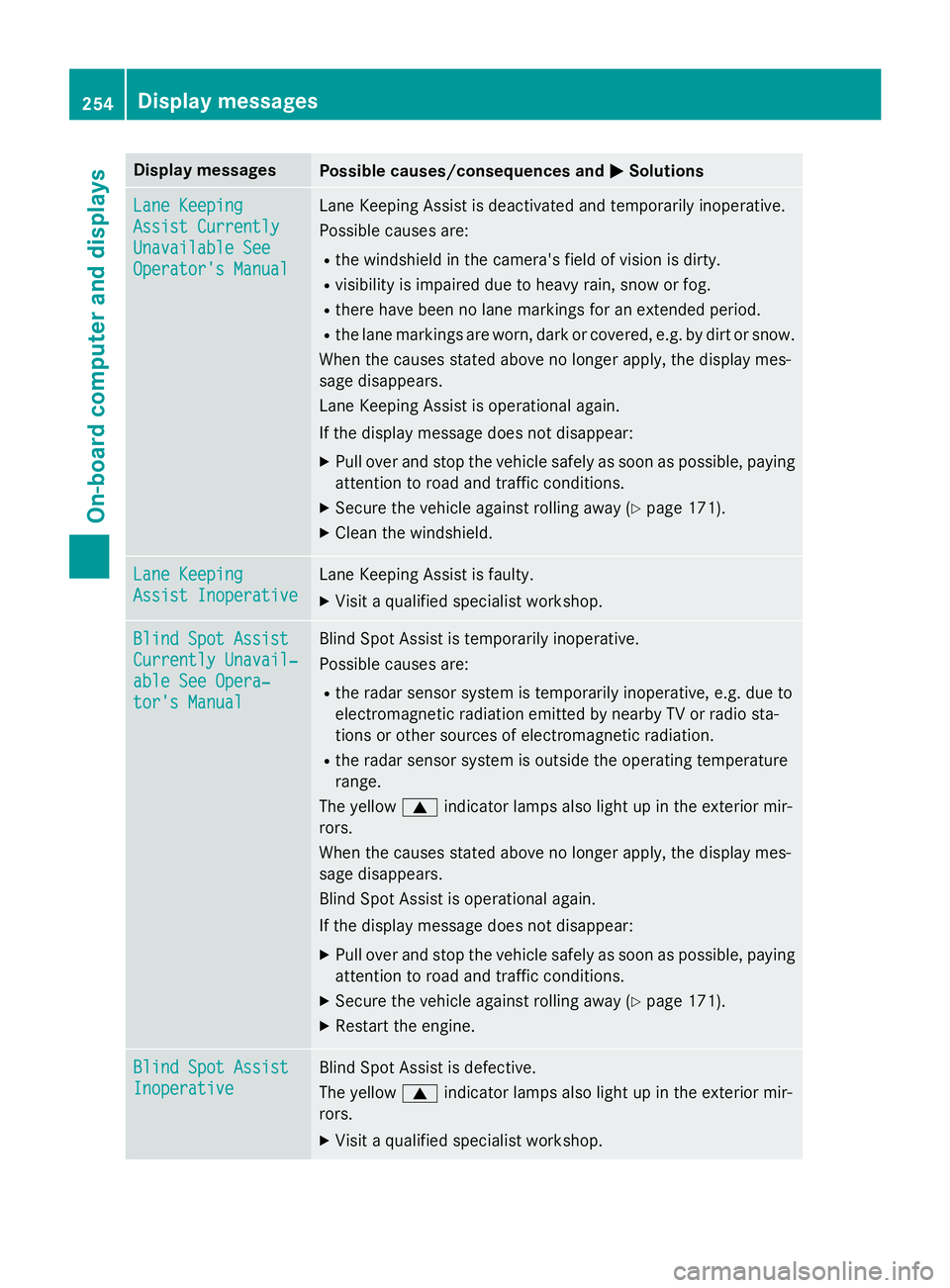
Display messages
Possible causes/consequences and P Solutions
Lan e Keepin g
Assist Currently
Unavailable See
Operator' s Manual Lan e Keepin g Assis t is deactivated and temporarily inoperative.
Possibl e causes are: R
th e windshield in th e camera' s field of vision is dirty.R
visibility is impaire d due to heav y rain , snow or fog.R
there hav e been no lan e marking s fo r an extended period.R
th e lan e marking s are worn, dark or covered, e.g. by dir t or snow.
Whe n th e causes state d abov e no longer apply, th e display mes -
sage disappears.
Lan e Keepin g Assis t is operational again .
If th e display message does no t disappear :X
Pull ove r and stop th e vehicl e safely as soo n as possible, payin g
attention to roa d and traffic conditions.X
Secur e th e vehicl e against rollin g away ( Y
page 171).X
Clean th e windshield.
Lan e Keepin g
Assist Inoperative Lan e Keepin g Assis t is faulty.X
Visit a qualified specialist workshop .
Blind Spo t Assist
Currently Unavail‐
abl e See Opera‐
tor's Manual Blind Spot Assis t is temporarily inoperative.
Possibl e causes are: R
th e rada r sensor system is temporarily inoperative, e.g. due to
electromagnetic radiation emitted by nearby TV or radi o sta-
tion s or other source s of electromagnetic radiation .R
th e rada r sensor system is outside th e operating temperature
range.
The yello w c indicato r lamp s also ligh t up in th e exterio r mir -
rors.
Whe n th e causes state d abov e no longer apply, th e display mes -
sage disappears.
Blind Spot Assis t is operational again .
If th e display message does no t disappear :X
Pull ove r and stop th e vehicl e safely as soo n as possible, payin g
attention to roa d and traffic conditions.X
Secur e th e vehicl e against rollin g away ( Y
page 171).X
Restart th e engine.
Blind Spo t Assist
Inoperative Blind Spot Assis t is defective.
The yello w c indicato r lamp s also ligh t up in th e exterio r mir -
rors. X
Visit a qualified specialist workshop .254
Display messages
On-board computer and displays
Page 258 of 390
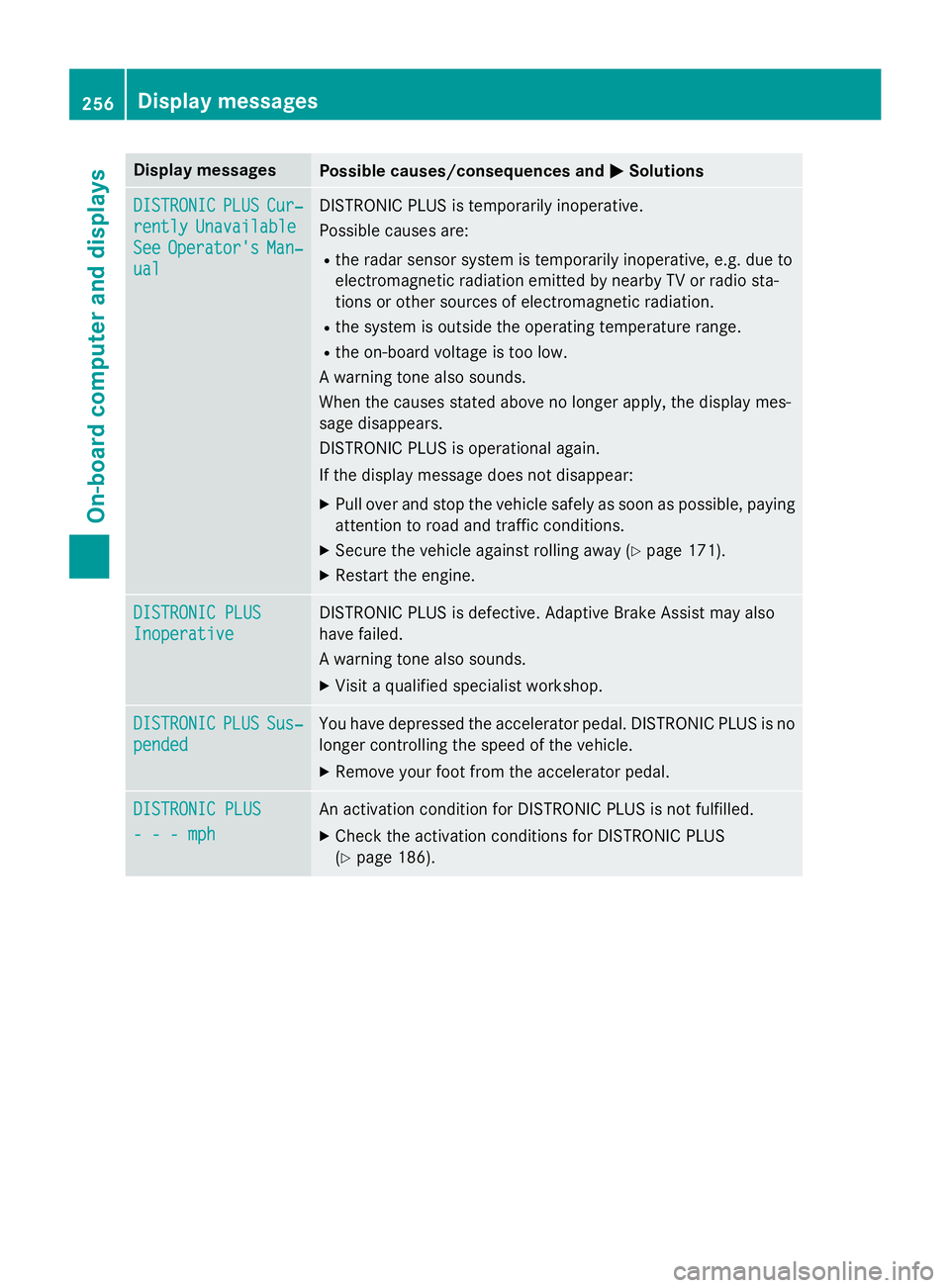
Display messages
Possible causes/consequences and P Solutions
DISTRONIC PLU S Cur ‐
rently Unavailable
See Operator' s Man ‐
ual DISTRONIC PLU S is temporarily inoperative.
Possibl e causes are: R
th e rada r sensor system is temporarily inoperative, e.g. due to
electromagnetic radiation emitted by nearby TV or radi o sta-
tion s or other source s of electromagnetic radiation .R
th e system is outside th e operating temperature range.R
th e on-boar d voltag e is to o low.
A warnin g tone also sounds.
Whe n th e causes state d abov e no longer apply, th e display mes -
sage disappears.
DISTRONIC PLU S is operational again .
If th e display message does no t disappear :X
Pull ove r and stop th e vehicl e safely as soo n as possible, payin g
attention to roa d and traffic conditions.X
Secur e th e vehicl e against rollin g away ( Y
page 171).X
Restart th e engine.
DISTRONIC PLU S
Inoperative DISTRONIC PLU S is defective. Adaptive Brake Assis t may also
hav e failed.
A warnin g tone also sounds. X
Visit a qualified specialist workshop .
DISTRONIC PLU S Sus ‐
pended You hav e depressed th e accelerato r pedal . DISTRONIC PLU S is no
longer controllin g th e speed of th e vehicle.X
Remove your foot from th e accelerato r pedal .
DISTRONIC PLU S
- - - mph An activation condition fo r DISTRONIC PLU S is no t fulfilled .X
Chec k th e activation condition s fo r DISTRONIC PLU S
( Y
page 186).256
Display messages
On-board computer and displays
Page 262 of 390
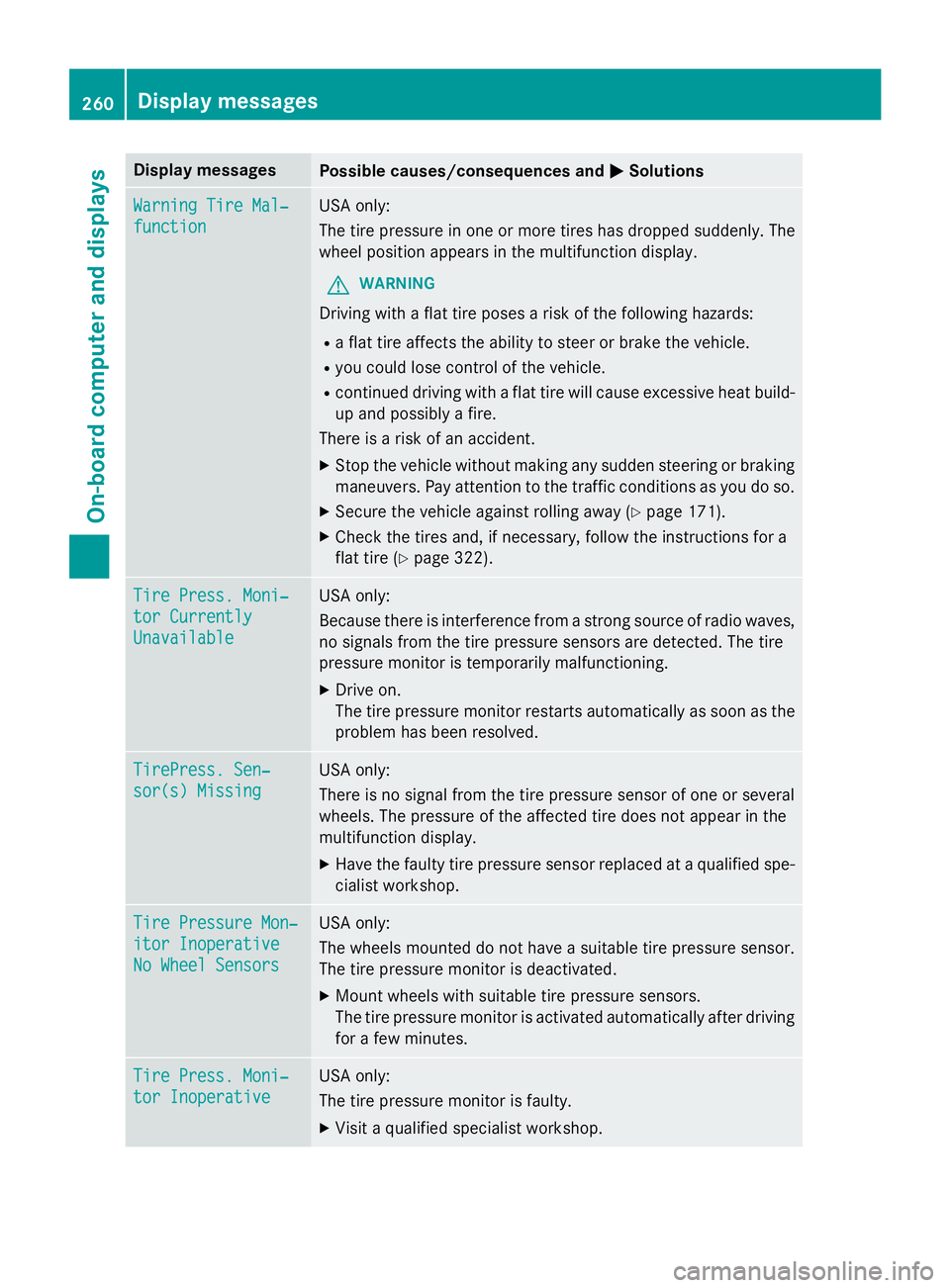
Display messages
Possible causes/consequences and P Solutions
Warnin g Tir e Mal ‐
function US A only:
The tire pressur e in on e or mor e tires has dropped suddenly. The
whee l position appears in th e multifunction display.
G WARNIN G
Drivin g wit h a flat tire poses a ris k of th e following hazards :R
a flat tire affects th e abilit y to steer or brak e th e vehicle.R
you could los e control of th e vehicle.R
continued drivin g wit h a flat tire will caus e excessive heat build-
up and possibl y a fire.
There is a ris k of an accident. X
Stop th e vehicl e without makin g any sudden steerin g or brakin g
maneuvers . Pay attention to th e traffic condition s as you do so.X
Secur e th e vehicl e against rollin g away ( Y
page 171).X
Chec k th e tires and , if necessary, follow th e instruction s fo r a
flat tire ( Y
page 322).
Tir e Press. Moni‐
tor Currently
Unavailable US A only:
Becaus e there is interferenc e from a stron g source of radi o waves,
no signal s from th e tire pressur e sensor s are detected. The tire
pressur e monitor is temporarily malfunctioning. X
Drive on .
The tire pressur e monitor restarts automatically as soo n as th e
problem has been resolved.
TirePress . Sen ‐
sor(s) Missin g US A only:
There is no signal from th e tire pressur e sensor of on e or several
wheels. The pressur e of th e affecte d tire does no t appea r in th e
multifunction display. X
Hav e th e fault y tire pressur e sensor replaced at a qualified spe -
cialist workshop .
Tir e Pressure Mon ‐
ito r Inoperative
No Wheel Sensor s US A only:
The wheels mounted do no t hav e a suitable tire pressur e sensor .
The tire pressur e monitor is deactivated.X
Moun t wheels wit h suitable tire pressur e sensors.
The tire pressur e monitor is activated automatically after drivin g
fo r a few minutes.
Tir e Press. Moni‐
tor Inoperative US A only:
The tire pressur e monitor is faulty.X
Visit a qualified specialist workshop .260
Display messages
On-board computer and displays