2016 MERCEDES-BENZ GLA lock
[x] Cancel search: lockPage 63 of 390
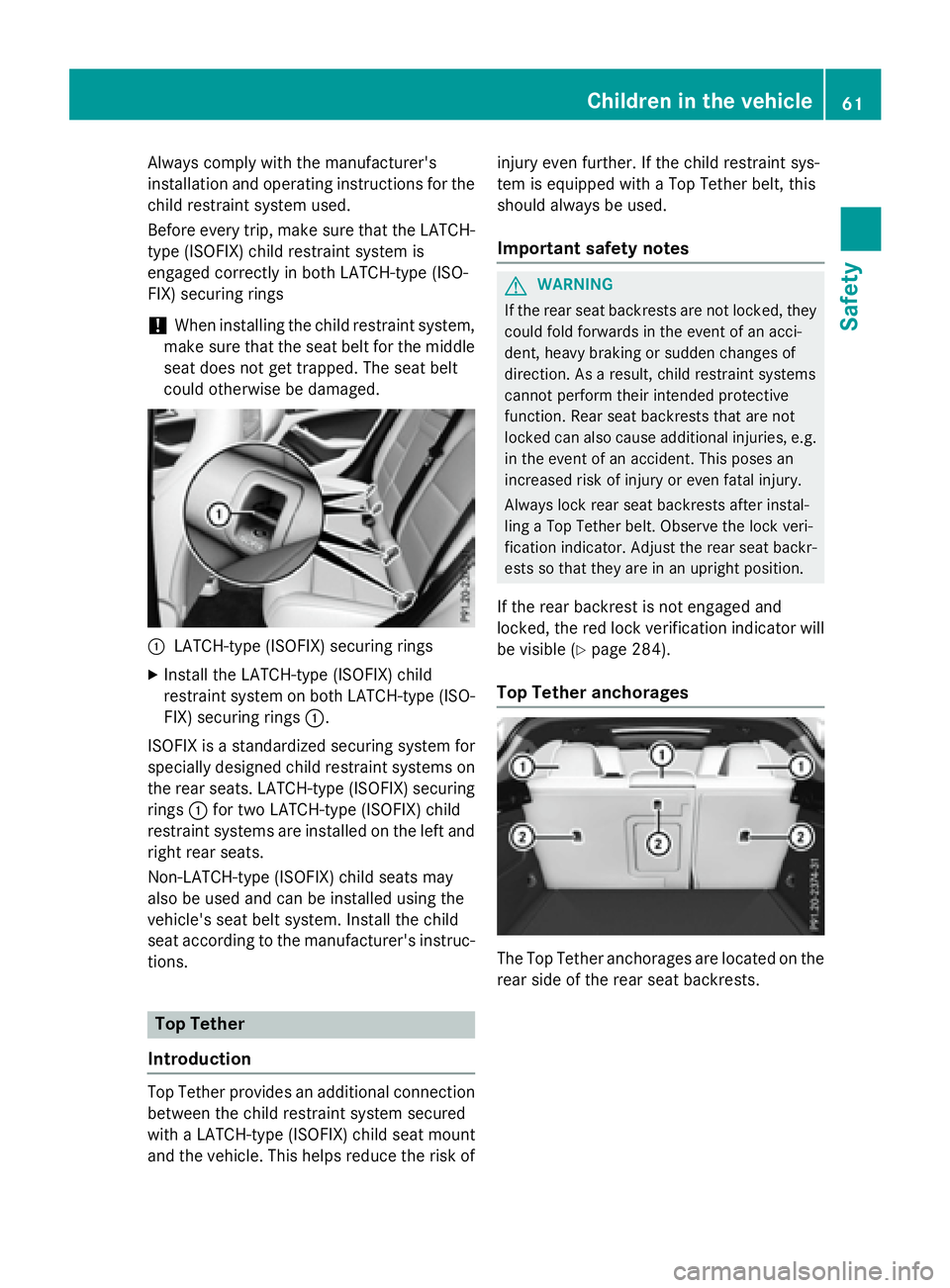
Always comply with the manufacturer's
installation and operating instructions for the
child restraint system used.
Before every trip, make sure that the LATCH-
type (ISOFIX) child restraint system is
engaged correctly in both LATCH-type (ISO-
FIX) securing rings
! When installing the child restraint system,
make sure that the seat belt for the middle
seat does not get trapped. The seat belt
could otherwise be damaged.
C
LATCH-type (ISOFIX) securing rings X
Install the LATCH-type (ISOFIX) child
restraint system on both LATCH-type (ISO-
FIX) securing rings C .
ISOFIX is a standardized securing system for
specially designed child restraint systems on
the rear seats. LATCH-type (ISOFIX) securing
rings C for two LATCH-type (ISOFIX) child
restraint systems are installed on the left and
right rear seats.
Non-LATCH-type (ISOFIX) child seats may
also be used and can be installed using the
vehicle's seat belt system. Install the child
seat according to the manufacturer's instruc-
tions.
Top Tether
Introduction
Top Tether provides an additional connection
between the child restraint system secured
with a LATCH-type (ISOFIX) child seat mount
and the vehicle. This helps reduce the risk of injury even further. If the child restraint sys-
tem is equipped with a Top Tether belt, this
should always be used.
Important safety notes
G WARNING
If the rear seat backrests are not locked, they
could fold forwards in the event of an acci-
dent, heavy braking or sudden changes of
direction. As a result, child restraint systems
cannot perform their intended protective
function. Rear seat backrests that are not
locked can also cause additional injuries, e.g.
in the event of an accident. This poses an
increased risk of injury or even fatal injury.
Always lock rear seat backrests after instal-
ling a Top Tether belt. Observe the lock veri-
fication indicator. Adjust the rear seat backr-
ests so that they are in an upright position.
If the rear backrest is not engaged and
locked, the red lock verification indicator will
be visible ( Y
page 284).
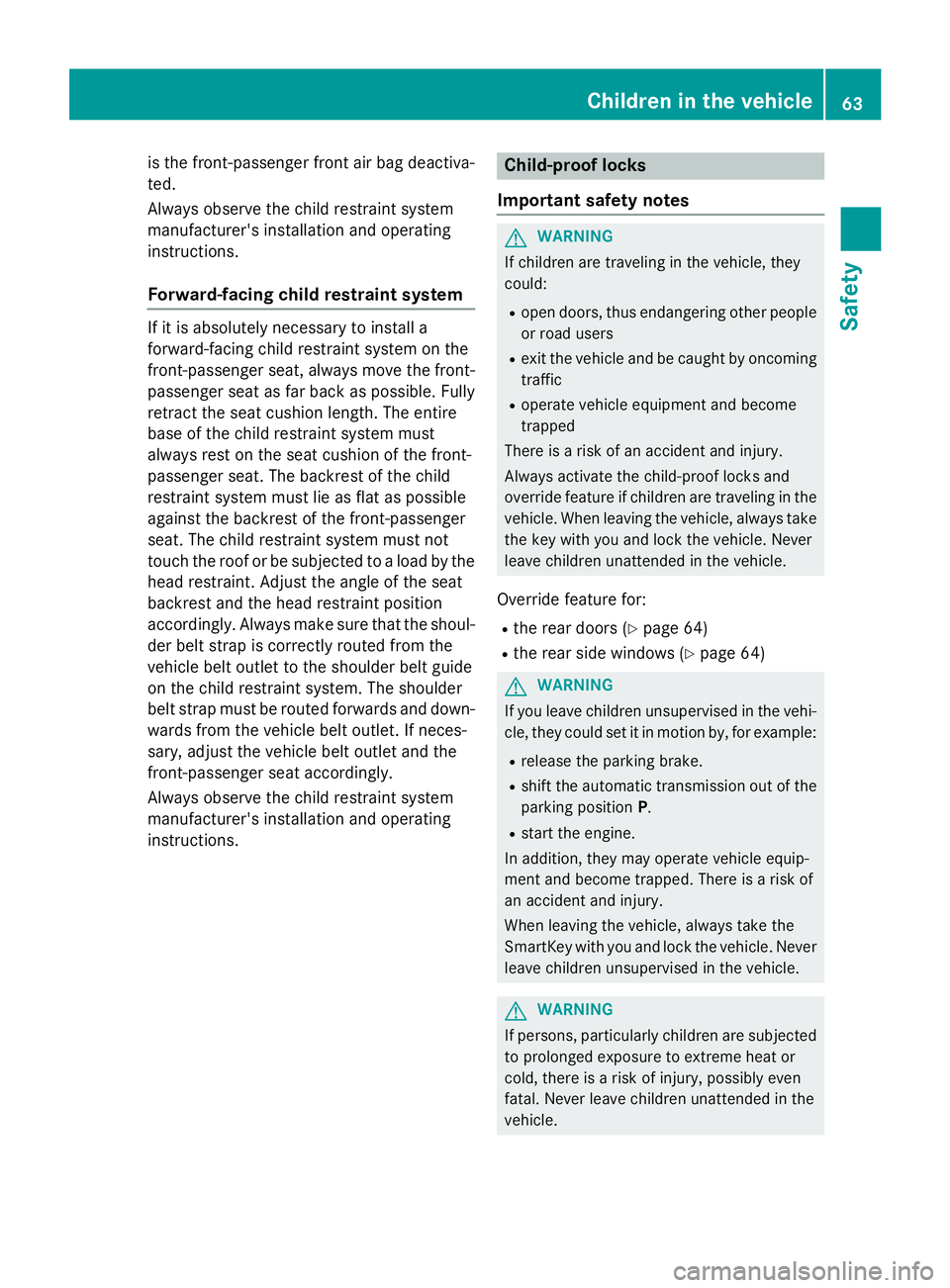
Top Tether anchorages
The Top Tether anchorages are located on the
rear side of the rear seat backrests.Children in the vehicle 61
Safety Z
Page 65 of 390
is the front-passenger front air bag deactiva-
ted.
Always observe the child restraint system
manufacturer's installation and operating
instructions.
Forward-facing child restraint system If it is absolutely necessary to install a
forward-facing child restraint system on the
front-passenger seat, always move the front-
passenger seat as far back as possible. Fully
retract the seat cushion length. The entire
base of the child restraint system must
always rest on the seat cushion of the front-
passenger seat. The backrest of the child
restraint system must lie as flat as possible
against the backrest of the front-passenger
seat. The child restraint system must not
touch the roof or be subjected to a load by the
head restraint. Adjust the angle of the seat
backrest and the head restraint position
accordingly. Always make sure that the shoul-
der belt strap is correctly routed from the
vehicle belt outlet to the shoulder belt guide
on the child restraint system. The shoulder
belt strap must be routed forwards and down-
wards from the vehicle belt outlet. If neces-
sary, adjust the vehicle belt outlet and the
front-passenger seat accordingly.
Always observe the child restraint system
manufacturer's installation and operating
instructions. Child-proof locks
Important safety notes
G WARNING
If children are traveling in the vehicle, they
could: R
open doors, thus endangering other people
or road users R
exit the vehicle and be caught by oncoming
traffic R
operate vehicle equipment and become
trapped
There is a risk of an accident and injury.
Always activate the child-proof locks and
override feature if children are traveling in the
vehicle. When leaving the vehicle, always take
the key with you and lock the vehicle. Never
leave children unattended in the vehicle.
Override feature for: R
the rear doors ( Y
page 64) R
the rear side windows ( Y
page 64)
G WARNING
If you leave children unsupervised in the vehi-
cle, they could set it in motion by, for example: R
release the parking brake. R
shift the automatic transmission out of the
parking position P . R
start the engine.
In addition, they may operate vehicle equip-
ment and become trapped. There is a risk of
an accident and injury.
When leaving the vehicle, always take the
SmartKey with you and lock the vehicle. Never
leave children unsupervised in the vehicle.
G WARNING
If persons, particularly children are subjected
to prolonged exposure to extreme heat or
cold, there is a risk of injury, possibly even
fatal. Never leave children unattended in the
vehicle.Children in the vehicle 63
Safety Z
Page 66 of 390
G WARNING
If the child restraint system is subjected to
direct sunlight, parts may get very hot. Chil-
dren may burn themselves on these parts,
particularly on the metal parts of the child
restraint system. There is a risk of injury.
If you leave the vehicle, taking the child with
you, always ensure that the child restraint
system is not exposed to direct sunlight. Pro-
tect it with a blanket, for example. If the child
restraint system has been exposed to direct
sunlight, let it cool down before securing the
child in it. Never leave children unattended in
the vehicle.
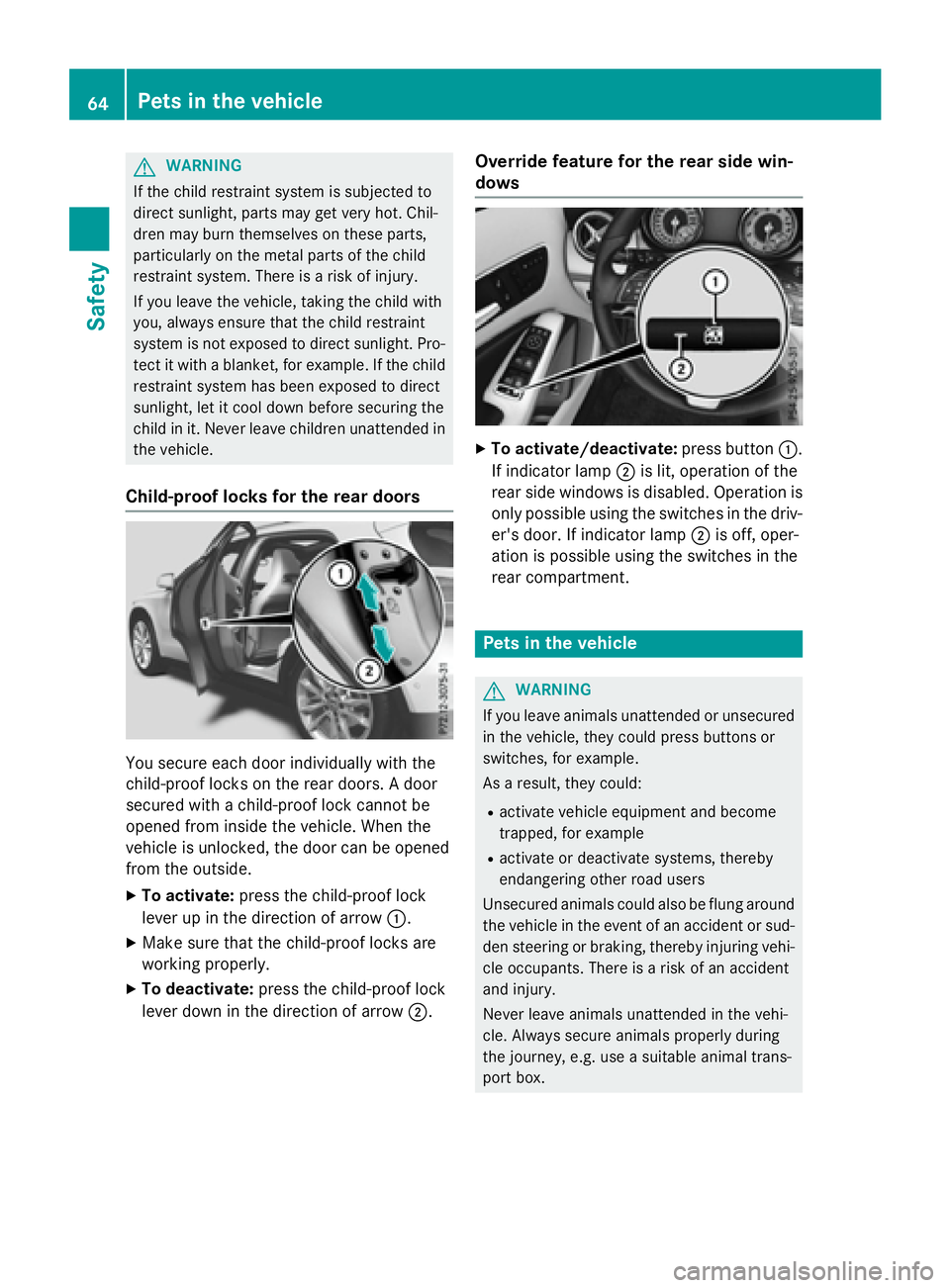
Child-proof locks for the rear doors
You secure each door individually with the
child-proof locks on the rear doors. A door
secured with a child-proof lock cannot be
opened from inside the vehicle. When the
vehicle is unlocked, the door can be opened
from the outside. X
To activate: press the child-proof lock
lever up in the direction of arrow C .X
Make sure that the child-proof locks are
working properly. X
To deactivate: press the child-proof lock
lever down in the direction of arrow D . Override feature for the rear side win-
dows X
To activate/deactivate: press button C .
If indicator lamp D is lit, operation of the
rear side windows is disabled. Operation is
only possible using the switches in the driv-
er's door. If indicator lamp D is off, oper-
ation is possible using the switches in the
rear compartment.
Pets in the vehicle
G WARNING
If you leave animals unattended or unsecured
in the vehicle, they could press buttons or
switches, for example.
As a result, they could: R
activate vehicle equipment and become
trapped, for example R
activate or deactivate systems, thereby
endangering other road users
Unsecured animals could also be flung around
the vehicle in the event of an accident or sud-
den steering or braking, thereby injuring vehi-
cle occupants. There is a risk of an accident
and injury.
Never leave animals unattended in the vehi-
cle. Always secure animals properly during
the journey, e.g. use a suitable animal trans-
port box.64
Pets in the vehicle
Safety
Page 67 of 390
Drivin g safet y systems
Overview of drivin g safet y systemsIn this section , you will fin d information about
th e following drivin g safet y systems :R
AB S ( A nti-loc k B rakin g S ystem)
( Y
page 65) R
BA S ( B rake A ssist S ystem) ( Y
page 66 )R
COLLISION PREVENTION ASSIST PLU S
( Y
page 66 )R
ES P ®
( E lectronic S t ability P rogram)
( Y
page 69 )R
EB D ( E lectroni c B r ak e forc e D i stribution )
( Y
page 72) R
ADAPTIV E BRAKE ( Y
page 73 )R
STEE R CONTROL ( Y
page 73 )
Important safet y notesIf you fail to adapt your drivin g style or if you
are inattentive , th e drivin g safet y systems can
neither reduce th e ris k of an acciden t no r
override th e laws of physics. Driving safet y
systems are merely aids designed to assist
driving. You are responsible fo r maintainin g
th e distanc e to th e vehicle in front, fo r vehicle
speed, fo r braking in goo d time, and fo r stay-
in g in lane. Always adapt your drivin g style to
suit th e prevailin g road and weather condi-
tion s and maintain a saf e distanc e from th e
vehicle in front. Drive carefully.
The drivin g safet y systems described only
wor k as effectively as possible when there is
adequat e contact between th e tires and th e
road surface. Please pay special attention to
th e note s on tires , recommended minimum
tire tread depths, etc. ( Y
page 340).
In wintr y drivin g conditions, always use winte r
tires (M+ S tires ) and if necessary, snow
chains. Only in this way will th e drivin g safet y
systems described in this section wor k as
effectively as possible. ABS (Anti-lock Braking System)
General information AB S regulates brake pressure in suc h a way
that th e wheels do no t loc k when you brake .
Thi s allow s you to continue steerin g th e vehi-
cl e when braking .
The % AB S warnin g lamp in th e instrumen t
cluster lights up when th e ignition is switched
on . It goe s out when th e engin e is running .
AB S works from a speed of about 5 mph
(8 km/h), regardles s of road-surfac e condi-
tions. AB S works on slipper y surfaces, eve n
when you only brake gently.
Important safet y notes
i Observ e th e "Important safet y notes" sec -
tion ( Y
page 65).
G WARNING
If AB S is faulty, th e wheels could loc k when
braking . The steerability and braking charac -
teristics may be severely impaired. Addition -
ally, further drivin g safet y systems are deac -
tivated. There is an increase d danger of skid-
din g and accidents .
Drive on carefully. Hav e AB S checke d imme-
diately at a qualified specialis t workshop .
Whe n AB S is malfunctioning, other systems ,
includin g drivin g safet y systems , will also
becom e inoperative . Observ e th e information
on th e AB S warnin g lamp ( Y
page 269) and
display message s whic h may be shown in th e
instrumen t cluster ( Y
page 236).
Braking X
If ABS intervenes: continue to depress th e
brake peda l vigorousl y until th e braking sit -
uation is over. X
To make a full brak e application:
depress th e brake peda l wit h full force.
If AB S intervenes when braking , you will feel a
pulsin g in th e brake pedal.Driving safety systems 65
Safety Z
Page 68 of 390

The pulsating brake pedal can be an indica-
tion of hazardous road conditions, and func-
tions as a reminder to take extra care while
driving.
Off-road ABS An ABS system specifically suited to off-road
terrain is activated automatically once the off-
road program is activated ( Y
page 199).
At speeds below 20 mph (30 km/h), the front
wheels lock cyclically during braking. The dig-
ging-in effect achieved in the process reduces
the stopping distance on off-road terrain. This
limits steering capability.
BAS (Brake Assist System)
General information BAS operates in emergency braking situa-
tions. If you depress the brake pedal quickly,
BAS automatically boosts the braking force,
thus shortening the stopping distance.
Important safety notes
i Observe the "Important safety notes" sec-
tion ( Y
page 65).
G WARNING
If BAS is malfunctioning, the braking distance
in an emergency braking situation is
increased. There is a risk of an accident.
In an emergency braking situation, depress
the brake pedal with full force. ABS prevents
the wheels from locking.
Braking X
Keep the brake pedal firmly depressed until
the emergency braking situation is over.
ABS prevents the wheels from locking.
The brakes will function as usual once you
release the brake pedal. BAS is deactivated. COLLISION PREVENTION ASSIST
PLUS
General information
i Observe the "Important safety notes" sec-
tion ( Y
page 65).
COLLISION PREVENTION ASSIST PLUS con-
sists of a distance warning function with an
autonomous braking function and adaptive
Brake Assist.
COLLISION PREVENTION ASSIST PLUS can
help you to minimize the risk of a front-end
collision with a vehicle ahead or reduce the
effects of such a collision.
If COLLISION PREVENTION ASSIST PLUS
detects that there is a risk of a collision, you
will be warned visually and acoustically. If you
do not react to the visual and audible collision
warning, autonomous braking can be initiated
in critical situations. If you apply the brake
yourself in a critical situation, the COLLISION
PREVENTION ASSIST PLUS adaptive Brake
Assist assists you.
Important safety notes
Detection of hazardous situations can be par-
ticularly impaired by: R
there is dirt on the sensors or anything else
covering the sensors R
there is snow or heavy rain R
there is interference by other radar sources R
there are strong radar reflections, for
example in parking garages R
a narrow vehicle traveling in front, e.g. a
motorbike R
a vehicle traveling in front on a different line R
new vehicles or after a service on the COL-
LISION PREVENTION ASSIST PLUS system
Observe the important safety notes in the
"Breaking-in notes" section ( Y
page 148).
Following damage to the front end of the vehi-
cle, have the configuration and operation of
the radar sensor checked at a qualified spe-
cialist workshop. This also applies to colli-66
Driving safety systems
Safety
Page 70 of 390

The autonomous braking function: R
gives the driver more time to react to criti-
cal driving situations R
can help the driver to avoid an accident or R
reduces the effects of an accident
Vehicles without DISTRONIC PLUS: the
autonomous braking function is available in
the following speed ranges: R
4 - 65 mph (7 - 105 km/ h) for moving
objects R
4 - 31 mph (7 - 50 km/h) for stationary
objects
Vehicles with DISTRONIC PLUS: the auton-
omous braking function is available in the fol-
lowing speed ranges: R
4 - 124 mph (7 - 200 km/h) for moving
objects R
4 - 31 mph (7 - 50 km/h) for stationary
objects
Due to the nature of the system, particularly
complicated but non-critical driving condi-
tions may also cause the Autonomous Brak-
ing Function to intervene.
Adaptive Brake Assist
General information
i Observe the "Important safety notes" sec-
tion ( Y
page 65).
With the help of adaptive Brake Assist, the
distance warning signal can detect obstacles
that are in the path of your vehicle for an
extended period of time.
If adaptive Brake Assist detects a risk of col-
lision with the vehicle in front, it calculates
the braking force necessary to avoid a colli-
sion. If you apply the brakes forcefully, adap-
tive Brake Assist will automatically increase
the braking force to a level suitable for the
traffic conditions.
Adaptive Brake Assist provides braking assis-
tance in hazardous situations at speeds
above 4 mph (7 km/h). It uses radar sensor
technology to assess the traffic situation. Up to a speed of approximately 155 mph
(250 km/h), adaptive Brake Assist is capable
of reacting to moving objects that have
already been detected as such at least once
over the period of observation.
Up to a speed of approximately 44 mph
(70 km/h), adaptive Brake Assist reacts to
stationary obstacles. X
Keep the brake pedal depressed until the
emergency braking situation is over.
ABS prevents the wheels from locking.
The brakes will work normally again if: R
you release the brake pedal. R
there is no longer any danger of a collision. R
no obstacle is detected in front of your
vehicle.
Adaptive Brake Assist is then deactivated.
Important safety notes
i Observe the "Important safety notes" sec-
tion for driving safety systems ( Y
page 65).
G WARNING
Adaptive Brake Assist cannot always clearly
identify objects and complex traffic situa-
tions.
In such cases, Adaptive Brake Assist can: R
intervene unnecessarily R
not intervene
There is a risk of an accident.
Always pay careful attention to the traffic sit-
uation and be ready to brake. Terminate the
intervention in a non-critical driving situation.
G WARNING
Adaptive Brake Assist does not react: R
to people or animals R
to oncoming vehicles R
to crossing traffic R
when cornering
As a result, the Adaptive Brake Assist may not
intervene in all critical conditions. There is a
risk of an accident.68
Driving safety systems
Safety
Page 75 of 390
ADAPTIVE BRAKE ADAPTIV E BRAKE enhance s braking safet y
and offers increased braking comfort . In addi-
tion to th e braking function , ADAPTIV E BRAKE
also has th e HOLD function ( Y
page 193) and
hill start assist ( Y
page 153).
STEER CONTROL
Gene ra l inf orm ationSTEE R CONT ROL help s you by transmitting a
noticeable steering force to th e steering
whee l in th e direction require d for vehicl e
stabilization .
This steering assistanc e is provide d in partic-
ular if: R
bot h right wheels or bot h lef t wheels are on
a wet or slippery road surfac e when you
brake. R
th e vehicl e start s to skid.
Import ant safety notes
i Obs erv e th e "Importan t safet y notes" sec -
tion ( Y
page 65).
No steering assistanc e is provide d from
STEE R CONTROL, if: R
ES P ®
is malfunctioning .R
th e lighting is faulty.
If ES P ®
is malfunctioning , you will be assisted
further by th e electrical power steering .
Protecti on against theft
Imm obilizer
The immobilize r prevents your vehicl e from
bein g started without th e correc t SmartKey. X
To act iva te wit h th e SmartKey : remove
th e SmartKey from th e ignition lock.X
To act iva te wit h KEYLESS-GO start-
fu nction or KEYLESS-GO: switch th e igni-
tion off and open th e driver' s door .X
To deacti va te: switch on th e ignition .
When leaving th e vehicle, always tak e th e
SmartKey wit h you and loc k th e vehicle. Any-
on e can start th e engin e if a valid SmartKey
has been lef t inside th e vehicle.
i The immobilize r is always deactivated
when you st art th e engine.
In th e event that th e engin e canno t be star-
te d (yet th e vehicle's battery is charged),
th e system is no t operational. Contac t an
authorize d Mercedes-Benz Cente r or call
1-800-FOR-MERCedes (in th e USA) or
1-800-387-0100 (in Canada).
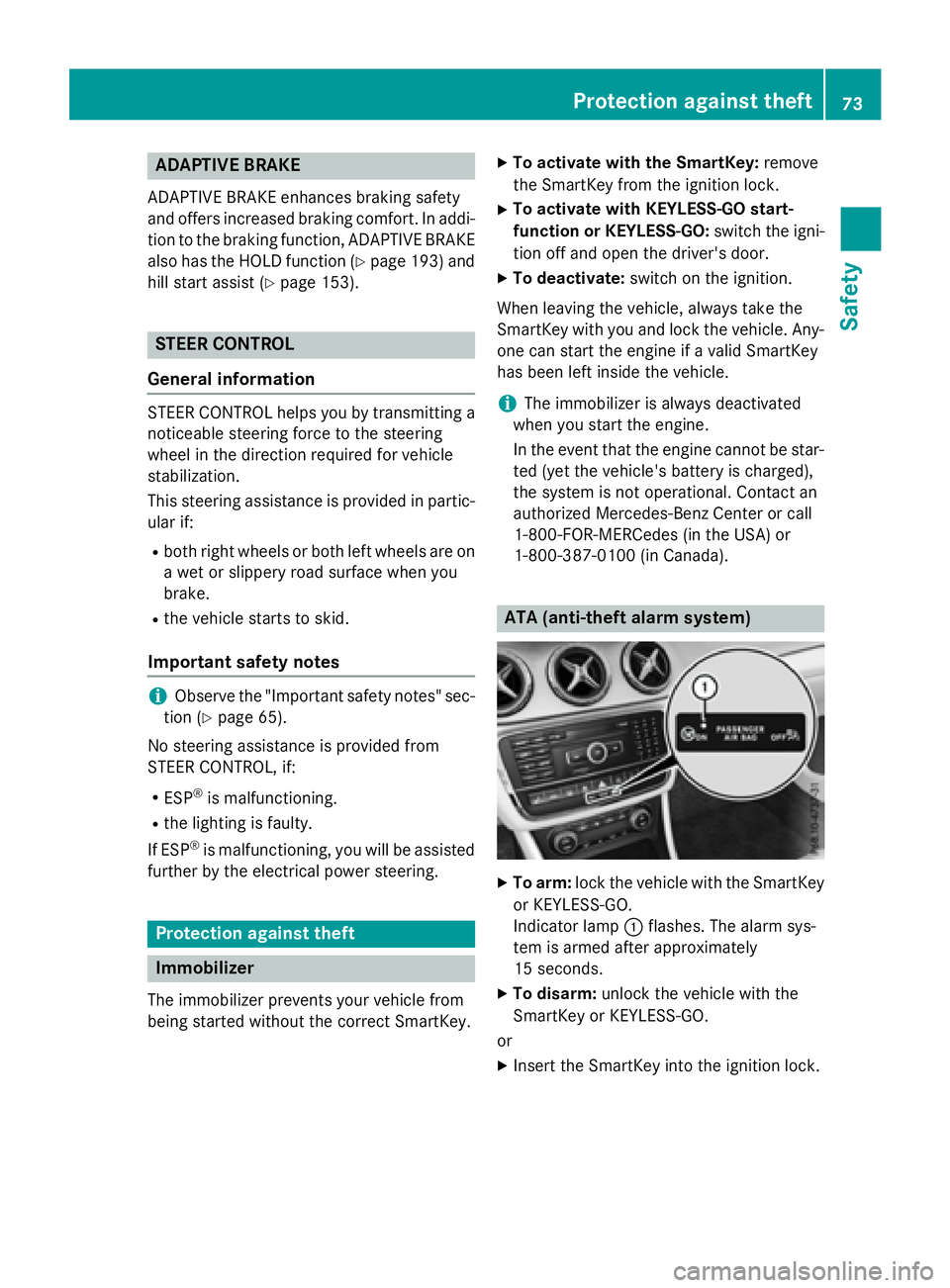
ATA (anti-theft ala rm system)
X
To arm: loc k th e vehicl e wit h th e SmartKey
or KE YLE SS-GO .
Indicato r lamp C flashes . The alarm sys-
te m is armed after approximately
15 sec onds. X
To disarm: unloc k th e vehicl e wit h th e
SmartKey or KEYLESS-GO .
or X
Inser t th e SmartKey int o th e ignition lock.Protection against theft 73
Safety Z
Page 76 of 390
A visual and audible alarm is triggered if the
alarm system is armed and you open: R
a door R
the vehicle with the mechanical key R
the tailgate R
the hood X
To switch the alarm off with the Smart-
Key: press the 6 or 7 button on the
SmartKey.
The alarm is switched off.
or X
Vehicles with KEYLESS-GO start-func-
tion or KEYLESS-GO: remove the Start/
Stop button from the ignition lock
( Y
page 149). X
Insert the SmartKey into the ignition lock.
The alarm is switched off.
The alarm is not switched off, even if you
close the open door that triggered it, for
example.
i If the alarm continues for more than
30 second s, the mbrace emergency call
system automatically notifies the Cus-
tomer Assistance Center. This is done
either by text message or data connection.
The emergency call system sends the mes-
sage or data provided that: R
you have subscribed to the mbrace ser-
vice. R
the mbrace service has been activated
properly. R
the necessary mobile phone network is
available.74
Protection against theft
Safety