2016 MERCEDES-BENZ GLA lights
[x] Cancel search: lightsPage 80 of 390
X
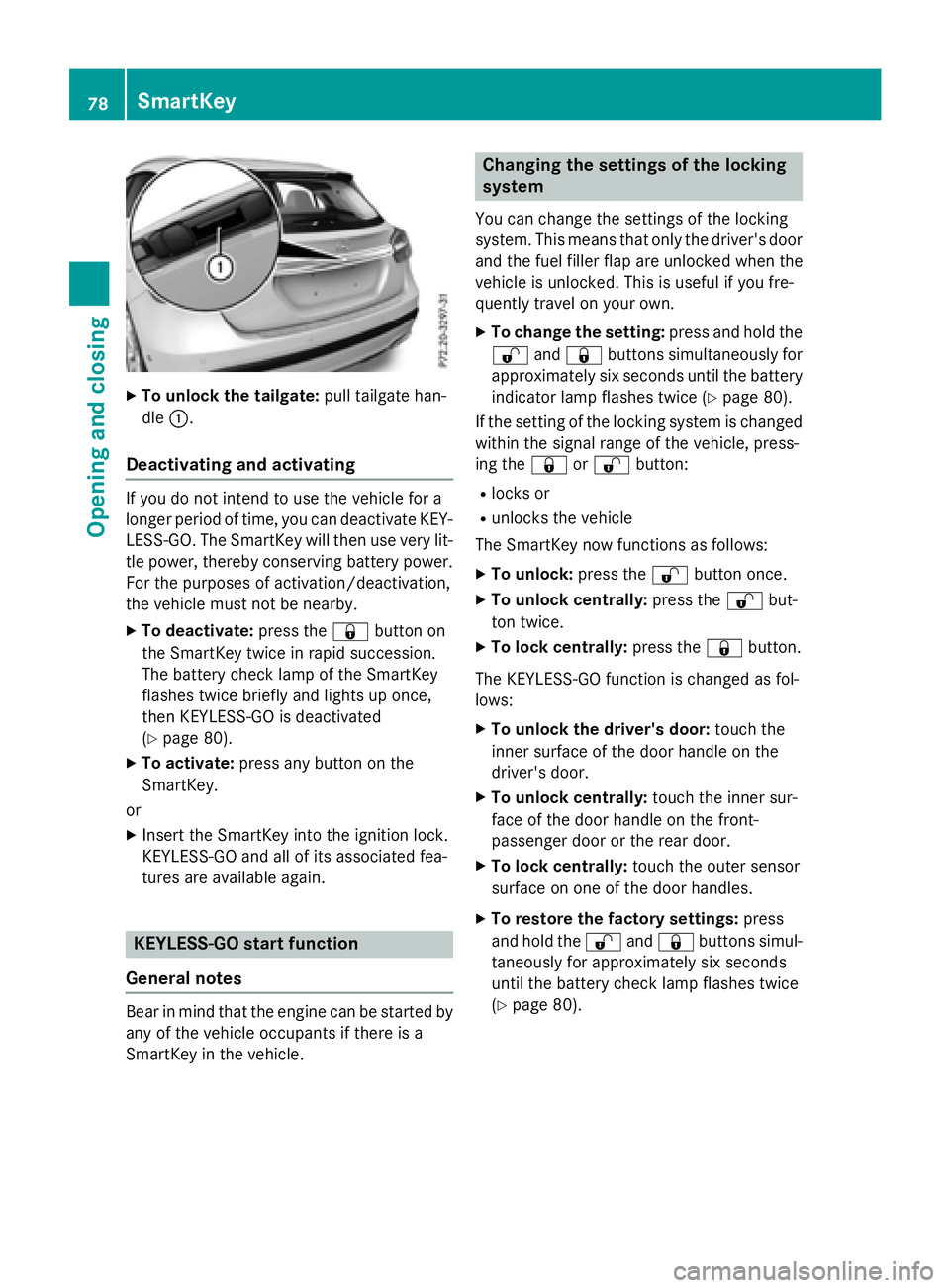
To unlock the tailgate: pull tailgate han-
dle C .
Deactivating and activating If you do not intend to use the vehicle for a
longer period of time, you can deactivate KEY-
LESS-GO. The SmartKey will then use very lit-
tle power, thereby conserving battery power.
For the purposes of activation/deactivation,
the vehicle must not be nearby. X
To deactivate: press the 7 button on
the SmartKey twice in rapid succession.
The battery check lamp of the SmartKey
flashes twice briefly and lights up once,
then KEYLESS-GO is deactivated
( Y
page 80). X
To activate: press any button on the
SmartKey.
or X
Insert the SmartKey into the ignition lock.
KEYLESS-GO and all of its associated fea-
tures are available again.
KEYLESS-GO start function
General notes
Bear in mind that the engine can be started by
any of the vehicle occupants if there is a
SmartKey in the vehicle. Changing the settings of the locking
system You can change the settings of the locking
system. This means that only the driver's door
and the fuel filler flap are unlocked when the
vehicle is unlocked. This is useful if you fre-
quently travel on your own. X
To change the setting: press and hold the
6 and 7 buttons simultaneously for
approximately six seconds until the battery
indicator lamp flashes twice ( Y
page 80).
If the setting of the locking system is changed
within the signal range of the vehicle, press-
ing the 7 or 6 button: R
locks or R
unlocks the vehicle
The SmartKey now functions as follows: X
To unlock: press the 6 button once.X
To unlock centrally: press the 6 but-
ton twice. X
To lock centrally: press the 7 button.
The KEYLESS-GO function is changed as fol-
lows: X
To unlock the driver's door: touch the
inner surface of the door handle on the
driver's door. X
To unlock centrally: touch the inner sur-
face of the door handle on the front-
passenger door or the rear door. X
To lock centrally: touch the outer sensor
surface on one of the door handles. X
To restore the factory settings: press
and hold the 6 and 7 buttons simul-
taneously for app roximately six seconds
u
ntil the battery check lamp flashes twice
( Y
page 80).78
SmartKey
Opening and closing
Page 82 of 390
Checking the battery X
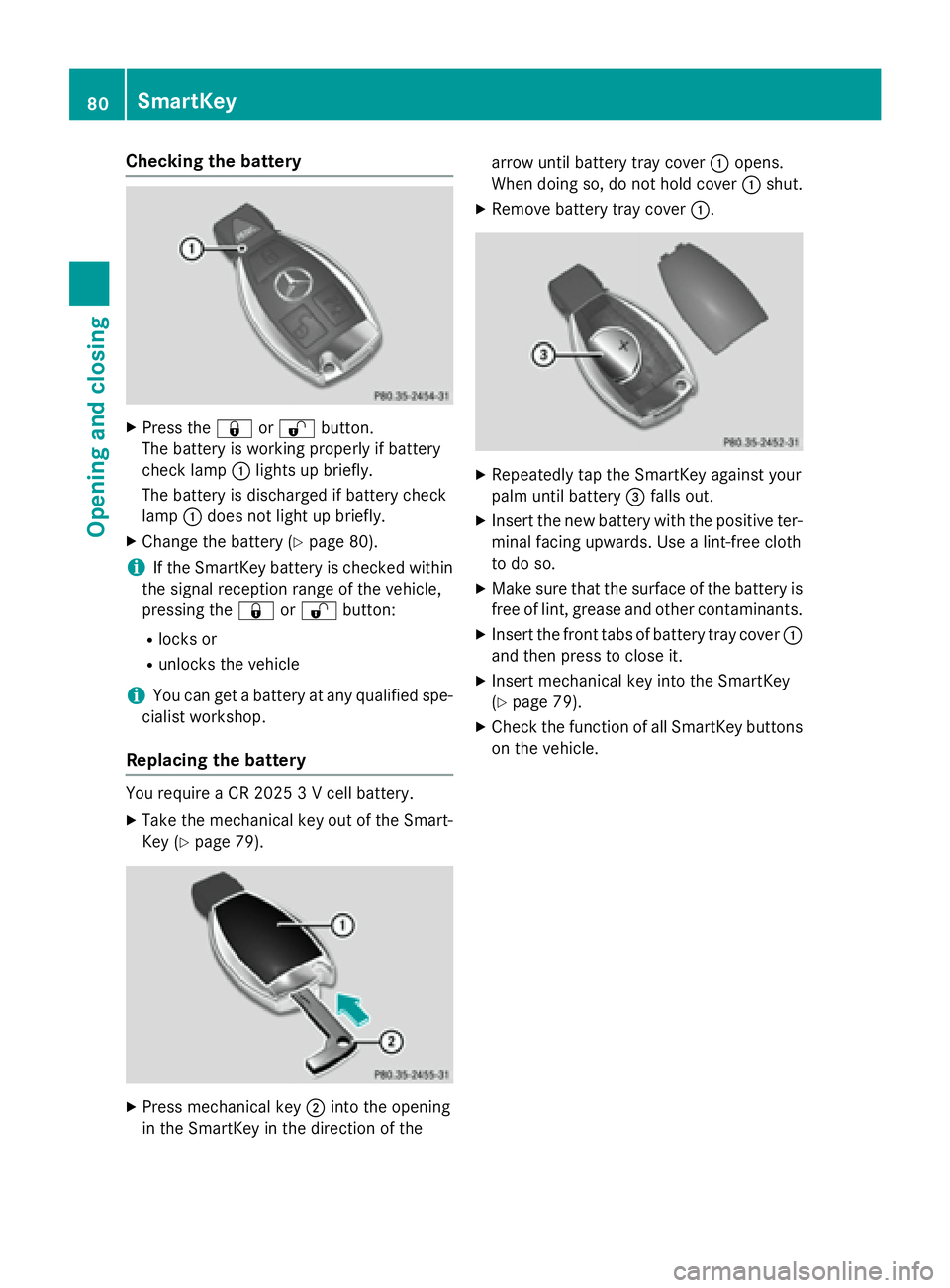
Press the 7 or 6 button.
The battery is working properly if battery
check lamp C lights up briefly.
The battery is discharged if battery check
lamp C does not light up briefly.X
Change the battery ( Y
page 80).
i If the SmartKey battery is checked within
the signal reception range of the vehicle,
pressing the 7 or 6 button:R
locks or R
unlocks the vehicle
i You can get a battery at any qualified spe-
cialist workshop.
Replacing the battery
You require a CR 2025 3 V cell battery. X
Take the mechanical key out of the Smart-
Key ( Y
page 79).
X
Press mechanical key D into the opening
in the SmartKey in the direction of the arrow until battery tray cover C opens.
When doing so, do not hold cover C shut.X
Remove battery tray cover C .X
Repeatedly tap the SmartKey against your
palm until battery
Page 111 of 390
Mirrors
Rear-view mirror X
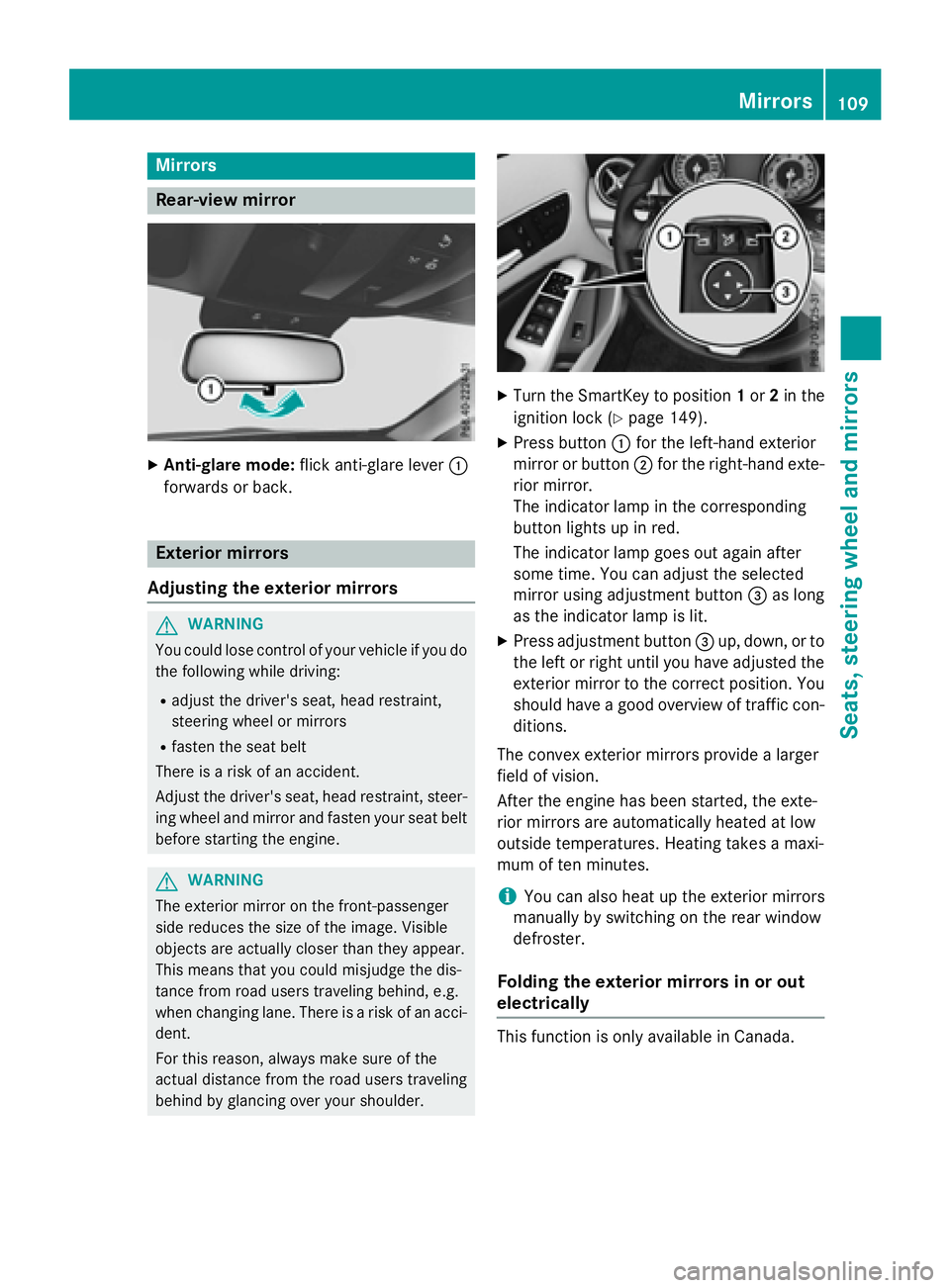
Anti-glare mode: flick anti-glare lever C
forwards or back.
Exterior mirrors
Adjusting the exterior mirrors
G WARNING
You could lose control of your vehicle if you do
the following while driving: R
adjust the driver's seat, head restraint,
steering wheel or mirrors R
fasten the seat belt
There is a risk of an accident.
Adjust the driver's seat, head restraint, steer-
ing wheel and mirror and fasten your seat belt
before starting the engine.
G WARNING
The exterior mirror on the front-passenger
side reduces the size of the image. Visible
objects are actually closer than they appear.
This means that you could misjudge the dis-
tance from road users traveling behind, e.g.
when changing lane. There is a risk of an acci-
dent.
For this reason, always make sure of the
actual distance from the road users traveling
behind by glancing over your shoulder. X
Turn the SmartKey to position 1 or 2 in the
ignition lock ( Y
page 149). X
Press button C for the left-hand exterior
mirror or button D for the right-hand exte-
rior mirror.
The indicator lamp in the corresponding
button lights up in red.
The indicator lamp goes out again after
some time. You can adjust the selected
mirror using adjustment button
Page 117 of 390
Useful information ............................ 116
Exterior lighting ................................ 116
Interior lighting ................................. 120
Replacing bulbs ................................. 121
Windshield wipers ............................ 125 115
Lights and windshield wipers
Page 118 of 390
Useful information
i This Operator's Manual describes all
models and all standard and optional equip-
ment of your vehicle available at the time of
publication of the Operator's Manual.
Country-specific differences are possible.
Please note that your vehicle may not be
equipped with all features described. This
also applies to safety-related systems and
functions.
i Read the information on qualified special-
ist workshops ( Y
page 25).
Exterior lighting
General notesFor reasons of safety, Mercedes-Benz recom-
mends that you drive with the lights switched
on even during the daytime. In some coun-
tries, operation of the headlamps varies due
to legal requirements and self-imposed obli-
gations.
Setting the exterior lighting
Setting options
Exterior lighting can be set using the: R
light switch R
combination switch ( Y
page 118)R
on-board computer ( Y
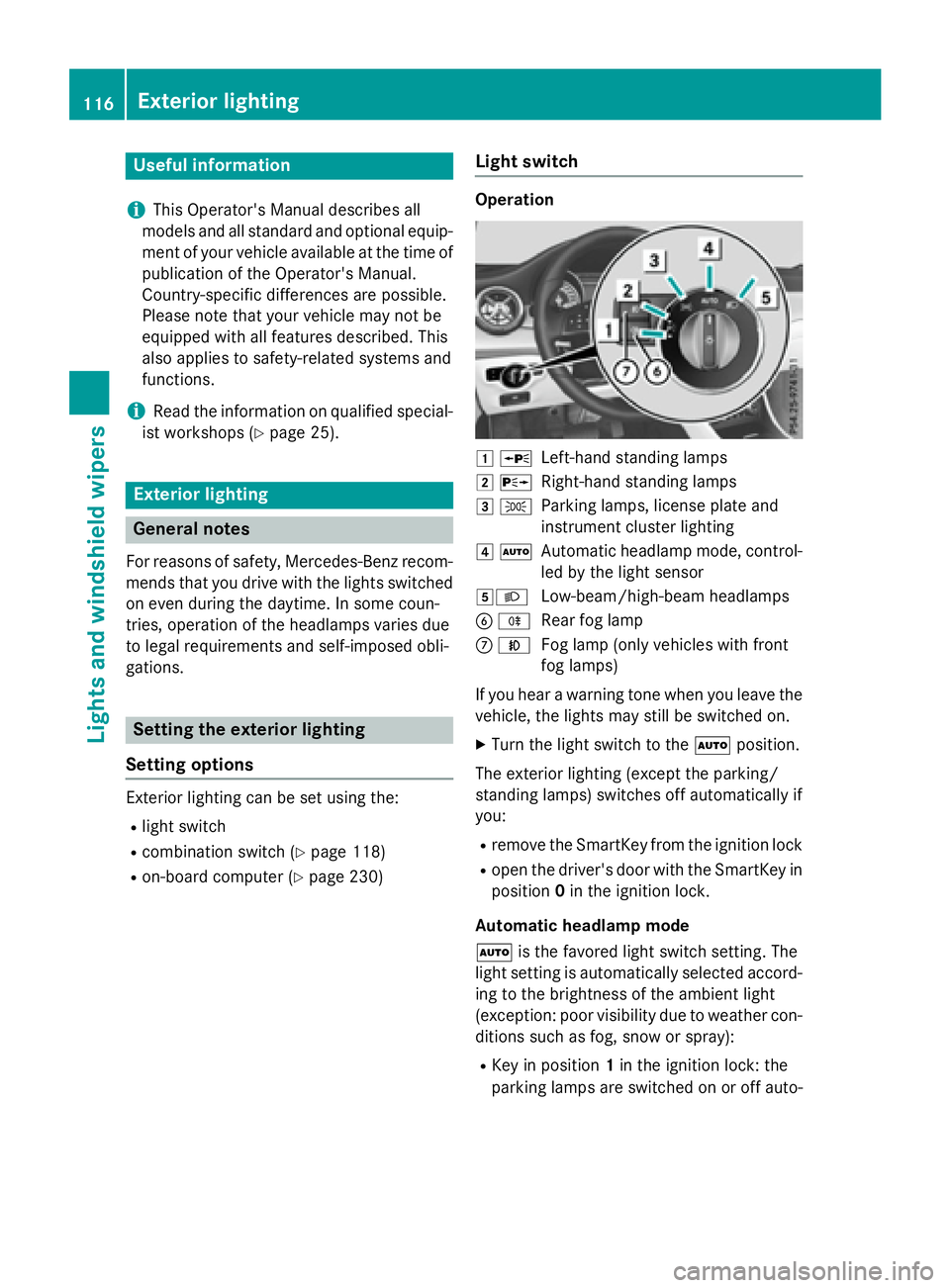
page 230) Light switch Operation
G c
Left-hand standing lampsH d
Right-hand standing lampsI `
Parking lamps, license plate and
instrument cluster lightingJ X
Automatic headlamp mode, control-
led by the light sensorK X
Low-beam/high-beam headlamps
Page 119 of 390
matically depending on the brightness of
the ambient light. R
With the engine running: if you have acti-
vated the daytime running lamps function
via the on-board computer, the daytime
running lamps or the parking lamps and the
low-beam headlamps are switched on or off
automatically depending on the brightness
of the ambient light. X
To switch on the automatic headlamp
mode: turn the light switch to the X
position.
G WARNING
When the light switch is set to X , the low-
beam headlamps may not be switched on
automatically if there is fog, snow or other
causes of poor visibility due to the weather
conditions such as spray. There is a risk of an
accident.
In such situations, turn the light switch to
X .
The automatic headlamp feature is only an
aid. The driver is responsible for the vehicle's
lighting at all times.
Canada only:
The daytime running lamps improve the visi-
bility of your vehicle during the day. The day-
time running lamps function is required by law
in Canada. It cannot therefore be deactivated.
When the engine is running and the vehicle is
stationary: if you move the selector lever from
a drive position to P , the daytime running
lamps/low-beam headlamps go out after
three minutes.
When the engine is running, the vehicle is
stationary and in bright ambient light: if you
turn the light switch to the ` position, the
daytime running lamps and parking lamps
turn on.
If the engine is running and you turn the light
switch to the X position, the manual set-
tings take precedence over the daytime run-
ning lamps.
USA only: The daytime running lamps improve the visi-
bility of your vehicle during the day. To do this,
the daytime running lamps function must be
switched on using the on-board computer
( Y
page 230).
If the engine is running and you turn the light
switch to the ` or X position, the man-
ual settings take precedence over the day-
time running lamps.
Low-beam headlamps
Even if the light sensor does not detect that it
is dark, the parking lamps and low-beam
headlamps switch on when the ignition is
switched on and the light switch is set to the
X position. This is a pa rticularly useful
fu nction in the event of rain and fog. X
To switch on the low-beam headlamps:
turn the SmartKey in the ignition lock to
position 2 or start the engine. X
Turn the light switch to X .
The green X indicator lamp in the instru-
ment cluster lights up.
Front fog lamps
In conditions where visibility is poor due to
fog, snow or rain, the fog lamps improve vis-
ibility as well as making it easier for other road
users to see you. They can be operated
together with the parking lamps or together
with the parking lamps and low-beam head-
lamps. X
To switch on the fog lamps: turn the key
in the ignition lock to position 2 or start the
engine. X
Turn the light switch to X or X .X
Press the Z button.
The green Z indicator lamp in the instru-
ment cluster lights up. X
To switch off the fog lamps: press the
Z button.
The green Z indicator lamp in the instru-
ment cluster goes out. Exterior lighting 117
Lights and windshield wipers Z
Page 120 of 390
Rear fog lamp
The rear fog lamp improves visibility of your
vehicle for the traffic behind in the event of
thick fog. Please take note of the country-
specific regulations for the use of rear fog
lamps. X
To switch on the rear fog lamp: turn the
SmartKey in the ignition lock to position 2
or start the engine. X
Turn the light switch to X or X .X
Press the ^ button.
The yellow ^ indicator lamp in the
instrument cluster lights up. X
To switch off the rear fog lamp: press the
^ button.
The yellow ^ indicator lamp in the
instrument cluster goes out.
Parking lamps
! If the battery has been excessively dis-
charged, the parking lamps or standing
lamps are automatically switched off to
enable the next engine start. Always park
your vehicle safely and sufficiently lit
according to legal standards. Avoid the
continuous use of the ` parking lamps
for several hours. If possible, switch on the
d right or the c left standing lamp.X
To switch on: turn the light switch to ` .
The green ` indicator lamp in the instru-
ment cluster lights up.
Standing lamps
Switching on the standing lamps ensures the
corresponding side of the vehicle is illumina-
ted. X
To switch on the standing lamps: the
SmartKey should not be in the ignition lock
or it should be in position 0 .X
Turn the light switch to c (left-hand side
of the vehicle) or d (right-hand side of
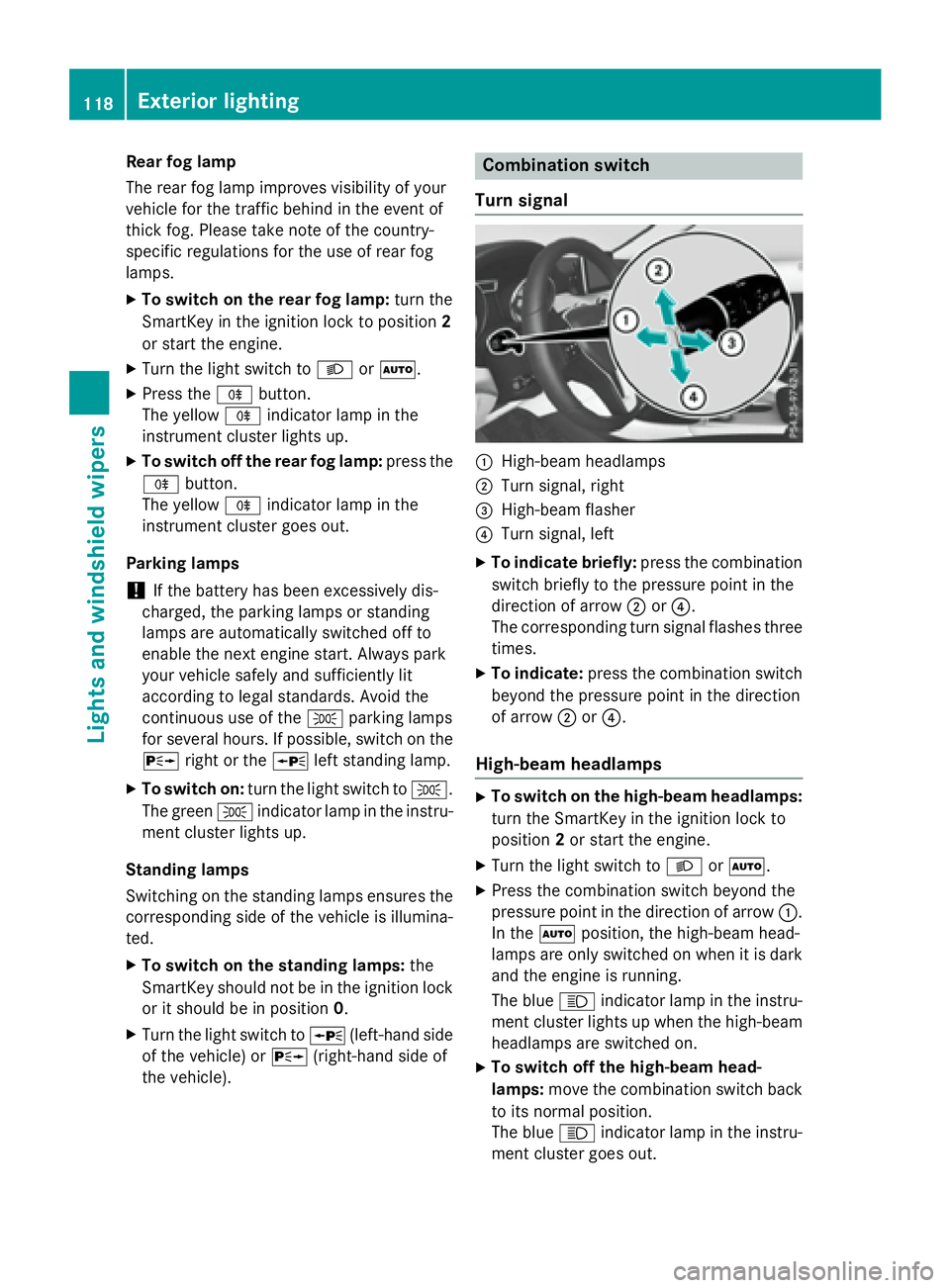
the vehicle). Combination switch
Turn signal
C
High-beam headlamps D
Turn signal, right
Page 123 of 390
adjusted using COMAND or Audio 20 (see the
separate Operator's Manual).
Manual interior lighting control X
To switch the front interior lighting on:
set the switch to the J position.X
To switch the front interior lighting off:
set the switch to the 3 position or (if the
door is closed) to the center position. X
To switch the rear interior lighting on or
off: press the B button.X
To switch the reading lamp on or off:
press the = button.
Crash-responsive emergency lighting The interior lighting is activated automatically
if the vehicle is involved in an accident. X
To switch off the crash-responsive
emergency lighting: press the hazard
warning lamp button.
or X
Lock and then unlock the vehicle using the
SmartKey.
Replacing bulbs
Important safety notes
Xenon bulbs
G DANGER
Xenon bulbs carry a high voltage. You can get
an electr ic shock if you remove the cover of
the Xenon bulb and touch the electrical con-
tacts. There is a risk of fatal injury.
Never touch the parts or the electrical con-
tacts of the Xenon bulb. Alwa ys have work on
the Xenon bulbs carried out at a qualif ied spe-
cialist worksho p.
If your vehicle is equipped with Xenon bulbs,
you can recognize this by the following: the
cone of light from the Xenon bulbs moves
from the top to the bottom and back again when you start the engine. For this to be
observed, the lights must be switched on
before starting the engine.
Bulbs and lamps are an important aspect of
vehicle safety. You must therefore make sure
that these function correctly at all times.
Have the headlamp setting checked regularly.
Other bulbs
G WARNING
Bulbs, lamps and connectors can get very hot
when operating. If you change a bulb, you
could burn yourself on these components.
There is a risk of injury.
Allow these components to cool down before
changing a bulb.
Do not use a bulb that has been dropped or if
its glass tube has been scratched.
The bulb may explode if: R
you touch it R
it is hot R
you drop it R
you scratch it
Only operate bulbs in enclosed lamps
designed for that purpose. Only install spare
bulbs of the same type and the specified volt-
age.
Marks on the glass tube reduce the service
life of the bulbs. Do not touch the glass tube
with your bare hands. If necessary, clean the
glass tube when cold with alcohol or spirit and
rub it off with a lint-free cloth.
Protect bulbs from moisture during opera-
tion. Do not allow bulbs to come into contact
with liquids.
There are bulbs other than the Xenon bulbs
that you cannot replace. Only replace the
bulbs listed ( Y
page 122). Have the bulbs that
you cannot replace yourself changed at a
qualified specialist workshop.
If you require assistance replacing bulbs, con-
sult a qualified specialist workshop.
If the new bulb still does not light up, consult
a qualified specialist workshop. Replacing bulbs 121
Lights and windshield wipers Z