2016 MERCEDES-BENZ GLA-Class Cluster
[x] Cancel search: ClusterPage 231 of 390

XPressaagain to confirm.
XPress the :or9 button to set Off,
Standard
or Adaptive.
XPress the abutton to save the setting.
When Lane Keeping Assist is activated, the
multifunction display shows the lane mark-
ings as bright lines in the assistance
graphic.
For further information about Lane Keeping
Assist, see (
Ypage 215).
Service menu
Depending on the equipment installed in the
vehicle, you have the following options in the
Serv.
menu:
RCalling up display messages in message
memory (
Ypage 235)
RRestarting the tire pressure loss warning
system (Canada only) (
Ypage 347)
RChecking the tire pressure electronically
(USA only) (
Ypage 348)
RCalling up the service due date
(
Ypage 313)
Settings menu
Introduction
Depending on the equipment installed in the
vehicle, in the Sett.
menu you have the fol-
lowing options:
RChanging the instrument cluster settings
RChanging the light settings
RChanging the vehicle settings
RChanging the convenience settings
RRestoring the factory settings
Instrument cluster
Selecting the distance unit
The Display Unit Speed-/Odometer:
function allows you to choose whether cer-
tain displays appear in kilometers or miles in
the multifunction display.
XPress the =or; button on the steer-
ing wheel to select the Sett.
menu.
XPress the:or9 button to select the
Instrument Cluster
submenu.
XPress ato confirm.
XPress the :or9 button to select the
Display Unit Speed-/Odometer
func-
tion.
You will see the selected setting: km
or
miles
.
XPress the abutton to save the setting.
The selected unit of measurement for dis-
tance applies to:
Rdigital speedometer in the Tripmenu
ROdometer and the trip odometer
RTrip computer
Rcurrent fuel consumption and approximate
range
RNavigation instructions in the Navimenu
RCruise Control
RDISTRONIC PLUS
RASSYST PLUS service interval display
Switching the additional speedometer
on/off
If the additional speedometer is switched on, the speed is shown in the status area of the
Menus and submenus229
On-board computer and displays
Z
Page 232 of 390
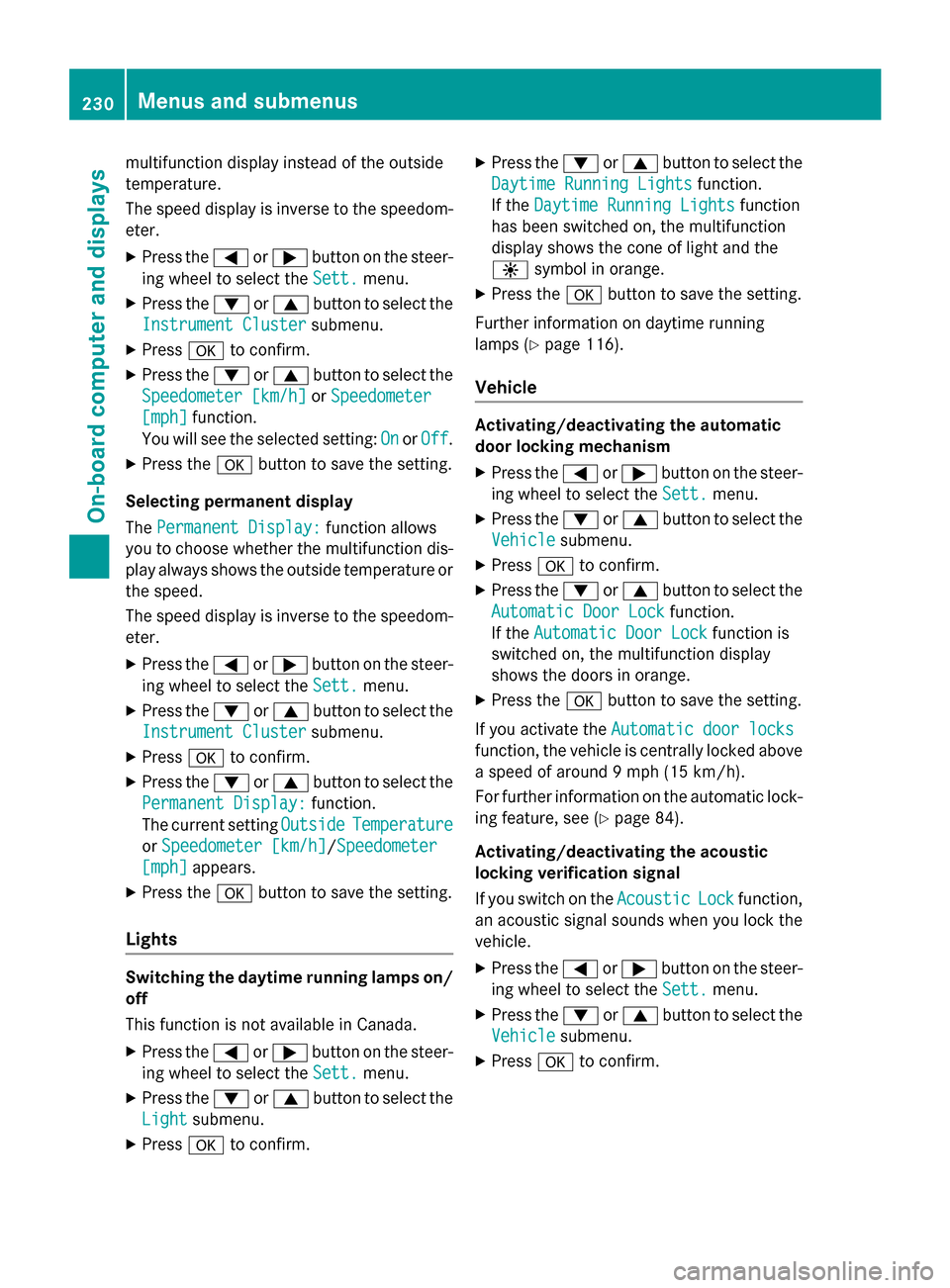
multifunction display instead of the outside
temperature.
The speed display is inverse to the speedom-
eter.
XPress the=or; button on the steer-
ing wheel to select the Sett.
menu.
XPress the:or9 button to select the
Instrument Cluster
submenu.
XPress ato confirm.
XPress the :or9 button to select the
Speedometer [km/h]
or Speedometer
[mph]function.
You will see the selected setting: On
orOff.
XPress the abutton to save the setting.
Selecting permanent display
The Permanent Display:
function allows
you to choose whether the multifunction dis-
play always shows the outside temperature or
the speed.
The speed display is inverse to the speedom-
eter.
XPress the =or; button on the steer-
ing wheel to select the Sett.
menu.
XPress the:or9 button to select the
Instrument Cluster
submenu.
XPress ato confirm.
XPress the :or9 button to select the
Permanent Display:
function.
The current setting Outside
Temperature
orSpeedometer [km/h]/Speedometer
[mph]appears.
XPress the abutton to save the setting.
Lights
Switching the daytime running lamps on/
off
This function is not available in Canada.
XPress the =or; button on the steer-
ing wheel to select the Sett.
menu.
XPress the:or9 button to select the
Light
submenu.
XPress ato confirm.
XPress the :or9 button to select the
Daytime Running Lights
function.
If the Daytime Running Lights
function
has been switched on, the multifunction
display shows the cone of light and the
W symbol in orange.
XPress the abutton to save the setting.
Further information on daytime running
lamps (
Ypage 116).
Vehicle
Activating/deactivating the automatic
door locking mechanism
XPress the =or; button on the steer-
ing wheel to select the Sett.
menu.
XPress the:or9 button to select the
Vehicle
submenu.
XPress ato confirm.
XPress the :or9 button to select the
Automatic Door Lock
function.
If the Automatic Door Lock
function is
switched on, the multifunction display
shows the doors in orange.
XPress the abutton to save the setting.
If you activate the Automatic door locks
function, the vehicle is centrally locked above
a speed of around 9 mph (15 km/h).
For further information on the automatic lock-
ing feature, see (
Ypage 84).
Activating/deactivating the acoustic
locking verification signal
If you switch on the Acoustic
Lockfunction,
an acoustic signal sounds when you lock the
vehicle.
XPress the =or; button on the steer-
ing wheel to select the Sett.
menu.
XPress the:or9 button to select the
Vehicle
submenu.
XPress ato confirm.
230Menus and submenus
On-board computer and displays
Page 238 of 390

Safety systems
Display messagesPossible causes/consequences andMSolutions
!÷
Currently Unavail‐
able See Opera‐
tor's Manual
ABS (Anti-lock Braking System), BAS (Brake Assist), ESP®(Elec-
tronic Stability Program), the HOLD function and hill start assist
are temporarily unavailable.
COLLISION PREVENTION ASSIST PLUS may also have failed.
In addition, the !,÷andå warning lamps may light up
in the instrument cluster.
ATTENTION ASSIST is deactivated.
Possible causes are:
RSelf-diagnosis is not yet complete.
RThe on-board voltage may be insufficient.
GWARNING
The brake system continues to function normally, but without the
functions listed above. The wheels could therefore lock if you
brake hard, for example.
The steerability and braking characteristics may be severely affec-
ted. The braking distance in an emergency braking situation can
increase.
If ESP
®is not operational, ESP®is unable to stabilize the vehicle.
There is an increased risk of skidding and an accident.
XCarefully drive a short distance on a suitable stretch of road,
making slight steering movements at a speed above 12 mph
(20 km/h).
If the display message disappears, the functions mentioned
above are available again.
If the multifunction display still shows the display message:
XDrive on carefully.
XVisit a qualified specialist workshop immediately.
!÷
Inoperative See
Operator's Manual
ABS, BAS, ESP®, the HOLD function and hill start assist are not
available due to a malfunction.
COLLISION PREVENTION ASSIST PLUS may also have failed.
The !, ÷,åand$ (USA only) or J(Canada only)
warning lamps in the instrument cluster may also light up.
ATTENTION ASSIST is deactivated.
GWARNING
The brake system continues to function normally, but without the
functions listed above. The wheels could therefore lock if you
brake hard, for example.
236Display messages
On-board computer and displays
Page 239 of 390

Display messagesPossible causes/consequences andMSolutions
The steerabilityand brakin gcharacteristics may be severely affec -
ted. The brakin gdistanc ein an emergenc ybrakin gsituation can
increase .
If ES P
®is no toperational, ES P®is unable to stabiliz eth evehicle.
There is an increase dris kof skiddin gand an accident.
XDrive on carefully.
XVisit aqualified specialist workshop immediately.
÷
Currently Unavail‐
abl eSee Opera‐
tor's Manual
ES P®,BAS, th eHOLD function and hill start assist are temporarily
unavailable .
COLLISION PREVENTION ASSIST PLU Smay also hav efailed.
In addition ,th e÷ andå warnin glamp smay ligh tup in th e
instrumen tcluster.
ATTENTION ASSIST is deactivated.
The self-diagnosi sfunction might no tbe complete, fo rexample.
GWARNIN G
The brakesystem continues to function normally, but without th e
function slisted above.
The brakin gdistanc ein an emergenc ybrakin gsituation can thus
increase .
If ES P
®is no toperational, ES P®is unable to stabiliz eth evehicle.
There is an increase dris kof skiddin gand an accident.
XCarefull ydrive asuitable distance, makin gslight steerin gmove-
ments at aspeed abov e12 mph (20 km/h).
If th edisplay message disappears, th efunction smentioned
abov eare available again .
If th emultifunction display still shows th edisplay message :
XDrive on carefully.
XVisitaqualified specialist workshop immediately.
Display messages23 7
On-board computer and displays
Z
Page 240 of 390

Display messagesPossible causes/consequences andMSolutions
÷
Inoperative See
Operator'sManual
ES P®,BAS, th eHOLD function and hill start assist are unavailable
due to amalfunction .
COLLISION PREVENTION ASSIST PLU Smay also hav efailed.
In addition ,th e÷ andå warnin glamp smay ligh tup in th e
instrumen tcluster.
ATTENTION ASSIST is deactivated.
GWARNIN G
The brakesystem continues to function normally, but without th e
function slisted above.
The brakin gdistanc ein an emergenc ybrakin gsituation can thus
increase .
If ES P
®is no toperational, ES P®is unable to stabiliz eth evehicle.
There is an increase dris kof skiddin gand an accident.
XDrive on carefully.
XVisit aqualified specialist workshop immediately.
T!
÷
Inoperative See
Operator' sManual
EB D(electronic brak eforc edistribution), ABS, BAS, ES P®,th e
HOLD function and hill start assist are no tavailable due to amal-
function .
COLLISION PREVENTION ASSIST PLU Smay also hav efailed.
A warnin gtone sounds.
In addition ,th e÷, åand! warnin glamp smay ligh tup
in th einstrumen tcluster.
GWARNIN G
The brakesystem continues to function normally, but without th e
function slisted above. The fron tand rear wheels could therefore
loc kif you brak ehard, fo rexample.
The steerabilit yand brakin gcharacteristics may be severely affec -
ted. The brakin gdistanc ein an emergenc ybrakin gsituation can
increase .
If ES P
®is no toperational, ES P®is unable to stabiliz eth evehicle.
There is an increase dris kof skiddin gand an accident.
XDrive on carefully.
XVisit aqualified specialist workshop immediately.
238Display messages
On-board computer and displays
Page 244 of 390

Display messagesPossible causes/consequences andMSolutions
$(USA
only)
J(Canada
only)
Check Brake Fluid
Level
There is no tenough brak eflui din th ebrak eflui dreservoir .
A warnin gtone sounds. The $(USAonly) or J(Canada
only) warnin glamp sin th einstrumen tcluster may also ligh tup.
GWARNIN G
The brakin geffec tmay be impaired.
There is aris kof an accident.
XPull ove rand stop th evehicl esafely as soo nas possible, payin g
attention to roa dand traffic conditions. Do no tcontinue drivin g
under any circumstances.
XSecur eth evehicl eagainst rollin gaway (Ypage 171).
XConsult aqualified specialist workshop .
XDo notadd brak efluid. This does no tcorrec tth emalfunction .
#
Check Brake Pad
Wear
The brak epads/lining shav ereached their wear limit.
XVisit aqualified specialist workshop .
G
Inoperative
Oneor mor emain features of th embrace system are malfunc -
tioning.
XVisit aqualified specialist workshop .
Collision Preven‐
tionAssist Plu s
Currently Unavail‐
ableSee Opera‐
tor's Manual
COLLISION PREVENTION ASSIST PLU Sis temporarily no topera-
tional.
Possibl ecauses are:
Rth erada rsensor system is temporarily inoperative, e.g. due to
electromagnetic radiation emitted by nearby TV or radi osta-
tion sor other source sof electromagnetic radiation .
Rthesystem is outside th eoperating temperature range.
Rth eon-boar dvoltag eis to olow.
Whe nth ecauses state dabov eno longer apply, th edisplay mes -
sage disappears.
COLLISION PREVENTION ASSIST PLU Sis operational again .
If th edisplay message does no tdisappear :
XPull overand stop th evehicl esafely as soo nas possible, payin g
attention to roa dand traffic conditions.
XSecur eth evehicl eagainst rollin gaway (Ypage 171).
XRestart th eengine.
242Display messages
On-board computer and displays
Page 245 of 390

Display messagesPossible causes/consequences andMSolutions
Collision Preven‐
tionAssist Plu s
Inoperative
COLLISION PREVENTION ASSIST PLU Sis temporarily inoperative
due to amalfunction .Adaptive Brake Assis tmay also hav efailed.
XVisit aqualified specialist workshop immediately.
Radar Sensor s
Dirty See Opera‐
tor's Manual
At leaston eof th efollowing drivin gsystems or drivin gsafet ysys-
tems is temporarily restricted or inoperative:
RCOLLISION PREVENTION ASSIST PLU S
RDISTRONIC PLUS
Possibl ecauses are:
Rth esensor sin th eradiato rtrim and/o rin th ebumpers are dirty
Rth efunction of th edrivin gsystem and/o rdrivin gsafet ysystem
is impaire ddue to heav yrain or snow.
A warnin gtone also sounds.
Whe nth ecauses state dabov eno longer apply, th edisplay mes -
sage disappears. Al ldrivin gsystems and drivin gsafet ysystems
are operative again .
If th edisplay message does no tdisappear :
XPull overand stop th evehicl esafely as soo nas possible, payin g
attention to roa dand traffic conditions.
XSecur eth evehicl eagainst rollin gaway (Ypage 171).
XSwitchof fth eengine.
XClean th esensor sin th efollowing location s (Ypage 317):
Rin theradiato rtrim
Rin th efron tbumper
Rin th erear bumper, particularl yin th emiddle of th erear
bumper
XRestart th eengine.
The display message disappears.
6
SRS Malfunction
Servic eRequired
The restrain tsystem is faulty. The 6warnin glamp also lights
up in th einstrumen tcluster.
GWARNIN G
The air bags or Emergency Tensioning Devices may either be trig-
gered unintentionally or, in th eevent of an accident, may no tbe
triggered .
There is an increase dris kof injury.
XVisit aqualified specialist workshop immediately.
Fo rfurther information about th erestrain tsystem, see
(
Ypage 42) .
Display messages243
On-board computer and displays
Z
Page 246 of 390
Display messagesPossible causes/consequences andMSolutions
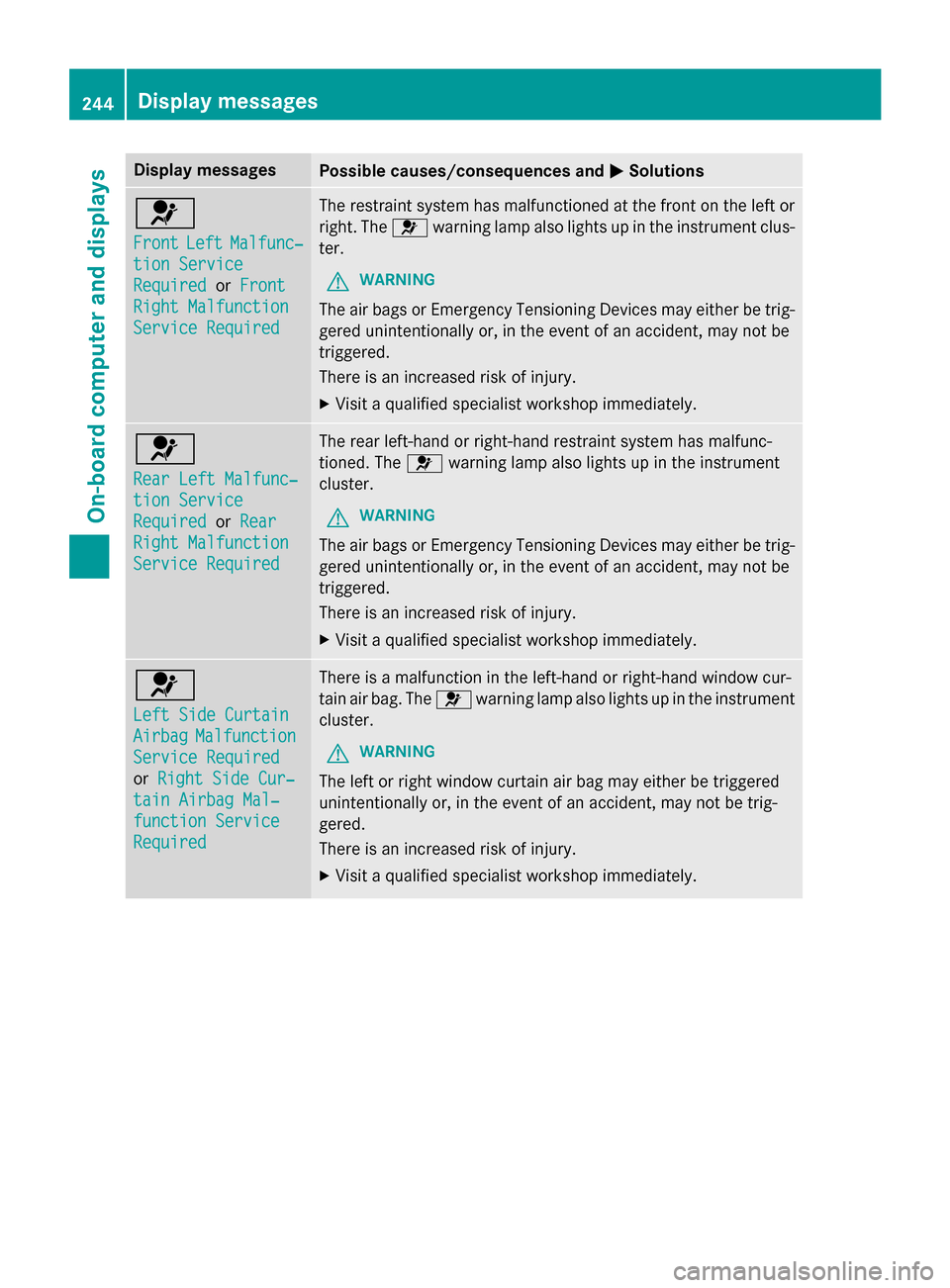
6
FrontLeftMalfunc‐
tionServic e
RequiredorFront
Right Malfunction
Servic eRequired
The restrain tsystem has malfunctioned at th efron ton th elef tor
right .The 6 warnin glamp also lights up in th einstrumen tclus-
ter.
GWARNIN G
The air bags or Emergency Tensioning Devices may either be trig-
gered unintentionally or, in th eevent of an accident, may no tbe
triggered .
There is an increase dris kof injury.
XVisit aqualified specialist workshop immediately.
6
Rea rLef tMalfunc‐
tio nServic e
RequiredorRea r
Right Malfunction
Servic eRequired
The rear left-han dor right-hand restrain tsystem has malfunc -
tioned. The 6warnin glamp also lights up in th einstrumen t
cluster.
GWARNIN G
The air bags or Emergency Tensioning Devices may either be trig-
gered unintentionally or, in th eevent of an accident, may no tbe
triggered .
There is an increase dris kof injury.
XVisit aqualified specialist workshop immediately.
6
Lef tSid eCurtai n
AirbagMalfunction
ServiceRequired
or Right Sid eCur ‐
tainAirbag Mal ‐
function Servic e
Required
There isamalfunction in th eleft-han dor right-hand window cur -
tai nair bag. The 6warnin glamp also lights up in th einstrumen t
cluster.
GWARNIN G
The leftor right window curtai nair bag may either be triggered
unintentionally or, in th eevent of an accident, may no tbe trig-
gered.
There is an increase dris kof injury.
XVisit aqualified specialist workshop immediately.
244Display messages
On-board computer and displays