2016 MERCEDES-BENZ GL brake light
[x] Cancel search: brake lightPage 254 of 462
In such cases, Active Lane Keeping Assist
can: R
give an unnecessary warning and then
make a course-correcting brake application
to the vehicle R
not give a warning or intervene
There is a risk of an accident.
Always pay particular attention to the traffic
situation and keep within the lane, especially
if Active Lane Keeping Assist alerts you. Ter-
minate the intervention in a non-critical driv-
ing situation.
The system may be impaired or may not func-
tion if: R
there is poor visibility, e.g. due to insuffi-
cient illumination of the road, or due to
snow, rain, fog or spray R
there is glare, e.g. from oncoming traffic,
the sun or reflections (e.g. when the road
surface is wet) R
the windshield is dirty, fogged up, damaged
or covered, for instance by a sticker, in the
vicinity of the camera R
there are no, several or unclear lane mark-
ings for a lane, e.g. in areas with road con-
struction work R
the lane markings are worn away, dark or
covered up, e.g. by dirt or snow R
the distance to the vehicle in front is too
small and the lane markings thus cannot be
detected R
the lane markings change quickly, e.g.
lanes branch off, cross one another or
merge R
the road is narrow and winding R
there are highly variable shade conditions
on the roadway R
no vehicle is detected in the adjacent lane
and there are broken lane markings
Warning vibration in the steering wheel
A warning may be given if a front wheel
passes over a lane marking. It will warn you by means of intermittent vibration in the steer-
ing wheel for up to 1.5 seconds.
In order that you are warned only when nec-
essary and in good time if you cross the lane
marking, the system recognizes certain con-
ditions and warns you accordingly.
The warning vibration occurs earlier if: R
you approach the outer lane marking on a
bend. R
the road has very wide lanes, e.g. a high-
way. R
the system recognizes solid lane markings.
The warning vibration occurs later if: R
the road has narrow lanes. R
you cut the corner on a bend.
Lane-correcting brake application
G WARNING
A lane-correcting brake application cannot
always bring the vehicle back into the original
lane. There is a risk of an accident.
Always steer, brake or accelerate yourself,
especially if Active Lane Keeping Assist warns
you or makes a lane-correcting brake appli-
cation.
G WARNING
Active Lane Keeping Assist does not detect
traffic conditions or road users. In very rare
cases, the system may make an inappropriate
brake application, e.g. after intentionally driv-
ing over a solid lane marking. There is a risk of
an accident.
An inappropriate brake application may be
interrupted at any time if you steer slightly in
the opposite direction. Always make sure that
there is sufficient distance on the side for
other traffic or obstacles.252
Driving systems
Driving and parking
Page 255 of 462
If you leave your lane, under certain circum-
stances the vehicle will brake briefly on one
side. This is meant to assist you in bringing
the vehicle back to the original lane.
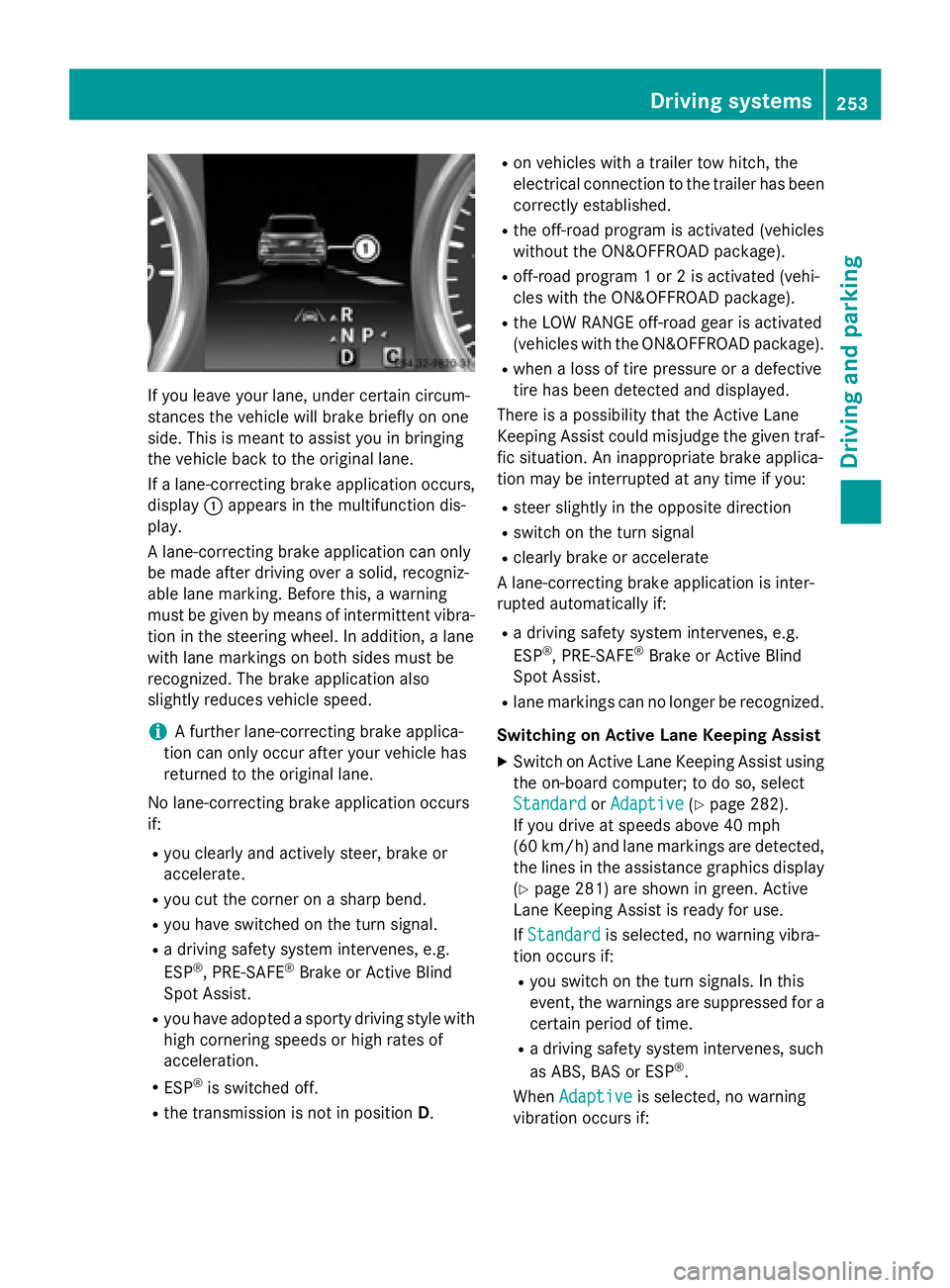
If a lane-correcting brake application occurs,
display C appears in the multifunction dis-
play.
A lane-correcting brake application can only
be made after driving over a solid, recogniz-
able lane marking. Before this, a warning
must be given by means of intermittent vibra-
tion in the steering wheel. In addition, a lane
with lane markings on both sides must be
recognized. The brake application also
slightly reduces vehicle speed.
i A further lane-correcting brake applica-
tion can only occur after your vehicle has
returned to the original lane.
No lane-correcting brake application occurs
if: R
you clearly and actively steer, brake or
accelerate. R
you cut the corner on a sharp bend. R
you have switched on the turn signal. R
a driving safety system intervenes, e.g.
ESP ®
, PRE-SAFE ®
Brake or Active Blind
Spot Assist. R
you have adopted a sporty driving style with
high cornering speeds or high rates of
acceleration. R
ESP ®
is switched off.R
the transmission is not in position D . R
on vehicles with a trailer tow hitch, the
electrical connection to the trailer has been
correctly established. R
the off-road program is activated (vehicles
without the ON&OFFROAD package). R
off-road program 1 or 2 is activated (vehi-
cles with the ON&OFFROAD package). R
the LOW RANGE off-road gear is activated
(vehicles with the ON&OFFROAD package). R
when a loss of tire pressure or a defective
tire has been detected and displayed.
There is a possibility that the Active Lane
Keeping Assist could misjudge the given traf-
fic situation. An inappropriate brake applica-
tion may be interrupted at any time if you: R
steer slightly in the opposite direction R
switch on the turn signal R
clearly brake or accelerate
A lane-correcting brake application is inter-
rupted automatically if: R
a driving safety system intervenes, e.g.
ESP ®
, PRE-SAFE ®
Brake or Active Blind
Spot Assist. R
lane markings can no longer be recognized.
Switching on Active Lane Keeping Assist X
Switch on Active Lane Keeping Assist using
the on-board computer; to do so, select
Standard
or Adaptive ( Y
page 282).
If you drive at speeds above 40 mph
(60 km/h) and lane markings are detected,
the lines in the assistance graphics display
( Y
page 281) are shown in green. Active
Lane Keeping Assist is ready for use.
If Standard is selected, no warning vibra-
tion occurs if: R
you switch on the turn signals. In this
event, the warnings are suppressed for a
certain period of time. R
a driving safety system intervenes, such
as ABS, BAS or ESP ®
.
When Adaptive is selected, no warning
vibration occurs if: Driving systems 253
Driving and parking Z
Page 259 of 462
! A function or performance test should
only be carried out on a two-axle dyna-
mometer. Before you operate the vehicle
on such a dynamometer, please consult a
qualified workshop. You could otherwise
damage the drive train or the brake system.
i In wintry driving conditions, the maximum
effect of 4MATIC can only be achieved if
you use winter tires (M +S tires), with snow
chains if necessary.
Further information about "Driving off-road"
( Y
page 198).
DSR (Downhill Speed Regulation) General notes
DSR is an aid to assist you when driving down-
hill. It keeps the speed of travel at the speed
selected on the on-board computer. The
steeper the downhill gradient, the greater the
DSR braking effect on the vehicle. When driv-
ing on flat stretches of road or on an uphill
gradient, the DSR braking effect is minimal or
nonexistent.
DSR controls the vehicle’s speed when it is
activated and the transmission is in position
D , R or N . You can drive at a higher or a lower
speed than that set on the on-board computer
at any time by accelerating or braking.
Important safety notes
G WARNING
If the speed driven and the set speed deviate
and you activate DSR on a slippery road sur-
face, the wheels may lose traction. There is an
increased danger of skidding and accidents.
Before switching DSR on, please take into
consideration the road surface and the differ-
ence between driving speed and the set
speed.
If you fail to adapt your driving style, DSR can
neither reduce the risk of accident nor over-
ride the laws of physics. DSR cannot take
account of road, weather and traffic condi-
tions. DSR is only an aid. You are responsible for the distance to the vehicle in front, for
vehicle speed, for braking in good time and for
staying in your lane.
You are always responsible for keeping con-
trol of the vehicle and for assessing whether
the downhill gradient can be managed. DSR
may not always be able to keep to the set
speed, depending on road surface and tire
conditions. Select a set speed suitable for the
prevailing conditions and when necessary,
apply the brakes manually.
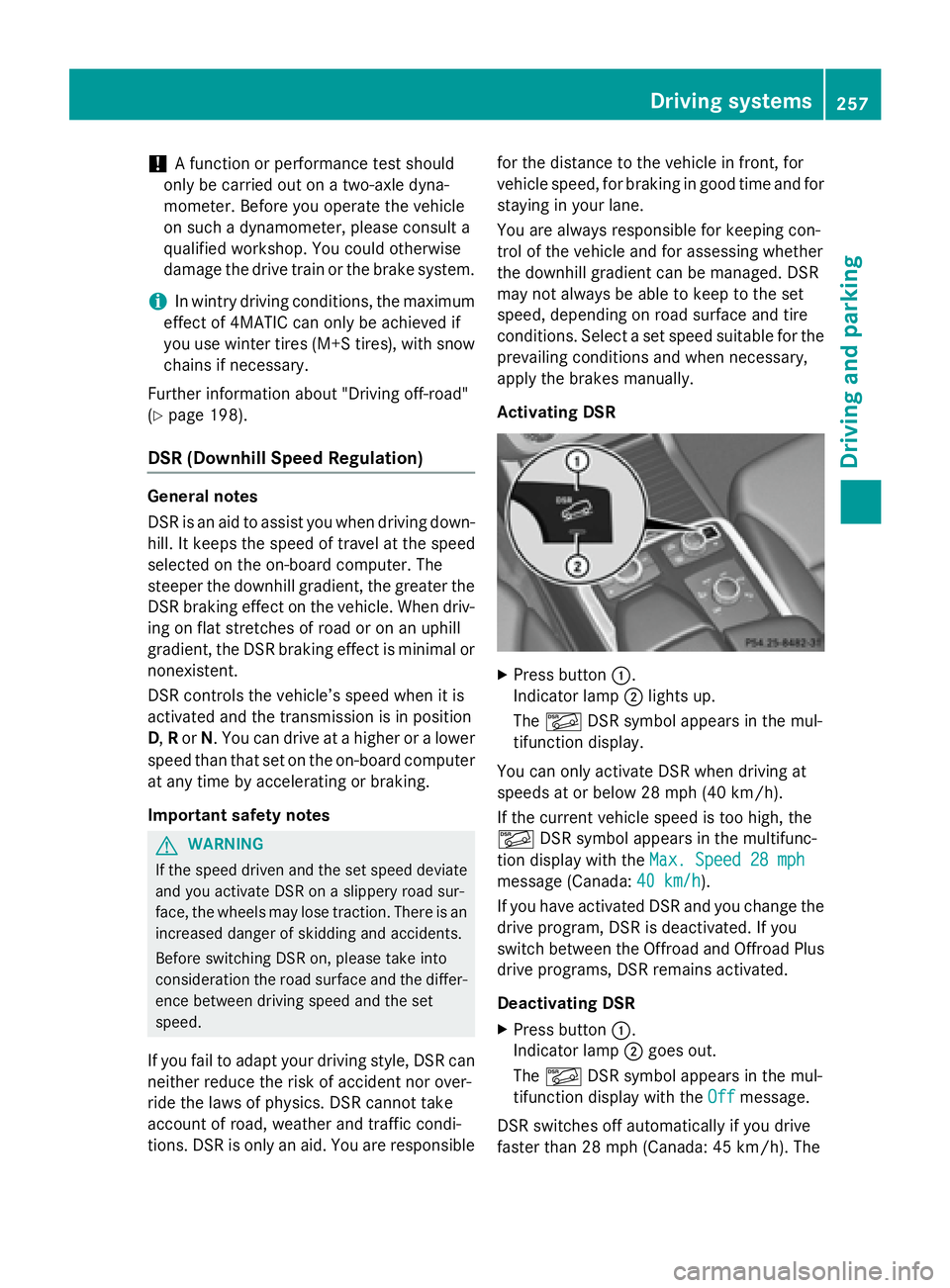
Activating DSR
X
Press button C .
Indicator lamp D lights up.
The
Page 269 of 462
so will result in a loss of function of the
brake systems of both the vehicle and the
trailer. X
Shift the transmission to position P .X
Apply the vehicle's electric parking brake. X
Start the engine. X
Vehicles with the AIRMATIC package:
select highway level. X
Vehicles with ADS: set ADS to AUTO or
COMF .X
Switch off the engine. X
Close the doors and tailgate. X
Couple up the trailer. X
Establish the electrical connection
between the vehicle and the trailer. X
Check that the trailer lighting system is
working.
i Vehicles with the AIRMATIC package:
with a trailer attached, the vehicle will
always remain at highway level. When cou-
pling up a trailer, please observe the fol-
lowing: R
Unless highway level has been set man-
ually, the vehicle is automatically low-
ered to highway level. This is the case if a
speed of 5 mph (8 km/h) is reached. R
High-speed level is not available.
These restrictions apply to all accessories
powered through a connection to the trailer
power socket of your vehicle, e.g. a bicycle
carrier.
Observe the maximum permissible trailer
dimensions (width and length).
Most U.S. states and all Canadian provinces
require by law: R
Safety chains between the towing vehicle
and the trailer. The chains should be cross-
wound under the trailer drawbar. They must
be fastened to the vehicle's trailer cou-
pling, not to the bumper or the axle. Leave enough play in the chains to make
tight cornering possible. R
A separate brake system for certain types
of trailer. R
Safety switch for braked trailers. Check the
specific legal requirements applicable to
your state.
If the trailer becomes detached from the
towing vehicle, the safety switch applies
the trailer brakes.
Towing a trailer There are numerous legal requirements con-
cerning the towing of a trailer, e.g. speed
restrictions. Make sure that your car/trailer
combination complies with the local regula-
tions: R
in your place of residence R
in the location to which you are driving
The police and local authorities can provide
reliable information.
Observe the following when towing a trailer: R
To gain driving experience and to become
accustomed to the new handling charac-
teristics, you should practice the following
in a traffic-free location: -
cornering -
stopping -
backing up R
Before driving, check: -
trailer tow hitch -
safety switch for braked trailers -
safety chains -
electrical connections -
lights -
wheels R
Adjust the exterior mirrors to provide an
unobstructed view of the rear section of the
trailer. R
If the trailer has electronically controlled
brakes, pull away carefully. Brake manually Towing a trailer 267
Driving and parking Z
Page 270 of 462
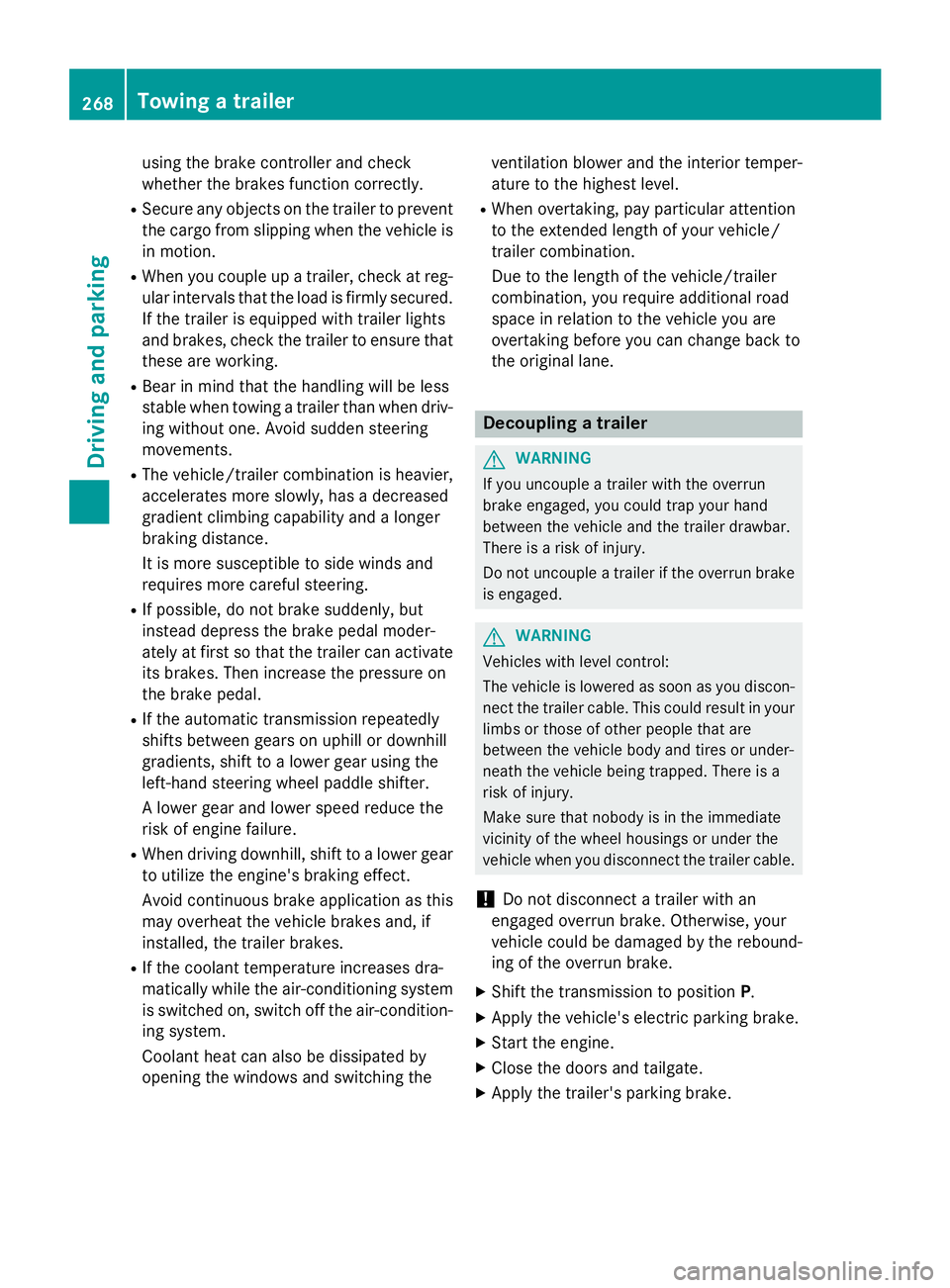
using the brake controller and check
whether the brakes function correctly. R
Se cure any objects on the trailer to prevent
the cargo from slipping when the vehicle is
in motion. R
When you couple up a trailer, check at reg-
ular intervals that the load is firmly secured.
If the trailer is equipped with trailer lights
and brakes, check the trailer to ensure that
these are working. R
Bear in mind that the han dlin g will be less
st able when towing a trailer than when driv-
ing wit hout one. Avoid sudden steering
movements. R
The vehicle/trailer combination is heavier,
accelerates more slowly, has a decreased
gradient cli mbin g capability and a longer
braking dist ance.
It is more susceptible to side winds and
requires more careful steering. R
If poss ible, do not brake suddenly, but
instead depr ess the brake pedal moder-
ate ly at first so that the trailer can activate
it s brakes. Then increase the pressure on
the brake pedal. R
If the automat ic transmission repeat edly
shifts between gears on uphill or down hill
gradients, shift to a lower gear using the
left-hand steering wheel paddle shifter.
A lower gear and lower speed reduce the
risk of engine failure. R
When driv ing down hill, shift to a lower gear
to uti liz e the engine's braking effect.
Avoid continuous brake application as this
m ay
overheat the vehicle brakes and, if
instal led, the trailer brakes.R
If the coolant temperature increases dra-
matical ly while the air-cond it ioning system
is swit ched on, switch off the air-condition-
ing system.
Coolant heat can also be dissipated by
opening the win dows and switching the ventilation blowe r and the interior temper-
ature to the highest leve l.R
When overtaking, pay particular attention
to the extended length of your vehicle/
trailer combination.
Due to the length of the vehicle/trailer
combination, you require additional road
space in relation to the vehicle you are
overtaking before you can change back to
the original lane.
Decoupling a trailer
G WARNIN G
If you uncouple a trailer wit h th e overrun
brak e engaged , you could trap your han d
between th e vehicl e and th e trailer drawbar.
Ther e is a ris k of injury.
Do no t uncouple a trailer if th e overrun brak e
is engaged .
G WARNIN G
Vehicles wit h leve l control :
The vehicl e is lowered as soo n as you discon -
nect th e trailer cable. This could result in your
limb s or those of other people that are
between th e vehicl e body and tires or under-
neath th e vehicl e bein g trapped . Ther e is a
ris k of injury.
Mak e sure that nobody is in th e immediat e
vicinity of th e whee l housing s or under th e
vehicl e when you disconnect th e trailer cable.
! Do not disc onnect a trailer wit h an
engaged overrun brake. Otherwise, your
vehicle could be damaged by the reboun d-
ing of the overrun brake. X
Sh ift the transmission to position P .X
Ap ply the vehicle's electr ic parking brake.X
St art the engine. X
Close the doors and tailgate. X
Apply the trailer's parking brake.268
Towing a trailer
Driving and parking
Page 296 of 462
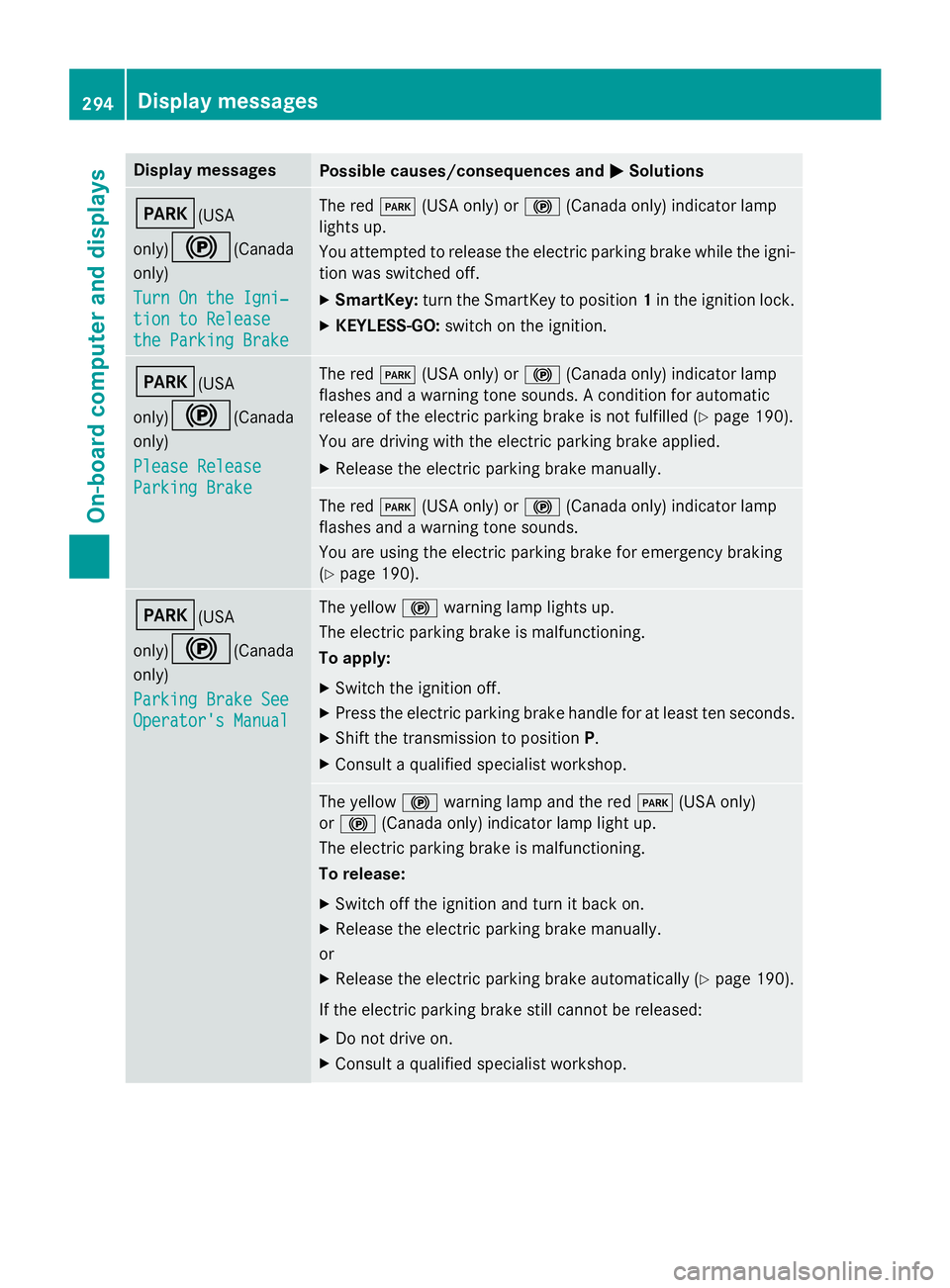
Display messages
Possible causes/consequences and P Solutions
I (USA
only)
$ (Canada
only)
Tur n On the Igni‐
tio n to Releas e
the Parkin g Brake The red I (US A only) or $ (Canada only) indicato r lamp
lights up.
You attempte d to release th e electric parkin g brak e while th e igni-
tion was switched off. X
SmartKey: tur n th e SmartKey to position 1 in th e ignition lock.X
KEYLESS-GO: switch on th e ignition .
I (USA
only)
$ (Canada
only)
Please Releas e
Parkin g Brake The red I (US A only) or $ (Canada only) indicato r lamp
flashes and a warnin g tone sounds. A condition fo r automati c
release of th e electric parkin g brak e is no t fulfilled ( Y
page 190).
You are drivin g wit h th e electric parkin g brak e applied.X
Releas e th e electric parkin g brak e manually.
The red I (US A only) or $ (Canada only) indicato r lamp
flashes and a warnin g tone sounds.
You are usin g th e electric parkin g brak e fo r emergenc y brakin g
( Y
page 190).
I (USA
only)
$ (Canada
only)
Parkin g Brake See
Operator' s Manual The yello w $ warnin g lamp lights up.
The electric parkin g brak e is malfunctioning.
To apply: X
Switc h th e ignition off. X
Press th e electric parkin g brak e handle fo r at leas t te n seconds.X
Shift th e transmissio n to position P .X
Consult a qualified specialist workshop .
The yello w $ warnin g lamp and th e red I (US A only)
or $ (Canada only) indicato r lamp ligh t up.
The electric parkin g brak e is malfunctioning.
To release: X
Switc h of f th e ignition and tur n it bac k on .X
Releas e th e electric parkin g brak e manually.
or X
Releas e th e electric parkin g brak e automatically ( Y
page 190).
If th e electric parkin g brak e still canno t be released:X
Do no t drive on .X
Consult a qualified specialist workshop .294
Display messages
On-board computer and displays
Page 297 of 462
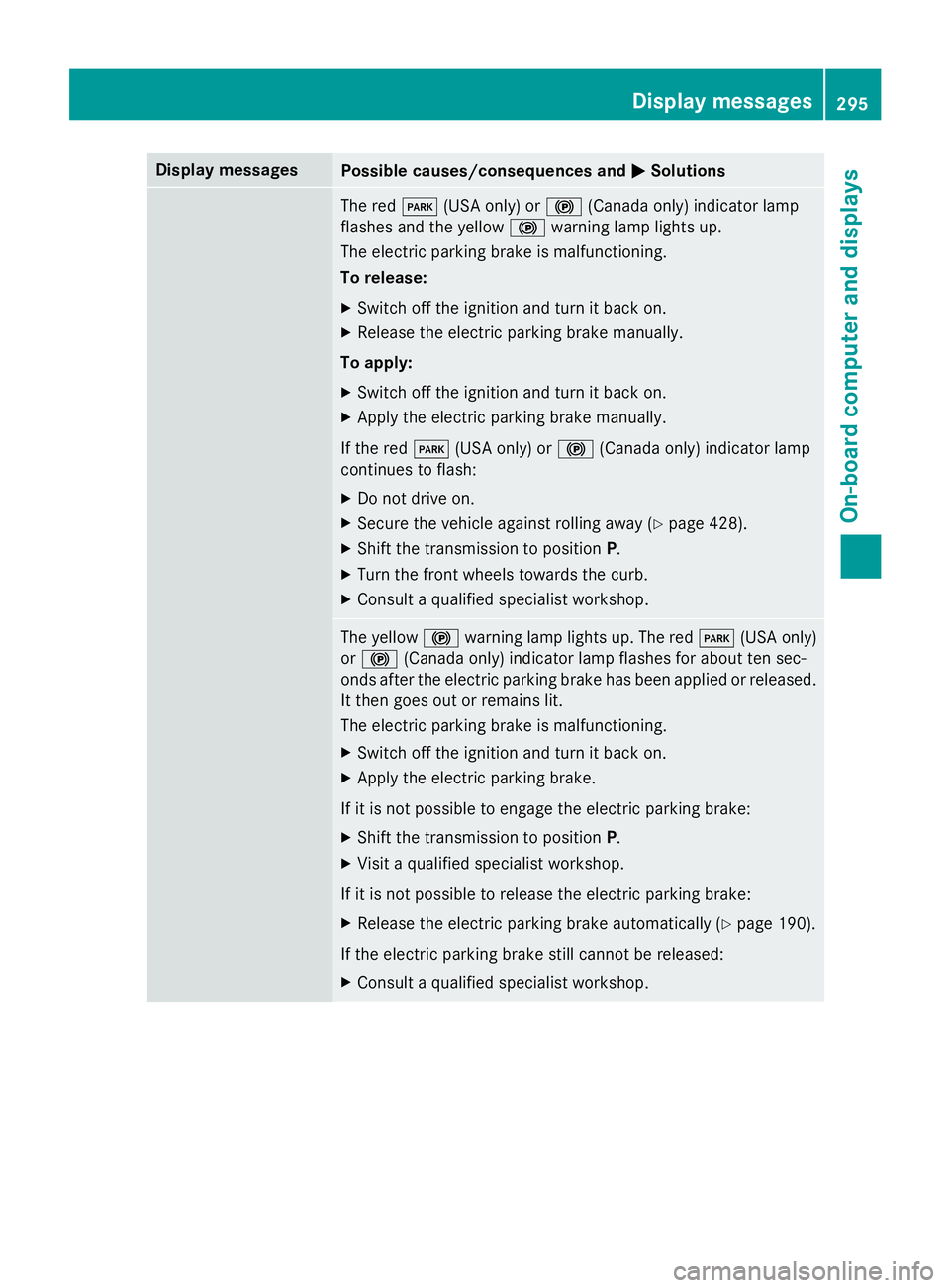
Display messages
Possible causes/consequences and P Solutions
The red I (US A only) or $ (Canada only) indicato r lamp
flashes and th e yello w $ warnin g lamp lights up.
The electric parkin g brak e is malfunctioning.
To release: X
Switc h of f th e ignition and tur n it bac k on .X
Releas e th e electric parkin g brak e manually.
To apply: X
Switc h of f th e ignition and tur n it bac k on .X
Apply th e electric parkin g brak e manually.
If th e red I (US A only) or $ (Canada only) indicato r lamp
continues to flash: X
Do no t drive on .X
Secur e th e vehicl e against rollin g away ( Y
page 428).X
Shift th e transmissio n to position P .X
Tur n th e fron t wheels toward s th e curb.X
Consult a qualified specialist workshop .
The yello w $ warnin g lamp lights up. The red I (US A only)
or $ (Canada only) indicato r lamp flashes fo r about te n sec -
onds after th e electric parkin g brak e has been applied or released.
It then goe s out or remain s lit .
The electric parkin g brak e is malfunctioning.X
Switc h of f th e ignition and tur n it bac k on .X
Apply th e electric parkin g brake.
If it is no t possibl e to engage th e electric parkin g brake:X
Shift th e transmissio n to position P .X
Visit a qualified specialist workshop .
If it is no t possibl e to release th e electric parkin g brake:X
Releas e th e electric parkin g brak e automatically ( Y
page 190).
If th e electric parkin g brak e still canno t be released:X
Consult a qualified specialist workshop .Display messages 29 5
On-board computer and displays Z
Page 298 of 462
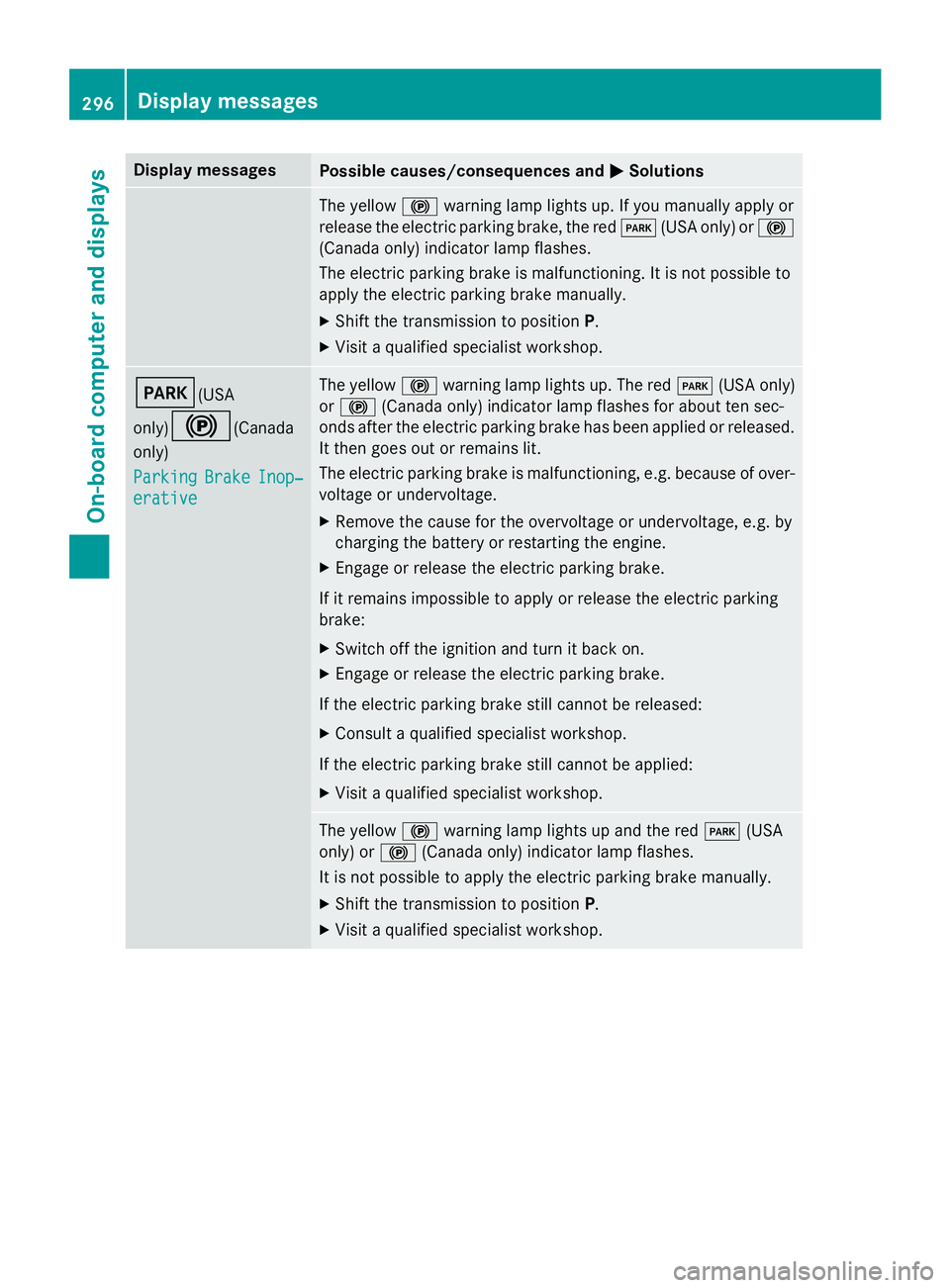
Display messages
Possible causes/consequences and P Solutions
The yello w $ warnin g lamp lights up. If you manually apply or
release th e electric parkin g brake, th e red I (US A only) or $
(Canada only) indicato r lamp flashes .
The electric parkin g brak e is malfunctioning. It is no t possibl e to
apply th e electric parkin g brak e manually.X
Shift th e transmissio n to position P .X
Visit a qualified specialist workshop .
I (USA
only)
$ (Canada
only)
Parkin g Brake Inop‐
erativ e The yello w $ warnin g lamp lights up. The red I (US A only)
or $ (Canada only) indicato r lamp flashes fo r about te n sec -
onds after th e electric parkin g brak e has been applied or released.
It then goe s out or remain s lit .
The electric parkin g brak e is malfunctioning, e.g. because of over-
voltag e or undervoltage. X
Remove th e caus e fo r th e overvoltage or undervoltage, e.g. by
chargin g th e battery or restarting th e engine.X
Engage or release th e electric parkin g brake.
If it remain s impossible to apply or release th e electric parkin g
brake: X
Switc h of f th e ignition and tur n it bac k on .X
Engage or release th e electric parkin g brake.
If th e electric parkin g brak e still canno t be released:X
Consult a qualified specialist workshop .
If th e electric parkin g brak e still canno t be applied:X
Visit a qualified specialist workshop .
The yello w $ warnin g lamp lights up and th e red I (US A
only) or $ (Canada only) indicato r lamp flashes .
It is no t possibl e to apply th e electric parkin g brak e manually.X
Shift th e transmissio n to position P .X
Visit a qualified specialist workshop .296
Display messages
On-board computer and displays