2016 MERCEDES-BENZ E-CLASS SALOON phone
[x] Cancel search: phonePage 125 of 557

Yo
u can find a li stof Qi-compatible mobile
phones online at:
http://www.mercedes-benz.com/connect
R Toensure more ef ficient charging and con‐
nection with theve hicle's exterior aerial,
re mo vethe pr otective co ver from the mobile
phone.
R If possible, use the mat when charging. #
Place the mobile phone as close tothe
centre of mat 1as possible wi th the display
fa cing up wards.
The mobile phone is charge d automatically,
as is apparent from thewa y in which the mobile phone
reacts and from thech arging
symbol in the multimedia sy stem displa y.
Malfunctions during thech arging process are
shown in the multimedia sy stem displa y.
% Toclean, mat 1can be remo ved. Fi
tting/ removing floormats &
WARNING Risk of accident due to
objects in the driver's foot we ll
Objects in the driver's foot we ll may impede
pedal tr avel or block a depressed pedal.
This jeopardises the operating and road
saf ety of theve hicle. #
Stow all objects in theve hicle securely
so that they cannot getinto the driver's
fo ot we ll. #
Alw aysfit th efloor mats securely and
as prescribed in order toensure that
th ere is alw ays suf ficient room forthe
pedals. #
Do not use loose floor mats and do not
place floor mats on top of one ano ther. #
Tofit: press studs 1onto holders 2. #
Toremo ve:pull thefloor mat off the holders
2. 12 2
Seats and stowing
Page 156 of 557

Driving
Swit
ching on the po wer supp lyor ignition
using thest art/s top button &
WARNING Risk of accident and inju ry
due tochildren left unat tended in the
ve hicle
If ch ildren are left unat tended in theve hicle,
th ey could:
R Open doo rs,th ereby endangering other
persons or road users.
R Get out of theve hicle and be hit by
oncoming traf fic.
R Ope rate ve hicle equipment.
Moreo ver,ch ildren could also set theve hicle
in motion by,fo rex ample:
R Releasing the parking brake.
R Shifting the automatic transmission out
of park position jor shifting manual
transmission into idle position.
R Starting the engine. #
Never lea vechildren and animals unat‐
te nded in theve hicle. #
When leaving theve hicle, alw aysta ke
th eke y with you and lock theve hicle.
This also applies tomobile phones if the
"Digital Car Key in the smartphone"
function is activated via the Mercedes
connect me web App. #
Keep theke ys out of there ach of chil‐
dren. This also applies tomobile
phones if the "Digital Car Key in the
smartphone" function is activated via
th e Mercedes connect me web App. &
WARNING Risk ofexhaust gas poisoning
Combustion engines emit poisonous exhaust
ga ses such as carbon monoxide. Inhaling
th ese exhaust gases causes poisoning. #
Never lea vethe engine running in an
enclosed space wi thout suf ficient venti‐
lation. &
WARNING Risk offire caused byflam‐
mable material on theex haust sy stem
Flammable materials brought in byeither ani‐
mals or environmen tal influences may ignite
if th ey come into contact wi thhot parts of
th e engine or exhaust sy stem. #
Therefore, check regularly that there
are no flammable materials in the
engine compartment or on theex haust
sy stem. Re
quirements:
R The key is located in theve hicle and thekey
battery is not dischar ged.
R Or if the "Digital Car Key in the smartphone"
function is activated via the Mercedes me
connect web App: the mobile phone is loca‐
te d in theve hicle. Driving and parking
15 3
Page 157 of 557
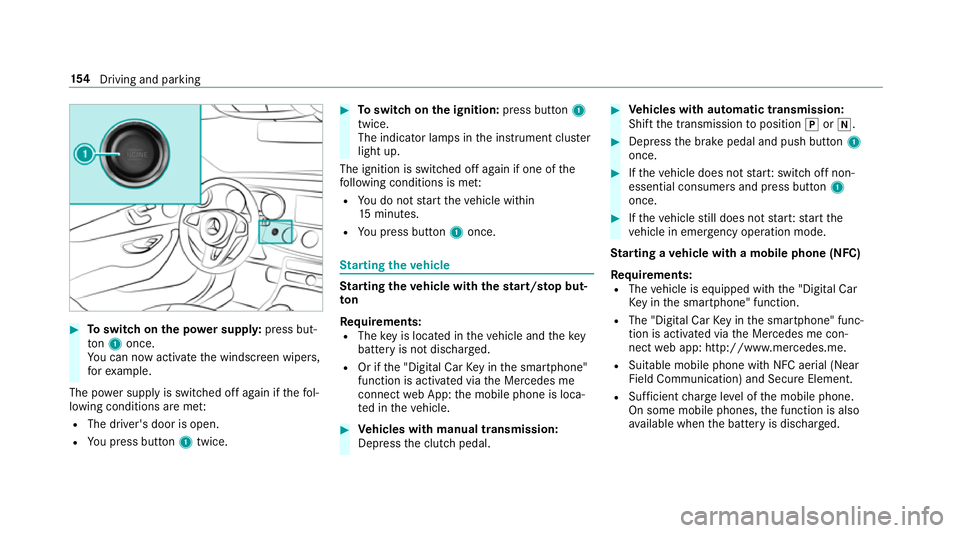
#
Toswitch on the po wer supp ly:press but‐
to n1 once.
Yo u can now activate the windscreen wipers,
fo rex ample.
The po wer supp lyis switched off again if thefo l‐
lowing conditions are me t:
R The driver's door is open.
R You press but ton1 twice. #
Toswitch on the ignition: press button 1
twice.
The indicator lamps in the instrument clus ter
light up.
The ignition is switched off again if one of the
fo llowing conditions is me t:
R You do not start theve hicle within
15 minutes.
R You press but ton1 once. St
arting theve hicle St
arting theve hicle with thest art/s top but‐
ton
Requ irements:
R The key is located in theve hicle and thekey
battery is not dischar ged.
R Or if the "Digital Car Key in the smartphone"
function is activated via the Mercedes me
connect web App: the mobile phone is loca‐
te d in theve hicle. #
Vehicles with manual transmission:
Depress the clutch pedal. #
Vehicles with automatic transmission:
Shift the transmission toposition jori. #
Depress the brake pedal and push button 1
once. #
Ifth eve hicle does not star t:switch off non-
essential consumers and press button 1
once. #
Ifth eve hicle still does not star t:start the
ve hicle in emer gency operation mode.
St arting a vehicle with a mobile phone (NFC)
Re quirements:
R The vehicle is equipped with the "Digital Car
Ke y in the smartphone" function.
R The "Digital Car Key in the smartphone" func‐
tion is activated via the Mercedes me con‐
nect web app: http://www.mercedes.me.
R Suitable mobile phone with NFC aerial (Near
Field Communication) and Secure Element.
R Sufficient charge leve l of the mobile phone.
On some mobile phones, the function is also
av ailable when the battery is dischar ged. 15 4
Driving and pa rking
Page 158 of 557

%
You can check the suitability of your mobile
phone byentering the phone number at
http://www.mercedes.me.
Information about suitable mobile phones
can be obtained from your Mercedes-Benz
service centre or at http://www.mercedes-
benz.com/connect.
% The function is on lyavailable in combination
with Mercedes me connect and on lyin cer‐
ta in countries.
% Protective cases around the mobile phone
can impair the functionality.
St arting theve hicle for the firs t time af ter
activating the function #
Make sure that there is a valid vehicle key in
th eve hicle. #
Place the mobile phone in stowage space 1
so that the NFC aerial areas touch each
ot her. #
Depress the brake pedal and start theve hicle
using thest art/ stop button.
% The key is not needed for any fur ther starts.
Any fu rther starts #
Place the mobile phone in stowage space 1
so that the NFC aerial areas touch each
ot her, and lea veitth ere while driving. #
Depress the brake pedal and start theve hicle
using thest art/ stop button.
If yo u lose your mobile phone, deactivate the
"Digital Car Key in the smartphone" service in
Mercedes me connect at https://
www.mercedes.me.
St arting theve hicle in emer gency operation
mode
If th eve hicle cannot be star ted, thePlace the
key in the marked space See Owner's Manual display message appears in
the multifunction
displa y. #
Make sure that mar ked space 2is em pty. #
Remo vekey1 from theke yring. #
Place key1 in mar ked space 2.
The vehicle will start af ter a short while.
If yo ure mo vekey1 from mar ked space 2
th e engine continues running. For fur ther
ve hicle starts ho wever,ke y1 must be loca‐
te d in mar ked space 2during the entire
journe y. #
Have key1 checked at a qualified specialist
wo rkshop. Driving and parking
15 5
Page 166 of 557
#
Never lea vechildren and animals unat‐
te nded in theve hicle. #
When leaving theve hicle, alw aysta ke
th eke y with you and lock theve hicle.
This also applies tomobile phones if the
"Digital Car Key in the smartphone"
function is activated via the Mercedes
me connect web app. #
Keep theke ys out of there ach of chil‐
dren. This also applies tomobile
phones if the "Digital Car Key in the
smartphone" function is activated via
th e Mercedes me connect web app. &
WARNING Risk of accident due toincor‐
re ct gearshifting
If th e engine speed is higher than the idle
speed and you en gage the transmission posi‐
tion hork, theve hicle may accelerate
sharply. #
Ifyo u en gage the transmission position
h ork always depress the brake pedal
firm lyand do not accelerate at
th e same time. *
NO
TEDama getothe automatic trans‐
mission caused bychanging the trans‐
mission position during the journey #
Only change the transmission position
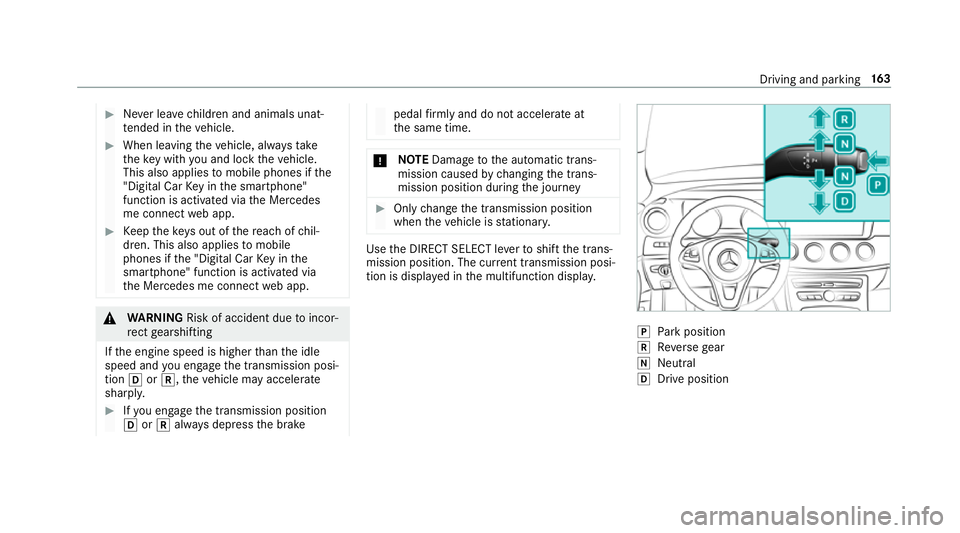
when theve hicle is stationar y. Use
the DIRECT SELECT le verto shift the trans‐
mission position. The cur rent transmission posi‐
tion is displ ayed in the multifunction displa y. j
Park position
k Reversege ar
i Neut ral
h Drive position Driving and pa
rking 16 3
Page 175 of 557

#
Start theve hicle.
The display message in the instrument clus‐
te r goes out.
% Avoid storing AdBlue ®
re fill con tainers per‐
manently in theve hicle. Pa
rking Switching off
theve hicle with thest art/s top
button &
WARNING Risk offire caused byhot
ex haust sy stem parts
Flammable material such as lea ves, grass or
twigs may ignite if they come into contact
wi th hot parts of theex haust sy stem or
ex haust gasflow. #
Park theve hicle so that no flammable
material can come into con tact wi thhot
ve hicle components. #
In particular, do not park on dry grass‐
land or har vested grain fields. &
WARNING Risk of accident and inju ry
due tochildren left unat tended in the
ve hicle
If yo u lea vechildren unat tended in theve hi‐
cle, they may be able toset theve hicle in
motion, forex ample by:
R Releasing the parking brake.
R Shifting the automatic transmission out
of park position jor shifting the manual
transmission into neutral.
R Starting the engine.
In addition, they may operate vehicle equip‐
ment. #
Never lea vechildren and animals unat‐
te nded in theve hicle. #
When leaving theve hicle, alw aysta ke
th eke y with you and lock theve hicle.
This also applies tomobile phones if the
"Digital Car Key in the smartphone"
function is activated via the Mercedes
connect me web app. *
NO
TEDama getotheve hicle or the driv‐
et ra in caused bytheve hicle rolling away #
Alw ays proper lysecure theve hicle
against rolling away. #
On uphill or downhill inclines, turn the front
wheels towa rdsth eke rb. 17 2
Driving and pa rking
Page 179 of 557
Ra
dio equipment appr oval numbers for the
ga rage door opener
R Egypt: TAC.2 5111 51 293.WIR
R Ando rra: CE
R Austra lia: R-NZ
R Barbados: MED1578
R Chile: 2488/DFRS205 76/F-74
R European Union: CE
R Gibraltar: CE
R Iceland: CE
R Jordan: TRC/LPD/20 15/299
R Canada: 4112 A-MUAHL5
R Kuwa it:CE
R Liechtens tein: CE
R Mexico: RCPGEMU15-0448
R Monaco: CE
R New Zealand: R-NZ
R Norway: CE
R Russian Federation: notrequ ired
R Saudi Arabia: TA10525 R
Switzerland: CE
R South Africa: TA-20 15/1386
R Turkey: not requ ired
R United Arab Emirates: ER41849/15
R United States: NZLMUAHL5 Electric parking brake
Au
tomatically applying the electric parking
brake &
WARNING Risk of accident and inju ry
due tochildren left unat tended in the
ve hicle
If yo u lea vechildren unat tended in theve hi‐
cle, they may be able toset theve hicle in
motion, forex ample by:
R Releasing the parking brake.
R Shifting the automatic transmission out
of park position jor shifting the manual
transmission into neutral.
R Starting the engine. In addition,
they may operate vehicle equip‐
ment. #
Never lea vechildren and animals unat‐
te nded in theve hicle. #
When leaving theve hicle, alw aysta ke
th eke y with you and lock theve hicle.
This also applies tomobile phones if the
"Digital Car Key in the smartphone"
function is activated via the Mercedes
connect me web app. Ve
hicles with manual transmission:
The electric parking brake is applied while the
ve hicle is being kept stationary bythe HOLD
function if one of thefo llowing conditions are
fulfilled:
R The engine is switched off.
R The seat belt tongue is not inser ted in the
seat belt buckle of the driver's seat and the
driver's door is opened.
R There is a sy stem malfunction.
R The po wer supp lyis insuf ficient.
R The vehicle is stationary for a lengt hyperiod. 176
Driving and pa rking
Page 225 of 557
Fu
nction of Remo teParking Pilot
% Remo teParking Pilot is an additional func‐
tion of Parking Pilot. Comply with local traf‐
fi c la wsand regulations when using Remo te
Pa rking Pilot on public roads.
Re mo teParking Pilot supports the parking
manoeuvre while you are outside your vehicle.
Once you ha veselected a suitable parking
space, youth en exitth eve hicle and guide it into
th e parking space using a suitable mobile phone.
Re mo teParking Pilot accelerates, brakes, steers
th eve hicle and changes gear. You can cancel the
parking manoeuvre at any time using your
mobile phone.
Yo u can also use your mobile phone tomo ve
yo ur vehicle backwards and forw ards in the
st ra ight-ahead position (exploration mode). This
is useful, forex ample, if a garage is so nar row
th at it is dif ficult or impossible toget in and out
of theve hicle af ter it has been par ked. Parking
Pilot automatically per form s any minor steering
cor rections that are requ ired.
Re mo teParking Pilot is only an aid. It is not a
substitute foryo ur attention tothe sur roundings. The
responsibility for safe manoeuvring and
parking remains with you. Make sure that no
persons, animals or objects etc. are in the
manoeuvring range. Co mply wi thlocal traf fic
la ws and regulations when using Remo teParking
Pilot on public roads.
Fo rth eRe mo teParking Pilot function, you
re qu ire a mobile phone and the cur rent Remo te
Pa rking Pilot app.
The following operating sy stems are suppor ted:
R Android™
R Apple ®
iOS
If th e connection between theve hicle and the
mobile phone is inter rupte d while a parking
manoeuvre is being per form ed, the manoeuvre
can be continued if the connection is re-es tab‐
lished within about two minutes.
The following scenarios are suppor ted:
R Parking in a parking space parallel tothe
direction of tra vel.
R Parking in a parking space at right angles to
th e direction of tra vel. R
Exiting a parking space at right angles tothe
direction of tra vel (exploration mode).
R Parking in a garage (exploration mode).
R Exiting a garage (exploration mode).
If te ch nical problems arise du ring a pa rking
manoeuvre (e.g. the permitted downhill gradient
is exc eeded), thefo llowing actions are per‐
fo rm ed automatically:
R The parking manoeuvre is cancelled.
R The vehicle is brought toast andstill.
R Transmission position jis engaged.
R The vehicle is switched off.
If th e parking manoeuvre is cancelled, a cor re‐
sponding message is displa yed on the mobile
phone. You can then take ove r and manoeuvre
th eve hicle into the parking space yourself. Alter‐
nativel y,yo u can mo vetheve hicle back toits
original position, if necessar y.
Whilst theve hicle is being par ked with Parking
Pilot, you can inter rupt the process totake con‐
trol of theve hicle with Remo teParking Pilot and
manoeuvre it into its final position. 222
Driving and pa rking