2016 MERCEDES-BENZ E-CLASS SALOON light
[x] Cancel search: lightPage 57 of 557
R
For cer tain child restra int sy stems in weight
categories II or III, there might be restrictions
in the maximum size setting, e.g. due topos‐
sible con tact wi th thero of.
R Make sure that thech ild's feet do not touch
th e front seat. If necessar y,mo vethe front
seat forw ard slightl y.
R The child restra int sy stem must not touch the
ro of or be put under stra in by the head
re stra ints. Adjust the head restra ints accord‐
ing ly. R
Obser vethe manufacturer's ins tallation
instructions forth ech ild restra int sy stem.
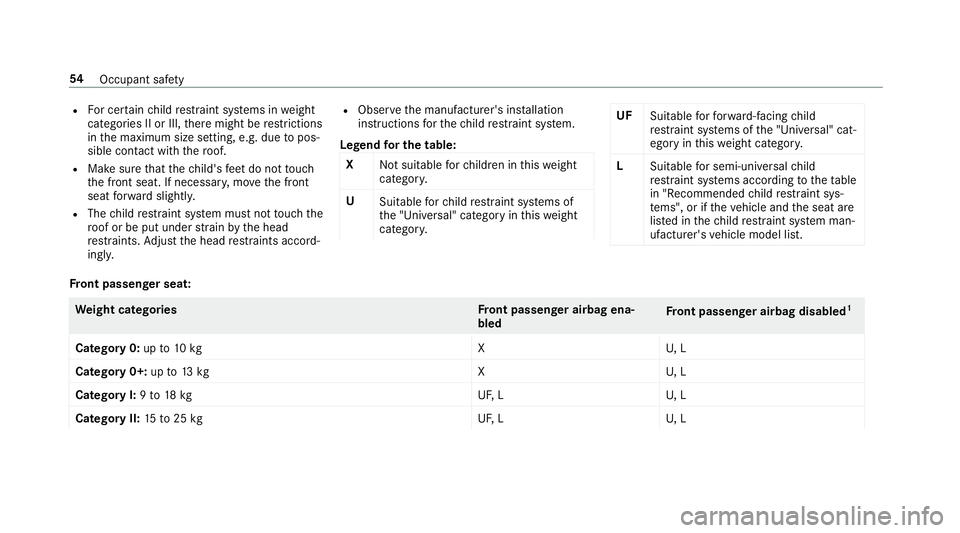
Legend for the table:
X Not suitable forch ildren in this we ight
categor y.
U Suitable forch ild restra int sy stems of
th e "Universal" category in this we ight
categor y. UF
Suitable forfo rw ard-facing child
re stra int sy stems of the "Universal" cat‐
egory in this we ight categor y.
L Suitable for semi-universal child
re stra int sy stems according totheta ble
in "Recommended child restra int sys‐
te ms", or if theve hicle and the seat are
lis ted in thech ild restra int sy stem man‐
ufacturer's vehicle model list. Fr
ont passenger seat: We
ight categories Front passenger airbag ena‐
bled Fr
ont passenger airbag disabled 1
Category 0: upto10 kg XU, L
Category 0+: upto13 kg XU, L
Category I: 9to 18 kg UF,LU , L
Category II: 15to25 kg UF,LU , L54
Occupant saf ety
Page 60 of 557
R
When using a forw ard-facing child
re stra int sy stem of category I: remo vethe
head restra int from there spective seat if
possible and position the seat backrest of
th ech ild restra int sy stem as flat as possible
against the seat backrest of theve hicle seat.
R When youre mo vethech ild restra int sy stem
yo u must ins tallth e head restra int again
immediately and adjust all of the head
re stra ints cor rectl y.
R For cer tain child restra int sy stems in weight
categories II or III, there might be restrictions
in the maximum size setting, e.g. due topos‐
sible con tact wi th thero of. R
Make sure that thech ild's feet do not touch
th e front seat. If necessar y,mo vethe front
seat forw ard slightl y.
R The child restra int sy stem must not touch the
ro of or be put under stra in by the head
re stra ints. Adjust the head restra ints accord‐
ing ly.
R Obser vethe manufacturer's ins tallation
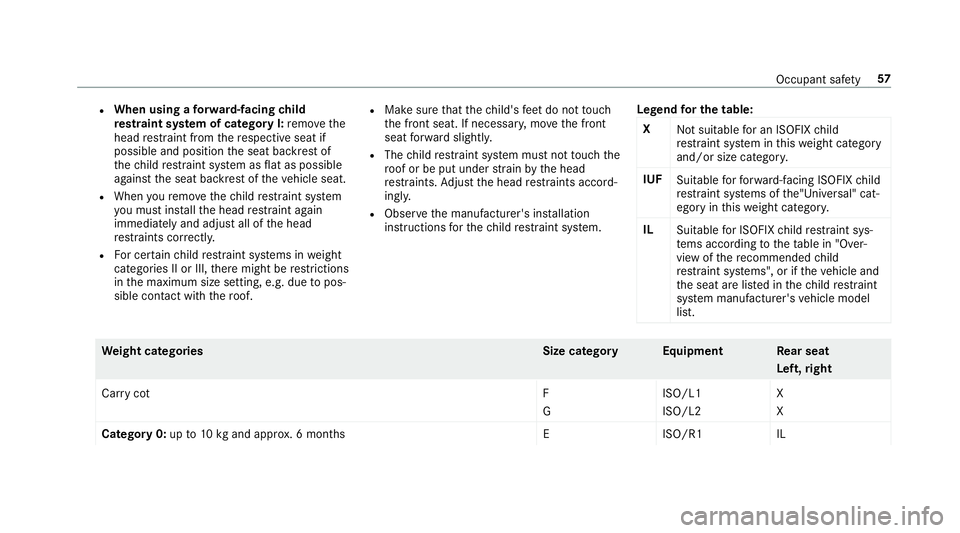
instructions forth ech ild restra int sy stem. Legend
for the table:
X Not suitable for an ISOFIX child
re stra int sy stem in this we ight category
and/or size categor y.
IUF Suitable forfo rw ard-facing ISOFIX child
re stra int sy stems of the"Universal" cat‐
egory in this we ight categor y.
IL Suitable for ISOFIX child restra int sys‐
te ms according tothetab le in "Over‐
view of there commended child
re stra int sy stems", or if theve hicle and
th e seat are lis ted in thech ild restra int
sy stem manufacturer's vehicle model
list. We
ight categories Size categoryEquipment Rear seat
Left ,ri ght
Car rycotF
GISO/L1
ISO/L2X
X
Category 0:up to10 kgand appr ox. 6 months EISO/R1I L Occupant saf
ety57
Page 61 of 557
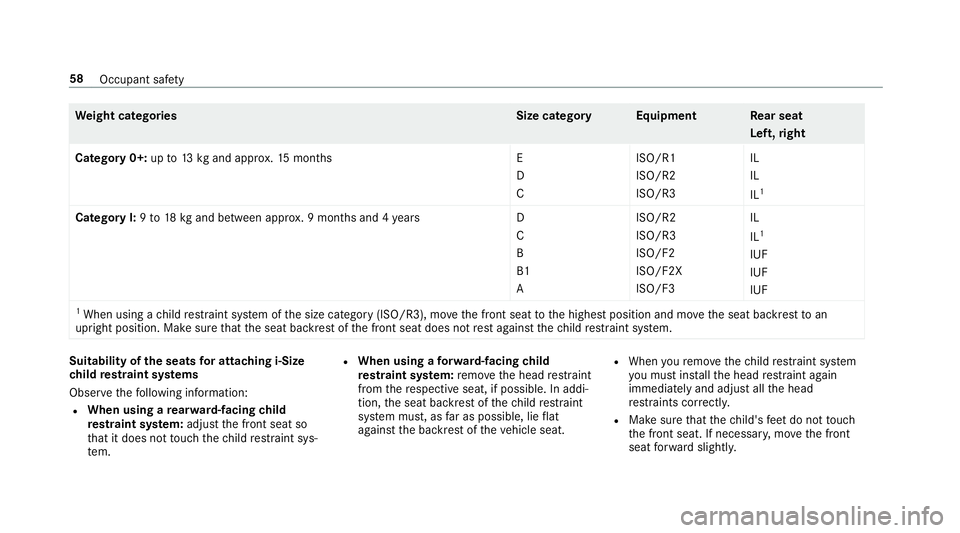
We
ight categories Size categoryEquipment Rear seat
Left ,ri ght
Category 0+: upto13 kgand appr ox.15 months E
D
CISO/R1
ISO/R2
ISO/R3IL
IL
IL
1
Category I:9to 18 kgand between appr ox. 9 months and 4 yearsD
C
B
B1
A ISO/R2
ISO/R3
ISO/F2
ISO/F2X
ISO/F3IL
IL
1
IUF
IUF
IUF
1 When using a child restra int sy stem of the size category (ISO/R3), mo vethe front seat tothe highest position and mo vethe seat backrest toan
upright position. Make sure that the seat backrest of the front seat does not rest against thech ild restra int sy stem. Suitability of
the seats for attaching i‑Size
ch ild restra int sy stems
Obser vethefo llowing information:
R When using a rear wa rd-facing child
re stra int sy stem: adjust the front seat so
th at it does not touch thech ild restra int sys‐
te m. R
When using a forw ard-facing child
re stra int sy stem: remo vethe head restra int
from there spective seat, if possible. In addi‐
tion, the seat backrest of thech ild restra int
sy stem must, as far as possible, lie flat
against the backrest of theve hicle seat. R
When youre mo vethech ild restra int sy stem
yo u must ins tallth e head restra int again
immediately and adjust all the head
re stra ints cor rectl y.
R Make sure that thech ild's feet do not touch
th e front seat. If necessar y,mo vethe front
seat forw ard slightl y. 58
Occupant saf ety
Page 68 of 557

R
Anti-theft pr otection is reactivated.
Do not keep theke yto get her with electronic
devices or me tal objects. This can af fect the
ke y's functionalit y.
% If battery check lamp 2does not light up
af te r pressing the% or& button, the
battery is dischar ged. Ac
tivating/deactivating the acoustic lo cking
ve rification signal Multimedia sy
stem:
, Vehicle .
î Vehicle set-
tings .
Acoustic lock #
Activate Oor deacti vate ª the function. Priming/deactivating
the panic ala rm Re
quirements:
R Ignition switched off. #
Toprime: press button 1for appro ximately
one second.
A visu al and audible alarm is triggered. #
Todeactivate: briefly press but ton1 again.
or #
Press thest art/ stop button on the cockpit
(the key is inside theve hicle). Changing
the unlocking settings Po
ssible unlocking functions of theke y:
R Central unlocking
R Unlocking the driver's door and fuel filler flap #
Toswitch between settings: pressthe
% and& buttons simultaneously for
appr oximately six seconds until the battery
ch eck lamp flashes twice.
If th e unlocking function forth e driver's door
and fuel filler flap has been selec ted:
R Pressing the% button a second time cen‐
trally unloc kstheve hicle.
R Vehicles with KEYLESS-GO: Ifyo uto uch
th e inner sur face of the door handle on the
driver's door, only the driver's door and fuel
fi ller flap are unlo cked. Re
ducing the energy consu mption of the key If
yo u do not intend touse theve hicle for an
ex tended pe riod of time, you can deactivate the
fo llowing functions on thekey.
R KEYLESS-GO starting function
R KEYLESS-GO Opening and closing
65
Page 69 of 557
#
Todeactivate: pressthe& button on the
ke y twice in rapid succession.
The battery check lamp of theke yflashes
twice brief lyand lights up once. #
Toactivate: press any button on thekey.
% When theve hicle is star ted with theke y in
th estow age compartment of the cent recon‐
sole (→ page 155), theke y functions are
automatical lyactivated. Inserting/removing
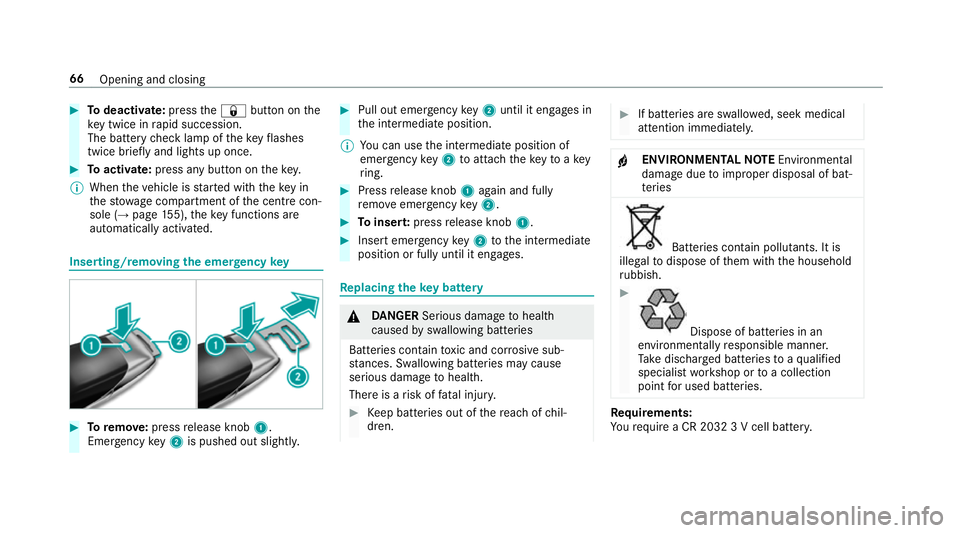
the emer gency key #
Toremo ve:press release knob 1.
Emer gency key2 is pushed out slight ly. #
Pull out emer gency key2 until it en gage s in
th e intermediate position.
% You can use the intermediate position of
emer gency key2 toattach theke yto akey
ri ng. #
Press release knob 1again and fully
re mo veemer gency key2. #
Toinser t:press release knob 1. #
Insert emer gency key2 tothe intermediate
position or fully until it engages. Re
placing the key battery &
DANG ER Serious damage tohealth
caused byswallowing batteries
Batteries contain toxic and cor rosive sub‐
st ances. Swallowing bat teries may cause
serious damage tohealth.
There is a risk of fata l injur y. #
Keep batteries out of there ach of chil‐
dren. #
If batteries are swallo wed, seek medical
attention immediately. +
ENVIRONMEN
TALNO TEEnvironmental
dama gedue toimproper disposal of bat‐
te ries Batteries conta
in pollutants. It is
illegal todispose of them with the household
ru bbish. #
Dispose of batteries in an
environmen tally responsible manner.
Ta ke dischar ged batteries toaqu alified
specialist workshop or toa collection
point for used batteries. Re
quirements:
Yo ure qu ire a CR 2032 3 V cell batter y.66
Opening and closing
Page 78 of 557
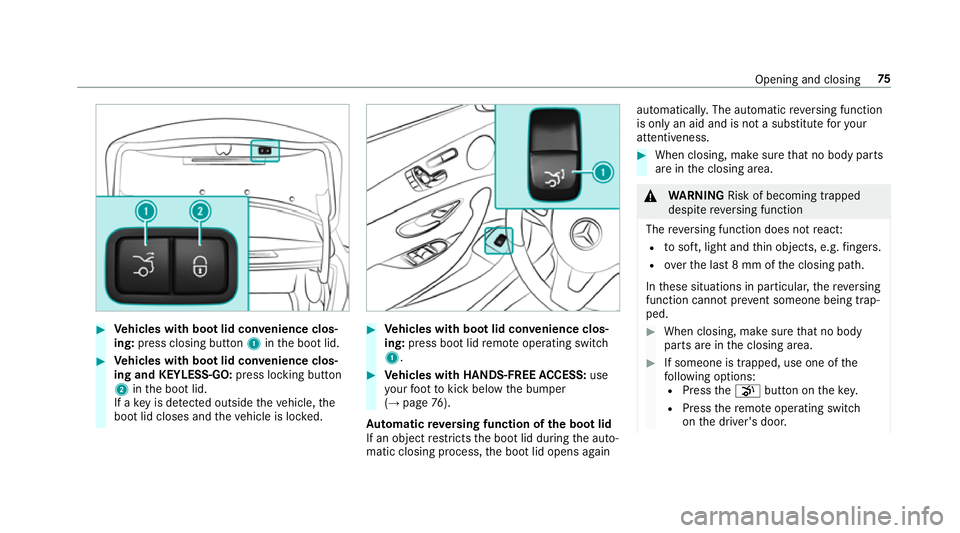
#
Vehicles with boot lid conve nience clos‐
ing: press closing button 1inthe boot lid. #
Vehicles with boot lid conve nience clos‐
ing and KEYLESS-GO: press locking button
2 inthe boot lid.
If a key is de tected outside theve hicle, the
boot lid closes and theve hicle is loc ked. #
Vehicles with boot lid conve nience clos‐
ing: press boot lid remo teoperating switch
1. #
Vehicles with HANDS-FREE ACCESS: use
yo ur foot to kick below the bumper
(→ page 76).
Au tomatic reve rsing function of the boot lid
If an object restricts the boot lid during the auto‐
matic closing process, the boot lid opens again automaticall
y.The automatic reve rsing function
is only an aid and is not a substitute foryo ur
attentiveness. #
When closing, make sure that no body parts
are in the closing area. &
WARNING Risk of becoming trapped
despi tereve rsing function
The reve rsing function does not react:
R tosoft, light and thin objects, e.g. fingers.
R overth e last 8 mm of the closing path.
In these situations in particular, there ve rsing
function cannot pr event someone being trap‐
ped. #
When closing, ma kesure that no body
parts are in the closing area. #
If someone is trapped, use one of the
fo llowing options:
R Press thep button on thekey.
R Press there mo teoperating switch
on the driver's door. Opening and closing
75
Page 83 of 557
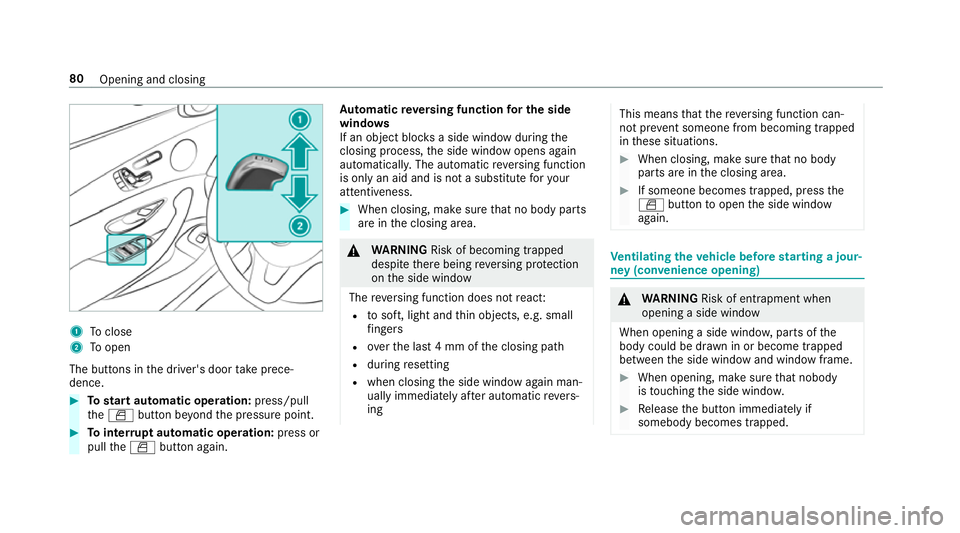
1
Toclose
2 Toopen
The buttons in the driver's door take prece‐
dence. #
Tostart automatic operation: press/pull
th eW button be yond the pressure point. #
Tointer rupt automatic operation: press or
pull theW button again. Au
tomatic reve rsing function for the side
windo ws
If an object bloc ksa side wind owduring the
closing process, the side window opens again
automaticall y.The automatic reve rsing function
is only an aid and is not a substitute foryo ur
attentiveness. #
When closing, make sure that no body parts
are in the closing area. &
WARNING Risk of becoming trapped
despi tethere being reve rsing pr otection
on the side window
The reve rsing function does not react:
R tosoft, light and thin objects, e.g. small
fi ngers
R overth e last 4 mm of the closing path
R during resetting
R when closing the side window again man‐
ually immediately af ter auto matic reve rs‐
ing This means
that there ve rsing function can‐
not pr event someone from becoming trapped
in these situations. #
When closing, make sure that no body
parts are in the closing area. #
If someone becomes trapped, press the
W button toopen the side window
again. Ve
ntilating theve hicle before starting a jour‐
ney (con venience opening) &
WARNING Risk of entrapment when
opening a side window
When opening a side windo w,parts of the
body could be dr awn in or become trapped
between the side window and window frame. #
When opening, make sure that nobody
is touching the side windo w. #
Release the button immediately if
somebody becomes trapped. 80
Opening and closing
Page 85 of 557
Problem
Possible causes/consequences and M
MSolutions
& WARNING Risk of entrapment if reve rsing pr otection is not activated
If yo u close a side wind owagain immediately af ter it has been bloc ked or reset, the side window closes
with increased or maximum forc e. The reve rsing feature is then not active.
Pa rts of the body could be trapped in the closing area in the process. #
Make sure that no parts of the body are in the closing area. #
Tostop the closing process, release the button or press the button again toreopen the side win‐
do w. If a side window is obstructed during closing and
reopens again slightly: #
Immediately af terth e window bloc ks, pull the cor responding button again until the side window has
closed, and hold the button for an additional second.
The side window is closed with increased forc e.
If a side window is obstructed again during closing and reopens again slightly: #
Repeat the pr evious step.
The side window is closed without the automatic reve rsing function. 82
Opening and closing