2016 MERCEDES-BENZ E-CLASS ESTATE ECO mode
[x] Cancel search: ECO modePage 441 of 565
*
NO
TEDama geand malfunctions due to
impurities in AdBlue ® Impu
rities in AdBlue ®
lead to:
R Increased emissions values
R Damage tothe catalytic con verter
R Engine damage
R BlueTEC exhaust gas af tertre atment mal‐
functions #
Avoid impurities in AdBlue ®
. +
ENVI
RONMENTAL NOTEContamination
caused byAdBlue ® Ad
Blue ®
re sidues cr ystallise af ter a period of
time, and contamina tethe sur faces wi th
which they come into contact. #
Surfaces that ha vecome into contact
wi th Ad Blue®
while refilling must be
immediately rinsed wi thwa ter,or
Ad Blue ®
must be remo ved with a damp
clo thand cold water. If
Ad Blue ®
has al ready cr ystallised, clean it
with a spon geand cold water. When
you open theAd Blue ®
tank, small
amounts of ammonia vapour may escape. Do
not inhale any ammonia vapours that may be
re leased. Only fill th eAd Blue ®
tank in well-venti‐
lated areas.
Ad Blue ®
filling capacity
To tal capacity of AdBlue ®
tank Mode
lT otal capacity
All models 23.5 l Engine oil
Note
s on engine oil
Obser vethe no tes on operating fluids
(→ page 433). *
NO
TEEngine dama gecaused byan
incor rect oil filter, incor rect oil or addi‐
tives #
Do not use engine oils or oil filters
which do not cor respond tothe specifi‐
cations explicitly prescribed forthe
service inter vals. #
Do not alter the engine oil or oil filter in
order toachie velonger change inter vals
th an presc ribed. #
Do not use additives. #
Have the engine oil rene we d at regular
inter vals. 438
Tech nical da ta
Page 442 of 565
Mercedes-Benz
recommends that you ha vethe
oil change car ried out at a qualified specialist
wo rkshop.
Only Mercedes-Benz appr oved engine oils may
be used in Mercedes-Benz engines.
Fu rther information on engine oils and oil filters:
R Inthe Mercedes-Benz Specifications for
operating fluids at http://be vo.mercedes-
benz.co m (by en tering the designation)
R Ataqu alified specialist workshop
Pet rol engines: For cer tain countries, dif fere nt
engine oils can be used in conjunction wi th
re duced maintenance inter vals. For more infor‐
mation, please contact a qualified specialist
wo rkshop.
Quality and filling capacity of engine oil
MB- Freigabe or MB -Appr oval Pe
trol engine sM B-Freigabe or MB-
Appr oval
All models 229.5, 229.6 MB-F
reigabe or MB-Appr oval Diesel engine
sMB-Freigabe or MB-
Appr oval
E 350 d2 28.51,229.3 1,
229.5 1,229.52
All other models 228.51 , 229.31,
229.5 1,229.52,
229.71 If
th e engine oils lis ted in theta ble are not avail‐
able, you may add a maximum of 1.0 lof thefo l‐
lowing engine oils once only:
R Petrol engines: MB-Freigabe or MB-Appr oval
229.3 or ACEA A3/B3
R Diesel engines: MB-Freigabe or MB-
Appr oval 229.3, 229.5 or ACEA C3
The following values referto an oil change,
including the oil filter: Re
placement amount Mode
lR eplacement
amount
E 200
E 250 7.
0 l
E 200 4MATIC
E 400 4MATIC 6.5 l
E 350 d9 .0 l
All other models 6.3 l Note
s on brake fluid Obser
vethe no tes on operating fluids
(→ page 433). &
WARNING Risk of an accident due to
va pour poc kets form ing in the brake sys‐
tem
The brake fluid cons tantly absorbs moi sture
from the air. This lo wersthe boiling point of Te
ch nical da ta439
Page 472 of 565
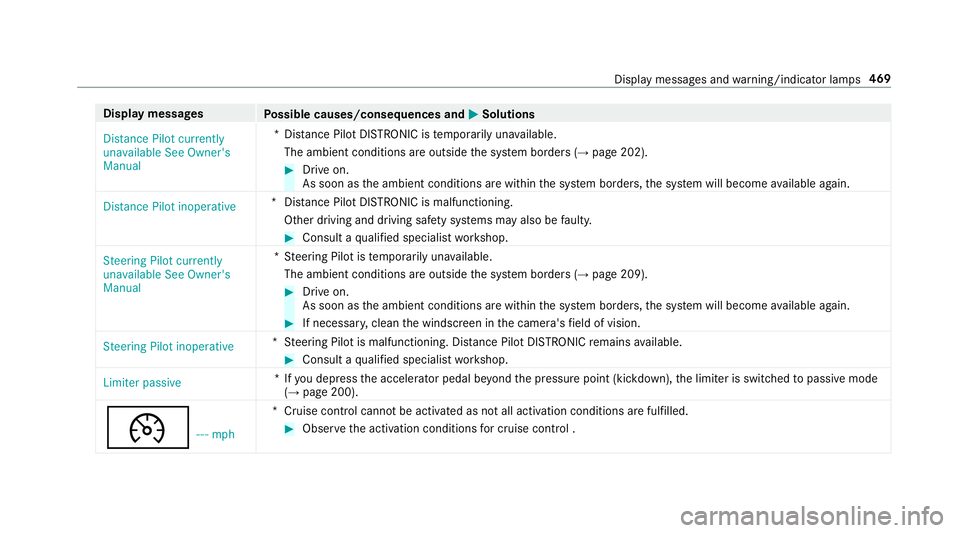
Display messages
Possible causes/consequences and M
MSolutions
Distance Pilot currently
unavailable See Owner's
Manual *D
ista nce Pilot DISTRONIC is temp orarily una vailable.
The ambient conditions are outside the sy stem borders (→ page 202). #
Drive on.
As soon as the ambient conditions are within the sy stem borders, the sy stem will become available again.
Distance Pilot inoperative *D
ista nce Pilot DISTRONIC is malfunctioning.
Other driving and driving sa fety sy stems may also be faulty. #
Consult a qualified specialist workshop.
Steering Pilot currently
unavailable See Owner's
Manual *S
teering Pilot is temp orarily una vailable.
The ambient conditions are outside the sy stem borders (→ page 209). #
Drive on.
As soon as the ambient conditions are within the sy stem borders, the sy stem will become available again. #
If necessar y,clean the windscreen in the camera's field of vision.
Steering Pilot inoperative *S
teering Pilot is malfunctioning. Dis tance Pilot DISTRONIC remains available. #
Consult a qualified specialist workshop.
Limiter passive *I
fyo u depress the accelera tor pedal be yond the pressure point (kickdown), the limiter is switched topassive mode
(→ page 200).
¯ ---mph *C
ruise control cannot be activated as not all activation conditions are fulfilled. #
Obser vethe activation conditions for cruise control . Display messa
ges and warning/indicator lamps 469
Page 523 of 565
Immobiliser ...........................................88
Interior pr otection ................................. 89
St opping the alarm (A TA) .......................88
To w- aw ay protection ............................. 89
Anticipatory occupant pr otection .....4 3,44
Apple CarPlay™ ...................................... .336
Connecting an iPhone ®
....................... 337
Ending ................................................. 337
Overview ............................................. 336
To ne settings ....................................... 337
Tr ans ferred vehicle data ......................3 39
Ashtr ay
Fr ont centre console ........................... 12 5
Re ar .................................................... .125
Assistance graphic
Menu (on-boa rdcompu ter) .................. 258
Assistance sy stems
see Driving saf ety sy stem
ASS YST PLUS ........................................... 372
Battery disconnection periods ............. 373
Displ aying the service due date ........... 372
Fu nction/no tes ................................... 372
Re gular service work ........................... 372
Special service requirements .............. 372ATA
(anti-theft ala rmsystem)
Fu nction ................................................ 88
St opping the alarm ................................ 88
ATA (anti-theft ala rmsystem)
see Anti- theft pr otection
AT TENTION ASSI ST......................... 238, 239
Ac tivating/deactivating ...................... .239
Fu nction .............................................. 238
Sy stem limitations ...............................2 38
At tention assistant
see ATTENTION ASSIST
Au dio mode
Ac tivating media mode ........................ 348
Connecting USB devices ...................... 351
Co pyright ............................................. 348
Information .......................................... 347
Inserting/re moving an SD card .......... .348
Media sea rch ....................................... 354
Overview ............................................. 350
Pa use and playback function .............. .351
Selecting a track .................................. 351
Selecting pl ayback options .................. 351
Tr ack list .............................................. 351 Au
thorised workshop
see Qualified specialist workshop
Au tomatic distance control
see Dis tance Pilot DISTRONIC
Au tomatic driving lights .........................13 2
Au tomatic engine start (ECO start/
sto p function) .......................................... 16 6
Au tomatic engine stop (ECO start/
sto p function) .......................................... 16 6
Au tomatic front passen ger airbag
shu toff
see Front passenger airbag shutoff
Au tomatic mir rorfo lding function
Ac tivating/deactivating ...................... .147
Au tomatic transmission
DIRECT SELECT le ver ........................... 171
Drive program display .......................... 16 9
Drive programs .................................... 16 8
DY NA MIC SELECT switch .................... 16 8
Engaging drive position ........................ 173
Engaging reve rsege ar ........................ .172
Kickdown ............................................. 174
Manual gearshifting ............................ .173 520
Index
Page 535 of 565
Emer
gency key element
Inserting/removing ............................... 66
Un locking theta ilgate ............................ 78
Emer gency operation mode
St arting vehicle ................................... 16 3
Emer gency spare wheel
No tes ................................................... 427
Re moving ............................................ 428
Emer gency spare wheel
see Spare wheel
see Wheel change
Energy consu mption
Ke y ........................................................ 65
Engine ECO start/ stop function ......................1 66
Engine number ................................... .431
St arting (eme rgency operation
mode) .................................................. 16 3
St arting (mobile phone) ...................... .162
St arting (s tart/s top button) .................1 62
St arting assis tance .............................. 398
Switching off (s tart/s top button) ........ 180
Engine bonnet Function (active bonnet) ...................... 373Opening/closing ..................................3
74
Re setting (active bonnet) ..................... 373
Engine data Displaying ............................................ 16 9
Engine electronics Notes .................................................. 429
Engine number ........................................4 31
Engine oil ................................................ .377
Ad ditives .............................................4 38
Che cking the oil le vel using the oil
dipstick ................................................ 376
Checking the oil le vel using the on-
board computer ................................... 376
Filling capacity .................................... 439
MB-F reigabe or MB-Appr oval .............. .439
To pping up ...........................................3 77
Entering characters
Fu nction/no tes ................................... 284
On theto uchpad ................................ .285
Using the controller ............................. 285
ERA-GLONASS test mode
St arting/ending .................................. 332 ESC (Elect
ronic Stability Control)
see ESP ®
(Electronic Stability Prog ram)
ESP ®
(Electronic Stability Prog ram) ...... 189
Crosswind Assist ................................ .193
Fu nction/no tes ................................... 189
Switching on/off ................................. 19 3
Tr ailer stabilisation .............................. 19 3
EU type appr oval number ....................... 431
Exterior lighting Care .................................................... 383
Ex terior lighting
see Lights F
Fa tigue warning
see ATTENTION ASSIST
Fa ult message
see Displ aymessa ge
Favo urites
Ad ding .................................................2 82
Calling up ............................................ 282
Deleting ............................................... 283
Moving ................................................ 283 532
Index
Page 537 of 565
Fu
ses ........................................................ 406
Assignment diagram ............................4 06
Before changing .................................. 406
Fu se box in the engine compartment .. 407
Fu se box in the front-passen gerfo ot‐
we ll ...................................................... 408
Fu se box in the load compartment ...... 408
Fu se box on the dashboard ................. 408
No tes .................................................. 406 G
Garage door opener Cleari ngthe memory ........................... 184
Opening or closing thega rage door .....1 83
Programming buttons .......................... 181
Ra dio equipment appr oval number ...... 184
Re solving problems ............................. 183
Synchronising thero lling code ............ 182
Gearshift paddles see Steering wheel gearshift paddles
Gea rshift recommendation .............170, 173
Genuine parts ............................................ 22
Genuine wood (Care) .............................. 385
Glide mode .............................................. .174 Glo
vebox
Air vent ................................................ 15 9
Locking/unlocking ...............................1 10
Gross mass ............................................. .431 H
Handbrake see Electric parking brake
Handling characteristics (unusual) ....... 409
HANDS-FREE ACCESS ................................ 76
HANDS-FREE ACCESS
see Opening theta ilgate using your foot
Hands-free sy stem .................................... 69
Hazard warning lights ............................ .134
HD prog rammes
see CAmodule (TV)
Head restra int .......................................... .95
Fr ont (adjusting manually) ..................... 95
Fr ont (luxury head restra int) .................. 96
Re ar (adjusting) .................................... .97
Re ar (lo wering from the front) ............... 97
Re ar (removing/fitting) .......................... 97Head-up display
Adjusting brightness (on-board com‐
pu ter) .................................................. 264
Ad justing display elements (on-board
compu ter) ............................................ 264
Fu nction .............................................. 265
Menu (on-board compu ter) .................. 264
Setting the position (on-board com‐
puter) .................................................. 264
Switching on/off ................................. 266
Using the memory function ................. 107
Head-up display see Menu (on-boa rdcompu ter)
Head-up display menu see On-board computer
Headlamp flashing .................................. 13 3
Heating see Climate control
High-pressure cleaner (care) ................. 380
Hill start assi st........................................ 212
HOLD function ......................................... 212
Ac tivating/deactivating ...................... .212
Fu nction/no tes .................................... 212534
Index
Page 543 of 565
Mercedes-Benz service centre
see Qualified specialist workshop
Message (multifunction display) see Display message
Message memory .................................... 445
Messages see Text messa ges
Mir rors
see Outside mir rors
Mobile phone ................................... 263, 430
Au thorising (Remo teParking Pilot) ...... 236
Cancelling permission for Internet
connection .......................................... 342
Fr equencies ......................................... 430
Locking theve hicle ................................ 69
St arting theve hicle ............................. 16 2
Tr ansmission output (maximum) ........ .430
Un locking theve hicle ............................69
Wi reless charging ................................ 12 9
Mobile phone see Hands-free sy stem
see Locking/unlocking
see Mobile phone
see Telephone Mobile phone
voice recognition
St arting ................................................ 321
St opping ..............................................3 21
Model type ............................................... 431
MOExtended tyres .................................. 390
Mo torw ay mode ....................................... 13 5
MULTIBEAM LED see Intelligent Light Sy stem
Multifunction display (on-board com‐
puter) ........................................................ 257
Multifunction steering wheel
Overview of buttons ............................ 255
Multifunction steering wheel
see Steering wheel
Multimedia sy stem ........................ .278, 286
Ac tivating/deactivating standby
mode .................................................. .187
Ad justing thevo lume .......................... .284
Calling up lists and menus .................. .281
Central cont rols .................................. .279
Configu ring displ aysettings ................2 86
Main functions ..................................... 281
Overview ............................................. 278Re
storing thefa ctory settings ............. 294
Switching the sound on/off ................2 83 N
Na vigation
Ac tivating ............................................ 294
Calling up the Digital Owner's Man‐
ual ........................................................ 316
Commands (LINGU ATRO NIC) ............... 271
Menu (on-board computer) .................. 260
Showing/hiding the menu ...................2 95
Up dating the map data ........................ 315
Na vigation
see Destination
see Destination entry
see Map
see Route
see Route guidance
see Traf fic information
Na vigation announcements ...................305
Ac tivating/deactivating ...................... .305
Ad justing thevo lume .......................... .305
Re peating ............................................ 306
Switching audio fadeout on/off .......... 305
Switching on/off during a phone call .. 305 540
Index
Page 548 of 565
Re
scue card ............................................... 27
Re ser ve
Fu el ..................................................... 437
Re set function (multimedia sy stem) .....2 94
Re storing (factory settings)
see Reset function (multimedia sy stem)
Re stra int sy stem
Children ................................................ .45
Fu nction in an accident ......................... 31
Fu nctionality .......................................... 31
Malfunction ...........................................31
Pr otection ..............................................30
Re duced pr otection ...............................30
Sy stem self-test .....................................31
Wa rning lamp ........................................ .31
Re stra int sy stem
see Occupant saf ety
Re turning an end-of-li fevehicle
Pr otection of the environment ............... 21
Re versege ar
Selecting .............................................. 172
Re versing camera .................................... 221
Assigning as a favo urite ...................... .227 Care .................................................... 383
Fu nction .............................................. 221
Opening the camera co ver .................. 227
Switching auto matic mode on/off ..... .226
RF transmitters see Two-w ayradios
Rims (Care) .............................................. 383
Ro llaw ay protection
see HOLD function
Ro ller sunblind
Side windo ws........................................ 79
Ro ller sunblind
see Co ver
Ro of lining (care) .................................... .385
Ro of load .................................................. 442
Ro ofrack .................................................. 12 2
Ro ute ................................................ 300, 303
Calculating .......................................... 300
Displ aying destination information ...... 302
Selecting a type .................................. .301
Selecting an al tern ative route ............ .303
Selecting notifications ......................... 302
Selecting options ................................ 302 Switching
the automatic filling sta‐
tion sear chon/off ...............................3 03
Wi th intermediate destinations .......... .299
Ro ute guidance ....................................... 303
Cancelling .......................................... .306
Changing direction .............................. 303
Continuing .......................................... .306
Destination reached ............................ 305
Fr om an off-road location .................... 307
Lane recommendations ....................... 304
No tes .................................................. 303
Off-road ............................................... 307
To an off- road destination .................. .306
Ro ute guidance
see Navigation announcements
Ru n-flat characteristics
MOExtended tyres ............................... 390
Ru nning-in no tes ...................................... 16 4 S
Saf ety
see Child seat
Saf ety net
At tach ing ............................................ .117 Index
545