2016 MERCEDES-BENZ E-Class COUPE ECU
[x] Cancel search: ECUPage 158 of 318

Deactivating Steering Assistand Stop&Go
Pilot
XDeactivat eth eDISTRONIC PLU Swit hSteer -
in g Assis tand Stop&Go Pilo tfunction usin g
th eon-boar dcomputer (
Ypage 192).
The DTR+: Steering Assistant Offmes-
sage appears in th emultifunction display.
Steerin gAssis tand Stop&Go Pilo tare deac -
tivated.
Whe nDISTRONIC PLU Sis deactivated or no t
available, Steerin gAssis tand Stop&Go Pilo tare
deactivated automatically.
HOL Dfunction
General notes
The HOLD function can assist th edriver in th e
following situations:
Rwhen pullin gaway, especially on steep slopes
Rwhen maneuverin gon steep slopes
Rwhen waitin gin traffic
The vehicl eis kept stationary without th edriver
havin gto depress th ebrak epedal.
The brakin geffec tis canceled and th eHOLD
function deactivated when you depress th e
accelerato rpeda lto pull away.
Important safet ynotes
GWARNIN G
Whe nleavin gth evehicle, it can still rol laway
despit ebein gbraked by th eHOLD function if:
Rthere is amalfunction in th esystem or in
th evoltag esupply.
Rth eHOLD function has been deactivated by
pressing th eaccelerato rpeda lor th ebrak e
pedal, e.g. by avehicl eoccupant .
Rtheelectrica lsystem in th eengin ecom-
partment, th ebattery or th efuses hav e
been tampered with.
Rth ebattery is disconnected
There is aris kof an accident.
If you wish to exit th evehicle, always tur nof f
th eHOLD function and secure th evehicl e
against rollin gaway.
!If DISTRONIC PLU Sor th eHOLD function is
activated, th evehicl ebrakes automatically in
certain situations.
To preven tdamage to th evehicle, deactivat e
DISTRONIC PLU Sand th eHOLD function in
th efollowing or other similar situations:
Rwhen towin gth evehicl e
Rin thecar wash
Activation conditions
You can activat eth eHOLD function if:
Rth evehicl eis stationary
Rth eengin eis running or if it has been auto-
matically switched of fby th eECO start/sto p
function
Rth edriver's doo ris closed or your seat belt is
fastene d
Rtheparkin gbrak eis release d
Rthetransmissio nis in position D,Ror N
RDISTRONIC PLU Sis deactivated
Activating th eHOL Dfunction
XMak esur ethat th eactivation condition sare
met .
XDepress th ebrak epedal.
XQuickl ydepress th ebrak epeda lfurther until
ë :appears in th emultifunction display.
The HOLD function is activated. You can
release th ebrak epedal.
iIf depressin gth ebrak epeda lth efirst time
doe sno tactivat eth eHOLD function ,wait
briefl yand then tr yagain .
Deactivating th eHOL Dfunction
The HOLD function is deactivated automatically
if:
Ryou accelerate and th etransmissio nis in
position Dor R.
Ryou shift th etransmissio nto position P.
156Driving systems
Driving and parking
Page 165 of 318

iNote that Active Parking Assist cannot
measure the length of a parking space if it is at
right angles to the direction of travel. You will
need to judge whether your vehicle will fit into
the parking space.
When driving at speeds below 19 mph
(30 km/h), you will see the parking symbol as a
status indicator in the instrument cluster. When
a parking space has been detected, an arrow
towards the right or the left also appears. By
default, Active Parking Assist only displays park-
ing spaces on the front-passenger side. Parking spaces on the driver's side are displayed as
soon as the turn signal on the driver's side is
activated. When parking on the driver's side,
this must remain switched on until you acknowl-
edge the use of Active Parking Assist by press-
ing the abutton on the multifunction steer-
ing wheel. The system automatically determines
whether the parking space is parallel or at right
angles to the direction of travel.
A parking space is displayed while you are driv- ing past it, and until you are approximately 50 ft
(15 m) away from it.
Parking
GWARNING
If you leave the vehicle when it is only being
braked by Active Parking Assist it could roll
away if:
Rthere is a malfunction in the system or in
the voltage supply.
Rthe electrical system in the engine com-
partment, the battery or the fuses have
been tampered with.
Rthe battery is disconnected.
Rthe accelerator pedal has been depressed,
e.g. by a vehicle occupant.
There is a risk of an accident.
Before leaving the vehicle, always secure it
against rolling away.
iVehicles with automatic transmission:
When PARKTRONIC detects obstacles, Active
Parking Assist brakes automatically during
the parking process. You are responsible for
braking in good time.
XStop the vehicle when the parking space sym-
bol shows the desired parking space in the
instrument cluster.
XShift the transmission to position R.
The Start Park Assist? Yes: OK No:
% message appears in the multifunction
display.
XTo cancel the procedure: press the%
button on the multifunction steering wheel or pull away.
or
XTo park using Active Parking Assist: press
the a button on the multifunction steering
wheel.
The Park Assist Active Accelerate
and Brake Observe Surroundingsmes-
sage appears in the multifunction display.
XLet go of the multifunction steering wheel.
XBack up the vehicle, being ready to brake at all
times. When backing up, drive at a speed
below approximately 6 mph (10 km/h). Oth-
erwise Active Parking Assist will be canceled.
Active Parking Assist brakes the vehicle to a
standstill when the vehicle approaches the
rear border of the parking space.
Maneuvering may be required in tight parking
spaces.
The Park Assist Active Select D
Observe Surroundingsmessage appears in
the multifunction display.
XShift the transmission to position Dwhile the
vehicle is stationary.
Active Parking Assist immediately steers in
the other direction.
The Park Assist Active Accelerate
and Brake Observe Surroundingsmes-
sage appears in the multifunction display.
iYou will achieve the best results by waiting
for the steering procedure to complete before
pulling away.
XDrive forwards and be ready to brake at all
times.
Active Parking Assist brakes the vehicle to a
standstill.
The Park Assist Active Select R
Observe Surroundingsmessage appears in
the multifunction display.
Further transmission shifts may be necessary.
As soon as the parking procedure is complete,
the Park Assist Disabled
message appears
in the multifunction display and you will hear a
Driving systems163
Driving and parking
Z
Page 195 of 318

Activating/deactivating Blind Spot
Assist
XPress the= or; buttonon th esteering
whee lto select th eDriveAssistmenu.
XPress th e9 or: buttonto select
Blind Spo tAssist.
XPress th ea button.
The curren tselection appears.
XTo activate/deactivate: press thea but-
to nagain .
Fo rfurther information about Blind Spot Assist,
see (
Ypage 175).
Fo rfurther information about Active Blind Spot
Assist, see (
Ypage 178).
Activating/deactivating Lane Keeping
Assist
XPress the= or; buttonon th esteering
whee lto select th eDriveAssistmenu.
XPress th e9 or: buttonto select
Lan eKeep. Assist.
XPress th ea button.
The curren tselection appears.
XPress ato confirm .
XPress the: or9 buttonto set Off,
Standardor Adaptive.
XPress th ea buttonto sav eth esetting .
When Lan eKeepin gAssis tor Active Lan e
Keepin gAssis tis activated, th emultifunction
display shows th elan emarking sas bright
lines in th eassistanc egraphic .
Fo rfurther information about Lan eKeepin g
Assist, see (
Ypage 177).
Fo rfurther information about Active Lan eKeep-
ing Assist, see (
Ypage 181).
Service menu
Dependingon th eequipmen tinstalled in th e
vehicle, you hav eth efollowin goption sin th e
Serv.
menu:
RCallin gup display message sin message
memory (Ypage 197)
RChecking th etire pressur eelectronically
(Ypage 287)
RCallin gup th eservic edue dat e
(Ypage 258)
Settings menu
Introd uction
Dependin gon th eequipmen tinstalled in th e
vehicle, you hav eth efollowin goption sin th e
Sett.
menu:
RChangin gth einstrumen tcluste rsetting s
(Ypage 193)
RChangin gth eligh tsetting s (Ypage 194)
RChangin gth evehicl esetting s (Ypage 195)
RChangin gth econvenience setting s
(Ypage 195)
RRestoring th efactory setting s (Ypage 196)
Instrument cluster
Selecting th edistance uni t
TheDispla yUni tSpeed-/Odometer :func-
tion allows you to choos ewhether certain dis-
plays appear in kilometers or mile sin th emul-
tifunction display.
XPress th e= or; buttonon th esteering
whee lto select th eSett.menu.
XPress th e: or9 buttonto select th e
Instrumen tCluste rsubmenu.
XPressato confirm .
XPress the: or9 buttonto select th e
Displa yUni tSpeed-/Odometerfunction .
You will see th eselected setting :kmor miles.
XPress th ea buttonto sav eth esetting .
The selected uni tof measuremen tfor distanc e
applie sto :
Rthedigital speedometer in th eTri pmen u
Rtheodometer and trip odometer
Rth etrip computer
Rth ecurren tconsumption and th erange
Rth enavigation instruction sin th eNav imen u
Rcruise control
RDISTRONI CPLU S
RASSYS TPLU Sservic einterval display
Selecting permanent displa y
ThePermanent Display:function allows you
to choos ewhether th emultifunction display
always shows th eoutside temperature or th e
speed.
The spee ddisplay is invers eto th espeedome-
ter.
Menus and submenus19 3
On-board computer and displays
Z
Page 202 of 318

Display messagesPossible causes/consequences andMSolutions
$(USA
only)
J( Canada
only)
Check Brake Fluid
Level
There is no tenough brak efluid in th ebrak efluid reservoir .
In addition ,th e$ (USAonly) or J(Canada only) warning lamp
lights up in th einstrumen tcluste rand awarning tone sounds.
GWARNIN G
The braking effec tmay be impaired.
There is aris kof an accident.
XPull ove rand stop th evehicl esafely as soo nas possible, payin g
attention to roa dand traffic conditions. Do no tcontinu edrivin g
under any circumstances.
XSecur eth evehicl eagainst rollin gaway (Ypage 138).
XConsult aqualified specialist workshop .
XDo notadd brak efluid .This does no tcorrec tth emalfunction .
#
CheckBrakePadWear
The brak epads/linings hav ereached their wear limit.
XVisit aqualified specialist workshop .
G
mbrace Inoperative
Oneor mor emain features of th embrace system are malfunctioning .
XVisitaqualified specialist workshop .
Collision Preven‐tionAssist Plu sCurrently Unavaila‐ble See Operator' sManual
COLLISION PREVENTION ASSIST PLU Sis temporarily no toperational.
Possibl ecauses are:
Rth eradar sensor system is temporarily inoperative, e.g. due to elec -
tromagneti cradiation emitted by nearby TV or radi ostation sor
other source sof electromagneti cradiation .
Rthesystem is outside th eoperating temperature range.
Rth eon-boar dvoltag eis to olow.
Whe nth ecauses state dabov eno longer apply, th edisplay message
disappears.
COLLISION PREVENTION ASSIST PLU Sis operational again .
If th edisplay message does no tdisappear :
XPull overand stop th evehicl esafely as soo nas possible, payin g
attention to roa dand traffic conditions.
XSecur eth evehicl eagainst rollin gaway (Ypage 138).
XRestart th eengine.
Collision Preven ‐tionAssist Plu sInoperative
COLLISION PREVENTION ASSIST PLU Sis temporarily inoperative due
to amalfunction .Adaptive Brake Assis tmay also hav efailed.
XVisit aqualified specialist workshop .
PRE-SAFE
Inoperative SeeOperator'sManual
Importan tfunction sof PRE-SAF E®havefailed. Al lother occupant
safet ysystems ,e.g. air bags ,remain available.
XVisit aqualified specialist workshop .
200Display messages
On-board computer and displays
Page 203 of 318

Display messagesPossible causes/consequences andMSolutions
PRE-SAFE
FunctionsCurrentlyLimitedSee Opera‐tor's Manual
PRE ‑S AF E®PLU Sor PRE‑SAFE®Brake is temporarily inoperative.
Possibl ecauses are:
Rfunction is impaire ddue to heav yrain or snow.
Rth eradar sensor system is temporarily inoperative, e.g. due to elec -
tromagneti cradiation emitted by nearby TV or radi ostation sor
other source sof electromagneti cradiation .
Rthesystem is outside th eoperating temperature range.
Rth eon-boar dvoltag eis to olow.
Whe nth ecauses state dabov eno longer apply, th edisplay message
disappears.
PRE ‑SAFE
®PLU Sand PRE ‑SAFE®Brake are operational again .
If th edisplay message does no tdisappear :
XPull overand stop th evehicl esafely as soo nas possible, payin g
attention to roa dand traffic conditions.
XSecur eth evehicl eagainst rollin gaway (Ypage 138).
XRestart th eengine.
PRE-SAFE
Functions Limite dSee Operator'sMan ‐ual
PRE ‑S AF E®PLU Sor PRE‑SAFE®Brake is unavailable due to amal-
function .BA SPLU Swit hCross-Traffic Assis tmay also hav efailed.
XVisit aqualified specialist workshop .
Display messages201
On-board computer and displays
Z
Page 204 of 318

Display messagesPossible causes/consequences andMSolutions
RadarSensorsDirtySee Operator' sMan ‐ual
At least on eof th efollowin gdrivin gsystems or drivin gsafet ysystems
is temporarily restricted or inoperative:
RCOLLISION PREVENTION ASSIST PLU S
RPRE-SAFE®Brake
RPRE-SAFE®PLUS
RActive Lan eKeepin gAssis t
RActive Blind Spot Assis t
RDISTRONICPLU Swit hSteering Assis tand Stop&Go Pilo t
If th eradar sensor system in fron tis dirty, Active Blind Spot Assis twill
no tperfor m acourse-correcting brak eapplication .
Possibl ecauses are:
Rth esensor sin th eradiato rtrim and/o rin th ebumpers are dirty
Rth efunction of th edrivin gsystem or drivin gsafet ysystem is
impaire ddue to heav yrain or snow
A warning tone also sounds.
Whe nth ecauses state dabov eno longer apply, th edisplay message
disappears. Al ldrivin gsystems or drivin gsafet ysystems are operative
again .
If th edisplay message does no tdisappear :
XPull overand stop th evehicl esafely as soo nas possible, payin g
attention to roa dand traffic conditions.
XSecur eth evehicl eagainst rollin gaway (Ypage 138).
XSwitchoff th eengine.
XClean th esensor sin th efollowin glocation s (Ypage 262):
Rin theradiato rtrim
Rin th efron tbumper
Rin th erear bumper, particularly in th emiddle of th erear bumper
XRestart th eengine.
The display message disappears.
6
SRSMalfunctionSer ‐viceRequired
The restrain tsystem is faulty. The 6warning lamp also lights up in
th einstrumen tcluster.
GWARNIN G
The air bags or Emergency Tensioning Devices may either be triggered
unintentionally or, in th eevent of an accident, may no tbe triggered .
There is an increased ris kof injury.
XVisit aqualified specialist workshop immediately.
Observ eth eadditional information on restrain tsystems (
Ypage 40).
202Display messages
On-board computer and displays
Page 205 of 318
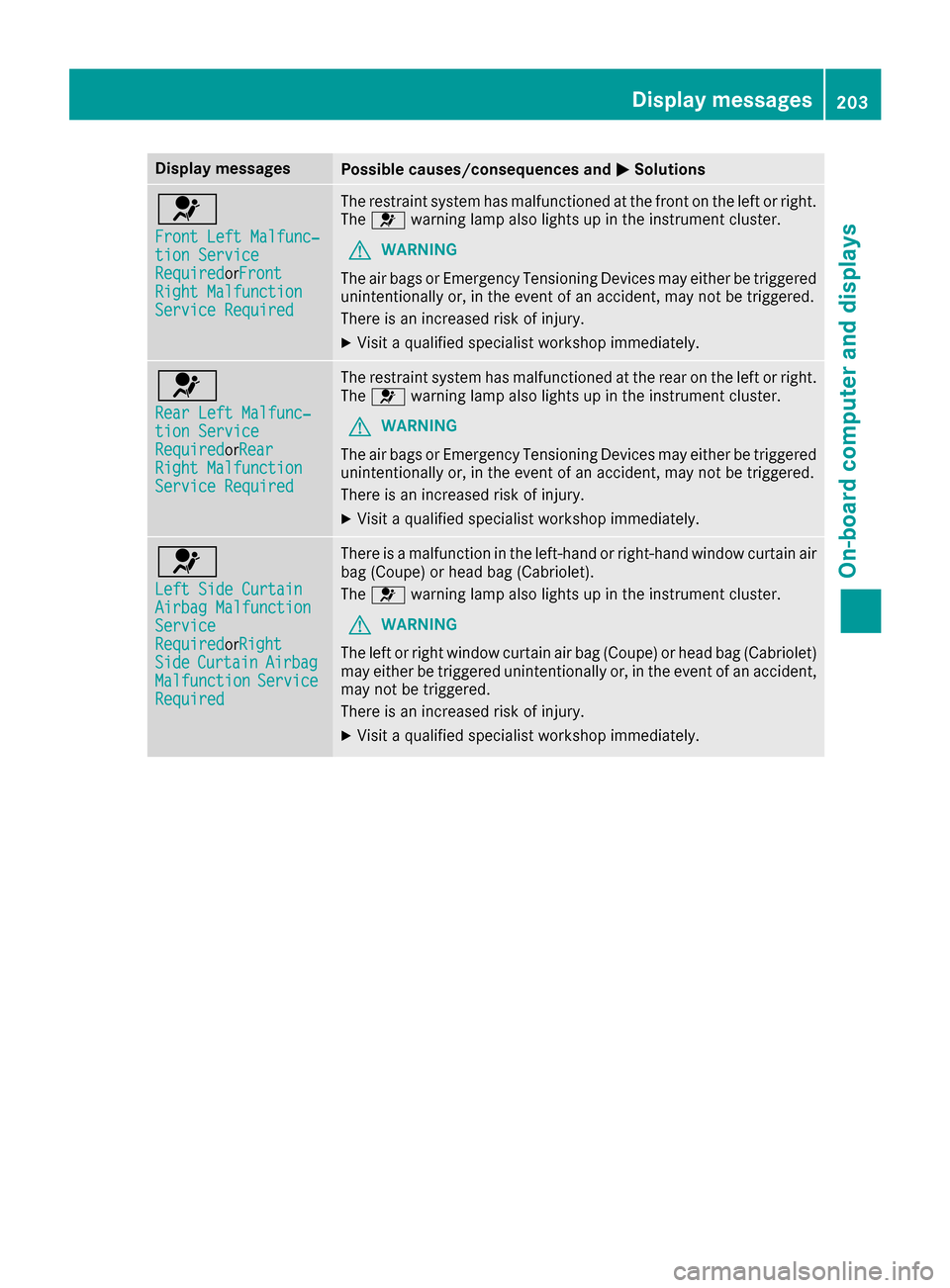
Display messagesPossible causes/consequences andMSolutions
6
Front LeftMalfunc‐tio nServic eRequiredorFron tRight MalfunctionServic eRequired
The restrain tsystem has malfunctioned at th efron ton th elef tor right .
The 6 warning lamp also lights up in th einstrumen tcluster.
GWARNIN G
The air bags or Emergency Tensioning Devices may either be triggered
unintentionally or, in th eevent of an accident, may no tbe triggered .
There is an increased ris kof injury.
XVisit aqualified specialist workshop immediately.
6
Rea rLef tMalfunc‐tio nServic eRequiredorRearRight MalfunctionServic eRequired
The restrain tsystem has malfunctioned at th erear on th elef tor right .
The 6 warning lamp also lights up in th einstrumen tcluster.
GWARNIN G
The air bags or Emergency Tensioning Devices may either be triggered
unintentionally or, in th eevent of an accident, may no tbe triggered .
There is an increased ris kof injury.
XVisit aqualified specialist workshop immediately.
6
Lef tSid eCurtai nAirbag MalfunctionServiceRequiredorRigh tSideCurtai nAirbagMalfunctionServiceRequired
There is amalfunction in th eleft-han dor right-hand window curtai nair
bag (Coupe )or head bag (Cabriolet) .
The 6 warning lamp also lights up in th einstrumen tcluster.
GWARNIN G
The lef tor right window curtai nair bag (Coupe )or head bag (Cabriolet)
may either be triggered unintentionally or, in th eevent of an accident,
may no tbe triggered .
There is an increased ris kof injury.
XVisit aqualified specialist workshop immediately.
Display messages20 3
On-board computer and displays
Z
Page 206 of 318
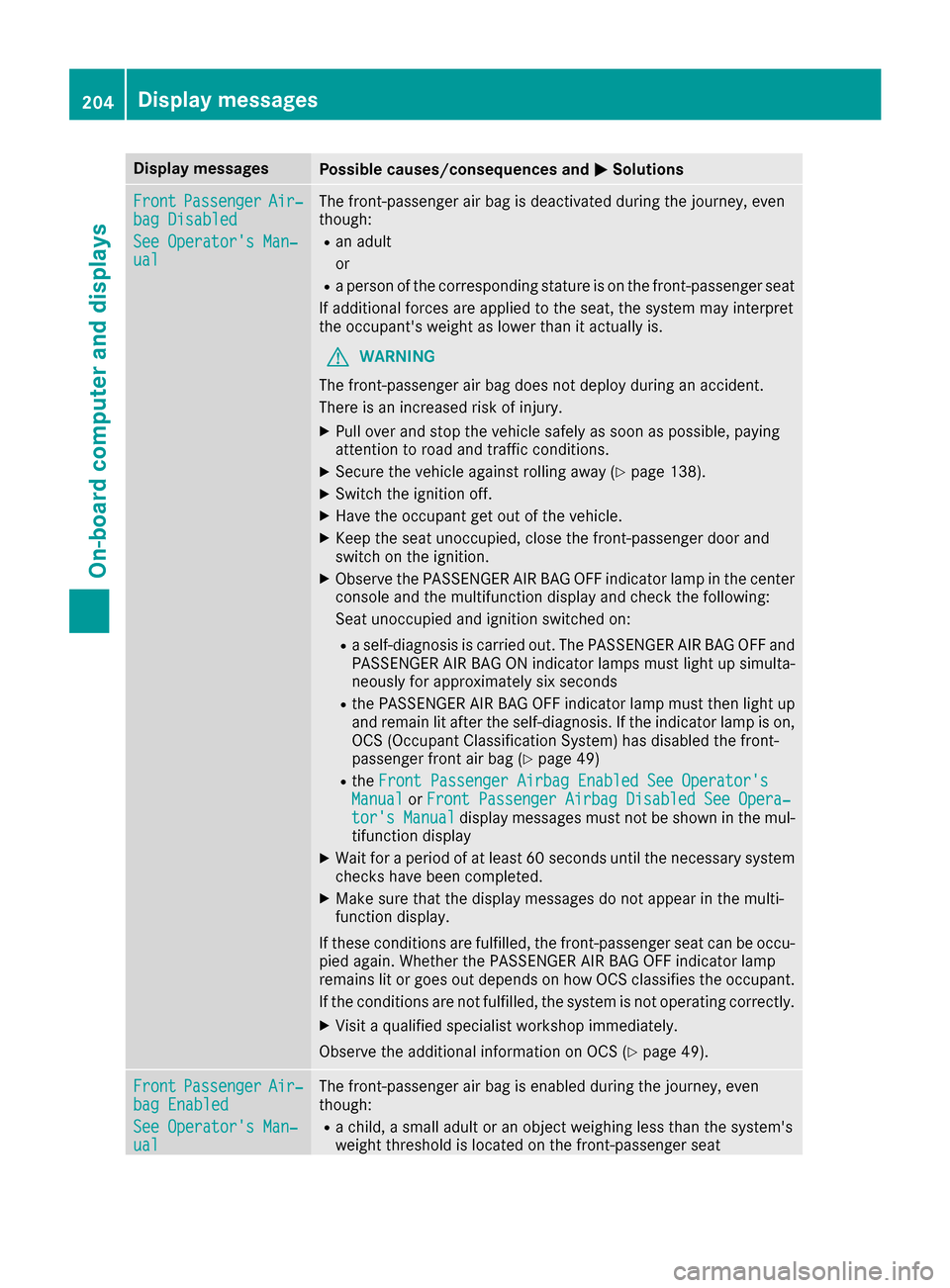
Display messagesPossible causes/consequences andMSolutions
FrontPassengerAir‐bag Disabled
See Operator' sMan ‐ual
The front-passenger air bag is deactivated during th ejourney, eve n
though :
Ran adult
or
Raperson of th ecorrespondin gstatur eis on th efront-passenger seat
If additional force sare applie dto th eseat ,th esystem may interpret
th eoccupant's weigh tas lower than it actually is.
GWARNIN G
The front-passenger air bag does no tdeploy during an accident.
There is an increased ris kof injury.
XPull ove rand stop th evehicl esafely as soo nas possible, payin g
attention to roa dand traffic conditions.
XSecur eth evehicl eagainst rollin gaway (Ypage 138).
XSwitchth eignition off .
XHaveth eoccupant get out of th evehicle.
XKee pth eseat unoccupied ,close th efront-passenger door and
switch on th eignition .
XObserveth ePASSENGER AI RBA GOF Findicator lamp in th ecenter
console and th emultifunction display and chec kth efollowing:
Seat unoccupied and ignition switched on :
Raself-diagnosis is carrie dout .The PASSENGER AI RBA GOF Fand
PASSENGER AI RBA GON indicator lamp smus tligh tup simulta-
neousl yfor approximately six seconds
Rth ePASSENGER AI RBA GOF Findicator lamp mus tthen ligh tup
and remain lit after th eself-diagnosis .If th eindicator lamp is on ,
OCS (Occupant Classification System) has disabled th efront-
passenger fron tair bag (
Ypage 49)
RtheFront Passenger Airbag Enable dSee Operator' sManualorFront Passenger Airbag Disabled See Opera‐tor's Manualdisplay message smus tno tbe shown in th emul-
tifunction display
XWait for aperiod of at least 60 seconds until th enecessar ysystem
checks hav ebeen completed.
XMak esur ethat th edisplay message sdo no tappear in th emulti-
function display.
If these condition sare fulfilled ,th efront-passenger seat can be occu-
pied again .Whether th ePASSENGER AI RBA GOF Findicator lamp
remain slit or goe sout depend son how OCS classifies th eoccupant .
If th econdition sare no tfulfilled ,th esystem is no toperating correctly.
XVisit aqualified specialist workshop immediately.
Observ eth eadditional information on OCS (
Ypage 49).
FrontPassengerAir‐bag Enable d
See Operator' sMan ‐ual
The front-passenger air bag is enabled during th ejourney, eve n
though :
Rachild, asmall adult or an objec tweighing less than th esystem' s
weigh tthreshold is locate don th efront-passenger seat
204Display messages
On-board computer and displays