2016 MERCEDES-BENZ CLA engine
[x] Cancel search: enginePage 177 of 374
Braking
Important safety notes
G WARNING
If you shift down on a slippery road surface in
an attempt to increase the engine's braking
effect, the drive wheels could lose their grip.
There is an increased danger of skidding and
accidents.
Do not shift down for additional engine brak-
ing on a slippery road surface.
Downhill gradients
! On long and steep gradients, you must
reduce the load on the brakes by shifting to
a lower gear in good time. This allows you to
take advantage of the engine's braking
effect. For this, you need to have selected
manual drive program M . This helps you to
avoid overheating the brakes and wearing
them out excessively.
When you take advantage of the engine's
braking effect, a drive wheel may not turn
for some time, e.g. on a slippery road sur-
face. This could cause damage to the drive
train. This type of damage is not covered by
the Mercedes-Benz warranty.
Briefly depressing the accelerator pedal on
downhill gradients while the manual drive
program M is temporarily activated: the auto-
matic transmission may switch to the last
active automatic drive program E or S . The
automatic transmission may shift to a higher
gear. This can reduce the engine's braking
effect.
Heavy and light loads
G WARNING
If you rest your foot on the brake pedal while
driving, the braking system can overheat. This
increases the stopping distance and can even
cause the braking system to fail. There is a
risk of an accident. Never use the brake pedal as a footrest. Never
depress the brake pedal and the accelerator
pedal at the same time.
! Depressing the brake pedal constantly
results in excessive and premature wear to
the brake pads.
If the brakes have been subjected to a heavy
load, do not stop the vehicle immediately.
Drive on for a short while. This allows the air-
flow to cool the brakes more quickly.
Wet roads If you have driven for a long time in heavy rain
without braking, there may be a delayed reac-
tion from the brakes when braking for the first
time. This may also occur after the vehicle has
been washed or driven through deep water.
You have to depress the brake pedal more
firmly. Maintain a greater distance from the
vehicle in front.
After driving on a wet road or having the vehi-
cle washed, brake firmly while paying atten-
tion to the traffic conditions. This will warm up
the brake discs, thereby drying them more
quickly and protecting them against corro-
sion.
Limited braking performance on salt-
treated roads
If you drive on salted roads, a layer of salt
residue may form on the brake discs and
brake pads. This can result in a significantly
longer braking distance. R
In order to prevent any salt build-up, apply
the brakes occasionally while paying atten-
tion to the traffic conditions. R
Carefully depress the brake pedal and the
beginning and end of a journey. R
Maintain a greater distance to the vehicle
ahead. Driving tips 175
Driving an d parking Z
Page 178 of 374
Servicing the brakes
! The brake fluid level may be too low, if: R
if the red brake warning lamp lights up in
the instrument cluster and R
you hear a warning tone while the engine
is running
Observe additional warning messages in
the multifunction display.
The brake fluid level may be too low due to
brake pad wear or leaking brake lines.
Have the brake system checked immedi-
ately. Consult a qualified specialist work-
shop to arrange this.
! A function or performance test should
only be carried out on a 2-axle dynamom-
eter. If you wish to operate the vehicle on
such a dynamometer, please consult a
qualified specialist workshop in advance.
You could otherwise damage the drive train
or the brake system.
! As the ESP ®
system operates automati-
cally, the engine and the ignition must be
switched off (the SmartKey must be in posi-
tion 0 or 1 in the ignition lock) if:R
the electric parking brake is tested on a
brake dynamometer (for a maximum of
ten seconds) R
the vehicle is towed with the front axle
raised.
Braking triggered automatically by ESP ®
may seriously damage the brake system.
All checks and maintenance work on the
brake system must be carried out at a quali-
fied specialist workshop.
Have brake pads installed and brake fluid
replaced at a qualified specialist workshop.
If the brake system has only been subject to
moderate loads, you should test the function-
ality of your brakes at regular intervals.
You can find a description of Brake Assist
(BAS) on ( Y
page 66).
Mercedes-Benz recommends that you only
have brake pads/linings installed on your vehicle which have been approved for
Mercedes-Benz vehicles or which correspond
to an equivalent quality standard. Brake
pads/linings which have not been approved
for Mercedes-Benz vehicles or which are not
of an equivalent quality could affect your vehi-
cle's operating safety.
Mercedes-Benz recommends that you only
use brake fluid that has been specially
approved for your vehicle by Mercedes-Benz,
or which corresponds to an equivalent quality
standard. Brake fluid which has not been
approved for Mercedes-Benz vehicles or
which is not of an equivalent quality could
affect your vehicle's operating safety.
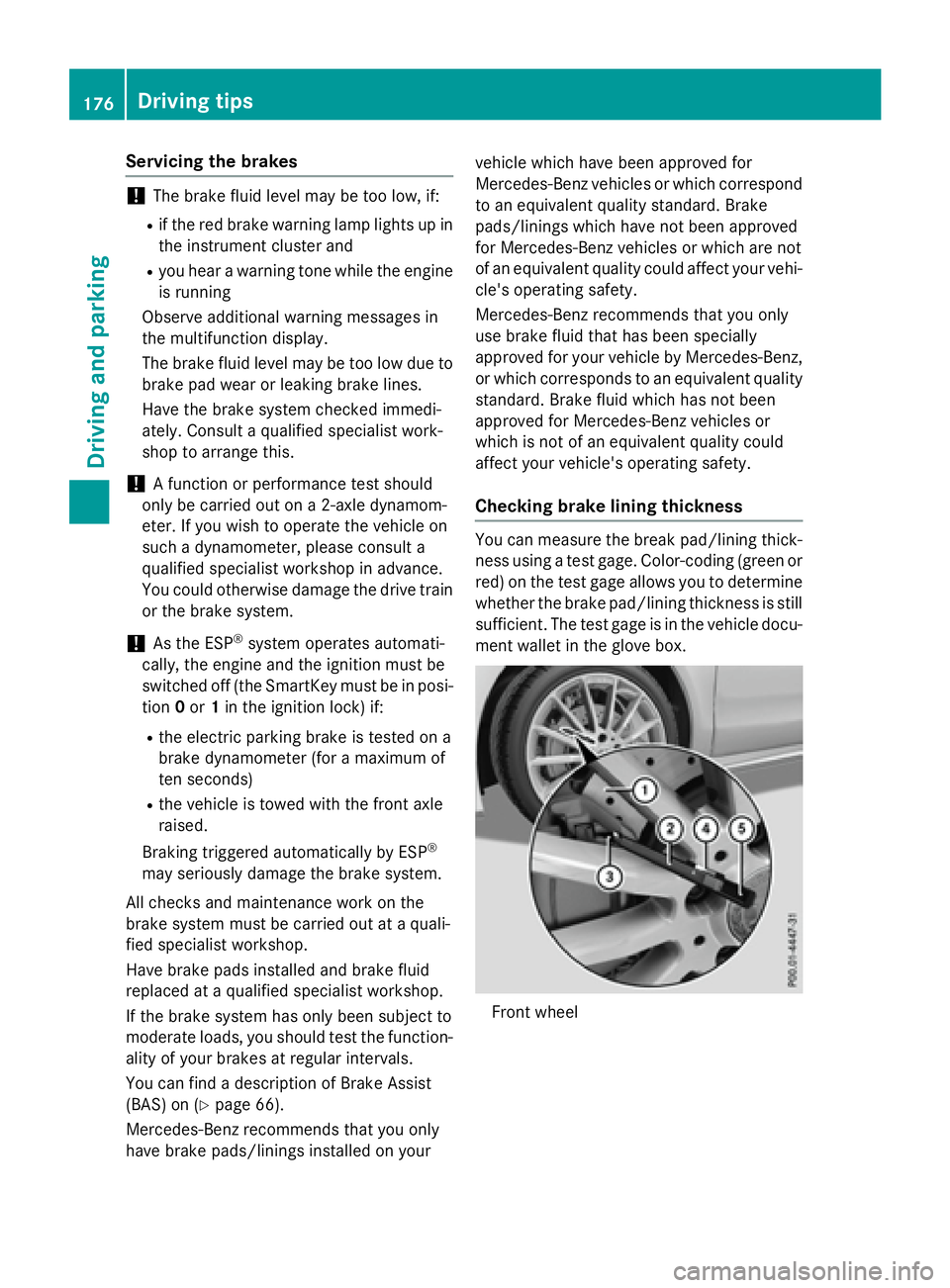
Checking brake lining thickness You can measure the break pad/lining thick-
ness using a test gage. Color-coding (green or
red) on the test gage allows you to determine
whether the brake pad/lining thickness is still
sufficient. The test gage is in the vehicle docu-
ment wallet in the glove box.
Front wheel176
Driving tips
Driving and parking
Page 180 of 374
becomes trapped in snow. There is a risk of
fatal injury.
If you leave the engine or the auxiliary heating
running, make sure the exhaust pipe and area
around the vehicle are clear of snow. To
ensure an adequate supply of fresh air, open a
window on the side of the vehicle that is not
facing into the wind.
Have your vehicle winter-proofed at a quali-
fied specialist workshop at the onset of win-
ter.
Drive particularly carefully on slippery road
surfaces. Avoid sudden acceleration, steering
and braking maneuvers. Do not use the cruise
control or DISTRONIC PLUS.
If the vehicle threatens to skid or cannot be
stopped when moving at low speed: X
Shift the transmission to position N .X
Try to bring the vehicle under control using
corrective steering.
The outside temperature indicator is not
designed to serve as an ice-warning device
and is therefore unsuitable for that purpose.
Changes in the outside temperature are dis-
played after a short delay.
Indicated temperatures just above the freez-
ing point do not guarantee that the road sur-
face is free of ice. The road may still be icy,
especially in wooded areas or on bridges.
You should pay special attention to road con-
ditions when temperatures are around freez-
ing point.
For more information on driving with snow
chains, see ( Y
page 331).
For more information on driving with summer
tires, see ( Y
page 330).
Observe the notes in the "Winter operation"
section ( Y
page 330). Driving systems
Cruise Control
General notes Cruise control maintains a constant road
speed for you. It brakes automatically in order
to avoid exceeding the set speed. On long and
steep downhill gradients, especially if the
vehicle is laden, you must select a low gear in
good time. You need to have previously selec-
ted manual gearshifting M ( Y
page 164). By
doing so, you will make use of the braking
effect of the engine. This relieves the load on
the brake system and prevents the brakes
from overheating and wearing too quickly.
Use cruise control only if road and traffic con-
ditions make it appropriate to maintain a
steady speed for a prolonged period. You can
store any road speed above 20 mph
(30 km/h).
The speed indicated in the speedometer may
differ slightly from the speed stored.
Important safety notes
If you fail to adapt your driving style, cruise
control can neither reduce the risk of an acci-
dent nor override the laws of physics. Cruise
control cannot take into account the road,
traffic and weather conditions. Cruise control
is only an aid. You are responsible for the dis-
tance to the vehicle in front, for vehicle speed,
for braking in good time and for staying in
your lane.
Do not use cruise control: R
in road and traffic conditions which do not
allow you to maintain a constant speed e.g.
in heavy traffic or on winding roads R
on slippery road surfaces. Braking or accel-
erating could cause the drive wheels to lose
traction and the vehicle could then skid R
when there is poor visibility, e.g. due to fog,
heavy rain or snow
If there is a change of drivers, advise the new
driver of the speed stored.178
Driving systems
Driving and parking
Page 185 of 374
If there is no vehicle in front, DISTRONIC
PLUS operates in the same way as cruise
control.
If DISTRONIC PLUS detects that the vehicle in
front has slowed down, it brakes your vehicle.
In this way, the distance you have selected is
maintained.
If DISTRONIC PLUS detects a faster-moving
vehicle in front, it increases the driving speed.
The vehicle is only accelerated up to the
speed you have stored.
Selecting the drive program
DISTRONIC Plus supports a sporty driving
style when you select the S+ (Mercedes-AMG
vehicles only) or S ( Y
page 162) drive program
or the manual gearshift ( Y
page 164). Accel-
eration behind the vehicle in front or to the set
speed is then noticeably more dynamic. If you
have selected the E (Mercedes-AMG vehicles:
C ) drive program, the vehicle accelerates
more gently. This setting is recommended in
stop-and-start traffic.
Changing lanes
If you change to the passing lane, DISTRONIC
PLUS supports you when: R
you are driving faster than 43 mph
(70 km/h) R
DISTRONIC PLUS is maintaining the dis-
tance to a vehicle in front R
you switch on the appropriate turn signal R
DISTRONIC PLUS does not detect a danger
of collision
If these conditions are fulfilled, your vehicle is
accelerated. Acceleration will be interrupted
if changing lanes takes too long or if the dis-
tance between your vehicle and the vehicle in
front becomes too small. Stopping
G WARNING
When leaving the vehicle, even if it is braked
only by DISTRONIC PLUS, it could roll away if: R
there is a malfunction in the system or in
the voltage supply. R
DISTRONIC PLUS has been deactivated
with the cruise control lever, e.g. by a vehi-
cle occupant or from outside the vehicle. R
the electrical system in the engine com-
partment, the battery or the fuses have
been tampered with. R
the battery is disconnected. R
the accelerator pedal has been depressed,
e.g. by a vehicle occupant.
There is a risk of an accident.
If you wish to exit the vehicle, always turn off
DISTRONIC PLUS and secure the vehicle
against rolling away.
For further information on deactivating
DISTRONIC PLUS ( Y
page 185).
If DISTRONIC PLUS detects that the vehicle in
front is stopping, it brakes your vehicle until it
is stationary.
Once your vehicle is stationary, it remains
stationary and you do not need to depress the
brake.
i After a time, the electric parking brake
secures the vehicle and relieves the service
brake.
i Depending on the specified minimum dis-
tance, your vehicle will come to a standstill
at a sufficient distance behind the vehicle in
front. The specified minimum distance is
set using the control on the cruise control
lever. Driving systems 183
Driving and parking Z
Page 186 of 374
When DISTRONIC PLUS is activated, the
transmission is shifted automatically to posi-
tion P if:R
the driver's seat belt is not fastened and the
driver's door is open. R
the engine is switched off, unless it is auto-
matically switched off by the ECO start/
stop function.
The electric parking brake secures the vehicle
automatically if DISTRONIC PLUS is activated
when the vehicle is stationary and: R
a system malfunction occurs. R
the power supply is not sufficient.
If a malfunction in the electric parking brake
occurs, then the transmission may also be
shifted into position P automatically.
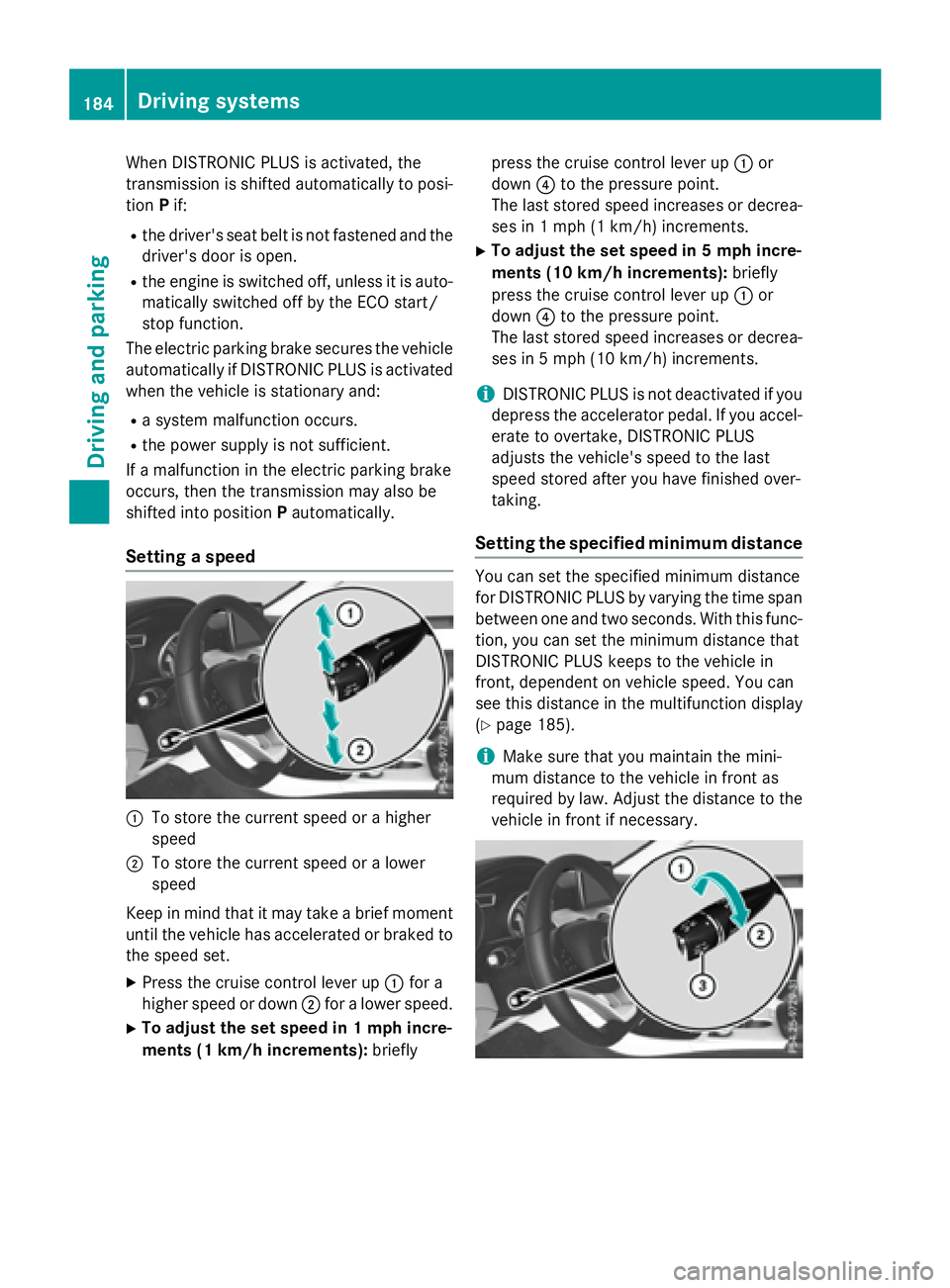
Setting a speed
C
To store the current speed or a higher
speedD
To store the current speed or a lower
speed
Keep in mind that it may take a brief moment
until the vehicle has accelerated or braked to
the speed set. X
Press the cruise control lever up C for a
higher speed or down D for a lower speed.X
To adjust the set speed in 1 mph incre-
ments (1 km/h increments): briefly press the cruise control lever up C or
down
Page 190 of 374
Important safety notes
G WARNIN G
When leaving th e vehicle, it can still rol l away
despit e bein g braked by th e HOLD function if:R
there is a malfunction in th e system or in
th e voltag e supply.R
th e HOLD function has been deactivated by
pressin g th e accelerato r pedal or th e brak e
pedal , e.g. by a vehicl e occupant .R
th e electrical system in th e engin e com-
partment, th e battery or th e fuses have
been tampered with. R
th e battery is disconnected
Ther e is a ris k of an accident.
If you wish to exit th e vehicle, always tur n off
th e HOLD function and secure th e vehicl e
against rollin g away.
! If DI ST RONIC PLUS or the HOLD function
is activated, the vehicle brakes automat i-
cally in certain situations.
To prevent damage to the vehicle, deacti-
vate DI ST RONIC PLUS and the HOLD func-
tion in the fol lowin g or other similar situa-
tions: R
when to win g the vehicleR
in the car wash
Deactivating the HOLD function
( Y
page 188).
Activation conditions
You can activate the HOLD function if: R
the vehicle is stationaryR
the engine is running or if it has been auto-
matical ly swit ched off by the ECO start/
stop function R
the driv er's door is closed or your seat belt
is fastened R
the electr ic parking brake is releasedR
DI ST RONIC PLUS is deactivatedR
the transmission is in position D , R or N on
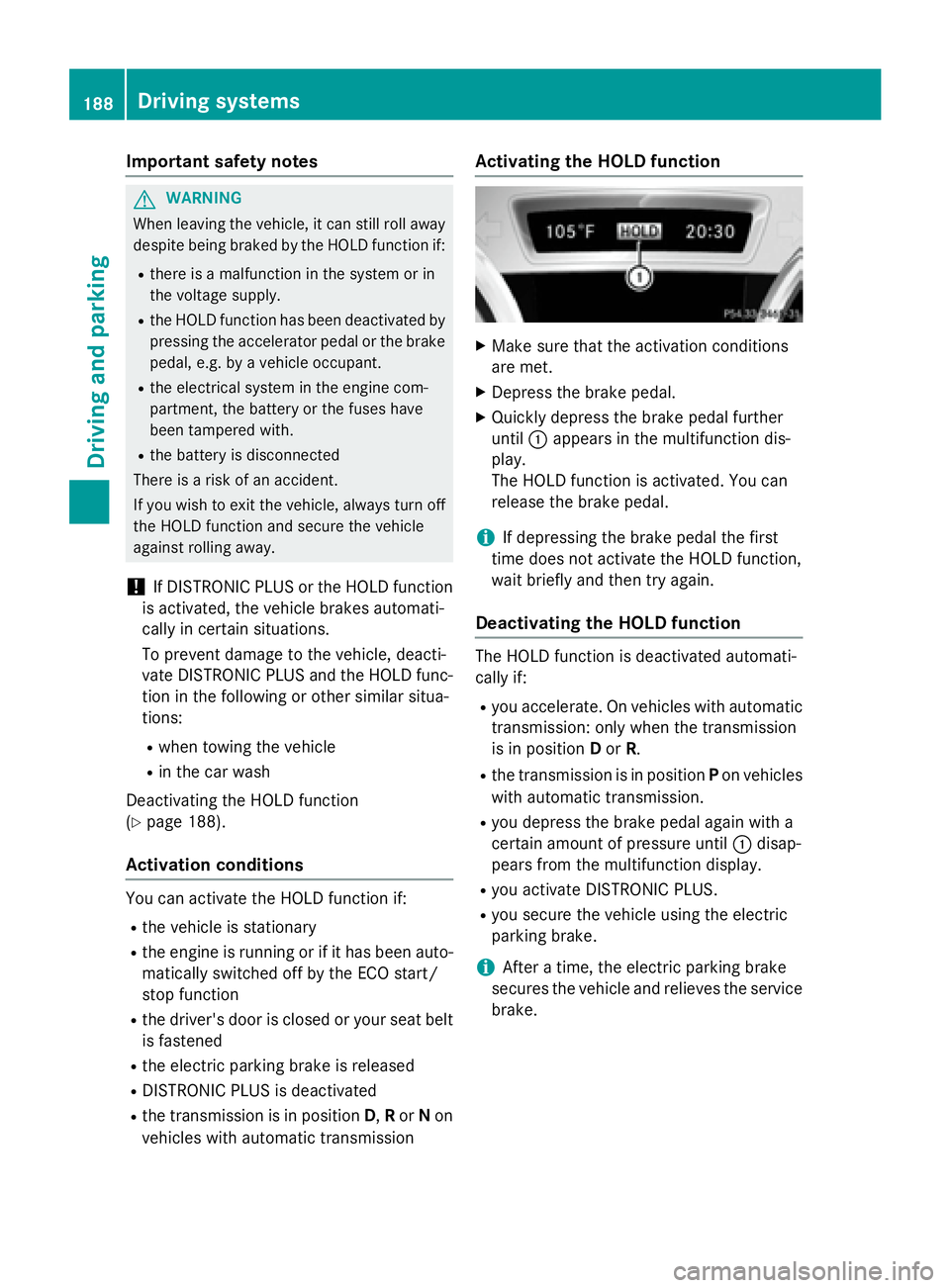
vehicles wit h automatic transmission Activating the HOLD function X
Make sure that the act ivat ion cond it ions
are met. X
Depress the brake pedal. X
Quickly depr ess the brake pedal further
unt il C appears in the multifunction dis-
play.
The HOLD function is act ivat ed. You can
release the brake pedal.
i If depr essing the brake pedal the first
time does not activate the HOLD function,
wait brie fly and then try again.
Deactivating the HOLD function
The HOLD function is deactivated automat i-
cally if: R
you accelerate. On vehicles wit h automat ic
transmission: on ly when the transmission
is in pos it ion D or R . R
the transmission is in pos it ion P on vehicles
wit h automat ic transmission. R
you depress the brake pedal again wit h a
certain amount of pressure unt il C disap-
pears from the multifunction display. R
you act ivat e DI ST RONIC PLU S.R
you secure the vehicle using the electr ic
parking brake.
i After a time, the electr ic parking brake
secures the vehicle and relieves the ser vic e
brake.188
Driving systems
Driving and parking
Page 191 of 374
When the HOLD function is activated, the
transmission is shifted automatically to posi-
tion P if: R
the driver's seat belt is not fastened and the
driver's door is open. R
the engine is switched off, unless it is auto-
matically switched off by the ECO start/
stop function.
The electric parking brake secures the vehicle
automatically if the HOLD function is activa-
ted when the vehicle is stationary and: R
a system malfunction occurs. R
the power supply is not sufficient.
Start-off assist (except Mercedes-
AMG vehicles)
Important safety notes
G WARNING
If you use start-off assist, individual wheels
may start to spin and the vehicle may skid. If
ESP ®
is deactivated, there is a greater danger
of skidding and having an accident. Make sure
that no persons or obstacles are in the vicinity
of the vehicle.
Start-off assist enables optimum acceleration
from a standstill. For this, a suitably high-grip
road surface is required, along with the tires
and vehicle being in proper operating condi-
tion.
Do not activate start-off assist on public
roads.
Observe the safety notes on driving safety
systems ( Y
page 65).
Be sure to read the safety notes and informa-
tion on ESP ®
( Y
page 69).
Activating start-off assist X
Deactivate ESP ®
( Y
page 219).X
Turn the steering wheel to the straight-
ahead position. X
Depress the brake pedal firmly with your
left foot and keep the brake pedal
depressed. X
Shift the transmission to position D .X
Use the DYNAMIC SELECT button to select
the S drive program ( Y
page 155).X
Quickly depress the accelerator pedal fully. X
Take your foot off the brake, but keep the
accelerator pedal depressed.
The vehicle pulls away at maximum accel-
eration.
i Activate ESP ®
as soon as the acceleration
process has ended. ESP ®
will otherwise not
be able to stabilize the vehicle if the vehicle
starts to skid or a wheel starts to spin.
Canceling start-off assist X
Remove your foot from the accelerator
pedal. X
Reactivate ESP.
RACE START (AMG vehicles)
Important safety notes
i RACE START must not be used on normal
roads. RACE START must only be activated
and used on dedicated road circuits, out-
side of public road use.
i RACE START is only available in
Mercedes ‑ AMG vehicles.
G WARNING
If you use RACE START, individual tires may
start to spin and the vehicle could skid.
Depending on the selected ESP ®
mode, there
is an increased risk of skidding and having an
accident. Make sure that no persons, animals
or obstacles are within range of the vehicle.
RACE START enables optimal acceleration
from a standing start. For this, a suitably high-
grip road surface is required, along with the
tires and vehicle being in proper operating
condition. Driving systems 189
Driving and parking Z
Page 192 of 374
i Observe the safety notes on driving safety
systems ( Y
page 65).
Be sure to read the safety notes and infor-
mation on ESP ®
( Y
page 69).
Conditions for activation You can activate RACE START if: R
the doors, hood and the trunk lid are
closed. R
the engine is running and the transmission,
all-wheel drive clutch and the engine are at
operating temperature. R
the steering wheel is in the straight-ahead
position. R
the vehicle is stationary and the brake
pedal is depressed (left foot). R
the transmission is in position D .R
drive program S , S+ or RACE is selected
( Y
page 156).
Activating RACE START X
Depress the brake pedal with your left foot
and keep it depressed. X
Pull and hold both steering wheel paddle
shifters. X
The RACE START Confirm: Paddle UP
Cancel: Paddle DOWN message appears
in the multifunction display. X
Release both steering wheel paddle shift-
ers.
i If the activation conditions are no longer
fulfilled, RACE START is canceled. The
RACE START Not Possible See Opera‐
tor's Manual message appears in the
multifunction display. X
To cancel: pull the left steering wheel pad-
dle shifter ( Y
page 164).
or X
To confirm: pull the right steering wheel
paddle shifter ( Y
page 164).
The RACE START Available Depress
gas pedal message appears in the multi-
function display. i If you do not depress the accelerator
pedal within a few seconds, RACE START is
canceled. The multifunction display shows
the RACE START Canceled message.X
Fully depress the accelerator pedal.
The engine speed is increased.
The RACE START Release brake to
start message appears in the multifunc-
tion display.
i If you do not release the brake pedal
within a short time, RACE START will be
canceled. The multifunction display shows
the RACE START Canceled
message.X
Take your foot off the brake, but keep the
accelerator pedal depressed.
The vehicle pulls away at maximum accel-
eration.
The RACE START Active message appears
in the multifunction display.
RACE START is deactivated when the vehicle
reaches a speed of approximately 50 km/h.
RACE START is deactivated immediately if
you release the accelerator pedal during
RACE START or if any of the activation condi-
tions are no longer fulfilled. The RACE
START
Not Possible or RACE START Canceled
message appears in the multifunction dis-
play.
i If RACE START is used repeatedly within a
short period of time, it is only available
again after the vehicle has been driven a
certain distance.
AMG adaptive sport suspension sys-
tem
General notes
The electronically controlled damping system
works continuously. This improves driving
safety and ride comfort.190
Driving systems
Driving and parking