2016 MERCEDES-BENZ CLA ESP
[x] Cancel search: ESPPage 62 of 374
tions and the notes on use. Please ensure,
that the base of the child restraint system is
always resting completely on the seat cush-
ion. Never place objects, e.g. cushions, under
or behind the child restraint system. Only use
child restraint systems with the original cover
designed for them. Only replace damaged
covers with genuine covers.
G WARNING
If the child restraint system is installed incor-
rectly or is not secured, it can come loose in
the event of an accident, heavy braking or a
sudden change in direction. The child
restraint system could be thrown about, strik-
ing vehicle occupants. There is an increased
risk of injury, possibly even fatal.
Always install child restraint systems prop-
erly, even if they are not being used. Make
sure that you observe the child restraint sys-
tem manufacturer's installation instructions.
You will find further information on stowing
objects, luggage or loads under "Loading
guidelines" ( Y
page 272).
G WARNING
Child restraint systems or their securing sys-
tems which have been damaged or subjected
to a load in an accident can no longer protect
as intended. The child cannot then be
restrained in the event of an accident, heavy
braking or sudden changes of direction. There
is an increased risk of injury, possibly even
fatal.
Replace child restraint systems which have
been damaged or subjected to a load in an
accident as soon as possible. Have the secur-
ing systems on the child restraint system
checked at a qualified specialist workshop,
before you install a child restraint system
again. The securing systems of child restraint sys-
tems are: R
the seat belt system R
the LATCH-type (ISOFIX) securing rings R
the Top Tether anchorages
If it is absolutely necessary to carry a child on
the front-passenger seat, be sure to observe
the information on the "Occupant Classifica-
tion System (OCS)" ( Y
page 51). There you
will also find information on deactivating the
front-passenger front air bag.
All child restraint systems must meet the fol-
lowing standards: R
U.S. Federal Motor Vehicle Safety Stand-
ards 213 and 225 R
Canadian Motor Vehicle Safety Standards
213 and 210.2
Confirmation that the child restraint system
corresponds to the standards can be found
on an instruction label on the child restraint
system. This confirmation can also be found
in the installation instructions that are inclu-
ded with the child restraint system.
Observe the warning labels in the vehicle inte-
rior and on the child restraint system.
LATCH-type (ISOFIX) child seat secur-
ing system
G WARNING
LATCH-type (ISOFIX) child restraint systems
do not offer sufficient protective effect for
children whose weight is greater than 48 lbs
(22 kg) who are secured using the safety belt
integrated in the child restraint system. In the
event of an accident, a child might not be
restrained correctly. This poses an increased
risk of injury or even fatal injury.
If the child weighs more than 48 lbs (22 kg),
only use LATCH-type (ISOFIX) child restraint
systems with which the child is also secured
with the vehicle seat belt. Also secure the
child restraint system with the Top Tether
belt, if available.60
Children in the vehicle
Safety
Page 67 of 374

Drivin g safet y systems
Overview of drivin g safet y systemsIn this section , you will fin d information about
th e following drivin g safet y systems :R
AB S ( A nti-loc k B rakin g S ystem)
( Y
page 65) R
BA S ( B rake A ssist S ystem) ( Y
page 66 )R
COLLISION PREVENTION ASSIST PLU S
( Y
page 66 )R
ES P ®
( E lectronic S t ability P rogram)
( Y
page 69 )R
EB D ( E lectroni c B r ak e forc e D i stribution )
( Y
page 72) R
ADAPTIV E BRAKE ( Y
page 72 )R
STEE R CONTROL ( Y
page 72 )
Important safet y notesIf you fail to adapt your drivin g style or if you
are inattentive , th e drivin g safet y systems can
neither reduce th e ris k of an acciden t no r
override th e laws of physics. Driving safet y
systems are merely aids designed to assist
driving. You are responsible fo r maintainin g
th e distanc e to th e vehicle in front, fo r vehicle
speed, fo r braking in goo d time, and fo r stay-
in g in lane. Always adapt your drivin g style to
suit th e prevailin g road and weather condi-
tion s and maintain a saf e distanc e from th e
vehicle in front. Drive carefully.
The drivin g safet y systems described only
wor k as effectively as possible when there is
adequat e contact between th e tires and th e
road surface. Please pay special attention to
th e note s on tires , recommended minimum
tire tread depths, etc. ( Y
page 328).
In wintr y drivin g conditions, always use winte r
tires (M+ S tires ) and if necessary, snow
chains. Only in this way will th e drivin g safet y
systems described in this section wor k as
effectively as possible. ABS (Anti-lock Braking System)
General information AB S regulates brake pressure in suc h a way
that th e wheels do no t loc k when you brake .
Thi s allow s you to continue steerin g th e vehi-
cl e when braking .
The % AB S warnin g lamp in th e instrumen t
cluster lights up when th e ignition is switched
on . It goe s out when th e engin e is running .
AB S works from a speed of about 5 mph
(8 km/h), regardles s of road-surfac e condi-
tions. AB S works on slipper y surfaces, eve n
when you only brake gently.
Important safet y notes
i Observ e th e "Important safet y notes" sec -
tion ( Y
page 65).
G WARNING
If AB S is faulty, th e wheels could loc k when
braking . The steerability and braking charac -
teristics may be severely impaired. Addition -
ally, further drivin g safet y systems are deac -
tivated. There is an increase d danger of skid-
din g and accidents .
Drive on carefully. Hav e AB S checke d imme-
diately at a qualified specialis t workshop .
Whe n AB S is malfunctioning, other systems ,
includin g drivin g safet y systems , will also
becom e inoperative . Observ e th e information
on th e AB S warnin g lamp ( Y
page 261) and
display message s whic h may be shown in th e
instrumen t cluster ( Y
page 228).
Braking X
If ABS intervenes: continue to depress th e
brake peda l vigorousl y until th e braking sit -
uation is over. X
To make a full brak e application:
depress th e brake peda l wit h full force.
If AB S intervenes when braking , you will feel a
pulsin g in th e brake pedal.Driving safety systems 65
Safety Z
Page 71 of 374
ESP ®
(Electronic Stability Program)
General notes
i Observe the "Important safety notes" sec-
tion ( Y
page 65).
ESP ®
monitors driving stability and traction,
i.e. power transmission between the tires and
the road surface.
If ESP ®
detects that the vehicle is deviating
from the direction desired by the driver, one
or more wheels are braked to stabilize the
vehicle. The engine output is also modified to
keep the vehicle on the desired course within
physical limits. ESP ®
assists the driver when
pulling away on wet or slippery roads. ESP ®
can also stabilize the vehicle during braking.
ETS/4ETS (Electronic Traction System)
i Observe the "Important safety notes" sec-
tion ( Y
page 65).
ETS traction control is part of ESP ®
. On vehi-
cles with 4MATIC, 4ETS is part of ESP ®
.
Traction control brakes the drive wheels indi-
vidually if they spin. This enables you to pull
away and accelerate on slippery surfaces, for
example if the road surface is slippery on one
side. In addition, more drive torque is trans-
ferred to the wheel or wheels with traction.
Traction control remains active, even if you
deactivate ESP ®
.
Important safety notes
i Observe the "Important safety notes" sec-
tion ( Y
page 65).
G WARNING
If ESP ®
is malfunctioning, ESP ®
is unable to
stabilize the vehicle. Additionally, further driv-
ing safety systems are deactivated. This
increases the risk of skidding and an accident.
Drive on carefully. Have ESP ®
checked at a
qualified specialist workshop. Vehicles without 4MATIC: when towing
your vehicle with the front axle raised, it is
important that you observe the notes on ESP ®
( Y
page 323).
If the
Page 72 of 374
Deactivating/activating ESP ®
(excep t
Mercedes ‑ AMG vehicles )Important safet y notes
You can selec t between th e following states
of ES P ®
:R
ES P ®
is activated.R
ES P ®
is deactivated.
G WARNING
If you deactivat e ES P ®
, ES P ®
no longer sta-
bilizes th e vehicle. There is an increase d ris k
of skidding and an accident.
Only deactivat e ES P ®
in th e situation s descri-
bed in th e following.
It may be bes t to deactivat e ES P ®
in th e fol-
lowin g situations:R
when usin g snow chain sR
in deep snow R
on san d or grave l
i Activat e ES P ®
as soo n as th e situation s
described abov e no longer apply. ES P ®
will
otherwise no t be able to stabilize th e vehi-
cl e if th e vehicle start s to skid or a whee l
start s to spin.
! Avoid spinnin g th e driven wheels fo r an
extended period wit h ES P ®
deactivated.
You could otherwise damage th e drivetrain .
Deactivating/activating ESP ®
You can deactivat e or activat e ES P ®
via th e
on-boar d compute r ( Y
page 219).
ESP ®
deactivated:
The
Page 73 of 374
In the following situations, it may be better to
activate SPORT handling mode or deactivate
ESP ®
: R
when using snow chains R
in deep snow R
on sand or gravel R
on specially designated roads when the
vehicle's own oversteering and understeer-
ing characteristics are desired
Driving in SPORT handling mode or without
ESP ®
requires an extremely qualified and
experienced driver.
i Activate ESP ®
as soon as the situations
described above no longer apply. ESP ®
will
otherwise not be able to stabilize the vehi-
cle if the vehicle starts to skid or a wheel
starts to spin.
! Avoid spinning the driven wheels for an
extended period with ESP ®
deactivated.
You could otherwise damage the drivetrain.
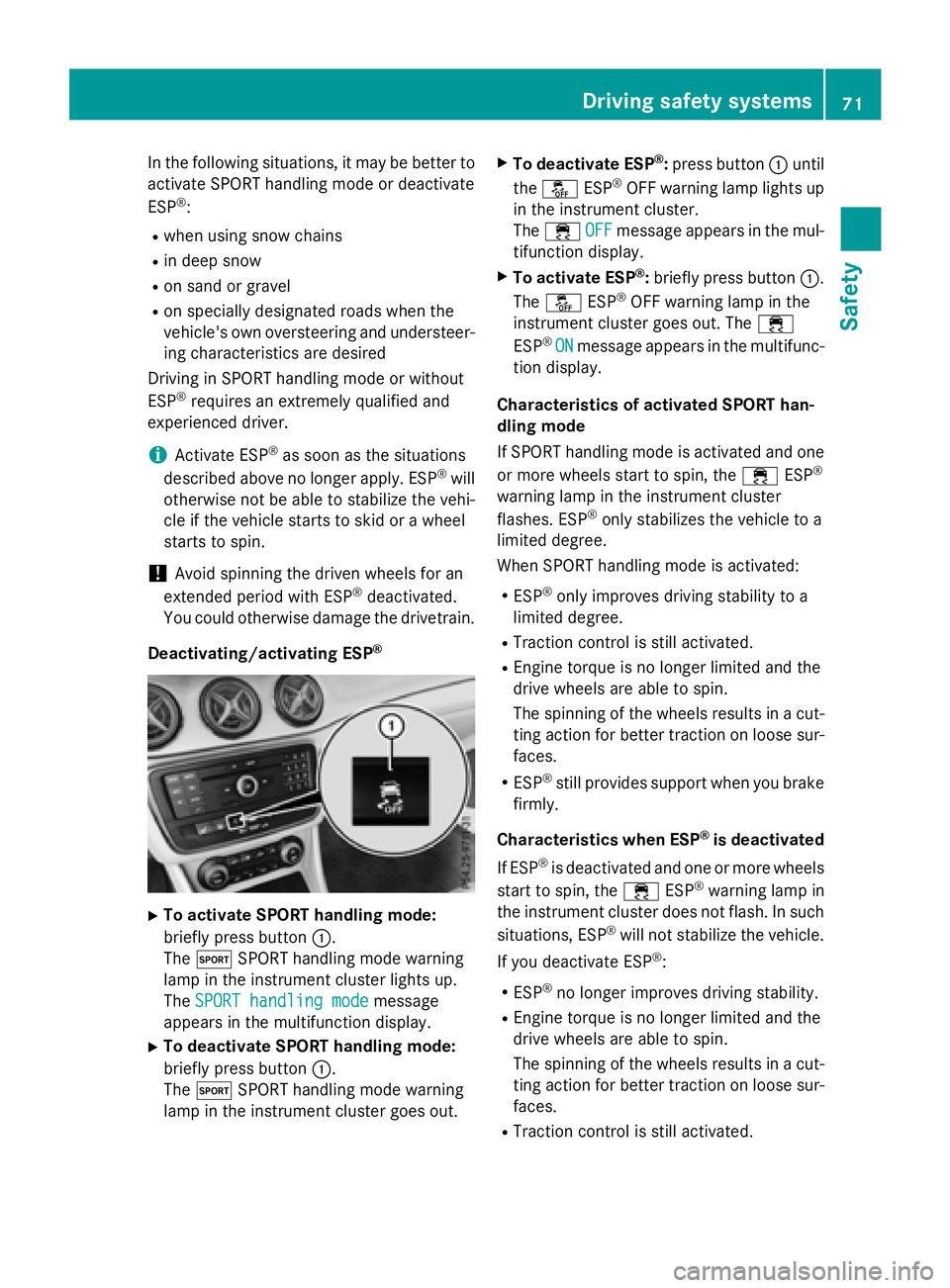
Deactivating/activating ESP ®
X
To activate SPORT handling mode:
briefly press button C .
The t SPORT handling mode warning
lamp in the instrument cluster lights up.
The SPORT handling mode message
appears in the multifunction display. X
To deactivate SPORT handling mode:
briefly press button C .
The t SPORT handling mode warning
lamp in the instrument cluster goes out. X
To deactivate ESP ®
: press button C until
the
Page 74 of 374
R
COLL IS ION PREVENTION AS SIST is no lon-
ger available; nor is it activated if you brake
firmly wit h assistance from ESP ®
.R
ESP ®
st ill provides support when you brake
firmly.
ESP ®
trailer stabilizationGeneral info rm ation
If your veh icle/t railer combination begins to
swerve, ESP ®
assists you in this situation.
ESP ®
slows the vehicle down by braking and
limit ing the engine output unt il the vehicle/
trailer co mbin ation has stabilized.
Import ant safety notes
G WARNIN G
If road and weather condition s are poor ,
trailer stabilization will no t be able to preven t
th e vehicle/traile r combination from swerv-
ing . Trailers wit h a high cente r of gravity can
tip ove r before ES P ®
can detect this. Ther e is
a ris k of an accident.
Always adapt your driving style to th e prevail-
ing road and weather conditions.
If your veh icle wit h trailer (vehicle/trailer
co mbin ation) begins to lurch, you can only
st abiliz e the vehicle /t railer combination by
depr essing the brake firmly.
ESP ®
trailer st abiliz ation is active above
spee ds of about 65 km/h.
ESP ®
trailer stabilization does not work if
ESP ®
is deactivated or disabled because of a
malfunction.
EBD (electronic brake force distribu-
tion)
General information
EBD mon it ors and controls the brake pres-
sure on the rear wheels to improve driving
st abilit y while braking. Important safety notes
i Observe the "Im portant safety notes" sec-
tion ( Y
page 65).
G WARNIN G
If EB D is malfunctioning, th e rear wheels can
lock, e.g. under full braking . This increases th e
ris k of skiddin g and an accident.
You should therefor e adapt your driving style
to th e different handlin g characteristics. Hav e
th e brak e system checked at a qualified spe-
cialist workshop.
Observe information regarding indicator and
warning lamps ( Y
page 261) as well as dis-
play messages ( Y
page 230).
ADAPTIVE BRAKE ADAPTIVE BRAKE enhances braking safety
and offers increased braking comfort. In addi-
tion to the braking function, ADAPTIVE BRAKE
also has the HOLD function ( Y
page 187) and
hill start assist ( Y
page 151).
STEER CONTROL
General information
ST EER CONTROL helps you by transmitting a
noticea ble steering force to the steering
wheel in the direction required for vehicle
st abiliz ation.
This steering assistance is pro vide d in partic-
ular if: R
both right wheels or both left wheels are on
a wet or slippery road surface when you
brake. R
the veh icle starts to skid.
Important safety notes
i Observe the "Im portant safety notes" sec-
tion ( Y
page 65).72
Driving safety systems
Safety
Page 75 of 374
No steering assistance is provided from
STEER CONTROL, if: R
ESP ®
is malfunctioning.R
the lighting is faulty.
If ESP ®
is malfunctioning, you will be assisted
further by the electrical power steering.
Protection against theft
Immobilizer The immobilizer prevents your vehicle from
being started without the correct SmartKey. X
To activate with the SmartKey: remove
the SmartKey from the ignition lock. X
To activate with KEYLESS-GO start-
function or KEYLESS-GO: switch the igni-
tion off and open the driver's door. X
To deactivate: switch on the ignition.
When leaving the vehicle, always take the
SmartKey with you and lock the vehicle. Any-
one can start the engine if a valid SmartKey
has been left inside the vehicle.
i The immobilizer is always deactivated
when you start the engine.
In the event that the engine cannot be star-
ted (yet the vehicle's battery is charged),
the system is not operational. Contact an
authorized Mercedes-Benz Center or call
1-800-FOR-MERCedes (in the USA) or
1-800-387-0100 (in Canada).
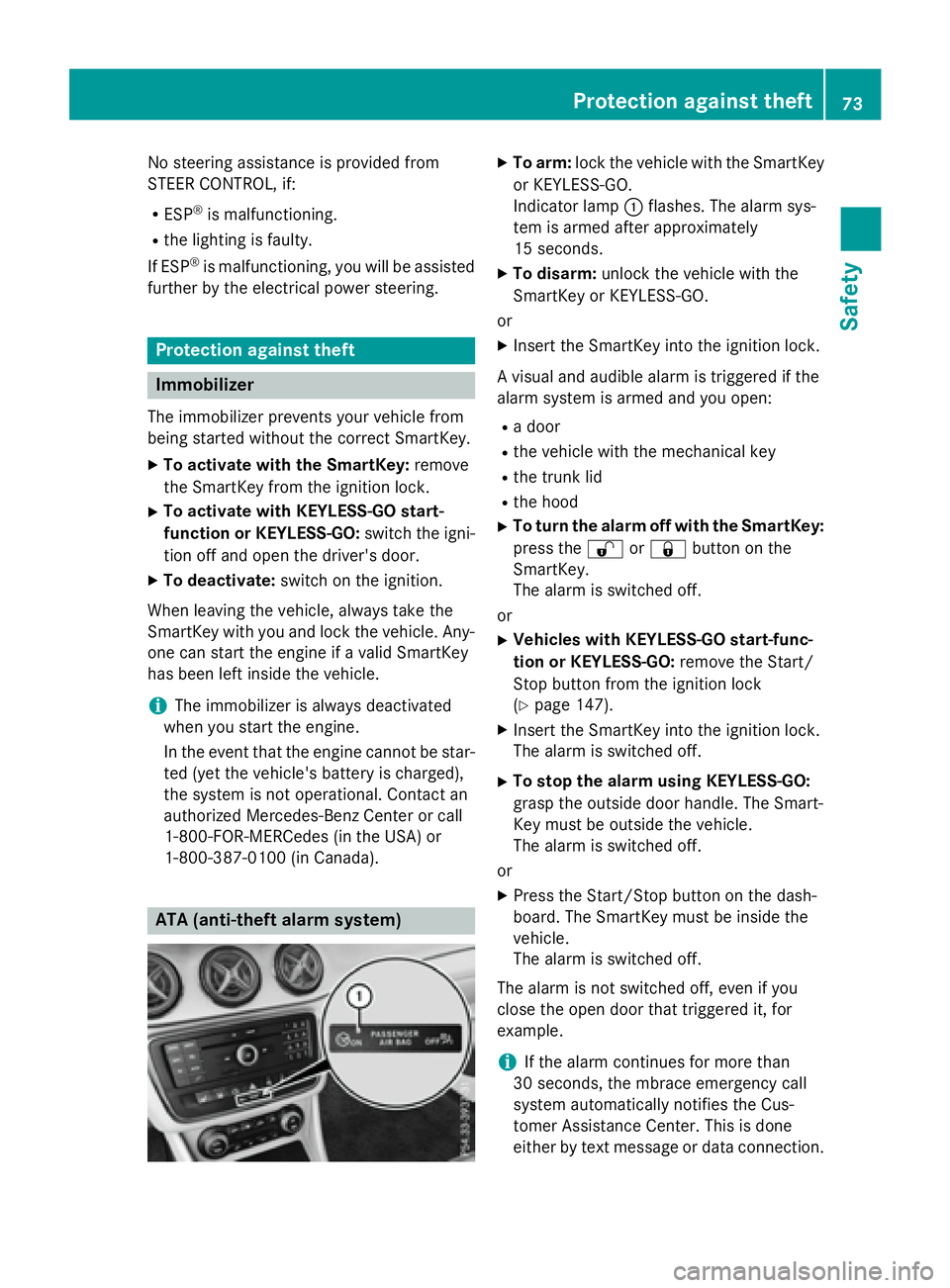
ATA (anti-theft alarm system) X
To arm: lock the vehicle with the SmartKey
or KEYLESS-GO.
Indicator lamp C flashes. The alarm sys-
tem is armed after approximately
15 seconds. X
To disarm: unlock the vehicle with the
SmartKey or KEYLESS-GO.
or X
Insert the SmartKey into the ignition lock.
A visual and audible alarm is triggered if the
alarm system is armed and you open: R
a door R
the vehicle with the mechanical key R
the trunk lid R
the hood X
To turn the alarm off with the SmartKey:
press the 6 or 7 button on the
SmartKey.
The alarm is switched off.
or X
Vehicles with KEYLESS-GO start-func-
tion or KEYLESS-GO: remove the Start/
Stop button from the ignition lock
( Y
page 147). X
Insert the SmartKey into the ignition lock.
The alarm is switched off. X
To stop the alarm using KEYLESS-GO:
grasp the outside door handle. The Smart-
Key must be outside the vehicle.
The alarm is switched off.
or X
Press the Start/Stop button on the dash-
board. The SmartKey must be inside the
vehicle.
The alarm is switched off.
The alarm is not switched off, even if you
close the open door that triggered it, for
example.
i If the alarm continues for more than
30 seconds, the mbrace emergency call
system automatically notifies the Cus-
tomer Assistance Center. This is done
either by text message or data connection.Protection against theft 73
Safety Z
Page 79 of 374
The SmartKey centrally locks/unlocks: R
the doors R
the trunk lid R
the fuel filler flap
The turn signals flash once when unlocking
and three times when locking.
When the locator lighting is activated in Audio
20/COMAND, it lights up when it is dark after
the vehicle is unlocked with the remote con-
trol (see separate operating instructions).
You can also set an audible signal to confirm
that the vehicle has been locked. The audible
signal can be activated and deactivated using
the on-board computer ( Y
page 222).X
To open the trunk lid automatically:
press and hold the T button until the
trunk lid opens ( Y
page 86).
KEYLESS-GO
General notes
Bear in mind that the engine can be started by
any of the vehicle occupants if there is a
SmartKey in the vehicle.
Locking and unlocking
You can start, lock or unlock the vehicle using
KEYLESS-GO. To do this, you only need carry
the SmartKey with you. You can combine the
functions of KEYLESS-GO with those of a con-
ventional SmartKey. Unlock the vehicle by
using KEYLESS-GO, for instance, and lock it
using the 7 button on the SmartKey.
The driver's door and the door at which the
handle is used, must both be closed. The
SmartKey must be outside the vehicle. When
locking or unlocking with KEYLESS-GO, the
distance between the SmartKey and the cor-
responding door handle must not be greater
than 3 ft (1 m). A check which periodically establishes a radio
connection between the vehicle and the
SmartKey determines whether a valid Smart-
Key is in the vehicle. This occurs, for example: R
when starting the engine R
whilst driving R
when the external door handles are
touched R
during convenience closing
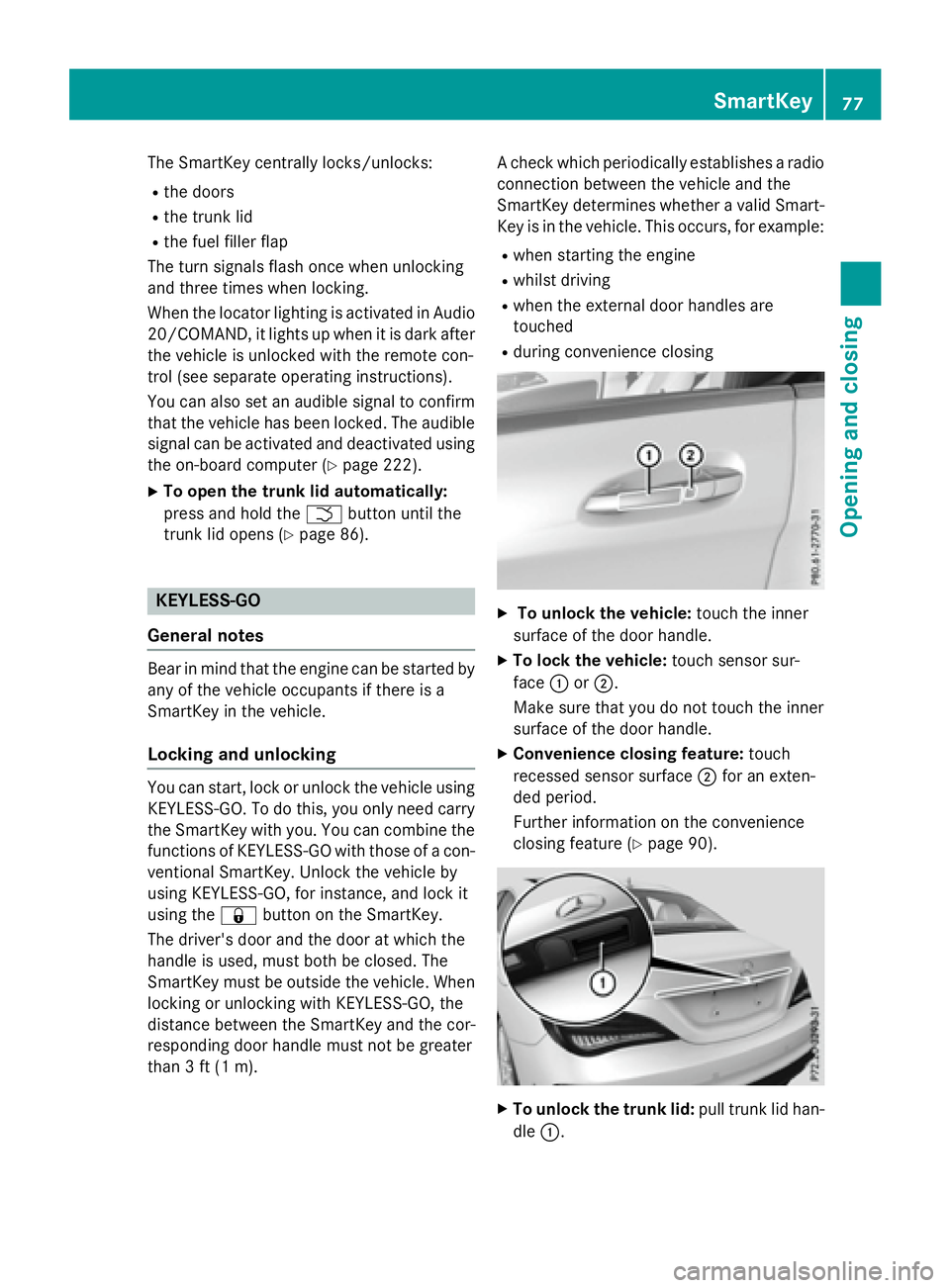
X
To unlock the vehicle: touch the inner
surface of the door handle. X
To lock the vehicle: touch sensor sur-
face C or D .
Make sure that you do not touch the inner
surface of the door handle. X
Convenience closing feature: touch
recessed sensor surface D for an exten-
ded period.
Further information on the convenience
closing feature ( Y
page 90).
X
To unlock the trunk lid: pull trunk lid han-
dle C . SmartKey 77
Opening and closing Z