2016 MERCEDES-BENZ CLA alarm
[x] Cancel search: alarmPage 81 of 374
X
Insert the SmartKey into the ignition lock.
or X
To deactivate the alarm with KEYLESS-
GO: press the Start/Stop button in the igni-
tion lock. The SmartKey must be in the
vehicle.
or X
Lock or unlock the vehicle using KEYLESS-
GO. The SmartKey must be outside the
vehicle.
If you unlock the vehicle using the mechanical
key, the fuel filler flap will not be unlocked
automatically. X
To unlock the fuel filler flap: insert the
SmartKey into the ignition lock.
Removing the mechanical key
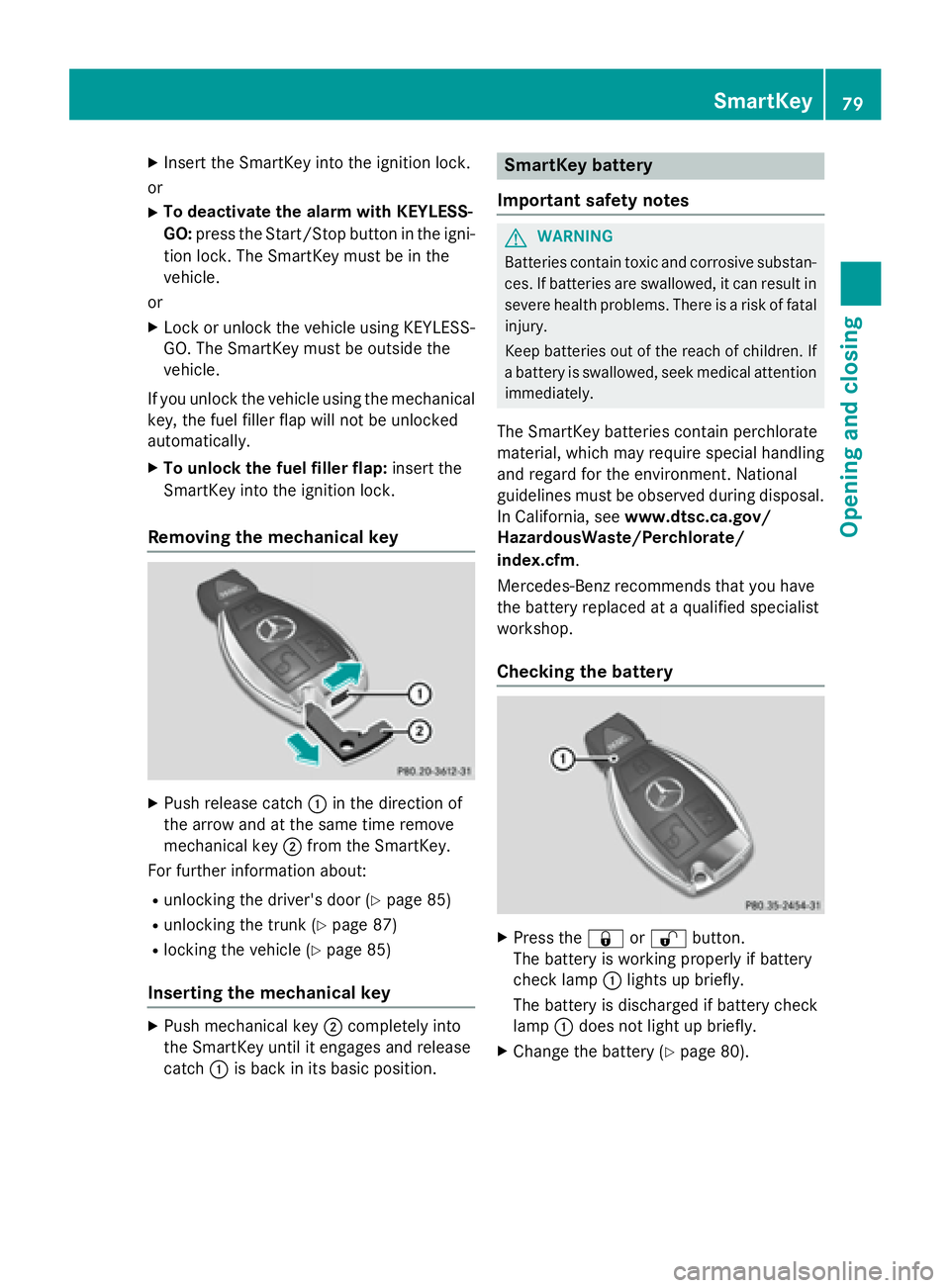
X
Push release catch C in the direction of
the arrow and at the same time remove
mechanical key D from the SmartKey.
For further information about: R
unlocking the driver's door ( Y
page 85)R
unlocking the trunk ( Y
page 87)R
locking the vehicle ( Y
page 85)
Inserting the mechanical key X
Push mechanical key D completely into
the SmartKey until it engages and release
catch C is back in its basic position. SmartKey battery
Important safety notes
G WARNING
Batteries contain toxic and corrosive substan-
ces. If batteries are swallowed, it can result in
severe health problems. There is a risk of fatal
injury.
Keep batteries out of the reach of children. If
a battery is swallowed, seek medical attention
immediately.
The SmartKey batteries contain perchlorate
material, which may require special handling
and regard for the environment. National
guidelines must be observed during disposal.
In California, see www.dtsc.ca.gov/
HazardousWaste/Perchlorate/
index.cfm .
Mercedes-Benz recommends that you have
the battery replaced at a qualified specialist
workshop.
Checking the battery
X
Press the 7 or 6 button.
The battery is working properly if battery
check lamp C lights up briefly.
The battery is discharged if battery check
lamp C does not light up briefly. X
Change the battery ( Y
page 80).SmartKey 79
Opening and closing Z
Page 86 of 374
alarm system. Switch off the alarm
( Y
page 73).
Centrally locking and unlocking the
vehicle from the insideYou can centrally lock or unlock the vehicle
from the inside. This can be useful if you wish
to lock the vehicle before pulling away, for
example.
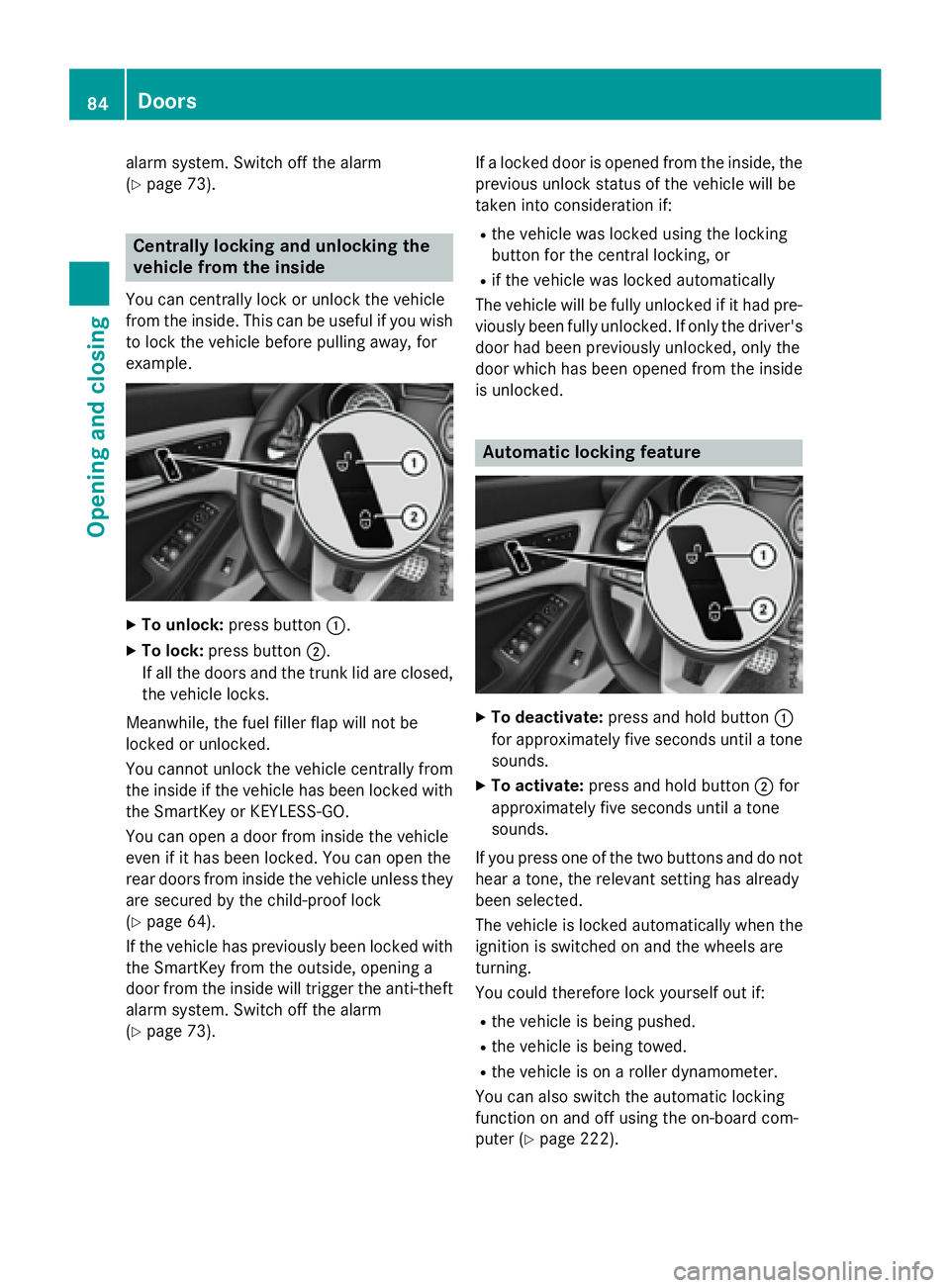
X
To unlock: press button C .X
To lock: press button D .
If all the doors and the trunk lid are closed,
the vehicle locks.
Meanwhile, the fuel filler flap will not be
locked or unlocked.
You cannot unlock the vehicle centrally from
the inside if the vehicle has been locked with
the SmartKey or KEYLESS-GO.
You can open a door from inside the vehicle
even if it has been locked. You can open the
rear doors from inside the vehicle unless they
are secured by the child-proof lock
( Y
page 64).
If the vehicle has previously been locked with
the SmartKey from the outside, opening a
door from the inside will trigger the anti-theft
alarm system. Switch off the alarm
( Y
page 73). If a locked door is opened from the inside, the
previous unlock status of the vehicle will be
taken into consideration if: R
the vehicle was locked using the locking
button for the central locking, or R
if the vehicle was locked automatically
The vehicle will be fully unlocked if it had pre-
viously been fully unlocked. If only the driver's
door had been previously unlocked, only the
door which has been opened from the inside
is unlocked.
Automatic locking feature
X
To deactivate: press and hold button C
for approximately five seconds until a tone
sounds. X
To activate: press and hold button D for
approximately five seconds until a tone
sounds.
If you press one of the two buttons and do not
hear a tone, the relevant setting has already
been selected.
The vehicle is locked automatically when the
ignition is switched on and the wheels are
turning.
You could therefore lock yourself out if: R
the vehicle is being pushed. R
the vehicle is being towed. R
the vehicle is on a roller dynamometer.
You can also switch the automatic locking
function on and off using the on-board com-
puter ( Y
page 222).84
Doors
Opening and closing
Page 87 of 374
Unlocking the driver's door (mechan-
ical key) If the vehicle can no longer be locked or
unlocked with the SmartKey or KEYLESS-GO,
use the mechanical key.
If you use the mechanical key to unlock and
open the driver's door, the anti-theft alarm
system will be triggered ( Y
page 73).X
Take the mechanical key out of the Smart-
Key ( Y
page 78).X
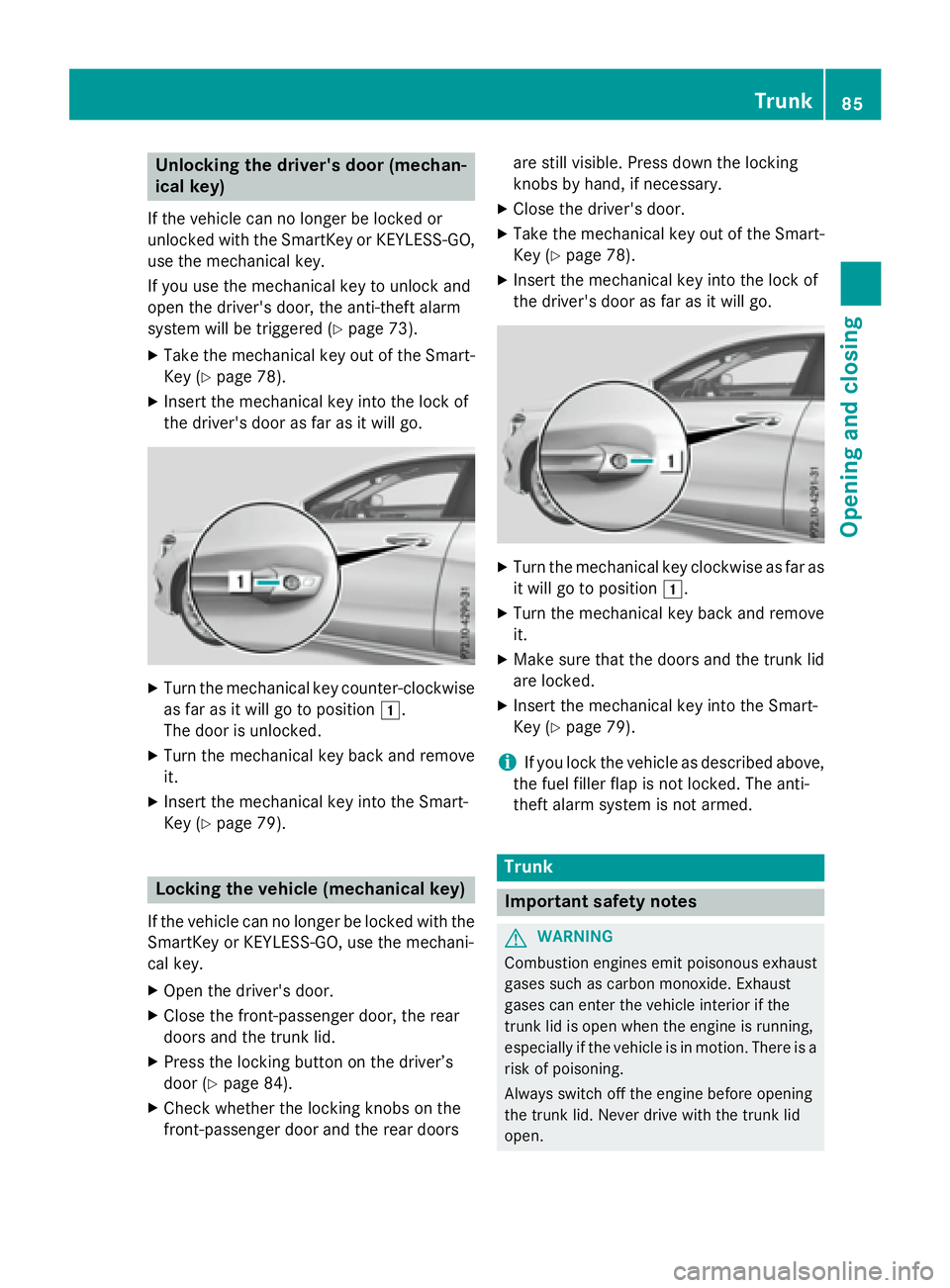
Insert the mechanical key into the lock of
the driver's door as far as it will go.
X
Turn the mechanical key counter-clockwise
as far as it will go to position G .
The door is unlocked. X
Turn the mechanical key back and remove
it. X
Insert the mechanical key into the Smart-
Key ( Y
page 79).
Locking the vehicle (mechanical key)
If the vehicle can no longer be locked with the
SmartKey or KEYLESS-GO, use the mechani-
cal key. X
Open the driver's door. X
Close the front-passenger door, the rear
doors and the trunk lid. X
Press the locking button on the driver’s
door ( Y
page 84).X
Check whether the locking knobs on the
front-passenger door and the rear doors are still visible. Press down the locking
knobs by hand, if necessary. X
Close the driver's door. X
Take the mechanical key out of the Smart-
Key ( Y
page 78). X
Insert the mechanical key into the lock of
the driver's door as far as it will go.
X
Turn the mechanical key clockwise as far as
it will go to position G .X
Turn the mechanical key back and remove
it. X
Make sure that the doors and the trunk lid
are locked. X
Insert the mechanical key into the Smart-
Key ( Y
page 79).
i If you lock the vehicle as described above,
the fuel filler flap is not locked. The anti-
theft alarm system is not armed.
Trunk
Important safety notes
G WARNING
Combustion engines emit poisonous exhaust
gases such as carbon monoxide. Exhaust
gases can enter the vehicle interior if the
trunk lid is open when the engine is running,
especially if the vehicle is in motion. There is a
risk of poisoning.
Always switch off the engine before opening
the trunk lid. Never drive with the trunk lid
open. Trunk 85
Opening and closing Z
Page 152 of 374
Starting procedure with the Start/Stop
button The Start/Stop button can be used to start
the vehicle manually without inserting the
SmartKey into the ignition lock. The Start/
Stop button must be inserted in the ignition
lock and the SmartKey must be in the vehicle.
This mode for starting the engine operates
independently of the ECO start/stop auto-
matic engine start function.
You can start the engine if a valid SmartKey is
in the vehicle. Switch off the engine and
always take the SmartKey with you when
leaving the vehicle, even if you only leave it for
a short time. Pay attention to the important
safety notes. X
Depress the brake pedal and keep it
depressed. X
Press the Start/Stop button once
( Y
page 147).
The engine starts.
Starting procedure via smartphone
Observe the important safety notes on start-
ing the engine ( Y
page 149).
You can also start your engine via your smart-
phone from outside the vehicle. In this case,
the previously selected climate control set-
ting is activated. In this way you can cool or
heat the interior of the vehicle before starting
the journey.
Only start the engine via your smartphone if it
is safe to start and run the engine where your
vehicle is parked.
Observe the legal stipulations in the area
where your vehicle is parked. Engine start via
smartphone may be limited to certain coun-
tries or regions.
You can execute a maximum of two consec-
utive starting attempts via your smartphone.
If you insert the key into the ignition lock, you
can carry out two more starting attempts.
Once you have started the engine, you can
switch the engine off via your smartphone at
any time. You can only start the engine via your smart-
phone if: R
the key is in the ignition lock R
park position P is selected R
the accelerator pedal is not depressed R
the anti-theft alarm system is not activated R
the panic alarm is not activated R
the hazard warning lamps are switched off R
the hood is closed. R
the doors are closed and locked R
the windows and sliding sunroof are closed
Also make sure that: R
the fuel tank is sufficiently filled R
the starter battery is sufficiently charged
G WARNING
Limbs could be crushed or trapped if the
engine is started unintentionally during ser-
vice or maintenance work. There is a risk of
injury.
Always secure the engine against uninten-
tional starting before carrying out mainte-
nance or repair work.
Make sure that the engine cannot be started
via your smartphone before carrying out
maintenance or repairs. You can prevent an
engine start via your smartphone, for exam-
ple, if you: R
switch on the hazard warning lamps R
do not lock the doors R
open the hood.
Pulling away
General notes
G WARNING
If the engine speed is above the idling speed
and you engage transmission position D or R ,
the vehicle could pull away suddenly. There is
a risk of an accident.150
Driving
Driving and parking
Page 290 of 374
Stolen vehicle recovery service If your vehicle has been stolen: X
Notify the police.
The police will issue a numbered incident
report. X
This number will be forwarded to the
Mercedes-Benz Customer Assistance Cen-
ter together with your PIN.
The Mercedes-Benz Customer Assistance
Center then tries to locate the system. The
Mercedes-Benz Customer Assistance Cen-
ter contacts you and the local law enforce-
ment agency if the vehicle is located.
However, only the law enforcement agency
is informed of the location of the vehicle.
If the anti-theft alarm system is activated for
longer than 30 seconds, the Mercedes-Benz
Customer Assistance Center is automatically
notified.
Vehicle Health Check With the Vehicle Health Check, the Customer
Assistance Center can provide improved sup-
port for problems with your vehicle. During an
existing call, vehicle data is transferred to the
Customer Assistance Center.
The customer service representative can use
the received data to decide what kind of
assistance is required. You are then, for
example, guided to the nearest authorized
Mercedes-Benz Center or a recovery vehicle
is called.
If vehicle data needs to be transferred during
an MB Info call or a Roadside Assistance call,
this is initiated by the Customer Assistance
Center.
The Roadside Assistance Connected
message appears in the display. If the Vehicle
Health Check can be started, the Request
for Vehicle Diagnostics Received
Start vehicle diagnostics? message
appears in the display. X
Press the Yes button to confirm the mes-
sage. X
When the Vehicle Diagnostics
Please Start Ignition message
appears: turn the SmartKey to position 2 in
the ignition lock ( Y
page 147). X
If the Please follow the instruc‐
tions received by phone and move
your vehicle to a safe position.
message appears: please follow the
instructions received by phone and move
your vehicle to a safe position.
The message in the display disappears.
The vehicle operating state check begins.
During this procedure, you will see the
Vehicle
Diagnostics Active message.
If you select Cancel , the Vehicle Health
Check is canceled completely.
When the check is complete, the Sending
vehicle diagnostics data. (Voice
connection may be interrupted dur‐
ing data transfer) message appears. The
vehicle data can now be sent. X
Press the OK button to confirm the mes-
sage.
The voice connection with the Customer
Assistance Center is terminated.
The Vehicle Diagnostics: Transfer‐
ring Data... message appears.
The vehicle data is sent to the Customer
Assistance Center.
Depending on what the customer service rep-
resentative agreed with you, the voice con-
nection is re-established after the transfer is
complete. If necessary, you will be contacted
at a later time by another means, e.g. by e-
mail or phone.
Another function of the Vehicle Health Check
is the transfer of service data to the Customer
Assistance Center. If a service is due, the dis-
play shows a message to this effect together
with information about any special offers at
your workshop.
This information can also be called up under
"Owners Online" at http://www.mbusa.com.288
Features
Stowage and features
Page 291 of 374
Information on the data stored in the vehicle
( Y
page 27).
Information on Roadside Assistance
( Y
page 23).
Downloading routes Downloading routes allows you to transfer
and save predefined routes in the navigation
system.
A route can be prepared and sent by either a
customer service representative or under
"Owners Online" at http://www.mbusa.com.
Each route can include up to four way points.
Once a route has been received by the navi-
gation system, you will see the External
route ICON_POI_Category Name_1 has
been saved to "Previous destina‐
tions". Would you like to start nav‐
igation? message on the Audio 20 display.
The route is saved. X
To start route guidance: select Yes .
An overview of the route is shown in the
display.
If you select No , the saved route can be
called up later in the navigation menu. X
Select Start .
Starting route guidance.
Downloaded and saved routes can be called
up again.
You can find further information in the sepa-
rate COMAND/Audio 20 operating instruc-
tions.
Speed alert
You can define the upper speed limit, which
must not be exceeded by the vehicle.
If this selected speed is exceeded by the vehi-
cle, a message will be sent to the Customer
Assistance Center. The Customer Assistance
Center then forwards this information to you.
You can select the way in which you receive
this information beforehand. Possible options
include text message, e-mail or an automated
call. The data you receive contains the following
information: R
the location where the speed limit was
exceeded R
the time at which the speed limit was
exceeded R
the selected speed limit which was excee-
ded
Geo fencing Geo fencing allows you to select areas which
the vehicle should not enter or leave. You will
be informed if the vehicle crosses the boun-
daries of the selected areas. You can select
the way in which you receive this information
beforehand. Possible options include text
message, e-mail or an automated call.
The area can be determined as either a circle
or a polygon with a maximum of ten corners.
You can specify up to ten areas simultane-
ously. Different settings are possible for each
area.
These settings can be called up under "Own-
ers Online" at http://www.mbusa.com.
Alternatively, you can trigger an MB Info call
and inform the customer service representa-
tive that you wish to activate geo fencing.
Currently inactive areas can be activated by
text message.
Triggering the vehicle alarm
With this function, you can trigger the vehi-
cle's panic alarm via text message. An alarm
sounds and the exterior lighting flashes.
Depending on the setting, the panic alarm
lasts five or ten seconds. Afterwards, the
alarm switches off.
Garage door opener
General notes
The HomeLink ®
garage door opener integra-
ted in the rear-view mirror allows you to oper- Features 289
Stowage and features Z