2016 MERCEDES-BENZ AMG GT S park assist
[x] Cancel search: park assistPage 4 of 290

Index....................................................... 3
Digital Operator's Manual..................20
Introduction ......................................... 21
At a glance........................................... 29
Safety................................................... 35
Opening and closing...........................60
Seats, steering wheel and mirrors ....75
Lights and windshield wipers ............86
Climate control .................................... 93
Driving and parking..........................101
On-board computer and displays ....151
Multimedia system ...........................200
Stowage and features ......................209
Maintenance and care ......................227
Breakdown assistance .....................241
Wheels and tires ............................... 254
Technical data................................... 279
2Contents
Page 6 of 290

ATTENTION ASSISTActivating /deactivating ................ .160
Display message ............................ 180
Function/notes .............................1 46
Authorized Mercedes-Benz Center
see Qualified specialist workshop
Authorized workshop
see Qualified specialist workshop
AUTO lights
Display message ............................ 177
see Lights
Automatic car wash (care) ...............234
Automatic engine start (ECO start/
stop function) ....................................1 06
Automatic engine switch-off (ECO
start/stop function) .......................... 105
Automatic headlamp mode ................ 86
Automatic transmission
Accelerator pedal position ............. 111
Automatic drive program ...............1 13
Changing gear ............................... 111
Display message ............................ 185
Double-clutch function .................. 112
Drive program display .................... 110
Driving tips .................................... 111
Emergency running mode .............. 117
Gliding mode ................................. 112
Kickdown ....................................... 112
Manual drive program .................... 114
Manual mode ................................. 115
Oil temperature (on-board com-
puter) ............................................. 162
Overview ........................................ 109
Problem (malfunction) ................... 117
Pulling away ................................... 104
Rocking the vehicle free ................ 112
Starting the engine ........................ 104
Steering wheel paddle shifters ...... 113
Transmission position display ........ 110
Transmission positions .................. 111
Automatic transmission emer-
gency mode ....................................... 117
B
Back button ....................................... 201
BAS (Brake Assist System) ................. 52Battery (SmartKey)
Checking .......................................... 63
Important safety notes .................... 62
Replacing ......................................... 63
Battery (vehicle)
Charging ........................................ 247
Display message ............................ 179
Important safety notes .................. 245
Jump starting ................................. 248
Belt
see Seat belts
Blind Spot Assist
Activating/deactivating (on-
board computer) ............................ 160
Display message ............................ 181
Notes/function .............................. 147
Bluetooth
®
Connecting another mobile
phone ............................................ 208
Searching for a mobile phone ........ 207
see also Digital Operator's Man-
ual .................................................. 200
Telephony ...................................... 206
Brake Assist
see BAS (Brake Assist System)
Brake fluid
Display message ............................ 172
Notes ............................................. 284
Brake force distribution
see EBD (electronic brake force
distribution)
Brakes
ABS .................................................. 52
Adaptive Brake Assist ...................... 54
AMG high-performance and
ceramic brakes .............................. 125
BAS .................................................. 52
Brake fluid (notes) ......................... 284
Display message ............................ 167
EBD .................................................. 57
Hill start assist ............................... 104
Important safety notes .................. 124
Maintenance .................................. 125
Parking brake ................................ 121
Riding tips ...................................... 124
Warning lamp ................................. 191
Breakdown
Where will I find...? ........................ 241
4Index
Page 9 of 290

SmartKey ....................................... 188
Tires ............................................... 183
Vehicle ........................................... 185
Distance recorder ............................. 153
Distance warning (warning lamp) .... 197
Distance warning function
Function/notes ................................ 53
DISTRONIC PLUS
Activating ....................................... 130
Activation conditions ..................... 130
Cruise control lever ....................... 130
Deactivating ................................... 133
Display message ............................ 182
Displays in the instrument cluster .. 134
Driving tips .................................... 135
Driving with DISTRONIC PLUS ....... 131
Function/notes ............................. 128
Important safety notes .................. 129
Setting a speed .............................. 133
Setting the specified minimum
distance ......................................... 133
Stopping ........................................ 132
Door control panel
Overview .......................................... 34
Doors
Automatic locking (switch) ............... 67
Central locking/unlocking
(SmartKey) ....................................... 60
Display message ............................ 187
Emergency locking ........................... 68
Emergency unlocking ....................... 68
Important safety notes .................... 66
Opening (from inside) ...................... 67
Drinking and driving ......................... 123
Drive program
Automatic ...................................... 113
Display ........................................... 110
Manual ........................................... 114
SETUP (on-board computer) .......... 163
Driver's door
see Doors
Driving abroad
Mercedes-Benz Service ................. 234
Driving on flooded roads .................. 126
Driving safety systems
ABS (Anti-lock Braking System) ....... 52
ADAPTIVE BRAKE ............................. 58
Adaptive Brake Assist ...................... 54 BAS (Brake Assist System) .............. 52
COLLISION PREVENTION ASSIST
PLUS ................................................ 53
Distance warning function ............... 53
EBD (electronic brake force distri-
bution) ............................................. 57
ESP
®(Electronic Stability Pro-
gram) ............................................... 55
Important safety information ........... 52
Overview .......................................... 52
Driving systems
AMG adaptive sport suspensi
on
system ........................................... 138
ATTENTION ASSIST ........................ 146
Blind Spot Assist ............................ 147
Cruise control ................................ 127
Display message ............................ 180
DISTRONIC PLUS ........................... 128
HOLD function ............................... 136
Lane Keeping Assist ...................... 149
Lane Tracking package .................. 147
PARKTRONIC ................................. 139
RACE START .................................. 137
Rear view camera .......................... 142
Driving tips
AMG high-performance and
ceramic brakes .............................. 125
Automatic transmission ................. 111
Brakes ........................................... 124
Break-in period .............................. 101
DISTRONIC PLUS ........................... 135
Downhill gradient ........................... 124
Drinking and driving ....................... 123
Driving in winter ............................. 126
Driving on flooded roads ................ 126
Driving on wet roads ...................... 126
Exhaust check ............................... 123
Fuel ................................................ 123
General .......................................... 123
Hydroplaning ................................. 126
Icy road surfaces ........................... 126
Limited braking efficiency on sal-
ted roads ....................................... 124
Snow chains .................................. 256
Subjecting brakes to a load ........... 124
The first 1000 miles (1500 km) ..... 101
Wet road surface ........................... 124
Index7
Page 12 of 290

High-beam headlampsDisplay message ............................ 177
Switching on/off .............................. 87
Hill start assist .................................. 104
HOLD function
Activating ....................................... 136
Deactivating ................................... 137
Display message ............................ 181
Function/notes ............................. 136
Home address
see also Digital Operator's Man-
ual .................................................. 200
Hood
Closing ........................................... 228
Display message ............................ 187
Important safety notes .................. 227
Opening .........................................2 27
Horn ...................................................... 29
Hydroplaning ..................................... 126
I
Ignition lock
see Key positions
Immobilizer .......................................... 58
Indicator and warning lamps
COLLISION PREVENTION ASSIST
PLUS .............................................. 197
Indicator lamps
see Warning and indicator lamps
Indicators
see Turn signals
Instrument cluster
Overview .......................................... 30
Warning and indicator lamps ........... 30
Instrument cluster lighting .............. 161
Interior lighting
Automatic control ............................ 90
General notes .................................. 89
Overview .......................................... 89
Reading lamp ................................... 89
Setting the brightness of the dis-
play/switch (on-board computer) .. 161
iPod
®
see also Digital Operator's Man-
ual ..................................................2 00
J
Jack
Using ............................................. 274
Jump starting (engine) ......................248
K
Key positions
SmartKey ....................................... 103
Start/Stop button .......................... 102
KEYLESS-GO
Convenience closing feature ............ 73
Deactivation ..................................... 61
Locking ............................................ 61
Start function ................................... 61
Unlocking ......................................... 61
KEYLESS-GO start function
Start/Stop button .......................... 102
Kickdown
Driving tips ....................................1 12
Knee bag .............................................. 41
L
Lamps
see Warning and indicator lamps
Lane Keeping Assist
Activating/deactivating (on-
board computer) ............................ 161
Display message ............................ 181
Function/information .................... 149
Lane Tracking package ..................... 147
Lap time (RACETIMER) ...................... 164
License plate lamp (display mes-
sage) ................................................... 177
Light sensor (display message) ....... 177
Lights
Automatic headlamp mode .............. 86
Fogged up headlamps ...................... 89
Hazard warning lamps ..................... 88
High beam flasher ............................ 87
High-beam headlamps ..................... 87
Light switch ..................................... 86
Low-beam headlamps ...................... 87
Parking lamps .................................. 87
Rear fog lamp .................................. 87
Setting exterior lighting ................... 86
10Index
Page 15 of 290

P
Paddle shifterssee Steering wheel paddle shifters
Paint code number ............................280
Paintwork (cleaning instructions) ... 235
Panic alarm .......................................... 35
Panorama roof ..................................... 74
Parking
Important safety notes .................. 119
Parking brake ................................ 121
Position of exterior mirror, front-
passenger side ................................. 83
Rear view camera .......................... 142
Switching off the engine ................ 120
see PARKTRONIC
Parking aid
see Exterior mirrors
see PARKTRONIC
Parking assistance
see PARKTRONIC
Parking brake
Applying automatically ................... 121
Applying or releasing manually ...... 121
Display message ............................ 169
Electric parking brake .................... 121
Emergency braking ........................ 122
General notes ................................ 121
Releasing automatically ................. 122
Warning lamp ................................. 194
Parking lamps
Switching on/off .............................. 87
PARKTRONIC
Deactivating/activating ................. 141
Driving system ............................... 139
Function/notes .............................1 39
Important safety notes .................. 139
Problem (malfunction) ................... 142
Range of the sensors ..................... 140
Warning display ............................. 140
PASSENGER AIR BAG
Display message ............................ 175
Problem (malfunction) ................... 175
PASSENGER AIR BAG OFF
Indicator lamp .................................. 36
Pets in the vehicle ............................... 51 Phone book
see also Digital Operator's Man-
ual .................................................. 200
Plastic trim (cleaning instruc-
tions) .................................................. 238
Power washers .................................. 235
Power windows
see Side windows
PRE-SAFE
®(anticipatory occupant
protection)
Display message ............................ 173
Opera
tion ......................................... 48
Protection against theft
ATA (Anti-Theft Alarm system) ......... 58
Immobilizer ...................................... 58
Protection of the environment
General notes .................................. 21
Pulling away
Automatic transmission ................. 104
General notes ................................ 104
Hill start assist ............................... 104
Q
QR codeMercedes-Benz Guide App ................. 1
Rescue card ..................................... 26
Qualified specialist workshop ........... 25
Quick access for audio and tele-
phone
Changing the station/music
track .............................................. 203
R
RACE STARTActivating ....................................... 138
Important safety notes .................. 137
RACETIMER (on-board computer) .... 164
Radio
Selecting a station ......................... 156
Radio mode
see also Digital Operator's Man-
ual .................................................. 200
Radio-wave reception/transmis-
sion in the vehicle
Declaration of conformity ................ 24
Reading lamp ....................................... 89
Index13
Page 35 of 290
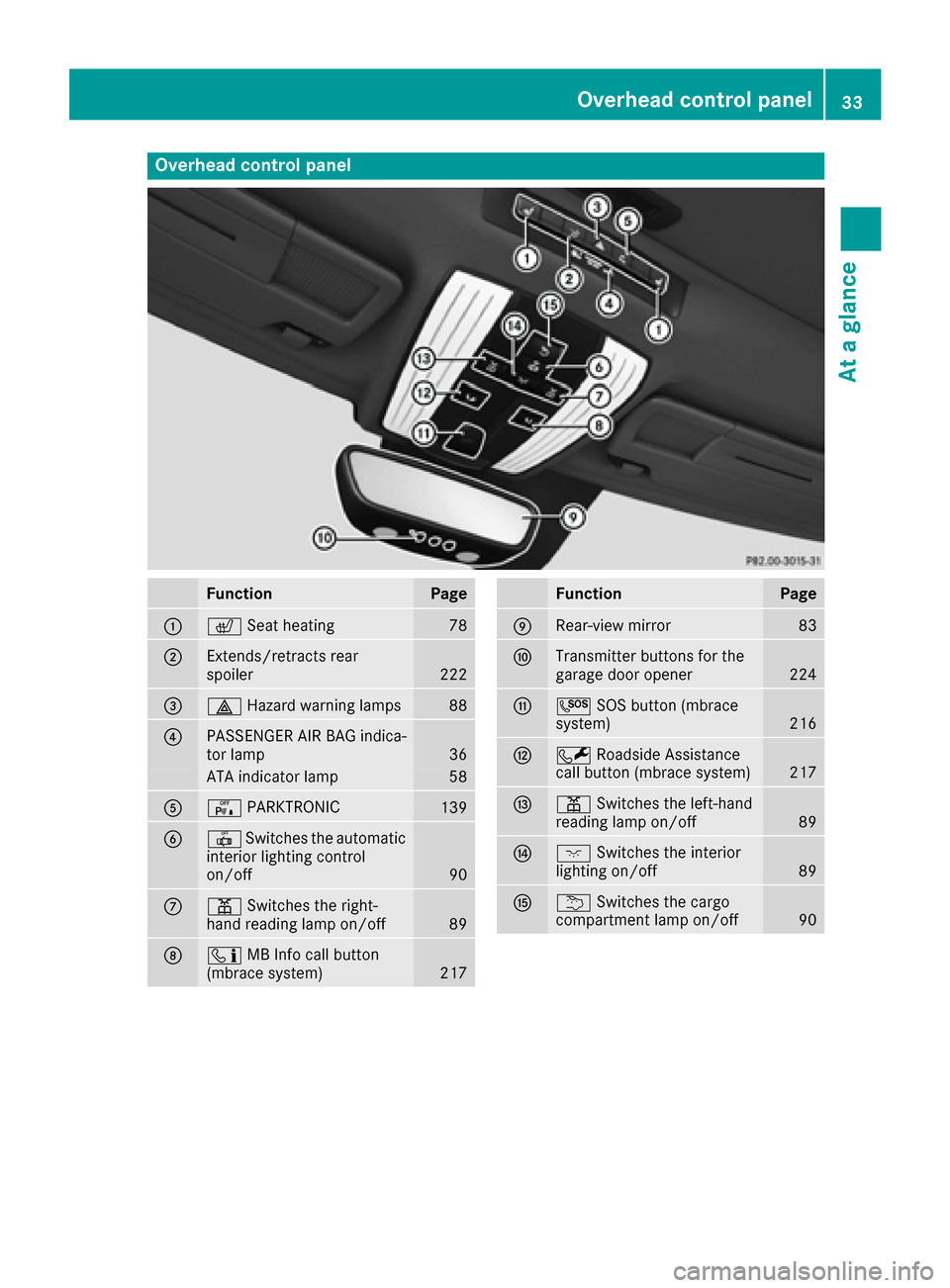
Overhead control panel
FunctionPage
:cSeat heating78
;Extends/retracts rear
spoiler222
=£Hazard warning lamps88
?PASSENGER AIR BAG indica-
tor lamp36
ATA indicator lamp58
AcPARKTRONIC139
B|Switches the automatic
interior lighting control
on/off
90
Cp Switches the right-
hand reading lamp on/off89
Dï MB Info call button
(mbrace system)217
FunctionPage
ERear-view mirror83
FTransmitter buttons for the
garage door opener224
GG SOS button (mbrace
system)216
HF Roadside Assistance
call button (mbrace system)217
Ip Switches the left-hand
reading lamp on/off89
Jc Switches the interior
lighting on/off89
Ku Switches the cargo
compartment lamp on/off90
Overhead control panel33
At a glance
Page 55 of 290
Important safety notes
iObserveth e"Importan tsafet ynotes" sec -
tion (Ypage 52).
GWARNIN G
If BA Sis malfunctioning ,th ebraking distanc e
in an emergenc ybraking situation is
increased. Ther eis aris kof an accident.
In an emergenc ybraking situation ,depress
th ebrak epedal wit hfull force .AB Sprevents
th ewheels from locking.
Braking
XKee pth ebrak epedal firmly depressed until
th eemergenc ybraking situation is over.
AB Sprevents th ewheels from locking.
The brakes will function as usual once you
release th ebrak epedal .BA Sis deactivated.
COLLISION PREVENTION ASSIST
PLUS
General information
iObserv eth e"Importan tsafet ynotes" sec -
tion (Ypage 52).
COLLISION PREVENTION ASSIST PLU Sconsist s
of adistanc ewarning function wit han autono -
mous braking function and adaptive Brake
Assist .
COLLISION PREVENTION ASSIST PLU Scan help
you to minimiz eth eris kof afront-en dcollision
wit h a vehicl eahead or reduce th eeffects of
suc h a collision .
If COLLISION PREVENTION ASSIST PLU S
detects that there is aris kof acollision ,you will
be warned visually and acoustically. If you do no t
reac tto th evisual and audible collision warning ,
autonomous braking can be initiate din critical
situations. If you apply th ebrak eyourself in a
critical situation ,th eCOLLISION PREVENTION
ASSIST PLU Sadaptive Brake Assist assist syou.
Important safety notes
In particular, th edetection of obstacles can be
impaire dif:
Rthere is dirt on th esensor sor anythin gelse
covering th esensor s
Rthere is snow or heav yrain
Rthere is interferenc eby other radar source s
Rthere are strongradar reflections, for exam-
ple in parking garages
Ra narrow vehicl etraveling in front, e.g. a
motorbike
Ra vehicl etraveling in fron ton adifferen tlin e
Rne wvehicles or after aservic eon th eCOLLI-
SION PREVENTION ASSIST PLU Ssystem
Observ eth eimportant safet ynote sin th e
"Breaking-in notes" section (
Ypage 101).
Followin gdamag eto th efron ten dof th evehicle,
hav eth econfiguration and operation of th e
radar sensor checke dat aqualified specialist
workshop. This also applie sto collision sat slow
speeds wher ethere is no visible damag eto th e
fron tof th evehicle.
Switching on/off
The COLLISION PREVENTION ASSIST PLU Sis
automatically active after switching on th eigni-
tion .
You can activat eor deactivat eCOLLISION PRE -
VENTION ASSIST PLU Sin th eon-board com-
puter (
Ypage 160). When deactivated, th edis-
tance warning function and th eautonomous
braking function are also deactivated.
If COLLISION PREVENTION ASSIST PLU Sis
deactivated, th eæ symbol appear sin th e
assistanc egraphic sdisplay.
Distance warning function
Gene ral information
The distanc ewarning function can help you to
minimiz eth eris kof afront-en dcollision wit h a
vehicl eahead or reduce th eeffects of suc h a
collision .If th edistanc ewarning function
detects that there is aris kof acollision ,you will
be warned visually and acoustically.
Import ant safety notes
iObserveth e"Importan tsafet ynotes" sec -
tion for driving safet ysystems (Ypage 52).
Driving safety systems53
Safety
Z
Page 56 of 290

GWARNING
The distance warning function does not react:
Rto people or animals
Rto oncoming vehicles
Rto crossing traffic
Rwhen cornering
Thus, the distance warning function cannot
provide a warning in all critical situations.
There is a risk of an accident.
Always pay careful attention to the traffic sit-
uation and be ready to brake.
GWARNING
The distance warning function cannot always
clearly identify objects and complex traffic
situations.
In such cases, the distance warning function
may:
Rgive an unnecessary warning
Rnot give a warning
There is a risk of an accident.
Always pay careful attention to the traffic sit-
uation and do not rely solely on the distance
warning function.
Function
Starting at a speed of approximately 4 mph
(7 km/h), the distance warning function warns
you if you rapidly approach a vehicle in front. An
intermittent warning tone will then sound, and
the · distance warning lamp will light up in
the instrument cluster.
XBrake immediately in order to increase the
distance from the vehicle in front.
or
XTake evasive action, provided it is safe to do
so.
Due to the nature of the system, particularly
complicated but non-critical driving conditions
may also cause the system to display a warning.
With the help of the radar sensor system, the
distance warning function can detect obstacles
that are in the path of your vehicle for an exten-
ded period of time.
Up to a speed of approximately 44 mph
(70 km/h), the distance warning function can also react to stationary obstacles, such as stop-
ped or parked vehicles.
Autonomous braking function
If the driver does not react to the distance warn-
ing signal in a critical situation, COLLISION PRE-
VENTION ASSIST PLUS can assist with the
autonomous braking function.
The autonomous braking function:
Rgives the driver more time to react to critical
driving situations
Rcan help the driver to avoid an accident or
Rreduces the effects of an accident
Vehicles without DISTRONIC PLUS: the
autonomous braking function is available in the
following speed ranges:
Rfrom 4 mph (7 km/h) to approx. 65 mph
(105 km/h) for moving objects
Rfrom 4 mph (7 km/h) to approx. 31 mph
(50 km/h) for stationary objects
Vehicles with DISTRONIC PLUS: the autono-
mous braking function is available in the follow-
ing speed ranges:
Rfrom 4 mph (7 km/h) to approximately
124 mph (200 km/h) for moving objects
Rfrom 4 mph (7 km/h) to approximately
31 mph (50 km/h) for stationary objects
Due to the nature of the system, particularly
complicated but non-critical driving conditions
may also cause the Autonomous Braking Func-
tion to intervene.
If the autonomous braking function requires a
particularly high braking force, preventative
passenger protection measures (PRE-SAFE
®)
are activated simultaneously (Ypage 48).
Adaptive Brake Assist
General information
iObserve the "Important safety notes" sec-
tion (Ypage 52).
With the help of adaptive Brake Assist, the dis-
tance warning signal can detect obstacles that
are in the path of your vehicle for an extended
period of time.
If adaptive Brake Assist detects a risk of colli-
sion with the vehicle in front, it calculates the
braking force necessary to avoid a collision. If
you apply the brakes forcefully, adaptive Brake
54Driving safety systems
Safety