2016 MERCEDES-BENZ AMG GT S Rear camera
[x] Cancel search: Rear cameraPage 7 of 290

see Flat tire
see Towing away
Buttons on the steering wheel ......... 152
C
California
Important notice for retail cus-
tomers and lessees .......................... 22
Calling up a malfunction
see Display messages
Calling up the climate control bar
Multimedia system ........................ 204
Calling up the climate control
menu
Multimedia system ........................ 204
Car
see Vehicle
Care
Car wash ........................................2 34
Carpets .......................................... 240
Display ...........................................2 38
Exhaust pipe .................................. 238
Exterior lights ................................ 237
Gear or selector lever .................... 239
Interior ...........................................2 38
Matte finish ................................... 236
Notes ............................................. 234
Paint .............................................. 235
Plastic trim ....................................2 38
Power washer ................................ 235
Rear view camera .......................... 238
Roof lining ...................................... 240
Seat belt ........................................ 239
Seat cover ..................................... 239
Sensors ......................................... 237
Steering wheel ............................... 239
Trim pieces ....................................2 39
Washing by hand ........................... 235
Wheels ...........................................2 36
Windows ........................................ 236
Wiper blades .................................. 237
Wooden trim .................................. 239
Cargo compartment
Unlocking with KEYLESS-GO ............ 69
Cargo compartment cover
Important safety notes .................. 211
Cargo net ...........................................2 11CD
see also Digital Operator's Man-
ual ..................................................2 00
CD player (on-board computer) ........157
Center console
Overview .......................................... 32
Central locking
Locking/unlocking (SmartKey) ........6 0
Changing the media source .....
.......
.157
Charge retention
Socket ...........................................1 22
Charge-air pressure (on-board
computer) .......................................... 162
Child seat
Forward-facing restraint system ...... 51
On the front-passenger seat ............ 51
Rearward-facing restraint system .... 51
Children
Restraint systems ............................ 50
Special seat belt retractor ............... 49
Cigarette lighter ................................ 214
Cleaning
Mirror turn signal ........................... 237
Climate control
Automatic climate control (dual-
zone) ................................................ 94
Controlling automatically ................. 96
Cooling with air dehumidification ..... 95
Cooling with air dehumidification
(multimedia system) ...................... 205
Defrosting the windows ................... 97
Defrosting the windshield ................ 97
ECO start/stop function (3-zone
automatic climate control) ............... 94
General notes .................................. 93
Indicator lamp .................................. 96
Information about using auto-
matic climate control ....................... 94
Overview ........................................ 204
Overview of systems ........................ 93
Problem with the rear window
defroster .......................................... 99
Problems with cooling with air
dehumidification .............................. 96
Refrigerant ..................................... 285
Refrigerant filling capacity ............. 286
Setting the air distribution ............... 96
Setting the air vents ........................ 99
Index5
Page 9 of 290

SmartKey ....................................... 188
Tires ............................................... 183
Vehicle ........................................... 185
Distance recorder ............................. 153
Distance warning (warning lamp) .... 197
Distance warning function
Function/notes ................................ 53
DISTRONIC PLUS
Activating ....................................... 130
Activation conditions ..................... 130
Cruise control lever ....................... 130
Deactivating ................................... 133
Display message ............................ 182
Displays in the instrument cluster .. 134
Driving tips .................................... 135
Driving with DISTRONIC PLUS ....... 131
Function/notes ............................. 128
Important safety notes .................. 129
Setting a speed .............................. 133
Setting the specified minimum
distance ......................................... 133
Stopping ........................................ 132
Door control panel
Overview .......................................... 34
Doors
Automatic locking (switch) ............... 67
Central locking/unlocking
(SmartKey) ....................................... 60
Display message ............................ 187
Emergency locking ........................... 68
Emergency unlocking ....................... 68
Important safety notes .................... 66
Opening (from inside) ...................... 67
Drinking and driving ......................... 123
Drive program
Automatic ...................................... 113
Display ........................................... 110
Manual ........................................... 114
SETUP (on-board computer) .......... 163
Driver's door
see Doors
Driving abroad
Mercedes-Benz Service ................. 234
Driving on flooded roads .................. 126
Driving safety systems
ABS (Anti-lock Braking System) ....... 52
ADAPTIVE BRAKE ............................. 58
Adaptive Brake Assist ...................... 54 BAS (Brake Assist System) .............. 52
COLLISION PREVENTION ASSIST
PLUS ................................................ 53
Distance warning function ............... 53
EBD (electronic brake force distri-
bution) ............................................. 57
ESP
®(Electronic Stability Pro-
gram) ............................................... 55
Important safety information ........... 52
Overview .......................................... 52
Driving systems
AMG adaptive sport suspensi
on
system ........................................... 138
ATTENTION ASSIST ........................ 146
Blind Spot Assist ............................ 147
Cruise control ................................ 127
Display message ............................ 180
DISTRONIC PLUS ........................... 128
HOLD function ............................... 136
Lane Keeping Assist ...................... 149
Lane Tracking package .................. 147
PARKTRONIC ................................. 139
RACE START .................................. 137
Rear view camera .......................... 142
Driving tips
AMG high-performance and
ceramic brakes .............................. 125
Automatic transmission ................. 111
Brakes ........................................... 124
Break-in period .............................. 101
DISTRONIC PLUS ........................... 135
Downhill gradient ........................... 124
Drinking and driving ....................... 123
Driving in winter ............................. 126
Driving on flooded roads ................ 126
Driving on wet roads ...................... 126
Exhaust check ............................... 123
Fuel ................................................ 123
General .......................................... 123
Hydroplaning ................................. 126
Icy road surfaces ........................... 126
Limited braking efficiency on sal-
ted roads ....................................... 124
Snow chains .................................. 256
Subjecting brakes to a load ........... 124
The first 1000 miles (1500 km) ..... 101
Wet road surface ........................... 124
Index7
Page 15 of 290

P
Paddle shifterssee Steering wheel paddle shifters
Paint code number ............................280
Paintwork (cleaning instructions) ... 235
Panic alarm .......................................... 35
Panorama roof ..................................... 74
Parking
Important safety notes .................. 119
Parking brake ................................ 121
Position of exterior mirror, front-
passenger side ................................. 83
Rear view camera .......................... 142
Switching off the engine ................ 120
see PARKTRONIC
Parking aid
see Exterior mirrors
see PARKTRONIC
Parking assistance
see PARKTRONIC
Parking brake
Applying automatically ................... 121
Applying or releasing manually ...... 121
Display message ............................ 169
Electric parking brake .................... 121
Emergency braking ........................ 122
General notes ................................ 121
Releasing automatically ................. 122
Warning lamp ................................. 194
Parking lamps
Switching on/off .............................. 87
PARKTRONIC
Deactivating/activating ................. 141
Driving system ............................... 139
Function/notes .............................1 39
Important safety notes .................. 139
Problem (malfunction) ................... 142
Range of the sensors ..................... 140
Warning display ............................. 140
PASSENGER AIR BAG
Display message ............................ 175
Problem (malfunction) ................... 175
PASSENGER AIR BAG OFF
Indicator lamp .................................. 36
Pets in the vehicle ............................... 51 Phone book
see also Digital Operator's Man-
ual .................................................. 200
Plastic trim (cleaning instruc-
tions) .................................................. 238
Power washers .................................. 235
Power windows
see Side windows
PRE-SAFE
®(anticipatory occupant
protection)
Display message ............................ 173
Opera
tion ......................................... 48
Protection against theft
ATA (Anti-Theft Alarm system) ......... 58
Immobilizer ...................................... 58
Protection of the environment
General notes .................................. 21
Pulling away
Automatic transmission ................. 104
General notes ................................ 104
Hill start assist ............................... 104
Q
QR codeMercedes-Benz Guide App ................. 1
Rescue card ..................................... 26
Qualified specialist workshop ........... 25
Quick access for audio and tele-
phone
Changing the station/music
track .............................................. 203
R
RACE STARTActivating ....................................... 138
Important safety notes .................. 137
RACETIMER (on-board computer) .... 164
Radio
Selecting a station ......................... 156
Radio mode
see also Digital Operator's Man-
ual .................................................. 200
Radio-wave reception/transmis-
sion in the vehicle
Declaration of conformity ................ 24
Reading lamp ....................................... 89
Index13
Page 16 of 290

Rear fog lampDisplay message ............................ 177
Switching on/off .............................. 87
Rear lamps
see Lights
Rear spoiler
Display message ............................ 187
Extending/retracting ..................... 222
Problem ......................................... 223
Rear view camera
Cleaning instructions ..................... 238
Function/notes ............................. 142
Switching on/off ........................... 143
Rear window defroster
Problem (malfunction) ..................... 99
Switching on/off .............................. 98
Rear-view mirror
Dipping (automatic) ......................... 83
Refrigerant (air-conditioning sys-
tem)
Important safety notes .................. 285
Refueling
Fuel gauge ....................................... 30
Important safety notes .................. 117
Refueling process .......................... 118
see Fuel
Remote control
Garage door opener ....................... 223
Programming (garage door
opener) .......................................... 224
Replacing bulbs
General notes .................................. 90
Reporting safety defects .................... 25
Rescue card ......................................... 26
Reserve (fuel tank)
see Fuel
Reserve fuel
Display message ............................ 180
Warning lamp ................................. 195
Restraint system
Display message ............................ 173
Introduction ..................................... 35
Warning lamp ................................. 194
Warning lamp (function) ................... 35
Reversing feature
Side windows ................................... 71
Reversing lamps (display mes-
sage) ................................................... 177 Roadside Assistance (breakdown)
.... 23
Roller sunblind for the panorama
roof
Opening and closing ........................ 74
Operating ......................................... 74
Roof lining and carpets (cleaning
guidelines) ......................................... 240
Route guidance
see also Digital Operator's Man-
ual .................................................. 200
S
SafetyChild restraint systems .................... 50
Children in the vehicle ..................... 49
Occupant Classification System
(OCS) ............................................... 42
see Occupant safety
see Operating safety
Safety system
see Driving safety systems
SD memory card
Ejecting .......................................... 208
Inserting ........................................ 208
Inserting/removing ........................ 208
see also Digital Operator's Man-
ual .................................................. 200
Selecting ........................................ 157
Search & Send
see also Digital Operator's Man-
ual .................................................. 200
Seat belts
Adjusting the driver's and front-
passenger seat belt ......................... 39
Cleaning ......................................... 239
Correct usage .................................. 38
Fastening ......................................... 39
Important safety guidelines ............. 37
Introduction ..................................... 36
Releasing ......................................... 39
Warning lamp ................................. 190
Warning lamp (function) ................... 39
Seats
Adjusting (electrically) ..................... 77
Adjusting (manually) ........................ 76
Adjusting (Performance Seat) .......... 78
Adjusting lumbar support ................ 77
14Index
Page 144 of 290
Problems with PARKTRONIC
ProblemPossible causes/consequences andMSolutions
Only the red segments in
the PARKTRONIC warn-
ing displays are lit. You
also hear a warning tone
for approximately two
seconds.
PARKTRONIC is then
deactivated and the indi-
cator lamp on the
PARKTRONIC button
lights up.PARKTRONIC has malfunctioned and has switched off.
XIf problems persist, have PARKTRONIC checked at a qualified spe-
cialist workshop.
Only the red segments in
the PARKTRONIC warn-
ing displays are lit.
PARKTRONIC is then
deactivated.The PARKTRONIC sensors are dirty or there is interference.
XClean the PARKTRONIC sensors (Ypage 237).
XSwitch the ignition back on.
The problem may be caused by an external source of radio or ultra-
sound waves.
XSee if PARKTRONIC functions in a different location.
Rear view camera
General notes
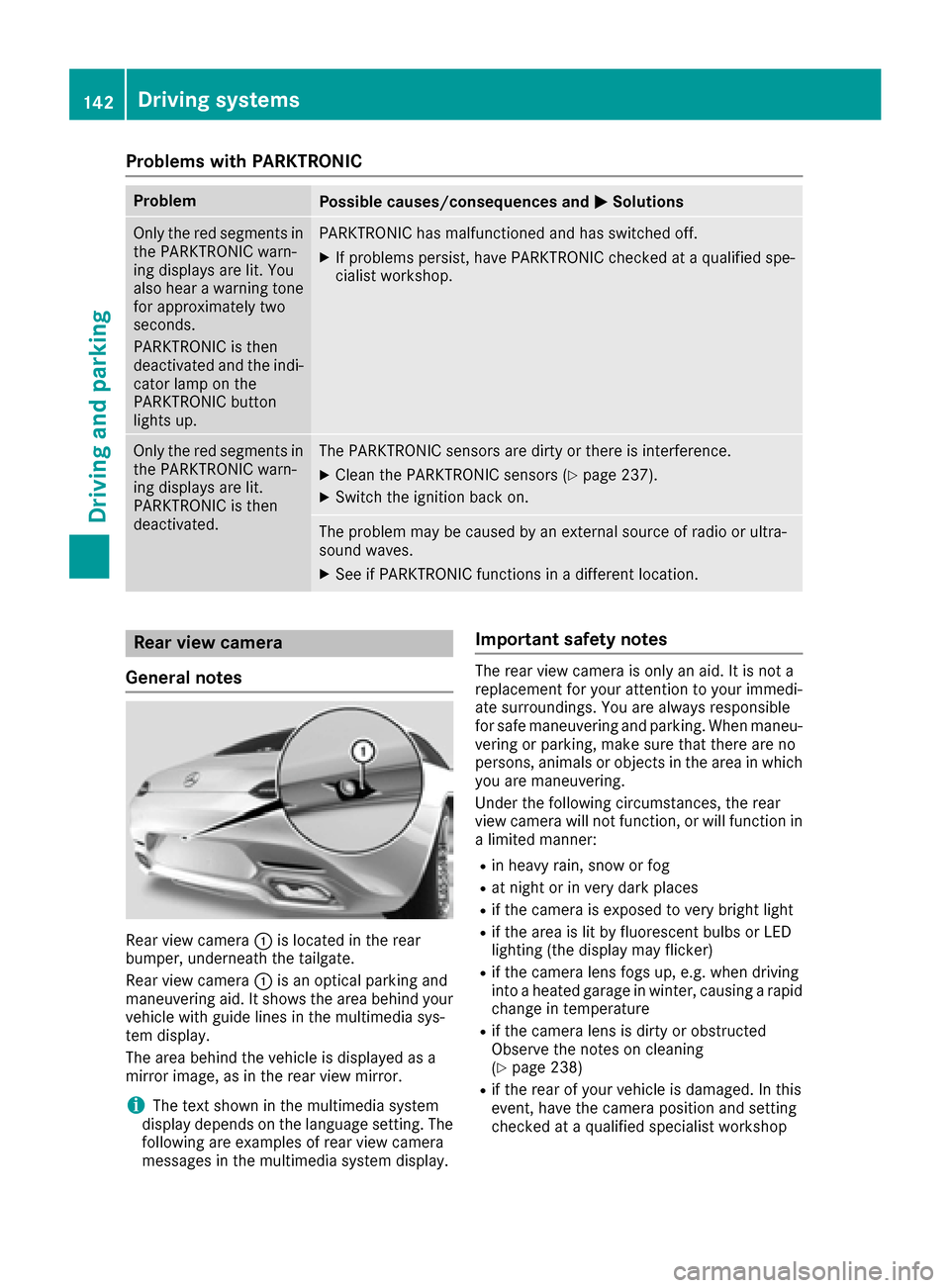
Rear view camera :is located in the rear
bumper, underneath the tailgate.
Rear view camera :is an optical parking and
maneuvering aid. It shows the area behind your
vehicle with guide lines in the multimedia sys-
tem display.
The area behind the vehicle is displayed as a
mirror image, as in the rear view mirror.
iThe text shown in the multimedia system
display depends on the language setting. The
following are examples of rear view camera
messages in the multimedia system display.
Important safety notes
The rear view camera is only an aid. It is not a
replacement for your attention to your immedi-
ate surroundings. You are always responsible
for safe maneuvering and parking. When maneu-
vering or parking, make sure that there are no
persons, animals or objects in the area in which you are maneuvering.
Under the following circumstances, the rear
view camera will not function, or will function in
a limited manner:
Rin heavy rain, snow or fog
Rat night or in very dark places
Rif the camera is exposed to very bright light
Rif the area is lit by fluorescent bulbs or LED
lighting (the display may flicker)
Rif the camera lens fogs up, e.g. when driving
into a heated garage in winter, causing a rapid
change in temperature
Rif the camera lens is dirty or obstructed
Observe the notes on cleaning
(
Ypage 238)
Rif the rear of your vehicle is damaged. In this
event, have the camera position and setting
checked at a qualified specialist workshop
142Driving systems
Driving and parking
Page 145 of 290

The field of vision and other functions of the rear
view camera may be restricted due to additionalaccessories on the rear of the vehicle (e.g.
license plate holder, bicycle rack).
The guide lines in the multimedia system display
show the distances to your vehicle. The distan-
ces only apply to road level.
Activating/deactivating the rear view
camera
XTo activate: ensure that key position 2has
been selected with the Start/Stop button.
XMake sure that the Activation by R gearfunction is selected in the multimedia system
(see the Digital Operator's Manual).
XEngage reverse gear.
The area behind the vehicle is shown with
guide lines in the multimedia system display.
The image from the rear view camera is avail-
able throughout the maneuvering process.
To deactivate: the rear view camera deacti-
vates if you shift the transmission to Por after
driving forwards a short distance.
Messages in the multimedia system dis-
play
The rear view camera may show a distorted view
of obstacles, show them incorrectly or not at all.
The rear view camera does not show objects in
the following positions:
Rvery close to the rear bumper
Runder the rear bumper
!Objects not at ground level may appear to
be further away than they actually are, e.g.:
Rthe bumper of a parked vehicle
Rthe drawbar of a trailer
Rthe ball coupling of a trailer tow hitch
Rthe rear section of an HGV
Ra slanted post
Use the guidelines only for orientation.
Approach objects no further than the bottom-
most guideline.
:Yellow guide line at a distance of approx-
imately 13 ft (4.0 m) from the rear of the
vehicle
;White guide line without turning the steering
wheel, vehicle width including the exterior
mirrors (static)
=Yellow guide line for the vehicle width
including the exterior mirrors, for current
steering wheel angle (dynamic)
?Yellow lane marking tires at current steering
wheel angle (dynamic)
AYellow guide line at a distance of approx-
imately 3 ft (1.0 m) from the rear of the vehi-
cle
BVehicle center axle (marker assistance)
CBumper
DRed guide line at a distance of approximately
12 in (0.30 m) from the rear of the vehicle
The guide lines are shown when the transmis-
sion is in position R.
The distance specifications only apply to
objects that are at ground level.
Driving systems143
Driving and parking
Z
Page 146 of 290
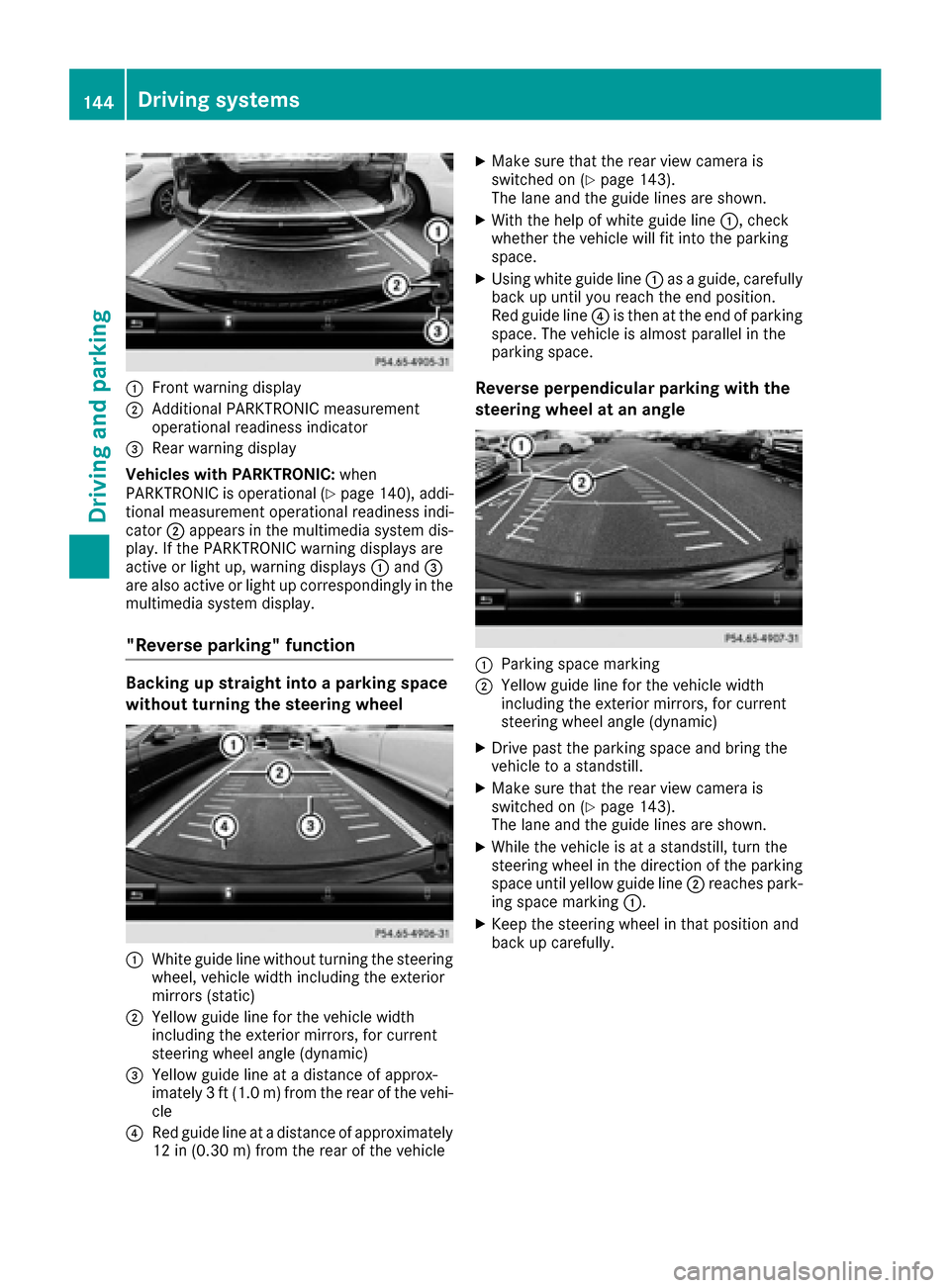
:Front warning display
;Additional PARKTRONIC measurement
operational readiness indicator
=Rear warning display
Vehicles with PARKTRONIC: when
PARKTRONIC is operational (
Ypage 140), addi-
tional measurement operational readiness indi-
cator ;appears in the multimedia system dis-
play. If the PARKTRONIC warning displays are
active or light up, warning displays :and =
are also active or light up correspondingly in the multimedia system display.
"Reverse parking" function
Backing up straight into a parking space
without turning the steering wheel
:White guide line without turning the steering
wheel, vehicle width including the exterior
mirrors (static)
;Yellow guide line for the vehicle width
including the exterior mirrors, for current
steering wheel angle (dynamic)
=Yellow guide line at a distance of approx-
imately 3 ft (1.0 m) from the rear of the vehi-
cle
?Red guide line at a distance of approximately
12 in (0.30 m) fromthe rear of the vehicle
XMake sure that the rear view camera is
switched on (Ypage 143).
The lane and the guide lines are shown.
XWith the help of white guide line :, check
whether the vehicle will fit into the parking
space.
XUsing white guide line :as a guide, carefully
back up until you reach the end position.
Red guide line ?is then at the end of parking
space. The vehicle is almost parallel in the
parking space.
Reverse perpendicular parking with the
steering wheel at an angle
:Parking space marking
;Yellow guide line for the vehicle width
including the exterior mirrors, for current
steering wheel angle (dynamic)
XDrive past the parking space and bring the
vehicle to a standstill.
XMake sure that the rear view camera is
switched on (Ypage 143).
The lane and the guide lines are shown.
XWhile the vehicle is at a standstill, turn the
steering wheel in the direction of the parking
space until yellow guide line ;reaches park-
ing space marking :.
XKeep the steering wheel in that position and
back up carefully.
144Driving systems
Driving an d parking
Page 147 of 290

:Yellow guide line for the vehicle width
including the exterior mirrors, for current
steering wheel angle (dynamic)
XStop the vehicle when it is almost exactly in
front of the parking space.
The white lane should be as close to parallel
with the parking space marking as possible.
:White guide line at current steering wheel
angle
;Parking space marking
XTurn the steering wheel to the center position
while the vehicle is stationary.
:Red guide line at a distance of approximately
12 in (0.30 m) from the rear of the vehicle
;White guide line without turning the steering
wheel
=End of parking space
XBack up carefully until you have reached the
final position.
Red guide line:is then at the end of parking
space =. The vehicle is almost parallel in the
parking space.
Wide-angle function
:Symbol for the wide-angle view function
;PARKTRONIC warning displays
You can also use the rear view camera to select
a wide-angle view.
When PARKTRONIC is operational (
Ypage 140),
a symbol for your own vehicle appears in the
display of the multimedia system. If the
PARKTRONIC warning displays are active, warn-
ing displays ;light up in the multimedia system
display in yellow or red respectively.
Driving systems145
Driving and parking
Z