2016 MERCEDES-BENZ AMG GT S door lock
[x] Cancel search: door lockPage 122 of 290
positionDor R, park position Pis otherwise
engaged automatically.
The transmission could be damaged.
!Always secure the vehicle correctly against
rolling away. Otherwise, the vehicle or its driv-
etrain could be damaged.
To ensure that the vehicle is secured against
rolling away unintentionally:
Rthe electric parking brake must be applied.
Rthe transmission must be in position P.
Rthe SmartKey in the ignition lock must be
turned to position0and removed from the
ignition lock, or the Start/Stop button must
be pressed.
Rthe front wheels must be turned towards the
curb on steep uphill or downhill gradients.
Rthe empty vehicle must be secured at the
front axle with a wheel chock or similar, for
example, on uphill or downhill gradients.
Ra laden vehicle must also be secured at the
rear axle with a wheel chock or similar, for
example, on uphill or downhill gradients.
Switching off the engine
Important safety notes
GWARNING
The automatic transmission switches to neu-
tral position Nwhen you switch off the engine.
The vehicle may roll away. There is a risk of an
accident.
After switching off the engine, always switch
to parking position P. Prevent the parked vehi-
cle from rolling away by applying the parking
brake.
AMG SPEEDSHIFT DCT 7-speed sports
transmission
!Do not remove the SmartKey while the vehi-
cle is in motion. Otherwise, at low speeds,
parking lock Pwill be activated automatically.
Do not open the driver's door while the vehi-
cle is in motion. At low speeds, transmission
position Pis engaged automatically.
This could cause damage to the transmission and the parking lock.
XApply the electric parking brake.
XShift the transmission to Pwith the button in
the center console.
Using the Start/Stop button
XPress the Start/Stop button (Ypage 102)
The engine stops and all the indicator lamps in
the instrument cluster go out.
When the driver's door is closed, this corre-
sponds to key position 1. When the driver's
door is open, this corresponds to key position
0: "Key removed".
If you switch the engine off with the trans-
mission in position Ror D, the transmission
automatically shifts to N.
If you move the E-SELECT lever to Nbefore
switching off the engine, the transmission
remains in Nfor approximately 30 minutes.
If you open the driver's or front-passenger
door during this period, the transmission
automatically shifts to P.
The engine can be switched off in an emer-
gency while the vehicle is in motion by press-
ing and holding the Start/Stop button for
three seconds. This function operates inde-
pendently of the ECO start/stop automatic
engine switch-off function.
Using the SmartKey
XTurn the SmartKey to position 0in the ignition
lock and remove it.
The immobilizer is activated.
If you move the E-SELECT lever to Nbefore
switching off the engine, the transmission
remains in Nfor approximately 30 minutes. If
you open the driver's or front-passenger door
during this period, the transmission automat-
ically shifts to P.
The transmission remains in Nif:
Rthe SmartKey is in the ignition lock and
Ryou use the E ‑SELECT lever to shift the
transmission to Nbefore switching the
engine off
This still applies if you open the driver's or
front-passenger door.
Further information on transmission position
N when operating with a SmartKey is availa-
ble under "Car wash" (
Ypage 234).
120Parking
Driving and parking
Page 123 of 290
Electric parking brake
General notes
GWARNING
If you leave children unsupervised in the vehi-
cle, they could set it in motion by, for example:
Rrelease the parking brake.
Rshift the automatic transmission out of the
parking position P.
Rstart the engine.
In addition, they may operate vehicle equip-
ment and become trapped. There is a risk of
an accident and injury.
When leaving the vehicle, always take the
SmartKey with you and lock the vehicle. Never
leave children unsupervised in the vehicle.
The function of the electric parking brake is
dependent on the on-board voltage. If the on-
board voltage is low or there is a malfunction in
the system, it may not be possible to apply the
released parking brake.
XIf this is the case, only park the vehicle on
level ground and secure it to prevent it rolling
away.
XShift the automatic transmission to position
P.
It may not be possible to release an applied
parking brake if the on-board voltage is low or
there is a malfunction in the system. Contact a
qualified specialist workshop.
The electric parking brake performs a function
test at regular intervals while the engine is
switched off. The sounds that can be heard while
this is occurring are normal.
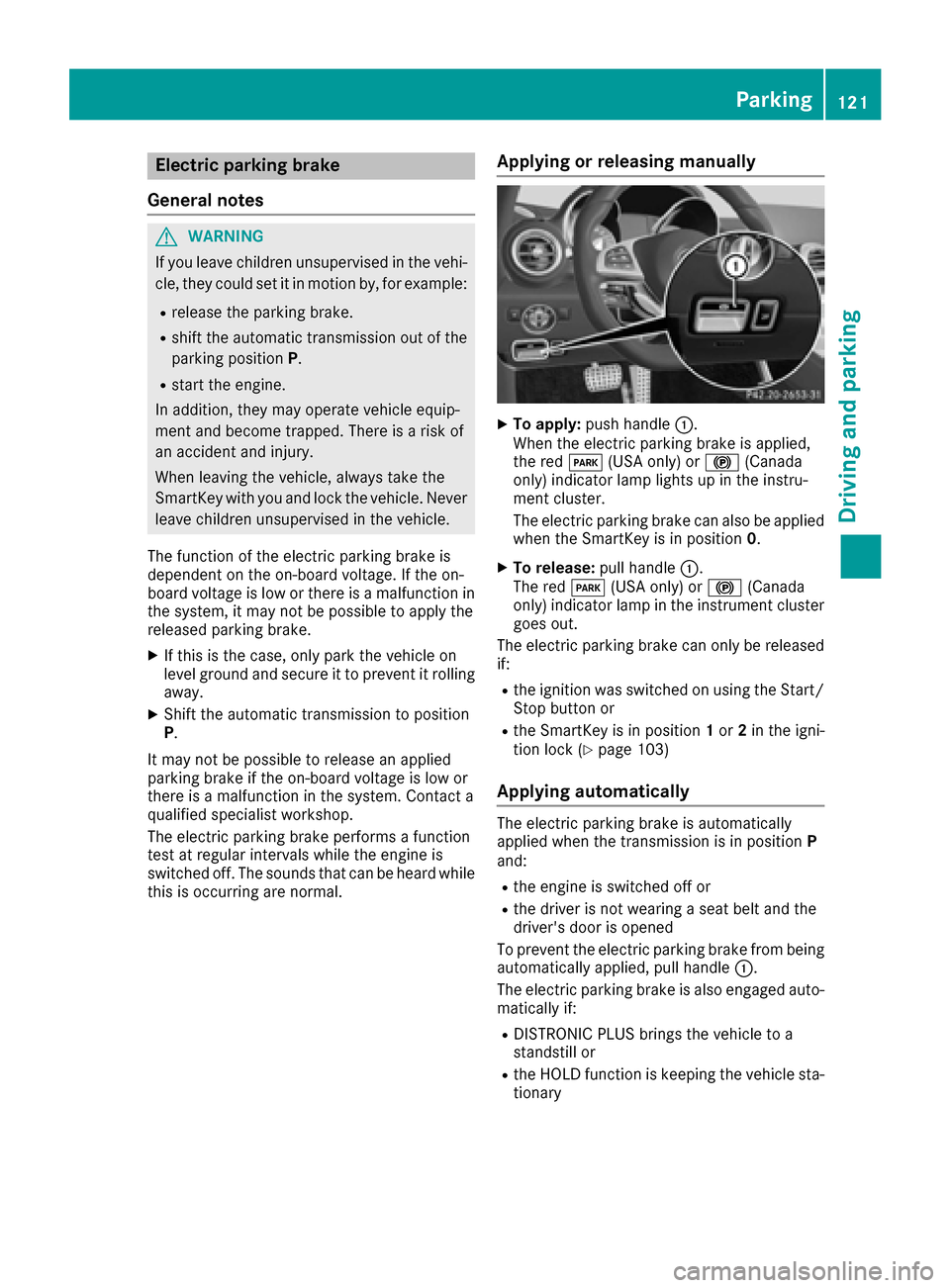
Applying or releasing manually
XTo apply: push handle :.
When the electric parking brake is applied,
the red F(USA only) or !(Canada
only) indicator lamp lights up in the instru-
ment cluster.
The electric parking brake can also be applied
when the SmartKey is in position 0.
XTo release:pull handle:.
The red F(USA only) or !(Canada
only) indicator lamp in the instrument cluster goes out.
The electric parking brake can only be released
if:
Rthe ignition was switched on using the Start/
Stop button or
Rthe SmartKey is in position 1or 2in the igni-
tion lock (Ypage 103)
Applying automatically
The electric parking brake is automatically
applied when the transmission is in position P
and:
Rthe engine is switched off or
Rthe driver is not wearing a seat belt and the
driver's door is opened
To prevent the electric parking brake from being
automatically applied, pull handle :.
The electric parking brake is also engaged auto- matically if:
RDISTRONIC PLUS brings the vehicle to a
standstill or
Rthe HOLD function is keeping the vehicle sta-
tionary
Parking121
Driving and parking
Z
Page 139 of 290

XMake sure that the activation conditions are
met.
XDepress the brake pedal.
XQuickly depress the brake pedal further
until:HOLDappears in the multifunction
display.
The HOLD function is activated. You can
release the brake pedal.
iIf depressing the brake pedal the first time
does not activate the HOLD function, wait
briefly and then try again.
Deactivating the HOLD function
The HOLD function is deactivated automatically
if:
Ryou accelerate and the transmission is in
position Dor R.
Ryou shift the transmission to position P.
Ryou apply the brakes again with a certain
amount of pressure untilHOLDdisappears
from the multifunction display.
Ryou secure the vehicle using the electric park- ing brake.
iAfter a time, the electric parking brake
secures the vehicle and relieves the service
brake.
The electric parking brake secures the vehicle
automatically if the HOLD function is activated
when the vehicle is stationary and:
Rthe driver's seat belt is not fastened and the
driver's door is open.
Rthe engine is switched off, unless it is auto-
matically switched off by the ECO start/stop
function.
Ra system malfunction occurs.
Rthe power supply is not sufficient.
If the electric parking brake is not operational, a
horn will sound at regular intervals. The HOLD
function must then be deactivated.
If a malfunction occurs, then the transmission
may be shifted into position Pautomatically.
The Brake Immediately
message may also
appear in the multifunction display.
XImmediately depress the brake firmly until the
warning message in the multifunction display goes out.
The HOLD function is deactivated. The horn
sounds at regular intervals if you have switched off the engine, released the seat belt and
opened the driver's door with the HOLD function
activated. The sounding of the horn alerts you to
the fact that the HOLD function is still activated.
If you attempt to lock the vehicle, the tone
becomes louder. The vehicle cannot be locked
until you have deactivated the HOLD function.
iAfter switching off the engine, it can only be
started again once you have deactivated the
HOLD function.
RACE START
Important safety notes
iRACE START must not be used on normal
roads. RACE START must only be activated
and used on dedicated road circuits, outside
of public road use.
RACE START enables optimal acceleration from a standing start. For this, a suitably high-grip
road surface is required, along with the tires and
vehicle being in proper operating condition.
GWARNING
If you use RACE START, individual tires may
start to spin and the vehicle could skid.
Depending on the selected ESP
®mode, there
is an increased risk of skidding and having an accident. Make sure that no persons, animals
or obstacles are within range of the vehicle.
iObserve the safety notes on driving safety
systems (Ypage 52).
Be sure to read the safety notes and informa-
tion on ESP
®(Ypage 55).
Conditions for activation
You can activate RACE START if:
Rthe doors are closed.
Rthe engine is running and the engine and
transmission are at operating temperature.
This is the case when the oil temperature
gauge in the multifunction display is shown in
white (
Ypage 162).
RESP®is functioning correctly. (Ypage 56)
Rthe steering wheel is in the straight-ahead
position.
Driving systems137
Driving and parking
Z
Page 189 of 290
Display messagesPossible causes/consequences andMSolutions
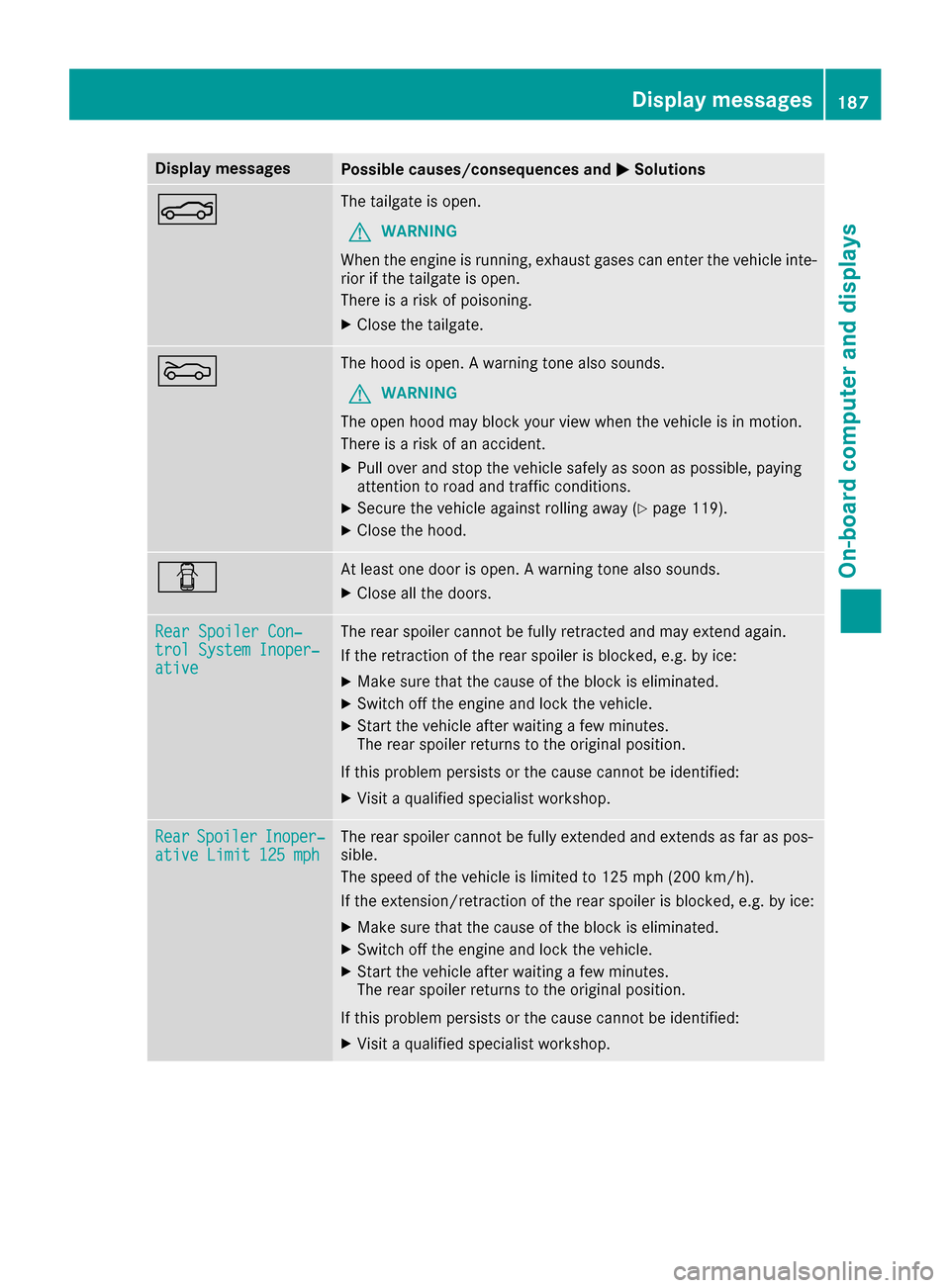
NThe tailgateis open .
GWARNIN G
Whe nth eengin eis running, exhaust gase scan ente rth evehicl einte-
rio rif th etailgat eis open .
There is aris kof poisoning .
XCloseth etailgate.
MThe hoo dis open . Awarning tone also sounds.
GWARNIN G
The open hoo dmay bloc kyour vie wwhen th evehicl eis in motion .
There is aris kof an accident.
XPull ove rand stop th evehicl esafely as soo nas possible, payin g
attention to roa dand traffic conditions.
XSecur eth evehicl eagainst rollin gaway (Ypage 119).
XCloseth ehood.
CAt least on edoor is open . Awarning tone also sounds.
XClos eall th edoors.
Rea rSpoile rCon ‐trolSystem Inoper ‐ative
The rear spoiler canno tbe full yretracte dand may extend again .
If th eretraction of th erear spoiler is blocked, e.g. by ice :
XMakesur ethat th ecaus eof th ebloc kis eliminated.
XSwitc hoff th eengin eand loc kth evehicle.
XStart th evehicl eafter waiting afew minutes.
The rear spoiler return sto th eoriginal position .
If this problem persists or th ecaus ecanno tbe identified:
XVisit aqualified specialist workshop .
RearSpoile rInoper‐ative Limit 125 mphThe rear spoiler canno tbe full yextended and extend sas far as pos -
sible.
The speed of th evehicl eis limite dto 12 5mph (20 0km/h ).
If the extension/retraction of the rear spoiler is blocked, e.g. by ice:
XMake sure that the cause of the block is eliminated.
XSwitch off the engine and lock the vehicle.
XStart the vehicle after waiting a few minutes.
The rear spoiler returns to the original position.
If this problem persists or the cause cannot be identified:
XVisit a qualified specialist workshop.
Display messages187
On-board computer and displays
Z
Page 190 of 290
Display messagesPossible causes/consequences andMSolutions
Ð
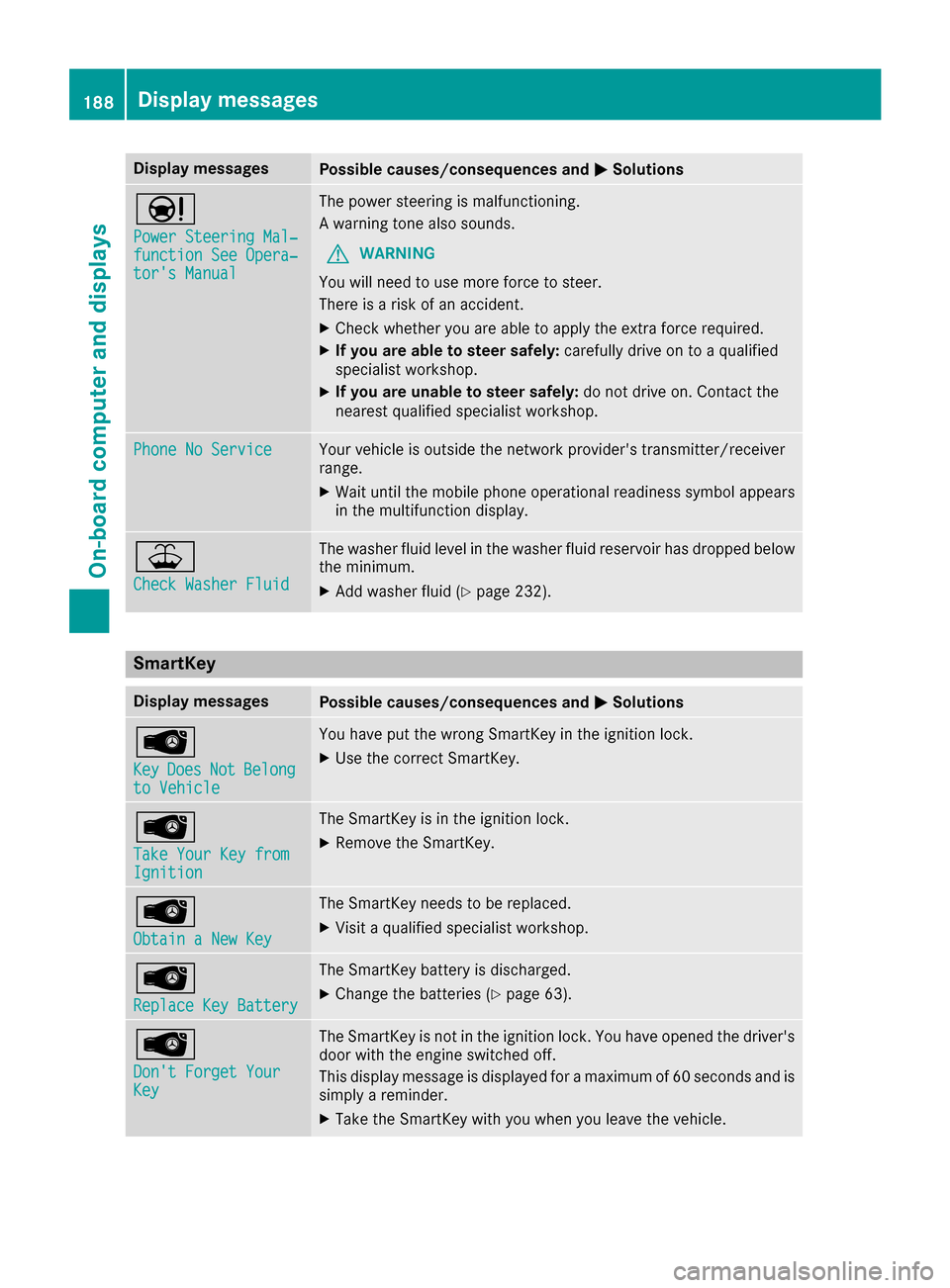
Power Steering Mal‐function See Opera‐tor's Manual
The powersteering is malfunctioning .
A warning tone also sounds.
GWARNIN G
You will need to use mor eforce to steer .
There is aris kof an accident.
XChec kwhether you are able to apply th eextr aforce required.
XIf you ar eabl eto steer safely: carefully drive on to aqualified
specialist workshop .
XIf you areunable to steer safely: do notdrive on .Contac tth e
neares tqualified specialist workshop .
Phone No ServiceYour vehicleis outside th enetwork provider' stransmitter/receiver
range.
XWait until th emobile phone operational readiness symbol appear s
in th emultifunction display.
¥
Check Washer Fluid
The washer flui dlevel in th ewasher flui dreservoir has dropped belo w
th eminimum .
XAddwasher flui d (Ypage 232).
SmartKey
Display messagesPossible causes/consequences and MSolutions
Â
KeyDoesNotBelongto Vehicl e
You haveput th ewrong SmartKey in th eignition lock.
XUse th ecorrec tSmartKey.
Â
Tak eYou rKey fro mIgnition
The SmartKey is in th eignition lock.
XRemove th eSmartKey.
Â
Obtain aNew Key
The SmartKey needs to be replaced.
XVisit aqualified specialist workshop .
Â
ReplaceKey Batter y
The SmartKey battery is discharged.
XChange thebatterie s (Ypage 63) .
Â
Don't Forget You rKey
The SmartKey is notin th eignition lock. You hav eopened th edriver's
door wit hth eengin eswitched off .
This display message is displayed for amaximum of 60 seconds and is
simply areminder.
XTak eth eSmartKey wit hyou when you leav eth evehicle.
188Display messages
On-board computer and displays
Page 212 of 290
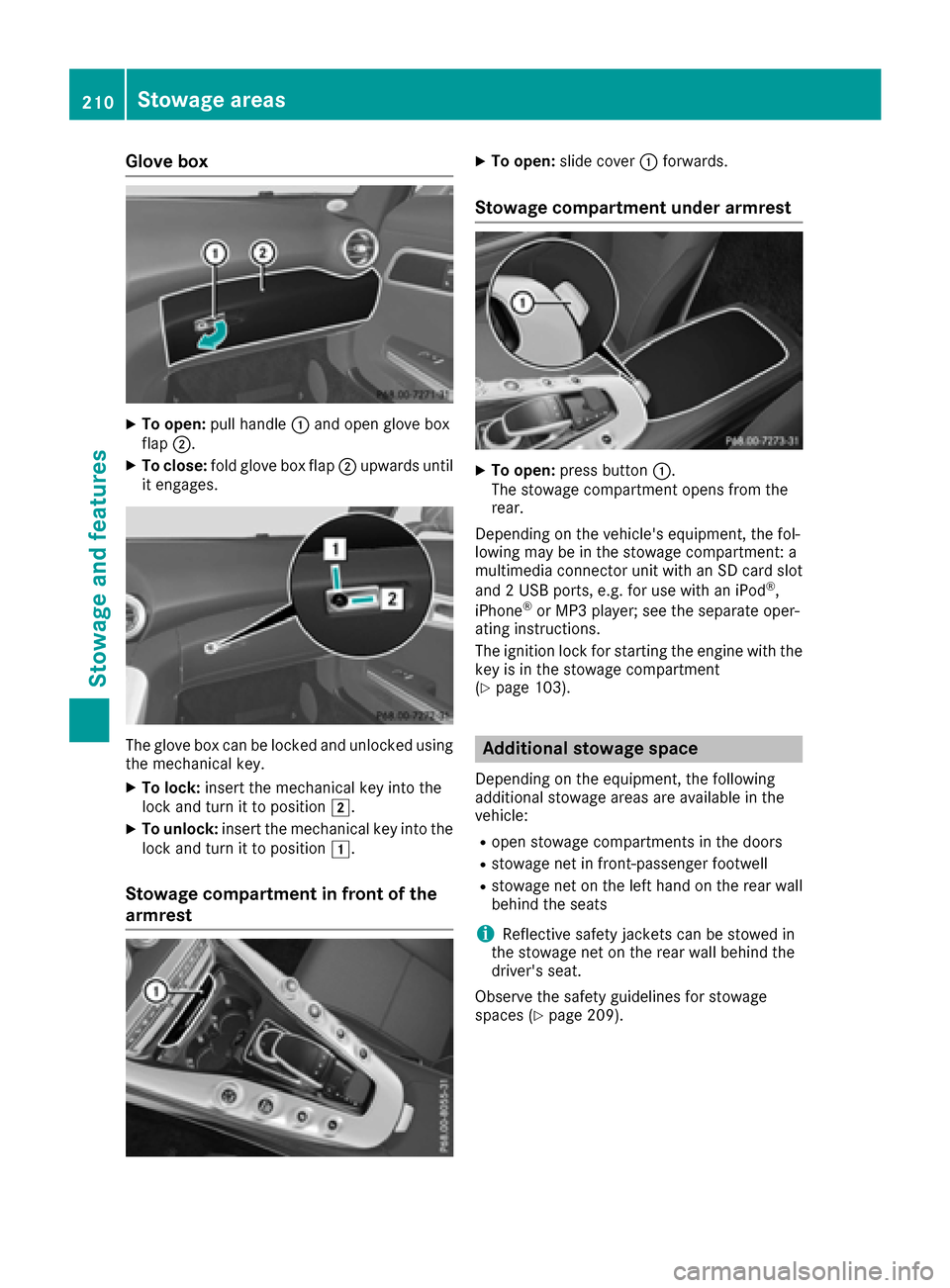
Glove box
XTo open:pull handle :and open glove box
flap ;.
XTo close: fold glove box flap ;upwards until
it engages.
The glove box can be locked and unlocked using
the mechanical key.
XTo lock: insert the mechanical key into the
lock and turn it to position 2.
XTo unlock:insert the mechanical key into the
lock and turn it to position 1.
Stowage compartment in front of the
armrest
XTo open:slide cover :forwards.
Stowage compartment under armrest
XTo open: press button :.
The stowage compartment opens from the
rear.
Depending on the vehicle's equipment, the fol-
lowing may be in the stowage compartment: a
multimedia connector unit with an SD card slot
and 2 USB ports, e.g. for use with an iPod
®,
iPhone®or MP3 player; see the separate oper-
ating instructions.
The ignition lock for starting the engine with the
key is in the stowage compartment
(
Ypage 103).
Additional stowage space
Depending on the equipment, the following
additional stowage areas are available in the
vehicle:
Ropen stowage compartments in the doors
Rstowage net in front-passenger footwell
Rstowage net on the left hand on the rear wall
behind the seats
iReflective safety jackets can be stowed in
the stowage net on the rear wall behind the
driver's seat.
Observe the safety guidelines for stowage
spaces (
Ypage 209).
210Stowage areas
Stowage and features
Page 222 of 290

Vehicle remote closing
The vehicle remote-closing feature can be used
when you have forgotten to lock the vehicle and
you are no longer nearby.
The vehicle can then be locked by the Mercedes-
Benz Customer Assistance Center.
The vehicle can be immediately remotely locked
within four days of the ignition being turned off.
After this time, remote closing may be delayed
by 15 to 60 minutes. After 30 days the vehicle
can no longer be locked remotely.
The vehicle remote closing feature is available if
the relevant mobile phone network is available
and a data connection is possible.
XContact the following service hotlines:
Mercedes-Benz Customer Assistance Center
at 1-800-FOR-MERCedes (1-800-367-6372)
or 1-866-990-9007
You will be asked for your password.
The next time you are inside the vehicle and you
switch on the ignition, the Doors Locked
Remotelymessage appears in the multifunction
display.
Alternatively, the vehicle can be locked via:
Rthe Internet, under the "Owners Online" sec-
tion
Rthe telephone application (e .g. for iPhone®,
Android)
To do this, you will need your identification num-
ber and password.
Stolen vehicle recovery service
If your vehicle has been stolen:
XNotify the police.
The police will issue a numbered incident
report.
XThis number will be forwarded to the
Mercedes-Benz Customer Assistance Center
together with your PIN.
The Mercedes-Benz Customer Assistance
Center then tries to locate the system. The
Mercedes-Benz Customer Assistance Center
contacts you and the local law enforcement
agency if the vehicle is located.
However, only the law enforcement agency is
informed of the location of the vehicle.
If the anti-theft alarm system is activated for
longer than 30 seconds, the Mercedes-Benz
Customer Assistance Center is automatically
notified.
Vehicle Health Check
With the Vehicle Health Check, the Customer
Assistance Center can provide improved sup-
port for problems with your vehicle. During an
existing call, vehicle data is transferred to the
Customer Assistance Center.
The customer service representative can use
the received data to decide what kind of assis-
tance is required. You are then, for example,
guided to the nearest authorized Mercedes-
Benz Center or a recovery vehicle is called.
If vehicle data needs to be transferred during an
MB Info call or a Roadside Assistance call, this is
initiated by the Customer Assistance Center.
The Roadside Assistance Connected
mes-
sage appears in the display. If the Vehicle Health
Check can be started, the Request
forVehi‐cle Diagnostics Received Start vehi‐cle diagnostics?message appears in the
display.
XPress the Yesbutton to confirm the message.
XWhen the Vehicle Diagnostics PleaseStart Ignitionmessage appears: turn the
SmartKey to position 2in the ignition lock
(
Ypage 103).
XIf the Please follow the instructionsreceivedbyphoneandmoveyourvehi‐cle to a safe position.message
appears: please follow the instructions
received by phone and move your vehicle to a
safe position.
The message in the display disappears.
The vehicle operating state check begins.
During this procedure, you will see the Vehi‐
cle Diagnostics Activemessage.
If you select Cancel
, the Vehicle Health
Check is canceled completely.
When the check is complete, the Sending
vehicle diagnostics data. (Voice con‐nection may be interrupted duringdatatransfer)message appears. The vehicle
data can now be sent.
XPress the OKbutton to confirm the message.
The voice connection with the Customer
Assistance Center is terminated.
The Vehicle Diagnostics: Transfer‐
ring Data...message appears.
The vehicle data is sent to the Customer
Assistance Center.
Depending on what the customer service rep-
resentative agreed with you, the voice connec-
220Features
Stowage and features
Page 225 of 290

Problems with the rear spoiler
ProblemPossible causes/consequences andMSolutions
The rear spoiler stops
before reaching the end
position when retracting
manually.You have opened the tailgate while manually retracting the rear
spoiler.
XClose the tailgate.
The rear spoiler extends or, if you press and hold the ¬button,
continues retracting.
The rear spoiler stops
before reaching the end
position when retract-
ing/extending manually.You have switched off the ignition.
XSwitch the ignition back on.
XPress the ¬button.
The rear spoiler extends/retracts.
The rear spoiler cannot
be retracted again after
manually extending it.You have opened the tailgate while manually extending the rear
spoiler.
XClose the tailgate.
The rear spoiler does not
extend or retract auto-
matically.The rear spoiler's movement is blocked, e.g. by an object jammed
between the body and the rear spoiler.
XRemove the object.
Garage door opener
General notes
The HomeLink®garage door opener integrated
in the rear-view mirror allows you to operate up
to three different door and gate systems.
Use the integrated garage door opener only on
garage doors that:
Rhave safety stop and reverse features and
Rmeet current U.S. federal safety standards
Once programed, the integrated garage door
opener in the rear-view mirror will assume the
function of the garage door system's remote
control. Please also read the operating instruc-
tions for the garage door system.
When programming a garage door opener, park
the vehicle outside the garage. Do not run the
engine while programming.
Certain garage door drives are incompatible
with the integrated garage door opener. If you
have difficulty programing the integrated garage door opener, contact an authorized Mercedes-
Benz Center. Alternatively, you can call the following tele-
phone assistance services:
RUSA:
Mercedes-Benz Customer Assistance
Center at 1-800-FOR-MERCedes
RCanada: Customer Service at
1-800-387-0100
RHomeLink®hotline 1-800-355-3515 (free of
charge)
More information on HomeLink
®and/or com-
patible products is also available online at
http://www.homelink.com.
Notes on the declaration of conformity
(
Ypage 24).
USA: FCC ID: CB2HMIHL4
Canada: IC: 279B-HMIHL4
Important safety notes
GWARNING
When you operate or program the garage door
with the integrated garage door opener, per-
sons in the range of movement of the garage
door can become trapped or struck by the
garage door. There is a risk of injury.
When using the integrated garage door
opener, always make sure that nobody is
Features223
Stowage and features
Z