2016 MERCEDES-BENZ AMG GT S bluetooth
[x] Cancel search: bluetoothPage 134 of 226
The contacts are sorted by surname and
displayed without a comma.
RFirst Name Last Name
The contacts are sorted by first name and
displayed without a comma.
XTo select the required option: turn and
press the controller.
The contacts are sorted and displayed
according to the selection.
Automatically importing contacts
from the phone
Depending on the mobile phone used, you
can set whether the contacts should be called
up automatically after the mobile phone is
connected to COMAND.
XConnect a mobile phone (Ypage 114).
XCall up the address book (Ypage 127).
XTo show the menu bar: slide6the con-
troller.
XTo select Options: turn and press the con-
troller.
XTo select Automatically Import Con‐
tacts from Phone: turn and press the
controller.
You can allow Oor suppress ªthe auto-
matic download.
Saving a contact
Saved contacts are indicated in the phone
book by different symbols (
Ypage 124).
XCall up the address book (Ypage 127).
XTo select a contact: turn and press the con-
troller.
The details for the contact are displayed.
XTo select G: slide 9the controller.
XTo select Save: turn and press the control-
ler.
The contact has now been saved.
iIf the saved address book entry contains a
phone number, the entry is also displayed
in the phone book.
Saving or editing the contact data on
COMAND does not change the contacts on
the mobile phone. If automatic download-
ing of phone contacts is activated,
COMAND displays the copy ¥with the
changed data. To add additional data, such
as additional phone numbers or e-mail
addresses, select this contact. In this way,
you avoid creating additional copies of the
mobile phone entry.
Deleting a contact
XCall up the address book (Ypage 127).
XSearch for a contact (Ypage 128).
XTo select G: slide 9the controller.
XTo select Delete Entry: turn and press
the controller.
XTo select Yes: turn and press the controller.
The contact is deleted.
or
XTo select No: turn and press the controller.
The process is canceled.
Importing contacts
Information and requirements
Contacts can be imported as vCards (vcf
files). A vCard is an electronic business card.
A memory card, USB device or a Bluetooth
®
connection can be used for importing.
iUp to 2000 entries can be imported into
the address book. A message notifies you
when the maximum number is reached. In
order to be able to then import new con-
tacts, you have to delete existing contacts
(
Ypage 132).
132Address book
Telephone
Page 135 of 226
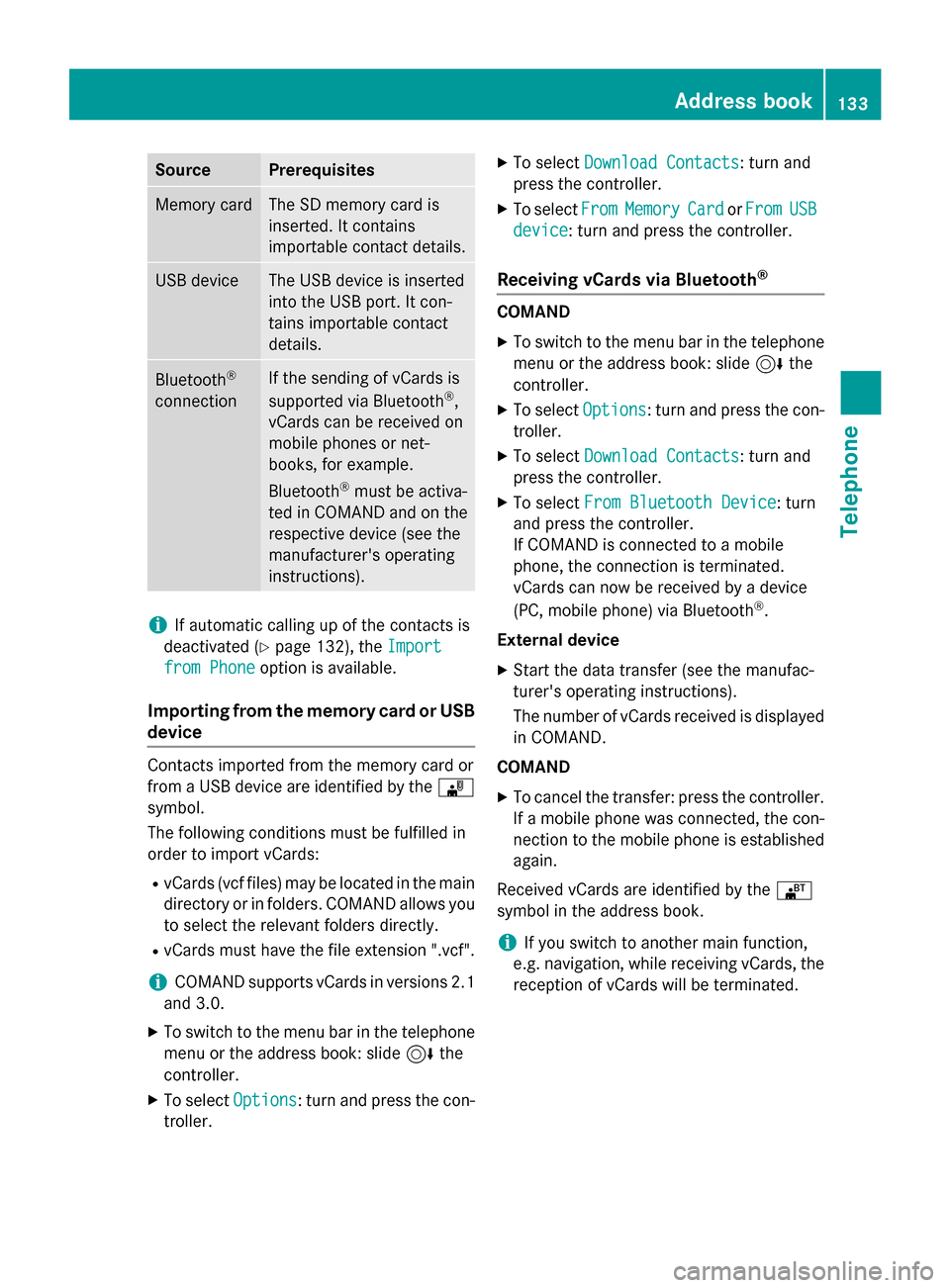
SourcePrerequisites
Memory cardThe SD memory card is
inserted. It contains
importable contact details.
USB deviceThe USB device is inserted
into the USB port. It con-
tains importable contact
details.
Bluetooth®
connection
If the sending of vCards is
supported via Bluetooth®,
vCards can be received on
mobile phones or net-
books, for example.
Bluetooth
®must be activa-
ted in COMAND and on the
respective device (see the
manufacturer's operating
instructions).
iIf automatic calling up of the contacts is
deactivated (
Ypage 132), the Import
from Phoneoption is available.
Importing from the memory card or USB
device
Contacts imported from the memory card or
from a USB device are identified by the ¯
symbol.
The following conditions must be fulfilled in
order to import vCards:
RvCards (vcf files) may be located in the main
directory or in folders. COMAND allows you
to select the relevant folders directly.
RvCards must have the file extension ".vcf".
iCOMAND supports vCards in versions 2.1
and 3.0.
XTo switch to the menu bar in the telephone menu or the address book: slide 6the
controller.
XTo select Options: turn and press the con-
troller.
XTo select Download Contacts: turn and
press the controller.
XTo select FromMemoryCardorFromUSB
device: turn and press the controller.
Receiving vCards via Bluetooth®
COMAND
XTo switch to the menu bar in the telephone
menu or the address book: slide 6the
controller.
XTo select Options: turn and press the con-
troller.
XTo select Download Contacts: turn and
press the controller.
XTo select From Bluetooth Device: turn
and press the controller.
If COMAND is connected to a mobile
phone, the connection is terminated.
vCards can now be received by a device
(PC, mobile phone) via Bluetooth
®.
External device
XStart the data transfer (see the manufac-
turer's operating instructions).
The number of vCards received is displayed in COMAND.
COMAND
XTo cancel the transfer: press the controller.
If a mobile phone was connected, the con-
nection to the mobile phone is established
again.
Received vCards are identified by the ®
symbol in the address book.
iIf you switch to another main function,
e.g. navigation, while receiving vCards, the
reception of vCards will be terminated.
Address book133
Telephone
Z
Page 136 of 226
Deleting importedcontact s
XTo chang eto th emen ubar when in th e
address boo kor th etelephon emenu: slid e
6 thecontroller .
XTo selectOption s:turn and press th econ-
troller.
XTo selec tDelete Contacts:turn and
press th econtroller .
XSelecton eof th efollowing options:
RInternal Contacts
RImported fro mStorag eDevice
RImported fro mBluetooth Device s
RDownloadedfro mPhone
Tur nand press th econtroller .
XTo selectYes:turn and press th econtroller .
The contact sare deleted.
or
XTo selec tNo:turn and press th econtroller .
The process is canceled.
Cal llist s
Introduction
If your mobile phone supports th ePBAP Blue-
toot h®profile, th ecal llist sfrom th emobile
phone are displayed in COMAND. Whe ncon-
nectin gth emobile phone ,you may hav eto
confirm th econnection fo rth ePBAP Blue-
toot h
®profile.
If your mobile phone doe sno tsuppor tth e
PBAP Bluetoot h
®profile, COMAN Dgenerate s
it s own cal llists. These are no tth esam eas
th ecal llist sin your mobile phone .
The Call list option is no tavailable unless a
mobile phone is connecte dto COMAND.
If th econtact fo ran incomin gcal lis no tsaved
in th eaddress book, you can use th ecal llist
to sav eth etelephon enumber .You can sav e
this telephon enumber as ane wcontact in th e
address boo kor add it to an existin gcontact
(
Ypage 135).
iIf you connec t adifferen tmobile phone to
COMAND, th ecal llist sfrom th ene wmobile
phone are displayed .
Openingth ecal llist an dselecting an
entry
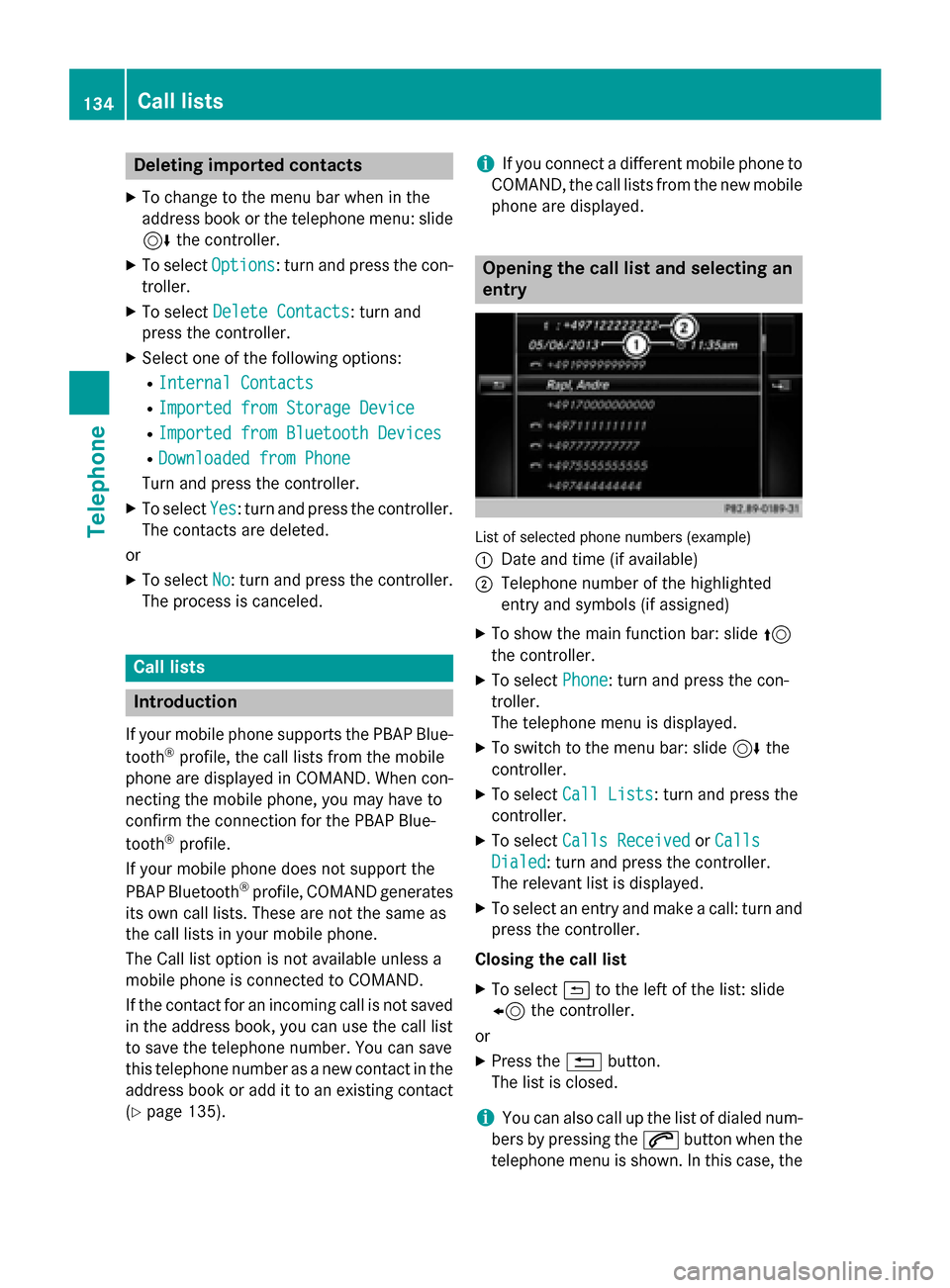
Lis tof selecte dphone number s(example)
:
Date and time (if available )
;Telephone number of thehighlighted
entr yand symbols (if assigned)
XTo sho wthemain function bar :slid e5
th econtroller .
XTo selectPhone:turn and press th econ-
troller.
The telephon emen uis displayed .
XTo switch to th emen ubar :slid e6 the
controller .
XTo selectCal lLists:turn and press th e
controller .
XTo selectCalls Receivedor Calls
Dialed:turn and press th econtroller .
The relevant list is displayed .
XTo selectan entr yand mak e acall: turn and
press th econtroller .
Closing th ecal llist
XTo selec t& to th elef tof th elist :slid e
8 thecontroller .
or
XPress th e% button.
The list is closed.
iYou can also cal lup th elist of diale dnum -
ber sby pressing th e6 buttonwhen th e
telephon emen uis shown .In this case, th e
134Call lists
Telephone
Page 138 of 226
XTo selectCall Lists: turn and press the
controller.
XTo select Calls ReceivedorCalls
Dialed: turn and press the controller.
The relevant list is displayed.
XTo highlight the desired telephone number:
turn the controller.
XTo select G: slide 9the controller.
XTo select Save: turn and press the control-
ler.
XSelect Add Phone No..
XSelect a number category, e.g. Home.
XSelect a telephone category, e.g. Mobile
Phone.
XSelectContinue.
The address book is displayed.
XSearch for the desired contact
(
Ypage 128).
XPress the controller when you have finished
searching.
The telephone number has been saved.
A maximum of five telephone numbers can
be saved for one contact.
If five numbers are already stored for the
entry you are searching for, a prompt will
appear asking whether you wish to overwrite
one of the existing numbers.
Overwriting an entry
XTo select Yes: turn and press the controller.
A list of the existing five numbers is dis-
played.
XTo select the number to be overwritten
from the list: turn the controller and press
to confirm.
The entry is overwritten with the new tele-
phone number.
Canceling the overwriting of an entry
XTo select No: turn and press the controller.
The process is canceled.
Deleting call lists
Call lists which are generated and managed
by COMAND can be deleted on COMAND.
You cannot delete call lists from COMAND
which are displayed on a mobile phone that
supports the PBAP Bluetooth
®profile.
XTo show the main function bar: slide 5
the controller.
XTo select Phone: turn and press the con-
troller.
The telephone menu is displayed.
XTo switch to the menu bar: slide 6the
controller.
XTo select Call Lists: turn and press the
controller.
XSelect Delete Call Lists.
A prompt appears asking whether you wish
to delete all call lists.
XTo select Yes: turn and press the controller.
The call lists are deleted.
or
XTo select No: turn and press the controller.
The process is canceled.
iIf you delete these call lists from the
mobile phone (see the separate mobile
phone operating instructions), COMAND
updates the call list display the next time it
connects.
Speed dial lists
Setting up
XTo show the main function bar: slide 5
the controller.
XTo select Phone: turn and press the con-
troller.
The telephone menu is displayed.
XTo call up the menu bar: slide 6the con-
troller.
XTo select Call Lists: turn and press the
controller.
136Speed dial lists
Telephone
Page 140 of 226
Prerequisites
To use the message functions, the connected
mobile phone must support the MAP Blue-
tooth
®profile. The prompt for the MAP Blue-
tooth®profile may have to be confirmed on
the mobile phone.
With some mobile phones, some settings still
have to be made after connecting to
COMAND (see the manufacturer's operating
instructions). The messages are displayed the
next time you connect to COMAND.
An e-mail account must be set up on the
mobile phone for the e-mail function (see the
manufacturer’s operating instructions).
To read and write e-mails in COMAND, the e-
mail account first needs to be configured
(
Ypage 139).
Some mobile phones with the MAP Blue-
tooth
®profile:
Ronly show new text messages.
Rdo not support the deleting or editing of
text messages.
Rdo not support the drafts folder for text
messages.
Rdo not support the sending of text mes-
sages.
Rdo not support the e-mail function.
Rdo not send messages in a locked status.
Not all mobile phones available on the market
are equally suitable. You can obtain further
information about settings and supported
functions of Bluetooth
®-capable mobile
phones on the Internet at
www.mercedes-benz-mobile.com .
Or call the Mercedes-Benz Customer Assis-
tance Center at 1-800-FOR-MERCedes
(1-800-367-6372) (for the USA) or Customer
Relations at 1-800-387-0100 (for Canada).
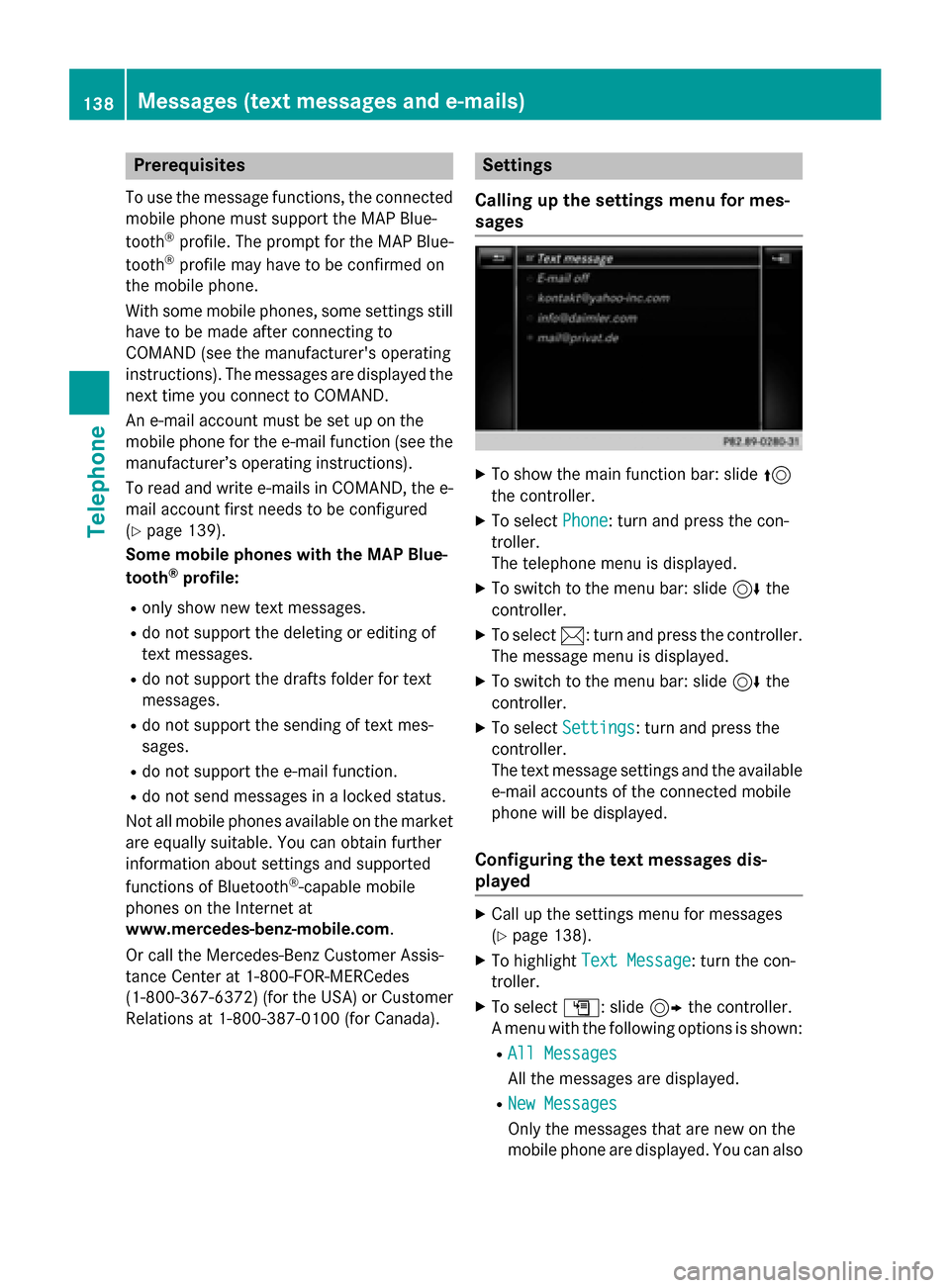
Settings
Calling up the settings menu for mes-
sages
XTo show the main function bar: slide 5
the controller.
XTo select Phone: turn and press the con-
troller.
The telephone menu is displayed.
XTo switch to the menu bar: slide 6the
controller.
XTo select 1: turn and press the controller.
The message menu is displayed.
XTo switch to the menu bar: slide 6the
controller.
XTo select Settings: turn and press the
controller.
The text message settings and the available
e-mail accounts of the connected mobile
phone will be displayed.
Configuring the text messages dis-
played
XCall up the settings menu for messages
(
Ypage 138).
XTo highlight Text Message: turn the con-
troller.
XTo select G: slide 9the controller.
A menu with the following options is shown:
RAll Messages
All the messages are displayed.
RNew Messages
Only the messages that are new on the
mobile phone are displayed. You can also
138Messages (text messages and e-mails)
Telephone
Page 151 of 226

current Internet connection. Therefore, you
cannot establish an Internet connection dur-
ing a service call.
Canada:a mobile phone must be connected
via Bluetooth
®(Ypage 114) or USB
(
Ypage 200) with COMAND. Furthermore,
you need a valid mobile service contract with
a data option, which is used to calculate the
associated connection costs.
Conditions for a Bluetooth
®connection
RThe mobile phone supports at least one of
the Bluetooth®profiles DUN ( Dial-U p
Networking) or PAN ( PersonalArea
Network).
The Bluetooth
®profiles DUN and PAN ena-
ble the Internet connection of the mobile
phone to be made available to the system.
Conditions for a USB connection
RThe mobile phone supports at least one of
the USB classes:
-RNDIS ( Remote Network Driver Inter-
face Specification)
-CDC/NCM ( NetworkControl Model)
-CDC/ECM ( Ethernet Control Model)
-CDC/ACM ( Access Control Model)
The USB classes enable the mobile phone
Internet connection to be made available to
the system.
The terms of use are shown when the system
is used for the first time and then once a year
thereafter. Only read and accept the terms of
use when the vehicle is stationary.
The driver is not permitted to call up websites
while driving and use of the Me
rcedes-Benz
Apps is restricted.
iThe availability of individual Mercedes-
Benz Apps may vary depending on the
country.
Setting up an Internet connection
(Canada)
Procedure and general information
If you are using Internet access for the first
time, you must enable the connected mobile
phone for Internet access (
Ypage 149). If the
connected mobile phone supports the Blue-
tooth
®PAN profile or the USB classes RNDIS,
CDC/NCM or CDC/ECM, you do not need to
make additional settings. The Internet con-
nection is established. If the connected
mobile phone does not support the named
Bluetooth
®profile or the named USB classes,
predefined (
Ypage 150) or manual access
data (
Ypage 150) must be set.
While initializing the mobile phone for the
Internet connection, access data which is
already on the mobile phone may be over-
written. You should therefore check the set-
tings on the mobile phone (see the manufac-
turer's operating instructions).
Enabling the mobile phone for Inter-
net access
XTo call up Internet functions (Ypage 153).
XTo switch to the menu bar: slide 6the
controller.
XTo select Settings: turn and press the
controller.
XTo select Configure Internet Set‐
tings: turn and press the controller.
A message is displayed telling you that the
settings for the Internet functions depend
on your mobile phone network provider and
your mobile phone.
If a mobile phone has already been ena-
bled, the device list is displayed.
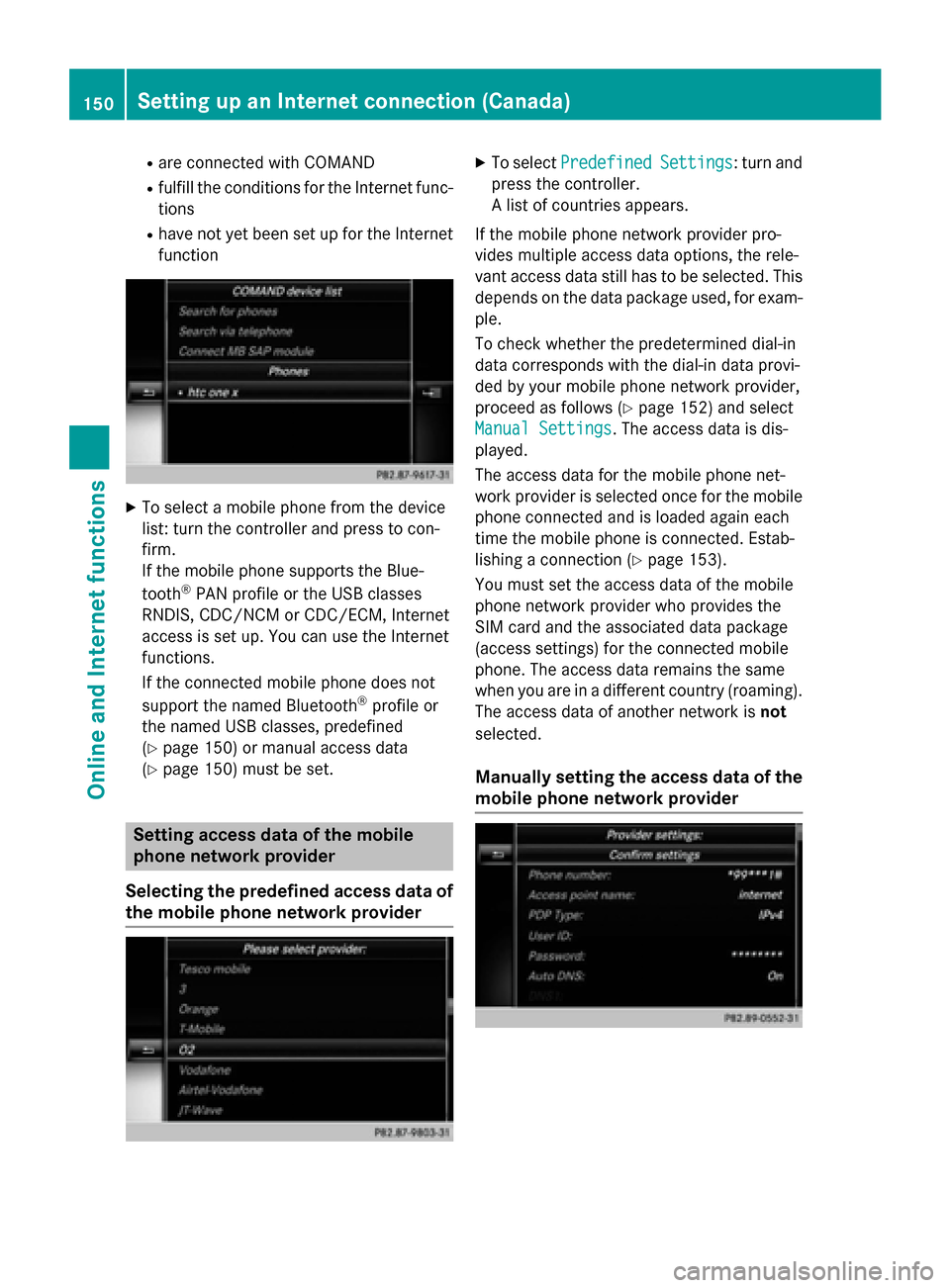
XTo select Start Search: turn and press
the controller.
Mobile phones are displayed that:
Setting up an Internet connection (Canada)149
Online and Internet functions
Z
Page 152 of 226
Rare connected with COMAND
Rfulfill the conditions for the Internet func-
tions
Rhave not yet been set up for the Internet
function
XTo select a mobile phone from the device
list: turn the controller and press to con-
firm.
If the mobile phone supports the Blue-
tooth
®PAN profile or the USB classes
RNDIS, CDC/NCM or CDC/ECM, Internet
access is set up. You can use the Internet
functions.
If the connected mobile phone does not
support the named Bluetooth
®profile or
the named USB classes, predefined
(
Ypage 150) or manual access data
(
Ypage 150) must be set.
Setting access data of the mobile
phone network provider
Selecting the predefined access data of
the mobile phone network provider
XTo select PredefinedSettings: turn and
press the controller.
A list of countries appears.
If the mobile phone network provider pro-
vides multiple access data options, the rele-
vant access data still has to be selected. This
depends on the data package used, for exam-
ple.
To check whether the predetermined dial-in
data corresponds with the dial-in data provi-
ded by your mobile phone network provider,
proceed as follows (
Ypage 152) and select
Manual Settings
. The access data is dis-
played.
The access data for the mobile phone net-
work provider is selected once for the mobile phone connected and is loaded again each
time the mobile phone is connected. Estab-
lishing a connection (
Ypage 153).
You must set the access data of the mobile
phone network provider who provides the
SIM card and the associated data package
(access settings) for the connected mobile
phone. The access data remains the same
when you are in a different country (roaming).
The access data of another network is not
selected.
Manually setting the access data of the
mobile phone network provider
150Setting up an Internet connection (Canada)
Online and Internet functions
Page 182 of 226

Your COMANDequipment
i
These operatin ginstruction sdescribe all
th estandar dan doptional equipmen tof
your COMAN Dsystem, as available at th e
time of going to print .Country-specifi cdif -
ference sare possible. Bear in min dthat
your vehicle may no tfeature all function s
described here. Thi salso applies to safety-
relevant systems an dfunctions.
iRead th einformation on qualified special-
ist workshop sin th evehicle Operator's
Manual.
Activating medi amode
General notes
There are severa lways to activat emedia
source susin gCOMAND.
The relevant section sof th eOperator's Man -
ual describe th esimples tway to activat e a
media source .Thi ssection describes all
option sfo ractivatin gmedia sources. If you
wish to play external media sources, th e
default display mus talready be turned on .
The followin gexternal media source scan be
used :
RApple®devices (e.g. iPhon e®)
RUSBdevices (e.g. US Bstick, MP3 player)
RCD
RDV D
RSD memor ycards
Rvia devices connecte dby Bluetoot h®
Usingth emain function ba r
XTo display themain function bar :slid e5
th econtroller .
XTo selectMedi a:turn an dpress th econ-
troller.
The last media source you hav eset is dis -
played.
XTo selec tMedi ain media mode: slid e5
an dpress th econtroller .
The men uappears wit hth eavailable media
sources.
XTo selec tth emedia source :turn th econ-
trolle ran dpress to confirm .
Dependin gon th evehicle equipment, th e
followin goption swill be available :
RDisc
REject
RMemory Card
RMediaRegister
RMedi aInterfac e 1
RMediaInterfac e 2
RBluetoothAudi o
If playable music files are found ,they will be
playe dby COMAND. The correspondin g
basi cmen uwill be shown .
180Activating media mode
Media