2016 MERCEDES-BENZ AMG GT ROADSTER interior lights
[x] Cancel search: interior lightsPage 5 of 289
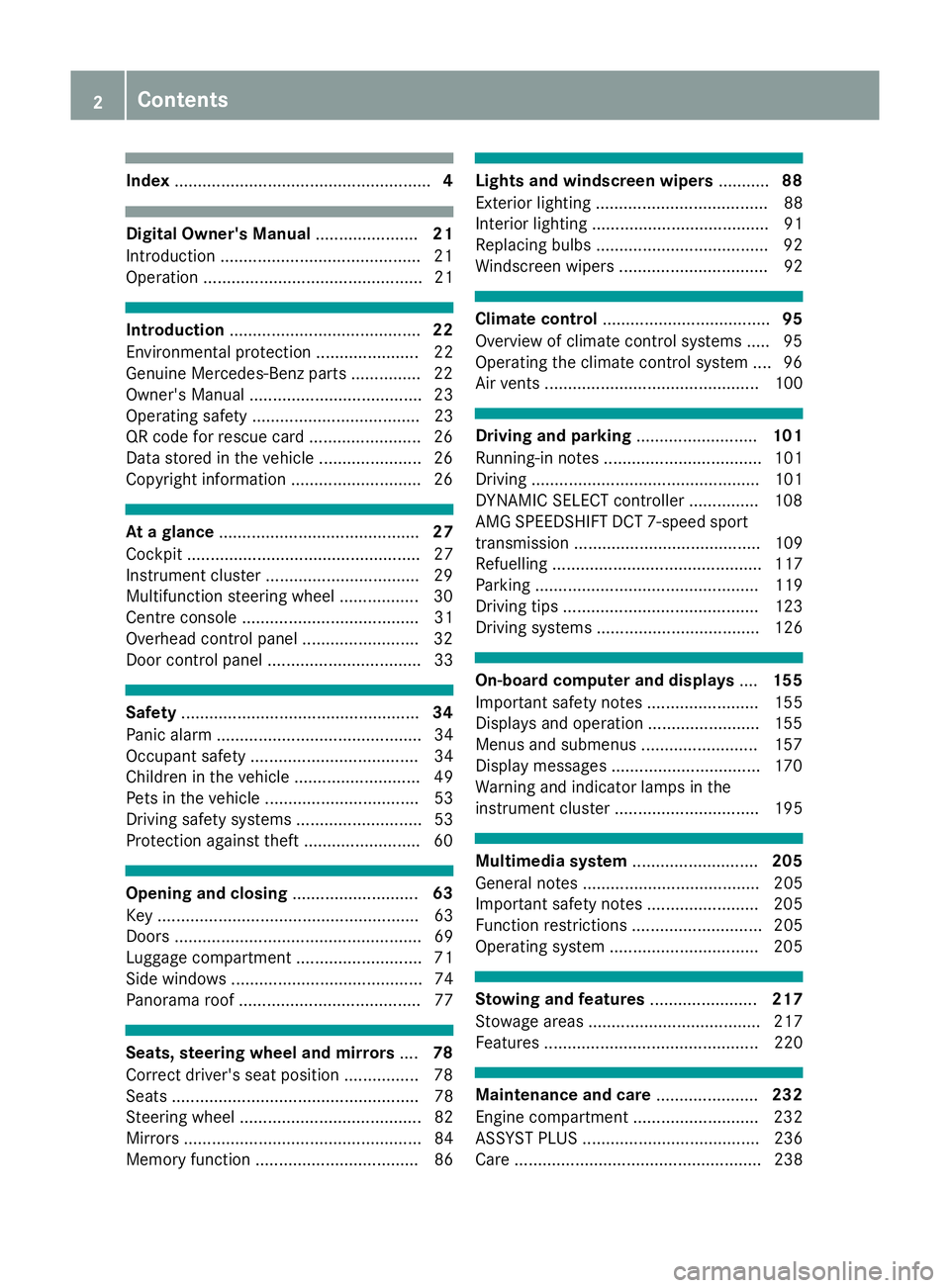
Index
....................................................... 4Digital Owner's Manual
......................21
Introduction .......................................... .21
Operation ............................................... 21 Introduction
......................................... 22
Environmental protection ......................22
Genuine Mercedes-Benz parts .............. .22
Owner's Manual .....................................23
Operating safety .................................... 23
QR code for rescue card ........................ 26
Data stored in the vehicle ......................26
Copyright information ............................ 26 At a glance
........................................... 27
Cockpit .................................................. 27
Instrument cluster ................................ .29
Multifunction steering wheel ................. 30
Centre console ...................................... 31
Overhead control panel .........................32
Door control panel ................................. 33 Safety
................................................... 34
Panic alarm ............................................ 34
Occupant safety .................................... 34
Children in the vehicle ........................... 49
Pets in the vehicle ................................. 53
Driving safety systems ........................... 53
Protection against theft ........................ .60Opening and closing
...........................63
Key ........................................................ 63
Doors ..................................................... 69
Luggage compartment ........................... 71
Side windows ......................................... 74
Panorama roof ....................................... 77 Seats, steering wheel and mirrors
....78
Correct driver's seat position ................78
Seats ..................................................... 78
Steering wheel ....................................... 82
Mirrors ................................................... 84
Memory function ................................... 86 Lights and windscreen wipers
...........88
Exterior lighting ..................................... 88
Interior lighting ...................................... 91
Replacing bulbs ..................................... 92
Windscreen wipers ................................ 92 Climate control
.................................... 95
Overview of climate control systems ..... 95
Operating the climate control system .... 96
Air vents .............................................. 100 Driving and parking
..........................101
Running-in notes .................................. 101
Driving ................................................. 101
DYNAMIC SELECT controller ............... 108
AMG SPEEDSHIFT DCT 7-speed sport
transmission ........................................ 109
Refuelling ............................................. 117
Parking ................................................ 119
Driving tips .......................................... 123
Driving systems ................................... 126 On-board computer and displays
....155
Important safety notes ........................ 155
Displays and operation ........................ 155
Menus and submenus ......................... 157
Display messages ................................ 170
Warning and indicator lamps in the
instrument cluster ............................... 195 Multimedia system
...........................205
General notes ...................................... 205
Important safety notes ........................ 205
Function restrictions ............................ 205
Operating system ................................ 205 Stowing and features
.......................217
Stowage areas ..................................... 217
Features .............................................. 220 Maintenance and care
......................232
Engine compartment ........................... 232
ASSYST PLUS ...................................... 236
Care ..................................................... 238 2
Contents
Page 15 of 289

Reading lamp ..................................
.91
Setting brightness for display/
switches (on-board computer) ....... 165
Interior motion sensor
Deactivating ..................................... 62
Function ........................................... 61
Priming ............................................ 61
Switching off .................................... 62
iPod ®
See also Digital Owner's Manua l... 205 J
Jack Declaration of conformity ................ 24
Storage location ............................ 246
Using ............................................. 269
Jump starting (engine) ...................... 253K
Key Changing the battery ....................... 66
Checking the battery ....................... 66
Convenience closing feature ............ 75
Convenience opening feature .......... 75
Display message ............................ 194
Door central locking/unlocking ....... 64
Emergency key element ................... 65
Important safety notes .................... 63
KEYLESS-GO start function .............. 65
Loss ................................................. 67
Modifying the programming ............. 65
Overview .......................................... 63
Positions (ignition lock) ................. 103
Problem (malfunction) ..................... 67
Starting the engine ........................ 104
Key positions
Key ................................................ 103
Start/Stop button .......................... 102
KEYLESS-GO
Convenience closing ........................ 75
Deactivation ..................................... 64
Locking ............................................ 64
Start function ................................... 65
Unlocking ......................................... 64
KEYLESS-GO start function
Start/Stop button .......................... 102 Kickdown
Driving tips .................................... 112
Kneebag ............................................... 40 L
Lamps see Warning and indicator lamps
Lane Keeping Assist
Activating/deactivating (on-
board computer) ............................ 165
Display message ............................ 186
Function/information .................... 153
Lane package ..................................... 151
Lap time (RACETIMER) ...................... 168
Licence plate lamp (display mes-
sage) ................................................... 182
Light sensor (display message) ....... 182
Lighting
see Lights
Lights
Automatic headlamp mod e.............. 88
Dipped-beam headlamp s................. 89
Driving abroad ................................. 88
Hazard warning lamps ..................... 90
Headlamp flashe r............................. 89
Light switch ..................................... 88
Main-beam headlamp s..................... 89
Misted up headlamp s....................... 91
Parking lamps .................................. 89
Rear foglamp ................................... 89
Setting brightness for display/
switches (on-board computer) ....... 165
Setting exterior lighting ................... 88
Side lamps ....................................... 89
Turn signals ..................................... 89
see Interior lighting
LIM indicator lamp
Cruise control ................................ 126
DISTRONIC PLUS ........................... 131
Variable SPEEDTRONIC ................. 128
Limiting the speed
see SPEEDTRONIC
Loading guidelines ............................ 217
Locking (doors)
Automatic ........................................ 70
Emergency locking ........................... 70 12
Index
Page 18 of 289
PRE-SAFE
®
(anticipatory occupant
protection)
Operation ......................................... 48
PRE-SAFE ®
(preventive occupant
safety system)
Display message ............................1 77
Protection against theft
ATA (Anti-Theft Alarm system) ......... 60
Immobiliser ...................................... 60
Interior motion sensor ..................... 61
Tow-away protectio n ........................61
Protection of the environment
General notes .................................. 22
Pulling away
Automatic transmission ................. 104
General notes ................................ 104
Hill start assist ............................... 104 Q
QR code Mercedes-Benz Guide App ................. 1
Rescue card ..................................... 26
Qualified specialist workshop ........... 25
Quick access for audio and tele-
phone
Changing the station/music
track .............................................. 208 R
RACE START Activating ....................................... 139
important safety notes ................... 139
RACETIMER (on-board computer) .... 168
Radio
Selecting a station ......................... 160
Radio mode
See also Digital Owner's Manual ... 205
Radio-based vehicle components
Declaration of conformity ................ 24
Reading lamp ....................................... 91
Rear foglamp
Display message ............................ 182
Switching on/off .............................. 89
Rear lamps
see Lights Rear spoiler
Extending/retracting ..................... 224
Problem ......................................... 225
Rear window heating
Problem (fault) ................................. 99
Switching on/off .............................. 99
Rear wing
Display message ............................ 193
Rear-view mirror
Anti-dazzle mode (automatic) .......... 85
Dipping (manual ).............................. 84
Reflective safety vest ....................... 244
Refuelling
Fuel gaug e....................................... 29
Important safety notes .................. 117
Refuelling process ......................... 118
see Fuel
Remote control
Garage door opener ....................... 225
Programming (garage door
opener) .......................................... 226
Replacing bulbs
General notes .................................. 92
Rescue card ......................................... 26
Reserve (fuel tank)
see Fuel
Reserve fuel
Display message ............................ 185
Warning lamp ................................. 200
Restraint system
Display message ............................ 178
Introduction ..................................... 34
Warning lamp ................................. 199
Warning lamp (function) ................... 35
Rev counter ........................................ 155
Reversing camera
Cleaning instructions ..................... 241
Function/note s............................. 144
Switching on/of f........................... 144
Reversing feature
Side window s................................... 74
Reversing lamp (display message) .. 182
Roller sunblind of the panorama
roof
Opening and closing ........................ 77
Operating ......................................... 77 Index
15
Page 45 of 289
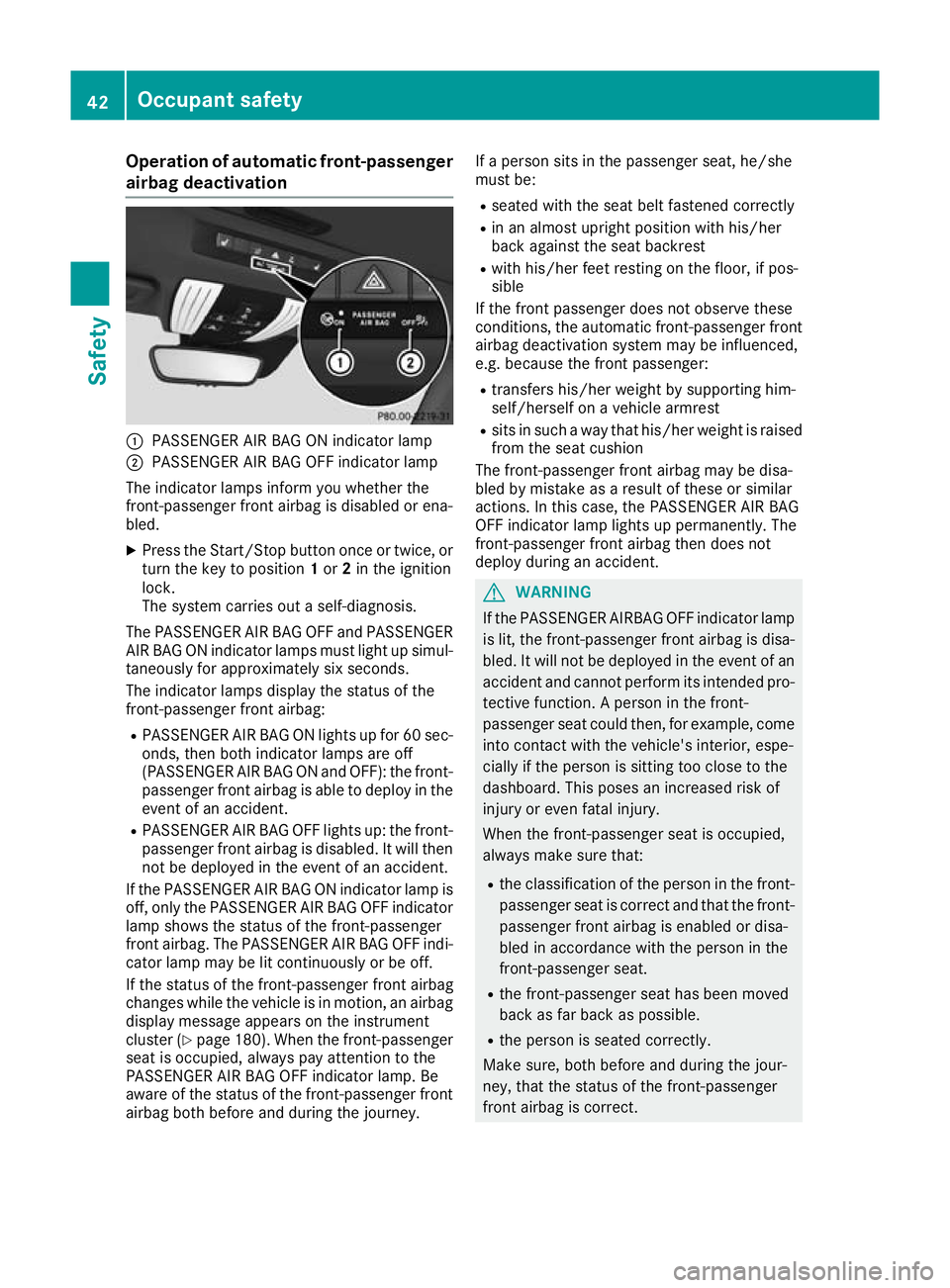
Operation of automatic front-passenger
airbag deactivation :
PASSENGER AIR BAG ON indicator lamp
; PASSENGER AIR BAG OFF indicator lamp
The indicator lamps inform you whether the
front-passenger front airbag is disabled or ena-
bled.
X Press the Start/Stop button once or twice, or
turn the key to position 1or 2in the ignition
lock.
The system carries out a self-diagnosis.
The PASSENGER AIR BAG OFF and PASSENGER
AIR BAG ON indicator lamps must light up simul- taneously for approximately six seconds.
The indicator lamps display the status of the
front-passenger front airbag:
R PASSENGER AIR BAG ON lights up for 60 sec-
onds, then both indicator lamps are off
(PASSENGER AIR BAG ON and OFF): the front-
passenger front airbag is able to deploy in the event of an accident.
R PASSENGER AIR BAG OFF lights up: the front-
passenger front airbag is disabled. It will then
not be deployed in the event of an accident.
If the PASSENGER AIR BAG ON indicator lamp is off, only the PASSENGER AIR BAG OFF indicator
lamp shows the status of the front-passenger
front airbag. The PASSENGER AIR BAG OFF indi- cator lamp may be lit continuously or be off.
If the status of the front-passenger front airbag
changes while the vehicle is in motion, an airbag
display message appears on the instrument
cluster (Y page 180). When the front-passenger
seat is occupied, always pay attention to the
PASSENGER AIR BAG OFF indicator lamp. Be
aware of the status of the front-passenger front
airbag both before and during the journey. If a person sits in the passenger seat, he/she
must be:
R seated with the seat belt fastened correctly
R in an almost upright position with his/her
back against the seat backrest
R with his/her feet resting on the floor, if pos-
sible
If the front passenger does not observe these
conditions, the automatic front-passenger front
airbag deactivation system may be influenced,
e.g. because the front passenger:
R transfers his/her weight by supporting him-
self/herself on a vehicle armrest
R sits in such a way that his/her weight is raised
from the seat cushion
The front-passenger front airbag may be disa-
bled by mistake as a result of these or similar
actions. In this case, the PASSENGER AIR BAG
OFF indicator lamp lights up permanently. The
front-passenger front airbag then does not
deploy during an accident. G
WARNING
If the PASSENGER AIRBAG OFF indicator lamp is lit, the front-passenger front airbag is disa-
bled. It will not be deployed in the event of an
accident and cannot perform its intended pro-
tective function. A person in the front-
passenger seat could then, for example, come
into contact with the vehicle's interior, espe-
cially if the person is sitting too close to the
dashboard. This poses an increased risk of
injury or even fatal injury.
When the front-passenger seat is occupied,
always make sure that:
R the classification of the person in the front-
passenger seat is correct and that the front-
passenger front airbag is enabled or disa-
bled in accordance with the person in the
front-passenger seat.
R the front-passenger seat has been moved
back as far back as possible.
R the person is seated correctly.
Make sure, both before and during the jour-
ney, that the status of the front-passenger
front airbag is correct. 42
Occupant safetySafety
Page 64 of 289

call system automatically sends a message to
the Customer Assistance Centre. This is done by means of a text message or a data con-
nection.
The emergency call system sends a message
or establishes a data connection provided
that:
R you have subscribed to the Mercedes‑Benz
emergency call system
R the Mercedes ‑Benz emergency call system
has been activated properly
R the necessary mobile phone network is
available Tow-away protection
Function An audible and visual alarm is triggered if your
vehicle's angle of inclination is altered while
tow-away protection is primed. This can occur if
the vehicle is jacked up on one side, for exam-
ple.
Activating X
Make sure that:
R the doors are closed
R the tailgate is closed
Only then is tow-away protection primed.
X Lock the vehicle with the key or KEYLESS-GO.
Tow-away protection is primed after approx-
imately 60 seconds.
Switching off X
Unlock the vehicle with the key or KEYLESS-
GO.
or X Insert the key into the ignition lock.
Tow-away protection is switched off automat-
ically. Deactivating X
With KEYLESS-GO start function or vehi-
cles with KEYLESS-GO: switch off the
engine using the Start/Stop button and open the driver's door.
or
X Remove the key from the ignition lock.
X Press button :.
Indicator lamp ;lights up briefly.
X Lock the vehicle with the key or KEYLESS-GO.
Tow-away protection is deactivated.
Tow-away protection remains deactivated until: R the vehicle is unlocked again and
R a door is opened and closed again and
R the vehicle is locked again
To prevent a false alarm, deactivate tow-away
protection if you lock your vehicle and it:
R is being transported
R is being loaded onto a ferry or car transporter,
for example
R is parked on a movable surface, e.g. in a split-
level garage Interior motion sensor
Function When the interior motion sensor is primed, a
visual and audible alarm is triggered if move-
ment is detected in the vehicle interior. This can
occur if someone reaches into the vehicle inte-
rior, for example.
Activating X
Make sure that: Protection against theft
61Safety Z
Page 94 of 289
In particular, the detection of obstacles can be
restricted if there is:
R poor visibility, e.g. due to fog, heavy rain or
snow
R dirt on the sensors or if the sensors are
obscured
Switching Adaptive Highbeam Assist
on/off X
To switch on: turn the light switch to the
à position.
X Press the combination switch beyond the
pressure point in the direction of arrow :.
The _ indicator lamp in the multifunction
display lights up when it is dark and the light
sensor switches on the dipped-beam head-
lamps.
If you are driving at speeds above approx-
imately 25 km/h:
The headlamp range is set automatically
depending on the distance between the vehi-
cle and other road users.
If you are driving at speeds above approx-
imately 30 km/h and no other road users are detected:
The main-beam headlamps are switched on
automatically. The Kindicator lamp in the
instrument cluster also lights up.
If you are driving at speeds below approx-
imately 25 km/h or other road users are
detected or the roads are adequately lit:
The main-beam headlamps are switched off
automatically. The Kindicator lamp in the
instrument cluster goes out. The _indi-
cator lamp in the multifunction display
remains lit.
X To switch off:move the combination switch
back to its normal position or move the light
switch to another position.
The _ indicator lamp in the instrument
cluster goes out. Headlamps misted up on the inside
Certain climatic and physical conditions may
cause moisture to form in the headlamp. This
moisture does not affect the functionality of the headlamp. Interior lighting
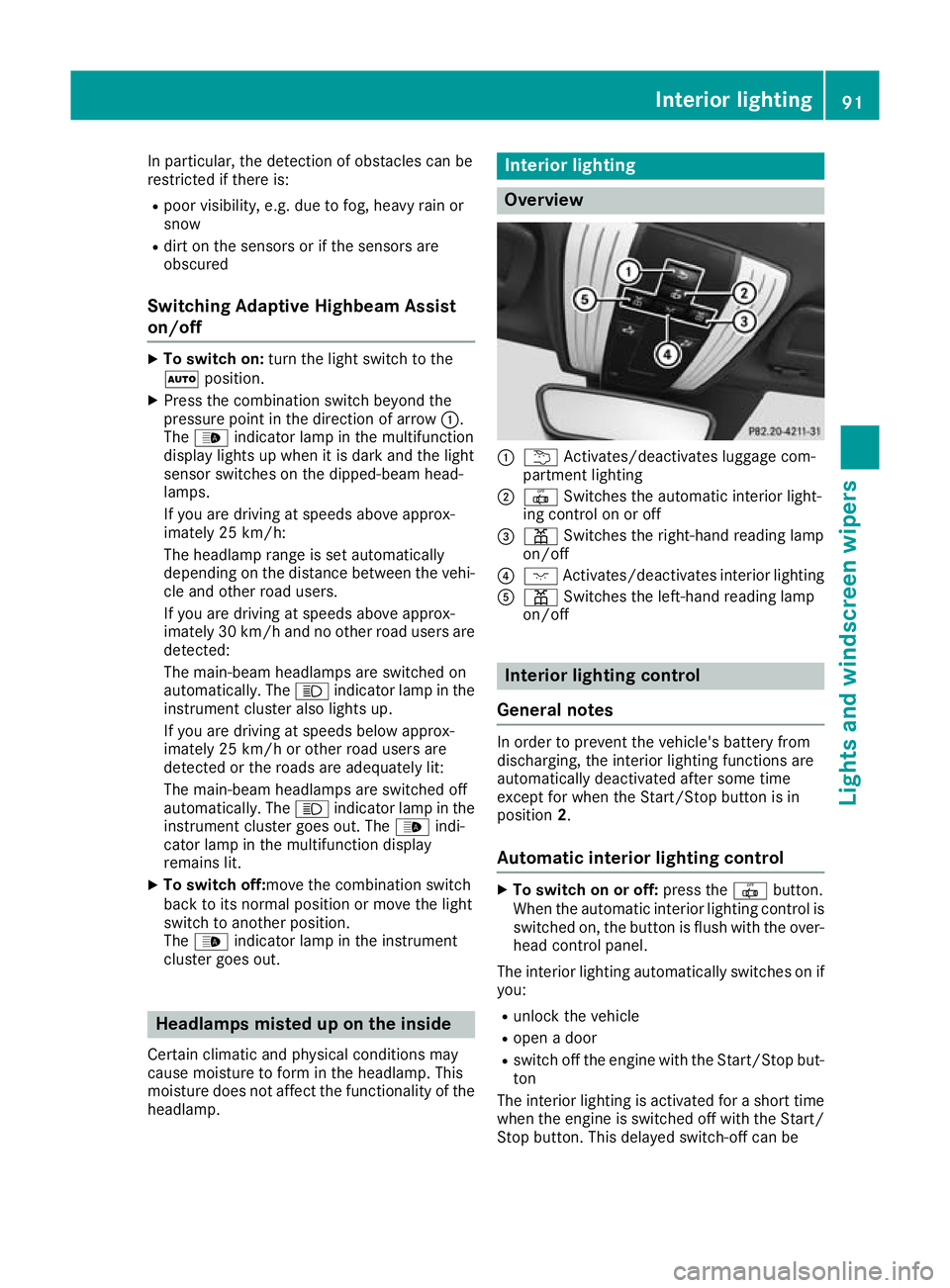
Overview
:
u Activates/deactivates luggage com-
partment lighting
; | Switches the automatic interior light-
ing control on or off
= p Switches the right-hand reading lamp
on/off
? c Activates/deactivates interior lighting
A p Switches the left-hand reading lamp
on/off Interior lighting control
General notes In order to prevent the vehicle's battery from
discharging, the interior lighting functions are
automatically deactivated after some time
except for when the Start/Stop button is in
position
2.
Automatic interior lighting control X
To switch on or off: press the|button.
When the automatic interior lighting control is
switched on, the button is flush with the over- head control panel.
The interior lighting automatically switches on if
you:
R unlock the vehicle
R open a door
R switch off the engine with the Start/Stop but-
ton
The interior lighting is activated for a short time when the engine is switched off with the Start/
Stop button. This delayed switch-off can be Interior lighting
91Lights and windscreen wipers Z
Page 102 of 289
Rear window heating
General notes The rear window heating has a high current
draw. You should therefore switch it off as soon
as the window is clear. It otherwise switches off automatically after several minutes.
If the battery voltage is too low, the rear window
heating may switch off. Switching on/off X
Select key position 2with the Start/Stop but-
ton (Y page 103).
X Press the ¤rocker switch up or down.
The indicator lamp above the ¤rocker
switch lights up or goes out.
Problems with the rear window heating Problem
Possible causes/consequences and
M MSolutions The rear window heating
has switched off prema-
turely or cannot be acti-
vated. The battery has not been sufficiently charged.
X Switch off any consumers that are not required, e.g. reading lamps,
interior lighting or the seat heating.
When the battery is sufficiently charged, the rear window heating
can be activated again. Activating/deactivating air-recircula-
tion mode
General notes You can also temporarily deactivate the flow of
fresh air manually if unpleasant odours are
entering the vehicle from outside. The air
already inside the vehicle will then be recircula-
ted.
If you activate air-recirculation mode, the win-
dows can mist up more quickly, in particular at
low temperatures. Only use air-recirculation
mode briefly to prevent the windows misting up.
Activating/deactivating X
Select key position 2with the Start/Stop but-
ton (Y page 103).
X To activate: press thegrocker switch up
or down.
The indicator lamp above the grocker
switch lights up.
Air-recirculation mode is activated automati-
cally: R at high outside temperatures
R in a tunnel (vehicles with a navigation system
only)
The indicator lamp above the grocker
switch is not lit when automatic air-recirculation mode is activated. Outside air is added after
approximately 30 minutes.
X To deactivate:press the grocker switch
up or down.
The indicator lamp above the grocker
switch goes out.
Air-recirculation mode is deactivated automati-
cally:
R after approximately five minutes at outside
temperatures below approximately 5 †
R after approximately five minutes if "Cooling
with air dehumidification" is deactivated
R after approximately 30 minutes at outside
temperatures above approximately 5 †if the
"Cooling with air dehumidification" function is activated Convenience opening/closing using
the air-recirculation button
G
WARNING
When using convenience closing, you could
become trapped within the sweep of the clos- ing window. There is a risk of injury.
Monitor the entire closing procedure when
using convenience closing. When closing, Operating the climate control system
99Climate control
Z
Page 103 of 289
make sure that no one has any parts of the
body within the closing area. G
WARNING
During convenience opening parts of the body could be drawn in or become trapped
between the side window and window frame.
There is a risk of injury.
When opening, make sure that nobody is
touching the side window. If someone
becomes trapped, immediately press
the W switch in the door to stop the move-
ment of the side windows. To continue closing
the side window, pull on the Wswitch.
X Convenience closing feature: press and
hold the grocker switch up or down until
the side windows start to close automatically. The indicator lamp above the grocker
switch lights up. Air-recirculation mode is
activated.
If you open the side windows manually after
closing them using the convenience closing
feature, they will remain in this position when
opened.
If parts of the body are in the closing area during convenience closing, proceed as follows:
X Press the Wbutton to stop the side win-
dows.
The side windows stop.
X To then open the side windows, press the
W button again.
Observe the notes on the automatic reversing
feature for the side windows (Y page 74).
X Convenience opening feature: press and
hold the grocker switch up or down until
the side windows start to open automatically.
The indicator lamp above the grocker
switch goes out. Air-recirculation mode is
deactivated. Air vents
Important safety notes
G
WARNING
Very hot or very cold air can flow from the air vents. This could result in burns or frostbite in the immediate vicinity of the air vents. There
is a risk of injury.
Make sure that all vehicle occupants always
maintain a sufficient distance to the air out-
lets. If necessary, redirect the airflow to
another area of the vehicle interior.
In order to ensure the direct flow of fresh air
through the air vents into the vehicle interior,
please observe the following notes:
R keep the air inlet between the windscreen and
the bonnet free of blockages, such as ice,
snow or leaves
R never cover the vents or ventilation grilles in
the vehicle interior Adjusting the air vents
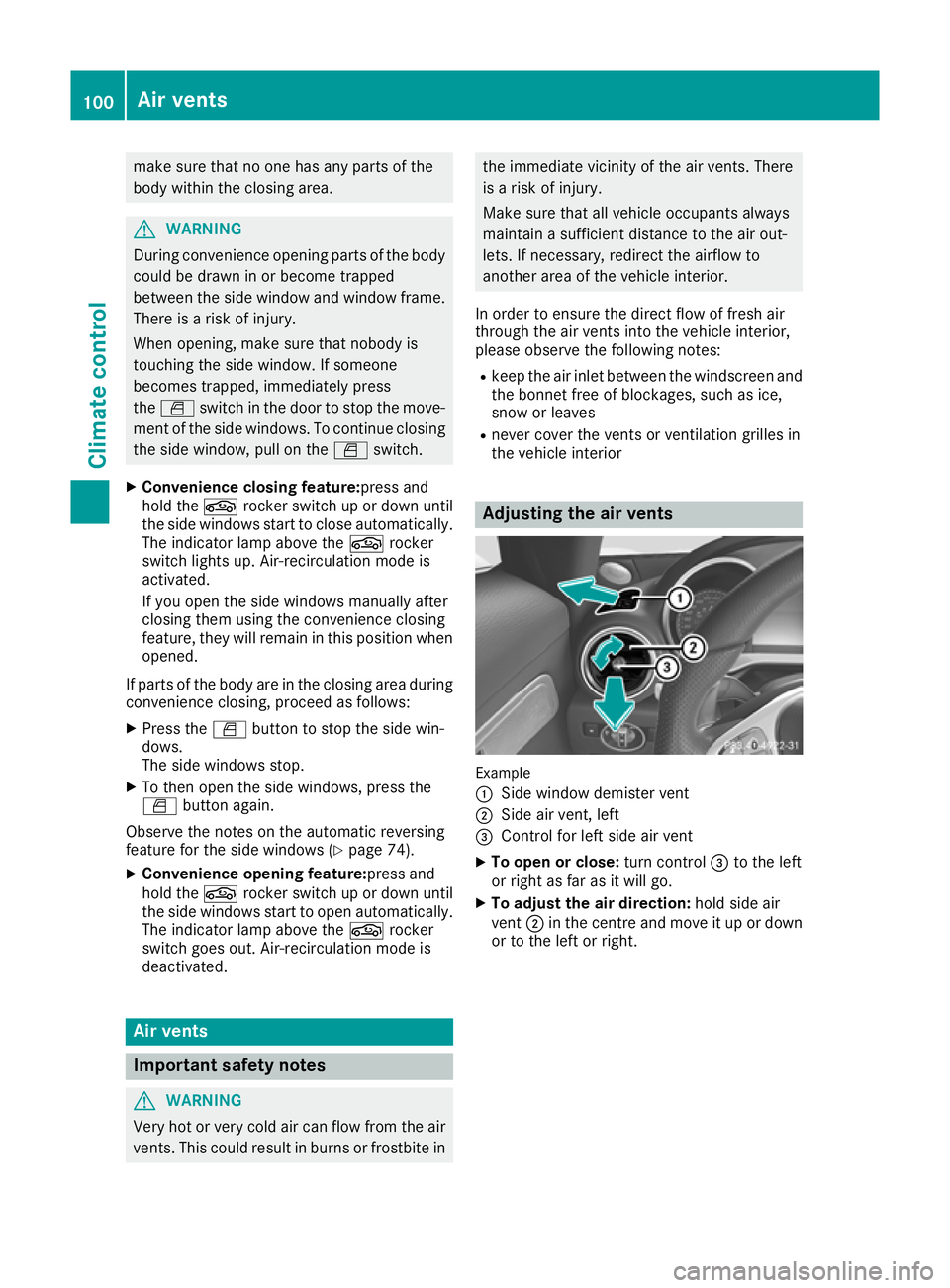
Example
:
Side window demister vent
; Side air vent, left
= Control for left side air vent
X To open or close: turn control=to the left
or right as far as it will go.
X To adjust the air direction: hold side air
vent ;in the centre and move it up or down
or to the left or right. 100
Air ventsClimate control