2016 MAZDA MODEL 6 fuel
[x] Cancel search: fuelPage 141 of 614

Black plate (141,1)
NOTElEven though the distance-to-empty display
may indicate a sufficient amount of
remaining driving distance before refueling
is required, refuel as soon as possible if the
fuel level is very low or the low fuel
warning light illuminates.
lThe display will not change unless you add
more than approximately 10 L (2.6 US gal,
2.2 Imp gal) of fuel.
lThe distance-to-empty is the approximate
remaining distance the vehicle can be
driven until all the graduation marks in the
fuel gauge indicating the remaining fuel
supply disappear.
lIf there is no past fuel economy information
such as after first purchasing your vehicle
or the information is deleted when the
battery cables are disconnected, the actual
distance-to empty/range may differ from the
amount indicated.
Average fuel economy mode
This mode displays the average fuel
economy by calculating the total fuel
consumption and the total traveled
distance since purchasing the vehicle, re-
connecting the battery after disconnection,
or resetting the data. The average fuel
economy is calculated and displayed
every minute.
Type A
Type B
To clear the data being displayed, press
the INFO button for more than 1.5
seconds.
After pressing the INFO button, - - - L/
100 km (- - - mpg) will be displayed for
about 1 minute before the fuel economy is
recalculated and displayed.
Current fuel economy mode
This mode displays the current fuel
economy by calculating the amount of
fuel consumption and the distance
traveled.
When Driving
Instrument Cluster and Display
4-17
Mazda6_8EA2-EA-14K_Edition2 Page141
Saturday, January 10 2015 3:24 PM
Form No.8EA2-EA-14K
Page 142 of 614

Black plate (142,1)
Current fuel economy will be calculated
and displayed every 2 seconds.
Type A
Type B
When you've slowed to about 5 km/h (3
mph), - - - L/100 km (- - - mpg) will be
displayed.
Average vehicle speed mode
This mode displays the average vehicle
speed by calculating the distance and the
time traveled since connecting the battery
or resetting the data.Average vehicle speed will be calculated
and displayed every 10 seconds.
Type A
Type B
To clear the data being displayed, press
the INFO button for more than 1.5
seconds. After pressing the INFO button,
- - - km/h (- - - mph) will be displayed for
about 1 minute before the vehicle speed is
recalculated and displayed.
Lane Departure Warning System
(LDWS) display (Type A instrument
cluster)í
Information regarding the Lane Departure
Warning System (LDWS) is displayed.
4-18
When Driving
íSome models.
Instrument Cluster and Display
Mazda6_8EA2-EA-14K_Edition2 Page142
Saturday, January 10 2015 3:24 PM
Form No.8EA2-EA-14K
Page 148 of 614
Black plate (148,1)
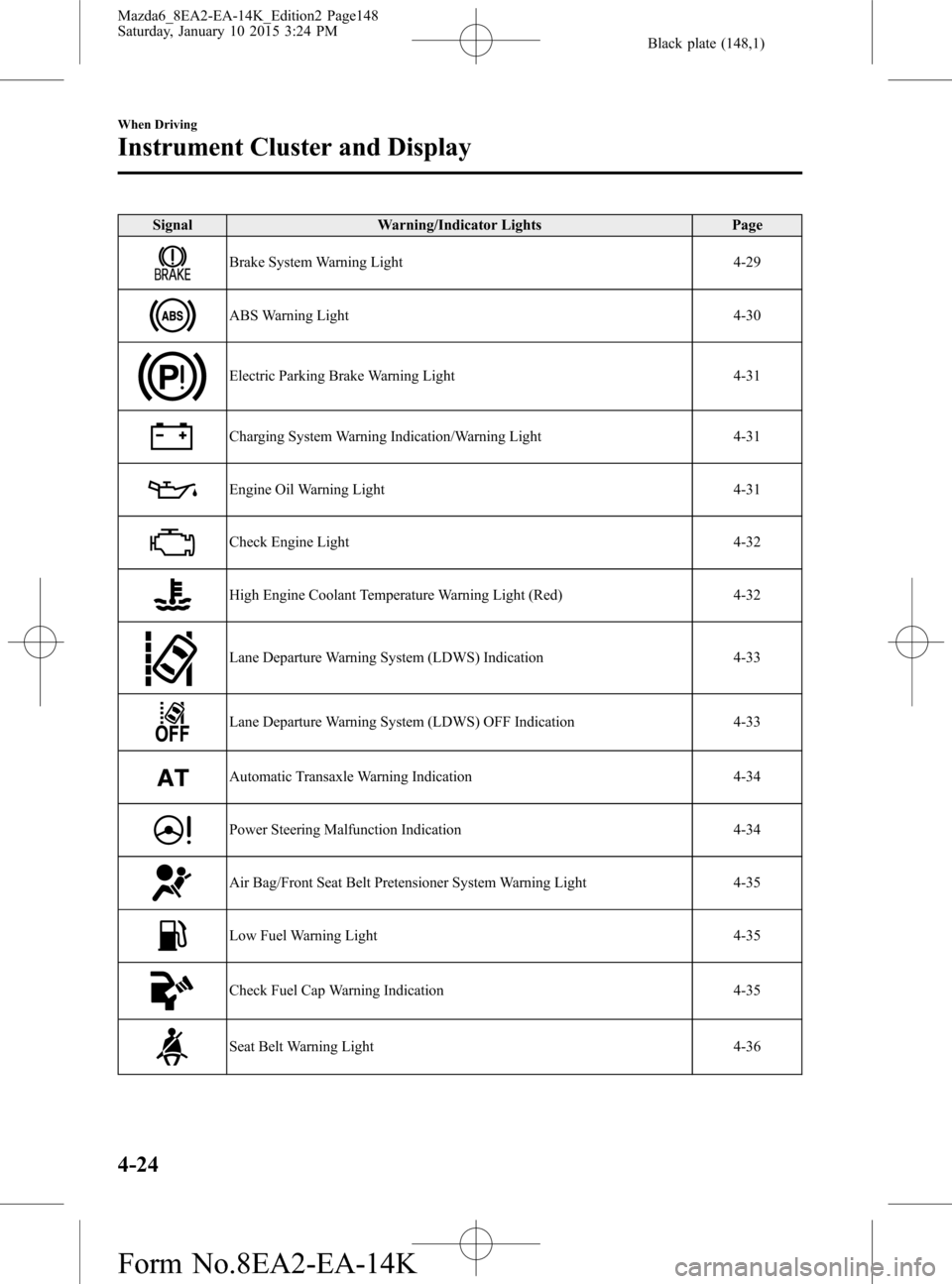
Signal Warning/Indicator Lights Page
Brake System Warning Light 4-29
ABS Warning Light 4-30
Electric Parking Brake Warning Light 4-31
Charging System Warning Indication/Warning Light 4-31
Engine Oil Warning Light 4-31
Check Engine Light 4-32
High Engine Coolant Temperature Warning Light (Red) 4-32
Lane Departure Warning System (LDWS) Indication 4-33
Lane Departure Warning System (LDWS) OFF Indication 4-33
Automatic Transaxle Warning Indication 4-34
Power Steering Malfunction Indication 4-34
Air Bag/Front Seat Belt Pretensioner System Warning Light 4-35
Low Fuel Warning Light 4-35
Check Fuel Cap Warning Indication 4-35
Seat Belt Warning Light 4-36
4-24
When Driving
Instrument Cluster and Display
Mazda6_8EA2-EA-14K_Edition2 Page148
Saturday, January 10 2015 3:24 PM
Form No.8EA2-EA-14K
Page 151 of 614

Black plate (151,1)
Signal Warning/Indicator Lights Page
Brake System Warning Light 4-29
ABS Warning Light 4-30
Electric Parking Brake Warning Light 4-31
Brake Pedal Operation Demand Indicator Light 4-31
Charging System Warning Light 4-31
Engine Oil Warning Light 4-31
Check Engine Light 4-32
High Engine Coolant Temperature Warning Light (Red) 4-32
Lane Departure Warning System (LDWS) Warning Light 4-33
Lane Departure Warning System (LDWS) OFF Indicator Light 4-33
Automatic Transaxle Warning Light 4-34
Power Steering Malfunction Indicator Light 4-34
Air Bag/Front Seat Belt Pretensioner System Warning Light 4-35
Low Fuel Warning Light 4-35
Check Fuel Cap Warning Light 4-35
Seat Belt Warning Light 4-36
When Driving
Instrument Cluster and Display
4-27
Mazda6_8EA2-EA-14K_Edition2 Page151
Saturday, January 10 2015 3:25 PM
Form No.8EA2-EA-14K
Page 156 of 614

Black plate (156,1)
CAUTION
Do not run the engine if the oil
pressure is low. Otherwise, it could
result in extensive engine damage.
If the light illuminates while driving:
1. Drive to the side of the road and park
off the right-of-way on level ground.
2. Turn off the engine and wait 5 minutes
for the oil to drain back into the oil
pan.
3. Inspect the engine oil level (page 6-28).
If it's low, add the appropriate amount
of engine oil while being careful not to
overfill.
CAUTION
Do not run the engine if the oil level
is low. Otherwise, it could result in
extensive engine damage.
4. Start the engine and check the warning
light.
If the light remains illuminated even
though the oil level is normal or after
adding oil, stop the engine immediately
and have your vehicle towed to an
Authorized Mazda Dealer.
qCheck Engine Light
This indicator light illuminates when the
ignition is switched ON and turns off
when the engine is started.If this light illuminates while driving, the
vehicle may have a problem. It is
important to note the driving conditions
when the light illuminated and consult an
Authorized Mazda Dealer.
The check engine light may illuminate in
the following cases:
lThe fuel tank level being very low or
approaching empty.
lThe engine's electrical system has a
problem.
lThe emission control system has a
problem.
l(U.S.A. and Canada)
The fuel-filler cap is missing or not
tightened securely.
If the check engine light remains on, do
not drive at high speeds and consult an
Authorized Mazda Dealer as soon as
possible.
qHigh Engine Coolant Temperature
Warning Light (Red)
When the ignition is switched ON, the
light illuminates momentarily and then
turns off.
The light flashes when the engine coolant
temperature is extremely high, and
illuminates when the engine coolant
temperature increases further.
4-32
When Driving
Instrument Cluster and Display
Mazda6_8EA2-EA-14K_Edition2 Page156
Saturday, January 10 2015 3:25 PM
Form No.8EA2-EA-14K
Page 159 of 614

Black plate (159,1)
NOTElIf the indicator light/warning indication
illuminates, the power steering will not
operate normally. If this happens, the
steering wheel can still be operated,
however, the operation may feel heavy
compared to normal, and the steering
wheel could vibrate when turning.
lRepeatedly jerking the steering wheel left
and right while the vehicle is stopped or
moving extremely slowly will cause the
power steering system to go into protective
mode which will make the steering feel
heavy, but this does not indicate a problem.
If this occurs, park the vehicle safely and
wait several minutes for the system to
return to normal.
qAir Bag/Front Seat Belt
Pretensioner System Warning Light
If the air bag/front seat belt pretensioner
system is working properly, the warning
light illuminates when the ignition is
switched ON or after the engine is
cranked. The warning light turns off after
a specified period of time.
A system malfunction is indicated if the
warning light constantly flashes,
constantly illuminates or does not
illuminate at all when the ignition is
switched ON. If any of these occur,
consult an Authorized Mazda Dealer as
soon as possible. The system may not
operate in an accident.
WARNING
Never tamper with the air bag/
pretensioner systems and always have
an Authorized Mazda Dealer perform
all servicing and repairs:
Self-servicing or tampering with the
systems is dangerous. An air bag/
pretensioner could accidentally
activate or become disabled causing
serious injury or death.
qLow Fuel Warning Light
This warning light signals that the fuel
tank will soon be empty.
Refuel as soon as possible.
qCheck Fuel Cap Warning
Indication/Warning Light
Type B
This warning light illuminates for a few
seconds when the ignition is switched
ON.
When Driving
Instrument Cluster and Display
4-35
Mazda6_8EA2-EA-14K_Edition2 Page159
Saturday, January 10 2015 3:25 PM
Form No.8EA2-EA-14K
Page 160 of 614

Black plate (160,1)
Type A/Type B
If the check fuel cap warning light
illuminates/indication while driving, the
fuel-filler cap may not be installed
properly. Stop the engine and reinstall the
fuel-filler cap.
Refer to Fuel-Filler Cap on page 3-27.
qSeat Belt Warning Light
Driver's seat
Front passenger's seat
Except Mexico
The seat belt warning light turns on if the
driver or front passenger's seat is occupied
and the seat belt is not fastened with the
ignition switched ON.
If the driver or front passenger's seat belt
is unfastened (only when the front
passenger's seat is occupied) and the
vehicle is driven at a speed faster than
about 20 km/h (12 mph), the warning
light flashes. After a short time, the
warning light stops flashing, but remains
illuminated.
NOTE
lThe warning light flashes for about 6
seconds if the driver's seat belt is not
fastened when the ignition is switched ON.
lTo allow the front passenger occupant
classification sensor to function properly,
do not place and sit on an additional seat
cushion on the front passenger's seat. The
sensor may not function properly because
the additional seat cushion could cause
sensor interference.
lIf a small child is seated on the front
passenger's seat, the warning light may not
operate.
Mexico
The seat belt warning light turns on if the
driver or front passenger's seat is occupied
and the seat belt is not fastened with the
ignition switched ON.
If the driver or front passenger's seat belt
is unfastened (only when the front
passenger's seat is occupied) and the
vehicle is driven at a speed faster than
about 20 km/h (12 mph), the warning
light flashes. After a short time, the
warning light stops flashing, but remains
illuminated. If a seat belt remains
unfastened, the warning light flashes
again for a given period of time.
4-36
When Driving
Instrument Cluster and Display
Mazda6_8EA2-EA-14K_Edition2 Page160
Saturday, January 10 2015 3:25 PM
Form No.8EA2-EA-14K
Page 172 of 614
Black plate (172,1)
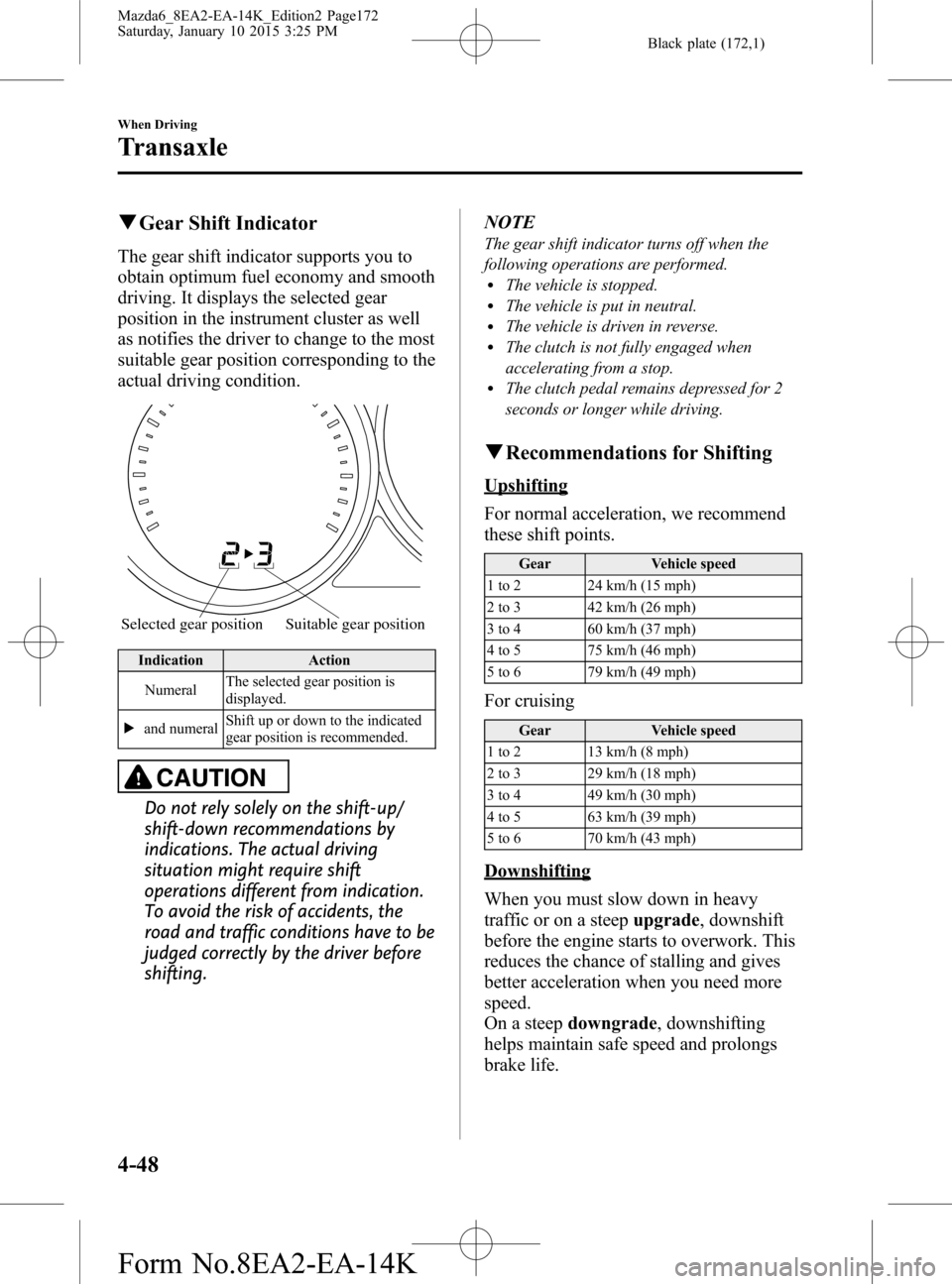
qGear Shift Indicator
The gear shift indicator supports you to
obtain optimum fuel economy and smooth
driving. It displays the selected gear
position in the instrument cluster as well
as notifies the driver to change to the most
suitable gear position corresponding to the
actual driving condition.
Selected gear position Suitable gear position
Indication Action
NumeralThe selected gear position is
displayed.
and numeralShift up or down to the indicated
gear position is recommended.
CAUTION
Do not rely solely on the shift-up/
shift-down recommendations by
indications. The actual driving
situation might require shift
operations different from indication.
To avoid the risk of accidents, the
road and traffic conditions have to be
judged correctly by the driver before
shifting.NOTE
The gear shift indicator turns off when the
following operations are performed.
lThe vehicle is stopped.lThe vehicle is put in neutral.lThe vehicle is driven in reverse.lThe clutch is not fully engaged when
accelerating from a stop.
lThe clutch pedal remains depressed for 2
seconds or longer while driving.
qRecommendations for Shifting
Upshifting
For normal acceleration, we recommend
these shift points.
Gear Vehicle speed
1 to 2 24 km/h (15 mph)
2 to 3 42 km/h (26 mph)
3 to 4 60 km/h (37 mph)
4 to 5 75 km/h (46 mph)
5 to 6 79 km/h (49 mph)
For cruising
Gear Vehicle speed
1 to 2 13 km/h (8 mph)
2 to 3 29 km/h (18 mph)
3 to 4 49 km/h (30 mph)
4 to 5 63 km/h (39 mph)
5 to 6 70 km/h (43 mph)
Downshifting
When you must slow down in heavy
traffic or on a steepupgrade, downshift
before the engine starts to overwork. This
reduces the chance of stalling and gives
better acceleration when you need more
speed.
On a steepdowngrade, downshifting
helps maintain safe speed and prolongs
brake life.
4-48
When Driving
Transaxle
Mazda6_8EA2-EA-14K_Edition2 Page172
Saturday, January 10 2015 3:25 PM
Form No.8EA2-EA-14K