2016 LINCOLN NAVIGATOR ECU
[x] Cancel search: ECUPage 174 of 419

AUTOMATIC TRANSMISSION
WARNINGS
Always set the parking brake fully and
latch the gearshift in park (P). Turn the
ignition to the off position and remove the
key whenever you leave your vehicle. Do not use the tow/haul feature when
driving in icy or slippery conditions as
the increased engine braking can cause the
rear wheels to slide and your vehicle to
swing around with the possible loss of
vehicle control. Selector Lever Positions
Putting your vehicle in or out of gear:
1. Fully press down the brake pedal.
2.
Move the gearshift lever into the desired
gear.
3. Come to a complete stop.
4. Move the gearshift lever and securely latch it in park (P).
Park (P)
This position locks the transmission and
prevents the rear wheels from turning. Reverse (R)
With the gearshift lever in reverse (R), your
vehicle will move backward. Always come
to a complete stop before shifting into and
out of reverse (R).
Neutral (N)
With the gearshift lever in neutral (N), your
vehicle can be started and is free to roll. Hold
the brake pedal down while in this position.
Drive (D)
Drive (D) is the normal driving position for
the best fuel economy. The overdrive
function allows automatic upshifts and
downshifts through gears one through six.
Manual (M)
With the gearshift lever in manual (M), you
can change gears up or down as desired by
using buttons on the shift lever. See
Understanding your SelectShift Automatic
™
transmission later in this section.
171
Navigator (TB5) Canada/United States of America, enUSA, First Printing TransmissionE209112
Page 178 of 419

2. Move the steering column to the full
down and full rearward position (toward
the driver’ s seat).
3. Remove the gearshift lever boot.
4. Place fingers into gearshift lever boot hole and pull top half of shroud up and
forward to separate it from the lower half
of the shroud. There is a hinge at the
forward edge of the top shroud. Roll the
top half of the shroud upward on the
hinge point to clear the hazard flasher
button, then pull straight rearward toward
the driver’ s seat to remove.
5. Remove the top half of the shroud.
6. Remove the three fasteners under the column that secure the lower shroud half
to the column. 7. Pull the lock lever into the full unlocked
position and remove the lower shroud
cover by pulling the lever handle through
the slot in the cover. 8.
Apply the brake, pull the white disk then
move the shifter to neutral (N).
9. Start your vehicle.
Perform Steps 4 through 8 in reverse order,
making sure to engage the hinge pivots
between the upper and lower halves of the
shroud. Keep slight pressure in the forward
direction as the halves rotate together.
If Your Vehicle Gets Stuck In Mud or
Snow
Note: Do not rock your vehicle if the engine
is not at normal operating temperature or
damage to the transmission may occur.
Note: Do not rock your vehicle for more than
a minute or damage to the transmission and
tires may occur, or the engine may overheat.
If your vehicle gets stuck in mud or snow,
you may rock it out by shifting between
forward and reverse gears, stopping
between shifts in a steady pattern. Press
lightly on the accelerator in each gear.
175
Navigator (TB5) Canada/United States of America, enUSA, First Printing TransmissionE163185 E163186
Page 216 of 419
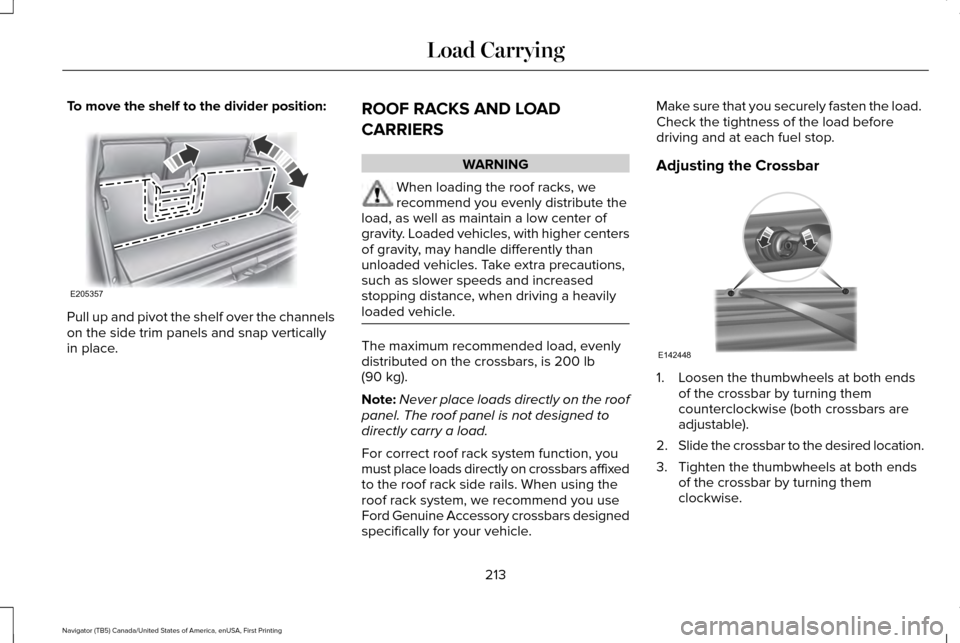
To move the shelf to the divider position:
Pull up and pivot the shelf over the channels
on the side trim panels and snap vertically
in place.
ROOF RACKS AND LOAD
CARRIERS WARNING
When loading the roof racks, we
recommend you evenly distribute the
load, as well as maintain a low center of
gravity. Loaded vehicles, with higher centers
of gravity, may handle differently than
unloaded vehicles. Take extra precautions,
such as slower speeds and increased
stopping distance, when driving a heavily
loaded vehicle. The maximum recommended load, evenly
distributed on the crossbars, is 200 lb
(90 kg).
Note: Never place loads directly on the roof
panel. The roof panel is not designed to
directly carry a load.
For correct roof rack system function, you
must place loads directly on crossbars affixed
to the roof rack side rails. When using the
roof rack system, we recommend you use
Ford Genuine Accessory crossbars designed
specifically for your vehicle. Make sure that you securely fasten the load.
Check the tightness of the load before
driving and at each fuel stop.
Adjusting the Crossbar
1. Loosen the thumbwheels at both ends
of the crossbar by turning them
counterclockwise (both crossbars are
adjustable).
2. Slide the crossbar to the desired location.
3. Tighten the thumbwheels at both ends of the crossbar by turning them
clockwise.
213
Navigator (TB5) Canada/United States of America, enUSA, First Printing Load CarryingE205357 E142448
Page 217 of 419
Make sure to check that the thumbwheels
are tight each time you add or remove load
from the roof rack, and periodically while
traveling. Make sure that the load is secure
before traveling.
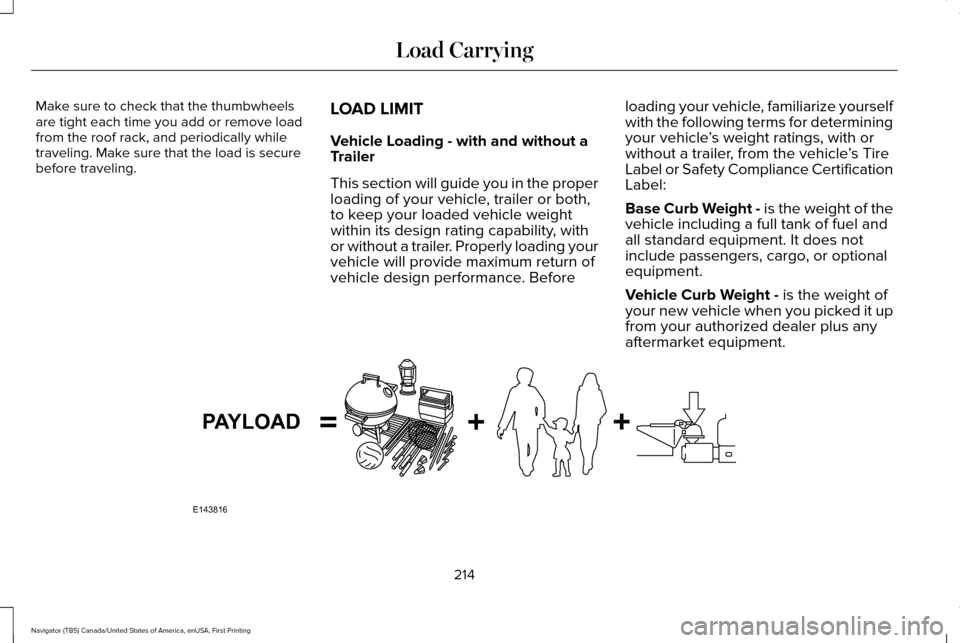
LOAD LIMIT
Vehicle Loading - with and without a
Trailer
This section will guide you in the proper
loading of your vehicle, trailer or both,
to keep your loaded vehicle weight
within its design rating capability, with
or without a trailer. Properly loading your
vehicle will provide maximum return of
vehicle design performance. Beforeloading your vehicle, familiarize yourself
with the following terms for determining
your vehicle
’s weight ratings, with or
without a trailer, from the vehicle ’s Tire
Label or Safety Compliance Certification
Label:
Base Curb Weight - is the weight of the
vehicle including a full tank of fuel and
all standard equipment. It does not
include passengers, cargo, or optional
equipment.
Vehicle Curb Weight - is the weight of
your new vehicle when you picked it up
from your authorized dealer plus any
aftermarket equipment. 214
Navigator (TB5) Canada/United States of America, enUSA, First Printing Load CarryingE143816PAYLOAD
Page 232 of 419

5. Install and adjust the tension in the
weight-distributing bars so that the height
of your vehicle's front wheel opening on
the fender is approximately half the way
down from H2, toward H1.
6. Check that the trailer is level or slightly nose down toward your vehicle. If not,
adjust the ball height accordingly and
repeat Steps 2-6.
When the trailer is level or slightly nose down
toward the vehicle:
• Lock the bar tension adjuster in place.
• Check that the trailer tongue securely
attaches and locks onto the hitch.
• Install safety chains, lighting, and trailer
brake controls as required by law or the
trailer manufacturer. Weight-distributing Hitch - Vehicles with
Automatic Leveling Suspension WARNING
Do not adjust a weight-distributing
hitch to any position where the rear
bumper of the vehicle is higher than it was
before attaching the trailer. Doing so will
defeat the function of the weight-distributing
hitch, which may cause unpredictable
handling, and could result in serious personal
injury. Note:
If you do not move the loaded vehicle
for approximately 12 hours, the leveling
system may bleed down to a lower height.
This can be especially apparent if you leave
a trailer attached to the parked vehicle for
long periods. You must drive your vehicle in
order to re-level the suspension.
When hooking-up a trailer using a
weight-distributing hitch, always use the
following procedure: 1. Load the interior of the vehicle to a
weight similar to that which you intend
to carry when towing. This includes
things such as passenger weight and
cargo.
2. Drive the vehicle for approximately 2 miles (3 kilometers) to re-level the
suspension.
3. Park the loaded vehicle, without the trailer, on a level surface.
4. Measure the height to the top of your vehicle's front wheel opening on the
fender. This is H1.
5. Attach the loaded trailer to your vehicle without the weight-distributing bars
connected.
6. Make sure you securely attach and lock the trailer tongue to the hitch.
7. Install safety chains, lighting, and trailer brake controls as required by law or the
trailer manufacturer.
8. Drive the vehicle and trailer at 20–25 mph (32–40 km/h) for approximately 2
miles (3 kilometers) to re-level the
suspension.
229
Navigator (TB5) Canada/United States of America, enUSA, First Printing Towing
Page 233 of 419

9. Park your vehicle and trailer on a level
surface.
10. Measure the height to the top of your vehicle's front wheel opening on the
fender a second time. This is H2.
11. Install and adjust the tension in the weight-distributing bars so that the
height of your vehicle's front wheel
opening on the fender is approximately
half the way down from H2, toward H1.
12. Check that the trailer is level or slightly
nose down toward your vehicle. If not,
remove the trailer, adjust the ball height
accordingly and repeat Steps 5-11.
When the trailer is level or slightly nose down
toward the vehicle:
• Lock the bar tension adjuster in place.
• Check that the trailer tongue securely
attaches and locks onto the hitch.
• Install safety chains, lighting, and trailer
brake controls as required by law or the
trailer manufacturer. Safety Chains
Note:
Never attach safety chains to the
bumper.
Always connect the safety chains to the hook
retainers of your vehicle hitch.
To connect the trailer’ s safety chains, cross
them under the trailer tongue and allow
enough slack for turning tight corners. Do
not allow the chains to drag on the ground.
Trailer Brakes (If Equipped) WARNING
Do not connect a trailer's hydraulic
brake system directly to your vehicle's
brake system. Your vehicle may not have
enough braking power and your chances of
having a collision greatly increase. Electric brakes and manual, automatic or
surge-type trailer brakes are safe if you install
them properly and adjust them to the
manufacturer's specifications. The trailer
brakes must meet local and federal
regulations.The rating for the tow vehicle's braking
system operation is at the gross vehicle
weight rating, not the gross combined
weight rating.
Separate functioning brake systems are
required for safe control of towed vehicles
and trailers weighing more than 1500
pounds (680 kilograms) when loaded.
Trailer Lamps
WARNING
Never connect any trailer lamp wiring
to the vehicle's tail lamp wiring; this
may damage the electrical system resulting
in fire. Contact your authorized dealer as
soon as possible for assistance in proper
trailer tow wiring installation. Additional
electrical equipment may be required. Trailer lamps are required on most towed
vehicles. Make sure all running lights, brake
lights, turn signals and hazard lights are
working.
230
Navigator (TB5) Canada/United States of America, enUSA, First Printing Towing
Page 235 of 419

Your vehicle may be equipped with a
temporary or conventional spare tire. A
“temporary” spare tire is different in size
(diameter or width), tread-type (All-Season
or All-Terrain) or is from a different
manufacturer than the road tires on your
vehicle. Consult information on the tire label
or Safety Compliance label for limitations
when using.
Launching or Retrieving a Boat or
Personal Watercraft (PWC)
Note:
Disconnect the wiring to the trailer
before backing the trailer into the water.
Note: Reconnect the wiring to the trailer
after
removing the trailer from the water.
When backing down a ramp during boat
launching or retrieval:
• Do not allow the static water level to rise
above the bottom edge of the rear
bumper.
• Do not allow waves to break higher than
6 inches (15 centimeters) above the
bottom edge of the rear bumper. Exceeding these limits may allow water to
enter vehicle components:
•
Causing internal damage to the
components.
• Affecting driveability, emissions, and
reliability.
Replace the rear axle lubricant anytime the
rear axle has been submerged in water.
Water may have contaminated the rear axle
lubricant, which is not normally checked or
changed unless a leak is suspected or other
axle repair is required.
TOWING POINTS WARNINGS
Using recovery hooks is dangerous
and should only be done by a person
familiar with proper vehicle recovery safety
practices. Improper use of recovery hooks
may cause hook failure or separation from
the vehicle and could result in serious injury
or death. WARNINGS
Always slowly remove the slack from
the recovery strap prior to pulling.
Failure to do so can introduce significantly
higher loads which can cause the recovery
hooks to break off, or the recovery strap to
fail which can cause serious injury or death. Never link two straps together with a
clevis pin. These heavy metal objects
could become projectiles if the strap breaks
and can cause serious injury or death. Your vehicle comes equipped with
frame-mounted front recovery hooks. These
hooks should never have a load applied to
them greater than the gross vehicle weight
rating of your vehicle.
Before using recovery hooks:
•
Make sure all attaching points are secure
and capable of withstanding the applied
load.
• Never use chains, cables or tow straps
with metal hook ends.
232
Navigator (TB5) Canada/United States of America, enUSA, First Printing Towing
Page 239 of 419

There are also some things you may want to
avoid doing because they reduce your fuel
economy:
•
Avoid sudden or hard accelerations.
• Avoid revving the engine before turning
off the car.
• Avoid long idle periods.
• Do not warm up your vehicle on cold
mornings.
• Reduce the use of air conditioning and
heat.
• Avoid using speed control in hilly terrain.
• Do not rest your foot on the brake pedal
while driving.
• Avoid carrying unnecessary weight.
• Avoid adding particular accessories to
your vehicle (e.g. bug deflectors,
rollbars/light bars, running boards, ski
racks).
• Avoid driving with the wheels out of
alignment. DRIVING THROUGH WATER WARNING
Do not drive through flowing or deep
water as you may lose control of your
vehicle. Note:
Driving through standing water can
cause vehicle damage.
Note: Engine damage can occur if water
enters the air filter.
Before driving through standing water, check
the depth. Never drive through water that is
higher than the bottom of the wheel hubs. When driving through standing water, drive
very slowly and do not stop your vehicle.
Your brake performance and traction may
be limited. After driving through water and
as soon as it is safe to do so:
•
Lightly press the brake pedal to dry the
brakes and to check that they work.
• Check that the horn works.
• Check that the exterior lights work.
• Turn the steering wheel to check that the
steering power assist works.
FLOOR MATS WARNINGS
Always use floor mats that are
designed to fit the foot well of your
vehicle. Only use floor mats that leave the
pedal area unobstructed. Only use floor mats
that are firmly secured to retention posts so
that they cannot slip out of position and
interfere with the pedals or impair safe
operation of your vehicle in other ways.
236
Navigator (TB5) Canada/United States of America, enUSA, First Printing Driving HintsE176913