2016 LINCOLN MKZ 161
[x] Cancel search: 161Page 6 of 544

Cigar Lighter...................................................158
Storage Compartments
Center Console.............................................160
Overhead Console.......................................160
Starting and Stopping theEngine
General Information.......................................161
Keyless Starting..............................................161
Starting a Gasoline Engine.........................162
Engine Block Heater....................................165
Fuel and Refueling
Safety Precautions........................................166
Fuel Quality.....................................................167
Running Out of Fuel.....................................168
Refueling.........................................................169
Fuel Consumption..........................................171
Emission Control System.............................172
Transmission
Automatic Transmission...............................175
All-Wheel Drive
Using All-Wheel Drive...................................181
Brakes
General Information......................................187
Hints on Driving With Anti-LockBrakes..........................................................187
Electric Parking Brake..................................188
Hill Start Assist...............................................190
Traction Control
Principle of Operation..................................192
Using Traction Control.................................192
Stability Control
Principle of Operation..................................194
Using Stability Control.................................195
Parking Aids
Principle of Operation..................................196
Rear Parking Aid............................................197
Front Parking Aid...........................................197
Active Park Assist..........................................198 Rear View Camera.......................................202
Cruise Control
Principle of Operation.................................206
Using Cruise Control...................................206
Using Adaptive Cruise Control.................207
Driving Aids
Driver Alert......................................................214
Lane Keeping System..................................215
Blind Spot Information System.................220
Steering..........................................................225
Pre-Collision Assist......................................226
Drive Control.................................................229
Load Carrying
Load Limit........................................................231
Towing
Towing a Trailer.............................................240
Recommended Towing Weights...............241
Essential Towing Checks............................243
Transporting the Vehicle............................245
3
Table of Contents
Page 12 of 544

Hazard warning flashers
Heated rear window
Heated windshield
Interior luggage compartment
release
Jack
E161353
Keep out of reach of children
Lighting control
Low tire pressure warning
Maintain correct fluid level
Note operating instructions
Panic alarm
E139213
Parking aid
Parking brake
Power steering fluid
Power windows front/rear
Power window lockout
Service engine soon
Side airbag
Shield the eyes
E138639
Stability control
Windshield wash and wipe
DATA RECORDING
Service Data Recording
Service data recorders in your vehicle are
capable of collecting and storing diagnostic
information about your vehicle. This
potentially includes information about the
performance or status of various systems
and modules in the vehicle, such as engine,
throttle, steering or brake systems. In order
to properly diagnose and service your
vehicle, Ford Motor Company, Ford of
Canada, and service and repair facilities may
access or share among them vehicle
diagnostic information received through a
direct connection to your vehicle when
diagnosing or servicing your vehicle.
9
Introduction
Page 64 of 544
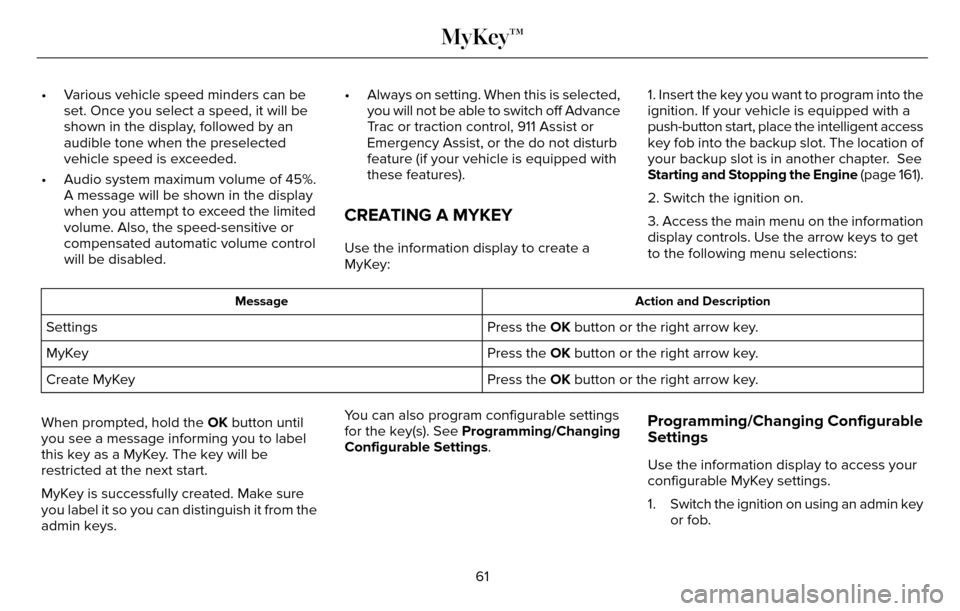
• Various vehicle speed minders can beset. Once you select a speed, it will be
shown in the display, followed by an
audible tone when the preselected
vehicle speed is exceeded.
• Audio system maximum volume of 45%. A message will be shown in the display
when you attempt to exceed the limited
volume. Also, the speed-sensitive or
compensated automatic volume control
will be disabled. • Always on setting. When this is selected,
you will not be able to switch off Advance
Trac or traction control, 911 Assist or
Emergency Assist, or the do not disturb
feature (if your vehicle is equipped with
these features).
CREATING A MYKEY
Use the information display to create a
MyKey: 1. Insert the key you want to program into the
ignition. If your vehicle is equipped with a
push-button start, place the intelligent access
key fob into the backup slot. The location of
your backup slot is in another chapter. See
Starting and Stopping the Engine
(page 161).
2. Switch the ignition on.
3. Access the main menu on the information
display controls. Use the arrow keys to get
to the following menu selections:
Action and Description
Message
Press the OK button or the right arrow key.
Settings
Press the OK button or the right arrow key.
MyKey
Press the OK button or the right arrow key.
Create MyKey
When prompted, hold the OK button until
you see a message informing you to label
this key as a MyKey. The key will be
restricted at the next start.
MyKey is successfully created. Make sure
you label it so you can distinguish it from the
admin keys. You can also program configurable settings
for the key(s). See Programming/Changing
Configurable Settings.
Programming/Changing Configurable
Settings
Use the information display to access your
configurable MyKey settings.
1. Switch the ignition on using an admin key
or fob.
61
MyKey™
Page 83 of 544

ADJUSTING THE STEERING WHEEL
WARNING
Do not adjust the steering wheel when
your vehicle is moving.
Note:Make sure that you are sitting in the
correct position. See Sitting in the Correct
Position (page 140).
2
2
1E157083
1. Unlock the steering column.
2. Adjust the steering wheel to the desired position.
E157084
3. Lock the steering column.
Power Tilt and Telescope Steering
Column (If Equipped)
WARNING
Do not adjust the steering wheel when
your vehicle is moving.
Note: Make sure that you are sitting in the
correct position. See Sitting in the Correct
Position (page 140).
E161834
Use the control on the side of the steering
column to adjust the position.
To adjust:
• tilt: press the top or bottom of the control
• telescope: press the front or rear of the control.
80
Steering Wheel
Page 95 of 544

E161714
B
A
The system will only work with the lighting
control switch in the autolamp position.
E142451
Note:There may be a delay of up to five
seconds before the system will operate when
the vehicle is first driven.
Note: The system is only active at speeds
above 3 mph (5 km/h).
When the vehicle is started, the lamps track
to a predetermined position, then back to
center to alert the driver that the system is
working properly.
DIRECTION INDICATORS
E162681
Push the lever up or down to use the
direction indicators.
Note: Tap the lever up or down to make the
direction indicators flash three times to
indicate a lane change.
92
Lighting
Page 126 of 544

Hill Start Assist
Action
Message
Displays when hill start assist is not available. Contact your authorized dealer.
Hill Start Assist Not Available
Keys and Intelligent Access
Action
Message
Displayed as a reminder to press the brake while starting the vehicle.
Press Brake to START
Displayed if the key is not detected by the system. See Keyless Starting (page 161).
No Key Detected
Displayed when the start/stop button is pressed to shut off the engine a\
nd an Intelligent Accesskey is not detected inside the vehicle.
Restart Now or Key is Needed
Displayed when the vehicle is in the run ignition state.
Run Power Active
This message is displayed when there is a problem with your vehicle’s starting system. See your authorized dealer for service.
Starting System Fault
Displayed during spare key programming, when an intelligent access key i\
s programmed to the system.
Key Program Successful
Displayed during spare key programming, when an intelligent access key h\
as failed to be programmed.
Key Program Failure
123
Information Displays
Page 164 of 544

GENERAL INFORMATION
WARNINGS
Extended idling at high engine speeds
can produce very high temperatures
in the engine and exhaust system, creating
the risk of fire or other damage.
Do not park, idle or drive your vehicle
on dry grass or other dry ground cover.
The emission system heats up the engine
compartment and exhaust system, creating
the risk of fire.
Do not start the engine in a closed
garage or in other enclosed areas.
Exhaust fumes can be toxic. Always open
the garage door before you start the engine.
If you smell exhaust fumes inside your
vehicle, have your vehicle checked by
an authorized dealer immediately. Do not
drive your vehicle if you smell exhaust fumes.
If you disconnect the battery, your vehicle
may exhibit some unusual driving
characteristics for approximately 5 miles (8
kilometers) after you reconnect it. This is
because the engine management system
must realign itself with the engine. You can
disregard any unusual driving characteristics
during this period.
The powertrain control system meets all
Canadian interference-causing equipment
standard requirements regulating the
impulse electrical field or radio noise.
When you start the engine, avoid pressing
the accelerator pedal before and during
operation. Only use the accelerator pedal
when you have difficulty starting the engine.
KEYLESS STARTING
Note: The keyless starting system may not
function if the key is close to metal objects
or electronic devices such as cellular
phones.
Note: A valid key must be located inside
your vehicle to switch the ignition on and
start the vehicle.
Ignition Modes
E164319
161
Starting and Stopping the Engine
Page 170 of 544

• Fuels can also be harmful if absorbedthrough the skin. If fuel is splashed on
the skin, clothing or both, promptly
remove contaminated clothing and wash
skin thoroughly with soap and water.
Repeated or prolonged skin contact with
fuel liquid or vapor causes skin irritation.
• Be particularly careful if you are taking “Antabuse” or other forms of disulfiram
for the treatment of alcoholism. Breathing
gasoline vapors, or skin contact could
cause an adverse reaction. In sensitive
individuals, serious personal injury or
sickness may result. If fuel is splashed on
the skin, promptly wash skin thoroughly
with soap and water. Consult a physician
immediately if you experience an adverse
reaction.FUEL QUALITY
Choosing the Right Fuel
E161513
Use only regular unleaded gasoline with a
minmum pump (R+M)/2 octane rating of 87.
Some fuel stations offer fuels posted as
regular unleaded gasoline with an octane
rating below 87, particularly in high altitude
areas. Fuels with octane levels below 87 are
not recommended.
Do not use any fuel other than those
recommended because they could lead to
engine damage that may not be covered by
the vehicle Warranty.
Note: Use of any fuel other than those
recommended can impair the emission
control system and cause a loss of vehicle
performance. Do not use:
• Diesel fuel.
• Fuels containing kerosene or paraffin.
• Fuel containing more than 15% ethanol
or E85 fuel.
• Fuels containing methanol.
• Fuels containing metallic-based additives, including manganese-based compounds.
• Fuels containing the octane booster additive, methylcyclopentadienyl
manganese tricarbonyl (MMT).
• Leaded fuel (using leaded fuel is prohibited by law).
The use of fuels with metallic compounds
such as methylcyclopentadienyl manganese
tricarbonyl (commonly known as MMT), which
is a manganese-based fuel additive, will
impair engine performance and affect the
emission control system.
167
Fuel and Refueling