2016 LINCOLN MKZ HYBRID ECU
[x] Cancel search: ECUPage 423 of 543
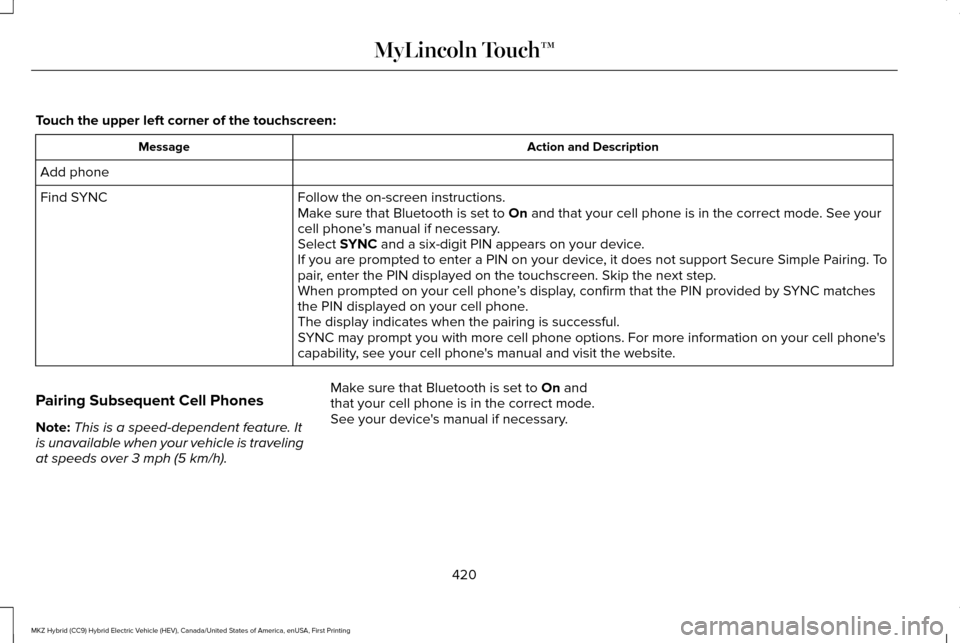
Touch the upper left corner of the touchscreen:
Action and Description
Message
Add phone Follow the on-screen instructions.
Find SYNC
Make sure that Bluetooth is set to On and that your cell phone is in the correct mode. See your
cell phone ’s manual if necessary.
Select
SYNC and a six-digit PIN appears on your device.
If you are prompted to enter a PIN on your device, it does not support Secure Simple Pairing. To
pair, enter the PIN displayed on the touchscreen. Skip the next step.
When prompted on your cell phone ’s display, confirm that the PIN provided by SYNC matches
the PIN displayed on your cell phone.
The display indicates when the pairing is successful.
SYNC may prompt you with more cell phone options. For more information on\
your cell phone's
capability, see your cell phone's manual and visit the website.
Pairing Subsequent Cell Phones
Note: This is a speed-dependent feature. It
is unavailable when your vehicle is traveling
at speeds over
3 mph (5 km/h). Make sure that Bluetooth is set to
On and
that your cell phone is in the correct mode.
See your device's manual if necessary.
420
MKZ Hybrid (CC9) Hybrid Electric Vehicle (HEV), Canada/United States of America, enUSA, First Printing MyLincoln Touch™
Page 424 of 543

To pair a subsequent cell phone, select:
Action and Description
Menu Item
Phone
Settings
Bluetooth Devices
Add Device Follow the on-screen instructions.
Find SYNC
Make sure that Bluetooth is set to On and that your cell phone is in the correct mode. See your
cell phone ’s manual if necessary.
Select
SYNC and a six-digit PIN appears on your device.
If you are prompted to enter a PIN on your device, it does not support Secure Simple Pairing. To
pair, enter the PIN displayed on the touchscreen. Skip the next step.
When prompted on your cell phone ’s display, confirm that the PIN provided by SYNC matches
the PIN displayed on your cell phone.
The display indicates when the pairing is successful.
SYNC may prompt you with more cell phone options. For more information on\
your cell phone's
capability, see your cell phone's manual and visit the website.
Making Calls 421
MKZ Hybrid (CC9) Hybrid Electric Vehicle (HEV), Canada/United States of America, enUSA, First Printing MyLincoln Touch™E142599
Page 446 of 543

Sirius Travel Link Voice Commands
Press the voice button on the steering
wheel controls. When prompted, say any
of the following or a similar command:
Voice command
Show Traffic
Show Weather
Help
Alerts If your vehicle is equipped with
Navigation, touch the I
(Information) button to access
these features. If your vehicle is not
equipped with Navigation, touch the corner
of the touchscreen with the green tab. Press Alerts, then choose from any of the
following services: Action and Description
Menu Item
The complete message
View
The message
Delete
Messages
Delete All
This screen displays any system messages
(such as an SD card fault).
Note: The system alerts you to any
messages by turning the information icon
yellow. After you read or delete the
messages, the icon returns to white.
Calendar If your vehicle is equipped with
Navigation, touch the I
(Information) button to access
these features. If your vehicle is not
equipped with Navigation, touch the corner
of the touchscreen with the green tab. Press Calendar. You can view the current
calendar by day, week or month.
911 Assist
(If Equipped) WARNINGS
Unless the 911 Assist setting is set on
before a crash, the system will not dial
for help, which could delay response time,
potentially increasing the risk of serious
injury or death after a crash. Do not wait for 911 Assist to make an
emergency call if you can do it yourself.
Dial emergency services immediately to
avoid delayed response time, which could
increase the risk of serious injury or death
after a crash. If you do not hear 911 Assist
within five seconds of the crash, the system
or phone may be damaged or non-functional. Always place your phone in a secure
location in your vehicle so it does not
become a projectile or damaged in a crash.
Failure to do so may cause serious injury to
someone or damage the phone, which could
prevent 911 Assist from working properly. 443
MKZ Hybrid (CC9) Hybrid Electric Vehicle (HEV), Canada/United States of America, enUSA, First Printing MyLincoln Touch™E142599 E142608 E142608
Page 470 of 543

Phone issues
Possible solution(s)
Possible cause(s)
Issue
Depending upon your phone, you may have
to grant SYNC permission to access your
phonebook contacts. Make sure to confirm
when prompted by your phone during the
phonebook download.
Go to the website to review your phone's
compatibility.
This is a phone-dependent feature.
This may be a possible phone malfunction.
I am having trouble connecting my phone to
SYNC.
Try turning off the device, resetting the device
or removing the device's battery, then trying
again.
Try deleting your device from SYNC, deleting
SYNC from your device and trying again.
Check the security and auto accept and
prompt always settings relative to the SYNC
Bluetooth connection on your phone.
Update your device's firmware.
Turn off the Auto phonebook download
setting.
You can also preform the touchscreen system
reset procedure.
Go to the website to review your phone's
compatibility.
This is a phone-dependent feature.
This may be a possible phone malfunction.
Text messaging is not working on SYNC.
467
MKZ Hybrid (CC9) Hybrid Electric Vehicle (HEV), Canada/United States of America, enUSA, First Printing MyLincoln Touch™
Page 472 of 543

USB and media issues
Possible solution(s)
Possible cause(s)
Issue
Make sure that the device does not have an
auto-install program or active security settings.
Make sure you are not leaving the device in
your vehicle during very hot or cold temperat-
ures.
This is a device limitation.
SYNC does not recognize my device when I
turn on the car.
Review the device compatibility chart on the
SYNC website to confirm your phone supports
the Bluetooth audio streaming function.
This is a phone-dependent feature.
The device is not connected.
Bluetooth audio does not stream.
Make sure you correctly connect the device
to SYNC, and that you have pressed play on
your device.
You can also preform the touchscreen system
reset procedure.
Make sure that all song details are populated.
Your music files may not contain the correct
artist, song title, album or genre information.
SYNC does not recognize music that is on my
device.
Some devices require you to change the USB
settings from mass storage to MTP class.
The file may be corrupted.
The song may have copyright protection,
which does not allow it to play.
469
MKZ Hybrid (CC9) Hybrid Electric Vehicle (HEV), Canada/United States of America, enUSA, First Printing MyLincoln Touch™
Page 477 of 543

For a complete listing of the accessories
that are available for your vehicle, please
contact your authorized dealer or visit our
online store at:
Web Address
www.Accessories.Lincoln.com
You can also visit: Web Address
www.LincolnCanada.com
Lincoln Accessories are available for your
vehicle through an authorized Lincoln dealer.
Lincoln Motor Company will repair or replace
any properly authorized dealer-installed
Lincoln accessory found to be defective in
factory-supplied materials or workmanship
during the warranty period, as well as any
component damaged by the defective
accessories. Lincoln Motor Company will warrant your
Lincoln accessory through the warranty that
provides the greatest benefit:
•
24 months, unlimited mileage.
• The remainder of your new vehicle
limited warranty.
Contact an authorized dealer for details and
a copy of the warranty.
Exterior style
• Bumper protectors.
• Side-window deflectors.
• Wheels.
Interior style
• All-weather floor mats.
• Premium carpeted floor mats.
• Rear seat entertainment*.
Lifestyle
• Ash cup (smoker's packages).
• Cargo area protector.
• Cargo net. •
Cargo organizer.
• Roof racks and carriers*.
Peace of mind
• Car cover*.
• Remote start.
• Vehicle security system.
• Wheel locks.
*Lincoln Licensed Accessory. The accessory
manufacturer designs, develops and
therefore warrants Lincoln Licensed
Accessories, and does not design or test
these accessories to Lincoln Motor Company
engineering requirements. Contact an
authorized Lincoln dealer for the
manufacturer's limited warranty details and
request a copy of the Lincoln Licensed
Accessories product limited warranty from
the accessory manufacturer.
474
MKZ Hybrid (CC9) Hybrid Electric Vehicle (HEV), Canada/United States of America, enUSA, First Printing Accessories
Page 480 of 543

Transferable Coverage
If you sell your vehicle before your Lincoln
Extended Service Plan coverage expires,
you can transfer any remaining coverage to
the new owner. Whenever you sell your
vehicle, prospective buyers may have a
higher degree of confidence that vehicle was
properly maintained with Lincoln ESP,
thereby improving resale value.
Avoid the Rising Cost of Properly
Maintaining Your Vehicle!
Lincoln Extended Service Plan also offers a
Premium Maintenance Plan that covers all
scheduled maintenance, and select items
that routinely wear out. The coverage is
prepaid, so you never have to worry about
affording your vehicle maintenance. It covers
regular checkups, routine inspections,
preventive care and replacement of select
items that require periodic attention for
normal wear:
•
Windshield wiper blades.
• Spark plugs.
• The clutch disc. •
Brake pads and linings.
• Shock absorbers and struts.
• Engine cooling hoses, clamps and
o-rings.
• Engine belts.
• Diesel exhaust fluid replenishment.
Interest Free Finance Options Available
Take advantage of our interest free
installment payment plan. Just a 10% down
payment will provide you with an affordable,
no interest, no fee payment program allowing
you all the security and benefits Lincoln ESP
has to offer while paying over time. You are
pre-approved with no credit checks, no
hassles! To learn more, call our Lincoln ESP
specialists at 800-367-3377.
Complete the information below and mail to:
Ford ESP
P.O. Box 321067
Detroit, MI 48232 SERVICE PLANS (CANADA ONLY)
You can get more protection for your vehicle
by purchasing a Lincoln Extended Service
Plan. Lincoln Extended Service Plan is the
only service contract backed by Lincoln
Motor Company of Canada, Limited.
Depending on the plan you purchase, Lincoln
Extended Service Plan provides benefits
such as:
•
Rental reimbursement.
• Coverage for certain maintenance and
wear items.
• Protection against repair costs after your
New Vehicle Limited Warranty Coverage
expires.
• Roadside Assistance benefits.
477
MKZ Hybrid (CC9) Hybrid Electric Vehicle (HEV), Canada/United States of America, enUSA, First Printing Extended Service Plan (ESP)
Page 505 of 543

and printed materials, any upgrades, and,
if applicable, the Certificate(s) of
Authenticity), and the recipient agrees to
the terms of this EULA. If the SOFTWARE
is an upgrade, any transfer must include
all prior versions of the SOFTWARE.
• Termination: Without prejudice to any
other rights, FORD MOTOR COMPANY
or MS may terminate this EULA if you fail
to comply with the terms and conditions
of this EULA.
• Security Updates/Digital Rights
Management:
Content owners use the
WMDRM technology included in your
DEVICE to protect their intellectual
property, included copyrighted content.
Portions of the SOFTWARE on your
DEVICE use WMDRM software to access
WMDRM-protected content. If the
WMDRM software fails to protect the
content, content owners may ask
Microsoft to revoke the SOFTWARE's
ability to use WMDRM to play or copy
protected content. This action does not
affect unprotected content. When your
DEVICE downloads licenses for protected
content, you agree that Microsoft may include a revocation list with the licenses.
Content owners may require you to
upgrade the SOFTWARE on your DEVICE
to access their content. If you decline an
upgrade, you will not be able to access
content that requires the upgrade.
• Consent to Use of Data:
You agree that
MS, Microsoft Corporation, FORD
MOTOR COMPANY, third party software
and systems suppliers, their affiliates
and/or their designated agent may collect
and use technical information gathered
in any manner as part of product support
services related to the SOFTWARE or
related services. MS, Microsoft
Corporation, FORD MOTOR COMPANY,
third party software and services
suppliers, their affiliates and/or their
designated agent may use this
information solely to improve their
products or to provide customized
services or technologies to you. MS,
Microsoft Corporation, FORD MOTOR
COMPANY, third party software and
systems suppliers, their affiliates and/or
their designated agent may disclose this
information to others, but not in a form
that personally identifies you. •
Internet-Based Services Components:
The SOFTWARE may contain
components that enable and facilitate
the use of certain Internet-based
services. You acknowledge and agree
that MS, Microsoft Corporation, FORD
MOTOR COMPANY, third party software
and service suppliers, their affiliates
and/or their designated agent may
automatically check the version of the
SOFTWARE and/or its components that
you are utilizing and may provide
upgrades or supplements to the
SOFTWARE that may be automatically
downloaded to your DEVICE.
• Additional Software/Services:
The
SOFTWARE may permit FORD MOTOR
COMPANY, third party software and
service suppliers, MS, Microsoft
Corporation, their affiliates and/or their
designated agent to provide or make
available to you SOFTWARE updates,
supplements, add-on components, or
Internet-based services components of
the SOFTWARE after the date you obtain
your initial copy of the SOFTWARE
("Supplemental Components").
502
MKZ Hybrid (CC9) Hybrid Electric Vehicle (HEV), Canada/United States of America, enUSA, First Printing Appendices