2016 LINCOLN MKZ HYBRID ECU
[x] Cancel search: ECUPage 80 of 543

PASSIVE ANTI-THEFT SYSTEM
Note:
The system is not compatible with
non-Ford aftermarket remote start systems.
Use of these systems may result in vehicle
starting problems and a loss of security
protection.
Note: Metallic objects, electronic devices or
a second coded key on the same key chain
may cause vehicle starting problems if they
are too close to the key when starting your
vehicle. Prevent these objects from touching
the coded key while starting your vehicle.
Switch the ignition off, move all objects on
the key chain away from the coded key and
restart your vehicle if a problem occurs.
Note: Do not leave a duplicate coded key
in your vehicle. Always take your keys and
lock all doors when leaving your vehicle. SecuriLock
The system helps prevent your vehicle from
starting unless you use a coded key
programmed to your vehicle. Using the
wrong key may prevent your vehicle from
starting. A message may appear in the
information display.
If you are unable to start your vehicle with a
correctly coded key, it is not operating
properly. A message may appear in the
information display.
Automatic Arming
Your vehicle arms immediately after
switching the ignition off.
Automatic Disarming
Switching the ignition on with a coded key
disarms your vehicle.
Replacement Keys
Note:
Your vehicle comes equipped with two
intelligent access keys. The intelligent access key functions as a
programmed key that operates the driver
door lock and activates the intelligent access
with push button start system, as well as a
remote control.
If your programmed transmitters are lost or
stolen and you do not have an extra coded
key, have your vehicle towed to an
authorized dealer. You need to erase the
key codes from your vehicle and program
new coded keys.
Store an extra programmed key away from
your vehicle in a safe place to help prevent
any inconveniences. See your authorized
dealer to purchase additional spare or
replacement keys.
Programming a Spare Intelligent Access
Key
Note:
You can program a maximum of four
intelligent access keys to your vehicle.
77
MKZ Hybrid (CC9) Hybrid Electric Vehicle (HEV), Canada/United States of America, enUSA, First Printing Security
Page 81 of 543

You must have two previously programmed
intelligent access keys inside your vehicle
and the new unprogrammed intelligent
access keys readily accessible. See an
authorized dealer to have the spare key
programmed if two previously programmed
keys are not available.
Make sure that your vehicle is off before
beginning this procedure. Make sure that
you close all the doors before beginning and
that they remain closed throughout the
procedure. Perform all steps within 30
seconds of starting the sequence. Stop and
wait for at least one minute before starting
again if you perform any steps out of
sequence.
Read and understand the entire procedure
before you begin.
1.
Remove the rubber covering (A) from the
cupholder. Place the first programmed
key in the backup slot (B) at the bottom
of the cupholder, then press the push
button ignition switch.
2. Wait five seconds and then press the push button ignition switch again.
3. Remove the intelligent access key.
4. Within 10 seconds, place a second programmed intelligent access key in the
backup slot. Press the push button
ignition switch.
5. Wait five seconds and then press the push button ignition switch again.
6. Remove the intelligent access key. 7. Place the unprogrammed intelligent
access key in the backup slot and press
the push button ignition switch.
Programming is now complete. Verify the
remote control functions operate and your
vehicle starts with the new intelligent access
key.
If programming was not successful, wait 10
seconds and repeat Steps 1 through 7. If you
are still unsuccessful, take your vehicle to
your authorized dealer.
ANTI-THEFT ALARM
The system will warn you of an unauthorized
entry to your vehicle. It will be triggered if
any door, the luggage compartment or the
hood is opened without using the key,
remote control or keyless entry keypad.
The direction indicators will flash and the
horn will sound if unauthorized entry is
attempted while the alarm is armed.
Take all remote controls to an authorized
dealer if there is any potential alarm problem
with your vehicle.
78
MKZ Hybrid (CC9) Hybrid Electric Vehicle (HEV), Canada/United States of America, enUSA, First Printing SecurityE155835
Page 82 of 543

Arming the Alarm
The alarm is ready to arm when there is not
a key in your vehicle. Electronically lock your
vehicle to arm the alarm.
Disarming the Alarm
Disarm the alarm by any of the following
actions:
•
Unlock the doors or luggage
compartment with the remote control or
keyless entry keypad.
• Switch your vehicle on or start your
vehicle.
• Use a key in the driver door to unlock
your vehicle, then switch your vehicle on
within 12 seconds.
Note: Pressing the panic button on the
remote control will stop the horn and signal
indicators, but will not disarm the system.
79
MKZ Hybrid (CC9) Hybrid Electric Vehicle (HEV), Canada/United States of America, enUSA, First Printing Security
Page 130 of 543

Action
Message
Displays when the door switches have been disabled.
Switches Inhibited Security Mode
Displays when there is a system malfunction with the child locks. Contac\
t your authorized dealeras soon as possible.
Child Lock Malfunction Service Required
Displays the factory keypad code after the keypad has been reset. See Keyless Entry (page
72).
Factory Keypad Code XXXXX
Driver Alert Action
Message
Stop and rest as soon as it is safe to do so.
Driver Alert Warning Rest Now
Take a rest break soon.
Driver Alert Warning Rest Suggested
Fuel Action
Message
Displayed as an early reminder of a low fuel condition.
Fuel Level Low
Displayed when the fuel fill inlet may not be properly closed.
Check Fuel Fill Inlet
127
MKZ Hybrid (CC9) Hybrid Electric Vehicle (HEV), Canada/United States of America, enUSA, First Printing Information Displays
Page 142 of 543

Action
Message
Displays to request the operator to apply the brake as needed by the transmission.
Press Brake Pedal
Displays when the brake pedal needs to be depressed to enable the transmission to shift from park.
Depress Brake to Shift from Park
Displays when the neutral button N needs to be pressed again to enter ne\
utral hold. See Auto-matic Transmission (page 190).
Press N again to Enter Stay in Neutral
Mode
Displays when neutral hold is active.
See Automatic Transmission (page 190).
Stay in Neutral Mode Engaged
Displays when neutral hold is active.
See (page 110).
Stay in Neutral Tow Engaged See Manual
to Disable
Displays when there is a system fault and the park brake needs to be depressed before exiting the vehicle. See your authorized dealer.
SHIFT SYS FAULT Confirm Park Brake
Apply Before Exiting the Vehicle
Displays when there is a system fault and the park brake needs to be depressed before exitingthe vehicle. See your authorized dealer.
SHIFT SYS FAULT Cannot Shift Trans Use
Park Brake to Secure Vehicle
See your authorized dealer.
SHIFT SYS FAULT Service Required
Displays when there is a system fault while the vehicle is shifting to p\
ark. See your authorized dealer.
SHIFT SYS FAULT Vehicle is Shifting to
Park
Displays when there is a system fault while the vehicle is shifting to r\
everse. See your authorized dealer.
SHIFT SYS FAULT Reverse Unavailable
Service Required
See your authorized dealer.
SHIFT SYS FAULT Drive Unavailable Select
L for Drive Service Required
139
MKZ Hybrid (CC9) Hybrid Electric Vehicle (HEV), Canada/United States of America, enUSA, First Printing Information Displays
Page 155 of 543

This feature automatically recalls the position
of the driver seat, power mirrors and power
steering column. The memory control is
located on the driver door.
Saving a PreSet Position
1. Switch the ignition on.
2. Adjust the seat, exterior mirrors and
power steering column to your desired
position.
3. Press and hold the desired preset button
until you hear a single tone.
You can save up to three preset memory
positions. You can save a memory preset at
any time. Recalling a PreSet Position
Press and release the preset button
associated with your desired driving position.
The seat, mirrors and steering column will
move to the position stored for that preset.
Note:
A pre-set memory position can only
be recalled when the ignition is off, or when
the transmission is in park (P) or neutral (N)
if the ignition is on.
You can also recall a preset memory position
by:
• Pressing the unlock button on your
intelligent access key fob if it is linked to
a preset position.
• Unlocking the intelligent driver door
handle if a linked key fob is present.
• Entering a personal entry code on the
Securicode keypad. See Locks (page
67).
Note: Using a linked key fob to recall your
memory position when the ignition is off
moves the seat to the Easy Entry position. Note:
Pressing any active memory feature
control - power seat, mirror (or steering
column switch) (or any memory button)
during a memory recall cancels the
operation.
Linking a PreSet Position to your
Remote Control or Intelligent Access
Key Fob
Your vehicle can save the preset memory
positions for up to three remote controls or
intelligent access (IA) keys.
1. With the ignition on, move the memory positions to the desired positions.
2. Press and hold the desired preset button
for about five seconds. A tone will sound
after about two seconds. Continue
holding until a second tone is heard.
3. Within three seconds, press the lock button on the remote control you are
linking.
To unlink a remote control, follow the same
procedure – except in step 3, press the
unlock button on the remote control.
152
MKZ Hybrid (CC9) Hybrid Electric Vehicle (HEV), Canada/United States of America, enUSA, First Printing SeatsE142554
Page 161 of 543
HomeLink Wireless Control System (If
Equipped) WARNING
Do not use the system with any garage
door opener that does not have the
safety stop and reverse feature as required
by U.S. Federal Safety Standards (this
includes any garage door opener
manufactured before April 1, 1982). A garage
door opener which cannot detect an object,
signaling the door to stop and reverse, does
not meet current federal safety standards.
Using a garage door opener without these
features increases the risk of serious injury
or death. Note:
Make sure that the garage door and
security device are free from obstruction
when you are programming. Do not program
the system with the vehicle in the garage.
Note: Make sure you keep the original
remote control transmitter for use in other
vehicles as well as for future system
programming. Note:
We recommend that upon the sale or
lease termination of your vehicle, you erase
the programmed function buttons for security
reasons. See Erasing the function button
codes later in this section.
Note: You can program a maximum of three
devices. To change or replace any of the
three devices after it has been initially
programmed, you must first erase the current
settings. See Erasing the function button
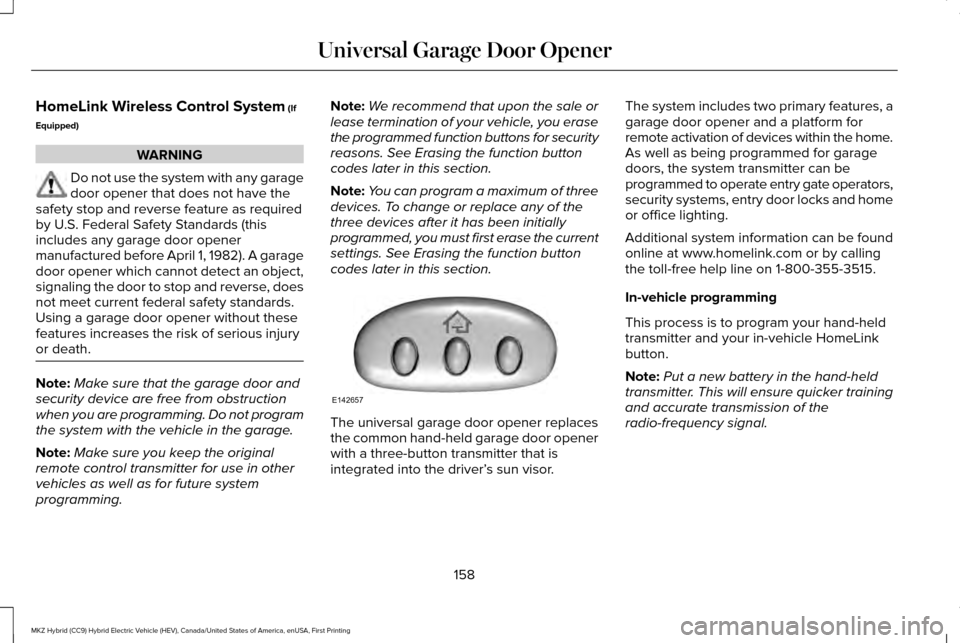
codes later in this section. The universal garage door opener replaces
the common hand-held garage door opener
with a three-button transmitter that is
integrated into the driver’
s sun visor.The system includes two primary features, a
garage door opener and a platform for
remote activation of devices within the home.
As well as being programmed for garage
doors, the system transmitter can be
programmed to operate entry gate operators,
security systems, entry door locks and home
or office lighting.
Additional system information can be found
online at www.homelink.com or by calling
the toll-free help line on 1-800-355-3515.
In-vehicle programming
This process is to program your hand-held
transmitter and your in-vehicle HomeLink
button.
Note:
Put a new battery in the hand-held
transmitter. This will ensure quicker training
and accurate transmission of the
radio-frequency signal.
158
MKZ Hybrid (CC9) Hybrid Electric Vehicle (HEV), Canada/United States of America, enUSA, First Printing Universal Garage Door OpenerE142657
Page 201 of 543
Manual release
WARNING
If the brake system warning light
remains illuminated or flashes after you
have released the parking brake, there could
be a problem with you braking system. Have
the system checked by an authorized dealer
as soon as possible. You can manually release the electric parking
brake by:
1. Turning the ignition on.
2. Pressing the brake pedal.
3. Pressing the electric parking brake
switch.
When the electric parking brake is released,
the brake system warning lamp will turn off. Automatic release - drive away release
Your vehicle will automatically release the
parking brake if:
•
The driver door is closed.
• The vehicle is accelerated.
• There are no faults detected in the
parking brake system.
Note: If the electric parking brake warning
lamp stays illuminated, the electric parking
brake will not automatically release. You
must release the electric parking brake using
the electric parking brake switch.
Note: On hybrid vehicles, the vehicle must
be Ready-to-Drive as indicated by the green
ready indicator light.
The brake system warning lamp will go off
to confirm that the electric parking brake has
been released.
Note: The electric parking brake drive away
release makes starting on a hill easier. This
feature will release the parking brake
automatically when the vehicle has sufficient
drive force to move up the hill. To assure
drive away release when starting uphill,
press the accelerator pedal quickly. Battery With No Charge WARNING
You will not be able to apply or release
the electric parking brake if the battery
is low or has no charge. If the battery is low or has no charge, use
jumper cables and a booster battery.
HILL START ASSIST
WARNINGS
The system does not replace the
parking brake. When you leave your
vehicle, always apply the parking brake.
Failure to leave your vehicle securely parked
may lead to a crash or injury. See Electric
Parking Brake (page 196). You must remain in your vehicle when
the system turns on. At all times, you
are responsible for controlling your vehicle,
supervising the system and intervening, if
required. Failure to take care may result in
the loss of control of your vehicle, serious
personal injury or death.
198
MKZ Hybrid (CC9) Hybrid Electric Vehicle (HEV), Canada/United States of America, enUSA, First Printing Brakes