Page 117 of 563

GENERAL INFORMATION
WARNING
Driving while distracted can result in
loss of vehicle control, crash and injury.
We strongly recommend that you use
extreme caution when using any device that
may take your focus off the road. Your
primary responsibility is the safe operation
of your vehicle. We recommend against the
use of any hand-held device while driving
and encourage the use of voice-operated
systems when possible. Make sure you are
aware of all applicable local laws that may
affect the use of electronic devices while
driving. You can control various systems on your
vehicle using the information display controls
on the steering wheel. Corresponding
information appears in the information
display. Information Display Controls
•
Press the up and down arrow buttons to
scroll through and highlight the options
within a menu.
• Press the right arrow button to enter a
sub-menu.
• Press the left arrow button to exit a menu. •
Press and hold the left arrow button at
any time to return to the main menu
display (escape button).
• Press the OK button to choose and
confirm settings or messages.
Main menu
From the main menu bar on the left side of
the information display, you can choose from
the following categories:
• Trip 1 & 2
• Fuel Economy
• Driver Assist
• Settings
Scroll up or down to highlight one of the
categories and then press the right arrow
key or OK to enter into that category. Press
the left arrow key as needed to exit back to
the main menu.
Trip 1 & 2
You can access the menu using the
information display control.
114
MKX (CD9) Canada/United States of America, enUSA, ASO/OGC Review Information DisplaysE152750
Page 121 of 563
Tire Pressure
The low tire pressure warning light will turn
on if the tire pressure is significantly low.
Once the light is illuminated, your tires are
under-inflated and need to be inflated to the
manufacturer’
s recommended tire pressure.
Settings
In this mode, you can configure different
driver setting choices.
Note: Some items are optional and may not
appear. Settings
Comfort, Normal or Sport
Handling in D
Drive Control
Vehicle
Normal or Sport
Handling in S
Normal or Sport
Performance in S
Easy Entry / Exit - check enabled or uncheck disabled
Auto Engine Off - check enabled or uncheck disabled Right Hand Traffic or Left HandTraffic
Traffic Setup
Adaptive Headlamps
Lighting
On or Off
Auto Highbeam
118
MKX (CD9) Canada/United States of America, enUSA, ASO/OGC Review Information DisplaysE200335
Page 122 of 563
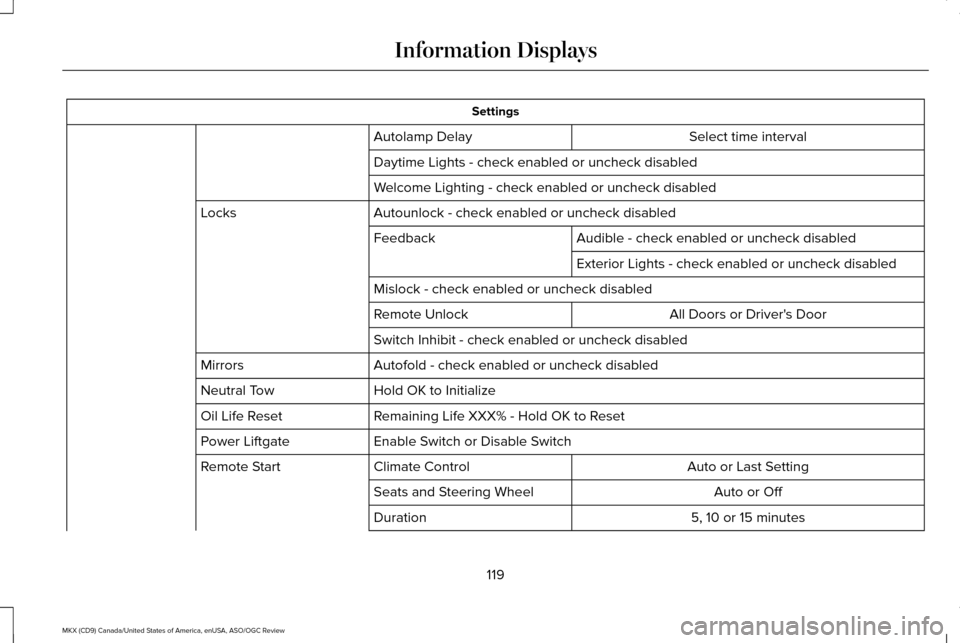
Settings
Select time interval
Autolamp Delay
Daytime Lights - check enabled or uncheck disabled
Welcome Lighting - check enabled or uncheck disabled
Autounlock - check enabled or uncheck disabled
Locks
Audible - check enabled or uncheck disabled
Feedback
Exterior Lights - check enabled or uncheck disabled
Mislock - check enabled or uncheck disabled All Doors or Driver's Door
Remote Unlock
Switch Inhibit - check enabled or uncheck disabled
Autofold - check enabled or uncheck disabled
Mirrors
Hold OK to Initialize
Neutral Tow
Remaining Life XXX% - Hold OK to Reset
Oil Life Reset
Enable Switch or Disable Switch
Power Liftgate
Auto or Last Setting
Climate Control
Remote Start
Auto or Off
Seats and Steering Wheel
5, 10 or 15 minutes
Duration
119
MKX (CD9) Canada/United States of America, enUSA, ASO/OGC Review Information Displays
Page 123 of 563
Settings
System - check enabled or uncheck disabled
Seatbelts Remote Open/Close - check enabled or uncheck disabled
Windows
Courtesy Wipe - check enabled or uncheck disabled
Wipers
Rain Sensing - check enabled or uncheck disabled
MyKey Status
MyKey
Hold OK to Create MyKey
Create MyKey
Always On or User Selectable
911 Assist
Always On or User Selectable
Do Not Disturb
Always On or User Selectable
Traction Control
Choose desired speed or off
Max Speed
Choose desired speed or off
Speed Minder
Volume Limiter - check enabled or uncheck disabled
Hold OK to Clear All MyKeys
Clear MyKeys
Miles & Gallons, L/100km or km/L
Distance
Display
Fahrenheit or Celsius
Temperature
120
MKX (CD9) Canada/United States of America, enUSA, ASO/OGC Review Information Displays
Page 124 of 563
Settings
psi, kPa or BAR
Tire Pressure
Choose your applicable setting
Language
Speedometer in km/h - check enabled or uncheck disabled
Note: Some MyKey items only appear if a MyKey is set.
INFORMATION MESSAGES
Note: Depending on the vehicle options
equipped with your vehicle, not all of the
messages display or are available. Certain
messages may be abbreviated or shortened
depending upon which cluster type you
have. Press the OK button to acknowledge and
remove some messages from the information
display. Other messages are removed
automatically after a short time.
Certain messages need to be confirmed
before you can access the menus.
Active Park Action
Message
Displayed when the system needs service. Contact an authorized dealer as soon as possible.
Active Park Fault
121
MKX (CD9) Canada/United States of America, enUSA, ASO/OGC Review Information DisplaysE145981
Page 135 of 563

MyKey
Action
Message
Displayed during key programming when MyKey cannot be programmed.
MyKey Not Created
Displays when MyKey is active.
MyKey Active Drive Safely
Displays when starting the vehicle and MyKey is in use and the MyKey speed limit is on.
Speed Limited to XX MPH/km/h
Displays when a MyKey is in use and the MyKey speed limit is on and the vehicle speed isapproaching 80 mph (130 km/h).
Near Vehicle Top Speed
Displays when a MyKey is in use and the MyKey speed limit is reached.
Vehicle at Top Speed of MyKey Setting
Displays when MyKey is active.
Check Speed Drive Safely
Displays when a MyKey is in use and Belt-Minder is activated.
Buckle Up to Unmute Audio
Displays when a MyKey is in use and AdvanceTrac is activated.
AdvanceTrac On - MyKey Setting
Displays when a MyKey is in use and Traction control is activated.
Traction Control On - MyKey Setting
Displays when a MyKey is in use and park aid is activated.
MyKey Park Aid Cannot be Deactivated
Displayed when the lane keeping aid is on per MyKey settings.
Lane Keeping Alert On MyKey Setting
132
MKX (CD9) Canada/United States of America, enUSA, ASO/OGC Review Information Displays
Page 144 of 563

Left-hand temperature control: Adjust the temperature setting using the control on the left-hand side. This control also adjusts the
right-hand side temperature when you switch off dual zone mode.
A
Fan speed control: Adjust the volume of air circulated in the vehicle.
B
Right-hand temperature control:
Adjust the temperature on the right-hand side.
C
A/C:
Press the button to switch the air conditioning on or off. Air conditioning cools your vehicle using outside air. To improve the
time to reach a comfortable temperature in hot weather, drive with the windows open until you feel cold air through the air ve\
nts.
D
MAX A/C:
Press the button for maximum cooling. Recirculated air flows through the instrument panel vents, air conditioni\
ng
automatically turns on, and the fan automatically adjusts to the highest\
speed.
E
Recirculated air: Press the button to switch between outside air and recirculated air. The air currently in the passenger compartment
recirculates. This can reduce the time needed to cool the interior and r\
educe unwanted odors from entering your vehicle.
F
Note:
Recirculated air may also turn on and off automatically in instrument pan\
el or instrument panel and floor airflow modes during
hot weather to improve cooling efficiency.
Heated seats:
Press the button to switch the heated seats on and off. See Heated Seats (page 154).
G
Climate controlled seats:
Press the button to switch the climate controlled seats on and off. See Climate Controlled Seats (page
155).
H
DUAL:
Press the button to switch separate passenger side temperature control \
off and on. When dual zone is off, passenger
temperature settings remain the same as the driver settings.
I
Note:
Dual zone automatically turns on when you adjust the right-hand setting\
s.
AUTO:
Press the button to switch on automatic operation. Adjust to select the\
desired temperature. Fan speed, air distribution, air
conditioning operation, and outside or recirculated air are automaticall\
y adjusted to heat or cool the vehicle to maintain the desired
temperature. You can also switch off dual zone mode by pressing and holding the button\
for more than two seconds.
J
Power:
Press the button to switch the system on and off. When the system is off, it prevents outside air from entering the vehicle.
K
141
MKX (CD9) Canada/United States of America, enUSA, ASO/OGC Review Climate Control
Page 145 of 563

Defrost: Select to distribute air through the windshield air vents. Air distribu\
tion to the instrument panel and footwell vents turns
off. You can also use this setting to defrost and clear the windshield of a th\
in covering of ice.
L
Heated rear window: Press the button to switch the heated rear window on and off. See Heated Windows and Mirrors
(page 143).
M
HINTS ON CONTROLLING THE
INTERIOR CLIMATE
General Hints
Note: Prolonged use of recirculated air may
cause the windows to fog up.
Note: You may feel a small amount of air
from the footwell air vents regardless of the
air distribution setting.
Note: To reduce humidity build-up inside
your vehicle, do not drive with the system
switched off or with recirculated air always
switched on.
Note: Do not place objects under the front
seats as this may interfere with the airflow
to the rear seats.
Note: Remove any snow, ice or leaves from
the air intake area at the base of the
windshield. Note:
To improve the time to reach a
comfortable temperature in hot weather,
drive with the windows open until you feel
cold air through the air vents.
Automatic Climate Control
Note: Adjusting the settings when your
vehicle interior is extremely hot or cold is not
necessary. The system automatically adjusts
to heat or cool the cabin to your selected
temperature as quickly as possible. For the
system to function efficiently, the instrument
panel and side air vents should be fully
open.
Note: If you select
AUTO during cold outside
temperatures, the system directs airflow to
the windshield and side window vents. In
addition, the fan may run at a slower speed
until the engine warms up. Note:
If you select AUTO during hot outside
temperatures, or when the inside of the
vehicle is hot, the system automatically uses
recirculated air to maximize interior cooling.
When the interior reaches the selected
temperature, the system automatically
switches to using outside air.
Heating the Interior Quickly
1. Select the
AUTO function.
2. Adjust the temperature function to the desired setting.
Recommended Settings for Heating
1. Select the
AUTO function.
2. Adjust the temperature function to the desired setting. Use 72°F (22°C) as a
starting point, then adjust the setting as
necessary.
142
MKX (CD9) Canada/United States of America, enUSA, ASO/OGC Review Climate Control