2016 LINCOLN MKX Override
[x] Cancel search: OverridePage 188 of 563

Upshifts when accelerating (recommended for best fuel economy)
mph (km/h)
Gear Upshift
To
From
15 mph (24 km/h)
2
1
25 mph (40 km/h)
3
2
40 mph (64 km/h)
4
3
45 mph (72 km/h)
5
4
50 mph (80 km/h)
6
5
The instrument cluster will display your
currently selected gear. The transmission will automatically upshift if
your engine speed is too high or downshift
if your engine speed is too low.
Note:
The system will stay in manual control
until you make another shift button selection.
For example, drive (D).
Brake-Shift Interlock Override WARNINGS
Do not drive your vehicle until you
verify that the brake lamps are working.
185
MKX (CD9) Canada/United States of America, enUSA, ASO/OGC Review TransmissionE155990
Page 189 of 563
WARNINGS
When doing this procedure, you will
be taking the vehicle out of park which
means the vehicle can roll freely. To avoid
unwanted vehicle movement, always fully
set the parking brake prior to doing this
procedure. Use wheel chocks if appropriate. If the parking brake is fully released,
but the brake warning lamp remains
illuminated, the brakes may not be working
properly. See your authorized dealer. Note:
See your authorized dealer as soon
as possible if this procedure is used.
Note: For some markets this feature is
disabled.
Note: This feature will only function if your
12-volt battery has power.
Use the brake-shift interlock override to
move your transmission from the park
position in the event of an electrical
malfunction or if your vehicle has a dead
battery. 1. Apply the parking brake and turn your
ignition off before performing this
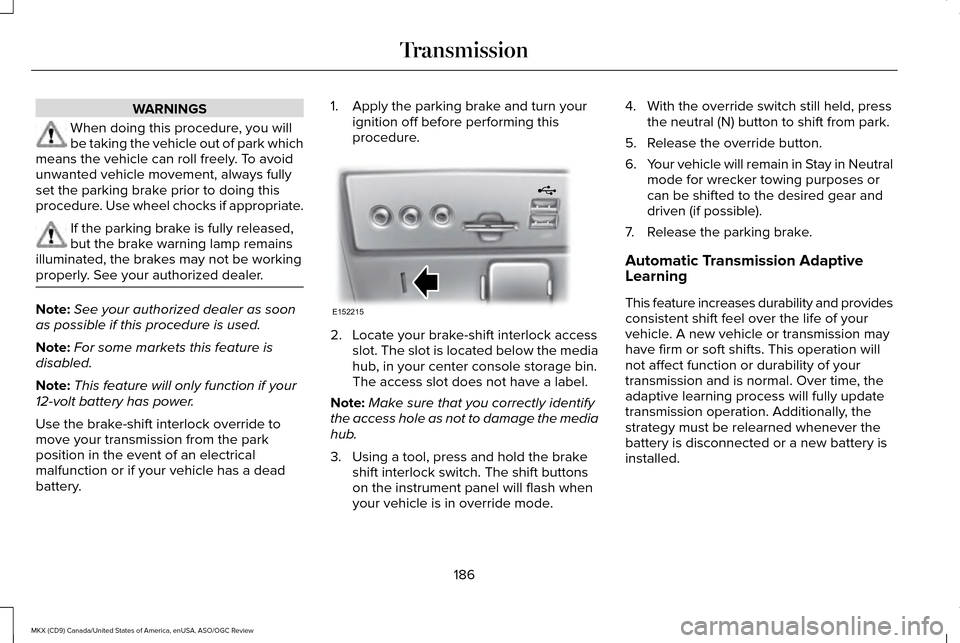
procedure. 2. Locate your brake-shift interlock access
slot. The slot is located below the media
hub, in your center console storage bin.
The access slot does not have a label.
Note: Make sure that you correctly identify
the access hole as not to damage the media
hub.
3. Using a tool, press and hold the brake shift interlock switch. The shift buttons
on the instrument panel will flash when
your vehicle is in override mode. 4. With the override switch still held, press
the neutral (N) button to shift from park.
5. Release the override button.
6. Your vehicle will remain in Stay in Neutral
mode for wrecker towing purposes or
can be shifted to the desired gear and
driven (if possible).
7. Release the parking brake.
Automatic Transmission Adaptive
Learning
This feature increases durability and provides
consistent shift feel over the life of your
vehicle. A new vehicle or transmission may
have firm or soft shifts. This operation will
not affect function or durability of your
transmission and is normal. Over time, the
adaptive learning process will fully update
transmission operation. Additionally, the
strategy must be relearned whenever the
battery is disconnected or a new battery is
installed.
186
MKX (CD9) Canada/United States of America, enUSA, ASO/OGC Review TransmissionE152215
Page 212 of 563

Note:
If the obstacle remains within 12 in
(30 cm) visual distance indication remains
on.
If the transmission is in neutral (N), the side
sensing system only provides visual distance
indication when your vehicle is moving at
7 mph (12 km/h) or below, for example when
moving on a slope, and obstacles are
detected within
12 in (30 cm). When you stop
your vehicle the visual distance indication
stops after 4 seconds.
If the side sensing system is not available,
the side distance indicator blocks will not be
present.
The side sensing system is not available
under the following condition:
• If you switch the traction control system
off. The side sensing system may not be
available until you have driven approximately
the length of your vehicle in order for the
system to reinitialize if:
•
You switch the ignition on, off and back
on.
• Your vehicle remains stationary for over
two minutes.
• The anti-lock brake system is activated.
• The traction control system is activated.
ACTIVE PARK ASSIST
(If Equipped)
Parallel Parking, Perpendicular
Parking, Park Out Assist WARNINGS
You must remain in your vehicle when
the system turns on. You are
responsible at all times for controlling your
vehicle, supervising the system and
intervening if required. Failure to take care
may result in the loss of control of your
vehicle, serious personal injury or death. WARNINGS
The sensors may not detect objects in
heavy rain or other conditions that
cause disruptive reflections. Note:
The driver is always responsible for
controlling the vehicle, supervising the
system and intervening if required by
grabbing the steering wheel or pushing the
active park assist button.
The system detects an available parallel or
perpendicular parking space and
automatically steers your vehicle into the
space (hands-free) while you control the
accelerator, gearshift and brakes. The system
visually and audibly guides you to park your
vehicle.
If you are uncomfortable with the proximity
to any vehicle or object, you may choose to
override the system.
Park Out Assist automatically steers your
vehicle out of a parallel parking space
(hands-free) while you control the
accelerator, gearshift and brakes. The system
visually and audibly guides you to enter
traffic.
209
MKX (CD9) Canada/United States of America, enUSA, ASO/OGC Review Parking Aids
Page 228 of 563

The current gap setting and SET also display.
Setting a Speed
1. Accelerate to the desired speed.
2. Press and release SET+. The vehicle
speed is stored in the memory.
3. The information display shows a green indicator light, current gap setting and
desired set speed.
4. Take your foot off the accelerator pedal. 5. A lead vehicle graphic illuminates when
the system detects a vehicle in front of
you.
Note: When adaptive cruise control is active,
the speedometer may vary slightly from the
set speed displayed in the information
display. Following a Vehicle WARNINGS
When following a vehicle in front of
you, your vehicle does not decelerate
automatically to a stop, nor does your vehicle
always decelerate quickly enough to avoid
a crash without driver intervention. Always
apply the brakes when necessary. Failing to
do so may result in a crash, serious injury or
death. Adaptive cruise control only warns of
radar-sensor-detected vehicles. In
some cases there may be no warning or a
delayed warning. You should always apply
the brakes when necessary. Failing to do so
may result in a crash, serious injury or death. Note:
The brakes may emit a sound when
the adaptive cruise control system is active.
When a vehicle ahead of you enters the
same lane or a slower vehicle is ahead in the
same lane, the vehicle speed adjusts to
maintain a preset gap distance. The distance
setting is adjustable.
The lead vehicle graphic illuminates. When you are following a vehicle and you
switch on your left directional indicator,
adaptive cruise control may provide a small
temporary acceleration to help you pass.
The vehicle maintains a constant distance
between the vehicle ahead until:
•
The vehicle in front of you accelerates to
a speed above the set speed.
• The vehicle in front of you moves out of
your lane or out of view.
• The vehicle speed falls below 12 mph (20
km/h).
• A new gap distance is set.
The vehicle applies brakes to slow the
vehicle to maintain a safe distance from the
vehicle in front. The maximum braking which
the system can apply is limited. You can
override the system by applying the brakes.
If the system predicts that its maximum
braking level is insufficient, an audible
warning sounds while the system continues
to brake. The red warning bar appears on
the windshield. You should take immediate
action.
225
MKX (CD9) Canada/United States of America, enUSA, ASO/OGC Review Cruise ControlE164805
Page 230 of 563

Each time you start the vehicle, the system
selects the last chosen gap for the current
driver.
Disengaging the System
Press the brake pedal or press and release
CNCL. The last set speed displays in grey
but does not erase.
Overriding the System WARNING
Whenever the driver presses the
accelerator pedal and overrides the
system, the system does not automatically
apply the brakes to maintain the set distance
from any vehicle ahead. Press the accelerator pedal to override the
set speed and gap distance.
When you override the system,
the green indicator light
illuminates and the lead vehicle
graphic does not show in the information
display. The system resumes operation when you
release the accelerator pedal. The vehicle
speed decreases to the set speed, or a
slower speed if following a slower vehicle.
Changing the Set Speed
•
Accelerate or brake to the desired speed,
then press and release
SET+.
• Press and hold
SET+ or SET- until the
desired set speed shows on the
information display. The vehicle speed
gradually changes to the selected speed.
• Press and release SET+ or SET-. The set
speed changes in approximately 1 mph
(2 km/h) increments.
The system may apply the brakes to slow
the vehicle to the new set speed. The set
speed displays continuously in the
information display when the system is
active.
Resuming the Set Speed
Note: Only use resume if you are aware of
the set speed and intend to return to it. Press and release
RES. The vehicle returns
to the previously set speed. The set speed
displays continuously in the information
display while the system is active.
Low Speed Automatic Cancellation
The system does not function at speeds
below 12 mph (20 km/h). An audible alarm
sounds and the automatic braking releases
if your vehicle drops below this speed.
Hilly Condition Usage
Note: An audible alarm sounds and the
system shuts down if it is applying brakes
for an extended period of time. This allows
the brakes to cool. The system functions
normally again when the brakes cool.
Select a lower gear during prolonged
downhill driving on steep slopes, such as
mountainous areas, when the system is
active. In such situations, the system needs
additional engine braking to reduce the load
on the vehicle ’s regular brake system to
prevent the brakes from overheating.
227
MKX (CD9) Canada/United States of America, enUSA, ASO/OGC Review Cruise ControlE144529
Page 270 of 563

Front-wheel drive vehicles must have the
front wheels placed on a tow dolly when
towing your vehicle from the rear using
wheel lift equipment. This prevents damage
to the transmission.
Towing an all-wheel drive vehicle requires
that all wheels be off the ground, such as
using a wheel lift and dollies or flatbed
equipment. This prevents damage to the
transmission, all-wheel drive system and
vehicle.
TOWING THE VEHICLE ON FOUR
WHEELS
Emergency Towing
You can flat-tow (all wheels on the ground,
regardless of the powertrain/transmission
configuration) your disabled vehicle (without
access to wheel dollies, car-hauling trailer,
or flatbed transport vehicle) under the
following conditions:
•
Your vehicle is facing forward so you tow
it in a forward direction.
• You place the transmission in position N.
If you cannot place the transmission in
position
N, you may need to override it.
See Transmission (page 182).
• Maximum speed is 35 mph (56 km/h).
• Maximum distance is 50 miles (80
kilometers).
Recreational Towing
Note: Put your climate control system in
recirculated air mode to prevent exhaust
fumes from entering the vehicle.
See
Climate Control (page 140). Follow these guidelines if you have a need
for recreational (RV) towing. An example of
recreational towing would be towing your
vehicle behind a motorhome. These
guidelines are to make sure you do not
damage the transmission during towing.
You can tow your vehicle with all four wheels
on the ground using the Neutral Tow feature,
or with all four wheels off the ground using
a vehicle transport trailer. If you are using a
vehicle transport trailer, follow the instruction
specified by the equipment provider.
Neutral Tow
If you tow your vehicle with all four wheels
on the ground:
•
Tow only in the forward direction.
• Release the parking brake.
Enter Neutral Tow mode by doing the
following:
1. Put the ignition in accessory mode by pressing the engine START button
without pressing the brake pedal.
267
MKX (CD9) Canada/United States of America, enUSA, ASO/OGC Review Towing
Page 416 of 563

To make adjustments using the touchscreen, select:
Action and Description
Menu Item
Press the settings icon.
Settings
Media Player
Then select from the following:
When this feature is on, the system automatically switches to the media \
source upon initial
connection. This allows you to listen to music during the indexing proce\
ss. When this feature is
off, the system does not automatically switch to the inserted media source.
Autoplay
Select to connect, disconnect, add or delete a device. You can also set a device as your favorite
so that the system automatically attempts to connect to that device at e\
very ignition cycle.
Bluetooth Devices
This allows you to view the version level of the Gracenote Database.
Gracenote® Database Info
With this feature on, the Gracenote Database supplies metadata informati\
on for your music files.
This overrides information from your device. This feature defaults to off.
Gracenote® Management
With this feature on, the Gracenote Database supplied cover art for your\
music files. This overrides
any art from your device. This feature defaults to Media Player.
Cover Art Priority
Navigation 413
MKX (CD9) Canada/United States of America, enUSA, ASO/OGC Review MyLincoln Touch™E142607
Page 553 of 563

Automatic Transmission..............................182
Automatic Transmission Adaptive
Learning............................................................186
Brake-Shift Interlock Override.........................185
If Your Vehicle Gets Stuck In Mud or Snow...................................................................187
Push Button Shift Transmission.......................182
SelectShift Automatic ™ Transmission.............184
Automatic Transmission Fluid Check.......313 Adding Transmission Fluid ...............................314
Checking the Transmission Fluid Level ........313
Autowipers.......................................................88
Auxiliary Power Points.................................163 110 Volt AC Power Point.....................................163
12 Volt DC Power Point......................................163
Locations...............................................................163
AWD See: All-Wheel Drive...........................................188
B
Blind Spot Information System..................237 Blind Spot Information System (BLIS™) with
Cross Traffic Alert...........................................237
Bonnet Lock See: Opening and Closing the Hood............302
Booster Seats
...................................................27
Types of Booster Seats.......................................27 Brake Fluid Check
.........................................315
Brakes..............................................................194 General Information............................................194
Breaking-In....................................................269
Bulb Specification Chart
.............................322
C
Cabin Air Filter
...............................................143
California Proposition 65................................11
Capacities and Specifications - 2.7L EcoBoost™....................................................376
Specifications.......................................................377
Capacities and Specifications - 3.7L.........381 Specifications......................................................383
Capacities and Specifications...................370
Cargo Nets
.....................................................249
Car Wash See: Cleaning the Exterior...............................325
Center Console
.............................................165
Changing a Bulb............................................321
Headlamp..............................................................321
LED Lamps............................................................321
Changing a Fuse...........................................301 Fuses......................................................................301 Changing a Road Wheel.............................363
Dissimilar Spare Wheel and Tire Assembly
Information.......................................................364
Stowing the flat tire ...........................................367
Tire Change Procedure....................................365
Changing the 12V Battery...........................316
Changing the Engine Air Filter..................324
Changing the Wiper Blades
.......................318
Changing the Rear Window Wiper
Blade..................................................................319
Changing the Windshield Wiper Blades.......318
Checking MyKey System Status.................64
Checking the Wiper Blades........................318
Child Restraint and Safety Belt Maintenance...................................................41
Child Safety
.......................................................16
General Information..............................................16
Child Safety Locks...........................................31 Left-Hand Side.......................................................32
Right-Hand Side....................................................32
Child Seat Positioning...................................29
Cleaning Leather Seats..............................330
Cleaning Products........................................325
Cleaning the Alloy Wheels..........................331
Cleaning the Engine....................................327
550
MKX (CD9) Canada/United States of America, enUSA, ASO/OGC Review Index