2016 LINCOLN MKX ignition
[x] Cancel search: ignitionPage 277 of 563

Should your vehicle shut off after a collision,
you may restart your vehicle. For vehicles
equipped with a key system:
1. Switch off the ignition.
2. Switch on the ignition.
3. Repeat Steps 1 and 2 to re-enable the
fuel pump.
For vehicles equipped with a push button
start system:
1. Press the START/STOP button to switch
off the ignition.
2. Press the brake pedal and press the START/STOP button to switch on the
ignition.
3. Remove your foot from the brake pedal and press the
START/STOP button to
switch off the ignition.
4. You can either attempt to start the engine
by pressing the brake pedal and the
START/STOP
button, or switch on the
ignition only by pressing the
START/STOP
button without pressing
the brake pedal. Both ways re-enable the
fuel system. Note:
When you try to restart your vehicle
after a fuel shutoff, the vehicle makes sure
that various systems are safe to restart.
Once your vehicle determines that the
systems are safe, then the vehicle will allow
you to restart.
Note: In the event that your vehicle does not
restart after your third attempt, contact an
authorized dealer.
JUMP STARTING THE VEHICLE WARNINGS
Batteries normally produce explosive
gases which can cause personal injury.
Therefore, do not allow flames, sparks or
lighted substances to come near the battery.
When working near the battery, always shield
your face and protect your eyes. Always
provide correct ventilation. WARNINGS
Keep batteries out of reach of children.
Batteries contain sulfuric acid. Avoid
contact with skin, eyes or clothing. Shield
your eyes when working near the battery to
protect against possible splashing of acid
solution. In case of acid contact with skin or
eyes, flush immediately with water for a
minimum of 15 minutes and get prompt
medical attention. If acid is swallowed, call a
physician immediately. Use only adequately sized cables with
insulated clamps.
Preparing Your Vehicle
Do not attempt to push-start your automatic
transmission vehicle.
Note:
Attempting to push-start a vehicle with
an automatic transmission may cause
transmission damage.
Note: Use only a 12-volt supply to start your
vehicle.
Note: Do not disconnect the battery of the
disabled vehicle as this could damage the
vehicle electrical system.
274
MKX (CD9) Canada/United States of America, enUSA, ASO/OGC Review Roadside Emergencies
Page 301 of 563

Protected components
Fuse amp rating
Fuse or relay number
MyLincoln module.
Not used (spare).
5A 2
11
Climate control module.
7.5A 2
12
Cluster.
7.5A 2
13
Steering column control module.
Smart datalink connector (gateway) module.
Not used (spare).
10A 2
14
Datalink power.
10A 2
15
Not used (spare).
15A 1
16
Not used (spare).
5A 2
17
Ignition switch.
5A 2
18
Push button start switch.
Key inhibit solenoid.
Not used (spare).
7.5A 2
19
Active front steering logic power.
7.5A 2
20
298
MKX (CD9) Canada/United States of America, enUSA, ASO/OGC Review Fuses
Page 320 of 563

For longer, trouble-free operation, keep the
top of the battery clean and dry. Also, make
certain the battery cables are always tightly
fastened to the battery terminals.
If you see any corrosion on the battery or
terminals, remove the cables from the
terminals and clean with a wire brush. You
can neutralize the acid with a solution of
baking soda and water.
When a battery replacement is required, the
battery should only be replaced with a Ford
recommended replacement battery that
matches the electrical requirements of the
vehicle.
Because your vehicle
’s engine is
electronically-controlled by a computer,
some engine control settings are maintained
by power from the low voltage battery. Some
engine computer settings, like the idle trim
and fuel trim strategy, optimize the
driveability and performance of the engine. Some other computer settings, like the clock
and radio station presets, are also maintained
in memory by power from the low voltage
battery. When a technician disconnects and
connects the low voltage battery, these
settings are erased.
Note:
Until you switch the ignition to the on
position, you will receive a message in your
information display stating that your vehicle
is not in park.
Complete the following procedure in order
to restore the settings:
1. With the vehicle at a complete stop, set the parking brake.
2. Shift the transmission into P.
3. Turn off all accessories.
4. Step on the brake pedal and start the vehicle. 5. Run the engine until it reaches normal
operating temperature. While the engine
is warming up, complete the following:
Reset the clock. See Audio System
(page 388). Reset the power windows
bounce-back feature. See Windows and
Mirrors (page 100).
Reset the radio station
presets. See Audio System (page 388).
6. Allow the engine to idle for at least one minute. If the engine turns off, step on
the accelerator to start the engine.
7. While the engine is running, step on the brake pedal and shift the transmission to
N.
8. Allow the engine to run for at least one minute by pressing on the accelerator
pedal.
9. Drive your vehicle at least 10 miles (16 kilometers) to completely relearn the idle
and fuel trim strategy.
Note: Certain features may not operate if
the Battery Monitor System is not reset with
a scan tool following a jump start or battery
replacement. Normal electrical accessory
operation should resume after your vehicle
is left undisturbed for 8 hours.
317
MKX (CD9) Canada/United States of America, enUSA, ASO/OGC Review Maintenance
Page 324 of 563

5. Locate the vertical adjuster on each
headlamp. Using a Phillips #2
screwdriver, turn the adjuster either
clockwise or counterclockwise in order
to adjust the vertical aim of the
headlamp. The horizontal edge of the
brighter light should touch the horizontal
reference line.
6. Close the hood and turn off the lamps.
CHANGING A BULB WARNINGS
Switch all of the lamps and the ignition
off. Failure to follow this warning could
result in serious personal injury. Bulbs become hot when in use. Let
them cool down before you remove
them. Use the correct specification bulb.
See Bulb Specification Chart (page 322).
Install in the reverse order unless otherwise
stated. Headlamp
Headlamp low and high beam -
vehicles with high-intensity
discharge headlamps.
A
Front direction indicator.
B
Note: Vehicles with LED headlamps do not
contain servicable bulbs. See an
authorized dealer if they fail.
Front Direction Indicator
1. Turn the bulb holder counterclockwise and remove it.
2. Remove the bulb by pulling it straight out. High-Intensity Discharge Headlamps
These lamps operate at a high voltage. See
an authorized dealer if they fail.
LED Lamps
LED lamps are not serviceable items. See an
authorized dealer if they fail.
The following lamps are LED:
•
Front parking lamps.
• Front side marker lamps.
• Front signature lamps.
• Daytime running lamps.
• Side direction indicators.
• Rear side marker lamps.
• Brake and rear lamps.
• Central high mounted brake lamp.
• Rear direction indicators.
• Reversing lamps.
• License plate lamp.
321
MKX (CD9) Canada/United States of America, enUSA, ASO/OGC Review MaintenanceE201500
AB
Page 330 of 563

CLEANING THE ENGINE
Engines are more efficient when they are
clean because grease and dirt buildup keep
the engine warmer than normal.
When washing:
•
Take care when using a power washer
to clean the engine. The high-pressure
fluid could penetrate the sealed parts
and cause damage.
• Do not spray a hot engine with cold water
to avoid cracking the engine block or
other engine components.
• Spray Motorcraft Engine Shampoo and
Degreaser on all parts that require
cleaning and pressure rinse clean. In
Canada, use Motorcraft Engine Shampoo.
• Never wash or rinse the engine while it
is hot or running; water in the running
engine may cause internal damage. •
Never wash or rinse any ignition coil,
spark plug wire or spark plug well, or the
area in and around these locations.
• Cover the battery, power distribution box,
and air filter assembly to prevent water
damage when cleaning the engine.
CLEANING THE WINDOWS AND
WIPER BLADES
Car wash chemicals and environmental
fallout can result in windshield and wiper
blade contamination. Dirty windshield and
wipers will result in poor windshield wiper
operation. Keep the windshield and wiper
blades clean to maintain windshield wiper
performance. To clean the windshield and wiper blades:
•
Clean the windshield with a non-abrasive
glass cleaner. When cleaning the interior
of the windshield, avoid getting any glass
cleaner on the instrument panel or door
panels. Wipe any glass cleaner off these
surfaces immediately.
• For windshields contaminated with tree
sap, chemicals, wax or bugs, clean the
entire windshield using steel wool (no
greater than 0000 grade) in a circular
motion and rinse with water.
• Clean the wiper blades with isopropyl
rubbing alcohol or windshield washer
concentrate.
Note: Do not use razor blades or other
sharp objects to clean or remove decals from
the inside of the heated rear window. The
vehicle warranty does not cover damage
caused to the heated rear window grid lines.
327
MKX (CD9) Canada/United States of America, enUSA, ASO/OGC Review Vehicle Care
Page 397 of 563

Note:
You can access the entertainment
features for 30 minutes after you switch the
ignition off, and no doors are opened.
PHONE
Press to select any of the following: Menu Item
Phone
Quick Dial
Phonebook
History
Messaging
Settings NAVIGATION
Press to select any of the following: Menu Item
My Home
Favorites
Previous Destinations
Point of Interest
Emergency
Street Address
Intersection
City Center
Map
Edit Route
Cancel Route
CLIMATE
Press the corresponding icons to control the
following options: •
Driver Settings
• Recirculated Air
• Auto
• Dual
• Passenger Settings
• A/C
• Defrost
SETTINGS Press to select any of the following:
Menu Item
Clock
Display
Sound
Vehicle
Settings
Help
394
MKX (CD9) Canada/United States of America, enUSA, ASO/OGC Review MyLincoln Touch™E142607
Page 416 of 563

To make adjustments using the touchscreen, select:
Action and Description
Menu Item
Press the settings icon.
Settings
Media Player
Then select from the following:
When this feature is on, the system automatically switches to the media \
source upon initial
connection. This allows you to listen to music during the indexing proce\
ss. When this feature is
off, the system does not automatically switch to the inserted media source.
Autoplay
Select to connect, disconnect, add or delete a device. You can also set a device as your favorite
so that the system automatically attempts to connect to that device at e\
very ignition cycle.
Bluetooth Devices
This allows you to view the version level of the Gracenote Database.
Gracenote® Database Info
With this feature on, the Gracenote Database supplies metadata informati\
on for your music files.
This overrides information from your device. This feature defaults to off.
Gracenote® Management
With this feature on, the Gracenote Database supplied cover art for your\
music files. This overrides
any art from your device. This feature defaults to Media Player.
Cover Art Priority
Navigation 413
MKX (CD9) Canada/United States of America, enUSA, ASO/OGC Review MyLincoln Touch™E142607
Page 439 of 563
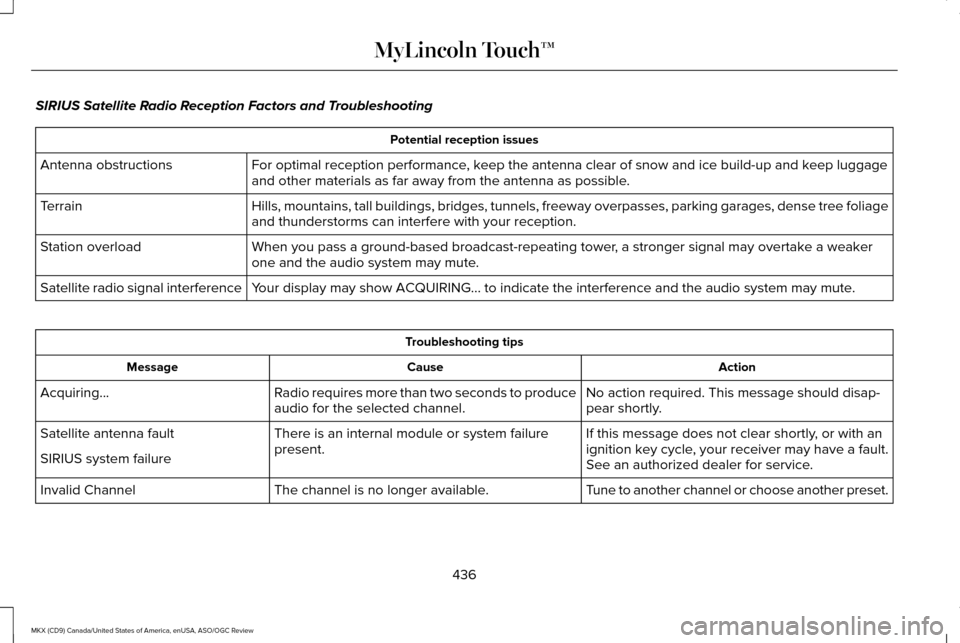
SIRIUS Satellite Radio Reception Factors and Troubleshooting
Potential reception issues
For optimal reception performance, keep the antenna clear of snow and ice build-up and keep luggage
and other materials as far away from the antenna as possible.
Antenna obstructions
Hills, mountains, tall buildings, bridges, tunnels, freeway overpasses, \
parking garages, dense tree foliage
and thunderstorms can interfere with your reception.
Terrain
When you pass a ground-based broadcast-repeating tower, a stronger signal may overtake a weaker
one and the audio system may mute.
Station overload
Your display may show ACQUIRING... to indicate the interference and the a\
udio system may mute.
Satellite radio signal interference Troubleshooting tips
Action
Cause
Message
No action required. This message should disap-
pear shortly.
Radio requires more than two seconds to produce
audio for the selected channel.
Acquiring…
If this message does not clear shortly, or with an
ignition key cycle, your receiver may have a fault.
See an authorized dealer for service.
There is an internal module or system failure
present.
Satellite antenna fault
SIRIUS system failure
Tune to another channel or choose another preset.
The channel is no longer available.
Invalid Channel
436
MKX (CD9) Canada/United States of America, enUSA, ASO/OGC Review MyLincoln Touch™