2016 LINCOLN MKS ECU
[x] Cancel search: ECUPage 50 of 382

REMOTE CONTROL
Intelligent Access Key
Your intelligent access key operates the
power locks and the remote start system.
The key must be in your vehicle to activate
the push-button start system.
Removable Key Blade
The intelligent access key also contains a
removable mechanical key blade that you
can use to unlock the driver door. Slide the release on the back of the remote
control to release the mechanical key blade,
and then pull the blade out.
Note:
Your vehicle ’s backup keys came with
a security tag that provides important vehicle
key cut information. Keep the tag in a safe
place for future reference. Replacing the Battery
Note:
Refer to local regulations when
disposing of transmitter batteries.
Note: Do not wipe off any grease on the
battery terminals or on the back surface of the
circuit board.
Note: Replacing the battery will not delete
the transmitter from the vehicle. The
transmitter should operate normally.
Intelligent Access Transmitter
The remote control uses one coin-type
three-volt lithium battery CR2032 or
equivalent. 1. Remove the mechanical key blade from
the transmitter.
47
MKS (CLE) Canada/United States of America, enUSA, First Printing Keys and Remote ControlsE173598 E173599 E173600 E173599
Page 62 of 382
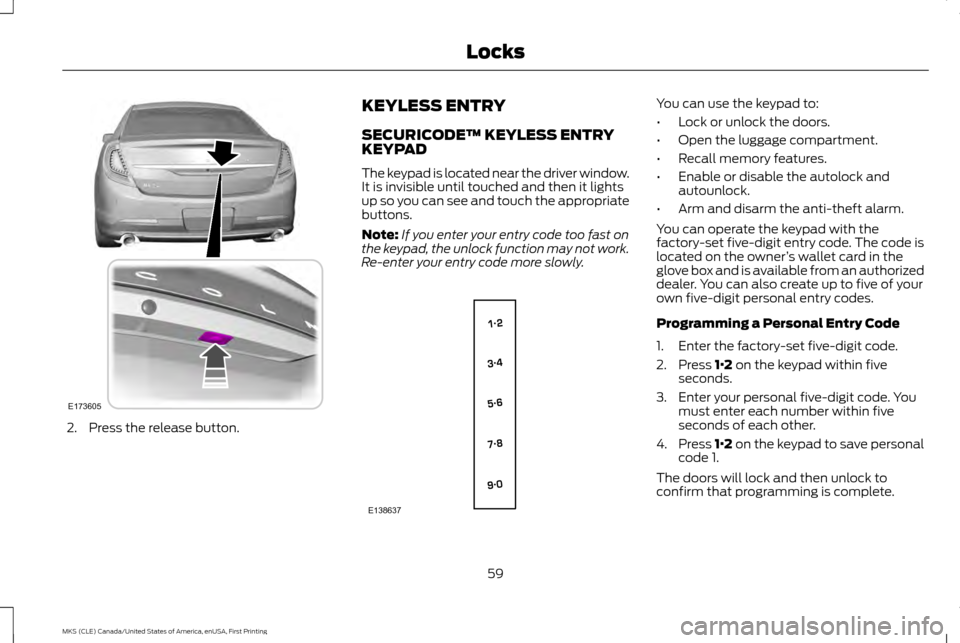
2. Press the release button. KEYLESS ENTRY
SECURICODE™ KEYLESS ENTRY
KEYPAD
The keypad is located near the driver window.
It is invisible until touched and then it lights
up so you can see and touch the appropriate
buttons.
Note:
If you enter your entry code too fast on
the keypad, the unlock function may not work.
Re-enter your entry code more slowly. You can use the keypad to:
•
Lock or unlock the doors.
• Open the luggage compartment.
• Recall memory features.
• Enable or disable the autolock and
autounlock.
• Arm and disarm the anti-theft alarm.
You can operate the keypad with the
factory-set five-digit entry code. The code is
located on the owner ’s wallet card in the
glove box and is available from an authorized
dealer. You can also create up to five of your
own five-digit personal entry codes.
Programming a Personal Entry Code
1. Enter the factory-set five-digit code.
2. Press 1·2 on the keypad within five
seconds.
3. Enter your personal five-digit code. You must enter each number within five
seconds of each other.
4. Press 1·2 on the keypad to save personal
code 1.
The doors will lock and then unlock to
confirm that programming is complete.
59
MKS (CLE) Canada/United States of America, enUSA, First Printing LocksE173605 E138637
Page 63 of 382

To program additional personal entry codes,
repeat steps 1 through 3, then for step 4:
•
Press 3·4 to save personal code 2.
• Press
5·6 to save personal code 3.
• Press
7·8 to save personal code 4.
• Press
9·0 to save personal code 5.
You may also program a personal entry code
using the touchscreen.
Tips:
• Do not set a code that uses five of the
same number.
• Do not use five numbers in sequential
order.
• The factory-set five-digit code will work
even if you have set your own personal
code.
Recalling Memory Positions (If
Equipped)
The programmed entry codes recall driver
memory positions as follows:
• Entry code 1 recalls driver 1 memory
positions.
• Entry code 2 recalls driver 2 memory
positions.
• Entry code 3 recalls driver 3 memory
positions. Note:
Personal entry codes 4 and 5 will not
recall memory positions.
Note: The factory-set five-digit code cannot
be associated with a memory setting.
Erasing a Personal Code
1. Enter the factory-set five-digit code.
2. Press and release
1·2 on the keypad
within five seconds.
3. Press and hold
1·2 for two seconds. You
must do this within five seconds of
completing Step 2.
All personal codes are now erased and only
the factory-set five–digit code will work.
Anti-Scan Feature
The keypad will go into an anti-scan mode if
you enter the wrong code seven times (35
consecutive button presses). This mode
disables the keypad for one minute and the
keypad lamp will flash.
The anti-scan feature will turn off after:
• One minute of keypad inactivity.
• Pressing the unlock button on the remote
control. •
Switching the ignition on.
• Unlocking your vehicle using intelligent
access.
Unlocking and Locking the Doors
To Unlock the Driver Door
Enter the factory-set five-digit code or your
personal code. You must press each number
within five seconds of each other. The interior
lamps will illuminate.
Note: All doors will unlock if you disable the
two-stage unlocking feature. See
Locking
and Unlocking (page 56).
To Unlock All Doors
Enter the factory-set five-digit code or your
personal code, then press
3·4 within five
seconds.
To Lock All Doors
Press and hold 7·8 and 9·0 at the same time
(with the driver door closed). You do not
need to enter the keypad code first.
Displaying the Factory Set Code
Note: You will need to have two programmed
intelligent access keys for this procedure.
60
MKS (CLE) Canada/United States of America, enUSA, First Printing Locks
Page 66 of 382

PASSIVE ANTI-THEFT SYSTEM
Note:
The system is not compatible with
non-Ford aftermarket remote start systems.
Use of these systems may result in vehicle
starting problems and a loss of security
protection.
Note: Metallic objects, electronic devices or
a second coded key on the same key chain
may cause vehicle starting problems if they
are too close to the key when starting your
vehicle. Prevent these objects from touching
the coded key while starting your vehicle.
Switch the ignition off, move all objects on the
key chain away from the coded key and restart
your vehicle if a problem occurs.
Note: Do not leave a duplicate coded key in
your vehicle. Always take your keys and lock
all doors when leaving your vehicle. The
system is an engine immobilization system. It
will not start without a coded key programmed
to your vehicle. If you use the wrong key, a
message may appear in the information
display. SecuriLock
The system helps prevent your vehicle from
starting unless you use a coded key
programmed to your vehicle. Using the wrong
key may prevent your vehicle from starting.
A message may appear in the information
display.
If you are unable to start your vehicle with a
correctly coded key, it is not operating
properly. A message may appear in the
information display.
Automatic Arming
Your vehicle arms immediately after
switching the ignition off.
Automatic Disarming
Switching the ignition on with a coded key
disarms your vehicle.
Replacement Keys
Note:
Your vehicle comes equipped with two
intelligent access keys.
The intelligent access key functions as a
programmed key that operates the driver
door lock and activates the intelligent access
with push button start system, as well as a
remote control. If your programmed transmitters are lost or
stolen and you do not have an extra coded
key, you will need to have your vehicle towed
to an authorized dealer. You need to erase
the key codes from your vehicle and program
new coded keys.
Store an extra programmed key away from
your vehicle in a safe place to help prevent
any inconveniences. Contact your authorized
dealer to purchase additional spare or
replacement keys.
Programming a Spare Intelligent Access
Key
Note:
You can program a maximum of four
intelligent access keys to your vehicle.
You must have two previously programmed
intelligent access keys inside your vehicle and
the new unprogrammed intelligent access
keys readily accessible. Contact an
authorized dealer to have the spare key
programmed if two previously programmed
keys are not available.
63
MKS (CLE) Canada/United States of America, enUSA, First Printing Security
Page 67 of 382

Make sure that your vehicle is off before
beginning this procedure. Make sure that you
close all the doors before beginning and that
they remain closed throughout the procedure.
Perform all steps within 30 seconds of
starting the sequence. Stop and wait for at
least one minute before starting again if you
perform any steps out of sequence.
Read and understand the entire procedure
before you begin.
1. Place the first programmed key in the
backup slot inside the glove
compartment, then press the push button
ignition switch.
2. Wait five seconds and then press the push button ignition switch again.
3. Remove the intelligent access key. 4. Within 10 seconds, place a second
programmed intelligent access key in the
backup slot. Press the push button
ignition switch.
5. Wait five seconds and then press the push button ignition switch again.
6. Remove the intelligent access key.
7. Place the unprogrammed intelligent access key in the backup slot and press
the push button ignition switch.
Programming is now complete. Verify the
remote control functions operate and your
vehicle starts with the new intelligent access
key.
If programming was not successful, wait 10
seconds and repeat Steps 1 through 7. If you
are still unsuccessful, take your vehicle to
your authorized dealer.
ANTI-THEFT ALARM
The system will warn you of an unauthorized
entry to your vehicle. Anyone opening any
door, the luggage compartment or the hood
without using a valid key, remote control or
keyless entry keypad will set off the alarm.
The turn signal lamps will flash and sound
the horn up to a total of 10 times. Take all remote controls to an authorized
dealer if there is any potential alarm problem
with your vehicle.
Arming the Alarm
The alarm is ready to arm when there is not
a key in the ignition. Electronically lock the
vehicle to arm the alarm.
Disarming the Alarm
To disarm the alarm do any of the following:
•
Press the power door unlock button
within the 20-second pre-arm period.
• Unlock the doors with the keyless entry
pad.
• Press the unlock button on the remote
control.
• Enter the vehicle using intelligent access.
• Press the panic button on the remote
control. The alarm system remains
armed, but the horn and turn indicators
shut off.
Note: If the driver door is unlocked with a key,
a tone will sound when you open the door and
a message will appear in the information
display. You will have 12 seconds to disarm
the alarm using any of the actions above,
otherwise the alarm goes off.
64
MKS (CLE) Canada/United States of America, enUSA, First Printing SecurityE173591
Page 117 of 382

•
Lumbar adjust: Press and hold the front
of the lumbar control (B) to increase the
firmness of the selected portion of the
seatback. Press and hold the rear of the
lumbar to decrease the firmness.
• Power seat controls (C).
We recommend first selecting the lumbar to
the desired setting and then selecting the
back or cushion massage setting.
MEMORY FUNCTION WARNINGS
Before activating the seat memory,
make sure that the area immediately
surrounding the seat is clear of
obstructions and that all occupants are clear
of moving parts. Do not use the memory function when
your vehicle is moving.
This function automatically recalls the
position of these features.
•
Driver seat.
• Power mirrors.
• Optional power adjustable pedals
• Optional power steering column. The memory control is on the driver door.
Saving a Preset Position
1. Switch the ignition on.
2. Adjust the features to your desired
positions.
3. Press and hold the desired preset button
until you hear a tone sound.
You can save up to three preset memory
positions. You can save a memory preset at
any time.
Recalling a Preset Position
Press and release the desired memory preset
button to recall a saved memory position. Note:
You can recall a programmed memory
position:
• In any gearshift position if you have
switched the ignition off.
• Only in park (P) or neutral (N) if you have
switched the ignition on.
You can also recall a preset memory position
by:
• Pressing the unlock button on your
intelligent access key fob if it is linked to
a preset position.
• Unlocking the intelligent driver door
handle if a linked key fob is present.
• Entering a personal entry code on the
Securicode keypad. See Locks (page
56).
Note: When the ignition is off, a linked fob
used to recall your memory position moves
the seat and steering column to the Easy Entry
position if the Easy Entry and Exit feature is
enabled in the information display.
Note: During a memory recall, pressing any
seat, steering column, mirror, or memory
button cancels the operation.
114
MKS (CLE) Canada/United States of America, enUSA, First Printing SeatsE142554
Page 122 of 382

HomeLink Wireless Control System
WARNINGS
Make sure that the garage door and
security device are free from
obstruction when you are
programming. Do not program the system
with the vehicle in the garage. Do not use the system with any garage
door opener that does not have the
safety stop and reverse feature as
required by U.S. Federal Safety Standards
(this includes any garage door opener
manufactured before April 1, 1982). A garage
door opener which cannot detect an object,
signaling the door to stop and reverse, does
not meet current federal safety standards.
Using a garage door opener without these
features increases the risk of serious injury or
death. Note:
Make sure you keep the original remote
control transmitter for use in other vehicles as
well as for future system programming.
Note: We recommend that upon the sale or
lease termination of your vehicle, you erase
the programmed function buttons for security
reasons. See Erasing the Function Button
Codes. Note:
You can program a maximum of three
devices. To change or replace any of the three
devices after it has been initially programmed,
you must first erase the current settings. See
Erasing the Function Button Codes
. The universal garage door opener replaces
the common hand-held garage door opener
with a three-button transmitter that is
integrated into the driver
’s sun visor.
The system includes two primary features, a
garage door opener and a platform for
remote activation of devices within the home.
As well as being programmed for garage
doors, the system transmitter can be
programmed to operate entry gate operators,
security systems, entry door locks and home
or office lighting. Additional system information can be found
online at www.homelink.com,
www.youtube.com/HomeLinkGentex or by
calling the toll-free help line on
1-800-355-3515.
In-Vehicle Programming
This process is to program your hand-held
transmitter and your in-vehicle HomeLink
button.
Note:
The programming steps below assume
you will be programming HomeLink that was
not previously programmed.
Note: Put a new battery in the hand-held
transmitter. This will ensure quicker training
and accurate transmission of the
radio-frequency signal. 1. With your vehicle parked outside of the
garage, turn your ignition to the
on
position, but do not start your vehicle.
119
MKS (CLE) Canada/United States of America, enUSA, First Printing Universal Garage Door OpenerE142657 E142658
Page 154 of 382

PARKING BRAKE
WARNINGS
If the parking brake is fully released, but
the brake warning lamp remains
illuminated, then driving your vehicle
could result in reduced braking ability,
increased stopping distances and potential
loss of brakes. See your authorized dealer as
soon as possible. Always set the parking brake fully and
make sure the transmission is placed
in park (P). Failure to set the parking
brake and engage park could result in vehicle
roll-away, property damage or bodily injury.
Turn the ignition to the lock position and
remove the key whenever you leave your
vehicle. To set the parking brake, press the parking
brake pedal down to its fullest extent.
To release the parking brake, press the
parking brake pedal down again. HILL START ASSIST WARNINGS
The system does not replace the
parking brake. When you leave your
vehicle, always apply the parking brake.
Failure to leave your vehicle securely parked
may lead to a crash or injury. See
Parking
Brake (page 151). You must remain in your vehicle when
the system turns on. At all times, you
are responsible for controlling your
vehicle, supervising the system and
intervening, if required. Failure to take care
may result in the loss of control of your
vehicle, serious personal injury or death. The system will turn off if a malfunction
is apparent or if you rev the engine
excessively. Failure to take care may
result in the loss of control of your vehicle,
serious personal injury or death. The system makes it easier to pull away
when your vehicle is on a slope without the
need to use the parking brake.When the system is active, your vehicle
remains stationary on the slope for two to
three seconds after you release the brake
pedal. This allows time to move your foot
from the brake to the accelerator pedal. The
system releases the brakes automatically
once the engine has developed sufficient
torque to prevent your vehicle from rolling
down the slope. This is an advantage when
pulling away on a slope, for example from a
car park ramp, traffic lights or when reversing
uphill into a parking space.
Note:
The system only functions when you
bring your vehicle to a complete standstill in
an uphill gear (for example, drive (D) when
facing uphill or reverse (R) when facing
downhill).
Note: There is no warning light to indicate the
system is either on or off.
Using Hill Start Assist
1. Press the brake pedal to bring your vehicle to a complete standstill. Keep the
brake pedal pressed.
2. If the sensors detect that your vehicle is on a slope, the system activates
automatically.
151
MKS (CLE) Canada/United States of America, enUSA, First Printing Brakes