Page 347 of 660
3474-5. Using the driving support systems
4
Driving
RX450h_U_OM0E013U
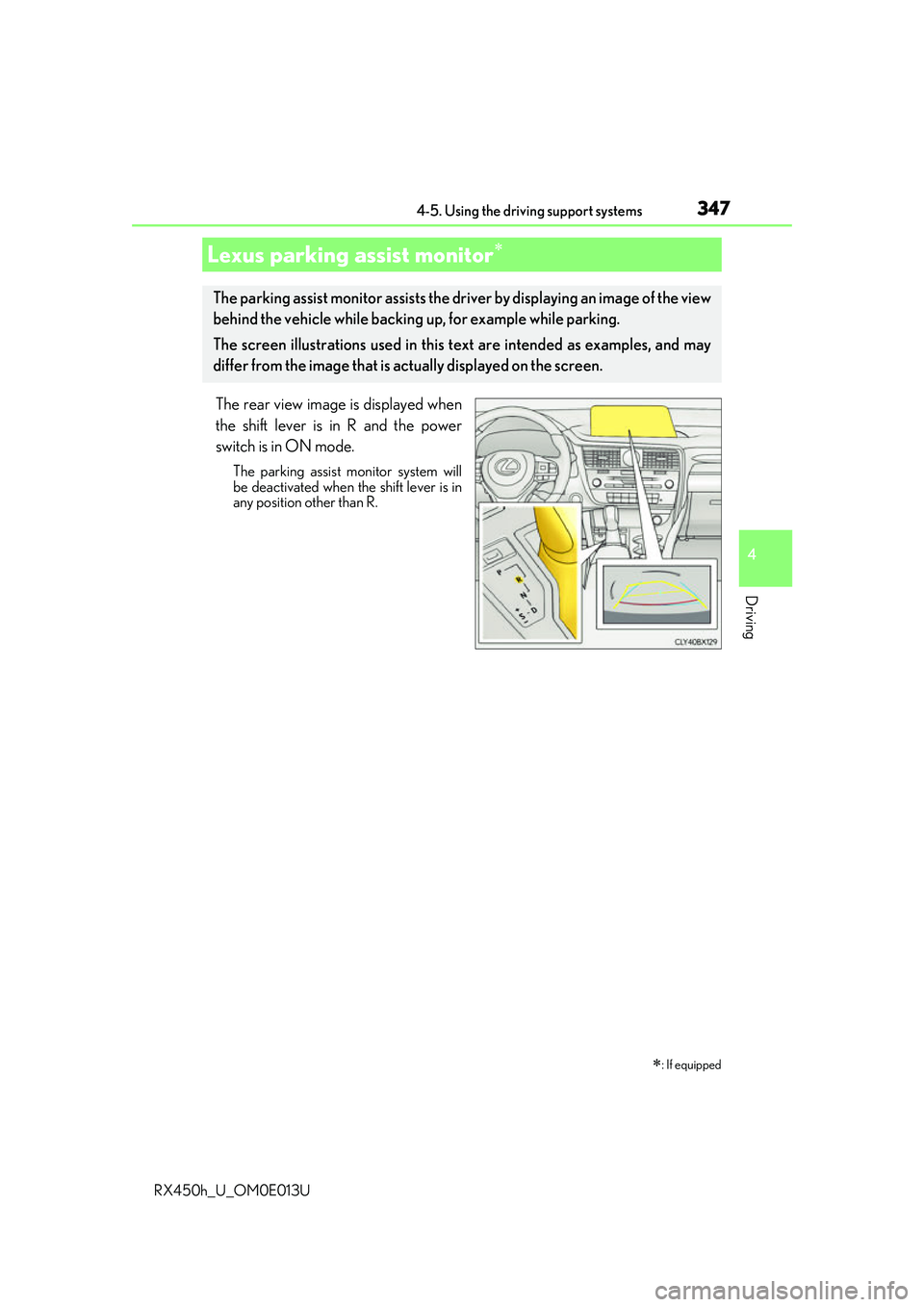
The rear view image is displayed when
the shift lever is in R and the power
switch is in ON mode.
The parking assist monitor system will
be deactivated when the shift lever is in
any position other than R.
Lexus parking assist monitor
: If equipped
The parking assist monitor assists the driv er by displaying an image of the view
behind the vehicle while backing up, for example while parking.
The screen illustrations used in this text are intended as examples, and may
differ from the image that is ac tually displayed on the screen.
Page 348 of 660
3484-5. Using the driving support systems
RX450h_U_OM0E013U
■Screen display
The parking assist monitor screen will be displayed if the shift position is
shifted to R while the power switch is in ON mode.
Intuitive parking assist
Rear Cross Traffic Alert (if
equipped)
A simplified image is displayed on
the upper part of the screen when an
obstacle is detected.
■Using the system
Use any of the following modes.
●Estimated course line display mode ( P. 350)
Estimated course lines are dis-
played which move in accor-
dance with the operation of the
steering wheel.
Using the Lexus parking assist monitor
1
2
Page 349 of 660
3494-5. Using the driving support systems
4
Driving
RX450h_U_OM0E013U
●Parking assist guide line display mode (P. 352)
The steering wheel return points
(parking assist guide lines) are
displayed.
●Distance guide line display mode
Distance guide lines only are dis-
played.
When the shift lever is in any position other than R, the display mode can be
changed in the following procedure. Press the “MENU” button on the Remote Touch, and then select on the
screen.
Select “Vehicle”, and then select “Backup Camera Guide Line Settings” on
the screen.
Select the desired display mode.
Estimated course line display
mode ( P. 350)
Parking assist guide line display
mode ( P. 352)
Distance guide line display mode
Distance guide lines only are dis-
played.
Switching the display mode
1
2
3
1
2
3
Page 351 of 660
3514-5. Using the driving support systems
4
Driving
RX450h_U_OM0E013U
■Parking operation
When parking in a space which is in the reverse direction to the space
described in the procedure below, the steering directions will be reversed.
Shift the shift lever to R.
Turn the steering wheel so that
the estimated course lines are
within the parking space, and
back up slowly. Parking space
Estimated course lines
When the rear position of the
vehicle has entered the parking
space, turn the steering wheel so
that the vehicle width guide lines
are within the left and right divid-
ing lines of the parking space. Vehicle width guide line
1
2
1
2
3
3
Page 352 of 660
3524-5. Using the driving support systems
RX450h_U_OM0E013U
Once the vehicle width guide lines and the parking space lines are parallel,
straighten the steering wheel and back up slowly until the vehicle has com-
pletely entered the parking space.
Stop the vehicle in an approp riate place, and finish parking.
■Screen description
Vehicle width guide lines
These lines indicate a guide path when the vehicle is being backed straight
up. The displayed width is wider than the actual vehicle width.
Parking assist guide lines
These lines indicate the path of the sm allest turn possible behind the vehi-
cle.
These lines also indicate the approx imate position of the steering wheel
when parking.
Distance guide line
This line (red) indicates points approxim ately 1.5 ft. (0.5 m) behind the rear
bumper of your vehicle.
Vehicle center guide line
The line indicates the estimated vehicle center on the ground.
Parking assist guide line display mode
4
5
1
2
3
4
Page 353 of 660
3534-5. Using the driving support systems
4
Driving
RX450h_U_OM0E013U
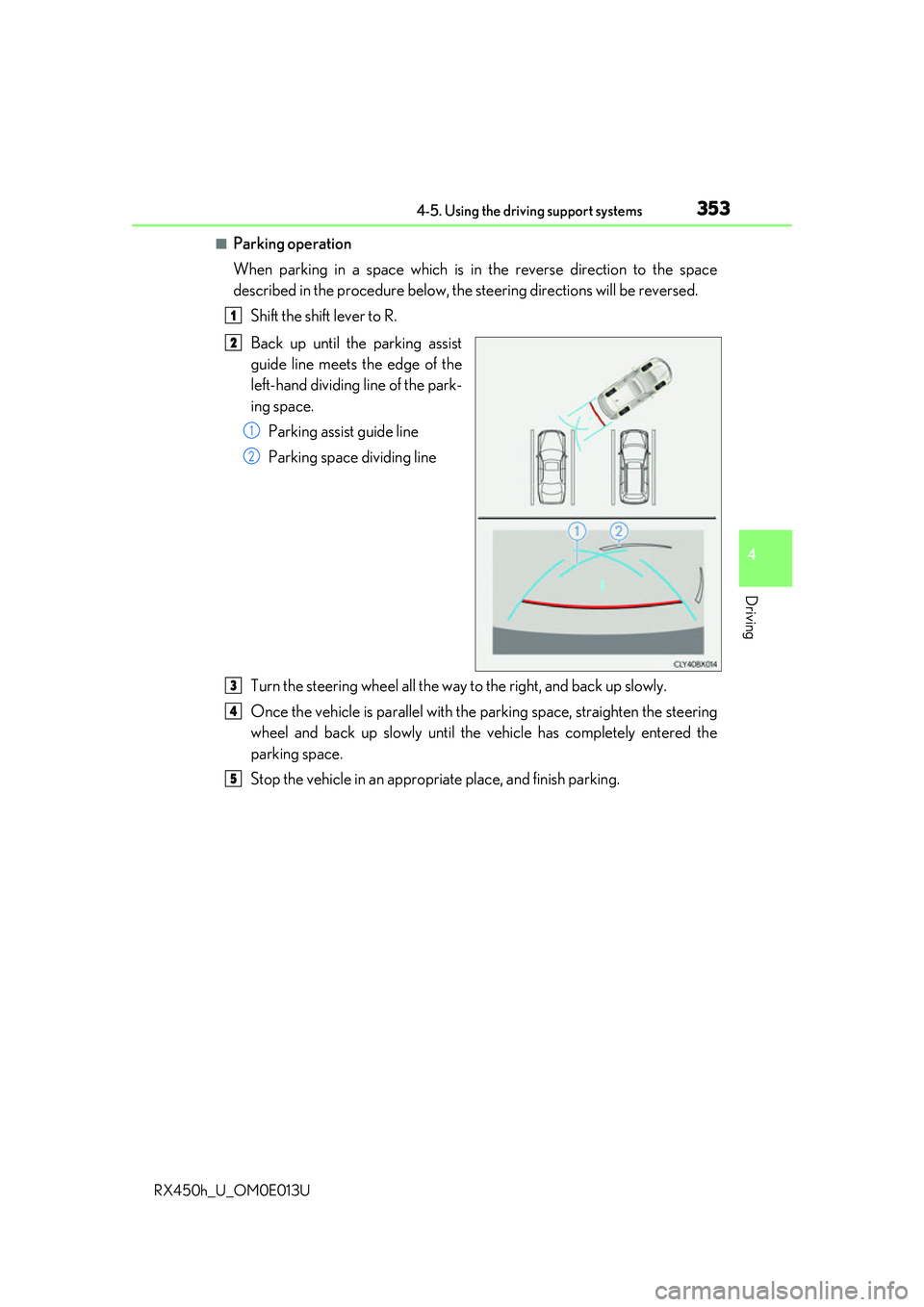
■Parking operation
When parking in a space which is in the reverse direction to the space
described in the procedure below, the steering directions will be reversed.
Shift the shift lever to R.
Back up until the parking assist
guide line meets the edge of the
left-hand dividing line of the park-
ing space. Parking assist guide line
Parking space dividing line
Turn the steering wheel all the way to the right, and back up slowly.
Once the vehicle is parallel with the parking space, straighten the steering
wheel and back up slowly until the vehicle has completely entered the
parking space.
Stop the vehicle in an approp riate place, and finish parking.
1
2
1
2
3
4
5
Page 354 of 660
3544-5. Using the driving support systems
RX450h_U_OM0E013U
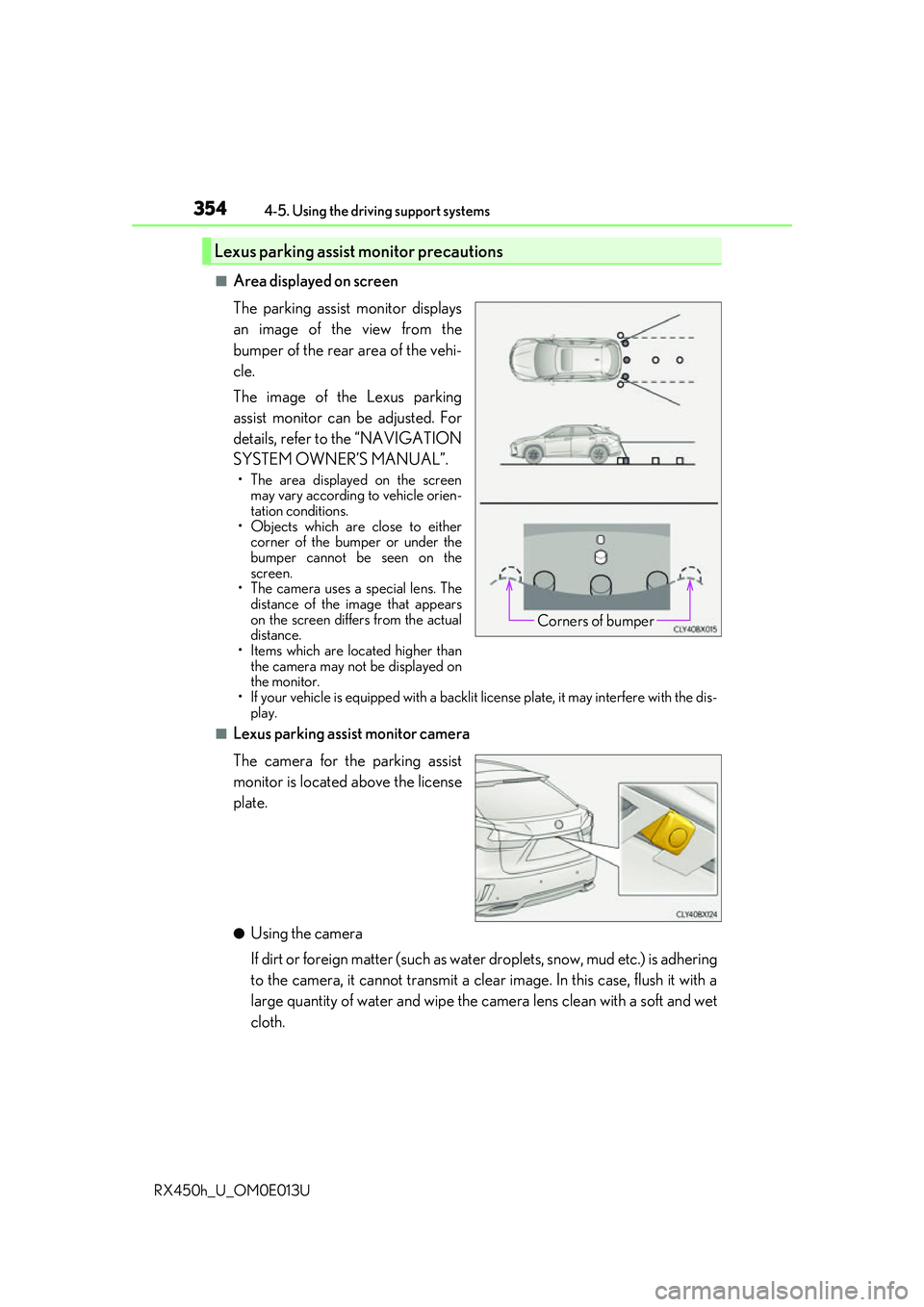
■Area displayed on screen
The parking assist monitor displays
an image of the view from the
bumper of the rear area of the vehi-
cle.
The image of the Lexus parking
assist monitor can be adjusted. For
details, refer to the “NAVIGATION
SYSTEM OWNER’S MANUAL”.
• The area displayed on the screen may vary according to vehicle orien-
tation conditions.
• Objects which are close to either corner of the bumper or under the
bumper cannot be seen on the
screen.
• The camera uses a special lens. The
distance of the image that appears
on the screen differs from the actual
distance.
• Items which are located higher than the camera may not be displayed on
the monitor.
• If your vehicle is equipped with a backlit license plate, it may interfere with the dis-
play.
■Lexus parking assist monitor camera
The camera for the parking assist
monitor is located above the license
plate.
●Using the camera
If dirt or foreign matter (such as wate r droplets, snow, mud etc.) is adhering
to the camera, it cannot transmit a clear image. In this case, flush it with a
large quantity of water and wipe the camera lens clean with a soft and wet
cloth.
Lexus parking assist monitor precautions
Corners of bumper
Page 355 of 660

3554-5. Using the driving support systems
4
Driving
RX450h_U_OM0E013U
■Differences between the screen and the actual road
The distance guide lines and the vehicle width guide lines may not actually be
parallel with the dividing lines of the parking space, even when they appear to
be so. Be sure to check visually.
The distances between the vehicle width guide lines and the left and right
dividing lines of the parking space may not be equal, even when they appear
to be so. Be sure to check visually.
The distance guide lines give a distance guide for flat road surfaces. In any of
the following situations, there is a margin of error between the guide lines on
the screen and the actual distance/course on the road.
●When the ground behind the vehicle slopes up sharply
The distance guide lines will
appear to be closer to the vehicle
than the actual distance. Because
of this, objects will appear to be
farther away than they actually
are. In the same way, there will be
a margin of error between the
guidelines and the actual dis-
tance/course on the road.