2016 LEXUS RX450H park
[x] Cancel search: parkPage 250 of 660

2504-2. Driving procedures
RX450h_U_OM0E013U
■When the parking brake is set automatically while the system is holding the brakes
The parking brake will not be released auto matically. With the brake pedal depressed,
release the parking brake by operating the pa rking brake switch, making sure that the
parking brake indicator light goes off. ( P. 245)
■If “Brake Hold Fault Depress Brake to Deacti vate Visit Your Dealer” is displayed on the
multi-information display
The system may be malfunctio ning. Have the vehicle inspected by your Lexus dealer
immediately.
■Warning messages and buzzers
Warning messages and buzzers are used to indicate a system malfunction or to inform
the driver of the need for caution. If a warn ing message is shown on the multi-information
display, read the message and follow the instructions.
■If the brake hold operated indicator flashes
P. 536
WARNING
■When the vehicle is on a steep incline
When using the brake hold system on a steep incline exercise caution. The brake hold
function may not hold the vehicle in such a situation.
■When stopped on a slippery road
The system cannot stop the vehicle when the gripping ability of the tires has been
exceeded. Do not use the system when stopped on a slippery road.
NOTICE
■When parking the vehicle
The brake hold system is not designed for use when parking the vehicle for a long
period of time. Turning the power switch off while the system is holding the brake may
release the brake, which would cause the vehicle to move. When operating the power
switch, depress the brake pedal, shift the shift lever to P and set the parking brake.
Page 251 of 660

251
4
Driving
RX450h_U_OM0E013U4-3. Operating the lights and wipers
Turning the end of the lever turns on the lights as follows:
Headlight switch
The headlights can be operated
manually or automatically.
Operating instructions
U.S.A. Canada
The side marker, parking, tail,
license plate and instrument
panel lights turn on.
(The parking lights serve as
the daytime running lights:
P. 253)
The headlights and all the
lights listed above turn on.
When the power switch is in
ON mode, the headlights and
all the lights listed above turn
on and off automatically.
(While in day mode, the park-
ing lights serve as the daytime
running lights: P. 253)
Off
The daytime running lights
turn on. ( P. 253)1
2
3
4
(U.S.A.)
(Canada)
Page 252 of 660

2524-3. Operating the lights and wipers
RX450h_U_OM0E013U
With the headlights on, push the
lever away from you to turn on the
high beams.
Pull the lever toward you to the center
position to turn the high beams off.
Pull the lever toward you and release
it to flash the high beams once.
You can flash the high beams with the
headlights on or off.
AFS (Adaptive Front-lighting System) secures excellent visibility at intersections
and on curves by automatically adjusting the direction of the light axis of the
headlights according to vehicle speed and the degree of the tire’s angle as con-
trolled by steering input.
AFS operates at speeds of 6 mph (10 km/h) or higher.
●When the steering wheel or turn signal lever is operated while the headlights
are on (low beam), a cornering light w ill turn on and light up the direction of
movement of the vehicle. The cornerin g lights are designed to ensure excel-
lent visibility when making a turn at an intersection.
However, when vehicle speed is approximately 22 mph (35 km/h) or higher, the cor-
nering lights will not turn on.
●When the shift lever is in R while the headlights are on (low beam), both cor-
nering lights will turn on. This is desi gned to enhance visibility when parking.
Turning on the high beam headlights
1
2
AFS (Adaptive Front-lighting System) (if equipped)
Cornering lights (if equipped)
Page 253 of 660

2534-3. Operating the lights and wipers
4
Driving
RX450h_U_OM0E013U
■Daytime running light system
●To make your vehicle more visible to other drivers during daytime driving, the daytime
running lights turn on automatically whenever the hybrid system is started and the park-
ing brake is released with the headlight switch in (Canada only) or posi-
tion. (Illuminate brighter than the park ing lights.) Daytime running lights are not
designed for use at night.
For the U.S.A.: Daytime running lights can be turned off by operating the headlight
switch to position.
●Compared to turning on the headlights, the daytime running light system offers greater
durability and consumes less electricity, so it can help improve fuel economy.
■Cornering lights (if equipped)
When the cornering lights are on for more than 30 minutes, they will turn off automati-
cally.
■Headlight control sensor
■Automatic light off system
●When the headlights come on: The headlights and tail lights turn off 30 seconds after a
door is opened and closed if the power switch is turned to ACCESSORY mode or
turned off. (The lights turn off immediately if on the key is pre ssed after all the doors
are locked.)
●When only the tail lights come on: The tail lights turn off automatically if the power
switch is turned to ACCESSORY mode or tu rned off and the driver’s door is opened.
To turn the lights on again, turn the power switch to ON mode, or turn the light switch off
once and then back to or .
■Automatic headlight leve ling system (if equipped)
The level of the headlights is automatically adjusted accordi ng to the number of passen-
gers and the loading condition of the vehicle to ensure that the headlights do not inter-
fere with other road users.
■Light reminder buzzer
A buzzer sounds when the power switch is turned off or turned to ACCESSORY mode
and the driver’s door is opened while the lights are turned on.
■Welcome lighting
If the headlight switch is turned to and the surrounding area is dark, unlocking the
doors using the smart access system with pu sh-button start or wireless remote control
will turn the parking lights and tail lights on automatically. The sensor may not function properly if an
object is placed on the sensor, or anything that
blocks the sensor is affixed to the windshield.
Doing so interferes with the sensor detecting
the level of ambient light and may cause the
automatic headlight system to malfunction.
Page 262 of 660

2624-3. Operating the lights and wipers
RX450h_U_OM0E013U
■Front door opening linked windshield wiper stop function
When “AUTO” is selected and the windshield wipers are operating, if a front door is
opened, the operation of the windshield wipers will be stopped to prevent anyone near
the vehicle from being sprayed by water from the wipers, provided the vehicle is stopped
with the parking brake applied or the shift lever in P. When the front door is closed, wiper
operation will resume.
■Customization
Some functions can be customized. ( P. 607)
WARNING
■Caution regarding the use of windshield wipers in AUTO mode
The windshield wipers may operate unexpectedly if the sensor is touched or the wind-
shield is subject to vibration in AUTO mode. Take care that your fingers, etc. do not
become caught in the windshield wipers.
■Caution regarding the use of washer fluid
When it is cold, do not use the washer fl uid until the windshield becomes warm. The
fluid may freeze on the windshield and cause low visibility. This may lead to an accident,
resulting in death or serious injury.
NOTICE
■When the windshield is dry
Do not use the wipers, as they may damage the windshield.
■When the washer fluid tank is empty
Do not operate the switch continually as the washer fluid pump may overheat.
■When a nozzle becomes blocked
In this case, contact your Lexus dealer.
Do not try to clear it with a pin or other object. The nozz le will be damaged.
Page 263 of 660
2634-3. Operating the lights and wipers
4
Driving
RX450h_U_OM0E013U
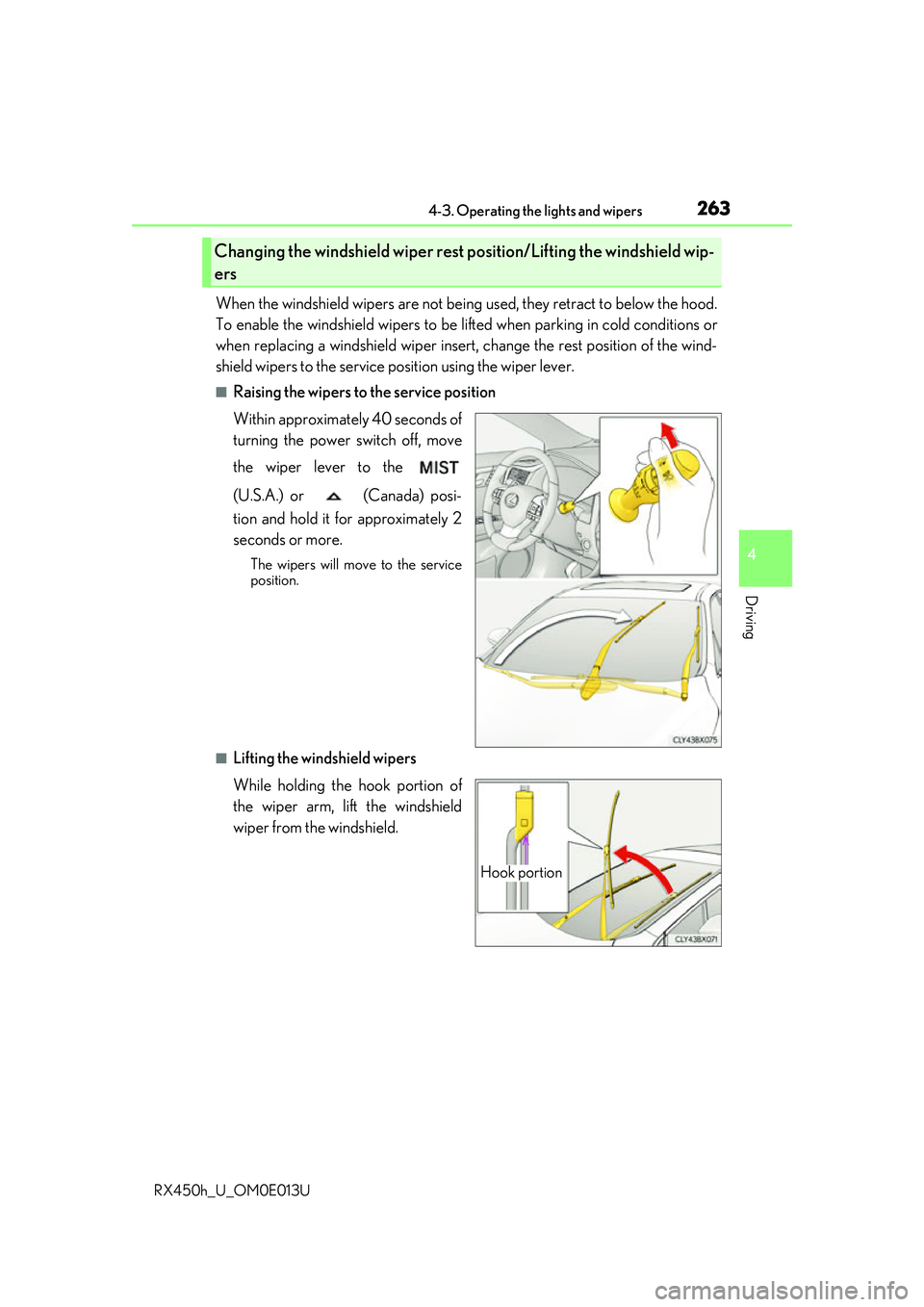
When the windshield wipers are not being used, they retract to below the hood.
To enable the windshield wi pers to be lifted when parking in cold conditions or
when replacing a windshield wiper insert, change the rest position of the wind-
shield wipers to the service position using the wiper lever.
■Raising the wipers to the service position
Within approximately 40 seconds of
turning the power switch off, move
the wiper lever to the
(U.S.A.) or (Canada) posi-
tion and hold it for approximately 2
seconds or more.
The wipers will move to the service
position.
■Lifting the windshield wipers
While holding the hook portion of
the wiper arm, lift the windshield
wiper from the windshield.
Changing the windshield wiper rest position/Lifting the windshield wip-
ers
Hook portion
Page 268 of 660

2684-4. Refueling
RX450h_U_OM0E013U
WARNING
■When refueling the vehicle
Observe the following precautions while refueling the vehicle. Failure to do so may
result in death or serious injury.
●After exiting the vehicle and before opening the fuel door, touch an unpainted metal
surface to discharge any static electricity. It is important to discharge static electricity
before refueling because sparks resulting fr om static electricity can cause fuel vapors
to ignite while refueling.
●Always hold the grips on the fuel tank cap and turn it slowly to remove it.
A whooshing sound may be heard when the fuel tank cap is loosened. Wait until the
sound cannot be heard before fully removing the cap. In hot weather, pressurized fuel
may spray out of the filler neck and cause injury.
●Do not allow anyone that has not discharged static electricity from their body to come
close to an open fuel tank.
●Do not inhale vaporized fuel.
Fuel contains substances that are harmful if inhaled.
●Do not smoke while refueling the vehicle.
Doing so may cause the fuel to ignite and cause a fire.
●Do not return to the vehicle or touch any person or object that is statically charged.
This may cause static electricity to build up, resulting in a possible ignition hazard.
■When refueling
Observe the following precautions to prevent fuel overflowing from the fuel tank:
●Securely insert the fuel nozzle into the fuel filler neck.
●Stop filling the tank after the fuel nozzle automatically clicks off.
●Do not top off the fuel tank.
NOTICE
■Refueling
●Finish refueling within 30 minutes. If more than 30 minutes passes, the internal valve
closes. In this condition, fuel may overflow during the refueling process. Press the fuel
filler door opener switch again.
●Do not spill fuel during refueling.
Doing so may damage the vehicle, such as causing the emission control system to
operate abnormally or damaging fuel system components or the vehicle’s painted
surface.
Page 288 of 660

2884-5. Using the driving support systems
RX450h_U_OM0E013U • When rapidly closing on an electric toll ga
te barrier, parking area barrier, or other
barrier that opens and closes
• When using an automatic car wash
• When the vehicle is hit by water, sn ow, dust, etc. from a vehicle ahead
• When driving through steam or smoke
• When there are patterns or paint on the road or a wall that may be mistaken for a
vehicle or pedestrian
*4
• When driving near an object that reflects radio waves, such as a large truck or
guardrail
• When driving near a TV tower, broadcasting station, electric power plant, or other location where strong radio waves or electrical noise may be present
*4: Depending on the region in which the ve hicle was sold, the pedestrian detection
function may not be available.
• When passing under an object (billboard,
etc.) at the top of an uphill road
• When driving through or under objects that may contact the vehicle, such as thick
grass, tree branches, or a banner