Page 461 of 660

4616-1. Maintenance and care
6
Maintenance and care
RX450h_U_OM0E013U
NOTICE
■To prevent paint deterioration and corrosion on the body and components (aluminum
wheels etc.)
●Wash the vehicle immediately in the following cases:
• After driving near the sea coast
• After driving on salted roads
• If coal tar or tree sap is present on the paint surface
• If dead insects, insect droppings or bird droppings are present on the paint surface
• After driving in an area contaminated wi th soot, oily smoke, mine dust, iron pow-
der or chemical substances
• If the vehicle becomes heavily soiled with dust or mud
• If liquids such as benzene and gasoli ne are spilled on the paint surface
●If the paint is chipped or scratched, have it repaired immediately.
●To prevent the wheels from corroding, remove any dirt and store in a place with low
humidity when storing the wheels.
■Cleaning the exterior lights
●Wash carefully. Do not use organic subs tances or scrub with a hard brush.
This may damage the surfaces of the lights.
●Do not apply wax to the surfaces of the lights.
Wax may cause damage to the lenses.
■When using an automatic car wash
Set the wiper switch to the off position.
If the wiper switch is in “AUTO”, the wipers may operate and the wiper blades may be
damaged.
■When using a high pressure car wash
●When washing the vehicle, do not let water of the high pressure washer hit directly or
the vicinity of the camera. Due to the shock from the high pressure water, it is possible
the device may not operate as normal.
●Do not bring the nozzle tip close to boots (rubber or resin manufactured cover), con-
nectors or the following parts. The parts may be damaged if they come into contact
with high-pressure water.
• Traction related parts
• Steering parts
• Suspension parts
• Brake parts
●Do not point the nozzle of a high pressure
washer at the areas sh own in the illustration,
as high pressure water may damage the oil
cooler.
Page 462 of 660
4626-1. Maintenance and care
RX450h_U_OM0E013U
Remove dirt and dust using a vacuum cl eaner. Wipe dirty surfaces with a cloth
dampened with lukewarm water.
●Remove dirt and dust using a vacuum cleaner.
●Wipe off any excess dirt and dust with a soft cloth dampened with diluted
detergent.
Use a diluted water solution of appr oximately 5% neutral wool detergent.
●Wring out any excess water from the clot h and thoroughly wipe off all remain-
ing traces of detergent.
●Wipe the surface with a dry, soft cl oth to remove any remaining moisture.
Allow the leather to dry in a shaded and ventilated area.
●Remove loose dirt using a vacuum cleaner.
●Apply a mild soap solution to the synthe tic leather using a sponge or soft cloth.
●Allow the solution to soak in for a few minutes. Remove the dirt and wipe off
the solution with a clean, damp cloth.
Cleaning and protecting the vehicle interior
The following procedures will help prot ect your vehicle’s interior and keep it
in top condition:
Protecting the vehicle interior
Cleaning the leather areas
Cleaning the synthetic leather areas
Page 464 of 660
4646-1. Maintenance and care
RX450h_U_OM0E013U
NOTICE
■Cleaning detergents
●Do not use the following types of detergent, as they may discolor the vehicle interior
or cause streaks or damage to painted surfaces:
• Non-seat portions: Organic substances su ch as benzene or gasoline, alkaline or
acidic solutions, dye, and bleach
• Seats: Alkaline or ac idic solutions, such as thinner, benzene, and alcohol
●Do not use polish wax or polis h cleaner. The instrument pane l’s or other interior part’s
painted surface may be damaged.
■Preventing damage to leather surfaces
Observe the following precautions to avoid damage to and deterioration of leather
surfaces:
●Remove any dust or dirt from leather surfaces immediately.
●Do not expose the vehicle to direct sunlight for extended periods of time. Park the
vehicle in the shade, especially during summer.
●Do not place items made of vinyl, plastic, or containing wax on the upholstery, as they
may stick to the leather surface if the vehicle interior heats up significantly.
■Water on the floor
Do not wash the vehicle floor with water.
Vehicle systems such as the audio system may be damaged if wate r comes into contact
with electrical components such as the au dio system above or under the floor of the
vehicle. Water may also cause the body to rust.
■When cleaning the inside of the windshield (vehicles with Lexus Safety System+)
Do not allow glass cleaner to contact the lens. Also, do not touch the lens.
( P. 292, 302)
■Cleaning the inside of the rear window
●Do not use glass cleaner to clean the rear window, as this may cause damage to the
rear window defogger heater wires or antenna. Use a cloth dampened with luke-
warm water to gently wipe the window clean. Wipe th e window in strokes running
parallel to the heater wires or antenna.
●Be careful not to scratch or damage the heater wires or antenna.
Page 472 of 660

4726-3. Do-it-yourself maintenance
RX450h_U_OM0E013U
*: Vehicles with single-beam headlights
Washer fluid
( P. 482)• Water or washer fluid containing antifreeze (for winter use)
• Funnel (used only for adding water or washer fluid)
WARNING
The engine compartment contains many mechan isms and fluids that may move suddenly,
become hot, or become electrically energize d. To avoid death or serious injury, observe
the following precautions.
■When working on the engine compartment
●Make sure that the indicator on the po wer switch and the “READY” indicator are
both off.
●Keep hands, clothing and tools away from the moving fan and engine drive belt.
●Be careful not to touch the engine, power co ntrol unit, radiator, exhaust manifold, etc.
right after driving as they may be hot. Oil and other fluids may also be hot.
●Do not leave anything that may burn easily, such as paper and rags, in the engine
compartment.
●Do not smoke, cause sparks or expose an open flame to fuel. Fuel fumes are flamma-
ble.
■When working near the electric cooling fans or radiator grille
Be sure the power switch is off.
With the power switch in ON mode, the electric cooling fans may automatically start to
run if the air conditioning is on and/or the coolant temperature is high. ( P. 480)
■Safety glasses
Wear safety glasses to prevent flying or falling material, fluid spray, etc. from getting in
your eyes.
NOTICE
■If you remove the air cleaner filter
Driving with the air cleaner f ilter removed may cause excessive engine wear due to dirt
in the air.
ItemsParts and tools
Page 477 of 660

4776-3. Do-it-yourself maintenance
6
Maintenance and care
RX450h_U_OM0E013U
■Adding engine oil
If the oil level is below or near the
low level mark, add engine oil of the
same type as that already in the
engine.
Make sure to check the oil type and prepare the items needed before adding
oil.
Remove the oil filler cap by turning it counterclockwise.
Add engine oil slowly, checking the dipstick.
Install the oil filler cap by turning it clockwise.
■Engine oil consumption
A certain amount of engine oil will be consumed while driving. In the following situations,
oil consumption may increase, and engine oil may need to be refilled in between oil
maintenance intervals.
●When the engine is new, for example directly after purchasing the vehicle or after
replacing the engine
●If low quality oil or oil of an inappropriate viscosity is used
●When driving at high engine speeds or with a heavy load, when towing, or when driving
while accelerating or decelerating frequently
●When leaving the engine idling for a long time, or when driving frequently through
heavy traffic
Engine oil selection P. 586
Oil quantity (Low Full)1.9 qt. (1.8 L, 1.6 Imp. qt.)
ItemsClean funnel
1
2
3
Page 478 of 660

4786-3. Do-it-yourself maintenance
RX450h_U_OM0E013U
■After changing the engine oil
The engine oil maintenance data should be reset. Perform the following procedures:
Select on the multi-information display. ( P. 109)
Press or of the meter control switch, select the “Oil Maintenance” screen and
then press and hold the .
Select the “Yes” and push .
A message is displayed on th e multi-information display.
WARNING
■Used engine oil
●Used engine oil contains potentially harm ful contaminants which may cause skin dis-
orders such as inflammation and skin cance r, so care should be taken to avoid pro-
longed and repeated contact. To remove used engine oil from your skin, wash
thoroughly with soap and water.
●Dispose of used oil and filters only in a sa fe and acceptable manner. Do not dispose of
used oil and filters in household trash, in sewers or onto the ground. Call your Lexus
dealer, service station or auto parts store for information concerning recycling or dis-
posal.
●Do not leave used engine oil within the reach of children.
NOTICE
■To prevent serious engine damage
Check the oil level on a regular basis.
■When replacing the engine oil
●Be careful not to spill engine oil on the vehicle components.
●Avoid overfilling, or the engine could be damaged.
●Check the oil level on the dipstick every time you refill the vehicle.
●Be sure the engine oil filler cap is properly tightened.
1
2
3
4
Page 480 of 660

4806-3. Do-it-yourself maintenance
RX450h_U_OM0E013U
Check the radiator and condenser an d clear away any foreign objects.
If either of the above parts is extremely dirty or you are not sure of their condi-
tion, have your vehicle inspected by your Lexus dealer.
WARNING
■When the hybrid system is hot
Do not remove the engine/power control unit coolant reservoir caps and radiator cap.
The cooling system may be under pressure and may spray hot coolant if the cap is
removed, causing serious injuries, such as burns.
NOTICE
■When adding coolant
Coolant is neither plain water nor straight antifreeze. The correct mixture of water and
antifreeze must be used to provide proper lubrication, corrosion protection and cool-
ing. Be sure to read the antifreeze or coolant label.
■If you spill coolant
Be sure to wash it off with water to prevent it from damaging parts or paint.
Radiator and condenser
WARNING
■When the hybrid system is hot
Do not touch the radiator or condenser as they may be hot and cause serious injuries,
such as burns.
Page 483 of 660
4836-3. Do-it-yourself maintenance
6
Maintenance and care
RX450h_U_OM0E013U
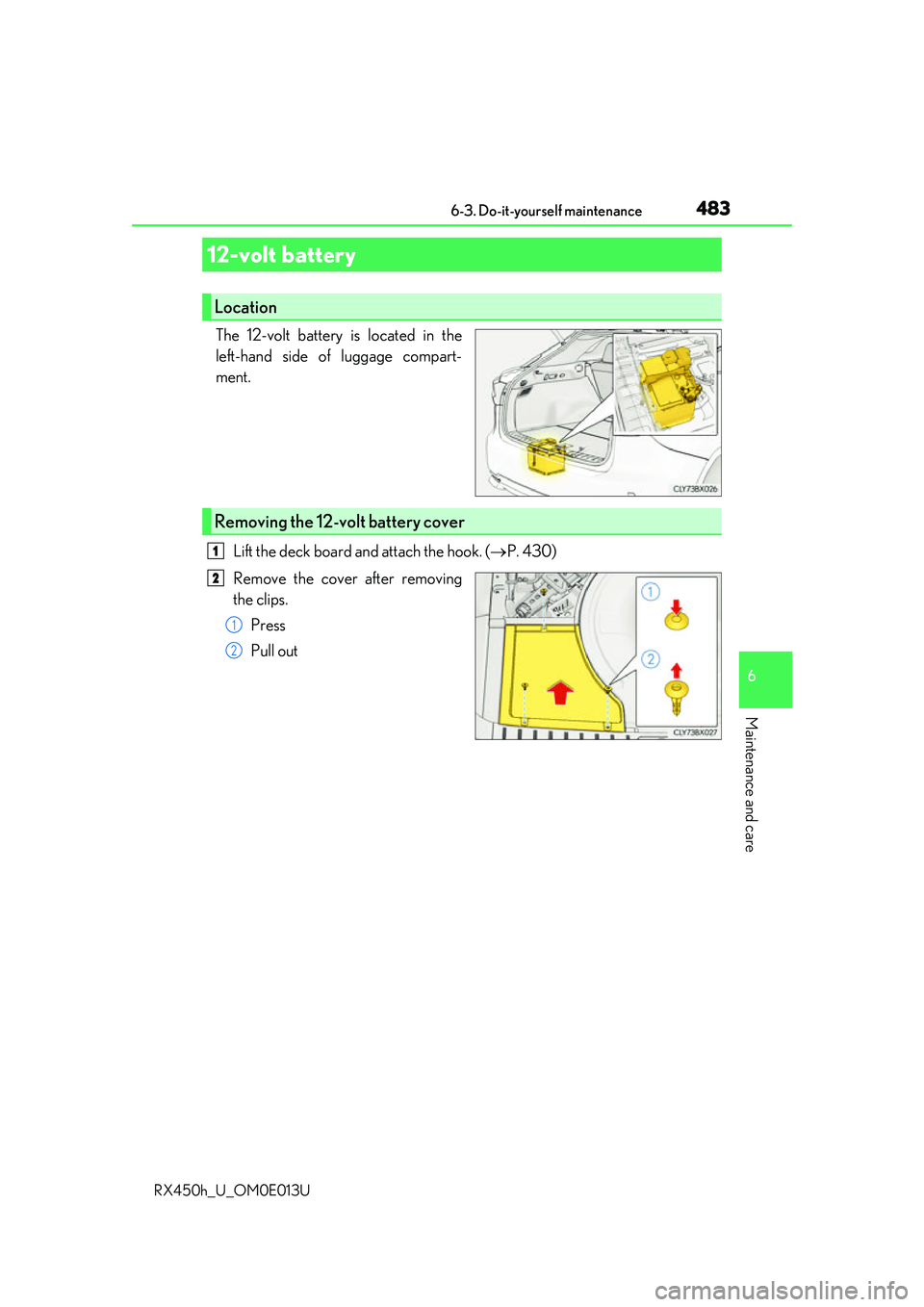
The 12-volt battery is located in the
left-hand side of luggage compart-
ment.Lift the deck board and attach the hook. ( P. 430)
Remove the cover after removing
the clips. Press
Pull out
12-volt battery
Location
Removing the 12-volt battery cover
1
2
1
2