Page 108 of 660

1082. Instrument cluster
RX450h_U_OM0E013U
■G-force (if equipped)
Displays lateral G-forces on the vehicle.
Also displays, around the periphery of the G-force display, the left and right
steering amount, accelerator pedal input, and brake fluid pressure.
Acceleration G-force on the
vehicle
Current G-force value (analyzed
value of front/rear and left/right
G-forces)
Record of the maximum G-forces
Accelerator pedal input
Brake fluid pressure
Steering amount
This display is intended for use as a guideline. Depending on factors such as the
road surface condition, temperature and vehicle speed, the display may not show
the actual condition of the vehicle.
●Resetting the record of maximum G-forces
Press and hold to reset the record.
●Peak hold function
If lateral G-forces of 0.5 G or grea ter are generated, the G-force value
display will turn yellow and be held for 2 seconds.
■Tire pressure
P. 488
■Units (if equipped)
The units of measure used can be changed while driving.
Unlike the units setting performed on , the units setting performed on can
be changed while driving.
■Blank (No items)
Displays no drive information contents.
1
2
3
4
5
6
Page 110 of 660
1102. Instrument cluster
RX450h_U_OM0E013U
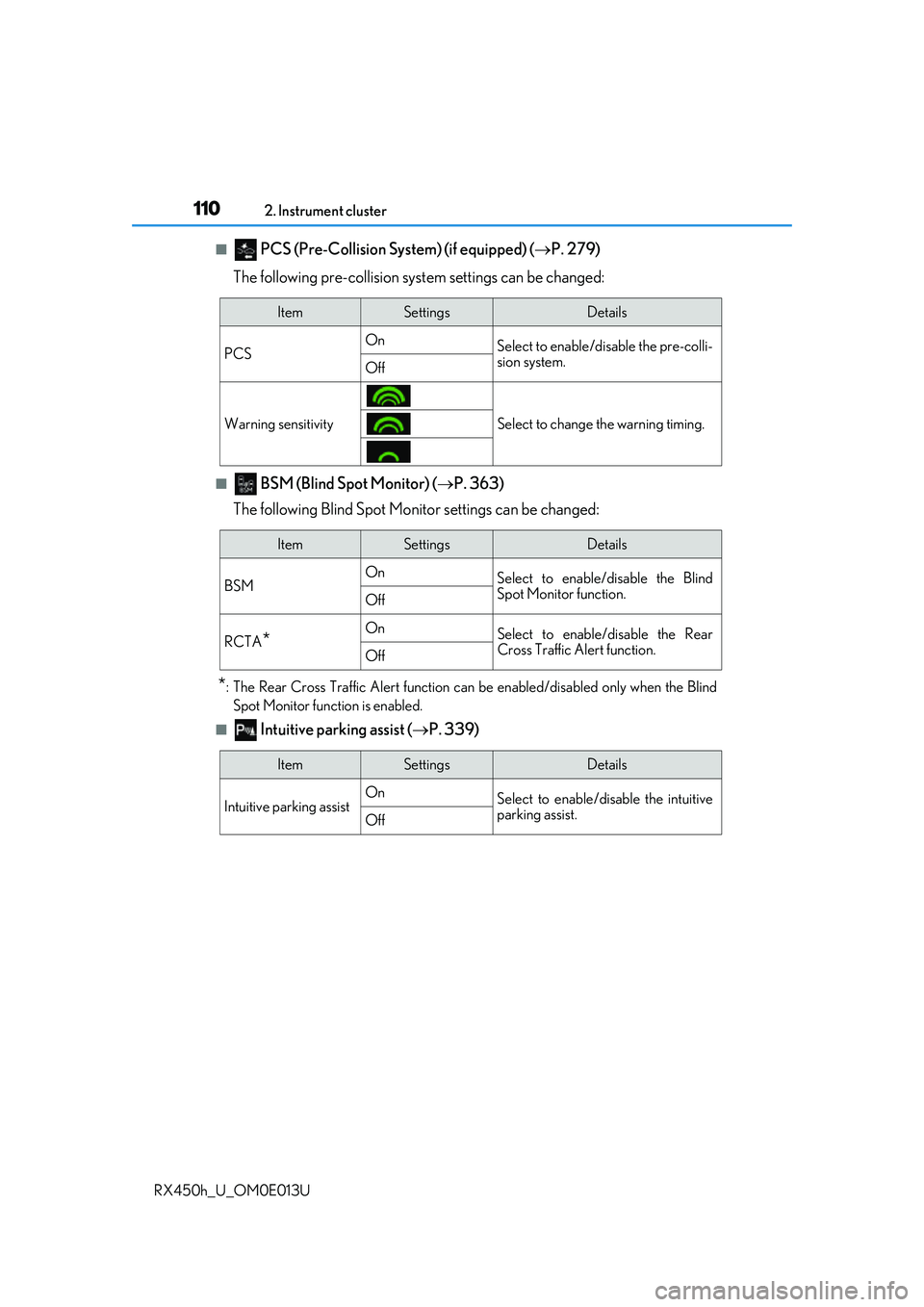
■ PCS (Pre-Collision Sy stem) (if equipped) (P. 279)
The following pre-collision syst em settings can be changed:
■ BSM (Blind Spot Monitor) (P. 363)
The following Blind Spot Monitor settings can be changed:
*: The Rear Cross Traffic Alert function can be enabled/disabled only when the Blind Spot Monitor function is enabled.
■ Intuitive parking assist ( P. 339)
ItemSettingsDetails
PCS On
Select to enable/disable the pre-colli-
sion system.
Off
Warning sensitivitySelect to change the warning timing.
ItemSettingsDetails
BSM On
Select to enable/disable the Blind
Spot Monitor function.
Off
RCTA*OnSelect to enable/disable the Rear
Cross Traffic Alert function.
Off
ItemSettingsDetails
Intuitive parking assist On
Select to enable/disable the intuitive
parking assist.
Off
Page 131 of 660
131
3
Operation of
each component
RX450h_U_OM0E013U
3-1. Key information
Keys .................................................. 132
3-2. Opening, closing and locking the doors
Side doors ...................................... 136
Power back door .........................142
Smart access system with push-button start ...................... 158
3-3. Adjusting the seats Front seats...................................... 164
Rear seats....................................... 165
Driving position memory ..........174
Head restraints .............................179
3-4. Adjusting the steering wheel and mirrors
Steering wheel ...............................181
Inside rear view mirror ............. 183
Outside rear view mirrors....... 185
3-5. Opening, closing the windows and
moon roof
Power windows ........................... 189
Moon roof ...................................... 193
Panoramic moon roof ................197
Page 138 of 660
1383-2. Opening, closing and locking the doors
RX450h_U_OM0E013U
◆Door lock switches (to lock/unlock) Locks all the doors
Unlocks all the doors
◆Inside lock buttons (to lock)
Push down the inside lock button to
lock the door.
◆Inside door handles (to unlock)
For the front doors
Pull the handle to unlock and open
the door.
When the door is unlocked, the
inside lock button will pop up.
For the rear doors
Pull the handle to unlock the door.
Pull the handle a second time to
open the door.
When the door is unlocked, the
inside lock button will pop up.
Locking and unlocking the doors from the inside
1
2
Page 139 of 660

1393-2. Opening, closing and locking the doors
3
Operation of each component
RX450h_U_OM0E013U
Push down the inside lock button.
Close the door.
The door cannot be locked if the power switch is in ACCESSORY or ON mode, or
the electronic key is left inside the vehicle. However, the key may not be detected cor-
rectly and the door may be locked.
The door cannot be opened from inside
the vehicle when the lock is set.
Unlock
Lock
These locks can be set to prevent chil-
dren from opening the rear doors. Push
down on each rear door switch to lock
both rear doors.
The following functions can be set or canceled:
For instructions on customizing, refer to P. 608.
Locking the doors from the outside without a key
Rear door child-protector lock
1
2
1
2
Automatic door locking and unlocking systems
FunctionOperation
Speed linked door locking function
All doors are automatically locked when
vehicle speed is approximately 12 mph
(20 km/h) or higher.
Shift position linked door locking
functionAll doors are automatically locked when
shifting the shift lever out of P.
Shift position linked door unlocking
functionAll doors are automatically unlocked
when shifting the shift lever to P.
Driver’s door linked door unlocking
functionAll doors are automatically unlocked
when driver’s door is opened.
Page 141 of 660

1413-2. Opening, closing and locking the doors
3
Operation of each component
RX450h_U_OM0E013U
■Conditions affecting the operation of the smart access system with push-button start
or wireless remote control
P. 160
■Customization
Some functions can be customized. ( P. 607)
WARNING
■To prevent an accident
Observe the following precautions while driving the vehicle.
Failure to do so may result in a door opening and an occupant falling out, resulting in
death or serious injury.
●Ensure that all doors are properly closed and locked.
●Do not pull the inside handle of the doors while driving.
Be especially careful for the front doors, as the doors may be opened even if the
inside lock buttons are in locked position.
●Set the rear door child-protector locks wh en children are seated in the rear seats.
■When opening or closing a door
Check the surroundings of the vehicle such as whether the vehicle is on an incline,
whether there is enough space for a door to open and whether a strong wind is blow-
ing. When opening or closing the door, hold the door handle tightly to prepare for any
unpredictable movement.
Page 144 of 660

1443-2. Opening, closing and locking the doors
RX450h_U_OM0E013U
■Touchless sensor (vehicles with a touchless power back door)
The touchless power back door enable s automatic opening of the power back
door by holding a hand over the upper part of the rear emblem or touching
the upper part of the rear emblem. When operating the touchless power back
door, make sure that the touchle ss sensor operation is enabled (P. 112) and
that you are carrying an electronic key.
While carrying an electronic key, m ove your hand over the upper part of
the rear emblem slowly and hold it there until a buzzer sounds. (The upper
part of the rear emblem can also be touched.)
When all of the doors are locked: When your hand is detected, all of the doors will
be unlocked.
Immediately after the buzzer so unds, move your hand away.
If you do not move your hand away, a buzzer will sound twice and the power back
door will not operate.
Check that the power back door begins to open.
To stop the power back door partway, touch the rear emblem.
To operate the power back door again, use a power back door switch. ( P. 143,
145) (Holding your hand over the upper part of the rear emblem will not operate
the touchless sensor again.)
1
2
3
Page 147 of 660

1473-2. Opening, closing and locking the doors
3
Operation of each component
RX450h_U_OM0E013U
■Power back door operating conditions
If the following conditions are met with the power back door operation enabled ( P. 112),
the power back door can be opened and closed automatically.
●When an electronic key is being carried an d the back door opener switch is pressed*
●When the wireless remote control is used*
●When the power switch is in ON mode, the vehicle speed must be lower than 2 mph (3
km/h) and one of the following conditions mu st be met in addition to the above condi-
tions:
• The parking brake is engaged.
• The brake pedal is depressed.
• The shift lever is in P.
*: When the operation of the power back door when it is locked has been disabled by a
customized setting, operate the power back door after it has been unlocked.
( P. 611)
Touchless sensor (vehicles with a touchless power back door)
The power back door will open automatically when the touchless sensor operation is
enabled ( P. 112) and the following conditions are met:
●The power back door is fully closed.
●The electronic key is within the operational range ( P. 158)
■Security feature
If the power back door is not opened within approximately 60 seconds after the vehicle
is unlocked, the security feature will automatically lock the doors again.
●A hand is held over the upper part of the rear
emblem with fingers closed. (The upper part of
the rear emblem can also be touched.)
The power back door may also be operated
by holding either of the following over the
upper part of the rear emblem. Make sure to
hold it close enough to the rear emblem.
•A gloved hand
•An elbow