2016 LEXUS RX450H start
[x] Cancel search: startPage 141 of 660

1413-2. Opening, closing and locking the doors
3
Operation of each component
RX450h_U_OM0E013U
■Conditions affecting the operation of the smart access system with push-button start
or wireless remote control
P. 160
■Customization
Some functions can be customized. ( P. 607)
WARNING
■To prevent an accident
Observe the following precautions while driving the vehicle.
Failure to do so may result in a door opening and an occupant falling out, resulting in
death or serious injury.
●Ensure that all doors are properly closed and locked.
●Do not pull the inside handle of the doors while driving.
Be especially careful for the front doors, as the doors may be opened even if the
inside lock buttons are in locked position.
●Set the rear door child-protector locks wh en children are seated in the rear seats.
■When opening or closing a door
Check the surroundings of the vehicle such as whether the vehicle is on an incline,
whether there is enough space for a door to open and whether a strong wind is blow-
ing. When opening or closing the door, hold the door handle tightly to prepare for any
unpredictable movement.
Page 142 of 660
1423-2. Opening, closing and locking the doors
RX450h_U_OM0E013U
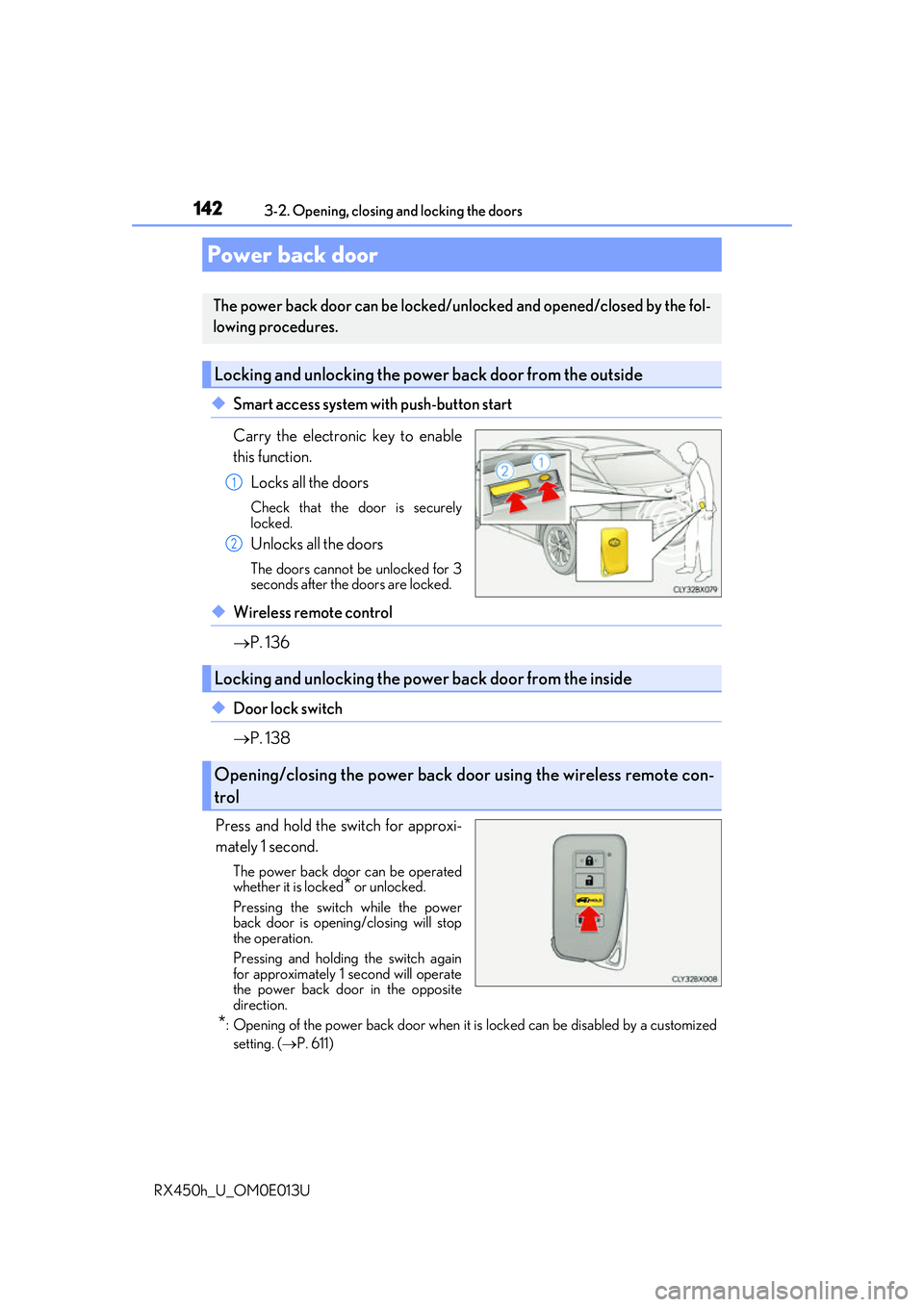
◆Smart access system with push-button start
Carry the electronic key to enable
this function. Locks all the doors
Check that the door is securely
locked.
Unlocks all the doors
The doors cannot be unlocked for 3
seconds after the doors are locked.
◆Wireless remote control
P. 136
◆Door lock switch
P. 138
Press and hold the switch for approxi-
mately 1 second.
The power back door can be operated
whether it is locked
* or unlocked.
Pressing the switch while the power
back door is opening/closing will stop
the operation.
Pressing and holding the switch again
for approximately 1 second will operate
the power back door in the opposite
direction.
*: Opening of the power back door when it is locked can be disabled by a customized setting. ( P. 611)
Power back door
The power back door can be locked/unlocked and opened/closed by the fol-
lowing procedures.
Locking and unlocking the power back door from the outside
1
2
Locking and unlocking the power back door from the inside
Opening/closing the power back d oor using the wireless remote con-
trol
Page 149 of 660

1493-2. Opening, closing and locking the doors
3
Operation of each component
RX450h_U_OM0E013U
■Back door closer
In the event that the power back door is left slightly open, the back door closer will auto-
matically close it to the fully closed position.
●The back door closer can function wh en the power switch is in any mode.
●The power back door can be opened using the back door opener switch even if the
back door closer is operating.
■Operation of the power back door
●When the power back door begins to operate, the emergency flashers will flash twice
and a buzzer will sound.
●When the power back door is disabled ( P. 112), the power back door will not operate
but can be opened and closed manually.
●The power back door turns to manual operat ion when the back door opener switch is
pressed while the power back door is in an automatic opening/closing operation.
●If anything obstructs the power back door while opening, a buzzer will sound and the
power back door will stop immediately. If anything obstructs the power back door while
closing, a buzzer will sound and the power back door will automatically move slightly in
the opposite direction and then stop.
■Back door reserve lock function
This function reserves the locking of the power back door when the power back door is
open. If the following operations are perfor med, all of the doors except the power back
door will lock and then the power back door will lock when it is completely closed.
Close all of the doors, ex cept the power back door.
Perform an automatic closing operation of the power back door and lock the doors
using the wireless remote control ( P. 136) or smart access system with push-button
start ( P. 136, 142) while the power back door is closing.
1
2
Page 154 of 660

1543-2. Opening, closing and locking the doors
RX450h_U_OM0E013U
WARNING
■Back door closer
●Use caution when using the back door closer as it still operates when the power back
door system is disabled.
■Power back door
Observe the following precautions wh en operating the power back door.
Failure to do so may cause death or serious injury.
●Check the safety of the surrounding area to make sure there are no obstacles or any-
thing that could cause any of yo ur belongings to get caught.
●If anyone is in the vicinity, make sure they are safe and let them know that the power
back door is about to open or close.
●If the power back door system is disabled ( P. 112) while the power back door is
operating, the power back door will stop operating. The power back door must then
be operated manually. Take extra care in th is situation, as the power back door may
open or close suddenly.
●If the operating conditions of the power back door ( P. 147) are no longer met, a
buzzer may sound and the power back door may stop opening or closing. The power
back door must then be operated manually. Ta ke extra care on an incline in this situa-
tion, as the power back door may move suddenly.
●On an incline, the power back door may suddenly shut after it opens. Make sure the
power back door is fully open and secure.
●In the following situations, the power back door may detect an abnormality and auto-
matic operation may be stopped. In this case, the power back door must then be
operated manually. Take extra care in this situation, as the stopped power back door
may suddenly open or close, causing an accident.
• When the power back door contacts an obstacle
• When the 12-volt battery voltage suddenly drops, such as when the power switch is turned to ON mode or the hybrid syst em is started during automatic operation
●In the event that the power back door is left
slightly open, the back door closer will auto-
matically close it to the fully closed position. It
takes several seconds before the back door
closer begins to operate. Be careful not to get
fingers caught or anything else in the power
back door, as this may cause bone fractures
or other serious injuries.
Page 157 of 660

1573-2. Opening, closing and locking the doors
3
Operation of each component
RX450h_U_OM0E013U
NOTICE
■Close & lock function
When closing the power back door using the close & lock function, a different buzzer
than the normal one will sound before the operation begins.
To check that the operation has started correctly, check that a different buzzer than the
normal one has sounded.
Additionally, when the power back door is fully closed and locked, operation signals
will indicate that all of the doors have been locked.
Before leaving the vehicle, make sure that the operational signals have operated and
that all of the doors are locked.
■Touchless sensor precautions (vehicles with a touchless power back door)
The touchless sensor is located behind the rear emblem. Observe the following to
ensure that the touchless power back door function operates properly:
●Operate the touchless sensor while carrying an electronic key within the operational
range.
●Keep the rear emblem clean at all times.
If the rear emblem is dirty or covered with snow, the touchless sensor may not oper-
ate. In this situation, clean off the dirt or snow, move the vehicle from the current posi-
tion and then check if the touchless sensor operates. If it does not operate, have the
vehicle inspected by your Lexus dealer.
●Do not apply coatings that have a rain clearing (hydrophilic) effect, or other coatings,
to the rear emblem.
●Do not park the vehicle near objects that may move and contact the rear emblem,
such as tall grass or trees.
If the vehicle has been parked for a while near objects that may move and contact the
rear emblem, such as tall grass or trees, th e touchless sensor may not operate. In this
situation, move the vehicle from the current position and then check if the touchless
sensor operates. If it does not operate, have the vehicle inspected by your Lexus
dealer.
●Do not subject the touchless sensor or it s surrounding area to a strong impact.
If the touchless sensor or its surrounding area has been subjected to a strong impact,
the touchless sensor ma y not operate properly.
If the touchless sensor does not operate in the following situations, have the vehicle
inspected by your Lexus dealer.
• The touchless sensor or its surroundin g area has been subjected to a strong
impact.
• The rear emblem is scratched or damaged.
●Do not disassemble the rear emblem.
●Do not attach stickers to the rear emblem.
●Do not paint the rear emblem.
●If a bicycle carrier or similar heavy object is attached to the power back door, disable
the touchless sensor. ( P. 112)
■To prevent unintentional operation (vehicles with a touchless power back door)
When the touchless sensor is not to be us ed, disable the touchless sensor operation
using the multi-information display ( P. 112)
Page 158 of 660

1583-2. Opening, closing and locking the doors
RX450h_U_OM0E013U
●Locks and unlocks the doors ( P. 136)
●Locks and unlocks the back door ( P. 142)
●Starts and stops the hybrid system ( P. 232)
■Antenna location
■Effective range (areas within which the electronic key is detected)
Smart access system with push-button start
The following operations can be perfor med simply by carrying the electronic
key on your person, for example in your pocket. The driver should always
carry the electronic key.
Antennas outside the cabin
Antennas inside the cabin
Antenna outside the luggage compartment
When locking or unlocking the doorsThe system can be operated when the elec-
tronic key is within about 2.3 ft. (0.7 m) of
an outside door handle. (Only the doors
detecting the key can be operated.)
When starting the hybrid system or chang- ing power switch modes
The system can be operated when the elec-
tronic key is in side the vehicle.1
2
3
Page 159 of 660

1593-2. Opening, closing and locking the doors
3
Operation of each component
RX450h_U_OM0E013U
■Alarms and warning messages
A combination of exterior and interior alar ms as well as warning messages shown on the
multi-information display are used to prevent theft of the vehicle and accidents resulting
from erroneous operation. Take appropriate measures in response to any warning mes-
sage on the multi-information display. ( P. 543)
The following table describes circumstan ces and correction procedures when only
alarms are sounded.
■If a warning message is displayed indicating that there is a malfunction in the smart
access system with push-button start
P. 543
■Battery-saving function
The battery-saving function w ill be activated in order to prevent the electronic key bat-
tery and the 12-volt battery from being discha rged while the vehicle is not in operation
for a long time.
●In the following situations, the smart acce ss system with push-button start may take
some time to unlock the doors.
• The electronic key has been le ft in an area of approximately 6 ft. (2 m) of the outside
of the vehicle for 10 minutes or longer.
• The smart access system with push-button st art has not been used for 5 days or lon-
ger.
●If the smart access system with push-button start has not been used for 14 days or lon-
ger, the doors cannot be unlocked at any doors except the driver’s door. In this case,
take hold of the driver’s d oor handle, or use the wireless remote control or the mechan-
ical key, to unlock the doors.
AlarmSituationCorrection procedure
Exterior alarm
sounds once for 5
secondsAn attempt was made to lock
the vehicle while a door was
open.Close all of the doors and
lock the doors again.
Interior alarm pings
repeatedly
The power switch was turned to
ACCESSORY mode while the
driver’s door was open (The
driver’s door was opened when
the power switch was in
ACCESSORY mode).
Turn the power switch off
and close the driver’s door.
Page 160 of 660

1603-2. Opening, closing and locking the doors
RX450h_U_OM0E013U
■Electronic Key battery-Saving Function
When battery-saving mode is set, battery depletion is minimized by stopping the elec-
tronic key from re ceiving radio waves.
■Conditions affecting operation
The smart access system with push-button st art, wireless remote control and immobilizer
system use weak radio waves. In the following situations, the communication between the
electronic key and the vehicle may be affect ed, preventing the smart access system with
push-button start, wireless remote control an d immobilizer system from operating prop-
erly. (Ways of coping: P. 564)
●When the electronic key battery is depleted
●Near a TV tower, electric power plant, gas st ation, radio station, large display, airport or
other facility that generates strong radio wave s or electrical noise
●When the electronic key is in contact with, or is covered by the following metallic
objects
• Cards to which aluminum foil is attached
• Cigarette boxes that have aluminum foil inside
• Metallic wallets or bags
•Coins
• Hand warmers made of metal
• Media such as CDs and DVDs
●When other wireless keys (that emit radio waves) are being used nearby
●When carrying the electronic key together with the following devices that emit radio
waves
• Portable radio, cellular phone, cordle ss phone or other wireless communication
devices
• Another vehicle’s electronic key, another electronic key of your vehicle, or a wireless
key that emits radio waves
• Personal computers or person al digital assistants (PDAs)
• Digital audio players
• Portable game systems
●If window tint with a metallic content or me tallic objects are attached to the rear win-
dow
●When the electronic key is placed near a battery charger or electronic devices
Press twice while pressing and holding .
Confirm that the electronic key indicator flashes
4 times.
While the battery-saving mode is set, the smart
access system with push
-button start cannot be
used. To cancel the function, press any of the
electronic key buttons.