Page 414 of 660
4145-2. Using the air conditioning system and defogger
RX450h_U_OM0E013U
Heated steering wheel/seat heaters/seat ventila-
tors
: If equipped
Heated steering wheel and seat heaters heat the side grips of the steering
wheel and seats, respectively. Seat ventilators maintain good airflow by blow-
ing air from the seats.
WARNING
●Care should be taken to prevent injury if anyone in the following categories comes in
contact with the steering wheel and seats when the heater is on:
• Babies, small children, the elderly, the sick and the physically challenged
• Persons with sensitive skin
• Persons who are fatigued
• Persons who have taken alcohol or drugs that induce sleep (sleeping drugs, cold
remedies, etc.)
●Observe the following precautions to prevent minor burns or overheating:
• Do not cover the seat with a blanket or cushion when using the seat heater.
• Do not use seat heater more than necessary.
NOTICE
●Do not put heavy objects that have an unev en surface on the seat and do not stick
sharp objects (needles, nails, etc.) into the seat.
●To prevent 12-volt battery discharge, do not use the functions when the hybrid system
is off.
Page 415 of 660
4155-2. Using the air conditioning system and defogger
5
Interior features
RX450h_U_OM0E013U
Turns the heated steering wheel on/off
The indicator light comes on when the
heated steering wheel is operating.
■Operation condition
The heated steering wheel can be used when the power switch is in ON mode.
■Timer
The heated steering wheel will automati cally turn off after about 30 minutes.
When any switch is pressed, the system is set to automatic mode and the
“AUTO” indicator (green) lights up.
Each time the switch is pressed, the
operation condition changes as follows.
Hi (3 segments lit) Mid (2 segments
lit) Lo (1 segment lit) Off
The level indicator (amber) lights up
during operation.
■Operation condition
The front seat heaters can be used when the power switch is in ON mode.
■Customization
Some functions can be customized. ( P. 607)
Heated steering wheel
Front seat heaters
Level
indicator
“AUTO”
indicator
Page 416 of 660
4165-2. Using the air conditioning system and defogger
RX450h_U_OM0E013U
Each time the switch is pressed, the
operation condition changes as follows.
Hi (3 segments lit) Mid (2 segments
lit) Lo (1 segment lit) Off
The level indicator (amber) lights up
during operation.
■Operation condition
The rear seat heaters can be used wh en the power switch is in ON mode.
When any switch is pressed, the system
is set to automatic mode and the
“AUTO” indicator (green) lights up.
Each time the switch is pressed, the
operation condition changes as follows.
Hi (3 segments lit) Mid (2 segments
lit) Lo (1 segment lit) Off
The level indicator (green) lights up
during operation.
■Operation condition
The seat ventilators can be used when the power switch is in ON mode.
■Customization
Some functions can be customized. (P. 607)
Rear seat heaters (if equipped)
Level indicator
Seat ventilators
Level
indicator
“AUTO”
indicator
Page 457 of 660

457
6Maintenance and care
RX450h_U_OM0E013U
6-1. Maintenance and careCleaning and protecting the vehicle exterior................ 458
Cleaning and protecting the vehicle interior ..................462
6-2. Maintenance Maintenance requirements.............................465
General maintenance .............. 467
Emission inspection and maintenance (I/M)
programs ....................................470 6-3. Do-it-yourself
maintenance
Do-it-yourself service precautions..................................471
Hood ............................................... 473
Positioning a floor jack ............ 474
Engine compartment ............... 475
12-volt battery .............................483
Tires ................................................. 487
Tire inflation pressure............... 496
Wheels ........................................... 499
Air conditioning filter ................ 501
Windshield wiper inserts ........504
Electronic key battery ..............506
Checking and replacing fuses ............................................. 508
Headlight aim ................................. 511
Light bulbs...................................... 513
Page 472 of 660

4726-3. Do-it-yourself maintenance
RX450h_U_OM0E013U
*: Vehicles with single-beam headlights
Washer fluid
( P. 482)• Water or washer fluid containing antifreeze (for winter use)
• Funnel (used only for adding water or washer fluid)
WARNING
The engine compartment contains many mechan isms and fluids that may move suddenly,
become hot, or become electrically energize d. To avoid death or serious injury, observe
the following precautions.
■When working on the engine compartment
●Make sure that the indicator on the po wer switch and the “READY” indicator are
both off.
●Keep hands, clothing and tools away from the moving fan and engine drive belt.
●Be careful not to touch the engine, power co ntrol unit, radiator, exhaust manifold, etc.
right after driving as they may be hot. Oil and other fluids may also be hot.
●Do not leave anything that may burn easily, such as paper and rags, in the engine
compartment.
●Do not smoke, cause sparks or expose an open flame to fuel. Fuel fumes are flamma-
ble.
■When working near the electric cooling fans or radiator grille
Be sure the power switch is off.
With the power switch in ON mode, the electric cooling fans may automatically start to
run if the air conditioning is on and/or the coolant temperature is high. ( P. 480)
■Safety glasses
Wear safety glasses to prevent flying or falling material, fluid spray, etc. from getting in
your eyes.
NOTICE
■If you remove the air cleaner filter
Driving with the air cleaner f ilter removed may cause excessive engine wear due to dirt
in the air.
ItemsParts and tools
Page 501 of 660
5016-3. Do-it-yourself maintenance
6
Maintenance and care
RX450h_U_OM0E013U
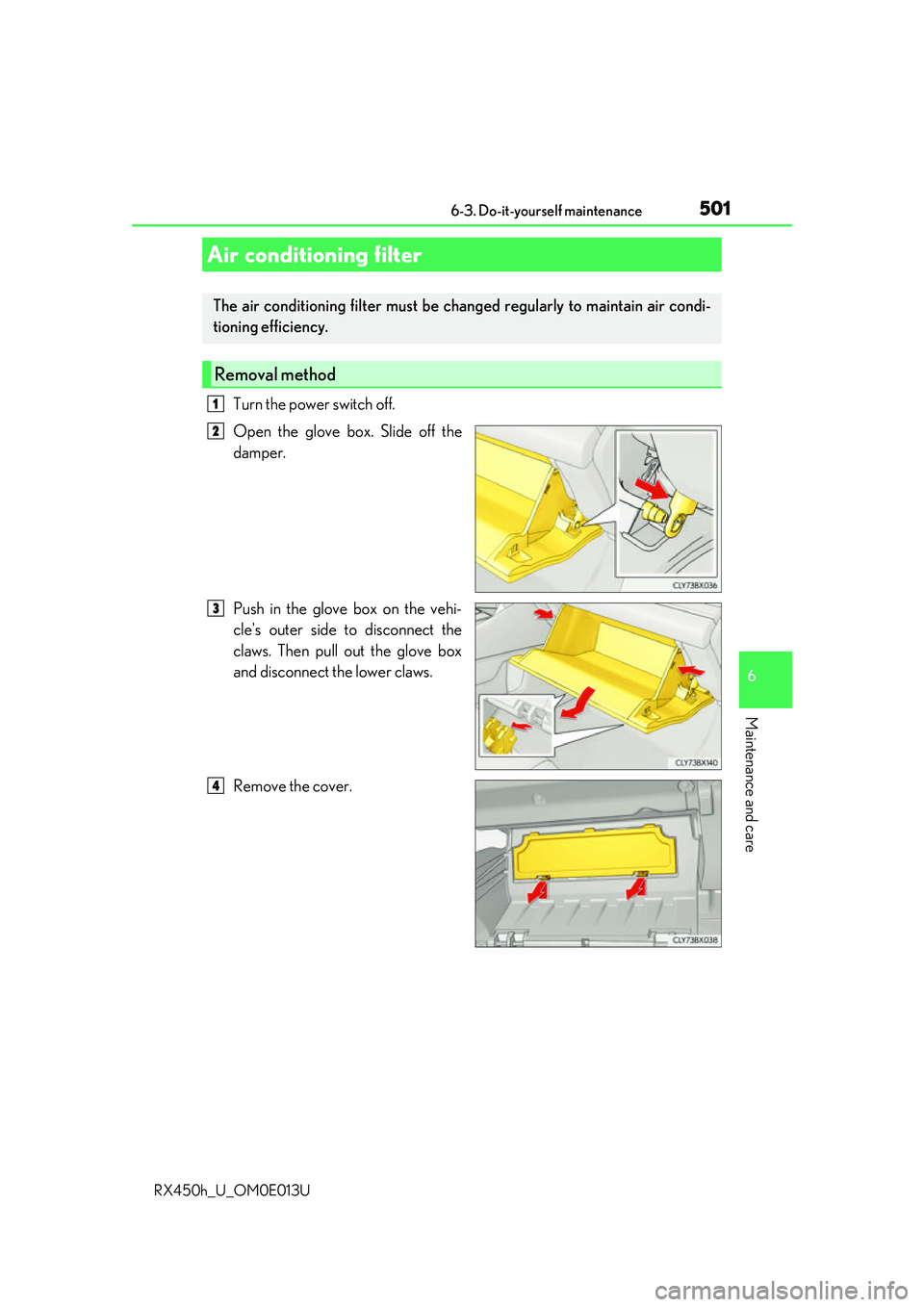
Turn the power switch off.
Open the glove box. Slide off the
damper.
Push in the glove box on the vehi-
cle's outer side to disconnect the
claws. Then pull out the glove box
and disconnect the lower claws.
Remove the cover.
Air conditioning filter
The air conditioning filter must be changed regularly to maintain air condi-
tioning efficiency.
Removal method
1
2
3
4
Page 502 of 660

5026-3. Do-it-yourself maintenance
RX450h_U_OM0E013U
Remove the filter cover. Unlock the filter cover.
Move the filter cover in the direc-
tion of the arrow, and then pull it
out of the claws.
Remove the filter case.
There may be foreign objects on top of
the air conditioning filter.
Remove the air conditioning filter
from the filter case and replace it
with a new one.
The “ UP” marks shown on the filter
and the filter case sh ould be pointing up.
■Checking interval
Inspect and replace the air cond itioning filter according to the maintenance schedule. In
dusty areas or areas with heavy traffic fl ow, early replacement may be required. (For
scheduled maintenance informat ion, please refer to the “Owner’s Manual Supplement”
or “Scheduled Maintenance”.)
■If air flow from the vents decreases dramatically
The filter may be clogged. Check the filter and replace if necessary.
■Air conditioning filter with deodorizing function
When fragrances are placed in your vehicle, the deodorizing effect may become signifi-
cantly weakened in a short period.
When an air conditioning odor comes out cont inuously, replace the air conditioning filter.
5
1
2
6
7
Page 503 of 660
5036-3. Do-it-yourself maintenance
6
Maintenance and care
RX450h_U_OM0E013U
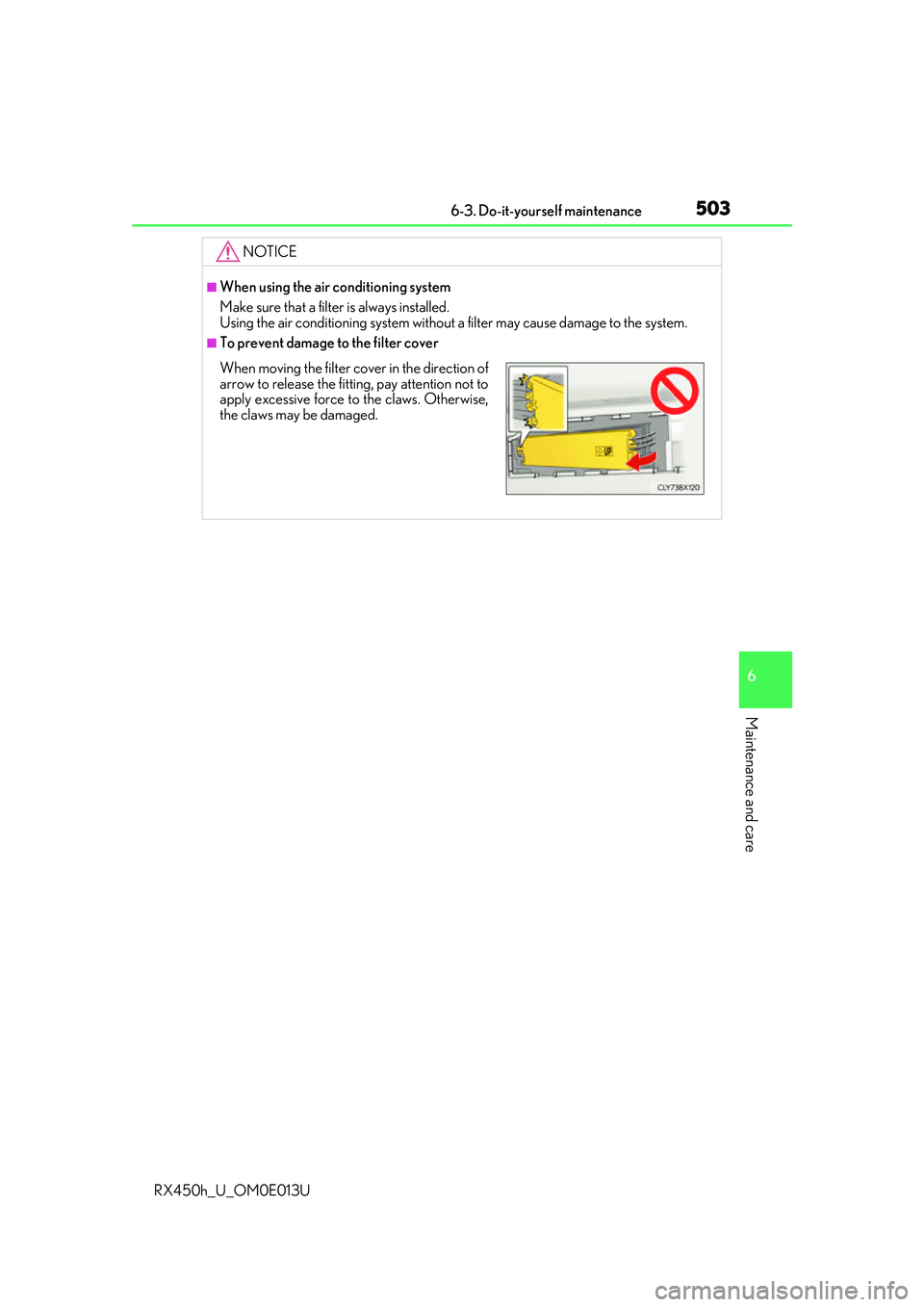
NOTICE
■When using the air conditioning system
Make sure that a filter is always installed.
Using the air conditioning system without a filter may cause damage to the system.
■To prevent damage to the filter cover
When moving the filter cover in the direction of
arrow to release the fitting, pay attention not to
apply excessive force to the claws. Otherwise,
the claws may be damaged.