Page 333 of 660
3334-5. Using the driving support systems
4
Driving
RX450h_U_OM0E013U
■When the sensor may not be correctly detecting the vehicle ahead
In the case of the following and depending on the conditions, operate the brake pedal
when deceleration of the system is insufficient or operate the accelerator pedal when
acceleration is required.
As the sensor may not be able to correctly detect these types of vehicles, the approach
warning ( P. 330) may not be activated.
●Vehicles that cut in suddenly
●Vehicles traveling at low speeds
●Vehicles that are not moving in the same lane
●Vehicles with small rear ends (traile rs with no load on board, etc.)
●Motorcycles traveling in the same lane
●When water or snow thrown up by the surrounding vehicles hinders the detecting of
the sensor
●When your vehicle is pointing upwards
(caused by a heavy load in the luggage com-
partment, etc.)
●Preceding vehicle has an extremely high
ground clearance
Page 350 of 660
3504-5. Using the driving support systems
RX450h_U_OM0E013U
■Screen description Vehicle center guide line
The line indicates the estimated vehicle center on the ground.
Vehicle width guide line
The line indicates a guide path when the vehicle is being backed straight up.
The displayed width is wider th an the actual vehicle width.
The line aligns with the estimated course lines when the steering wheel is straight.
Estimated course lines
The lines show an estimated course when the steering wheel is turned.
Distance guide line
The line moves, together with the estimated course lines, in sync with the steering
wheel. The line shows points approximately 1.5 ft. (0.5 m) (red) and approximately
3 ft. (1 m) (yellow) from the center of the edge of the bumper.
Distance guide line
The line shows distance behind the vehicle, a point approximately 1.5 ft. (0.5 m)
(blue) from the edge of the bumper.
Estimated course line display mode
1
2
3
4
5
Page 352 of 660
3524-5. Using the driving support systems
RX450h_U_OM0E013U
Once the vehicle width guide lines and the parking space lines are parallel,
straighten the steering wheel and back up slowly until the vehicle has com-
pletely entered the parking space.
Stop the vehicle in an approp riate place, and finish parking.
■Screen description
Vehicle width guide lines
These lines indicate a guide path when the vehicle is being backed straight
up. The displayed width is wider than the actual vehicle width.
Parking assist guide lines
These lines indicate the path of the sm allest turn possible behind the vehi-
cle.
These lines also indicate the approx imate position of the steering wheel
when parking.
Distance guide line
This line (red) indicates points approxim ately 1.5 ft. (0.5 m) behind the rear
bumper of your vehicle.
Vehicle center guide line
The line indicates the estimated vehicle center on the ground.
Parking assist guide line display mode
4
5
1
2
3
4
Page 355 of 660

3554-5. Using the driving support systems
4
Driving
RX450h_U_OM0E013U
■Differences between the screen and the actual road
The distance guide lines and the vehicle width guide lines may not actually be
parallel with the dividing lines of the parking space, even when they appear to
be so. Be sure to check visually.
The distances between the vehicle width guide lines and the left and right
dividing lines of the parking space may not be equal, even when they appear
to be so. Be sure to check visually.
The distance guide lines give a distance guide for flat road surfaces. In any of
the following situations, there is a margin of error between the guide lines on
the screen and the actual distance/course on the road.
●When the ground behind the vehicle slopes up sharply
The distance guide lines will
appear to be closer to the vehicle
than the actual distance. Because
of this, objects will appear to be
farther away than they actually
are. In the same way, there will be
a margin of error between the
guidelines and the actual dis-
tance/course on the road.
Page 356 of 660
3564-5. Using the driving support systems
RX450h_U_OM0E013U
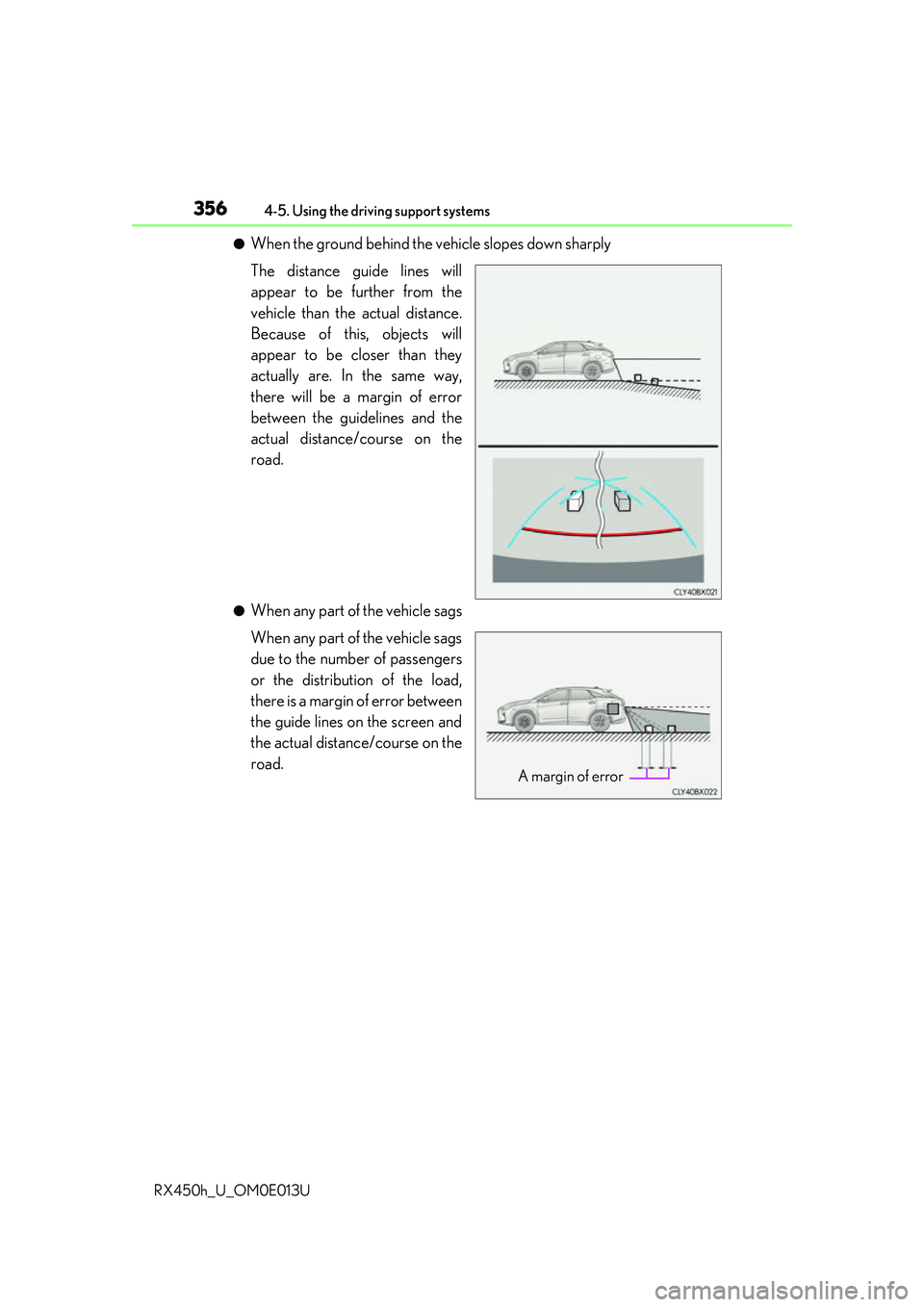
●When the ground behind the vehicle slopes down sharply
The distance guide lines will
appear to be further from the
vehicle than the actual distance.
Because of this, objects will
appear to be closer than they
actually are. In the same way,
there will be a margin of error
between the guidelines and the
actual distance/course on the
road.
●When any part of the vehicle sags
When any part of the vehicle sags
due to the number of passengers
or the distribution of the load,
there is a margin of error between
the guide lines on the screen and
the actual distance/course on the
road.
A margin of error
Page 394 of 660

3944-6. Driving tips
RX450h_U_OM0E013U
●Specific design characteristics give it a higher center of gravity than ordinary
passenger cars. This vehicle design feature causes this type of vehicle to be
more likely to rollover. And, utility vehicles have a significantly higher rollover
rate than other types of vehicles.
●An advantage of the higher ground cl earance is a better view of the road
allowing you to anticipate problems.
●It is not designed for cornering at the same speeds as ordinary passenger cars
any more than low-slung sports cars are designed to perform satisfactorily
under off-road conditions. Therefore, sharp turns at excessive speeds may
cause the vehicle to rollover.
Utility vehicle precautions
This vehicle belongs to the utility vehicle class, which has higher ground clear-
ance and narrower tread in relation to the height of its center of gravity.
Utility vehicle feature
WARNING
■Utility vehicle precautions
Always observe the following precautions to minimize the risk of death, serious injury
or damage to your vehicle:
●In a rollover crash, an unbelted person is significantly more likely to die than a person
wearing a seat belt. Therefore, the driver and all passengers should always fasten
their seat belts.
●Avoid sharp turns or abrupt maneuvers, if at all possible.
Failure to operate this vehicle correctly may result in loss of control or vehicle rollover
causing death or serious injury.
●Loading cargo on the roof luggage carrier will make the center of the vehicle gravity
higher. Avoid high speeds, sudden starts, sharp turns, sudden braking or abrupt
maneuvers, otherwise it may re sult in loss of control or vehicle rollover due to failure
to operate this vehicle correctly.
●Always slow down in gusty crosswinds. Be cause of its profile and higher center of
gravity, your vehicle is more sensitive to side winds than an ordinary passenger car.
Slowing down will allow you to have better control.
●Do not drive horizontally across steep slopes. Driving straight up or straight down is
preferred. Your vehicle (or any similar off- road vehicle) can tip over sideways much
more easily than forward or backward.
Page 476 of 660
4766-3. Do-it-yourself maintenance
RX450h_U_OM0E013U
With the engine at operating temperatur e and turned off, check the oil level on
the dipstick.
■Checking the engine oil
Park the vehicle on level ground. Afte r warming up the engine and turning
off the hybrid system, wait more than 5 minutes for the oil to drain back into
the bottom of the engine.
Holding a rag under the end, pull
the dipstick out.
Wipe the dipstick clean.
Reinsert the dipstick fully.
Holding a rag under the end, pull
the dipstick out and check the oil
level.
Low
Normal
Excessive
The shape of the dipstick may dif-
fer depending on the type of vehi-
cle or engine.
Wipe the dipstick and reinsert it fully.
Engine oil
1
2
3
4
5
1
2
3
6
Page 478 of 660

4786-3. Do-it-yourself maintenance
RX450h_U_OM0E013U
■After changing the engine oil
The engine oil maintenance data should be reset. Perform the following procedures:
Select on the multi-information display. ( P. 109)
Press or of the meter control switch, select the “Oil Maintenance” screen and
then press and hold the .
Select the “Yes” and push .
A message is displayed on th e multi-information display.
WARNING
■Used engine oil
●Used engine oil contains potentially harm ful contaminants which may cause skin dis-
orders such as inflammation and skin cance r, so care should be taken to avoid pro-
longed and repeated contact. To remove used engine oil from your skin, wash
thoroughly with soap and water.
●Dispose of used oil and filters only in a sa fe and acceptable manner. Do not dispose of
used oil and filters in household trash, in sewers or onto the ground. Call your Lexus
dealer, service station or auto parts store for information concerning recycling or dis-
posal.
●Do not leave used engine oil within the reach of children.
NOTICE
■To prevent serious engine damage
Check the oil level on a regular basis.
■When replacing the engine oil
●Be careful not to spill engine oil on the vehicle components.
●Avoid overfilling, or the engine could be damaged.
●Check the oil level on the dipstick every time you refill the vehicle.
●Be sure the engine oil filler cap is properly tightened.
1
2
3
4