2016 LEXUS RX450H display
[x] Cancel search: displayPage 409 of 660

4095-2. Using the air conditioning system and defogger
5
Interior features
RX450h_U_OM0E013U
■Switching between outside air and recirculated air modes
Press .
The mode switches between (recir culated air mode), automatic and
(outside air mode) modes each time the button is pressed.
When the system is switched to automatic mode, the air conditioning system oper-
ates automatically.
■Defogging the windshield
Defoggers are used to defog the wi ndshield and front side windows.
Press .
Set the outside/recirculated air mode button to outside air mode if the recirculated
air mode is used. (It may switch automatically.)
To defog the windshield and the side wind ows early, turn the air flow and tempera-
ture up.
To return to the previous mode, press again when the windshield is
defogged.
■Defogging the rear window and outside rear view mirrors
Defoggers are used to defog the rear window and to remove raindrops, dew
and frost from the outside rear view mirrors.
Press .
The defoggers will automatically turn off after a period of time.
■Windshield wiper de-icer (if equipped)
This feature is used to prevent ice fr om building up on the windshield and
wiper blades.
Select on the option control screen.
When the windshield wiper de-icer is on , is displayed on the air condition-
ing control screen.
The windshield wiper de-icer will automati cally turn off after a period of time.
Other functions
Page 439 of 660
4395-5. Using the other interior features
5
Interior features
RX450h_U_OM0E013U
NOTICE
■Conditions in which the wireless charger may not operate correctly
In the following situations, the wireless charger may not operate correctly:
●When a portable device is fully charged
●When there is a foreign object between the charging area and portable device
●When a portable device becomes hot while charging
●When a portable device is placed on the wireless area with its charging surface fac-
ing up
●When a portable device is not centered on the charging area
●When the vehicle is near a TV tower, electric power plant, gas station, radio station,
large display, airport or other facility that generates strong radio waves or electrical
noise
●When the portable device is in contact with, or is covered by any of the following
metallic objects
• Cards to which aluminum foil is attached
• Cigarette boxes that have aluminum foil inside
• Metallic wallets or bags
• Coins
• Metal hand warmers
• Media such as CDs and DVDs
●When wireless keys (that emit radio waves) other than those of your vehicle are being
used nearby.
If in situations other than above the wirele ss charger does not operate properly or the
operation indicator light is blinking, the wireless charger may be malfunctioning. Con-
tact your Lexus dealer.
■To prevent failure or damage to data
●Do not bring magnetic cards, such as a cr edit card, or magnetic recording media,
close to the wireless charger while charging. Otherwise, data may be erased due to
the influence of magnetism.
Additionally, do not bring pr ecision instruments such as wrist watches, close to the
wireless charger, as such objects may malfunction.
●Do not leave portable devices in the cab in. The temperature inside the cabin may
become high when parked in the sun, and cause damage to the device.
■To prevent 12-volt battery discharge
Do not use the wireless charger for a long pe riod of time with the hybrid system is
stopped.
Page 449 of 660
4495-5. Using the other interior features
5
Interior features
RX450h_U_OM0E013U
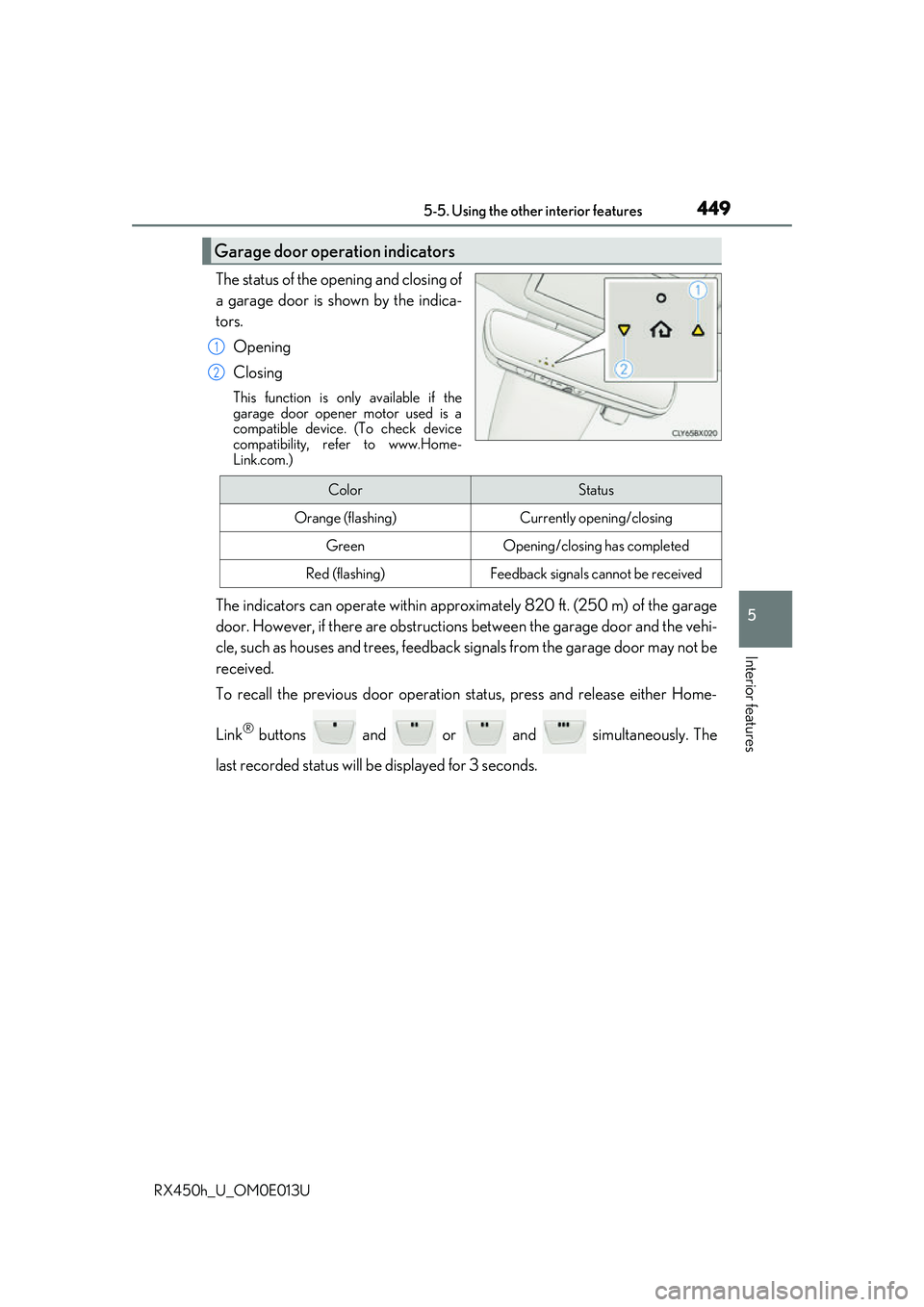
The status of the opening and closing of
a garage door is shown by the indica-
tors.Opening
Closing
This function is only available if the
garage door opener motor used is a
compatible device. (To check device
compatibility, refer to www.Home-
Link.com.)
The indicators can operate wi thin approximately 820 ft. (250 m) of the garage
door. However, if there are obstructions between the garage door and the vehi-
cle, such as houses and trees, feedback signals from the garage door may not be
received.
To recall the previous door operation status, press and release either Home-
Link
® buttons and or and simultaneously. The
last recorded status will be displayed for 3 seconds.
Garage door operation indicators
1
2
ColorStatus
Orange (flashing)Currently opening/closing
GreenOpening/closing has completed
Red (flashing)Feedback signals cannot be received
Page 466 of 660

4666-2. Maintenance
RX450h_U_OM0E013U
■Repair and replacement
It is recommended that genuine Lexus parts be used for repairs to ensure performance
of each system. If non-Lexus parts are used in replacement or if a repair shop other than
a Lexus dealer performs repairs, confirm the warranty coverage.
■Resetting the message indicating main tenance is required (U.S.A. only)
After the required maintenanc e is preformed according to the maintenance schedule,
please reset the message.
To reset the message, follow the procedures described below:
Select on the multi-information display.( P. 109)
Press or of the meter control switch, select the “Scheduled Maintenance”
screen and then press and hold the .
Select the “Yes” and push .
A message will be displayed on the multi-information display when the reset proce-
dure has been completed.
■Allow inspection and repairs to be performed by a Lexus dealer
●Lexus technicians are well-trained specialists and are kept up to date with the latest ser-
vice information. They are well informed about the operat ion of all systems on your
vehicle.
●Keep a copy of the repair order. It proves that the maintenance that has been per-
formed is under warranty co verage. If any problem should arise while your vehicle is
under warranty, your Lexus dealer will promptly take care of it.
WARNING
■If your vehicle is not properly maintained
Improper maintenance could result in seriou s damage to the vehicle and possible seri-
ous injury or death.
■Handling of the 12-volt battery
●Engine exhaust, some of its constituents, and a wide variety of automobile compo-
nents contain or emit chemicals known to th e State of California to cause cancer and
birth defects and other reproductive ha rm. Work in a well ventilated area.
●Oils, fuels and fluids contained in vehicles as well as waste produced by component
wear contain or emit chemicals known to the State of California to cause cancer and
birth defects or other reproductive harm. Avoid exposure and wash any affected area
immediately.
●12-volt battery posts, terminals and related accessories contain lead and lead com-
pounds which are known to cause brain damage. Wash your hands after handling.
( P. 483)
1
2
3
4
Page 478 of 660

4786-3. Do-it-yourself maintenance
RX450h_U_OM0E013U
■After changing the engine oil
The engine oil maintenance data should be reset. Perform the following procedures:
Select on the multi-information display. ( P. 109)
Press or of the meter control switch, select the “Oil Maintenance” screen and
then press and hold the .
Select the “Yes” and push .
A message is displayed on th e multi-information display.
WARNING
■Used engine oil
●Used engine oil contains potentially harm ful contaminants which may cause skin dis-
orders such as inflammation and skin cance r, so care should be taken to avoid pro-
longed and repeated contact. To remove used engine oil from your skin, wash
thoroughly with soap and water.
●Dispose of used oil and filters only in a sa fe and acceptable manner. Do not dispose of
used oil and filters in household trash, in sewers or onto the ground. Call your Lexus
dealer, service station or auto parts store for information concerning recycling or dis-
posal.
●Do not leave used engine oil within the reach of children.
NOTICE
■To prevent serious engine damage
Check the oil level on a regular basis.
■When replacing the engine oil
●Be careful not to spill engine oil on the vehicle components.
●Avoid overfilling, or the engine could be damaged.
●Check the oil level on the dipstick every time you refill the vehicle.
●Be sure the engine oil filler cap is properly tightened.
1
2
3
4
Page 488 of 660
4886-3. Do-it-yourself maintenance
RX450h_U_OM0E013U
Your vehicle is equipped with a tire pressure warning system that uses tire pres-
sure warning valves and transmitters to detect low tire inflation pressure before
serious problems arise.
◆Installing tire pressure warning valves and transmitters
When replacing tires or wheels, tire pr essure warning valves and transmitters
must also be installed.
When new tire pressure wa rning valves and transmitters are installed, new ID
codes must be registered in the tire pressure warning computer and the tire
pressure warning system must be initia lized. Have tire pressure warning valve
and transmitter ID codes registered by your Lexus dealer. ( P. 489)
◆Initializing the tire pressure warning system
■The tire pressure warning system must be initialized in the following circum-
stances:
●When the tire inflation pressure is changed such as when changing travel-
ing speed.
●When the tire inflation pressure is changed such as when the tire size is
changed.
●When rotating the tires
When the tire pressure warning system is initialized, the current tire inflation
pressure is set as the benchmark pressure.
Tire pressure warning system
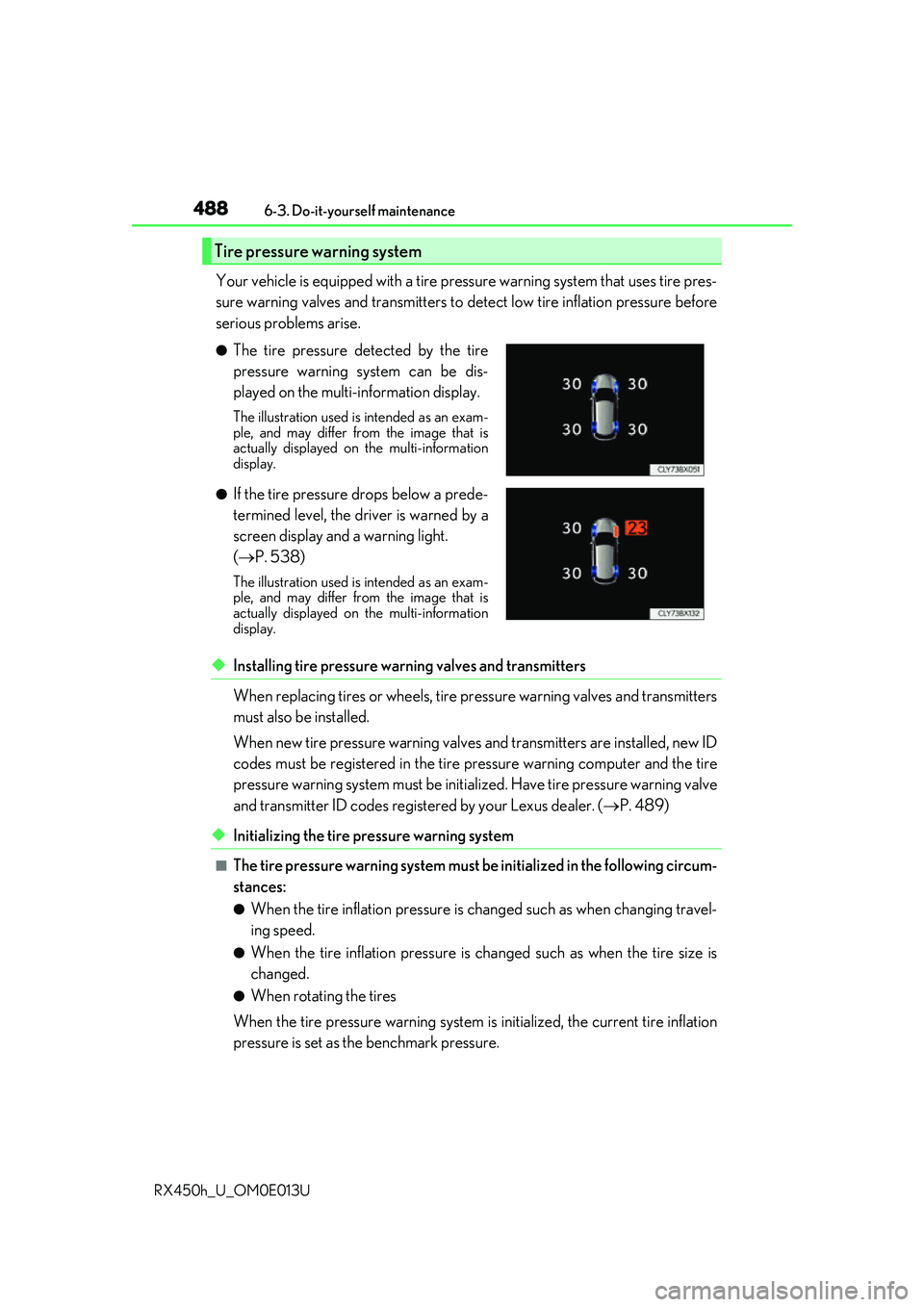
●The tire pressure detected by the tire
pressure warning system can be dis-
played on the multi-information display.
The illustration used is intended as an exam-
ple, and may differ from the image that is
actually displayed on the multi-information
display.
●If the tire pressure drops below a prede-
termined level, the driver is warned by a
screen display and a warning light.
( P. 538)
The illustration used is intended as an exam-
ple, and may differ from the image that is
actually displayed on the multi-information
display.
Page 489 of 660

4896-3. Do-it-yourself maintenance
6
Maintenance and care
RX450h_U_OM0E013U
■How to initialize the tire pressure warning systemPark the vehicle in a safe place and turn the power switch off.
Initialization cannot be performed while the vehicle is moving.
Adjust the tire inflation pressure to th e specified cold tire inflation pressure
level. ( P. 589)
Make sure to adjust the tire pressure to the specified cold tire inflation pressure
level. The tire pressure warning system will operate based on this pressure level.
Turn the power switch to ON mode.
Select on the multi-information display. ( P. 109)
Press or of the meter con-
trol switch, select the “TPMS”
screen and then press and hold
the
until the tire pressure
warning light blinks slowly 3
times.
“- -” will be displayed for inflation
pressure of each tire on the multi-
information displa y while the tire
pressure warning system determines
the position of each tire.
When position of each tire is determined, the inflation pressure of each tire will be
displayed on the mult i-information display.
Drive the vehicle at approximately 25 mph (40 km/h) or more for approx-
imately 10 to 30 minutes until the inflat ion pressure of each tire is displayed
on the multi-information display.
If tire inflation pressure becomes low before the inflation pressure is displayed, the
tire pressure warning light will come on.
Depending on the vehicle and driving co nditions, initialization may take up to
approximately 1 hour to complete.
◆Registering ID codes
The tire pressure warning valve and tran smitter is equipped with a unique ID
code. When replacing a tire pressure warning valve and transmitter, it is nec-
essary to register the ID code. Have the ID code registered by your Lexus
dealer.
1
2
3
4
5
6
Page 492 of 660

4926-3. Do-it-yourself maintenance
RX450h_U_OM0E013U
■Situations in which the tire pressure warning system may not operate properly
●In the following cases, the tire pressure warning system may not operate properly.
• If non-genuine Lexus wheels are used.
• A tire has been replaced with a tire that is not an OE (Original Equipment) tire.
• A tire has been replaced with a tire that is not of the specified size.
• Tire chains etc. are equipped.
• If a window tint that affects th e radio wave signals is installed.
• If there is a lot of snow or ice on the vehi cle, particularly around the wheels or wheel
housings.
• If the tire inflation pressure is extr emely higher than the specified level.
• If wheel without the tire pressure warning valve and transmitter is used.
• If the ID code on the tire pressure warning valves and transmitters is not registered in the tire pressure warning computer.
●Performance may be affected in the following situations.
• Near a TV tower, electric power plant, gas station, radio station, large display, air-
port or other facility that generates st rong radio waves or electrical noise.
• When carrying a portable radio, cellular phone, cordless phone or other wireless
communication device.
If tire position information is not correctl y displayed due to the radio wave conditions,
the display may be corrected by driving and changing the radio wave conditions.
●When the vehicle is parked, the time taken for the warning to start or go off could be
extended.
●When tire inflation pressure declines rapidly for example when a tire has burst, the
warning may not function.
■The initialization operation
●Make sure to carry out initialization afte r adjusting the tire inflation pressure.
Also, make sure the tires are cold before carryi ng out initialization or tire inflation pres-
sure adjustment.
●If you have accidentally turned the power switch off during initialization, it is not neces-
sary to press the reset switch again as initialization will restart automatically when the
power switch has been turned to ON mode for the next time.
●If you accidentally press the re set switch when initialization is not necessary, adjust the
tire inflation pressure to the specified leve l when the tires are cold, and conduct initial-
ization again.
●While the position of each tire is being de termined and the inflation pressures are not
being displayed on the multi-info rmation display, if the inflation pressure of a tire drops,
the tire pressure warning light will come on.