Page 407 of 660
4075-2. Using the air conditioning system and defogger
5
Interior features
RX450h_U_OM0E013U
Adjust the left-hand side tem-
perature setting
Adjust the fan speed setting
Select the air flow mode
Adjust the right-hand side tem-
perature setting
Display the option control screen
(P. 407)
Select to set automatic mode on/off
Select to set cooling and dehumidification function on/off
Adjust the temperature for driver an d passenger seats separately (“DUAL”
mode) ( P. 408)
Select to set eco mode on/off ( P. 412)
■Option control screen
Select on the air conditioning control screen to display the option
control screen. The functions can be switched on and off.
Prevent ice from building up on
the windshield and wiper blades
(if equipped) ( P. 409)
Control screen
1
2
3
4
5
6
7
8
9
1
Page 408 of 660

4085-2. Using the air conditioning system and defogger
RX450h_U_OM0E013U
■Side display operation screen (V ehicles with 12.3-inch display)
Select the air flow mode
Adjust the left-hand side tem-
perature setting
Adjust the fan speed setting
Adjust the right-hand side tem-
perature setting
Select to set auto mode on/off
Select to set cooling and dehu-
midification function on/off
Adjust the temperature for driver an d passenger seats separately (“DUAL”
mode) ( P. 408)
■Using the automatic mode
Press the “AUTO” button or select “A UTO” on the air conditioning control
screen.
Press to switch to automatic air intake mode. (if equipped)
The air conditioning system automati cally switches between outside air
and recirculated air modes.
Adjust the temperature setting.
To stop the operation, press the “OFF” button.
■Automatic mode indicator
If the fan speed setting or air flow modes are operated, the automatic mode
indicator goes off. However, automati c mode for functions other than that
operated is maintained.
■Adjusting the temperature for driv er and passenger seats separately
(“DUAL” mode)
To turn on the “DUAL” mode, perfor m any of the following procedures:
●Select “DUAL” on the air conditioning control screen.
●Select “DUAL” on the side display op eration screen. (Vehicles with 12.3-
inch display)
●Adjust the temperature setting of th e passenger side with the passenger
side temperature adjustment button.
The indicator comes on when the “DUAL” mode is on.
1
2
3
4
5
6
Air conditioning controls
7
1
2
3
4
Page 438 of 660
4385-5. Using the other interior features
RX450h_U_OM0E013U
WARNING
■Caution while driving
When charging a portable device while driv ing, for safety reasons, the driver should
not operate the portable device.
■Caution regarding interference with electronic devices
People with implantable card iac pacemakers, cardiac resynchronization therapy pace-
makers or implantable cardioverter defibrilla tors, as well as any other electrical medi-
cal device, should consult their physician about the usage of the wireless charger.
Operations of the wireless charger may have an affect on medical devices.
■To prevent damage or burns
Observe the following precautions.
Failure to do so may result in the possibi lity of fire, equipment failure or damage, or
burns due to heat.
●Do not put any metallic objects between th e charging area and the portable device
while charging.
●Do not attach metallic objects, such as aluminum stickers, to the charging area.
●Do not cover the wireless charger with a cloth or other object while charging.
●Do not attempt to charge portable devi ces which are not compatible with the Qi
wireless charging standard.
●Do not disassemble, modify or remove the wireless charger.
●Do not apply force or impact to the wireless charger.
Page 453 of 660
4535-5. Using the other interior features
5
Interior features
RX450h_U_OM0E013U
Subscribers have the following Safety Connect services available:
●Automatic Collision Notification*
Helps drivers receive necessary response from emergency service providers.
(P. 455)
*: U.S. Patent No. 7,508,298 B2
●Stolen Vehicle Location
Helps drivers in the event of vehicle theft. ( P. 455)
●Emergency Assistance Button (“SOS”)
Connects drivers to resp onse-center support. (P. 455)
●Enhanced Roadside Assistance
Provides drivers various on-road assistance. ( P. 455)
After you have signed the Telematics Subscription Service Agreement and are
enrolled, you can begi n receiving services.
A variety of subscription terms is ava ilable for purchase. Contact your Lexus
dealer, call 1-800-25-LEXUS (1-800-255- 3987) or push the “SOS” button in
your vehicle for furthe r subscription details.
Services
Subscription
Page 463 of 660
4636-1. Maintenance and care
6
Maintenance and care
RX450h_U_OM0E013U
■Caring for leather areas
Lexus recommends cleaning the interior of the vehicle at least twice a year to maintain
the quality of the vehicle’s interior.
■Shampooing the carpets
There are several commercial foaming-type cleaners available. Use a sponge or brush to
apply the foam. Rub in overlapping circles. Do not use water. Wipe dirty surfaces and let
them dry. Excellent results are obtained by keeping the carpet as dry as possible.
■Seat belts
Clean with mild soap and lukewarm water using a cloth or sponge. Also check the belts
periodically for excessive wear, fraying or cuts.
WARNING
■Water in the vehicle
●Do not splash or spill liquid in the vehicle, su ch as on the floor, in the hybrid battery
(traction battery) air vents, and in the luggage compartment.
Doing so may cause the hybrid battery, elec trical components, etc. to malfunction or
catch fire.
●Do not get any of the SRS components or wiring in the vehicle interior wet. (P. 40)
An electrical malfunction may cause the airbags to deploy or not function properly,
resulting in death or serious injury.
●Vehicles with wireless charger:
Do not let the wireless charger ( P. 434) get wet. Failure to do so may cause the
charger to become hot and cause burns or could cause electric shock resulting in
death or serious injury.
■Cleaning the interior (especially instrument panel)
Do not use polish wax or polish cleaner. Th e instrument panel may reflect off the wind-
shield, obstructing the driver’s view and leading to an accident, resulting in death or
serious injury.
Page 471 of 660

471
RX450h_U_OM0E013U
6
Maintenance and care
6-3. Do-it-yourself maintenance
Do-it-yourself service precautions
If you perform maintenance by yourself, be sure to follow the correct proce-
dure as given in these sections.
ItemsParts and tools
12-volt battery con-
dition (P. 483)•Grease
• Conventional wrench (for terminal clamp bolts)
Brake fluid level
( P. 481)
• FMVSS No.116 DOT 3 or SAE J1703 brake fluid
• Rag or paper towel
• Funnel (used only for adding brake fluid)
Engine/power con-
trol unit coolant level
( P. 479)
• “Toyota Super Long Life Coolan t” or a similar high quality
ethylene glycol-based non-silicate, non-amine, non-nitrite
and non-borate coolant with long-life hybrid organic acid
technology
For the U.S.A.:
“Toyota Super Long Life Coolant” is pre-mixed with 50%
coolant and 50% deionized water.
For Canada:
“Toyota Super Long Life Cool ant” is pre-mixed with 55%
coolant and 45% deionized water.
• Funnel (used only for adding coolant)
Engine oil level
( P. 476)
• “Toyota Genuine Motor Oil” or equivalent
• Rag or paper towel
• Funnel (used only for adding engine oil)
Fuses ( P. 508)• Fuse with same amperage rating as original
Headlight aim*
( P. 511)• Phillips-head screwdriver
Light bulbs
( P. 513)• Bulb with same number and wattage rating as original
• Flathead screwdriver•Wrench
Radiator and con-
denser ( P. 480)
Tire inflation pres-
sure (P. 496)• Tire pressure gauge• Compressed air source
Page 488 of 660
4886-3. Do-it-yourself maintenance
RX450h_U_OM0E013U
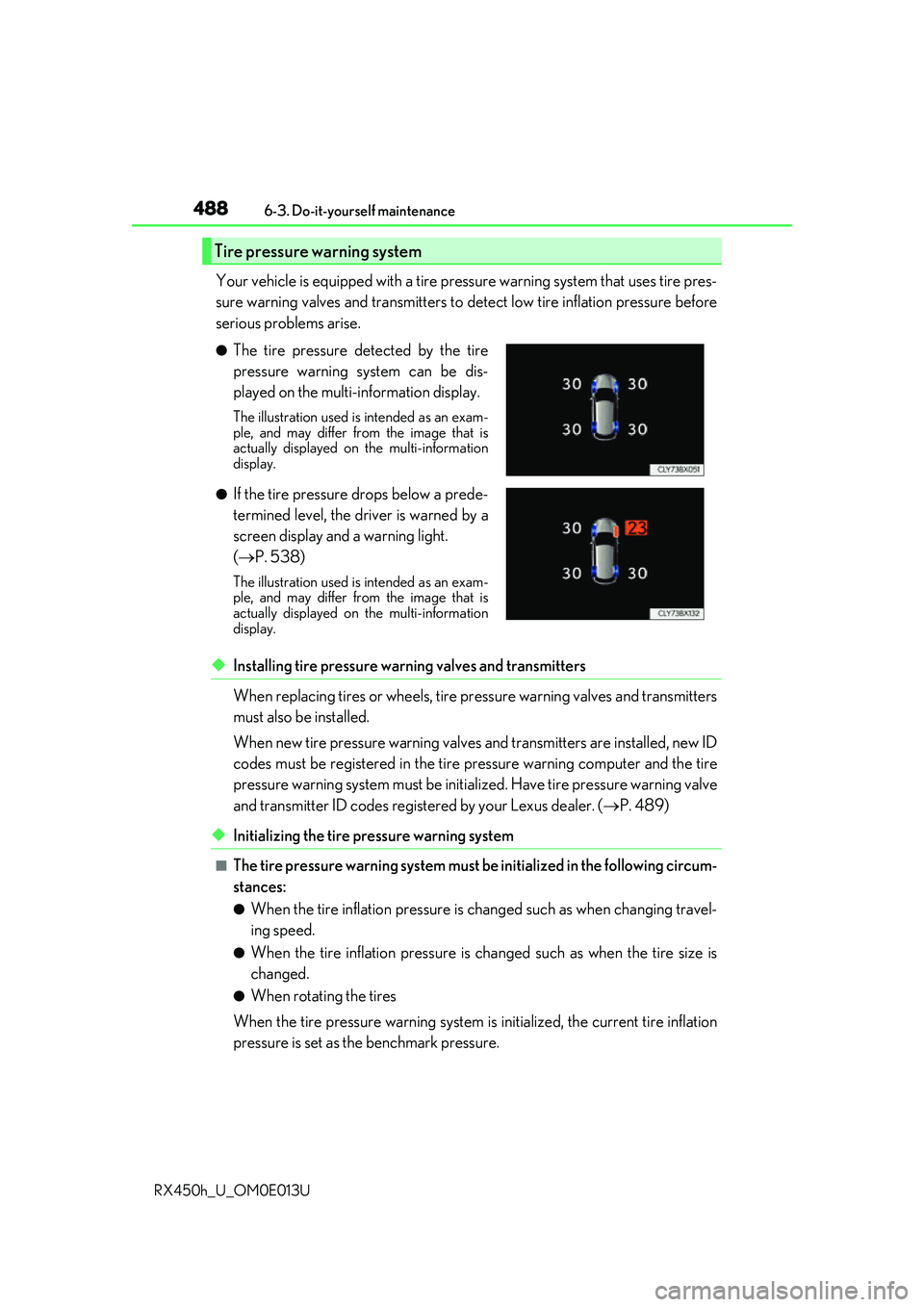
Your vehicle is equipped with a tire pressure warning system that uses tire pres-
sure warning valves and transmitters to detect low tire inflation pressure before
serious problems arise.
◆Installing tire pressure warning valves and transmitters
When replacing tires or wheels, tire pr essure warning valves and transmitters
must also be installed.
When new tire pressure wa rning valves and transmitters are installed, new ID
codes must be registered in the tire pressure warning computer and the tire
pressure warning system must be initia lized. Have tire pressure warning valve
and transmitter ID codes registered by your Lexus dealer. ( P. 489)
◆Initializing the tire pressure warning system
■The tire pressure warning system must be initialized in the following circum-
stances:
●When the tire inflation pressure is changed such as when changing travel-
ing speed.
●When the tire inflation pressure is changed such as when the tire size is
changed.
●When rotating the tires
When the tire pressure warning system is initialized, the current tire inflation
pressure is set as the benchmark pressure.
Tire pressure warning system
●The tire pressure detected by the tire
pressure warning system can be dis-
played on the multi-information display.
The illustration used is intended as an exam-
ple, and may differ from the image that is
actually displayed on the multi-information
display.
●If the tire pressure drops below a prede-
termined level, the driver is warned by a
screen display and a warning light.
( P. 538)
The illustration used is intended as an exam-
ple, and may differ from the image that is
actually displayed on the multi-information
display.
Page 504 of 660

5046-3. Do-it-yourself maintenance
RX450h_U_OM0E013U
Change the rest position of the windshie ld wipers to the service position using
the wiper lever and then lift a windshield wiper. ( P. 263)
While pressing and holding the
wiper blade lock release button,
remove the wiper blade.
When performing this operation, make
sure to hold the hook portion of the
wiper arm securely.
While disengaging the cap lock,
using a tool such as a flathead
screwdriver if necessary, remove the
wiper insert.
Hold the cap on the end of the wiper
insert when removing the wiper insert.
(The cap is integrated into the wiper
insert.)
If using a screwdriver, make sure to wrap
its tip with tape to protect the wiper
blade.
Install a new wiper insert.
Make sure to push the wiper insert firmly until the cap lock is engaged.
After installation, check that th e cap lock is locked securely.
Install the wiper blade to the wiper arm.
Make sure to push the wiper blade until it is locked.
When performing this operation, make sure to hold the hook portion of the wiper arm
securely.
After installation, check that the wiper blade is locked securely.
Windshield wiper inserts
Replacing a windshield wiper insert
1
Hook portion
12
Cap lock
3
14
5

