2016 LEXUS RX350 brake
[x] Cancel search: brakePage 276 of 748

276 4-5. Using the driving support systems
RX350_U_OM48E90U
Region B
(The pedestrian detection fu nction is not available and the pre-collision braking func-
tion is available)
The pre-collision system is enabled and the sy stem determines that the possibility of a
frontal collision with a vehicle is high.
Each function is operationa l at the following speeds:●
Pre-collision warning:
• Vehicle speed is approximately 10 mph (15 km/h) or more.
• The relative speed between your vehicl e and the vehicle or pedestrian ahead is
approximately 7 mph (10 km/h) or more. ●
Pre-collision brake assist:
• Vehicle speed is approximately 19 mph (30 km/h) or more.
• The relative speed between your vehicl e and the vehicle or pedestrian ahead is
approximately 19 mph (30 km/h) or more. ●
Pre-collision braking:
• Vehicle speed is approximately 10 mph (15 km/h) or more.
• The relative speed between your vehicl e and the vehicle or pedestrian ahead is
approximately 7 mph (10 km/h) or more.
The system may not operate in the following situations: ●
If a battery terminal has be en disconnected and reconnected and then the vehicle has
not been driven for a certain amount of time ●
If the shift lever is in R ●
If VSC is disabled (only the pre-collision warning function will be operational) ●
If the PCS warning light is flashing or illuminated
Region C
(The pedestrian detection function and pr e-collision braking function are not avail-
able)
The pre-collision system is enabled and the sy stem determines that the possibility of a
frontal collision with a vehicle is high.
Each function is operationa l at the following speeds:●
Pre-collision warning:
• Vehicle speed is approximately 10 mph (15 km/h) or more.
• The relative speed between your vehicl e and the vehicle or pedestrian ahead is
approximately 7 mph (10 km/h) or more. ●
Pre-collision brake assist:
• Vehicle speed is approximately 19 mph (30 km/h) or more.
• The relative speed between your vehicl e and the vehicle or pedestrian ahead is
approximately 19 mph (30 km/h) or more.
The system may not operate in the following situations: ●
If a battery terminal has be en disconnected and reconnected and then the vehicle has
not been driven for a certain amount of time ●
If the shift lever is in R ●
If VSC is disabled (only the pre-collision warning function will be operational) ●
If the PCS warning light is flashing or illuminated
Page 281 of 748

2814-5. Using the driving support systems
4
Driving
RX350_U_OM48E90U • After the engine has started the vehicle has not been driven for a certain amount of
time
• While making a left/right turn and for a few seconds after making a left/right turn
• While driving on a curve and for a few seconds after driving on a curve
• If your vehicle is skidding
• If the front of the vehicle is raised or lowered, such as when the road surface is
uneven or undulating
• If the wheels are misaligned
• If a wiper blade is blocking the camera sensor
• The vehicle is wobbling.
• The vehicle is being driven at extremely high speeds.
• When driving on a hill ●
In some situations such as the following, su fficient braking force may not be obtained,
preventing the system from performing properly:
• If the braking functions cannot operate to their full extent, such as when the brake
parts are extremely cold, extremely hot, or wet
• If the vehicle is not properly maintained (brakes or tires are excessively worn,
improper tire inflation pressure, etc.)
• When the vehicle is being driven on a gravel road or other slippery surface ●
Some pedestrians such as the following may not be detected by the radar sensor and
camera sensor, preventing the system from operating properly
* 4
:
• Pedestrians shorter than approximately 3.2 ft. (1 m) or taller than approximately 6.5
ft. (2 m)
• Pedestrians wearing oversized clothing (a rain coat, long skirt, etc.), making their sil-
houette obscure
• Pedestrians who are carrying large baggag e, holding an umbrella, etc., hiding part
of their body
• Pedestrians who are bending forward or squatting
• Pedestrians who are pushing a stroller, wheelchair, bicycle or other vehicle
• Groups of pedestrians which are close together
• Pedestrians who are wearing white and look extremely bright
• Pedestrians in the dark, such as at night or while in a tunnel
• Pedestrians whose clothing appears to be nearly the same color or brightness as
their surroundings
• Pedestrians near walls, fences, guardrails, or large objects
• Pedestrians who are on a metal object (man hole cover, steel plate, etc.) on the road
• Pedestrians who are walking fast
• Pedestrians who are changing speed abruptly
• Pedestrians running out from behind a vehicle or a large object
• Pedestrians who are extremely close to the side of the vehicle (outside rear view
mirror, etc.)
* 4
: Depending on the region in which the ve hicle was sold, the pedestrian detection
function may not be available.
Page 282 of 748

282 4-5. Using the driving support systems
RX350_U_OM48E90U ■
If the PCS warning light flashes and a warnin g message is displayed on the multi-infor-
mation display
The pre-collision system may be temporarily unavailable or there may be a malfunction
in the system. ●
In the following situations, the warning light will turn off, the message will disappear and
the system will become operational when normal operating conditions return:
• When the radar sensor or camera sensor or the area around either sensor is hot,
such as in the sun
• When the radar sensor or camera sensor or the area around either sensor is cold,
such as in an extremely cold environment
• When the radar sensor or front grille embl em is dirty or covered with snow, etc.
• If the camera sensor is obst ructed, such as when the h ood is open or a sticker is
attached to the windshield near the camera sensor ●
If the PCS warning light continues to flash or the warning messag e does not disappear,
the system may be malfunctioning. Have the vehicle inspected by your Lexus dealer
immediately. ■
If VSC is disabled ●
If VSC is disabled ( P. 377), the pre-collision brake assist and pre-collision braking
functions are also disabled. ●
The PCS warning light will turn on and “VSC Turned Off Pre-Collision Brake System
Unavailable” will be displayed on the multi-information display.
Page 305 of 748

3054-5. Using the driving support systems
4
Driving
RX350_U_OM48E90U This mode employs a radar sensor to detect the presence of vehicles up to
approximately 400 ft. (120 m) ahead, determines the current vehicle-to-vehicle
following distance, and operates to main tain a suitable following distance from
the vehicle ahead. Note that vehicle-to-vehicle distance will close in when traveling on long downhill
slopes.
Example of constant speed cruising
When there are no vehicles ahead The vehicle travels at the speed set by the driver. The desired vehicle-to-vehicle dis-
tance can also be set by operating th e vehicle-to-vehicle distance button.
Example of deceleration cruising and follow-up cruising
When a preceding vehicle driving slower than the set speed appears When a vehicle is detected running ahead of you, the system automatically deceler-
ates your vehicle. When a greater reduction in vehicle speed is necessary, the system
applies the brakes (the stop lights will come on at this time). The system will respond to
changes in the speed of the vehicle ahead in order to maintain the vehicle-to-vehicle
distance set by the driver. Approach wa rning warns you when the system cannot
decelerate sufficiently to prevent your ve hicle from closing in on the vehicle ahead.
When the vehicle ahead of you stops, your ve hicle will also stop (vehicle is stopped by
system control). After the vehicle ahead starts off, pushing the cruise control lever up
or depressing the accelerator peda l will resume follow-up cruising.
Example of acceleration
When there are no longer any preceding vehicles driving slower than the set
speed The system accelerates until the set speed is reached. The system then returns to con-
stant speed cruising.Driving in vehicle-to-vehicle distance control mode
1
2
3
Page 309 of 748

3094-5. Using the driving support systems
4
Driving
RX350_U_OM48E90U Pulling the lever toward you cancels
the speed control. The speed setting is also canceled when
the brake pedal is depressed.
(When the vehicle has been stopped by
system control, depressing the brake
pedal does not cancel the setting.)
Pushing the lever up resumes the
cruise control and returns vehicle
speed to the set speed. However, when a vehicle ahead is not dete cted, cruise control does not resume when
the vehicle speed is approximately 25 mph (40 km/h) or less.
When your vehicle is too close to a
vehicle ahead, and sufficient automatic
deceleration via the cruise control is
not possible, the display will flash and
the buzzer will sound to alert the driver.
An example of this would be if another
driver cuts in front of you while you are
following a vehicle. Depress the brake
pedal to ensure an appropriate vehicle-
to-vehicle distance. ■
Warnings may not occur when
In the following instances, warnings may not occur even when the vehicle-to-
vehicle distance is small. ●
When the speed of the preceding vehicle matches or exceeds your vehicle
speed ●
When the preceding vehicle is traveling at an extremely slow speed ●
Immediately after the cruise control speed was set ●
When depressing the accelerator pedalCanceling and resuming the speed control 1
2
Approach warning (vehicle-to-vehicle distance control mode)
Page 311 of 748

3114-5. Using the driving support systems
4
Driving
RX350_U_OM48E90U ■
Dynamic radar cruise control with full-speed range can be set when ●
The shift lever is in the D or range 4 or higher of S has been selected.
(vehicles without padd le shift switches)●
The shift lever is in D.
(vehicles with paddle shift switches) ●
Range 4 or higher of D has been se lected by using the paddle shift.
(vehicles with paddle shift switches) ●
Vehicle speed is above approximately 30 mph (50 km/h). However, when a preceding
vehicle is detected, the dynamic radar cruise control with full-speed range can be set
even if the vehicle speed is at or below approximately 30 mph (50 km/h).■
Accelerating after setting the vehicle speed
The vehicle can accelerate by operating the accelerator pedal. After accelerating, the
set speed resumes. However, during vehicle- to-vehicle distance control mode, the vehi-
cle speed may decrease below the set speed in order to maintain the distance to the pre-
ceding vehicle. ■
Automatic cancelation of vehicle- to-vehicle distance control mode
Vehicle-to-vehicle distance control mode is automatically canceled in the following situ-
ations. ●
Actual vehicle speed falls below approximately 25 mph (40 km/h) when there are no
vehicles ahead. ●
The preceding vehicle leaves the lane when your vehicle is following at a vehicle speed
below approximately 25 mph (40 km/h). Otherwise, the sensor cannot properly
detect the vehicle. ●
VSC is activated. ●
TRAC is activated for a period of time. ●
When the VSC or TRAC system is turned off by pressing the VSC OFF switch. ●
The sensor cannot detect correctly because it is covered in some way. ●
Pre-collision braking is activated. ●
The parking brake is operated. ●
The vehicle is stopped by system control on a steep incline. ●
The following are detected when the vehicle has been stopped by system control:
• The driver is not wearing a seat belt.
• The driver’s door is opened.
• The vehicle has been stopped for about 3 minutes
If vehicle-to-vehicle distance control mode is automatically canceled for any other rea-
son, there may be a malfunction in the system. Contact your Lexus dealer.
Page 312 of 748

312 4-5. Using the driving support systems
RX350_U_OM48E90U ■
Automatic cancelation of constant speed control mode
Constant speed control mode is automatica lly canceled in the following situations:●
Actual vehicle speed is more than approximately 10 mph (16 km/h) below the set vehi-
cle speed. ●
Actual vehicle speed falls below approximately 25 mph (40 km/h). ●
VSC is activated. ●
TRAC is activated for a period of time. ●
When the VSC or TRAC system is turned off by pressing the VSC OFF switch. ●
Pre-collision braking is activated.
If constant speed control mode is automatica lly canceled for any other reason, there may
be a malfunction in the system. Contact your Lexus dealer. ■
Warning messages and buzzers for dynamic ra dar cruise control with full-speed range
Warning messages and buzzers are used to indicate a system malfunction or to inform
the driver of the need for caution while driving. If a warning message is shown on the
multi-information display, read the message and follow the instructions.■
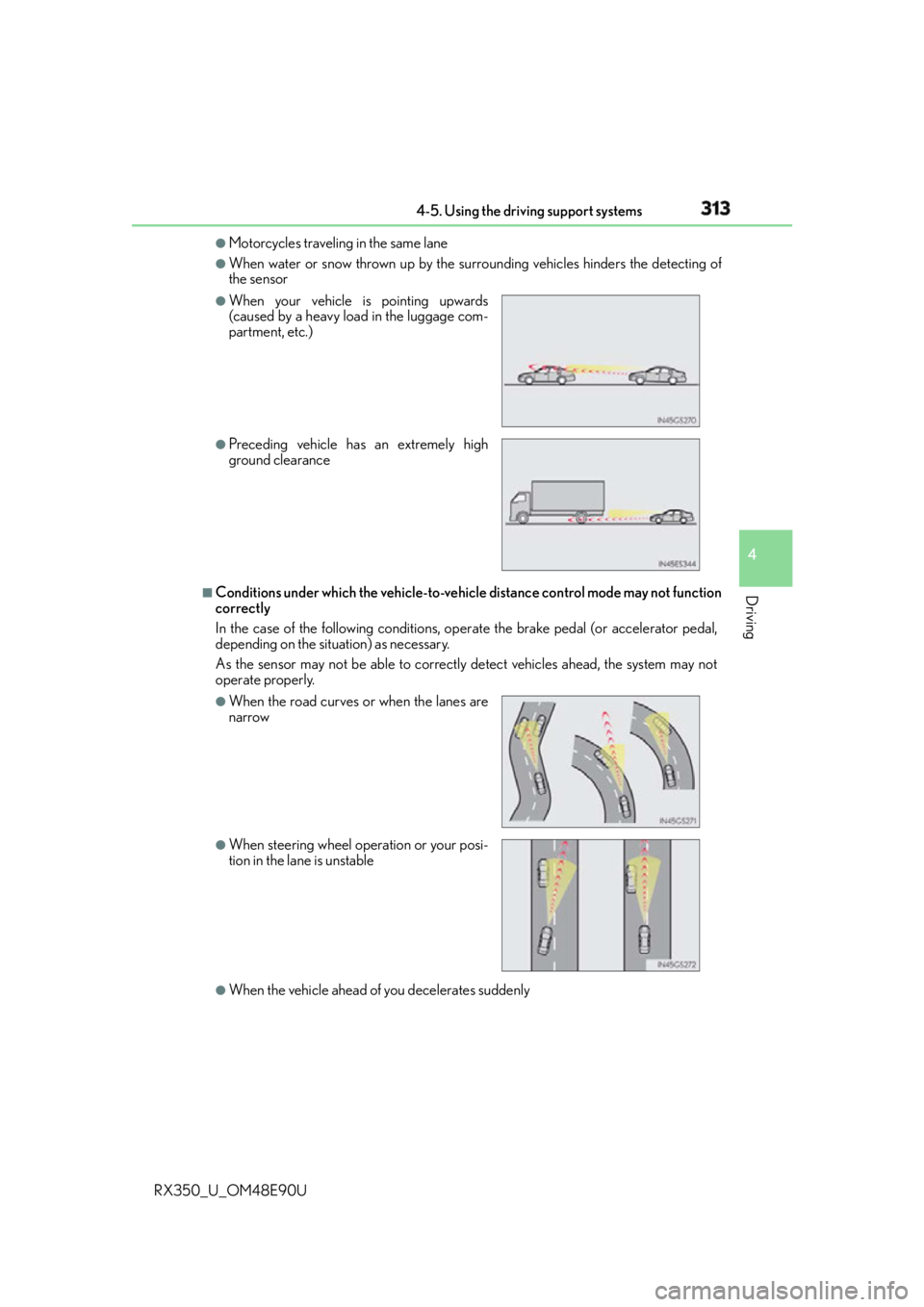
When the sensor may not be correctly detecting the vehicle ahead
In the case of the following and depending on the conditions, operate the brake pedal
when deceleration of the system is insuff icient or operate the accelerator pedal when
acceleration is required.
As the sensor may not be able to correctly detect these types of vehicles, the approach
warning ( P. 309) may not be activated.●
Vehicles that cut in suddenly ●
Vehicles traveling at low speeds ●
Vehicles that are not moving in the same lane ●
Vehicles with small rear ends (traile rs with no load on board, etc.)
Page 313 of 748
3134-5. Using the driving support systems
4
Driving
RX350_U_OM48E90U ●
Motorcycles traveling in the same lane ●
When water or snow thrown up by the surrounding vehicles hinders the detecting of
the sensor
■
Conditions under which the ve hicle-to-vehicle distance co ntrol mode may not function
correctly
In the case of the following conditions, op erate the brake pedal (or accelerator pedal,
depending on the situ ation) as necessary.
As the sensor may not be able to correctly detect vehicles ahead, the system may not
operate properly.
●
When the vehicle ahead of you decelerates suddenly ●
When your vehicle is pointing upwards
(caused by a heavy load in the luggage com-
partment, etc.) ●
Preceding vehicle has an extremely high
ground clearance
●
When the road curves or when the lanes are
narrow
●
When steering wheel operation or your posi-
tion in the lane is unstable