2016 LEXUS RX350 air conditioning
[x] Cancel search: air conditioningPage 398 of 748

398 5-1. Basic Operations
RX350_U_OM48E90U ■
Adjusting the volume
The volume of the Mobile Assist ant can be adjusted using the
“ PWR·VOL
” knob or
steering wheel volume switches. The Mobile Assistant and phone call volumes are syn-
chronized. ■
Microphone
It is not necessary to speak directly into the microphone when using the Mobile Assis-
tant. ●
Wait for the listening beeps befo re using the Mobile Assistant.●
The Mobile Assistant may not recognize commands in the following situations:
• When spoken too quickly.
• When spoken at a low or high volume.
• When the roof or windows are open.
• When passengers are talking while th e Mobile Assistant is being used.
• When the air conditioning syst em’s fan speed is set high.
• When the air conditioning vents ar e turned toward the microphone.■
Mobile Assistant precautions ●
The available features and functions may vary based on the iOS version installed on the
connected device. ●
Some Siri features are limited in Eyes Free mode. If you attempt to use an unavailable
function, Siri will inform you that the function is not available. ●
If Siri is not enabled on the cellular phone connected via Bluetooth
, an error message
will be displayed on the screen. ●
While a phone call is active, the Mobile Assistant cannot be used. ●
If using the navigation feature of the cellular phone, ensure the active audio source is
Bluetooth
audio or iPod in order to hear turn by turn direction prompts.
Page 471 of 748

4715-11. Bluetooth ®
5
Lexus Display Audio system
RX350_U_OM48E90U ■
When using the Bluetooth ®
audio system●
In the following situations, the system may not function.
• If the portable audio player is turned off
• If the portable audio player is not connected
• If the portable audio player’s battery is low ●
There may be a delay if a cellular phon e connection is made during Bluetooth ®
audio
play. ●
Depending on the type of portable audio play er that is connected to the system, opera-
tion may differ slightly and certain functions may not be available. ■
When using the hands-free system ●
The audio system is mu ted when making a call.●
If both parties speak at the same time, it may be difficult to hear.●
If the received call volume is over ly loud, an echo may be heard.
If the Bluetooth ®
phone is too close to the system, quality of the sound may deteriorate
and connection status may deteriorate. ●
In the following situations, it may be difficult to hear the other party:
• When driving on unpaved roads
• When driving at high speeds
•If a window is open
• If the air conditioning is blowing directly on the microphone
• If there is interference from the network of the cellular phone●
Depending on the type phone, cert ain functions may not be available.■
Conditions under which th e system will not operate●
If using a cellular phone that does not support Bluetooth ®
●
If the cellular phone is turned off ●
If you are outside of cellular phone service coverage ●
If the cellular phone is not connected ●
If the cellular phone’s battery is low ●
When outgoing calls are controlled, du e to heavy traffic on phone lines, etc.●
When the cellular phone itself cannot be used ●
When transferring phonebook data from the cellular phoneBluetooth ®
Page 482 of 748

482 5-12. Other function
RX350_U_OM48E90U ■
Microphone
P. 4 5 1 ■
When using the microphone ●
It is unnecessary to speak directly into the microphone when giving a command.●
Wait for the confirmation beep before speaking a command. ●
Voice commands may not be recognized if:
• Spoken too quickly.
• Spoken at a low or high volume.
• The roof or windows are open.
• Passengers are talking while voice commands are spoken.
• The air conditioning speed is set high.
• The air conditioning vents are turned towards the microphone. ●
In the following conditions, the system ma y not recognize the command properly and
using voice commands may not be possible:
• The command is incorrect or unclear. No te that certain words, accents or speech
patterns may be difficult for the system to recognize.
• There is excessive background noise, such as wind noise. ■
When searching for a track ●
A USB memory or iPod must be connected to enable track searching and playback.
( P. 3 9 9 ) ●
When a USB memory or iPod is connected, recognition data is created so tracks can
be searched using voice commands. ●
Recognition data is updated un der the following conditions:
• When the USB memory or iPod data has changed.
• When the voice recognition language is changed. ( P. 4 0 3 )●
While the recognition data is being created or being updated, a track search cannot be
performed using a voice command. ■
The Gracenote ®
media database
P. 4 2 6
Due to natural language speech recognitio n technology, this system enables rec-
ognition of a command when spoken naturally. However, the system cannot rec-
ognize every variation of each command.
In some situations, it is possible to omit the command for the procedure and
directly state the desired operation.
This function is available in English, Spanish and French.Casual speech recognition
Page 487 of 748

487
6Interior features
RX350_U_OM48E90U 6-1. Basic operation of the
Remote Touch screen
Remote Touch............................. 488
12.3-inch display......................... 492
6-2. Using the air conditioning
system and defogger
Lexus Climate Concierge ...... 494
Automatic air conditioning
system .......................................... 495
Heated steering wheel/
seat heaters/
seat ventilators......................... 505
6-3. Using the interior lights
Interior lights list......................... 508
• Interior lights ......................... 509
• Personal lights......................... 510
6-4. Using the storage features
List of storage features.............. 512
• Glove box................................. 513
• Console box ............................ 513
• Cup holders............................. 514
• Door pockets .......................... 515
• Bottle holders ......................... 515
• Coin box ................................... 516
• Auxiliary boxes....................... 517
Luggage compartment
features ......................................... 518 6-5. Using the other interior
features
Other interior features ............ 523
• Sun visors ................................ 523
• Vanity mirrors ........................ 523
• Clock ........................................ 524
• Wireless charger.................. 524
• Power outlets
(12 VDC) .................................. 531
• Power outlet
(120 VAC) .............................. 532
• Front passenger footwell
hooks......................................... 533
• Rear door sunshades ......... 534
• Armrest ....................................534
• Assist grips.............................. 535
• Coat hooks ............................. 535
Garage door opener................ 536
Compass ....................................... 543
LEXUS Enform Safety
Connect ...................................... 547
LEXUS Enform Remote ......... 552
LEXUS Enform Service
Connect ...................................... 554
Page 491 of 748
4916-1. Basic operation of the Remote Touch screen
6
Interior features
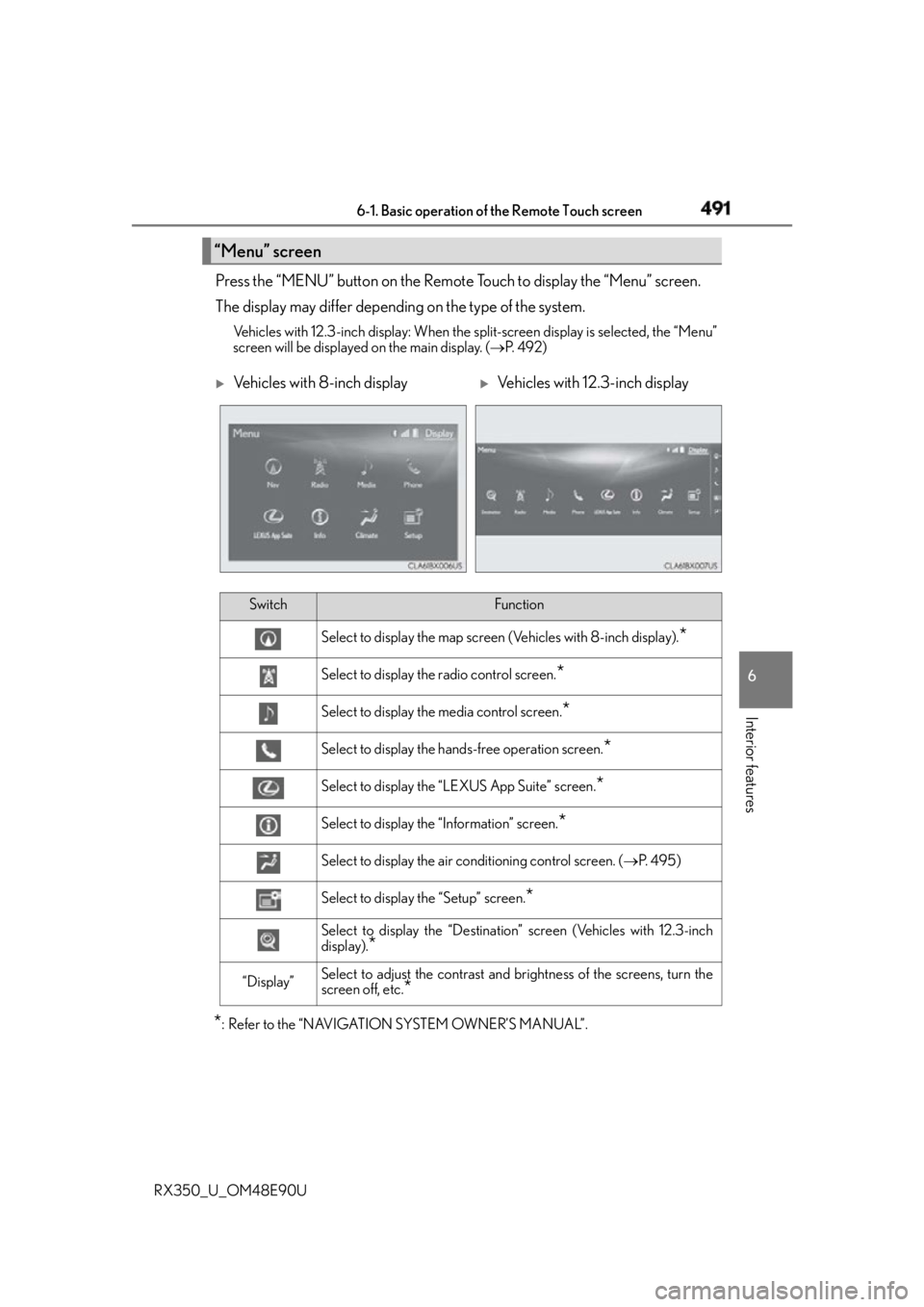
RX350_U_OM48E90U Press the “MENU” button on the Remote Touch to display the “Menu” screen.
The display may differ depending on the type of the system. Vehicles with 12.3-inch display: When the split-screen display is selected, the “Menu”
screen will be displayed on the main display. ( P. 4 9 2 )
* : Refer to the “NAVIGATION SYSTEM OWNER’S MANUAL”.“Menu” screen
Vehicles with 8-inch display
Vehicles with 12.3-inch display
Switch Function
Select to display the map screen (Vehicles with 8-inch display).
*Select to display the radio control screen.
*Select to display the media control screen.
*Select to display the hands-free operation screen.
*Select to display the “LEXUS App Suite” screen.
*Select to display the “Information” screen.
*Select to display the air conditioning control screen. ( P. 4 9 5 )
Select to display the “Setup” screen.
*Select to display the “Destination” screen (Vehicles with 12.3-inch
display).
*“Display” Select to adjust the contrast and br ightness of the screens, turn the
screen off, etc.
*
Page 493 of 748

4936-1. Basic operation of the Remote Touch screen
6
Interior features
RX350_U_OM48E90U ■
Selecting the operation screen
When selecting the main display, move the Remote Touch knob to the left.
When selecting the side display, move the Remote Touch knob to the right. ■
Main display
For details about the functions and operat ion of the main display, refer to the
respective section and “NAVIGATION SYSTEM OWNER’S MANUAL”. ■
Side display
Basic screens
To change the screen displayed on the side display, use the screen buttons on
the right side of the display.
Navigation system
*Audio
* Phone
* Vehicle information ( P. 117)
Air conditioning system
( P. 4 9 8 )
Interruption screens
Each of the following screens is displayed automatically in accordance with
conditions.
• Intuitive parking assist (if equipped) ( P. 3 3 1 )
•Phone
*• Destination Assist
*•Driving mode ( P. 3 6 9 )
* : Refer to the “NAVIGATION SYSTEM OWNER’S MANUAL”.Split-screen display operation
1
2
3
4
5
Page 494 of 748

494
RX350_U_OM48E90U 6-2. Using the air conditio ning system and defogger
Automatic air conditioning system ( P. 4 9 9 )
Set the air conditioning system to automatic mode. The temperature for the driver’s seat and front passenger’s seat can be adjusted indi-
vidually.
Seat heaters and ventilators ( P. 506, 507)
Select “AUTO” mode on each seat. Seat heater or ventilation is automatically selected according to the set temperature
of the air conditioning system, outside temperature, etc.Lexus Climate Concierge
: If equippedThe climate control seats are automati cally controlled according to the set
temperature of the air conditioning system, outside temperature, cabin tem-
perature, etc. Lexus Climate Concierge allows a comfortable condition to be
maintained without adjusting each system.
1
2
Page 495 of 748

4956-2. Using the air conditioning system and defogger
6
Interior features
RX350_U_OM48E90U ■
Adjusting the temperature setting
Press to increase the temperature and to decrease the temper-
ature. ■
Adjusting the fan speed setting
Press to increase the fan speed and to decrease the fan speed.
Press the “OFF” button to turn the fan off.Automatic air conditioning system Air outlets and fan speed are automatica lly adjusted according to the temper-
ature setting.
Vehicles with a Lexus Display Audio sy stem: Press the “MENU” button on the
Lexus Display Audio controller, then select “Climate” to display the air condi-
tioning control screen.
For details on the Lexus Display Audio controller, refer to “Lexus Display
Audio controller” on P. 392.
Vehicles with a navigati on system: Press the “MENU” button on the Remote
Touch, then select to display th e air conditioning control screen.
Vehicles with a navigation system (12.3- inch display): The air conditioning sys-
tem can be displayed and operated on the side display. ( P. 4 9 3 )
For details on the Remote Touch, refer to the “NAVIGATION SYSTEM
OWNER’S MANUAL”.
Control panel