2016 LEXUS NX300H change time
[x] Cancel search: change timePage 445 of 680

4456-2. Using the interior lights
6
Interior features
NX300h_OM_USA_OM78082U
Tu r n s t h e l i g h t o n /o f f
The rear interior light is also turned on/
off by the front interior light operations.
If the light is turned on by front interior
light operation, the rear interior light
cannot turn off by pressing the switch.
●Illuminated entry system: The lights automatically turn on/off according to power switch
mode, the presence of the electronic key, whether the doors are locked/unlocked, and
whether the doors are opened/closed.
●If the interior lights remain on when the power switch is turned off, the lights will go off
automatically after 20 minutes.
●In the following cases, the front interior li ghts and personal lights may not respond as
normal.
• When water, dirt, etc., have adhered to the lens surface
• When operated with a wet hand
• When wearing gloves, etc.
●Settings (e.g. the time elapsed before the lights turn off) can be changed.
(Customizable features: P. 6 3 5 )
Rear interior light
NOTICE
●Never remove the lens for the front interior light and personal lights. Otherwise, the
lights will be damaged. If the lens need to remove, contact your Lexus dealer.
●To prevent 12-volt battery discharge, do not leave the lights on longer than necessary
when the hybrid system is off.
Page 461 of 680

4616-4. Other interior features
6
Interior features
NX300h_OM_USA_OM78082U
■While charging, noise enters the AM radio
Turn off the wireless charger and confirm that the noise has decreased. If the noise
decreases, continuously pushing the power supply switch of the wireless charger for 2
seconds, the frequency of the charger can be changed and the noise can be reduced.
Also, on that occasion, the operation indicator light will flash orange 2 times.
■Important points of the wireless charger
●If the electronic key cannot be detected within the vehicle interior, charging cannot be
done. When the door is opened and closed , charging may be temporarily suspended.
●When charging, the wireless charging device and portable device will get warmer,
however this is not a malfunction.
When a portable device gets warm while charging, charging may stop due to the pro-
tection function on the portable device side . In this case, when the temperature of the
portable device drops significantly, charge again.
■Operation sounds
When the power supply is turned on, while se arching for the portable device a sound will
be produced, however this is not a malfunction.
■Certification for the wireless charger
FCC Note: This equipment has been tested and found to comply with Part 18 of the FCC
Rules. These limits are designed to provide reasonable protection against harmful inter-
ference in a residential installation.
FCC Caution: Any changes or modification s not expressly approved by the party
responsible for compliance could void the user’s authority to operate this equipment.
Page 521 of 680

5217-3. Do-it-yourself maintenance
7
Maintenance and care
NX300h_OM_USA_OM78082U
■Situations in which the tire pressure warning system may not operate properly
●In the following cases, the tire pressure warning system may not operate properly.
• If non-genuine Lexus wheels are used.
• A tire has been replaced with a tire that is not an OE (Original Equipment) tire.
• A tire has been replaced with a tire that is not of the specified size.
• Tire chains etc. are equipped.
• An auxiliary-supported run-flat tire is equipped.
• If a window tint that affects the radio wave signals is installed.
• If there is a lot of snow or ice on the vehicle, particularly around the wheels or wheelhousings.
• If the tire inflation pressure is extremely higher than the specified level.
• If wheel without the tire pressure warning valve and transmitter is used.
• If the ID code on the tire pressure warning valves and transmitters is not registered in the tire pressure warning computer.
●Performance may be affected in the following situations.
• Near a TV tower, electric power plant, gas station, radio station, large display, air- port or other facility th at generates strong radio waves or electrical noise
• When carrying a portable radio, cellular phone, cordless phone or other wireless
communication device
●When the vehicle is parked, the time taken for the warning to start or go off could be
extended.
●When tire inflation pressure declines rapidly for example when a tire has burst, the
warning may not function.
■The initialization operation
●Make sure to carry out initialization af ter adjusting the tire inflation pressure.
Also, make sure the tires are cold before carry ing out initialization or tire inflation pres-
sure adjustment.
●If you have accidentally turned the power swit ch off during initialization, it is not neces-
sary to press the reset switch again as init ialization will restart automatically when the
power switch has been turned to ON mode for the next time.
●If you accidentally press the reset switch when initialization is not necessary, adjust the
tire inflation pressure to the specified level when the tires are co ld, and conduct initial-
ization again.
■Warning performance of the tire pressure warning system
The warning of the tire pressure warning syst em will change in accordance with the con-
ditions under which it was initialized. For this reason, the system may give a warning even
if the tire pressure does not reach a low enough level, or if the pressure is higher than the
pressure that was adjusted to when the system was initialized.
■When initialization of the tire pressure warning system has failed
Initialization can be completed in a few minutes. However, in the following cases, the set-
tings have not been recorded and the system will not operate properly. If repeated
attempts to record tire inflation pressure settings are unsuccessful, have the vehicle
inspected by your Lexus dealer.
●When operating the tire pressure warning reset switch, the tire pressure warning light
does not blink 3 times.
●After carrying out the initializ ation procedure, the tire pressure warning light blinks for
1 minute then stays on after driving for 20 minutes.
Page 585 of 680

5858-2. Steps to take in an emergency
8
When trouble arises
NX300h_OM_USA_OM78082U
Firmly tighten each wheel nut two or
three times in the order shown in the
illustration.
Tightening torque:
76 ft•lbf (103 N•m, 10.5 kgf•m)
Stow the flat tire, tire jack and all tools.
■The compact spare tire
●The compact spare tire is identified by the label “TEMPORARY USE ONLY” on the
tire sidewall.
Use the compact spare tire temporarily, and only in an emergency.
●Make sure to check the tire inflation pressure of the compact spare tire. ( P. 6 1 3 )
■After completing the tire change
The tire pressure warning system must be reset. ( P. 5 1 8 )
■When using the compact spare tire
As the compact spare tire is not equipped wi th a tire pressure warning valve and trans-
mitter, low inflation pressure of the spare ti re will not be indicated by the tire pressure
warning system. Also, if you replace the compact spare tire after the tire pressure warn-
ing light comes on, th e light remains on.
■When the compact spare tire is equipped
The vehicle becomes lower when driving with the compact spare tire compared to when
driving with standard tires.
■If you have a flat front tire on a road covered with snow or ice (except for 225/60R18
tires)
Install the compact spare tire on one of the rear wheels of the vehicle. Perform the follow-
ing steps and fit tire chains to the front tires:
Replace a rear tire with the compact spare tire.
Replace the flat front tire with the tire removed from the rear of the vehicle.
Fit tire chains to the front tires.
5
6
1
2
3
Page 593 of 680

5938-2. Steps to take in an emergency
8
When trouble arises
NX300h_OM_USA_OM78082U
Press the power switch.
In the event that the hybrid system st ill cannot be operated, contact your Lexus
dealer.
■Stopping the hybrid system
Set the parking brake, shift the shift lever to P and press the power switch as you normally
do when stopping the hybrid system.
■Replacing the key battery
As the above procedure is a temporary measure, it is recommended that the electronic
key battery be replaced immediately when the battery is depleted. ( P. 5 3 2 )
■Alarm (if equipped)
Using the mechanical key to lock the doors will not set the alarm system. If a door is
unlocked using the mechanical key when the al arm system is set, the alarm may be trig-
gered.
■Changing power switch modes
Release the brake pedal and press the power switch in step above.
The hybrid system does not start and mode s will be changed each time the switch is
pressed. ( P. 202)
■When the electronic key does not work properly
●Make sure that the smart access system wi th push-button start has not been deacti-
vated in the custom ization setting. If it is off, turn the function on.
(Customizable features P. 6 3 3 )
●Check if battery-saving mo de is set. If it is set, cancel the function. ( P. 1 4 2 )
WA R N I N G
■When using the mechanical key and operating the power windows or moon roof
Operate the power window or moon roof afte r checking to make sure that there is no
possibility of any passenger having any of their body parts caught in the window or
moon roof.
Also, do not allow children to operate the mech anical key. It is possible for children and
other passengers to get caught in the power window or moon roof.
4
3
Page 597 of 680

5978-2. Steps to take in an emergency
8
When trouble arises
NX300h_OM_USA_OM78082U
■When exchanging the 12-volt battery
●Use a Central Degassing type 12-volt battery (European Regulations). Also, use 12-volt
batteries with case si zes similar to one prior the exchange and an equivalent 20 hour
rate capacity (20HR) or greater.
• If the sizes differ, the 12-volt battery cannot be properly secured.
• If the 20 hour rate capacity is low, even if the time period where the vehicle is not used is a short time, the 12-volt battery may discharge and hybrid system may not be
able to start.
●After exchanging, firmly attach the following items to the exhaust hole of the 12-volt
battery.
For details, consult your Lexus dealer. • Use the exhaust hose that was attached to
the 12-volt battery before exchanging and
confirm that it is firmly connected to the
hole section of the vehicle.
• Use the exhaust hole plug included with the 12-volt battery exchanged or the one
installed on the battery prior to the
exchange. (Depending on the 12-volt bat-
tery to be exchanged, the exhaust hole may
be plugged.)
WA R N I N G
■Avoiding 12-volt battery fires or explosions
Observe the following precautions to preven t accidentally igniting the flammable gas
that may be emitted from the 12-volt battery:
●Make sure each jumper cable is connected to the correct terminal and that it is not
unintentionally in contact with any other than the intended terminal.
●Do not allow the other end of the jumper cable connected to the “+” terminal to come
into contact with any other parts or metal surfaces in the area, such as brackets or
unpainted metal.
●Do not allow the + and - clamps of the jump er cables to come into contact with each
other.
●Do not smoke, use matches, cigarette lighters or allow open flame near the 12-volt
battery.
Exhaust holeExhaust
hole plug
Exhaust hose
Hole section
of the vehicle
Exhaust hole
Page 636 of 680
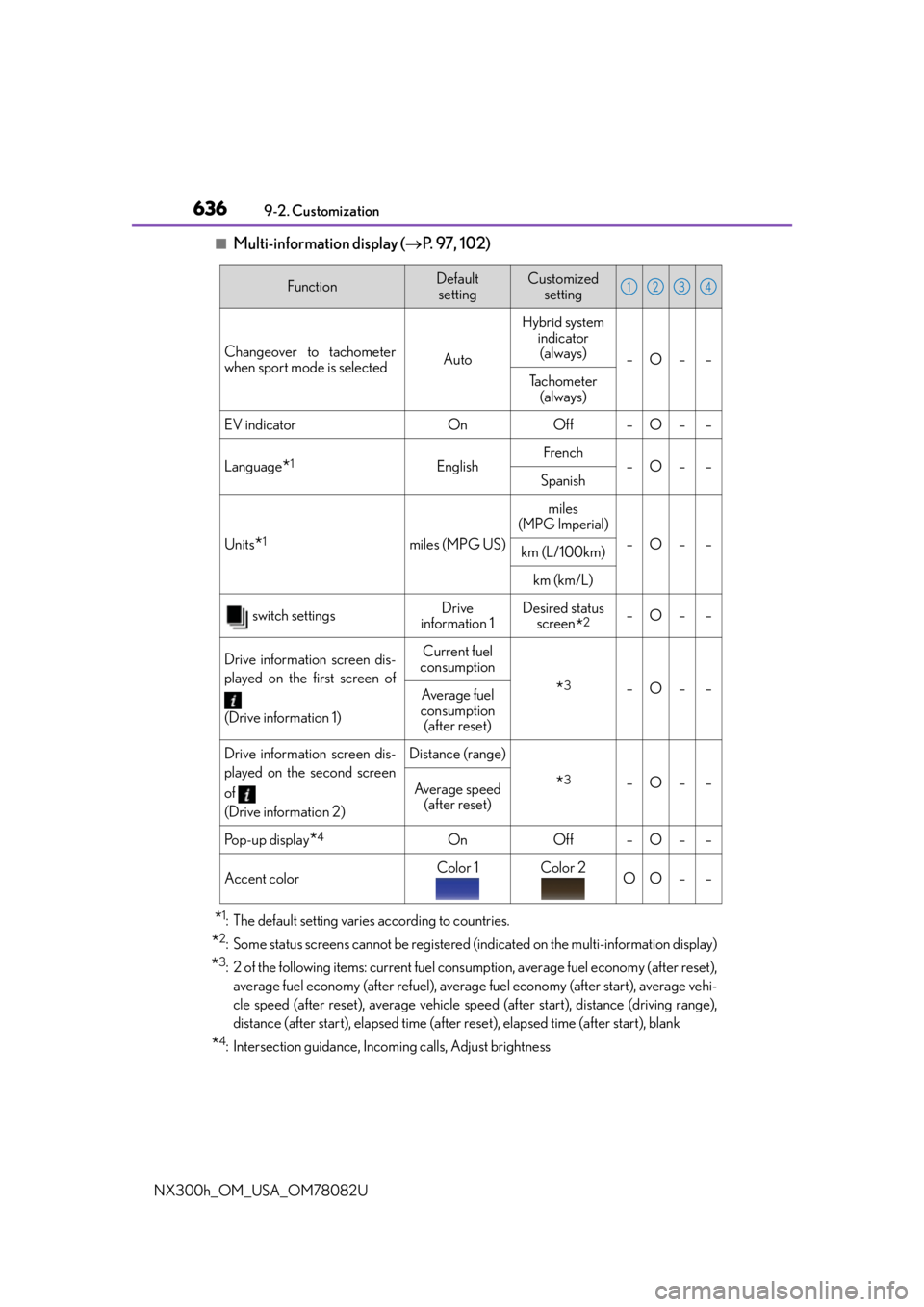
6369-2. Customization
NX300h_OM_USA_OM78082U
■Multi-information display ( P. 9 7 , 1 0 2 )
*1: The default setting varies according to countries.
*2: Some status screens cannot be registered (indicated on the multi-information display)
*3: 2 of the following items: current fuel consumption, average fuel economy (after reset),
average fuel economy (after refuel), average fuel economy (after start), average vehi-
cle speed (after reset), average vehicle speed (after start), distance (driving range),
distance (after start), elapsed time (after reset), elapsed time (after start), blank
*4: Intersection guidance, Incoming calls, Adjust brightness
FunctionDefault settingCustomized setting
Changeover to tachometer
when sport mode is selected AutoHybrid system
indicator (always) –O– –
Tachometer (always)
EV indicatorOnOff–O––
Language*1EnglishFrench–O––Spanish
Units*1miles (MPG US)
miles
(MPG Imperial)
–O––km (L/100km)
km (km/L)
switch settingsDrive
information 1Desired status screen
*2–O––
Drive information screen dis-
played on the first screen of
(Drive information 1)Current fuel
consumption
*3–O––Average fuel
consumption (after reset)
Drive information screen dis-
played on the second screen
of
(Drive information 2)Distance (range)
*3–O––Average speed
(after reset)
Po p - u p d i s p l a y*4OnOff–O––
Accent colorColor 1Color 2OO––
1234