Page 319 of 680

3194-5. Using the driving support systems
4
Driving
NX300h_OM_USA_OM78082U
The Blind Spot Monitor function uses radar sensors to detect vehicles that are
traveling in an adjacent lane in the area that is not reflected in the outside rear
view mirror (the blind spot), and advises the driver of the vehicles existence via
the BSM outside rear view mirror indicator.
The areas that vehicles can be detected in are outlined below.
The range of the detection area
extends to:
Approximately 11.5 ft. (3.5 m) from
the side of the vehicle
The first 1.6 ft. (0.5 m) from the side of
the vehicle is not in the detection area
Approximately 9.8 ft. (3 m) from the
rear bumper
Approximately 3.3 ft. (1 m) forward
of the rear bumper
The Blind Spot Monitor function
The Blind Spot Monitor function detection areas
1
2
3
WA R N I N G
■Cautions regarding the use of the system
The driver is solely responsible for safe driving. Always drive safely, taking care to
observe your surroundings.
The Blind Spot Monitor function is a supp lementary function which alerts the driver
that a vehicle is present in the blind spot. Do not overly rely on the Blind Spot Monitor
function. The function cannot judg e if it is safe to change lanes, therefore over reliance
could cause an accident resulting in death or serious injury.
According to conditions, the system may not function correctly. Therefore the driver’s
own visual confirmation of safety is necessary.
Page 321 of 680
3214-5. Using the driving support systems
4
Driving
NX300h_OM_USA_OM78082U
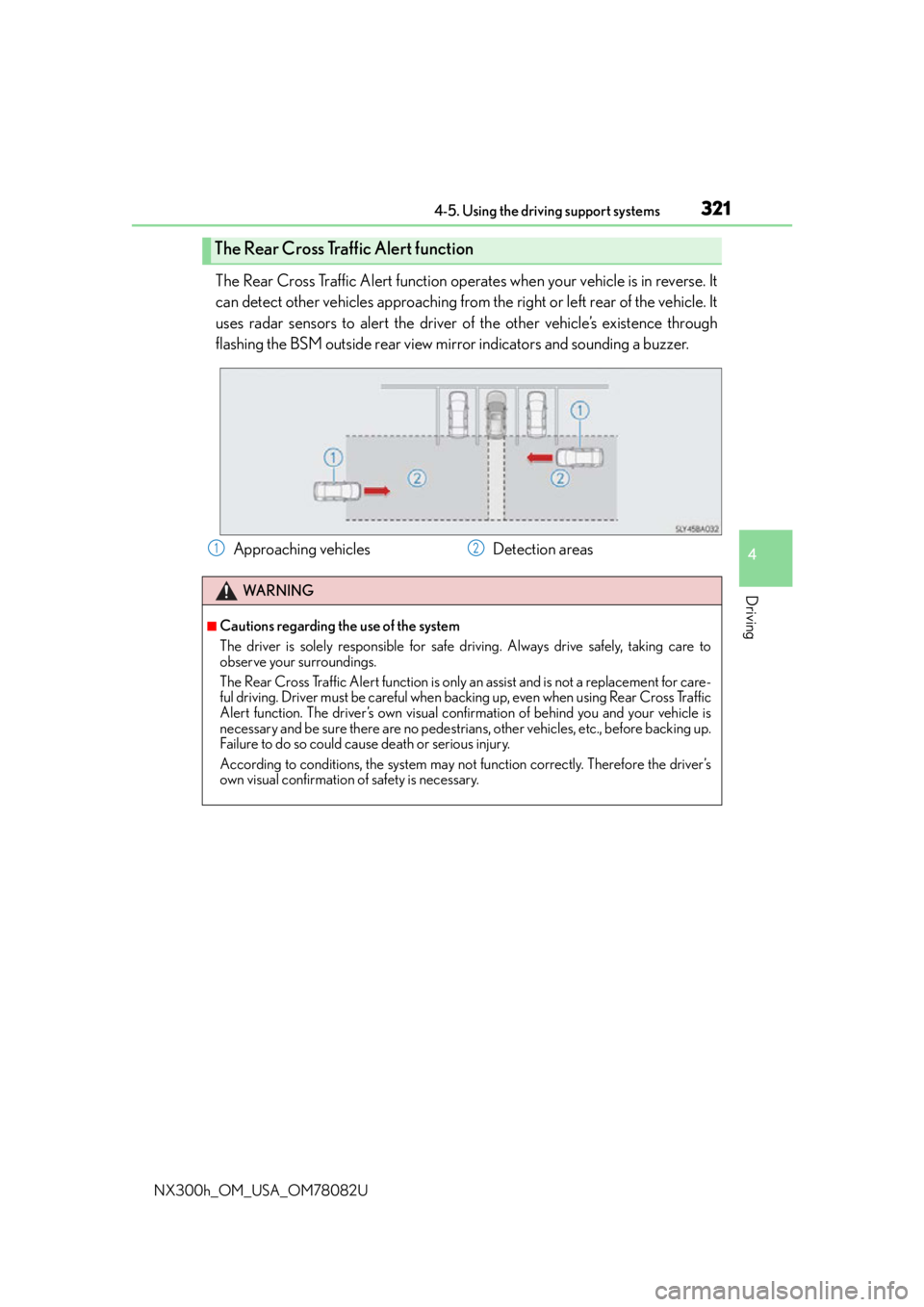
The Rear Cross Traffic Alert function operates when your vehicle is in reverse. It
can detect other vehicles approaching from the right or left rear of the vehicle. It
uses radar sensors to alert the driver of the other vehicle’s existence through
flashing the BSM outside rear view mirror indicators and sounding a buzzer.
The Rear Cross Traffic Alert function
Approaching vehicles Detection areas12
WA R N I N G
■Cautions regarding the use of the system
The driver is solely responsible for safe driving. Always drive safely, taking care to
observe your surroundings.
The Rear Cross Traffic Alert function is only an assist and is not a replacement for care-
ful driving. Driver must be careful when ba cking up, even when using Rear Cross Traffic
Alert function. The driver’s own visual confirmation of behind you and your vehicle is
necessary and be sure there are no pedestrians, other vehicles, etc., before backing up.
Failure to do so could cause death or serious injury.
According to conditions, the system may not function correctly. Therefore the driver’s
own visual confirmation of safety is necessary.
Page 429 of 680

429
6Interior features
NX300h_OM_USA_OM78082U
6-1. Using the air conditioning system and defogger
Automatic air conditioning system ......................................... 430
Heated steering wheel/ seat heaters/
seat ventilators......................... 440
6-2. Using the interior lights Interior lights list..........................443• Front interior light ................444
• Personal lights........................444
• Rear interior light .................445 6-3. Using the storage features
List of storage features ............ 446• Glove box ............................... 447
• Console box........................... 447
•Cup holders/ bottle holders......................... 448
• Sunglass holder .................... 449
Luggage compartment features........................................ 450
6-4. Other interior features Other interior features ............ 455
• Sun visors ................................ 455
• Vanity mirrors ........................ 455
• Clock ........................................ 456
• Power outlet (12 VDC)...... 456
• Power outlet (120 VAC) ... 457
• Wireless charger.................. 458
• Armrest .................................... 465
• Assist grips.............................. 465
• Coat hooks ............................. 466
Garage door opener................ 467
Compass ........................................473
Safety Connect ............................477
Page 432 of 680
4326-1. Using the air conditioning system and defogger
NX300h_OM_USA_OM78082U
■Change the airflow mode
To change the air outlets, press .
The air outlets used are switched
each time the button is pressed.
Air flows to the upper body.
Air flows to the upper body and
feet.
Air flows to the feet.
Air flows to the feet and the wind-
shield defogger operates.
■S-FLOW mode
Priority for airflow is given to the front seats, and the airflow and air condition-
ing for the rear seats is effectively controlled.
Press .
The indicator comes on when S-FLOW mode is on.
Press again to return to the previous mode.
■Other functions
●Switching between outside air and recirculated air modes (P. 4 3 5 )
●Defogging the windshield ( P. 4 3 5 )
●Defogging the rear window and outside rear view mirrors ( P. 4 3 5 )
1
2
3
4
Page 435 of 680

4356-1. Using the air conditioning system and defogger
6
Interior features
NX300h_OM_USA_OM78082U
■Adjusting the temperature for driver and passenger seats separately
(“DUAL” mode)
To turn on the “DUAL” mode, perform any of the following procedures:
●Press the “DUAL” button.
●Select “DUAL” on the option control screen.
●Adjust the temperature setting of the passenger side with the passenger
side temperature adjustment button.
The indicator comes on when the “DUAL” mode is on.
■Switching between outside air and recirculated air modes
Press .
The mode switches between (recirculated air mode) and (outside
air mode) modes each time the button is pressed.
■Defogging the windshield
Defoggers are used to defog the windshield and front side windows.
Press .
Set to outside air mode if the recirculated air mode is used. (It may
switch automatically.)
To defog the windshield and the side windows early, turn the air flow and tempera-
ture up.
To return to the previous mode, press again when the windshield is
defogged.
■Defogging the rear window and outside rear view mirrors
Defoggers are used to defog the rear window and to remove raindrops, dew
and frost from the outside rear view mirrors.
Press .
The defoggers will automatically turn off after a period of time.
Other functions
Page 439 of 680

4396-1. Using the air conditioning system and defogger
6
Interior features
NX300h_OM_USA_OM78082U
WA R N I N G
■To prevent the windshield from fogging up
●Do not use during cool air operation in extremely humid weather. The differ-
ence between the temperature of the outside air and that of the windshield can cause
the outer surface of the windshield to fog up, blocking your vision.
■To prevent burns
●Do not touch the rear view mirror surfaces when the outside rear view mirror defog-
gers are on.
●Do not touch the glass at lower part of the wi ndshield or to the side of the front pillars
when the windshield wiper de-icer is on.
NOTICE
■Humidity sensor
■To prevent 12-volt battery discharge
Do not leave the air conditioning system on longer than necessary when the hybrid sys-
tem is off.
●Do not place anything on the instrument
panel which may cover th e air outlets. Other-
wise, air flow may be obstructed, preventing
the windshield defoggers from defogging.
In order to detect fog on the windshield, a sen-
sor which monitors the temperature of the
windshield, the surround humidity, etc., is
installed. ( P. 4 3 8 )
Follow these points to avoid damaging the sen-
sor:
●Do not disassemble the sensor
●Do not spray the glass cleaner on the sensor
or subject it to strong impacts
●Do not stick anything on the sensor
Page 449 of 680
4496-3. Using the storage features
6
Interior features
NX300h_OM_USA_OM78082U
Remove the lid using the strap.
●The back side of the lid for the sunglass holder can be used as a vanity mirror.
( P. 4 5 5 )
NOTICE
●To prevent damage to the rear cup holder, stow the cup holder before stowing the
armrest.
●Do not place open bottles or glass and paper cups containing liquid in the bottle hold-
ers. The contents may spill and glasses may break.
Sunglass holder
Strap
●The removed the lid of the sunglass holder can
be stored on the tray in the console box.
Page 455 of 680

4556-4. Other interior features
6
Interior features
NX300h_OM_USA_OM78082U
Other interior features
To set the visor in the forward posi-
tion, flip it down.
To set the visor in the side position,
flip down, unhook, and swing it to the
side.
To use the side extender, place the
visor in the side position, then slide it
backward.
If the vanity lights remain on when the power switch is turned off, the light will go off auto-
matically after 20 minutes.
Sun visors
1
2
3
Vanity mirrors
On the sun visorsOn the sunglass holder
Slide the cover to open.
The light turns on when the cover is
opened.
Remove the lid of sunglasses holder
using the strap. ( P. 4 4 9 )
There is a vanity mirror on the back
side of the lid.
NOTICE
●To prevent damage to the vanity mirror, when the lid of sunglass holder is removed, do
not subject it to strong impacts or set heavy objects on top of it.
●To prevent 12-volt battery discharge, do not leave the vanity lights on for extended
periods while the hybrid system is off.
Strap

