Page 317 of 680

3174-5. Using the driving support systems
4
Driving
NX300h_OM_USA_OM78082U
■The BSM outside rear view mirror indicators visibility
When under strong sunlight, the BSM outside rear view mirror indicator may be difficult
to see.
■Rear Cross Traffic Alert buzzer hearing
Rear Cross Traffic Alert function may be difficult to hear over loud noises such as high
audio volume.
■When “Blind Spot Monitor Unavailable” is shown on the multi-information display
Water, snow mud, etc., may be built up in the vicinity of the sensor area of bumper.
( P. 318) Removing the water, snow, mud, etc., from the vicinity of the sensor area
bumper should return it to normal. Also, the sensor may not function normally when used
in extremely hot or cold weather.
■When “Blind Spot Monitor System Malfunct ion” is shown on the multi-information
display
There may be a sensor malfunction or volta ge abnormality. Have the vehicle inspected at
a Lexus dealer.
■Certification for the Blind Spot Monitor system
For vehicles sold in the U.S.A.
FCC ID: OAYSRR2A
This device complies with part 15 of the FC C Rules. Operation is subject to the following
two conditions:
(1) This device may not cause harmful interference, and
(2) this device must accept any interference received, including interference that may cause undesired operation.
FCC Warning
Changes or modifications not expressly approved by the party responsible for compli-
ance could void the user’s authority to operate the equipment.
For vehicles sold in Canada
Applicable law: Canada 310
This device complies with Industry Canada licence-exempt RSS standard(s). Operation
is subject to the following two conditions: (1) this device may not cause interference, and
(2) this device must accept any interference, including interference that may cause
undesired operation of the device.
Frequency bands: 24.05-24.25 GHz
Output power: less than 20 milliwatts
Page 334 of 680
334
NX300h_OM_USA_OM78082U
5-1. Basic Operations Lexus Display Audio System ......................................... 336
Steering wheel audio switches ...................................... 342
Mobile Assistant ........................ 343
USB/AUX ports ........................ 345
5-2. Setup Setup menu.................................. 347
General settings ........................348
Voice settings............................... 351
Display settings .......................... 352
5-3. Using the audio system Selecting the audio source .......................................... 353
Optimal use of the audio system ......................................... 354
Audio settings ............................. 355
Audio menu screen operation ...................................358
5-4. Using the radio Radio operation ............................361
5-5. Playing an audio CD and MP3/WMA/AAC discs
CD player operation ................ 367
Lexus Display Audio system
5
Page 335 of 680

335
Lexus DisplayAudio system
5
NX300h_OM_USA_OM78082U
5-6. Using an external device
Listening to an iPod ....................374Using USB memory device .......................................... 377
Using the AUX port .................. 381
5-7. Connecting Bluetooth
®
Steps for using Bluetooth
®
devices ........................................ 382
Registering a Bluetooth
®
device ......................................... 384
Selecting a Bluetooth
®
device ......................................... 385
Connecting a Bluetooth
®
audio player ............................. 386
Connecting a Bluetooth
®
phone...........................................387
Displaying a Bluetooth
®
device details........................... 388
Detailed Bluetooth
®
settings ....................................... 389
5-8. Bluetooth
® Audio
Listening to Bluetooth
®
Audio ........................................... 390 5-9. Bluetooth
® Phone
Using a Bluetooth
®
Phone ........................................... 392
Making a call ............................... 394
Receiving a call .......................... 397
Speaking on the phone ...........398
Using a Bluetooth
®
phone message ...................... 400
Using the steering wheel switches ...................................... 402
Bluetooth
® phone
settings........................................ 403
5-10. Phonebook Contact settings .........................405
Messaging setting .................... 408
5-11. Bluetooth
®
What to do if... (Troubleshooting)....................409
Bluetooth
®................................... 413
5-12. Other function “Information” screen .................. 418
USB photo ................................... 420
Weather information................ 422
Voice command system ......... 423
LEXUS Enform Remote..........427
Page 336 of 680
3365-1. Basic Operations
NX300h_OM_USA_OM78082U
Lexus Display Audio System
Disc slot
“TUNE•SCROLL” knob
Select a radio station band, track or file.
Except radio and A/V mode: Pause or resume playing a track or file.
Radio and A/V mode: Turn mute on/off.
Select preset radio stations, or access a desired track or file.
Display the media top screen.
Display the radio top screen.
Eject a disc.
“PWR•VOL” knob
Press to turn the audio system on/o ff, and turn to adjust the volume.
: If equipped
Use the following buttons to start listening to the audio system.
Lexus Display Audio operation buttons
1
2
3
4
5
6
7
8
Page 337 of 680
3375-1. Basic Operations
5
Lexus Display Audio system
NX300h_OM_USA_OM78082U
■“Menu” screen
To display the “Menu” screen, press the “MENU” button on the controller unit.
ButtonFunction
“Radio”Display the radio top screen ( P. 3 6 1 )
“Media”Display the media top screen ( P. 367, 374, 377, 381, 386)
“Climate”Automatic air conditioning system ( P. 4 3 0 )
“Phone”Display the phone top screen ( P. 3 9 2 )
“Info”Display the “Information” screen ( P. 4 1 8 )
“Setup”Setup menu ( P. 3 4 7 )
“Display”Display settings ( P. 3 5 2 )
Page 338 of 680
3385-1. Basic Operations
NX300h_OM_USA_OM78082U
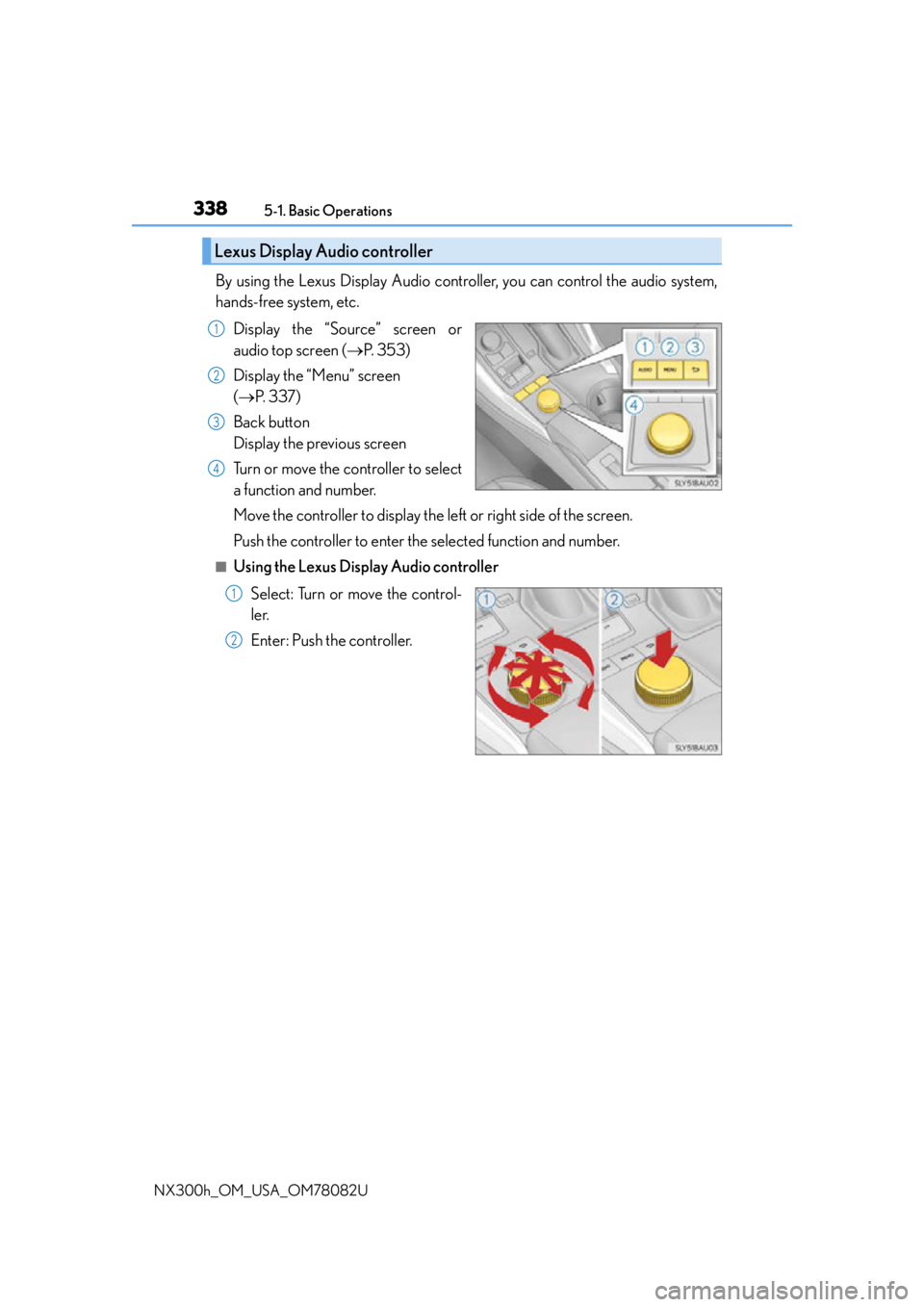
By using the Lexus Display Audio controller, you can control the audio system,
hands-free system, etc. Display the “Source” screen or
audio top screen ( P. 3 5 3 )
Display the “Menu” screen
( P. 3 3 7 )
Back button
Display the previous screen
Turn or move the controller to select
a function and number.
Move the controller to display the left or right side of the screen.
Push the controller to enter the selected function and number.
■Using the Lexus Display Audio controller
Select: Turn or move the control-
ler.
Enter: Push the controller.
Lexus Display Audio controller
1
2
3
4
1
2
Page 339 of 680
3395-1. Basic Operations
5
Lexus Display Audio system
NX300h_OM_USA_OM78082U
■Basic screen operation
When a list is displayed, use the appropriate button to scroll through the list.Indicator turns on when you can
select the list by turning the con-
troller.
Indicator turns on when you can
return to the previous screen by
pressing the back button.
Indicator turns on when you can
move the controller left to view
additional screen text.
Indicator turns on when you can move the controller right to view addi-
tional screen text.
1
2
3
4
Page 341 of 680

3415-1. Basic Operations
5
Lexus Display Audio system
NX300h_OM_USA_OM78082U
■When using the screen
●Under extremely cold conditions, the Lexus Display Audio controller may react slowly.
●If the screen is cold, the display may be dark, or the system may seem to be operating
slightly slower than normal.
●The screen may seem dark and hard to see when viewed through sunglasses. Change
your angle of viewing, adjust the display on the “Display” screen (P. 352) or remove
your sunglasses.
■Using cellular phones
Interference may be heard through the audio system’s speakers if a cellular phone is
being used inside or close to the vehi cle while the audio system is operating.
WA R N I N G
■Using the Lexus Display Audio controller
Be careful when touching the Lexus Display Audio controller in extreme temperatures
as it may become very hot or cold due to the temperature inside the vehicle.
■Laser product
●CAUTION
USE OF CONTROL OR ADJUSTMENT OR PERFORMANCE OF PROCE-
DURES OTHER THAN THOSE SPECIFIED HEREIN MAY RESULT IN HAZARD-
OUS RADIATION EXPOSURE.
●CAUTION
THE USE OF OPTICAL INSTRUMENTS WITH THIS PRODUCT WILL
INCREASE EYE HAZARD.
NOTICE
■To prevent Lexus Display Audio controller malfunction
●Do not allow the Lexus Display Audio controller to come into contact with food, liq-
uid, stickers or lit cigarettes as doing so may cause it to change color, emit a strange
odor or stop functioning.
●Do not subject the Lexus Display Audio controller to excessive pressure or strong
impact as the controller may bend or break off.
■To prevent 12-volt battery discharge
Do not leave the audio system on longer than necessary when the hybrid system is off.
■To avoid damaging the audio system
Take care not to spill drinks or other fluids on the audio system.