2016 LEXUS NX300H audio
[x] Cancel search: audioPage 142 of 680

1423-2. Opening, closing and locking the doors
NX300h_OM_USA_OM78082U
■Electronic Key battery-Saving Function
When battery-saving mode is set, battery depletion is minimized by stopping the elec-
tronic key from receiving radio waves.
■Conditions affe cting operation
The smart access system with push-button star t, wireless remote control and immobilizer
system use weak radio waves. In the followi ng situations, the communication between the
electronic key and the vehicle may be affected, preventing the smart access system with
push-button start, wireless remote control and immobilizer system from operating prop-
erly. (Ways of coping: P. 5 9 1 )
●When the electronic key battery is depleted
●Near a TV tower, electric powe r plant, gas station, radio station, large display, airport or
other facility that generates strong radio waves or electrical noise
●When the electronic key is in contact wi th, or is covered by the following metallic
objects
• Cards to which aluminum foil is attached
• Cigarette boxes that have aluminum foil inside
• Metallic wallets or bags
•Coins
•Hand warmers made of metal
• Media such as CDs and DVDs
●When other wireless keys (that emit radio waves) are being used nearby
●When carrying the electronic key together with the following devices that emit radio
waves
• Portable radio, cellular phone, cordless phone or other wireless communication
devices
• Another vehicle’s electronic key or a wireless key that emits radio waves
• Personal computers or personal digital assistants (PDAs)
• Digital audio players
• Portable game systems
●If window tint with a metallic content or me tallic objects are attached to the rear win-
dow
●When the electronic key is placed near a battery charger or electronic devices
Press twice while pressing and holding .
Confirm that the electronic key indicator flashes
4 times.
While the battery-saving mode is set, the smart
access system with push-button start cannot be
used. To cancel the function, press any of the
electronic key buttons.
Page 202 of 680

2024-2. Driving procedures
NX300h_OM_USA_OM78082U
Stop the vehicle completely.
Shift the shift lever to P. ( P. 2 0 8 )
Set the parking brake. ( P. 2 1 4 )
If the parking brake is in automatic mode, the parking brake is set automatically when
shifting the shift lever to P. (
P. 2 1 3)
Press the power switch.
Release the brake pedal and check that th e display on the instrument cluster is
off.
Modes can be changed by pressing the po wer switch with brake pedal released.
(The mode changes each time the switch is pressed.)
Off
*
The emergency flashers can be used.
ACCESSORY mode
Some electrical components such as the
audio system can be used.
“ACCESSORY” will be displayed on the
multi-information display.
ON mode
All electrical components can be used.
“IGNITION ON” will be displayed on
the multi-information display.
*: If the shift lever is in a position other thanP when turning off the hybrid system,
the power switch will be turned to
ACCESSORY mode, not to of f.
Stopping the hybrid system
Changing power switch modes
1
2
3
4
5
1
2
3
Page 275 of 680

2754-5. Using the driving support systems
4
Driving
NX300h_OM_USA_OM78082U
In steering control, the steering control
indicator will come on.
■If “Lane Departure Alert Malfunction Visit Your Dealer” is displayed on the multi-infor-
mation display
Even if the LDA switch is pressed, when th e LDA indicator does not come on the system
may have a malfunction. Have the vehicle in spected by your Lexus dealer immediately.
■The steering control function
There are cases where it may be difficult to sense the steering force on the steering
wheel by the steering control, according to speed, the deviatio n situation, conditions of a
road, etc.
■Alert buzzer for lane deviation alert
Depending on the audio system sound level or air conditioning fan noise while the audio
system or air conditioning system is in use, it may be difficult to hear the alert buzzer.
■After the vehicle has been parked in the sun
The LDA may not be available and a warning message will be displayed for a while after
driving has started. When the temperature in the cabin decreases and the temperature
around the lane recognition camera ( P. 270) becomes suitable for its operation, turn
the LDA switch on again after a short time.
■ If there are lane markers on only one side of the vehicle
The lane deviation alert will not operate for the side on which lane markers could not be
recognized.
■Conditions in which the functi on may not operate correctly
In the following situations, the lane recognition camera may be unable to recognize lane
markers causing the lane deviation alert function to operate incorrectly. However, this
does not indicate a malfunction.
●When there are shadows on the road running parallel with lane markers, or if a shadow
covers the lane markers
●When driving through an area with no lane markers, such as a toll booth, a crossing or
before a ticket checkpoint
●When the lane markers are broken, Botts’ dots (raised pavement markers) or stones
●When lane markers are obscured or partially obscured by sand, dirt, etc.
●When driving on a road surface that is wet du e to rain, previous rainfall, standing water,
etc.
●When the lane markers are yellow (These may be more difficult for the system to rec-
ognize compared to white markers.)
Display while in steering control
Page 280 of 680

2804-5. Using the driving support systems
NX300h_OM_USA_OM78082U
When the sensors detect an obstacle, the following displays inform the driver of
the position and distance to the obstacle.
■Multi-information display
Front corner sensor operation
Front center sensor operation
Rear corner sensor operation
Rear center sensor operation
■Lexus Display Audio or navigation system screenIntuitive parking assist display
When the Lexus parking assist moni-
tor is not displayed.
A graphic is automatically displayed
when an obstacle is detected. The
screen can be set so that the graphic
is not displayed. ( P. 2 8 3 )
: Select to mute the buzzer
sounds.
Insert display
When the Lexus parking assist moni-
tor is displayed.
A simplified image is displayed on
the right upper corner of the Lexus
Display Audio and the navigation
system screen when an obstacle is
detected.
Display
1
2
3
4
1
2
Page 281 of 680

2814-5. Using the driving support systems
4
Driving
NX300h_OM_USA_OM78082U
■Distance display
Sensors that detect an obstacle will illuminate continuously or blink.
*1: The images may differ from that shown in the illustrations. (P. 2 8 0 )
*2: Multi-information display
*3: Lexus Display Audio or navigation system screen
Sensor detection display, obstacle distance
Display*1Insert
displayApproximate distance to obstacle
Front and rear center sensorFront and rear corner sensor
(continuous)(blinking slowly) Front center sensor:
3.3 ft. (100 cm) to
2.0 ft. (60 cm)
Rear center sensor:
4.9 ft. (150 cm) to
2.0 ft. (60 cm)
(continuous)(blinking)
2.0 ft. (60 cm) to
1.5 ft. (45 cm)
2.0 ft. (60 cm) to
1.5 ft. (45 cm)
(continuous)(blinking rapidly) Front center sensor:
1.5 ft. (45 cm) to
1.0 ft. (30 cm)
Rear center sensor:
1.5 ft. (45 cm) to
1.2 ft. (35 cm)
1.5 ft. (45 cm) to
1.0 ft. (30 cm)
(blinking*2 or
continuous
*3)
(continuous) Front center sensor:
Less than
1.0 ft. (30 cm)
Rear center sensor:
Less than
1.2 ft. (35 cm)
Less than
1.0 ft. (30 cm)
Page 283 of 680

2834-5. Using the driving support systems
4
Driving
NX300h_OM_USA_OM78082U
You can change the buzzer sounds volume and the screen operating conditions
when the power switch is in ON mode.
Lexus Display Audio system
Press the “MENU” button on the Lexus Display Audio controller, and then
select “Setup” on the screen.
Select “Vehicle”, and th en select “LEXUS Park Assist” on the screen.
Select the desired item.
Navigation system
Press the “MENU” button on the Remote Touch, and then select “Setup” on
the screen.
Select “Vehicle”, and th en select “LEXUS Park Assist” on the screen.
Select the desired item.
The buzzer sounds volume can be adjusted.
On or off can be selected for intuitive parking assist display.
Both the front or rear center sensors display and tone indication can be set.
Setting up intuitive parking assist (v ehicles with a Lexus Display Audio
or navigation system)
1
2
3
1
2
3
Lexus Display Audio screenNavigation system screen
1
2
3
Page 285 of 680

2854-5. Using the driving support systems
4
Driving
NX300h_OM_USA_OM78082U
●The shape of the obstacle may prevent a sensor from detecting it. Pay particular atten-
tion to the following obstacles:
• Wires, fences, ropes, etc.
• Cotton, snow and other materials that absorb sound waves
• Sharply-angled objects
•Low obstacles
• Tall obstacles with upper sections projecting outwards in the direction of your vehi-
cle
●The following situations may occur during use.
• Depending on the shape of the obstacle and other factors, the detection distance may shorten, or detect ion may be impossible.
• Obstacles may not be detected if they are too close to the sensor.
• There will be a short delay between obst acle detection and display. Even at slow
speeds, there is a possibility that the obstacle will come within the sensor’s detection
areas before the display is shown and the buzzer sounds.
• Thin posts or objects lower than the sensor may not be detected when approached, even if they have been detected once.
• It might be difficult to hear beeps due to th e volume of audio system or air flow noise
of the air conditioning system.
■If “Clean Parking Assist Sensor” is di splayed on the multi-information display
A sensor may be dirty or covered with snow or ice. In such cases, if it is removed from the
sensor, the system should return to normal.
Also, due to the sensor being frozen at low temperatures, a malfunction display may
appear or an obstacle may no t be detected. If the sensor thaws out, the system should
return to normal.
■If “Parking Assist Malfunction” is di splayed on the multi-information display
Depending on the malfunction of the sensor, the device may not be working normally.
Have the vehicle inspected by your Lexus dealer.
■Certification
For vehicles sold in the U.S.A.
This device complies with Part 15 of the FC C Rules. Operation is subject to the following
two conditions; (1) this device may not cause harmful interference, and (2) this device
must accept any interference received, incl uding interference that may cause undesired
operation.
For vehicles sold in Canada
This ISM device complies with Canadian ICES-001.
Cet appareil ISM est conforme a la norme NMB-001 du Canada.
■Customization
Settings (e.g. buzzer sounds volume) can be changed. ( P. 2 8 3 )
Page 289 of 680
2894-5. Using the driving support systems
4
Driving
NX300h_OM_USA_OM78082U
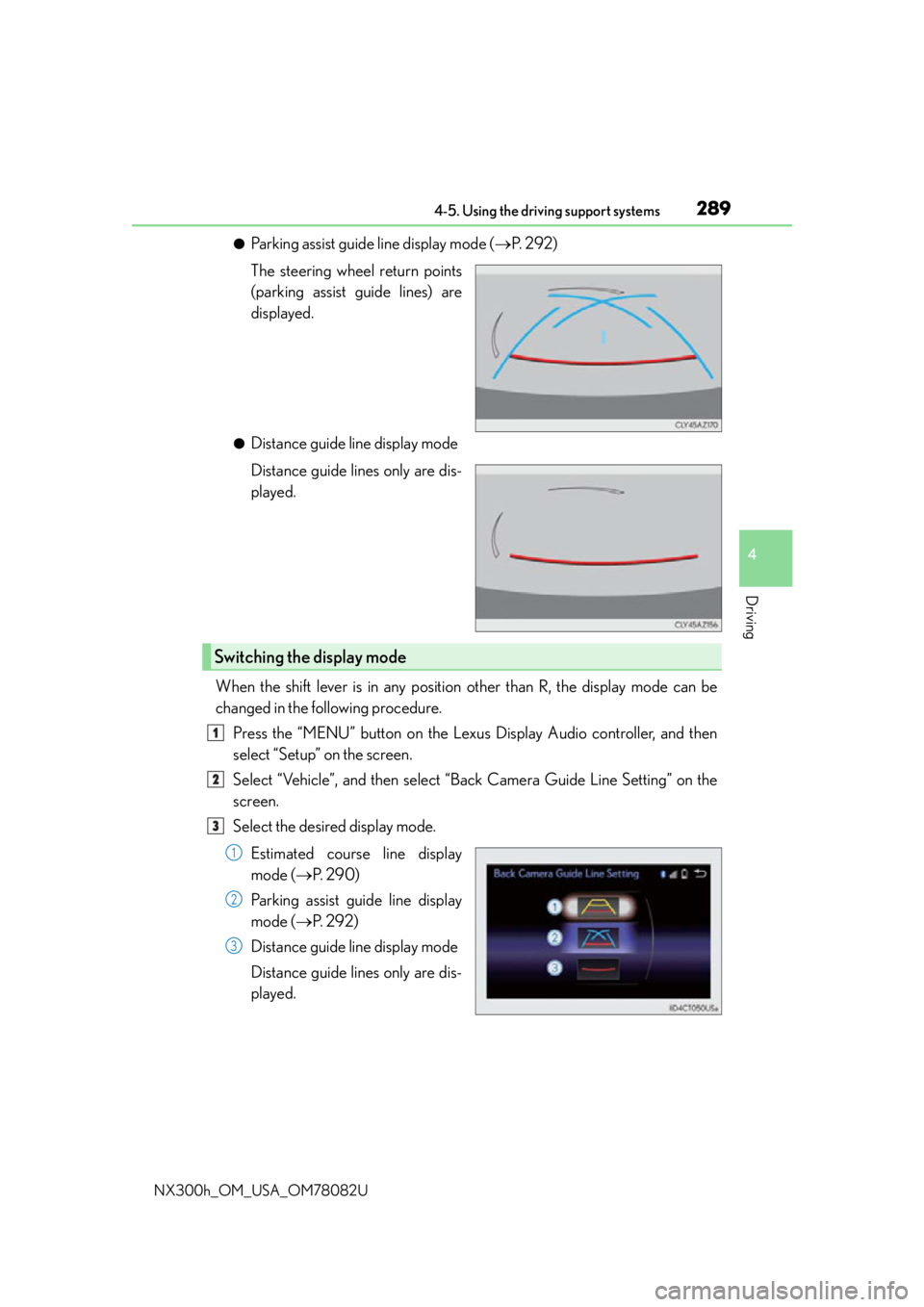
●Parking assist guide line display mode (P. 2 9 2 )
The steering wheel return points
(parking assist guide lines) are
displayed.
●Distance guide line display mode
Distance guide lines only are dis-
played.
When the shift lever is in any position other than R, the display mode can be
changed in the following procedure. Press the “MENU” button on the Lexus Display Audio controller, and then
select “Setup” on the screen.
Select “Vehicle”, and then select “B ack Camera Guide Line Setting” on the
screen.
Select the desired display mode.
Estimated course line display
mode ( P. 2 9 0 )
Parking assist guide line display
mode ( P. 2 9 2 )
Distance guide line display mode
Distance guide lines only are dis-
played.
Switching the display mode
1
2
3
1
2
3