Page 371 of 680
3715-5. Playing an audio CD and MP3/WMA/AAC discs
5
Lexus Display Audio system
NX300h_OM_USA_OM78082U
■The Gracenote® media database
●Music recognition technology and rela ted data are provided by Gracenote®.
Gracenote is the industry standard in music recognition technology and related
content delivery. For more information visit www.gracenote.com
.
●CD and music-related data from Graceno te, Inc., copyright © 2000 to present
Gracenote. Gracenote Software, copyrigh t © 2000 to present Gracenote. One
or more patents owned by Gracenote appl y to this product and service. See the
Gracenote website for a non-exhaustive list of applicable Gracenote patents.
Gracenote, CDDB, MusicID, MediaVOCS, the Gracenote logo and logotype,
and the “Powered by Gracenote” logo are either registered trademarks or trade-
marks of Gracenote in the United States and/or other countries.
Page 395 of 680
3955-9. Bluetooth® Phone
5
Lexus Display Audio system
NX300h_OM_USA_OM78082U
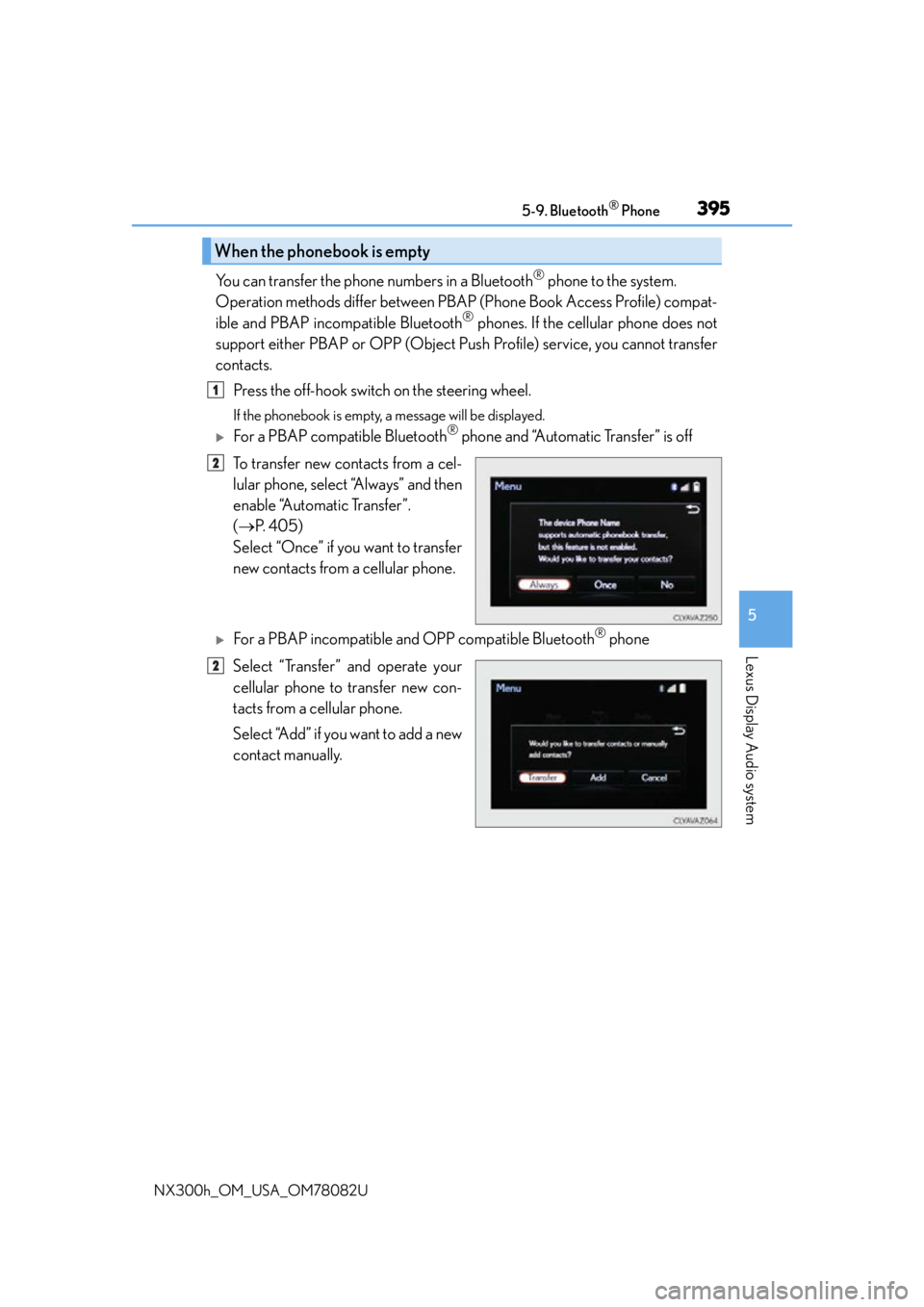
You can transfer the phone numbers in a Bluetooth® phone to the system.
Operation methods differ between PBAP (Phone Book Access Profile) compat-
ible and PBAP inco mpatible Bluetooth
® phones. If the cellular phone does not
support either PBAP or OPP (Object Push Profile) service, you cannot transfer
contacts.
Press the off-hook switch on the steering wheel.
If the phonebook is empty, a message will be displayed.
For a PBAP compatible Bluetooth® phone and “Automatic Transfer” is off
To transfer new contacts from a cel-
lular phone, select “Always” and then
enable “Automatic Transfer”.
( P. 4 0 5 )
Select “Once” if you want to transfer
new contacts from a cellular phone.
For a PBAP incompatible and OPP compatible Bluetooth® phone
Select “Transfer” and operate your
cellular phone to transfer new con-
tacts from a cellular phone.
Select “Add” if you want to add a new
contact manually.
When the phonebook is empty
1
2
2
Page 398 of 680

3985-9. Bluetooth® Phone
NX300h_OM_USA_OM78082U
Speaking on the phone
Select “Transmit Volume”. To restore default volume, move the controller to the
left on the “Transmit Volume” screen and then select “Default”.
Move the controller to the left and then select “In-call Volume”. You can also
adjust the volume using the “PWR•VOL” knob or the steering switches.
Select “Mute”.
When using phone services such as an answering service or a bank, you can
store phone numbers and code numbers in the contacts using “p” or “w” symbols
(eg. 056133 w 0123p#1).
Contact including a phone number only
Move the controller to the left and then select “0-9”.
Input the number.
Phone number containing a “p” symbol
When the “p” symbol is dialed in an ou tgoing call, there will be a pause for 2
seconds before the following digits are dialed automatically.
The following screen is displayed when speaking on the phone.
To adjust the transmit volume
To adjust in call volume
To prevent the other party from hearing your voice
Inputting tones
1
2
Page 406 of 680

4065-10. Phonebook
NX300h_OM_USA_OM78082U
You can transfer the phone numbers in your Bluetooth® phone to the system.
Operation methods differ between PBAP compatible and PBAP incompatible
Bluetooth
® phones. If your cellular phone does not support either PBAP or
OPP services, you cannot transfer contacts.
Go to “Transfer Contacts”: “MENU” button “Setup” “Phone” “Contact/
Call History Settings” “Update Contacts from Phone”
For PBAP compatible Bluetooth® phones when “Automatic Transfer” is set to
on
Start the update automatically.
For PBAP compatible Bluetooth® phones when “Automatic Transfer” is set to
off and PBAP incompatible Bluetooth® phones
Select to transfer the contact from
the connected cellular phone and
replace the current one.
Select to transfer the desired con-
tact data from the connected cellu-
lar phone to add to the current one.
You can register the desired contact from the phonebook. Up to 15 contacts per
phone can be registered.
Go to “Add Favorite”: “MENU” button “Setup” “Phone” “Contact/
Call History Settings” “A d d F a v o r i t e ”
Choose the contact to register.
Transferring a phone number
1
2
Registering favorites
1
2
Page 407 of 680
4075-10. Phonebook
5
Lexus Display Audio system
NX300h_OM_USA_OM78082U
Go to “Remove Favorite”: “MENU” button “Setup” “Phone” “Con-
tact/Call History Settings” “Remove Favorite”
Select the desired contacts.
You can select all contacts by selecting “Select All”.
Move the controller to the left and select “Remove”.
Go to “Delete Contacts”: “MENU” button “Setup” “Phone” “Con-
tact/Call History Settings” “Delete Contacts”
Select the desired contacts.
You can select all contacts by selecting “Select All”.
Move the controller to the left and select “Delete”.
■Phonebook data
Phonebook data is managed separately for every registered phone. When one phone is
connected, you cannot read the registered data of the other phones.
■When transferring contacts
Transfer contacts while the hy brid system is operating.
If the cellular phone is OPP or PBAP compatible, you may need to input “1234” on the
cellular phone for OBEX certification.
■When you have selected “Replace contacts ” or “Add contact” to transfer contacts
If the cellular phone does not support OPP service, you cannot use these functions. You
can transfer the phonebook data only by operating your phone.
■Transferring contacts while Bluetooth® audio is playing
Bluetooth® audio will disconnect. It will reconnect automatically when data transfer fin-
ishes. It may not reconnect dependin g on the phone which is connected.
Removing favorites
Deleting the contacts data
1
2
3
1
2
3
Page 408 of 680
4085-10. Phonebook
NX300h_OM_USA_OM78082U
Messaging setting
Go to “Messaging Settings”: “MENU” button “Setup” “Phone” “Mes-
saging Settings”
Set the message forwarding from
cellular phones on/off
Set the automatic message read out
function on/off
Set the new SMS/MMS notification
display on/off
Set the new e-mail notification dis-
play on/off
Set the signature function on/off
Set the cellular phone’s message
read and unread status update func-
tion on/off.
Change the incoming SMS/MMS display.
Change the incoming e-mail display.
Change the account name to “Service name” (names from the connected
device) or “Fixed name” (pre-defined names).
■Restoring the default settings
Move the controller to the left then select “Default” on the “Messaging Settings” screen.
1
2
3
4
5
6
7
8
9
Page 410 of 680

4105-11. Bluetooth®
NX300h_OM_USA_OM78082U
When registering/connecting a cellular phone
When making/receiving a call
A cellular phone cannot be registered.
An incorrect passcode was entered on the cellular phone.
Enter the correct passcode on the cellular phone.
The registration operation has not been completed on the cellular phone side.
Complete the registration operation on the cellular phone (approve registration
on the phone).
Old registration information remains on ei ther this system or the cellular phone.
Delete the existing registration informat ion from both this system and the cellu-
lar phone, then register the cellular phon e you wish to connect to this system.
( P. 3 8 4 )
A Bluetooth® connection cannot be made.
Another Bluetooth® device is already connected.
Manually connect the cellular phone you wish to use to this system. (P. 3 8 7 )
Bluetooth® function is not enabled on the cellular phone.
Enable the Bluetooth® function on the cellular phone.
A call cannot be made/received.
Your vehicle is in a “No Service” area.
Move to where “No Service” no longer appears on the display.
Page 413 of 680

4135-11. Bluetooth®
5
Lexus Display Audio system
NX300h_OM_USA_OM78082U
Bluetooth®
■When using the Bluetooth® audio system
●In the following situations, the system may not function.
• If the portable audio player is turned off
• If the portable audio player is not connected
• If the portable audio player’s battery is low
●There may be a delay if a cellular phon e connection is made during Bluetooth® audio
play.
●Depending on the type of portable audio play er that is connected to the system, opera-
tion may differ slightly and certain functions may not be available.
■When using the hands-free system
●The audio system is mu ted when making a call.
●If both parties speak at the same time, it may be difficult to hear.
●If the received call volume is overly loud, an echo may be heard.
If the Bluetooth® phone is too close to the system, quality of the sound may deteriorate
and connection status may deteriorate.
●In the following situations, it may be difficult to hear the other party:
• When driving on unpaved roads
• When driving at high speeds
•If a window is open
• If the air conditioning is blowing directly on the microphone
• If there is interference from the network of the cellular phone
●Depending on the type phone, cert ain functions may not be available.
■Conditions under which the system will not operate
●If using a cellular phone that does not support Bluetooth®
●If the cellular phone is turned off
●If you are outside of cellular phone service coverage
●If the cellular phone is not connected
●If the cellular phone’s battery is low
●When outgoing calls are controlled, due to heavy traffic on telephone lines, etc.
●When the cellular phone itself cannot be used
●When transferring phonebook data from the cellular phone

