2016 LEXUS NX200T lights
[x] Cancel search: lightsPage 267 of 660

2674-5. Using the driving support systems
4
Driving
NX200t_OM_USA_OM78081U
●When the lane markers are on a curb, etc.
●When driving on a particularly bright road surface, such as concrete
●When driving on a road surface that is bright due to reflected light
●When driving in a location where the light level changes rapi dly, such as the entrance to
or exit from a tunnel
●When sunlight or the headlights of oncoming vehicles are shining directly into the cam-
era lens
●When driving on roads that are branching or merging
●When driving on a hill
●When driving on winding roads or roads that are uneven
●When driving on rough or unpaved roads
●When driving on a sharp curve
●When lane markers are extremely narrow or extremely wide
●When the vehicle leans to one side an unus ual amount due to a heavy load or improper
tire inflation pressure
●When the following distance between your vehicle and the vehicle ahead is extremely
short
●When the vehicle experiences strong up-and -down motion such as when driving on an
extremely rough road or on a seam in the pavement
● When headlight brightness at nighttime is reduced due to dirt on the lenses, or when
the headlights are misaligned
●When receiving a side wind
■When changing the tires
Depending on the tires used, such as snow tires, etc., sufficient performance may not be
maintainable.
■Warning messages for the LDA
Warning messages are used to indicate a syst em malfunction or to inform the driver of
the need for caution while driving. If a wa rning message is shown on the multi-informa-
tion display, read the message and follow the instructions.
Also, even if a warning message is displayed, it will not impede normal driving.
■ When turning on/off the steering control function
From “Settings display” ( P. 92) of the multi-information display, the steering
control function can be turned on/off.
Pressing the or meter control switches ( P. 92), selects
With each press of meter control switch es, the control switches between “On” and
“Off”
■Sensitivity adjustment for th e lane deviation alert buzzer
From
“Settings display” ( P. 92) of the multi-information display, the alert sensi-
tivity for the alert buzzer when deviating from the lane can be adjusted.
Pressing the or meter control switches ( P. 92), selects
With each press of meter control switches, the control switches between “High”
and “Standard”
1
2
1
2
Page 269 of 660

2694-5. Using the driving support systems
4
Driving
NX200t_OM_USA_OM78081U
NOTICE
■To prevent damage to or incorrect operation of the LDA
Observe the following to ensure that the LDA system functions correctly
●Do not modify the headlights or attach stickers to the surface of the lights.
●Do not modify the suspension or replace it with non-genuine parts.
●Do not install or place anything on the hood or the grille. Also, do not install a grille
guard (bull bars, kangaroo bar, etc.).
●If your windshield needs repairs, contact your Lexus dealer.
●Do not overload with luggage
■ Lane recognition camera
Observe the following to ensure that the LDA system functions correctly
●Keep the windshield clean at all times.
Performance could be affected if the windshie ld is dirty, or if raindrops, condensation
or ice are adhering to the windshield.
●Do not spill liquids onto the lane recognition camera.
●Do not attach window tinting to the windshield.
●Do not install an antenna in fron t of the lane recognition camera.
●If the windshield area in front of the lane recognition camera is fogged up, use the
windshield defogger to remove the fog from that area. ( P. 4 2 5 )
When it is cold, using the he ater with air blowing to the feet may allow the upper part
of the windshield to fog up. This will have a negative effect on the images.
●Do not scratch the camera lens, or let it get dirty.
When cleaning the inside of the windshield , be careful not to get any glass cleaner,
etc., on the lens. Also, do not touch the lens.
For lens repair, contact your Lexus dealer.
●Do not change the installation position or direction of the lane recognition camera or
remove it.
The direction of the lane recognit ion camera is precisely adjusted.
●Do not subject the lane recognition camera to strong impact or force, and do not dis-
assemble the lane recognition camera.
●Do not replace windshield with non-genuine windshield.
Contact your Lexus dealer.
●Do not attach a sticker or other items to the
windshield near the lane recognition camera.
Page 290 of 660

2904-5. Using the driving support systems
NX200t_OM_USA_OM78081U
■If you notice any symptoms
If you notice any of the following symp toms, refer to the likely cause and the
solution, and re-check.
If the symptom is not resolved by the solution, have the vehicle inspected by
your Lexus dealer.
Things you should know
Likely causeSolution
The image is difficult to see
• The vehicle is in a dark area
• The temperature around the lens is
either high or low
• The outside temperature is low
• There are water droplets on the cam- era
• It is raining or humid
• Foreign matter (mud, etc.) is adhering to the camera
• Sunlight or headlights are shining directly into the camera
• The vehicle is under fluorescent lights,
sodium lights, mercury lights etc.
If this happens due to these causes, it
does not indicate a malfunction.
Back up while visually checking the vehi-
cle’s surroundings. (Use the monitor
again once conditions have been
improved.)
The image on the Lexus parking assist
monitor system screen can be adjusted.
( P. 3 4 2 )
The image is blurry
Dirt or foreign matter (such as water
droplets, snow, mud, etc.) is adhering to
the camera.Flush the camera with a large quantity of
water and wipe the camera lens clean
with a soft and wet cloth.
The image is out of alignment
The camera or surrounding area has
received a strong impact.Have the vehicle inspected by your Lexus
dealer.
The guide lines are very far out of alignment
The camera position is out of alignment.Have the vehicle inspected by your Lexus
dealer.
• The vehicle is tilted (there is a heavy
load on the vehicle, tire pressure is low
due to a tire puncture, etc.)
• The vehicle is used on an incline.If this happens due to these causes, it
does not indicate a malfunction.
Back up while visually checking the vehi-
cle’s surroundings.
Page 317 of 660

3174-6. Driving tips
4
Driving
NX200t_OM_USA_OM78081U
Winter driving tips
●Use fluids that are appropriate to the prevailing outside temperatures. •Engine oil
• Engine coolant
• Washer fluid
●Have a service technician inspect the condition of the battery.
●Have the vehicle fitted with four snow tires or purchase a set of tire chains for
the front tires
*.
Ensure that all tires are the same size and br and, and that chains match the size of the
tires.
*: Tire chains cannot be mounted on the 225/60R18 tires.
Perform the following according to the driving conditions:
●Do not try to forcibly open a window or move a wiper that is frozen. Pour
warm water over the frozen area to melt the ice. Wipe away the water imme-
diately to prevent it from freezing.
●To ensure proper operation of the climate control system fan, remove any
snow that has accumulated on the air inlet vents in front of the windshield.
●Check for and remove any excess ice or snow that may have accumulated on
the exterior lights, vehicle’s roof, chassis, around the tires or on the brakes.
●Remove any snow or mud from the bottom of your shoes before getting in the
vehicle.
Carry out the necessary preparations and inspections before driving the vehi-
cle in winter. Always drive the vehicle in a manner appropriate to the prevail-
ing weather conditions.
Preparation for winter
Before driving the vehicle
Page 342 of 660
3425-2. Setup
NX200t_OM_USA_OM78081U
Display settings
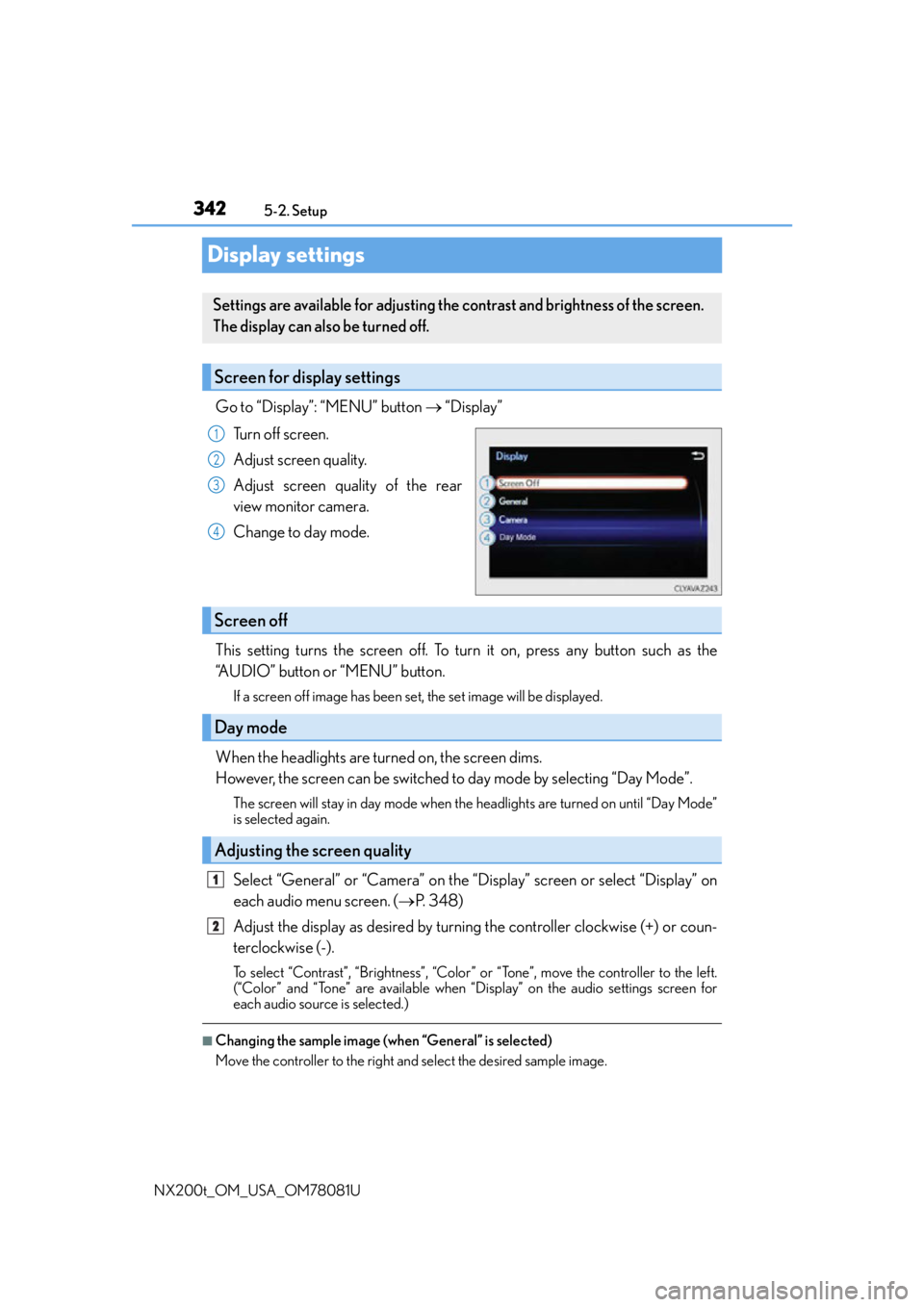
Go to “Display”: “MENU” button “Display”
Turn off screen.
Adjust screen quality.
Adjust screen quality of the rear
view monitor camera.
Change to day mode.
This setting turns the screen off. To turn it on, press any button such as the
“AUDIO” button or “MENU” button.
If a screen off image has been set, the set image will be displayed.
When the headlights are turned on, the screen dims.
However, the screen can be switched to day mode by selecting “Day Mode”.
The screen will stay in day mode when the headlights are turned on until “Day Mode”
is selected again.
Select “General” or “Camera” on the “Display” screen or select “Display” on
each audio menu screen. ( P. 3 4 8 )
Adjust the display as desired by turning the controller clockwise (+) or coun-
terclockwise (-).
To select “Contrast”, “Brightness”, “Color” or “Tone”, move the controller to the left.
(“Color” and “Tone” are available when “Display” on the audio settings screen for
each audio source is selected.)
■Changing the sample image (when “General” is selected)
Move the controller to the right and select the desired sample image.
Settings are available for adjusting the contrast and brightness of the screen.
The display can also be turned off.
Screen for display settings
1
2
3
4
Screen off
Day mode
Adjusting the screen quality
1
2
Page 419 of 660

419
6Interior features
NX200t_OM_USA_OM78081U
6-1. Using the air conditioning system and defogger
Automatic air conditioning system ..........................................420
Heated steering wheel/ seat heaters/
seat ventilators......................... 430
6-2. Using the interior lights Interior lights list..........................433• Front interior light ................434
• Personal lights........................434
• Rear interior light .................435 6-3. Using the storage features
List of storage features ............ 436• Glove box ............................... 437
• Console box........................... 437
•Cup holders/ bottle holders.........................438
• Sunglass holder .................... 439
Luggage compartment features........................................440
6-4. Other interior features Other interior features ............ 445
• Sun visors ................................ 445
• Vanity mirrors ........................ 445
• Clock ........................................ 446
• Power outlet (12 VDC)...... 446
• Power outlet (120 VAC) ... 447
• Wireless charger.................. 448
• Armrest .................................... 454
• Assist grips.............................. 455
• Coat hooks ............................. 455
Garage door opener................ 456
Compass ....................................... 462
Safety Connect ........................... 466
Page 433 of 660

4336-2. Using the interior lights
6
Interior features
NX200t_OM_USA_OM78081U
Interior lights list
Outer foot lights
Personal lights (P. 4 3 4 )
Front interior light ( P. 4 3 4 )
Rear interior light ( P. 4 3 5 )
Footwell lights
• When the engine switch is in IGNITION ON mode, the f ootwell lights will turn on.
However, if the instrument pa nel light control switch is turned to minimum, the foot-
well lights will turn off. ( P. 88)
• When shifting the shift lever is in a position other than P, the brightness of the foot-
well light will reduce intensity.
1
2
3
4
5
Page 434 of 660

4346-2. Using the interior lights
NX200t_OM_USA_OM78081U
Turns the light on/off (touch the light)
The rear interior light also turns on/off.
However, when the rear interior light
has already been turned on, it will not be
controlled by front interior light opera-
tions.
Turns the door position on/off On
The front and rear interior lights turn on/
off when a door is opened/closed.
Off
Turns the lights on/off (touch the lights)
Front interior light
1
2
Personal lights