Page 84 of 660
842. Instrument cluster
NX200t_OM_USA_OM78081U
*1: These lights turn on when the engine switch is turned to IGNITION ON mode to indicate that a system check is being perfor med. They will turn off after the engine is
started, or after a few seconds. There may be a malfunction in a system if the lights do
not turn on, or turn off. Have the vehicle inspected by your Lexus dealer.
*2: This light illuminates on the multi-information display.
*3: The light flashes to indicate a malfunction.
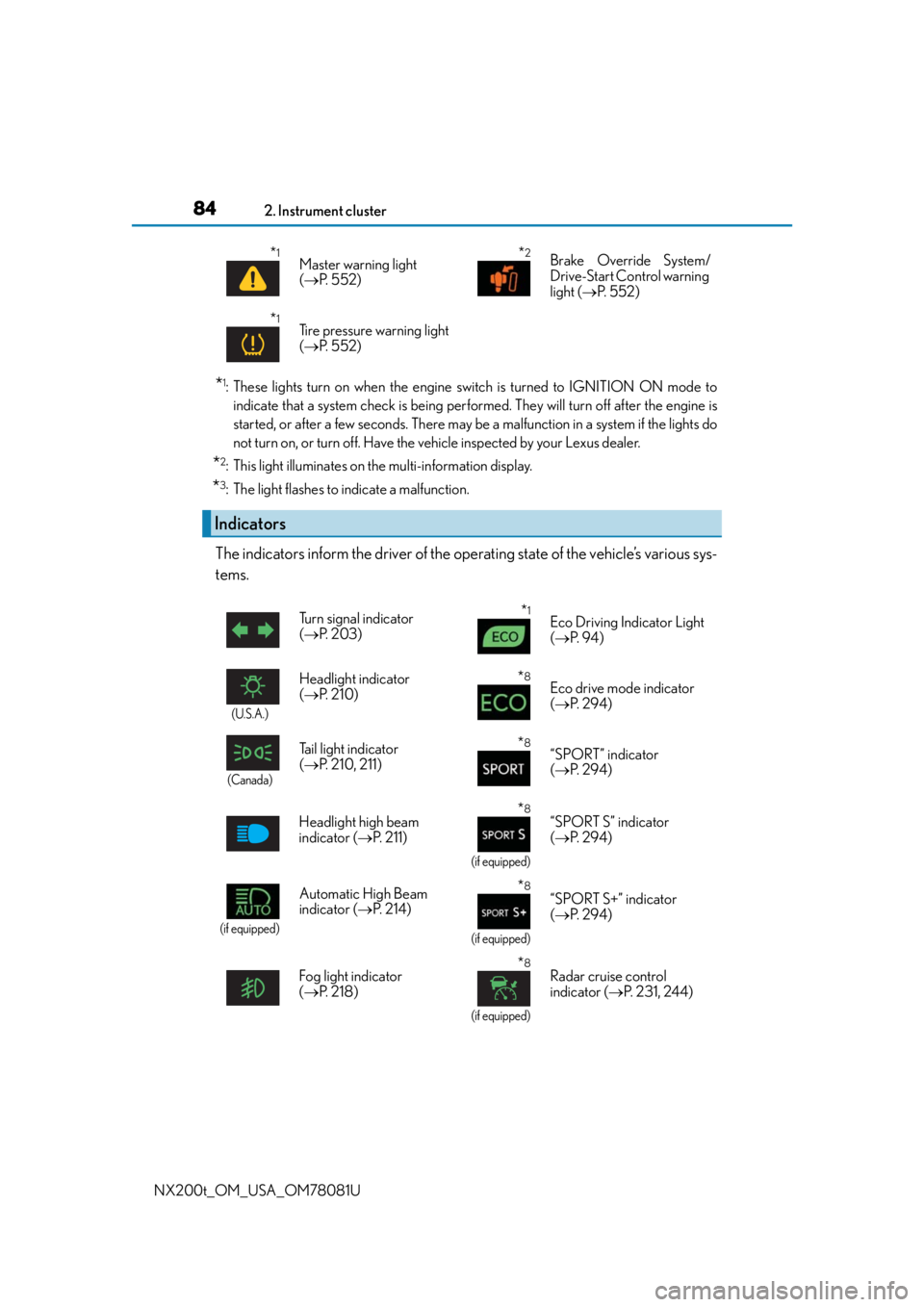
The indicators inform the driver of the operating state of the vehicle’s various sys-
tems.
*1Master warning light
( P. 5 5 2 )*2Brake Override System/
Drive-Start Control warning
light ( P. 5 5 2 )
*1Tire pressure warning light
( P. 5 5 2 )
Indicators
Turn signal indicator
( P. 2 0 3 )*1Eco Driving Indicator Light
( P. 9 4 )
(U.S.A.)
Headlight indicator
( P. 2 1 0 )*8Eco drive mode indicator
( P. 2 9 4 )
(Canada)
Tail light indicator
( P. 210, 211)*8“SPORT” indicator
( P. 2 9 4 )
Headlight high beam
indicator ( P. 211)
*8
(if equipped)
“SPORT S” indicator
( P. 2 9 4 )
(if equipped)
Automatic High Beam
indicator ( P. 2 1 4 )*8
(if equipped)
“SPORT S+” indicator
( P. 2 9 4 )
Fog light indicator
( P. 2 1 8 )
*8
(if equipped)
Radar cruise control
indicator ( P. 231, 244)
Page 85 of 660

852. Instrument cluster
2
Instrument cluster
NX200t_OM_USA_OM78081U
*1: These lights turn on when the engine switch is turned to the IGNITION ON mode toindicate that a system check is being perfor med. They will turn off after the engine is
started, or after a few seconds. There may be a malfunction in a system if the lights do
not turn on, or turn off. Have the vehicle inspected by your Lexus dealer.
*2: The light flashes to indicate that the system is operating.
*3: The light comes on when the system is turned off.
*8Cruise control “SET”
indicator
( P. 231, 244, 258)
(U.S.A.)
Parking brake indicator
( P. 2 0 4 , 2 0 5 )
*8Cruise control indicator
( P. 237, 251, 258)
(Canada)
Parking brake indicator
( P. 2 0 4 , 2 0 5 )
*8
(if equipped)
LDA indicator ( P. 2 6 1 )
*1Brake hold standby
indicator ( P. 2 0 7 )
*8
(if equipped)
Steering control indicator
( P. 2 6 1 ) *1Brake hold operated
indicator ( P. 2 0 7 )
(if equipped)
Intuitive parking assist
indicator ( P. 2 7 0 )*4, 8
Low outside temperature
indicator ( P. 8 7 )
*1, 2Slip indicator light
( P. 2 9 8 )*5, 6
(if equipped)
BSM outside rear view
mirror indicators
( P. 3 0 9 )
*1VSC OFF indicator
( P. 299)*7
Security indicator
( P. 75, 77)
*1, 3
(if equipped)
PCS warning light
( P. 3 0 4 ) *7“A I R B A G O N / O F F ”
indicator ( P. 51)
*1
(AWD
models only)
All-wheel drive lock
indicator ( P. 3 0 2 )
Page 88 of 660
882. Instrument cluster
NX200t_OM_USA_OM78081U
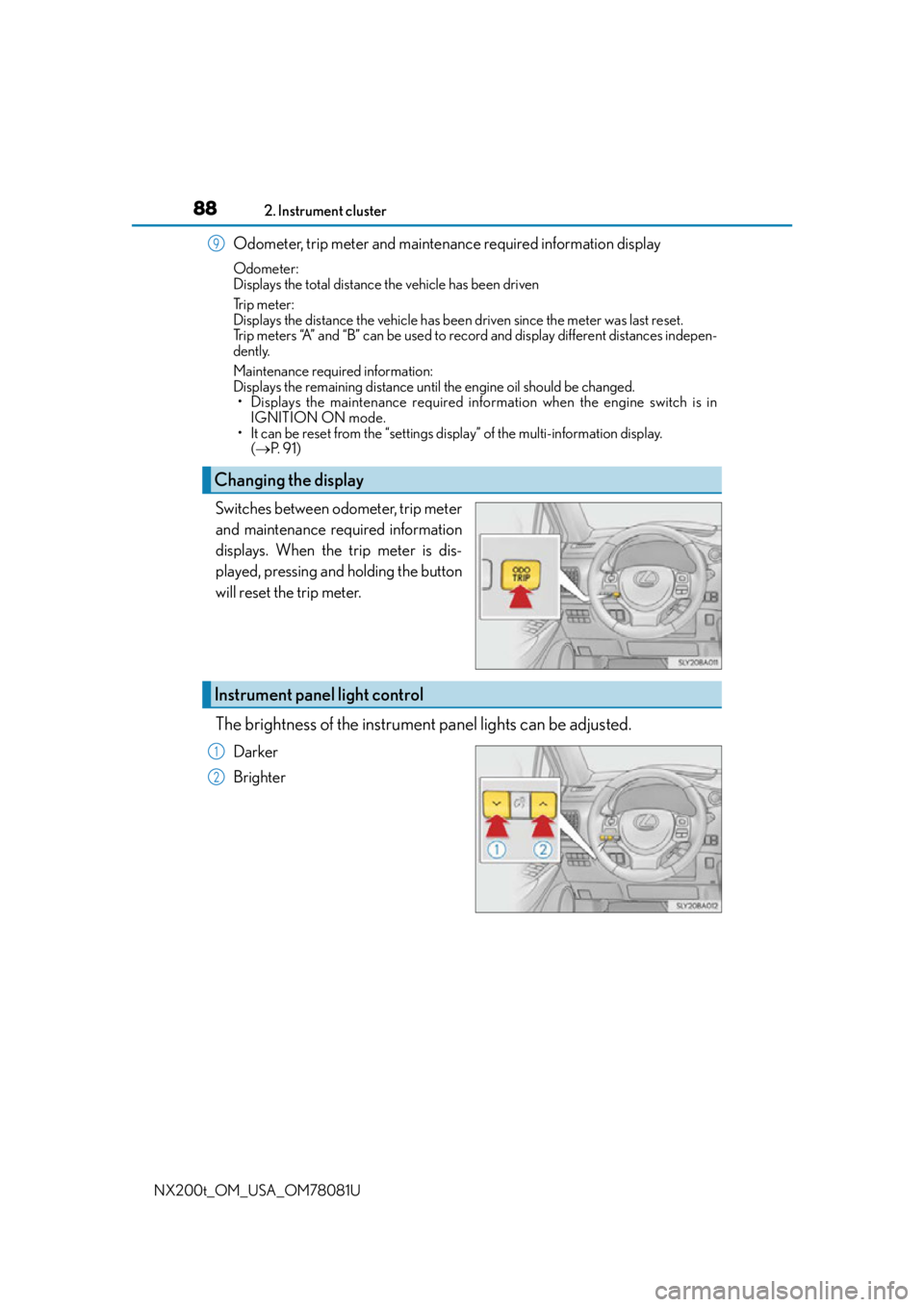
Odometer, trip meter and maintena nce required information display
Odometer:
Displays the total distance the vehicle has been driven
Tr i p m e t e r :
Displays the distance the vehicle has been driven since the meter was last reset.
Trip meters “A” and “B” can be used to record and display different distances indepen-
dently.
Maintenance required information:
Displays the remaining distance until the engine oil should be changed.
• Displays the maintenance required info rmation when the engine switch is in
IGNITION ON mode.
• It can be reset from the “settings display” of the multi-information display. ( P. 9 1 )
Switches between odometer, trip meter
and maintenance required information
displays. When the trip meter is dis-
played, pressing and holding the button
will reset the trip meter.
The brightness of the instrument panel lights can be adjusted.
Darker
Brighter
Changing the display
9
Instrument panel light control
1
2
Page 89 of 660

892. Instrument cluster
2
Instrument cluster
NX200t_OM_USA_OM78081U
■The meters and display illuminate when
The engine switch is in IGNITION ON mode.
■Instrument panel brightness adjustment
The instrument panel brightness levels when the tail ligh ts are on and off can be adjusted
individually. However, when the surroundings ar e bright (daytime, etc.), turning on the tail
lights will not change the instru ment panel brightness. At this time, any adjustments made
to the instrument panel bright ness levels will be applied to both settings at once.
■Outside temperature display
●In the following situations, the correct outside temperature may not be displayed, or the
display may take longer than normal to change.
• When stopped, or driving at low speeds (less than 12 mph [20 km/h])
• When the outside temperature has changed suddenly (at the entrance/exit of a
garage, tunnel, etc.)
●When “--” or “E” is displayed, the system may be malfunctioning.
Take your vehicle to your Lexus dealer.
■ Pop-up display
In some situations, a pop-up display will be temporarily displayed on the multi-informa-
tion display or the odometer/trip meter/ maintenance required information screen.
The pop-up display function can be set on/off. ( P. 6 1 9 )
■ Liquid crystal display
Small spots or light spots may appear on the display. This phenomenon is characteristic
of liquid crystal displays, and there is no problem continuing to use the display.
■Customization
The meter display can be customized on the multi-information display.
(Customizable features: P. 6 1 4 )
Page 109 of 660
1093-1. Key information
3
Operation of each component
NX200t_OM_USA_OM78081U
To take out the mechanical key, push
the release button and take the key out.
The mechanical key can only be
inserted in one direction, as the key only
has grooves on one side. If the key can-
not be inserted in a lock cylinder, turn it
over and re-attempt to insert it.
After using the mechanical key, store it
in the electronic key. Carry the mechan-
ical key together with the electronic key.
If the electronic key battery is depleted
or the entry function does not operate
properly, you will need the mechanical
key. (P. 5 76 )
■Panic mode
Using the mechanical key
When is pressed for longer than about
1 second, an alarm will sound intermittently and
the vehicle lights will flash to deter any person
from trying to break into or damage your vehi-
cle.
To stop the alarm, press any button on the elec-
tronic key.
Page 115 of 660

1153-2. Opening, closing and locking the doors
3
Operation of each component
NX200t_OM_USA_OM78081U
■Operation signals
Doors:
A buzzer sounds and the emergency flashers flash to indicate that the doors have been
locked/unlocked. (Locked: Once; Unlocked: Twice)
Windows:
A buzzer sounds to indicate that all windows are opening.
■Security feature
If a door is not opened within approximately 60 seconds after the vehicle is unlocked, the
security feature automatically locks the vehicle again.
■Welcome light illumination control
The side marker, parking, tail and license plat e lights automatically turn on at night when
the doors are unlocked using the entry functi on or wireless remote control if the light
switch is in the “AUTO” position.
■When the door cannot be locked by the lock sensor on the surface of the door handle
■Door lock buzzer
If an attempt to lock the doors is made when a door is not fully closed, a buzzer sounds
continuously for 5 seconds. Fully close the door to stop the buzzer, and lock the vehicle
once more.
■Setting the alarm
Locking the doors will set the alarm system. ( P. 77)
■If the smart access system with push-butto n start or the wireless remote control does
not operate properly
●Use the mechanical key to lock and unlock the doors. ( P. 5 76 )
●Replace the key battery with a new one if it is depleted. ( P. 5 1 8 )
When the door can not be locked even if the
lock sensor on the surfac
e of the door handle is
touched by a finger, touch the lock sensor with
the palm.
When gloves are being worn, remove the
gloves.
Page 153 of 660
1533-4. Adjusting the steering wheel and mirrors
3
Operation of each component
NX200t_OM_USA_OM78081U
Inside rear view mirror
The height of the rear view mirror can be adjusted to suit your driving posture.
Adjust the height of the rear view mir-
ror by moving it up and down.
Ty p e A
Responding to the level of brightness of the headlights of vehicles behind, the
reflected light is automatically reduced.
Changing automatic anti-glare func-
tion mode
On/off
When the automatic anti-glare function
is in ON mode, the indicator illuminates.
The function will set to ON mode each
time the engine switch is turned to
IGNITION ON mode.
Pressing the button turns the function to
OFF mode. (The indicator also turns
off.)
The rear view mirror’s position can be adjusted to enable sufficient confirma-
tion of the rear view.
Adjusting the height of rear view mirror
Anti-glare function
Indicator
Page 154 of 660
1543-4. Adjusting the steering wheel and mirrors
NX200t_OM_USA_OM78081U
Ty p e B
Responding to the level of brightness of the headlights of vehicles behind, the
reflected light is automatically reduced.
Changing automatic anti-glare func-
tion mode
On/off
When the automatic anti-glare function
is in ON mode, the indicator illuminates.
The function will set to ON mode each
time the engine switch is turned to
IGNITION ON mode.
Pressing the button turns the function to
OFF mode. (The indicator also turns
off.)
■To prevent sensor error
Indicator
To ensure that the sens ors operate properly, do
not touch or cover them.Ty p e A
Ty p e B
WA R N I N G
Do not adjust the position of the mirror while driving.
Doing so may lead to mishandling of the vehicle and cause an accident, resulting in
death or serious injury.