2016 LEXUS NX200T wheel
[x] Cancel search: wheelPage 186 of 660

1864-1. Before driving
NX200t_OM_USA_OM78081U
●Always place wheel blocks under both the vehicle’s and the trailer’s wheels
when parking. Put the transmission in P and apply the parking brake. Avoid
parking on a slope, but if unavoidable, do so only after performing the follow-
ing: Apply the brakes and keep them applied.
Have someone place wheel blocks under both the vehicle’s and trailer’s
wheels.
When the wheel blocks are in place, release the brakes slowly until the
blocks absorb the load.
Shift into P and apply the parking brake.
Turn off the engine.
●When restarting after parking on a slope:With the transmission in P, start the engine. Be sure to keep the brake pedal
depressed.
Shift into a forward gear. If reversing, shift into R.
If the parking brake is in manual mode, release the parking brake.
( P. 2 0 5 )
Release the brake pedal, and slowly pull or back away from the wheel
blocks. Stop and apply the brakes.
Have someone retrieve the blocks.
1
2
3
4
5
1
2
3
4
5
Page 188 of 660

1884-1. Before driving
NX200t_OM_USA_OM78081U
■Break-in schedule
If your vehicle is new or equipped with any new power train components (such as an
engine, transmission, differential or wheel bearing), Lexus recommends that you do not
tow a trailer until the vehicle has been driven for over 500 miles (800 km).
After the vehicle has been driven for over 500 miles (800 km), you can start towing.
However, for the next 500 miles (800 km), drive the vehicle at a speed of less than
50 mph (80 km/h) when towing a trailer, and avoid full throttle acceleration.
■Maintenance
●If you tow a trailer, your vehicle will require more frequent maintenance due to the addi-
tional load. (See “Warranty and Services Guide”, “Owner’s Manual Supplement” or
“Scheduled Maintenance”.)
●Retighten the fixing bolts of the towing ba ll and bracket after approximately 600 miles
(1000 km) of trailer towing.
■If trailer sway occurs
One or more factors (crosswinds, passing vehicles, rough roads, etc.) can adversely
affect handling of your vehicle and trailer, causing instability.
●If trailer swaying occurs:
• Firmly grip the steering wheel. Steer straight ahead.
Do not try to control trailer sway ing by turning the steering wheel.
• Begin releasing the accelerator pedal i mmediately but very gradually to reduce
speed.
Do not increase speed. Do not apply vehicle brakes.
If you make no extreme correction with the steering or brakes, your vehicle and trailer
should stabilize.
●After the trailer sw aying has stopped:
• Stop in a safe place. Get all occupants out of the vehicle.
• Check the tires of the vehicle and the trailer.
• Check the load in the trailer. Make sure the load has not shifted.
Make sure the tongue weight is appropriate, if possible.
• Check the load in the vehicle. Make sure the vehicle is not overloaded after occupants get in.
If you cannot find any problems, the speed at which trailer swaying occurred is beyond
the limit of your particular vehicle-trailer combination. Drive at a lower speed to pre-
vent instability. Remember that swaying of the towing vehicle-trailer increases as
speed increases.
Page 191 of 660

1914-1. Before driving
4
Driving
NX200t_OM_USA_OM78081U
Trailer towing (vehicles without towing package)
Lexus does not recommend towing a trailer with your vehicle. Lexus also does
not recommend the installation of a tow hitch or the use of a tow hitch carrier
for a wheelchair, scooter, bicycle, etc. Your vehicle is not designed for trailer
towing or for the use of tow hitch mounted carriers.
Page 192 of 660
1924-1. Before driving
NX200t_OM_USA_OM78081U
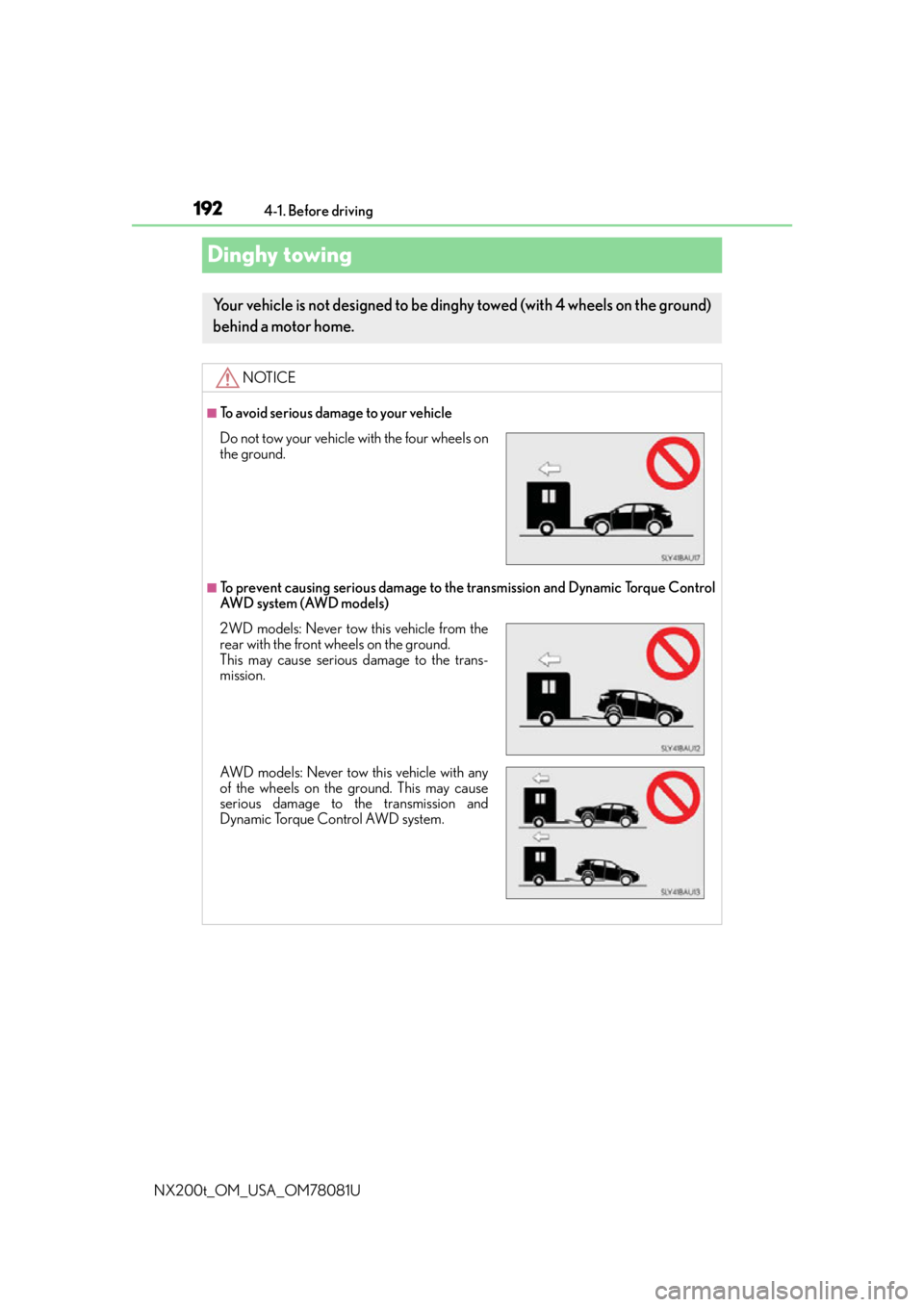
Dinghy towing
Your vehicle is not designed to be ding hy towed (with 4 wheels on the ground)
behind a motor home.
NOTICE
■To avoid serious damage to your vehicle
■To prevent causing serious damage to the transmission and Dynamic Torque Control
AW D s y s t e m ( AW D m o d e l s )
Do not tow your vehicle with the four wheels on
the ground.
2WD models: Never tow this vehicle from the
rear with the front wheels on the ground.
This may cause serious damage to the trans-
mission.
AWD models: Never tow this vehicle with any
of the wheels on the ground. This may cause
serious damage to the transmission and
Dynamic Torque Control AWD system.
Page 195 of 660

1954-2. Driving procedures
4
Driving
NX200t_OM_USA_OM78081U
■Auto power off function
If the vehicle is left in ACCESSORY mode for more than 20 minutes or IGNITION ON
mode (the engine is not running) for more than an hour with the shift lever in P, the engine
switch will automatically turn off. However, this function cannot entirely prevent battery
discharge. Do not leave the vehicle with the engine switch in ACCESSORY or IGNI-
TION ON mode for long periods of ti me when the engine is not running.
■Electronic key battery depletion
P. 111
■Conditions affe cting operation
P. 1 3 3
■Note for the entry function
P. 1 3 4
■If the engine does not start
●The engine immobilizer system may not have been deactivated. ( P. 7 5 )
Contact your Lexus dealer.
●Check that the shift lever is securely set in P. The engine may not start if the shift lever is
displaced out of P. “To Start Vehicle, Put Shift Lever into P” will be displayed on the
multi-information display.
■Steering lock
After turning the engine switch off and opening and closing the doors, the steering wheel
will be locked due to the stee ring lock function. Operating the engine switch again auto-
matically cancels the steering lock.
■When the steering lock cannot be released
■Steering lock motor overheating prevention
To prevent the steering lock motor from over heating, operation of the motor may be sus-
pended if the engine is turned on and off repeat edly in a short period of time. In this case,
refrain from running the engine. After about 10 seconds, the steering lock motor will
resume functioning.
■When “Smart Access System Malfunction See Owner’s Manual” is displayed on the
multi-information display
The system may be malfunctioning. Have the vehicle inspected by your Lexus dealer
immediately.
■If the electronic key battery is depleted
P. 5 1 8
A message will be displayed on the multi-infor-
mation display.
Check that the shift lever is in P. Press the
engine switch while turning the steering wheel
left and right.
Page 212 of 660

2124-3. Operating the lights and wipers
NX200t_OM_USA_OM78081U
When the following conditions are met, while the headlights (low beam) are on,
the cornering lights will additionally turn on and light up the direction of move-
ment for the vehicle. This is to ensure excellent visibility when either driving at
intersections or parking at night.
●The steering wheel is operated
●The turn signal lever is operated
●The shift lever is in R
However, when vehicle speed is 40 km/h (25 mph) or above, the cornering
lights do not turn on.
When the cornering lights ar e on for more than 30 minutes, they will automati-
cally turn off.
■Daytime running light system
●To make your vehicle more visible to other drivers during daytime driving, the daytime
running lights turn on automatically (at an increased intensity) whenever the engine is
started and the parking brake is released with the headlight switch off or in the “AUTO”
position. (Illuminate brighter than the front parking lights.) Daytime running lights are
not designed for use at night.
Type A only: Daytime running lights can be turned off by operating the switch.
●If a turn signal light is in use, the daytime running light, on the same side, is turned off.
For emergency flashers, both are turned off.
●Compared to turning on the headlights, the daytime running light system offers greater
durability and consumes less electricity, so it can help improve fuel economy.
■Headlight control sensor
■Automatic light off system
●When the headlights come on: The headlights and tail lights turn off 30 seconds after a
door is opened and closed if the engine switch is turned to ACCESSORY mode or
turned off. (The lights turn off immediately if on the key is pressed after all the doors
are locked.)
●When only the tail lights come on: The tail lights turn off automatically if the engine
switch is turned to ACCESSORY mode or turned off and the driver’s door is opened.
To turn the lights on again, turn the engine switch to IGNITION ON mode, or turn the
light switch off once and then back to or .
Cornering lights (if equipped)
The sensor may not function properly if an
object is placed on the sensor, or anything that
blocks the sensor is affixed to the windshield.
Doing so interferes with the sensor detecting
the level of ambient light and may cause the
automatic headlight system to malfunction.
Page 216 of 660

2164-3. Operating the lights and wipers
NX200t_OM_USA_OM78081U
■The Automatic High Beam can be operated when
The engine switch is in IGNITION ON mode.
■Camera sensor dete ction information
●High beam may not be automatically tu rned off in the following situations:
• When oncoming vehicles sudd enly appear from a curve
• When the vehicle is cut in front of by another
• When oncoming or preceding vehicles are hidden from sight due to repeated
curves, road dividers or roadside trees
●High beam may be turned off if an oncoming vehicle that is using fog lights without
using the headlights is detected.
●House lights, street lights, red traffic signals, and illuminated billboards or signs may
cause the high beam to turn off.
●The following factors may affect the amount of time taken to turn high beam on or off:
• The brightness of headlights, fog lights, and tail lights of oncoming and preceding
vehicles
• The movement and direction of oncoming and preceding vehicles
• When a oncoming or preceding vehicle on ly has operational lights on one side
• When a oncoming or preceding vehicle is a two-wheeled vehicle
• The condition of the road (gradient, curve, condition of the road surface, etc.)
• The number of passengers and amount of luggage
●High beam may be turned on or off when unexpected by the driver.
●In the situations below, the system may not be able to correctly detect the surrounding
brightness levels, and may flash or expose nearby pedestrians to the high beam. There-
fore, you should consider turning the high be ams on or off manually rather than relying
on the Automatic High Beam system.
• In bad weather (rain, snow , fog, sandstorms, etc.)
• The windshield is obscured by fog, mist, ice, dirt, etc.
• The windshield is cracked or damaged.
• The camera sensor is deformed or dirty.
• The camera sensor temperature is extremely high.
• Surrounding brightness levels are equal to those of headlights, tail lights or fog lights.
• Vehicles ahead have headlights or tail lights that are either switched off, dirty, are
changing color, or are not aimed properly.
• When driving through an area of intermit tently changing brightness and darkness.
• When frequently and repeatedly driving ascending/descending roads, or roads with
rough, bumpy or uneven surfaces (such as stone-paved roads, gravel tracks, etc.).
• When frequently and repeat edly taking curves or driving on a winding road.
• There is a highly reflective object ahead of the vehicle, such as a sign or a mirror.
• The back of a vehicle ahead is highly reflective, such as a container on a truck.
• The vehicle’s headlights are damaged or dirty.
• The vehicle is listing or titling, due to a flat tire, a trailer being towed, etc.
• The driver believes that the high beam may be causing problems or distress to other
drivers or pedestrians nearby.
Page 242 of 660

2424-5. Using the driving support systems
NX200t_OM_USA_OM78081U
WA R N I N G
■Conditions under which the vehicle-to-vehic le distance control mode may not func-
tion correctly
Operate the brake pedal (or accelerator pe dal operation depending on the situation)
as necessary in the following conditions as the radar sensor may not be able to cor-
rectly detect vehicles ahead, which may lead to an accident resulting in death or seri-
ous injury.
●When the vehicle ahead of you decelerates suddenly
●When your vehicle is pointing upwards
(caused by a heavy load in the luggage com-
partment, etc.)
●When the road curves or when the lanes are
narrow
●When steering wheel operation or your posi-
tion in the lane is unstable
Accelerate Accelerate Decelerate