2016 LEXUS NX200T set
[x] Cancel search: setPage 120 of 660

1203-2. Opening, closing and locking the doors
NX200t_OM_USA_OM78081U
Back door
◆Smart access system with push-button start
Carry the electronic key to enable
this function. Locks all the doors
Check that the door is securely
locked.
Unlocks all the doors
The doors cannot be unlocked for 3
seconds after the doors are locked.
◆Wireless remote control
P. 1 1 4
◆Door lock switch
P. 1 1 6
Press the switch for 1 second.
With the customization feature, it can be
set up so that it can operate even when
the back door is unlocked. ( P. 6 1 7 )
The back door can be locked/unlocked and opened/closed by the following
procedures.
Locking and unlocking the back door
1
2
Opening/closing the back door with the wireless remote control (vehi-
cles with a power back door)
Page 123 of 660

1233-2. Opening, closing and locking the doors
3
Operation of each component
NX200t_OM_USA_OM78081U
ON (operate) and OFF (stop) can be switched between by the “settings display”
(P. 91) of the multi-information display.
Pressing or of the meter control switches ( P. 92), selects .
ON and OFF will be switched over with presses of on the meter control
switch.
When OFF is selected and the operations of the power back door is made to
stop, select and turn ON from the “settings display” of multi-informa-
tion display, and unless it is put in a sy stem operating state, the operation of the
power back door will not return. (No re turn in the engine switch operation)
The open position of the powe r back door can be adjusted.
When setting with the switch
Stop the back door in the desirable position. ( P. 1 2 1 )
Press and hold the power back door
switch on the back door for 2 sec-
onds.
• When the settings are completed, the buzzer sounds 4 times.
• When opening the back door the next time, the back door will stop at
that position.
When setting by the navigation system
The opening position can be set with the navigation system. ( P. 622)
Priority for the stop position is given to the last position set by either the
switch or with navigation system.
To return the adjusted open position to the initial settings position. ( P. 1 2 5 )
Canceling the power back door sy stem (vehicles with a power back
door)
Adjusting the open position of th e back door (vehicles with a power
back door)
1
2
1
2
Page 124 of 660

1243-2. Opening, closing and locking the doors
NX200t_OM_USA_OM78081U
■Power back door operating conditions (vehicles with a power back door)
With the power back door operations set to ON, it can automatically open and close for
the following conditions:
●When the electronic key is being carried and the power back door switch is pushed*
●When the wireless remote control is used*
●When the engine switch is in IGNITION ON mode, in addition to the above for the
opening operations, the back door operates for any of the following conditions:
• Parking brake is engaged
• The brake pedal is depressed
• The shift lever is in P
*: When configured with the cu stomization function so that it can be operated after
being unlocked, operate the back door after it has been unlocked.
■Luggage compartment light
The luggage compartment light turns on when the back door is opened with the luggage
compartment light switch on.
■If the back door opener is inoperative
The back door can be unlocked from the inside.
Move the lever. Off
On
When the engine switch is turned off, the light
will go off automatically after 20 minutes.
Remove the cover.
To protect the cover, place a rag between the
flathead screwdriver and the cover as shown
in the illustration.
1
2
1
2
Vehicles without a power back
doorVehicles with a power back
door
Page 125 of 660
1253-2. Opening, closing and locking the doors
3
Operation of each component
NX200t_OM_USA_OM78081U
■Back door closer (vehicles with a power back door)
In the event that the back door is left slight ly open, the back door closer will automatically
close it to the fully closed position.
Whatever the state of the engine switch, the back door closer operates.
■Operation of the power back door (vehicles with a power back door)
●A buzzer sounds and the emergency flashers flash twice to indicate that the back door
is opening/closing.
●When the power back door operations are OFF, the power back door does not oper-
ate but it can be opened and closed by hand.
●When the power back door automatically op ens, if an abnormality due to people or
objects is detected, operation will stop.
■Back door reserve lock function (vehicles with a power back door)
This function is a function which reserves locking of all doors, beforehand, when the back
door is open. When the follow is done, all th e doors except the back door are locked and
then back door will also be locked at the same time it is closed.
Close all doors, except the back door.
Push the wireless lock button during the au tomatic closing operation of the back door.
■When reconnecting the battery (vehicles with a power back door)
To enable the power back door to operate properly, close the back door manually.
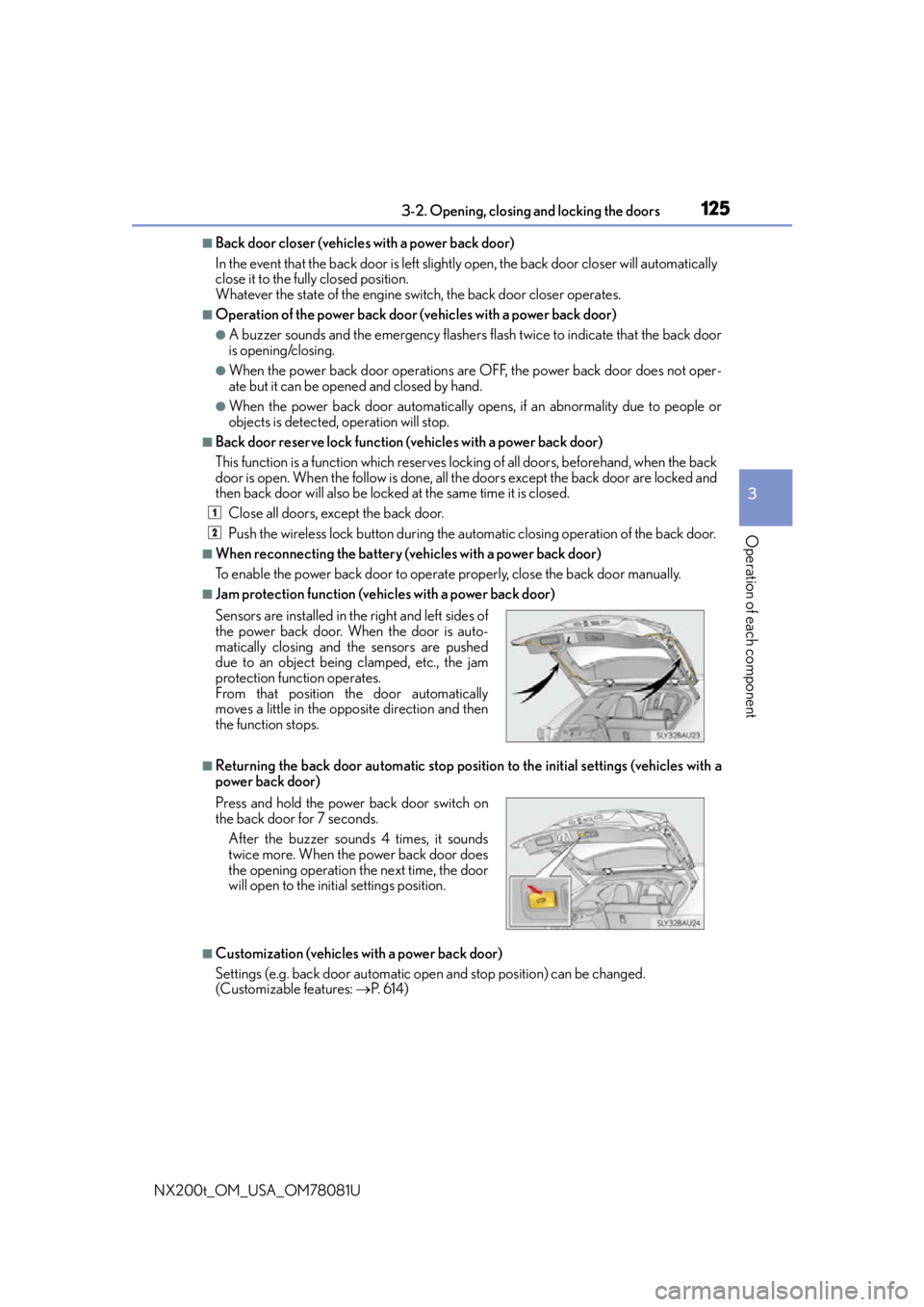
■Jam protection function (vehicles with a power back door)
■Returning the back door automatic stop position to the initial settings (vehicles with a
power back door)
■Customization (vehicles with a power back door)
Settings (e.g. back door automatic open and stop position) can be changed.
(Customizable features: P. 6 1 4 )
Sensors are installed in th
e right and left sides of
the power back door. When the door is auto-
matically closing and the sensors are pushed
due to an object being clamped, etc., the jam
protection function operates.
From that position the door automatically
moves a little in the opposite direction and then
the function stops.
Press and hold the power back door switch on
the back door for 7 seconds.
After the buzzer sounds 4 times, it sounds
twice more. When the power back door does
the opening operation the next time, the door
will open to the init ial settings position.
1
2
Page 133 of 660

1333-2. Opening, closing and locking the doors
3
Operation of each component
NX200t_OM_USA_OM78081U
■Electronic Key battery-Saving Function
When battery-saving mode is set, battery depletion is minimized by stopping the elec-
tronic key from receiving radio waves.
■Conditions affecting operation
The smart access system with push-button star t, wireless remote control and immobilizer
system use weak radio waves. In the followi ng situations, the communication between the
electronic key and the vehicle may be affected, preventing the smart access system with
push-button start, wireless remote control and immobilizer system from operating prop-
erly. (Ways of coping: P. 5 76 )
●When the electronic key battery is depleted
●Near a TV tower, electric powe r plant, gas station, radio station, large display, airport or
other facility that generates strong radio waves or electrical noise
●When the electronic key is in contact wi th, or is covered by the following metallic
objects
• Cards to which aluminum foil is attached
• Cigarette boxes that have aluminum foil inside
• Metallic wallets or bags
•Coins
•Hand warmers made of metal
• Media such as CDs and DVDs
●When other wireless keys (that emit radio waves) are being used nearby
●When carrying the electronic key together with the following devices that emit radio
waves
• Portable radio, cellular phone, cordless phone or other wireless communication
devices
• Another vehicle’s electronic key or a wireless key that emits radio waves
• Personal computers or personal digital assistants (PDAs)
• Digital audio players
• Portable game systems
●If window tint with a metallic content or me tallic objects are attached to the rear win-
dow
●When the electronic key is placed near a battery charger or electronic devices
Press twice while pressing and holding .
Confirm that the electronic key indicator flashes
4 times.
While the battery-saving mode is set, the smart
access system with push-button start cannot be
used. To cancel the function, press any of the
electronic key buttons.
Page 134 of 660

1343-2. Opening, closing and locking the doors
NX200t_OM_USA_OM78081U
■Note for the entry function
●Even when the electronic key is within the effective range (detection areas), the system
may not operate properly in the following cases:
• The electronic key is too close to the window or outside door handle, near the
ground, or in a high place when the doors are locked or unlocked.
• The electronic key is near the ground or in a high place, or too close to the rear
bumper center when the back door is opened.
• The electronic key is on the instrument panel, luggage room, floor, or in the door
pockets or glove box when the engine is started or engine switch modes are
changed.
●Do not leave the electronic key on top of th e instrument panel or near the door pockets
when exiting the vehicle. Depending on the radio wave reception conditions, it may be
detected by the antenna outs ide the cabin and the door will become lockable from the
outside, possibly trapping the el ectronic key inside the vehicle.
●As long as the electronic key is within the effective range, the doors may be locked or
unlocked by anyone.
●Even if the electronic key is not inside the vehicle, it may be possible to start the engine
if the electronic key is near the window.
●The doors may unlock if a large amount of wa ter splashes on the door handle, such as in
the rain or in a car wash when the electronic key is within the effective range. (The door
will automatically be locked after approximately 60 seconds if the doors are not
opened and closed.)
●If the wireless remote control is used to lo ck the doors when the electronic key is near
the vehicle, there is a possibility that the door may not be unlocked by the entry func-
tion. (Use the wireless remote control to unlock the doors.)
●Touching the door lock sensor while wearin g gloves may delay or prevent lock opera-
tion. Remove the gloves and touch the lock sensor again.
●When the lock operation is performed using the lock sensor, recognition signals will be
shown up to two consecutive times. After th is, no recognition signals will be given.
●If the door handle becomes wet while the el ectronic key is within the effective range,
the door may lock and unlock repeatedly. In that case, follow the following correction
procedures to wash the vehicle:
• Place the electronic key in a location 6 ft. (2 m) or more away from the vehicle. (Take
care to ensure that the key is not stolen.)
• Set the electronic key to battery-saving mode to disable the smart access system with push-button start. ( P. 1 3 3 )
●If the electronic key is insi de the vehicle and a door handle becomes wet during a car
wash, a message may be shown on the mult i-information display and a buzzer will
sound outside the vehicle. To turn off the alarm, lock all the doors.
●The lock sensor may not work properly if it comes into contact with ice, snow, mud, etc.
Clean the lock sensor and attempt to operate it again.
Page 135 of 660

1353-2. Opening, closing and locking the doors
3
Operation of each component
NX200t_OM_USA_OM78081U
●A sudden approach to the effective range or door handle may prevent the doors from
being unlocked. In this case, return the door handle to the original position and check
that the doors unlock before pulling the door handle again.
●If there is another electronic key in the detection area, it may take slightly longer to
unlock the doors after the door handle is gripped.
■When the vehicle is not driven for extended periods
●To prevent theft of the vehicle, do not leave the electronic key within 6 ft. (2 m) of the
vehicle.
●The smart access system with push-button start can be deactivated in advance.
( P. 6 1 6 )
■To operate the system properly
Make sure to carry the electronic key when operating the system. Do not get the elec-
tronic key too close to the vehicle when op erating the system from the outside of the
vehicle.
Depending on the position and holding condition of the electronic key, the key may not
be detected correctly and the system may not operate properly. (The alarm may go off
accidentally, or the door lock prevention may not operate.)
■If the smart access system with push-button start does not operate properly
●Locking and unlocking the doors: Use the mechanical key. (P. 5 76 )
●Starting the engine: P. 5 7 8
■Customization
Settings (e.g. smart access system with push-button start) can be changed.
(Customizable features: P. 6 1 4 )
■If the smart access system with push-butto n start has been deactivated in a customized
setting
●Locking and unlocking the doors:
Use the wireless remote control or mechanical key. ( P. 114, 576)
●Starting the engine and changing engine switch modes: P. 5 7 8
●Stopping the engine: P. 1 9 3
Page 143 of 660

1433-3. Adjusting the seats
3
Operation of each component
NX200t_OM_USA_OM78081U
■Reclining adjustment (power seat)
■Power seat operations (if equipped)
If the seat has a cover or seat cushion, it may not operate properly. Also, when folding
down the seat, check that there is nothing on the rear seat that would interfere with the
operation.
■Seatback jam protection function (power seat)
When folding down the seatback, if a foreig n object is perceived between the seatback
and seat cushion, the seatback will revers e operations and then stops operations.
The buzzer sounds intermitte ntly during reverse operations and sounds continuously
when operations are stopped. Stop the seatback partwa y. To set the seatback
to the rearmost position, press the button again.
WA R N I N G
■When folding the rear seatbacks down and after folded
Observe the following precautions.
Failure to do so may result in death or serious injury.
●Do not fold the seatbacks down while driving.
●Stop the vehicle on level ground, set the parking brake and shift the shift lever to P.
●Do not allow anyone to sit on a folded se atback or in the luggage compartment while
driving.
●Do not allow children to enter the luggage compartment.
■When operating the seatback
Observe the following precautions.
Failure to do so may cause death or serious injury.
●Keep other passengers from being hit with the seatback.
●Do not bring your hands close to the moving parts or between the seats, as well as do
not let any part of your body get caught.
●Vehicles with a power seat: Do not let children operate the seatback as other passen-
gers may get caught in seat.
●Vehicles with a power seat: Check that there are no passengers sitting in the seat
before folding that seat forward. Also, do le t other passengers sit in the seat while the
seat is forward folding.